When online meetings go bad, the damage is rarely dramatic. It’s quieter than that. A team leaves with fuzzy ownership, no real decision, three new follow-up meetings, and a weird collective feeling that everyone just lost an hour they can’t invoice, ship, or get back. Microsoft’s Work Trend Index has been blunt about the problem: people rank inefficient meetings as the top productivity disruptor, and many say it’s hard to brainstorm, summarize what happened, or even pin down next steps in virtual meetings. That’s not a small workflow issue. That’s operating drag.
Jeda.ai gives teams a way out of the “talk, forget, repeat” loop. Instead of treating the call as the whole event, you can turn it into a working board inside an AI Workspace and AI Whiteboard that captures context, decisions, owners, and follow-up in one place. That matters when you’re running distributed teams, client workshops, sprint reviews, leadership syncs, or anything else where clarity beats charisma.
If you’re trying to host sharper remote sessions, these are the online meeting mistakes that quietly wreck outcomes—and how to fix them with a more structured, Visual AI workflow in Jeda.ai.
Why online meeting mistakes cost more than people think
A bad in-person meeting wastes time. A bad virtual meeting multiplies confusion.
Here’s why. In online settings, people lose the side conversations that help resolve ambiguity after the call. Harvard Business School’s Working Knowledge highlighted that weak communication during virtual meetings can create misunderstanding and resentment once the cameras go off. And Harvard Business Review noted that remote workers saw meeting time climb during the shift to distributed work, with more 30-minute meetings being scheduled and overall meeting time increasing.
So the cost isn’t just “that meeting was annoying.” It’s slower decisions, duplicated work, weaker alignment, and more follow-up meetings created to fix the first meeting’s mess. Brutal little cycle.
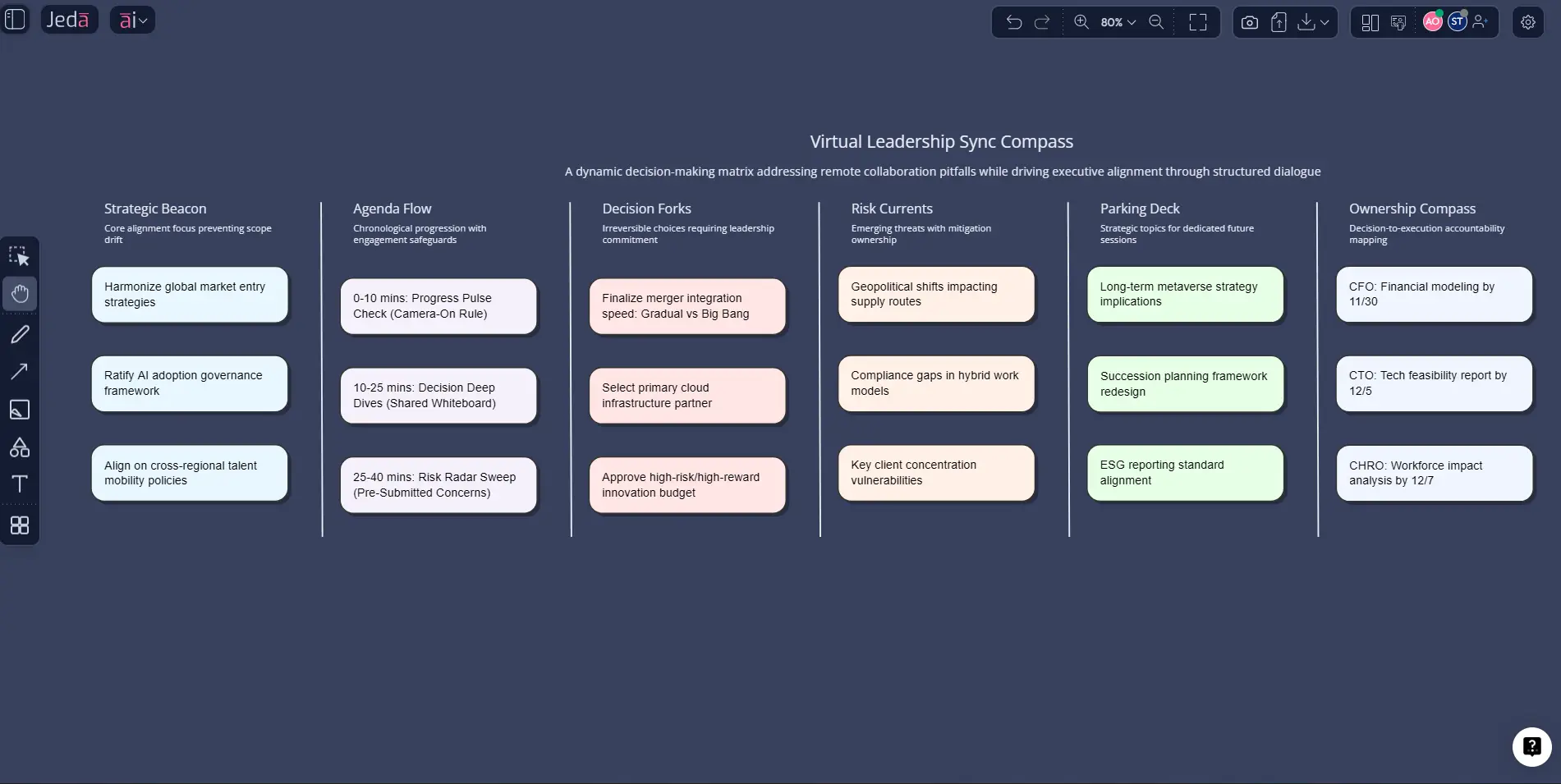
10 online meeting mistakes to avoid
1. Starting without a decision goal
The most common failure is also the most boring one: nobody knows what the meeting is actually for.
“Let’s sync” is not a meeting objective. Neither is “walk through a few things.” Strong meetings answer one of three questions before anyone joins: Are we deciding, aligning, or generating options? If you can’t state that in one sentence, your team is about to improvise for 45 minutes.
Steven Rogelberg’s work on meeting design has pointed out that an agenda alone does not guarantee quality. Goal clarity matters more. In practice, that means your invite should state the decision to be made, the output expected, and what attendees should bring with them.
2. Inviting everybody because nobody wants to miss out
Meeting FOMO is real. Microsoft found that only a minority of people feel they would be missed in most meetings, yet many still attend because they fear losing context. That creates bloated calls where half the room contributes, a quarter multitasks, and the rest silently age.
Smaller meetings produce better work. Invite decision-makers, owners, and the few people whose expertise changes the outcome. Everyone else can get the artifact afterward. Your team does not need a live performance. They need a clean record.
3. Treating the meeting as the work
This is the old trap: talk live, take scattered notes somewhere else, then rebuild the outcome later in docs, chat, and memory. That’s two workflows pretending to be one.
A successful online meeting creates a visible working object while the conversation is happening: a matrix, flowchart, decision board, action map, or visual summary. In Jeda.ai, that object lives inside the AI Workspace, where contributors can edit it in real time, use Follow Me for walkthroughs, and keep the board alive after the call instead of burying it in a recording no one will rewatch.
4. Overloading the session with updates, brainstorming, and decisions at the same time
Some meetings fail because they try to do three different jobs at once. Status update. Brainstorm. Debate. Decision. All in a single block.
That usually creates the worst of each mode: shallow updates, chaotic ideation, and rushed decisions.
Better move: split the work. Use asynchronous updates before the meeting. Use the live session for the one thing that benefits from live interaction. Microsoft has repeatedly argued for thinking beyond meetings as the default mode of collaboration and using asynchronous collaboration when that gets the work done faster.
5. Running too long without energy breaks
Virtual fatigue isn’t just whining with Wi-Fi. Research around videoconferencing fatigue has shown a relationship between meeting frequency, duration, and “burstiness” and higher fatigue levels. Microsoft’s Human Factors research also suggests fatigue begins to set in after roughly 30 to 40 minutes of sustained concentration.
So yes, your heroic 90-minute all-hands with no break is probably making the back half worse than useless.
Cap most meetings at 25 or 50 minutes. If a longer discussion is unavoidable, build in a short break and reset the board before returning. Shorter sessions force sharper thinking. Amazing how often that helps.
6. Forcing cameras and visual performance when they add no value
There’s nuance here. Cameras can help social connection. They can also make people tired faster.
Stanford’s Jeremy Bailenson described several contributors to “Zoom fatigue,” including excessive close-up eye contact, constant self-view, and reduced mobility. Later work has continued to connect camera-heavy virtual meetings with fatigue. So the mature answer is not “cameras always on” or “cameras never on.” It’s intentional camera use.
Use cameras when the social signal helps: onboarding, sensitive discussions, small-team trust-building, workshops where visual presence matters. Don’t make mandatory eye contact a religion for every routine status check.
7. Leaving participation to the loudest people
Online meetings flatten some voices and amplify others. The result is a fake consensus that feels efficient in the moment and expensive later.
If participation is unstructured, the quickest speakers dominate. The quieter experts drop thoughts into chat, or nowhere. That is how good risks get missed.
Use a visible contribution method. In Jeda.ai, a matrix or stickynote cluster gives everyone a place to contribute without fighting for airtime. Ask for silent input first, then discuss. It’s one of the simplest ways to improve inclusion and decision quality without turning the meeting into a talk show.
- Clarify the outcome
Start with one decision, one owner, and one visible deliverable.
- Reduce attendee sprawl
Invite only the people who change the quality or speed of the outcome.
- Make the board the record
Capture decisions, rationale, blockers, and actions in the workspace during the call.
8. Ignoring the technology until the meeting is already on fire
Nothing kills momentum faster than spending the first eight minutes discovering the audio is broken, the wrong file is open, and nobody can find the agenda.
This sounds obvious. People still do it every day.
Test the setup. Open the board before the call. Upload the brief, screenshot, or document ahead of time. If the meeting depends on a visual, don’t trust chance. In Jeda.ai, you can prepare the workspace in advance, upload a supporting file, and use Document Insight or Vision Transform when the conversation needs to move from raw material to structure fast.
9. Ending without explicit next steps
Microsoft’s research found that many workers say next steps are unclear at the end of meetings. That tracks. A surprising number of calls end with some version of “great discussion, thanks everyone,” which is corporate code for “good luck reconstructing that later.”
A meeting is not complete until there is a written list of actions, owners, deadlines, and unresolved questions. Not implied. Written.
This is where visual structure pays for itself. A final “Action / Owner / Due Date / Risk” column inside a Matrix or a closing branch in a Mindmap turns vague momentum into something a team can actually execute.
10. Assuming a meeting succeeded because people seemed engaged
Energy is not output. A lively meeting can still be strategically useless.
Teams often confuse participation, friendliness, or debate with progress. But the real test is boring and merciless: Did the team leave with a decision, a shared understanding, and a usable artifact?
That’s why strong online meetings create evidence. A board. A flow. A decision tree. A summary. A post-meeting action map. Something the team can reopen tomorrow and still understand without guessing what the room “really meant.”
What high-performing online meetings do instead
The strongest remote leaders don’t just run smoother calls. They reduce the amount of live talking required to get to a decision.
They prepare context before the call, use the session to resolve uncertainty, and leave with a board that can survive the next 48 hours without interpretation. That’s a much better standard than “we had a good conversation.”
How to avoid online meeting mistakes in Jeda.ai
Jeda.ai works especially well here because the platform is not just a place to talk about work. It’s an AI Whiteboard and AI Workspace built to turn prompts, documents, screenshots, and team input into editable visuals. That matters when you want your meeting artifact to be live, collaborative, and reusable.
This workflow uses the two methods you requested:
- Method 1: Recipe Matrix
- Method 2: Prompt Bar
And then one practical extension path:
- AI+ button deep dive for expanding the meeting board after the first draft exists
Method 1: Recipe Matrix
Use this when you want more structure up front.
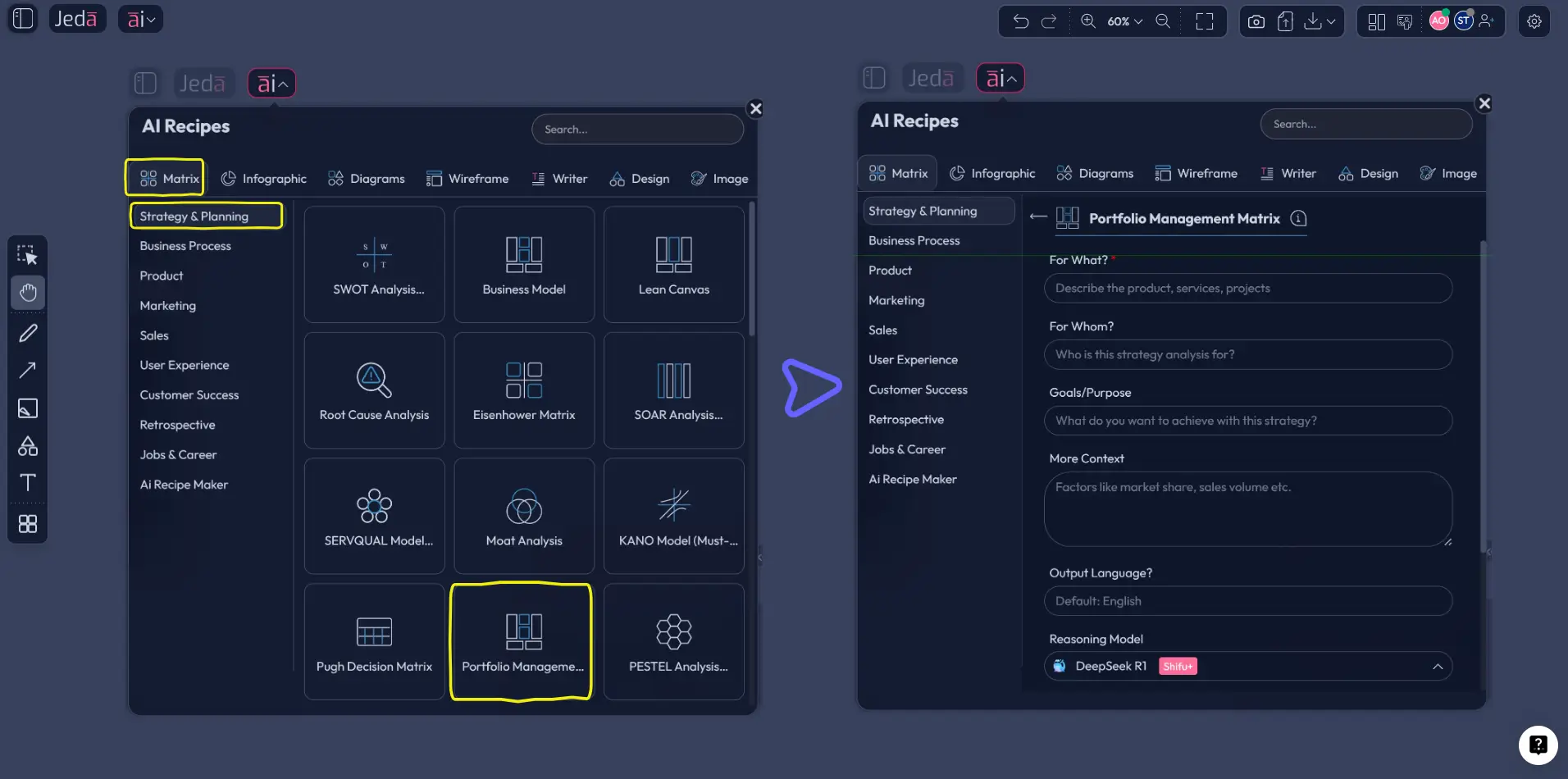
Open the AI Menu in the top-left corner, choose the Matrix recipe category, and pick a planning-oriented matrix recipe that fits the meeting. Good starting points from Jeda.ai’s Matrix recipes include Project Planning, Risk Analysis, or Clear Path to Action. You’re not hunting for a perfect pre-labeled “online meeting” template; you’re choosing the structure that best matches the decision you need to run.
Then fill the guided fields with the real context:
- meeting purpose
- participants
- core decision
- pre-read links or brief
- risks, blockers, or dependencies
- required outputs by the end of the call
This method is ideal when the meeting has stakes. Client reviews. Sprint planning. Leadership alignment. Postmortems. Anything where structure beats improvisation.
Method 2: Prompt Bar
Use this when speed matters and you want the board generated from plain language.
Go to the Prompt Bar at the bottom of the workspace, select the Matrix command, and give Jeda.ai a direct instruction such as:
“Create a meeting command board for a 45-minute product roadmap sync. Include objective, agenda, open questions, decisions to make, parking lot, action items, owners, and due dates.”
You can turn Web Search on if the meeting needs current market context, or switch on Multi-LLM Agent when the stakes justify deeper reasoning. For example, a strategy meeting about competitor moves or market signals benefits from grounded context. A routine internal check-in usually doesn’t.
The Prompt Bar method is faster, looser, and great for teams that already know the shape they want.
- Method 1 — Open Recipe Matrix
Click AI Menu in the top-left, choose the Matrix recipe category, and select a planning-oriented recipe such as Project Planning, Risk Analysis, or Clear Path to Action.
- Method 1 — Add meeting context
Enter the meeting objective, participants, required decisions, supporting material, blockers, and desired output so the board is structured around the real conversation.
- Method 1 — Generate and clean the board
Generate the matrix, then edit labels, color-code priorities, and remove any section that does not support the meeting outcome.
- Method 2 — Open the Prompt Bar
In the workspace, select the Matrix command from the Prompt Bar and describe the exact meeting board you want Jeda.ai to create.
- Method 2 — Generate a live meeting artifact
Ask for agenda, decision points, risks, owners, and next steps in one prompt so the board becomes the working record during the call.
- Run the meeting on the board
Use Follow Me for presentations, invite collaborators, and capture decisions in real time so the visual stays current while the discussion happens.
- Use AI+ to extend the useful parts
Select a smart shape after the meeting and tap the AI+ button to expand open questions, add risks, deepen analysis, or generate follow-up branches from an existing section.
- Convert if the format needs to change
Use Vision Transform when the meeting artifact should become a Flowchart, Mindmap, or another visual better suited to execution after the call.
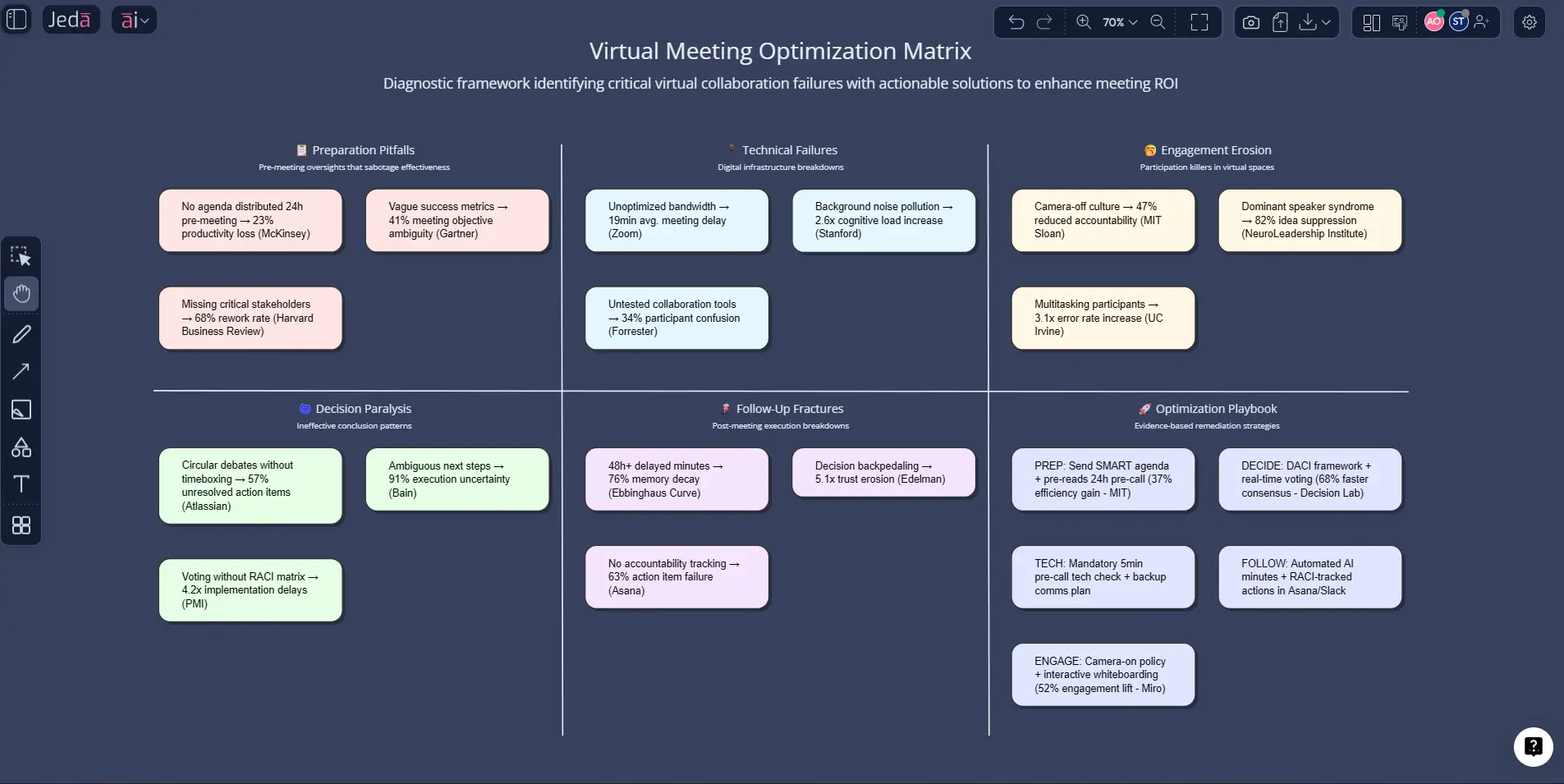
AI+ button deep dive: what it should do, and what it should not do
This part matters.
The AI+ button is excellent for extending something that already exists. It is not the place to demand a completely unrelated output out of thin air. In other words, don’t use AI+ like a magic vending machine.
Use AI+ when you already have a generated meeting board and want to:
- expand a risk cluster
- add likely objections under a decision node
- deepen an action plan
- generate discussion prompts from an unresolved question
- continue a branch for follow-up tasks, stakeholder concerns, or success metrics
That’s the sweet spot. You are extending context, not abandoning it.
For example, after a roadmap meeting, you might click the “Open Questions” section and use AI+ to generate likely implementation risks, dependencies, and stakeholder concerns. Or you might select the “Action Items” section and use AI+ to break one owner’s deliverable into smaller sub-steps.
That’s productive. Asking AI+ to suddenly create a legal policy, a hiring plan, and a brand campaign from one sticky note? That’s how you get hallucinated nonsense wearing business-casual clothes.
A simple online meeting board that works in real life
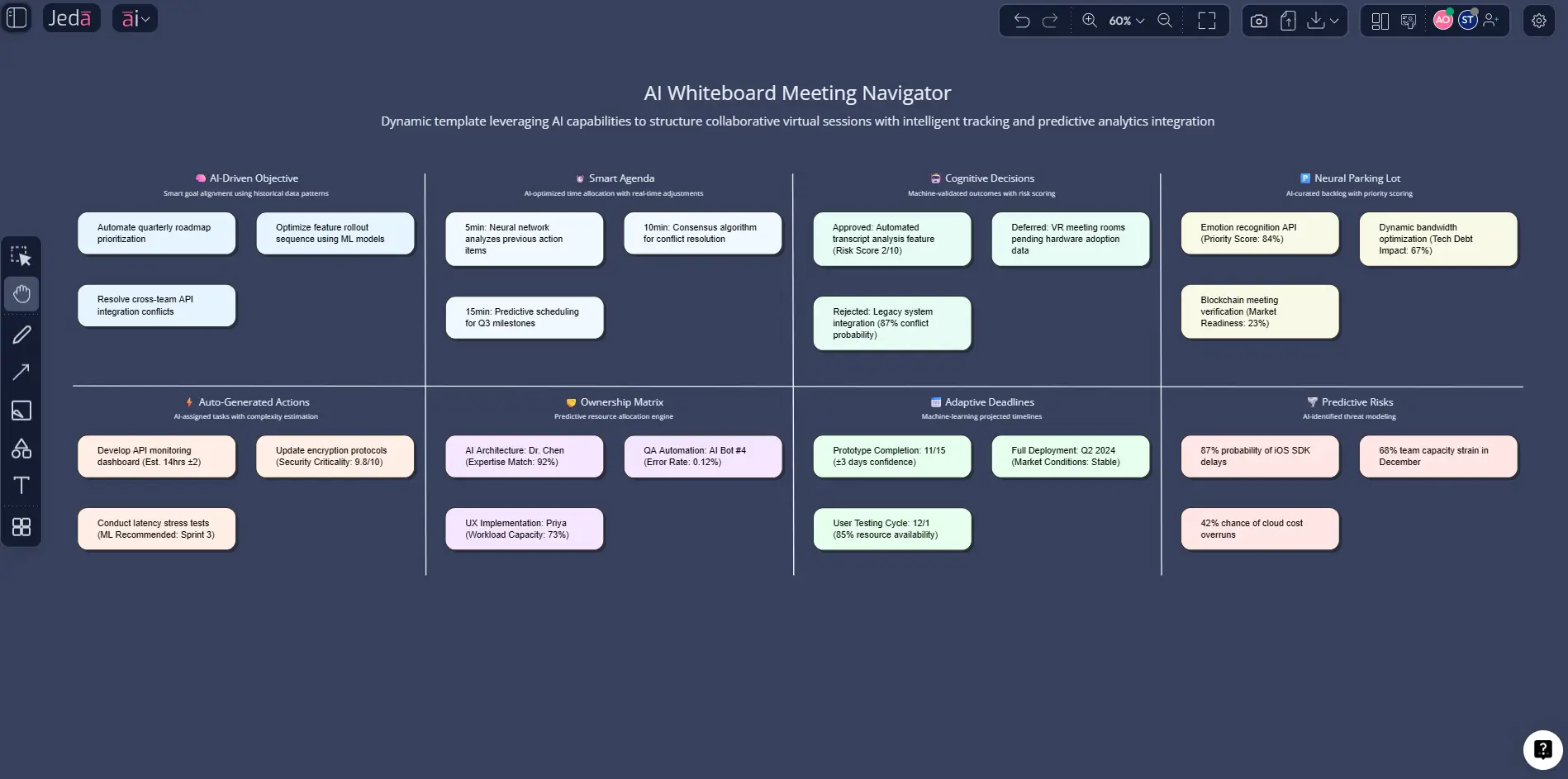
If you want one reliable structure, this is the one we keep coming back to:
That setup works for product reviews, leadership syncs, client workshops, sales handoffs, and retros. It also plays nicely with Jeda.ai’s AI Whiteboard model because each section can become a smart shape cluster, and each cluster can be expanded later with AI+.
Best practices for leaders who want fewer bad meetings
Look, you do not need a theatrical facilitation style to run better online meetings. You need better structure and slightly more discipline.
A few standards help immediately:
- decide whether the meeting should exist before you schedule it
- send the decision goal before the call, not during it
- make the board visible from minute one
- use silent input before open discussion when the topic is sensitive or political
- stop pretending recordings are the same thing as clarity
- end by reading actions and owners out loud
That last one sounds almost insultingly simple. It works anyway.
Frequently Asked Questions
- What is the biggest mistake in an online meeting?
- The biggest mistake is starting without a clear outcome. When people do not know whether the meeting is for a decision, alignment, or idea generation, discussion drifts, participation gets uneven, and next steps usually come out vague. Clarity beats enthusiasm every time.
- How long should an online meeting be?
- Most online meetings should be planned for 25 or 50 minutes, not a full 30 or 60. Research and workplace guidance suggest fatigue rises after roughly 30 to 40 minutes of sustained attention, so shorter sessions usually create better focus and cleaner decisions.
- Should everyone keep their camera on in virtual meetings?
- Not always. Cameras can support trust and social connection in small or sensitive discussions, but constant camera use can also increase fatigue. Use cameras intentionally when visual presence helps the work, and avoid turning it into a blanket rule for every routine meeting.
- How do you make online meetings more engaging without making them cheesy?
- Engagement improves when people have a job to do, not when the facilitator tries too hard to entertain them. Use visible prompts, structured contribution rounds, silent idea capture, and a shared board people can edit. Participation rises when the work is concrete.
- What is the best Jeda.ai command for planning an online meeting?
- For most teams, Matrix is the best starting command because it organizes objectives, agenda items, decisions, risks, and next steps in one view. Flowchart works better when the meeting is about process design, while Mindmap is useful for exploratory workshops and brainstorming.
- When should I use Recipe Matrix instead of the Prompt Bar?
- Use Recipe Matrix when the meeting has more structure, higher stakes, or recurring patterns you want to standardize. Use the Prompt Bar when you need speed and already know the board you want. The two methods complement each other rather than compete.
- What does AI+ do well in a meeting workflow?
- AI+ is strongest when it extends an existing board. It can deepen risks, expand action branches, add discussion prompts, or continue an unresolved section. It is not the right tool for creating unrelated outputs with no connection to the selected visual context.
- Can Jeda.ai help after the meeting ends?
- Yes. That is one of the main advantages of using an AI Workspace instead of treating the call as a one-time event. The visual remains editable, shareable, and expandable after the session, so teams can refine actions, transform the board, or continue work asynchronously.
- Why use an AI Whiteboard for online meetings instead of plain notes?
- Plain notes often capture fragments, not structure. An AI Whiteboard makes decisions, owners, dependencies, and unresolved questions visible at the same time. That reduces ambiguity, improves collaboration, and gives the team a working artifact they can act on later.
Sources & further reading
- [1]
Microsoft WorkLab (2023) . “Work Trend Index: Will AI Fix Work?” Microsoft.
View Source ↗ - [2]
Microsoft WorkLab (2021) . “Seven Steps to Building a Healthier Meeting Culture” Microsoft.
View Source ↗ - [3]
Laura Amico (2021) . “A Guide to the Virtual Meeting” Harvard Business Review.
View Source ↗ - [4]
Steven G. Rogelberg (2020) . “How to Create the Perfect Meeting Agenda” Harvard Business Review.
View Source ↗ - [5]
Jeremy N. Bailenson (2021) . “Nonverbal Overload: A Theoretical Argument for the Causes of Zoom Fatigue” Technology, Mind, and Behavior.
View Source ↗ - [6]
Gustav Fauville et al. (2021) . “Zoom Exhaustion & Fatigue Scale” Computers in Human Behavior Reports.
View Source ↗ - [7]
Michael Blanding featuring Leslie A. Perlow (2024) . “The Critical Minutes After a Virtual Meeting That Can Build Up or Tear Down Teams” Harvard Business School Working Knowledge.
View Source ↗ - [8]
CIPD (2023) . “Productive Meetings: An Evidence Review” CIPD.
View Source ↗
Start Fixing Your Online Meetings Today
Join over 150,000 professionals who use Jeda.ai to turn messy calls into clear decisions, visible actions, and reusable team knowledge.
Try Free Template