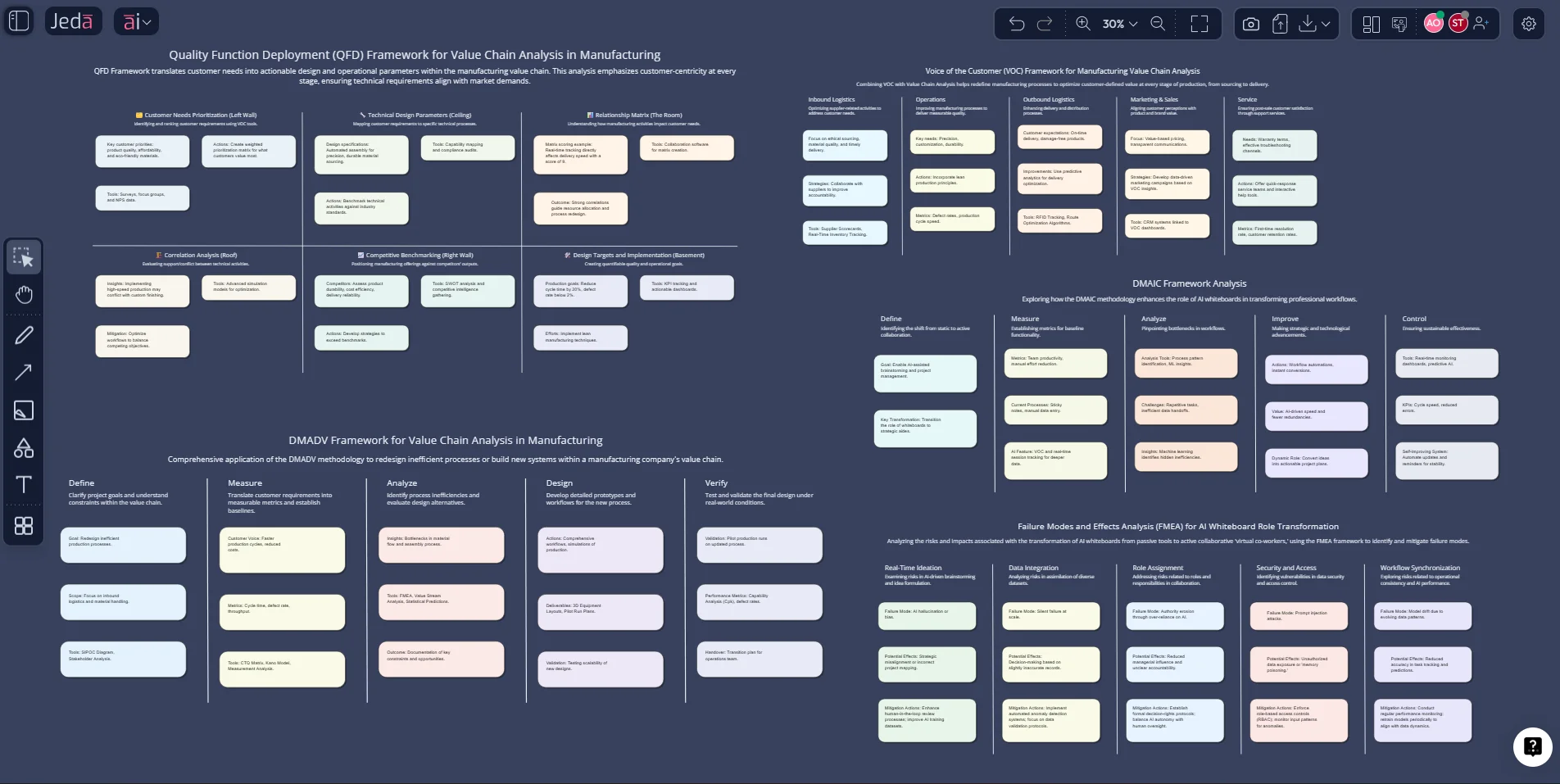
Six Sigma Methodologies with AI stop being abstract the moment your team can see them. That is the real gap in most process-improvement work. Teams know the acronyms. They do not always know how to turn them into a usable, editable working board.
Jeda.ai fixes that by giving you an AI Workspace and AI Whiteboard where structured frameworks become working visuals instead of static notes. Rather than forcing one generic “Six Sigma” board, Jeda.ai lets you build the methodology through the exact methods quality teams already use: DMAIC, DMADV, VOC, FMEA, and QFD. Those methods sit close to the operational truth. And that matters when you need fewer meetings, clearer root-cause logic, and faster agreement across operations, product, engineering, and leadership.
For teams trying to reduce defects, redesign a process, or turn customer feedback into measurable specs, that is a big deal. Jeda.ai combines 300+ strategic frameworks, editable visual generation, collaborative refinement, and AI-assisted expansion so you can move from “we should improve this” to “here is the board, the logic, the risk map, and the next step.” Jeda.ai now serves 150,000+ users across strategy, design, engineering, and planning workflows. The point is simple: Six Sigma work should be rigorous, but it should not be slow.
What are Six Sigma methodologies?
Six Sigma is a disciplined quality-improvement approach built to reduce variation, cut defects, and improve process capability. ASQ describes Six Sigma as a method for disciplined quality improvement, and DMAIC as the core data-driven strategy for improving existing processes. When the work involves designing something new rather than fixing what exists, teams commonly shift to DMADV, the Design for Six Sigma path. Around those two backbone methods, supporting tools such as VOC, FMEA, and QFD help teams define customer needs, surface likely failure points, and translate requirements into design priorities.
In plain English, Six Sigma methodologies answer five different kinds of questions:
- What process is broken and how do we improve it? DMAIC
- What should a new process or service look like? DMADV
- What does the customer actually need? VOC
- Where can the process fail before it hurts quality? FMEA
- How do we convert customer needs into technical actions? QFD
That is why “Six Sigma” should not be treated as one monolithic canvas. It is really a system of linked methods. The smarter play is to build those methods visually, compare them, and extend them as your project evolves.
Why use Six Sigma Methodologies with AI in Jeda.ai?
The usual Six Sigma workflow has a hidden tax. Data lives in one place. Voice-of-customer notes sit in another. Failure analysis is trapped in a spreadsheet. Someone eventually turns the whole thing into slides and calls that alignment. It is not alignment. It is survival.
Jeda.ai gives you one Visual AI environment where the methods can be generated, edited, expanded, and shared in context. You can start with a matrix recipe for DMAIC, move into a diagram for cause-and-effect logic, use the AI+ button to deepen an analysis branch, and then use Vision Transform to convert that output into a different visual form for the next conversation. The workflow file and platform guide explicitly frame the product around Prompt Bar generation, AI Menu recipes, editable outputs, and AI+ extension across smart-shape visuals.
- Method-specific structure
Use the right frame for the right job. DMAIC, DMADV, VOC, FMEA, and QFD should not be squeezed into one generic board.
- AI-assisted expansion
Use AI+ to extend a weak branch, explore more causes, or deepen a control plan without rebuilding the board manually.
- Visual conversion
Turn one analysis into another working format with Vision Transform when your audience needs a different lens.
- Web-grounded context
Use Jeda.ai’s platform-level Web Search when your prompt needs current benchmarks, customer trends, or industry context.
- Real collaboration
Process improvement is cross-functional. Jeda.ai keeps operators, analysts, engineers, and leaders inside the same editable workspace.
- Editable outputs
Unlike static deliverables, Jeda.ai outputs stay live. You can refine text, colors, shapes, connectors, and structure on the canvas.
And there is a second advantage most teams miss. AI is not there to replace Six Sigma discipline. It is there to remove the dumb friction around it.
Six Sigma Methodologies with AI in Jeda.ai: which method should you use?
DMAIC for improving an existing process
ASQ defines DMAIC as a structured approach for improving an existing process that fails to meet performance standards or customer expectations. Use it when the process already exists and the real job is reduction of errors, delay, waste, or inconsistency.
Good fits include support-ticket resolution, onboarding flow defects, procurement delays, approval bottlenecks, recurring quality escapes, and rework-heavy handoffs.
DMADV for designing or redesigning a process
DMADV is used when incremental fixes are not enough and the work requires a new process, product, or service design. ASQ distinguishes DMAIC and DMADV on that basis: one improves the current state; the other designs toward a new verified state. Good fits include launching a new service model, building a new compliance workflow, redesigning intake, or creating a new customer-facing process from scratch.
VOC for defining what the customer really values
ASQ defines voice of the customer as the expressed requirements and expectations of customers relative to products or services. This is where many projects either get sharper or get fake. When the VOC is weak, the rest of the methodology becomes neat-looking nonsense.
FMEA for anticipating breakdowns before they happen
ASQ describes FMEA as a systematic, step-by-step approach to identify and prioritize possible failures in a design, product, process, or service. It is proactive by design. That is why quality teams still reach for it when the cost of failure is high.
QFD for translating needs into design priorities
QFD is the bridge between customer expectations and technical requirements. ASQ describes QFD as a structured method for identifying and prioritizing customer expectations, while its Quality Progress materials describe it as a way to translate customer requirements into appropriate technical requirements across design and production.
Put differently: VOC hears the customer. QFD makes that input usable.
How to create Six Sigma Methodologies with AI in Jeda.ai
Here is the practical truth for this page: Jeda.ai does not need one umbrella “Six Sigma” recipe to make Six Sigma useful. Your strongest workflow is to build the methodology through the relevant Business Process matrix recipes — DMAIC, DMADV, VOC, FMEA, and QFD — then connect or extend them inside the same AI Whiteboard.
Method 1: Recipe Matrix
This is the best route when you want structure first.
- Open the AI Menu
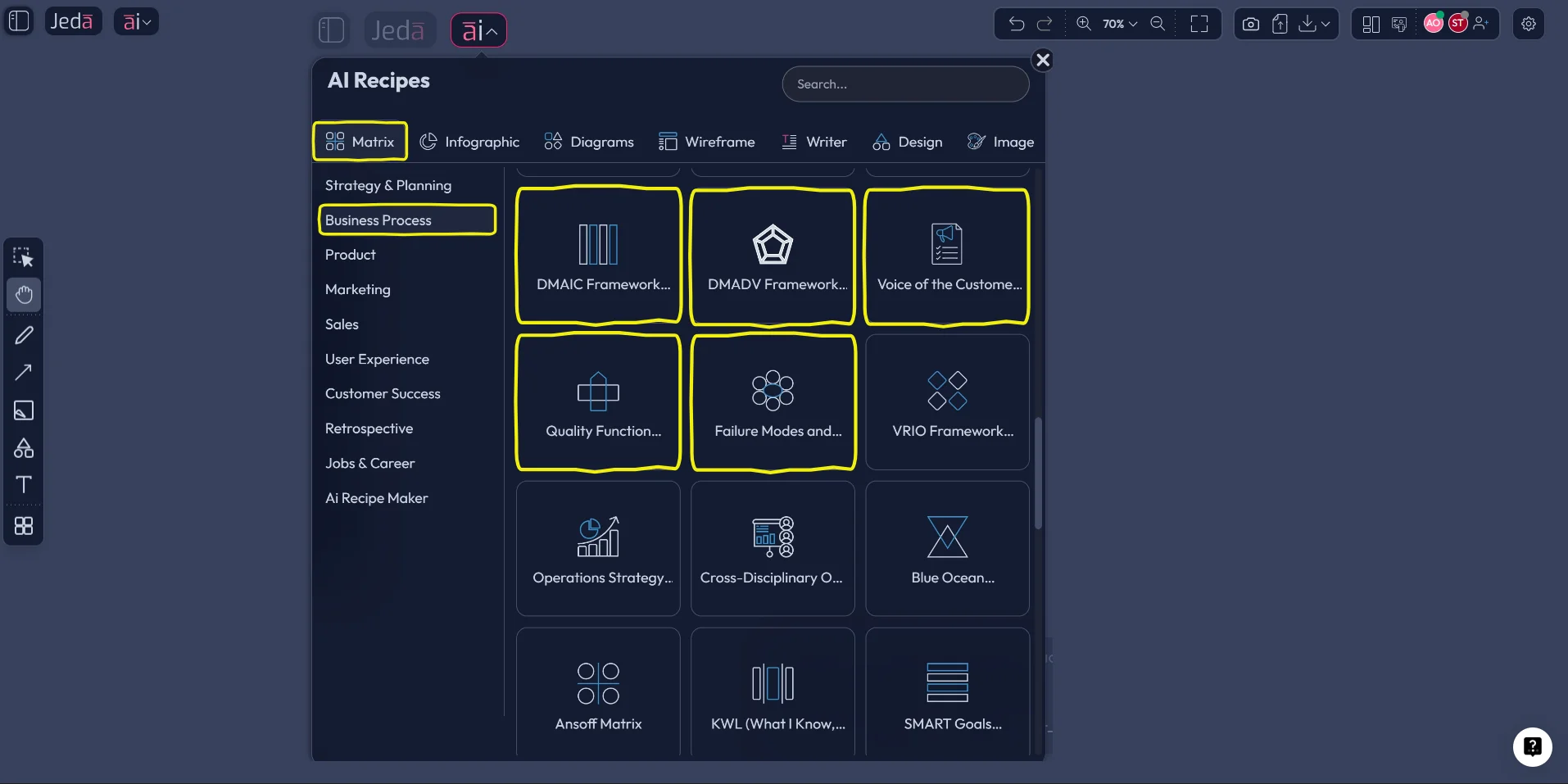
From the top-left of the Jeda.ai workspace, open the AI Menu and go to Matrix Recipes.
- Choose the Business Process category
Select the Business Process matrix category and choose the recipe that fits the job: DMAIC, DMADV, VOC, FMEA, or QFD.
- Fill in the recipe fields
Add the process name, problem statement, customer context, risks, quality gaps, or design objectives so the board starts with real operational detail.
- Generate the matrix
Let Jeda.ai create the structured visual on the canvas as editable smart shapes inside the AI Workspace.
- Extend with AI+
Click any node, section, or smart shape and use the AI+ button to deepen causes, controls, priorities, countermeasures, or technical requirements.
- Transform when needed
Use Vision Transform if you want to convert the output into a diagram, flowchart, or mind map for a different discussion or audience.
Method 2: Prompt Bar
This is the faster route when you already know the framework and want to move.
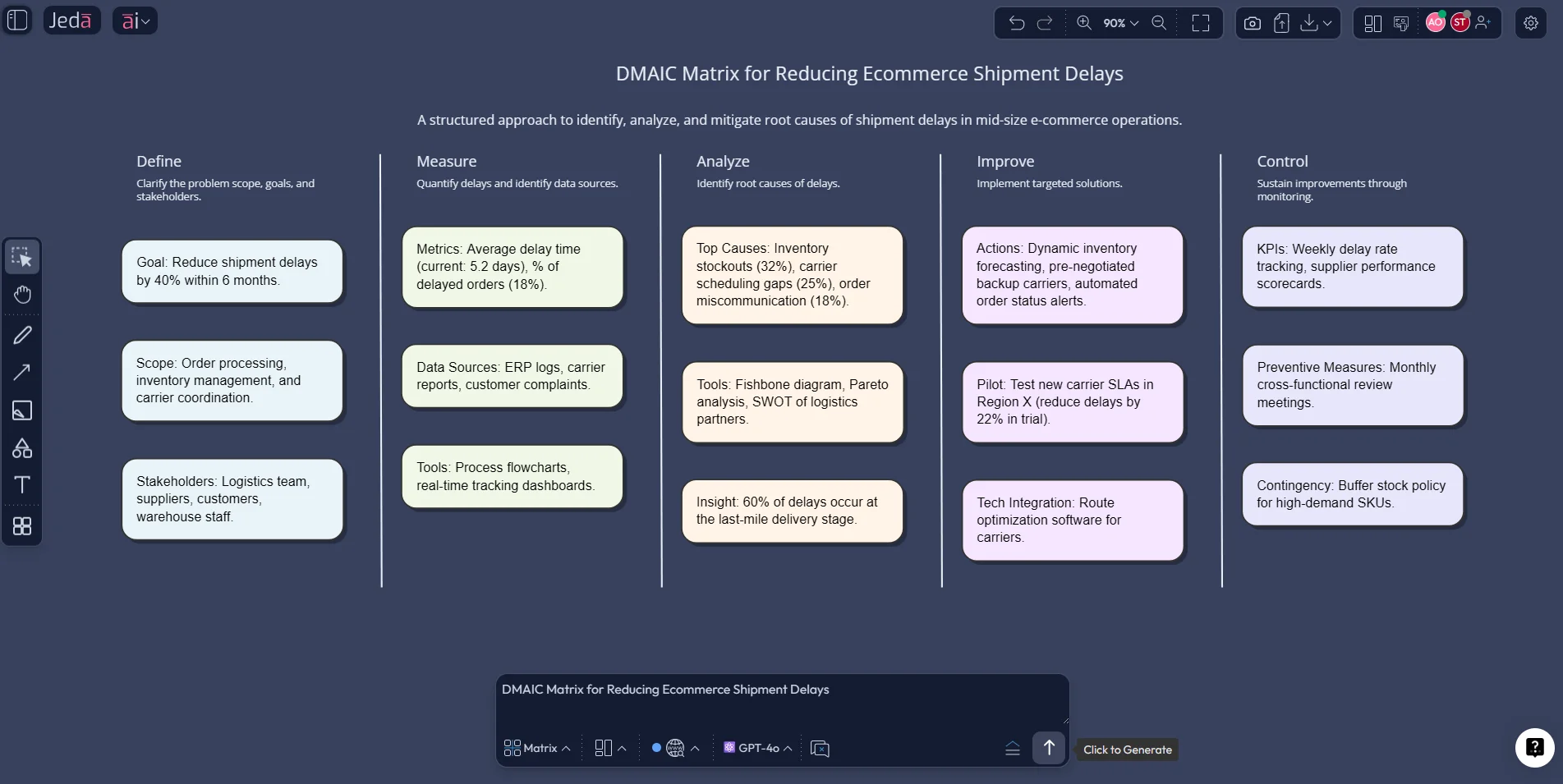
Start with the Prompt Bar at the bottom of the canvas. Select the Matrix command, then describe the exact Six Sigma output you want.
A few prompt examples:
- “Create a DMAIC matrix for reducing shipment delays in a mid-size ecommerce operation.”
- “Build a DMADV matrix for designing a new patient intake workflow for a clinic.”
- “Generate a VOC board for SaaS customers complaining about onboarding friction.”
- “Create an FMEA for a subscription billing process with severity, occurrence, and detection logic.”
- “Build a QFD matrix that translates customer support pain points into product requirements.”
After generation, use AI+ to deepen a branch, add more probable failure modes, expand measurement logic, or sharpen customer requirements. Then move pieces around manually, because Jeda.ai is not a static answer box. It is an editable AI Workspace.
A practical example: how the methods work together
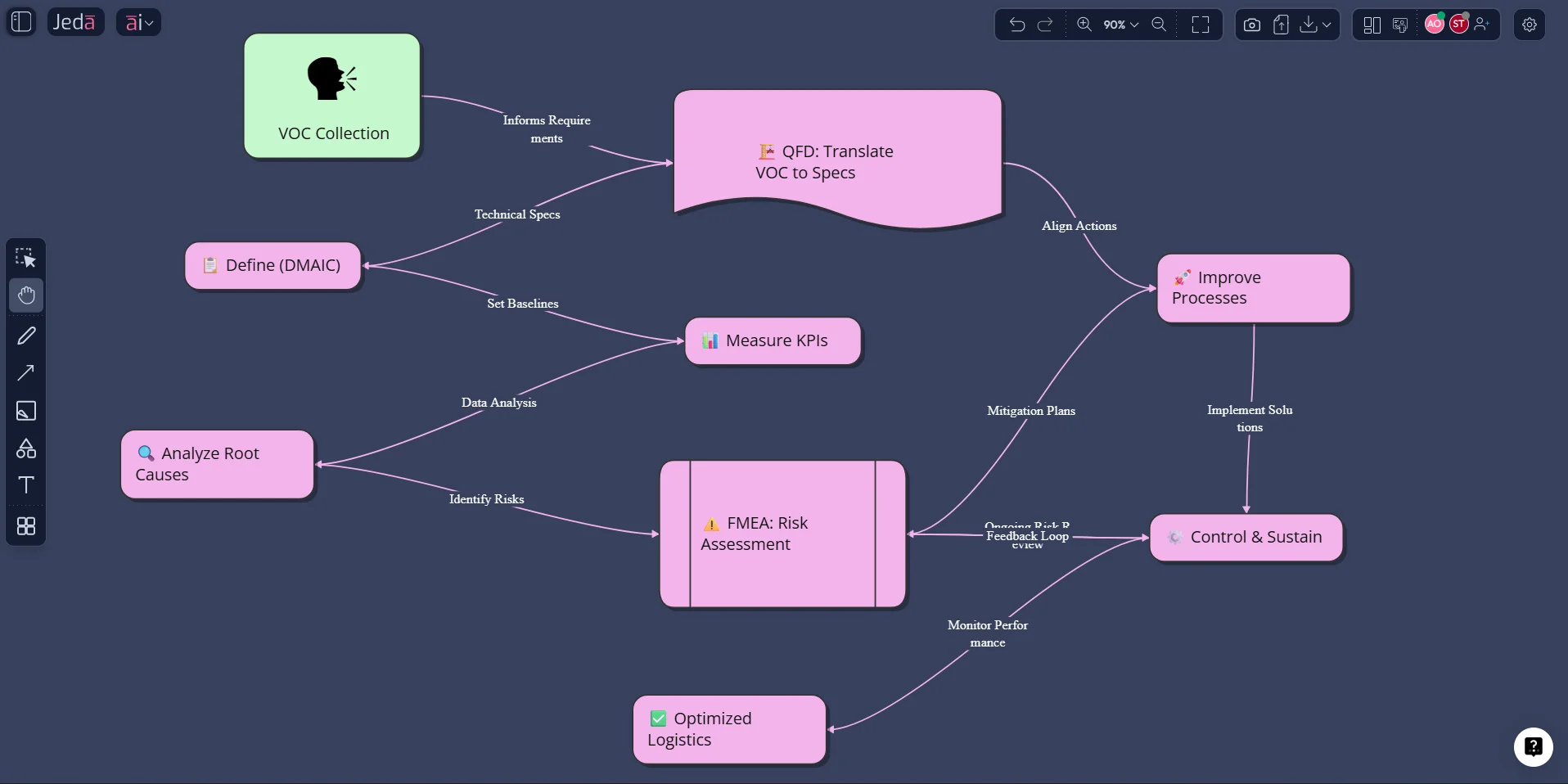
A lot of teams treat these methods like separate folders. That is a mistake.
Imagine a logistics company with late deliveries and rising complaint volume.
- Start with VOC to capture what customers are actually saying: missed delivery windows, weak tracking visibility, and poor exception handling.
- Use DMAIC to define the problem, measure delay patterns, analyze root causes, improve the weak handoff points, and control the new standard.
- Build an FMEA around the most fragile nodes in the process, such as scan failures, routing exceptions, handoff delays, or staffing mismatches.
- If the existing process is too broken to salvage, move to DMADV and design a new delivery-exception workflow instead of endlessly patching the old one.
- Use QFD to translate customer expectations into measurable operating requirements like status-update frequency, scan accuracy, or escalation thresholds.
Best practices when using Six Sigma Methodologies with AI
Common mistakes to avoid
1. Using DMAIC when the process actually needs redesign
This happens all the time. Teams keep “improving” a process that should be rebuilt. That is a DMADV problem, not a DMAIC problem.
2. Collecting VOC that is really just internal opinion
If the “voice of the customer” is actually the voice of your internal meeting, the rest of the methodology gets shaky fast.
3. Treating FMEA like a compliance artifact
FMEA works when it changes decisions. If it sits untouched after being filled out once, it is theater.
4. Skipping QFD after gathering customer feedback
VOC without translation is just listening. QFD is what turns that listening into action.
5. Exporting too early
In Jeda.ai, keep the board alive while the thinking is still moving. Export after the logic settles, not before.
Frequently asked questions
- What is the difference between DMAIC and DMADV?
- DMAIC improves an existing process, while DMADV is used to design a new process, product, or service when the current state cannot simply be optimized. That distinction is consistent with ASQ’s guidance on the two methods.
- Is VOC part of Six Sigma or a separate customer-research practice?
- VOC is widely used inside Lean Six Sigma and related quality work because it captures the expressed requirements and expectations of customers. In practice, it becomes the input that sharpens project scope, priorities, and downstream design choices.
- Why use FMEA in a Six Sigma project?
- FMEA helps teams identify and prioritize possible failures before those failures become customer-facing defects or expensive rework. It adds a preventive layer to improvement or redesign work.
- How does QFD relate to VOC?
- VOC gathers and clarifies what customers need. QFD then translates those needs into technical or operational requirements, priorities, and design targets. One listens; the other converts insight into execution.
- Can Jeda.ai create Six Sigma boards even without one master Six Sigma recipe?
- Yes. That is the practical approach here. Use the specific Business Process matrix recipes such as DMAIC, DMADV, VOC, FMEA, and QFD, then connect and extend them inside one Jeda.ai workspace.
- Which Jeda.ai method is better for Six Sigma work: Recipe Matrix or Prompt Bar?
- Recipe Matrix is better when you want structure and guided fields. Prompt Bar is faster when you already know the framework and want to generate a board immediately. Most teams use both at different stages.
- Can I extend a Six Sigma board after generation?
- Yes. Jeda.ai supports AI+ extension on editable smart-shape visuals, which means you can deepen branches, add details, and continue the analysis without rebuilding from zero.
- Can Jeda.ai convert one Six Sigma visual into another format?
- Yes. With Vision Transform, you can select an existing visual or area on the canvas and ask Jeda.ai to convert it into a different structure, such as turning a matrix into a flowchart or diagram.
- Are Jeda.ai outputs editable or static?
- Most structured outputs in Jeda.ai are editable smart-shape visuals. You can move, restyle, and update them collaboratively on the canvas. Static image outputs are the exception, not the rule.
- What can I export from Jeda.ai after finishing a Six Sigma board?
- Jeda.ai supports export to PNG, SVG, and PDF. If you need an editable PowerPoint workflow, exporting as SVG and converting that graphic to shapes in PowerPoint is the practical route described in the user guide.
Sources & further reading
- [1]
American Society for Quality (ASQ) (2026) . “What is Lean Six Sigma?” ASQ.
View Source ↗ - [2]
American Society for Quality (ASQ) (2026) . “DMAIC Process: Define, Measure, Analyze, Improve, Control” ASQ.
View Source ↗ - [3]
American Society for Quality (ASQ) (2026) . “What is FMEA? Failure Mode & Effects Analysis” ASQ.
View Source ↗ - [4]
American Society for Quality (ASQ) (2026) . “What is Quality Function Deployment (QFD)?” ASQ.
View Source ↗ - [5]
M. Ilin and A. Younis (2023) . “Six Sigma Method” StatPearls / NCBI Bookshelf.
View Source ↗ - [6]
Wolniak, R. (2017) . “The History of the QFD Method” Quality and Quantity.
View Source ↗ - [7]
Jeda.ai (2026) . “AI Content Workflow for Resource & Framework Pages” Internal workflow file.
View Source ↗ - [8]
Jeda.ai (2026) . “Jeda.ai User Guide v3” Internal product guide.
View Source ↗
Start Your Six Sigma Methodologies with AI Workflow
Join over 150,000 professionals using Jeda.ai to turn frameworks into editable, collaborative decisions inside one AI Workspace.
Try Free Template