Most roadmaps fail for a boring reason: they turn into presentation furniture. Strategic Roadmap with AI gives you a faster, sharper way to map ambition, sequence initiatives, test trade-offs, and keep the whole thing editable inside one AI Workspace instead of scattering strategy across slides, docs, spreadsheets, and someone's heroic memory. In Jeda.ai, you can build the roadmap in a shared AI Whiteboard, pull in evidence from documents and data, pressure-test weak spots with the AI+ button, and turn the same strategy into different visual forms without rebuilding it from scratch. That matters when you are trying to align leadership, product, operations, and execution on one visible plan. And yes, it is a lot better than another static quarterly deck.
Jeda.ai already serves 150,000+ users who need thinking tools, not just drawing tools.
What is a strategic roadmap?
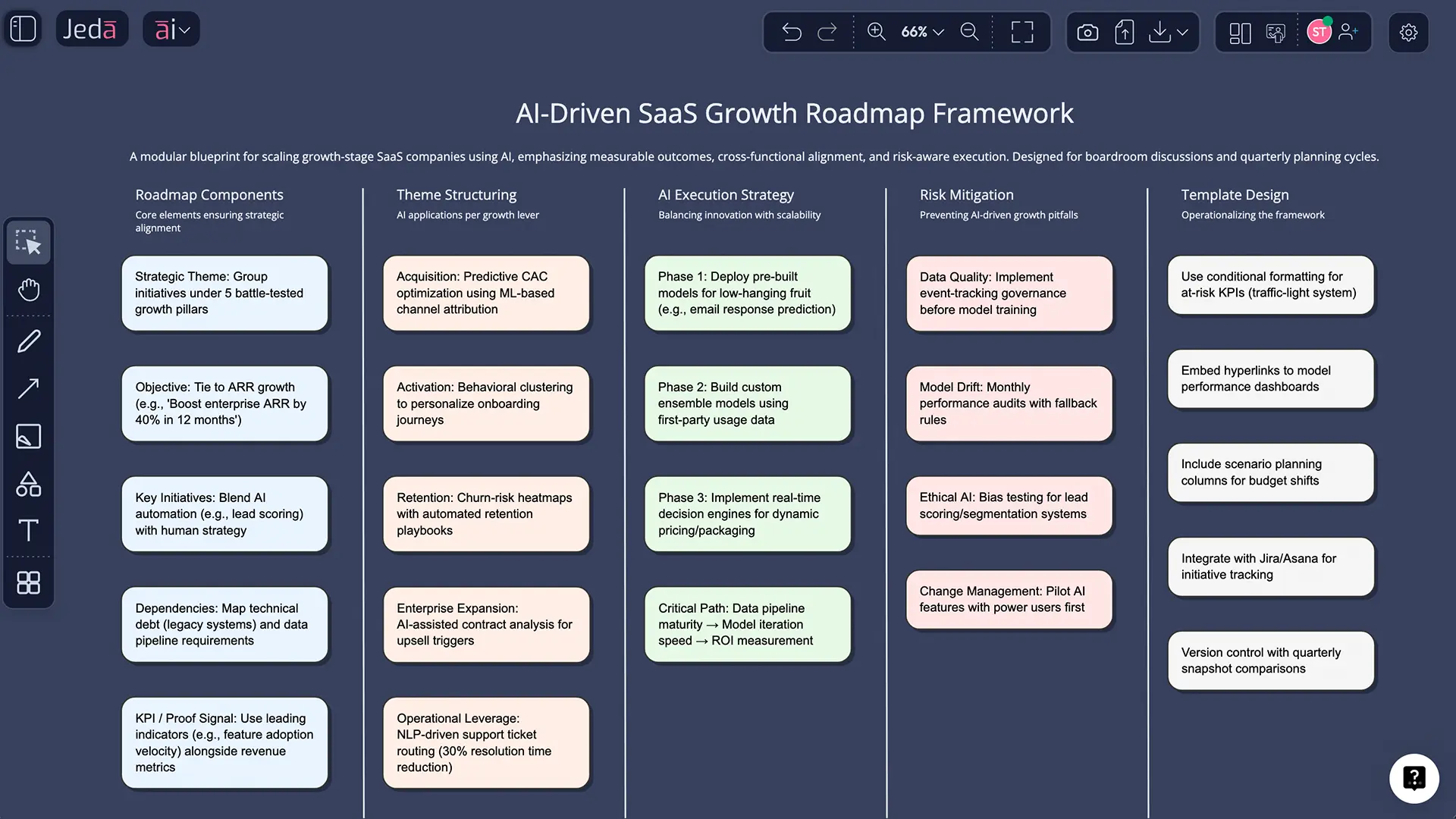
A strategic roadmap is a high-level visual plan that connects long-term direction to the initiatives, dependencies, timing, owners, and proof signals needed to move the business forward. It is not the same thing as a project plan. A project plan gets granular. A roadmap keeps the big bets visible.
That distinction matters more than people admit. A good roadmap answers four uncomfortable questions fast: Where are we trying to go? What will we not do yet? What has to happen first? How will we know this is working?
Modern roadmapping has roots in Motorola’s technology roadmapping work in the 1970s, later formalized in publications by Willyard and McClees, then expanded by researchers such as Robert Phaal and colleagues at Cambridge into a broader strategy and innovation method. The core idea has held up well: make time, choices, and dependencies visible so people can align around them instead of arguing from fragmented notes.
In practice, a strategic roadmap usually includes:
- strategic themes or goals
- the initiatives or bets that support them
- timing across quarters or phases
- dependencies and constraints
- owners and accountability
- KPIs or proof signals that show progress
Why Strategic Roadmap with AI beats slide-first planning
A static roadmap usually goes stale the minute the market moves, leadership changes its mind, or a dependency slips. That is to say: almost immediately.
Strategic Roadmap with AI works better because it lets you move from raw context to structured strategy in one place. You are not just filling boxes. You are generating, challenging, extending, and reshaping the roadmap as new evidence shows up. That is a different kind of workflow. And because Jeda.ai already offers 300+ strategic frameworks, the roadmap does not have to live as an isolated artifact — it can connect to the rest of your strategy system.
- Start with structure, not blank-canvas panic
Use the Matrix command to generate an editable roadmap framework in seconds, then refine the logic instead of formatting boxes for an hour.
- Pull strategy from real documents
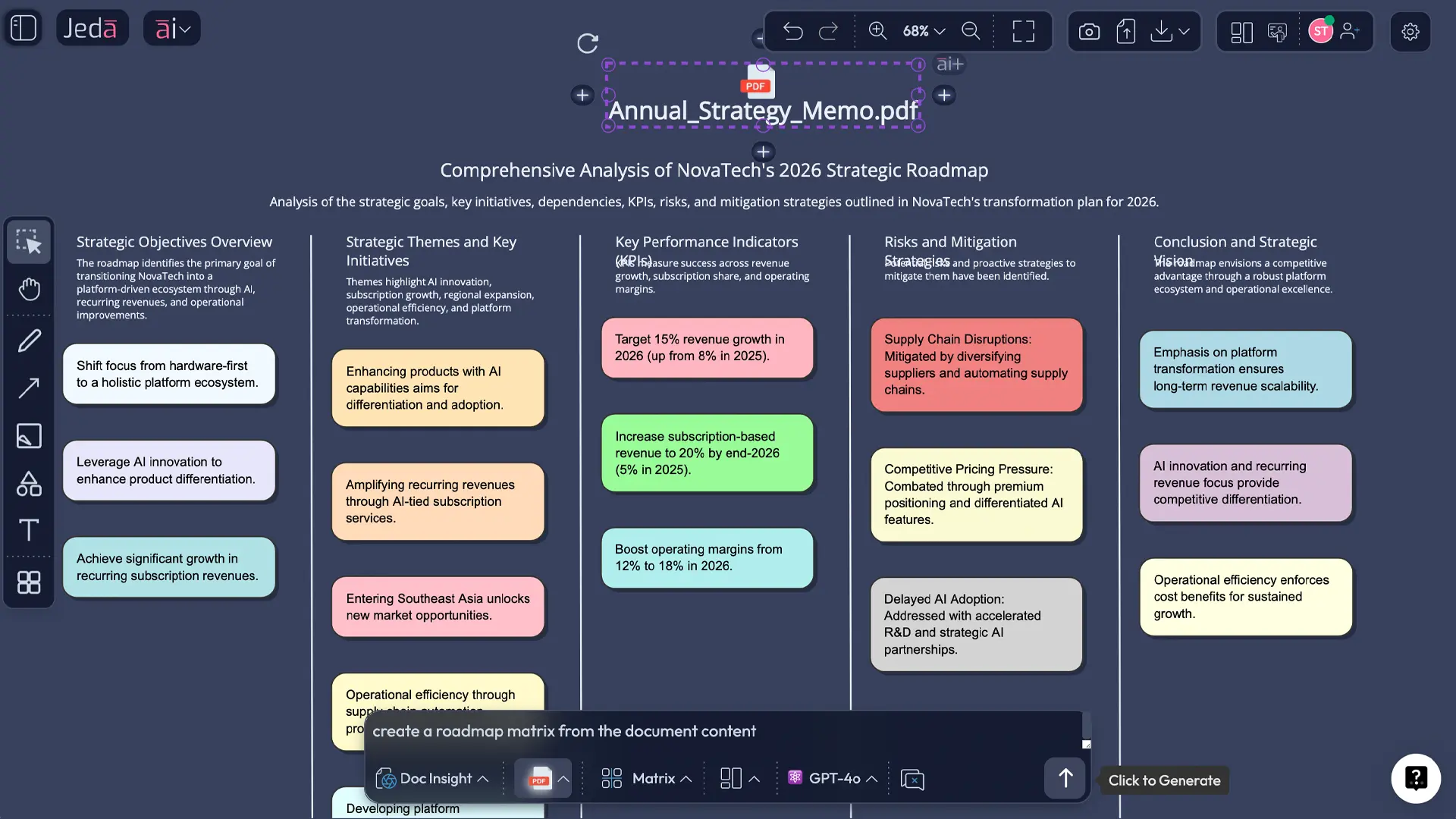
Use Document Insight to extract priorities, risks, and milestones from annual plans, board memos, product briefs, or transformation decks.
- Ground priorities in numbers
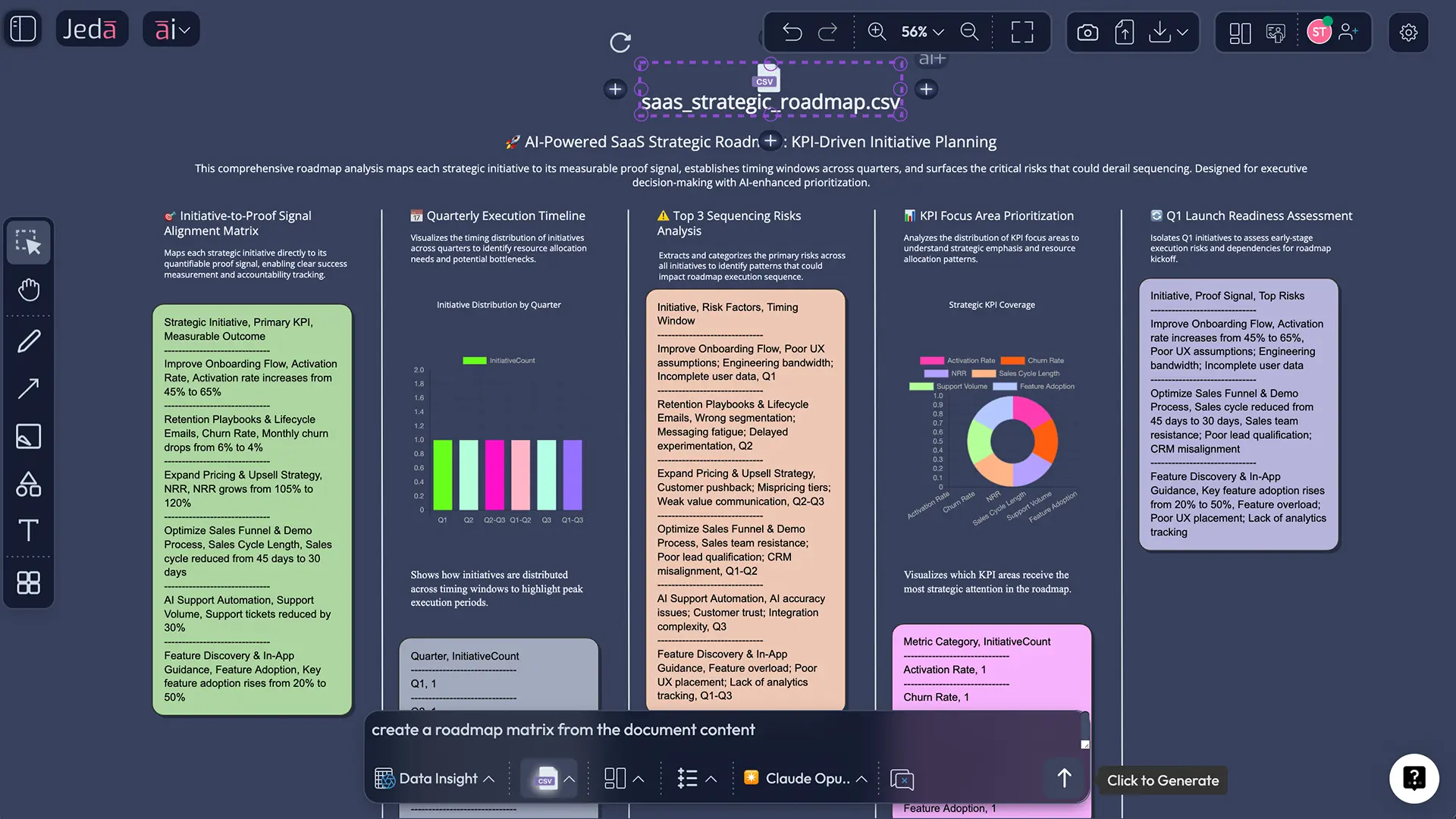
Use Data Insight to bring KPI trends, revenue signals, churn data, or adoption patterns into the roadmap so timing and sequencing are not guesswork.
- Add current-market context
Web search is a platform feature in Jeda.ai, so you can bring in fresh signals when competitive moves, regulation, or macro shifts matter.
- Extend weak areas with AI+
Select one part of the roadmap and use the AI+ button to expand risks, alternatives, dependencies, or execution steps without rebuilding the whole board.
- Convert strategy into execution views
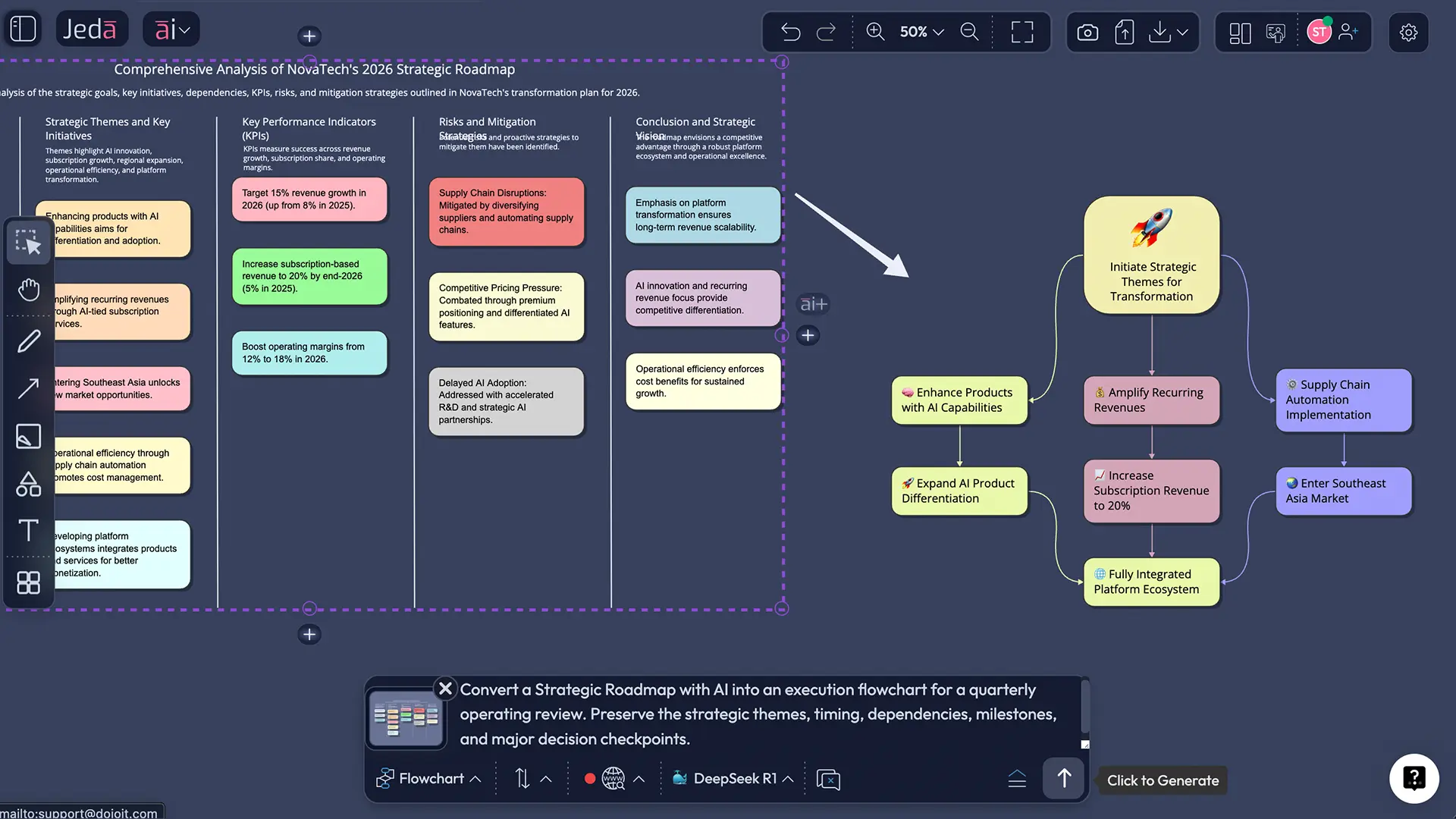
Use Vision Transform to turn the same roadmap into a flowchart, mind map, or diagram when you need a different storytelling angle for different stakeholders.
The bigger point is this: Jeda.ai is not just a prettier board. It is a Visual AI workspace where roadmap thinking, evidence, collaboration, and output all live together. That is why teams use it as an AI Workspace and not just another file graveyard.
How to create Strategic Roadmap with AI in Jeda.ai
Your brief says the how-to should be Prompt Bar only. Good call. It is the cleanest way to show the workflow.
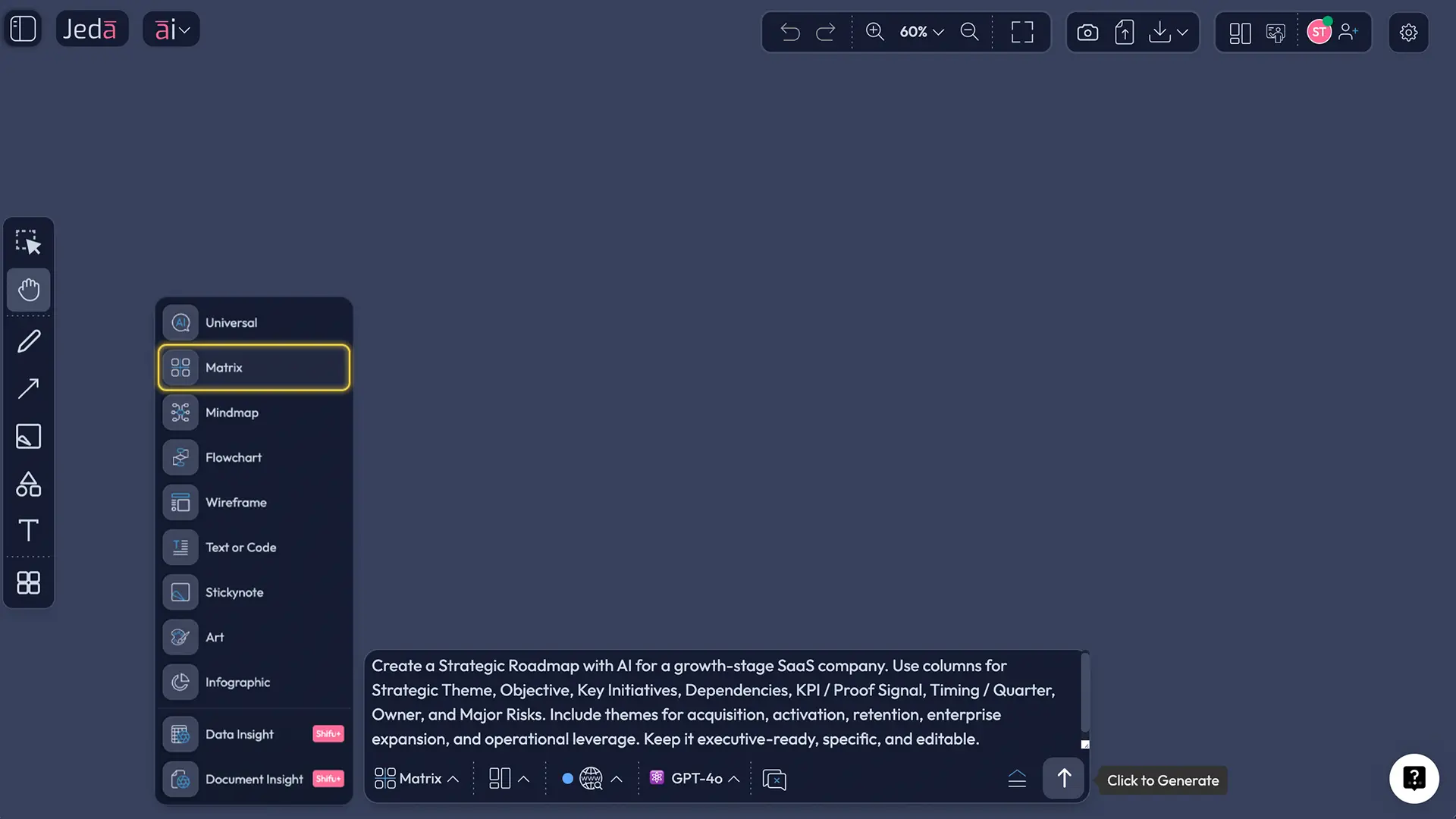
Open a board in Jeda.ai, go to the Prompt Bar at the bottom, and select the Matrix command. Then give the model enough context to do real work: business goal, horizon, constraints, priorities, dependencies, and the proof signals you care about. After the first draft appears, edit the board like a normal working canvas. This is where the AI Whiteboard model really earns its keep.
- Open a workspace in Jeda.ai
Create or open a board in your AI Workspace. This becomes the live source of truth for the roadmap discussion.
- Use the Prompt Bar and select Matrix
In the bottom Prompt Bar, choose the Matrix command so the roadmap is generated as an editable grid instead of a plain text answer.
- Paste a strategy-rich prompt
Add the target outcome, time horizon, strategic themes, constraints, owners, dependencies, KPIs, and risk assumptions. The more grounded the prompt, the less cleanup later.
- Refine the first draft on the canvas
Edit wording, merge duplicate initiatives, adjust timing, and remove filler. Treat the first output as a working board, not a final answer.
- Deep-dive one section with AI+
Select a theme, initiative, or risk area and tap the AI+ button to expand it into more detailed actions, assumptions, trade-offs, or supporting analysis.
- Transform and share
Use Vision Transform to convert the roadmap into a flowchart, diagram, or mind map for a different audience, then collaborate live and export as PNG, SVG, or PDF.
Copy-paste prompt for the Prompt Bar
Prompt:
Create a Strategic Roadmap with AI for [company / business unit / initiative].
Time horizon: [12, 18, or 24 months].
Strategic ambition: [one-sentence future state].
Key themes: [growth, product, operations, AI adoption, market expansion, etc.].
Constraints: [budget, team capacity, compliance, technical debt, timing].
Build an editable matrix with these columns: Strategic Theme, Objective, Key Initiatives, Dependencies, KPI / Proof Signal, Timing / Quarter, Owner, Major Risks.
Make it specific, prioritized, and boardroom-ready.
End with: top 3 sequencing bets, top 3 risks, and one initiative to delay or kill.
Turn messy inputs into a decision-ready roadmap
Here is where the workflow gets interesting.
A real roadmap is rarely born from a single prompt. It usually starts with a messy pile of material: strategy memo, board slides, customer research, quarterly metrics, competitive notes, maybe a spreadsheet with performance data nobody fully trusts. Jeda.ai helps you pull that mess into one working board.
Use Document Insight when the roadmap should reflect existing plans, annual goals, investor decks, transformation memos, or workshop notes. Upload the files, let Jeda.ai extract the signal, then generate a Matrix, Mindmap, Diagram, or Flowchart from that content. This is handy when leadership has already written the strategy but nobody has turned it into an operational view yet.
Use Data Insight when roadmap priorities should follow real numbers. Say you are planning a customer retention roadmap. Bring in churn, feature adoption, NPS, renewal dates, or expansion revenue. Jeda.ai can surface the patterns and help you convert them into roadmap themes with proof signals attached. That is a much sturdier conversation than “we feel like this matters.”
And when context outside your files matters, use web search. In Jeda.ai, web search is a platform feature, not a model gimmick. So if a new competitor move, regulatory shift, or market change should affect the roadmap, you can pull that in and update the board without leaving the AI Workspace.
If you want a wider point of view, run the same roadmap prompt across multiple models with Multi-LLM Agent. One model may be better at synthesis, another at risk framing, another at plain-English clarity. That is useful when the roadmap needs to survive executive scrutiny instead of just looking tidy in a meeting.
AI+ button deep dive: extend one roadmap lane without wrecking the whole board
This part is underrated.
Once the first roadmap exists, do not regenerate the whole thing every time you want more detail. Select one weak, risky, or politically loaded area and use the AI+ button to extend only that section. For example:
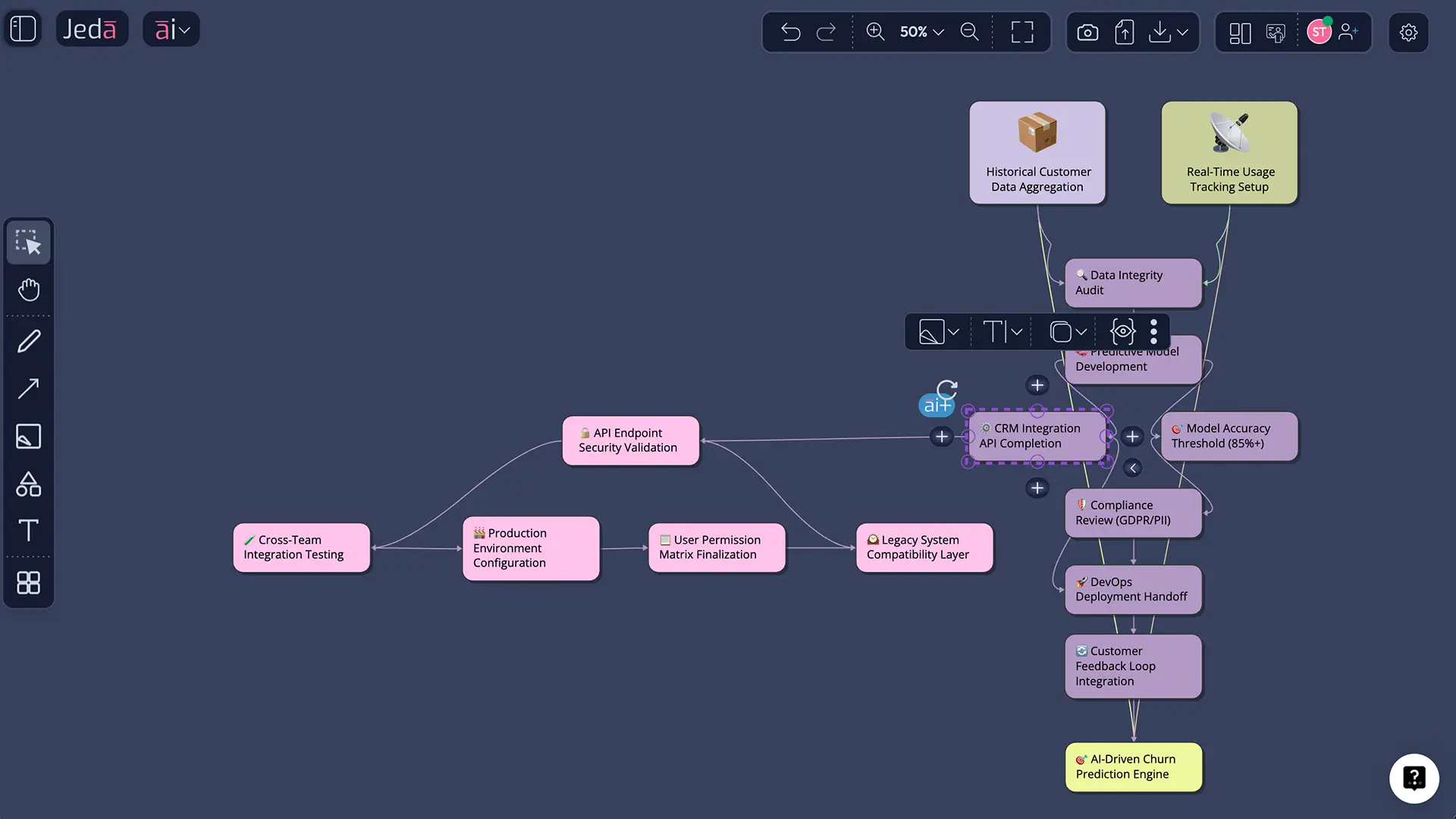
- expand one initiative into an execution dependency diagram
- challenge a risk assumption
- break a strategic theme into quarterly milestones
- surface capability gaps and hiring needs
- turn one row into a more detailed operating plan
That keeps the top layer strategic while letting you drill deeper only where needed.
A practical pattern that works well is this: generate the roadmap as a matrix first, then select a single initiative and ask AI+ to extend it into a delivery path. After that, use Vision Transform to convert the result into a flowchart or mind map for the team that actually has to execute it.
Strategic Roadmap with AI examples you can actually use
A roadmap should change shape depending on the job. Same logic, different board.
1) Growth roadmap for a B2B SaaS company
Use this when the business is trying to grow without pretending every initiative is equally important. Strategic themes might include activation, retention, enterprise expansion, and AI-assisted onboarding. KPIs could be activation rate, expansion MRR, time-to-value, and churn reduction. The payoff is clarity: everyone sees which bets move revenue and which ones are nice-to-have theater.
2) Transformation roadmap for an operations-heavy team
This is where documents and dependencies matter. Pull in process docs, transformation plans, and performance reports, then create a roadmap around modernization, automation, governance, vendor changes, and workforce readiness. It works especially well when leadership wants a cross-functional picture but each team is speaking a different dialect.
3) Product and portfolio alignment roadmap
Use this when product, GTM, and leadership are drifting apart. Build the roadmap around market bets, product capabilities, launch timing, enablers, and proof signals. Then transform the roadmap into a mind map for ideation or a flowchart for execution handoff. One strategy. Multiple views. No starting over.
Best practices for better roadmap planning
Common mistakes to avoid
The first mistake is overloading the board. If everything is priority-one, nothing is. Force choices.
The second is confusing roadmap rows with project tasks. A roadmap should show direction, sequencing, and logic. It should not collapse into a project manager’s full task breakdown on day one.
The third is hiding assumptions. Good strategy work says, “Here is the bet, here is the risk, here is what would have to be true.” Put that on the board.
And the fourth? Treating the roadmap as a one-time artifact. The point of using Jeda.ai as an AI Workspace is that the roadmap stays live. It evolves with evidence. That is the whole game.
Frequently asked questions
- What is a strategic roadmap?
- A strategic roadmap is a high-level visual plan that connects long-term goals to the initiatives, timing, dependencies, and proof signals needed to achieve them. It is meant to align decision-makers around direction and sequence, not replace detailed project plans.
- How is a strategic roadmap different from a project plan?
- A strategic roadmap focuses on the why, what, and sequence of major bets. A project plan focuses on detailed tasks, deadlines, and execution steps. Use the roadmap to align the business first, then turn selected parts into more detailed delivery views.
- What should a strategic roadmap include?
- A useful strategic roadmap includes strategic themes, objectives, initiatives, timing, dependencies, owners, risks, and KPIs or proof signals. If those elements are missing, the roadmap may look polished but it will be hard to use for decisions or accountability.
- Can AI create a strategic roadmap from documents or data?
- Yes. In Jeda.ai, Document Insight can extract priorities and structure from reports, decks, and memos, while Data Insight can turn spreadsheet signals into a roadmap view grounded in real performance data. You can then refine the board manually and extend weak areas with AI+.
- Which Jeda.ai command is best for roadmap creation?
- Matrix is the best starting point for most roadmap work because it keeps themes, initiatives, timing, risks, and KPIs visible in one editable structure. After that, you can use Diagram, Mindmap, or Flowchart when you need a different view for discussion or execution.
- How does the AI+ button help with roadmap planning?
- The AI+ button helps you extend one selected part of a roadmap without regenerating the whole board. That is useful for drilling into dependencies, execution paths, risk scenarios, or alternative sequencing while keeping the top-level roadmap clean and easy to read.
- Can I collaborate on the roadmap with my team?
- Yes. Jeda.ai lets teams work together on a shared AI Whiteboard in real time, review assumptions on the canvas, and keep one visible version of the strategy. When the board is ready, export it as PNG, SVG, or PDF for stakeholder sharing.
- How often should we update a strategic roadmap?
- Quarterly is a sensible default for most teams because it matches planning cycles without making the roadmap stale. For faster-moving businesses, a light monthly review works better so dependencies, risks, and market changes show up before they become expensive surprises.
- Do I need multiple AI models to build a strong roadmap?
- No, but multiple models can improve the first draft when the problem is complex or politically sensitive. In Jeda.ai, Multi-LLM Agent can surface different perspectives on prioritization, risk, and sequencing, which is useful before leadership reviews or major investment calls.
Sources and further reading
- [1]
Robert Phaal (2015) . “Roadmapping for strategy and innovation” Institute for Manufacturing, University of Cambridge.
View Source ↗ - [2]
Robert Phaal, Clare J. P. Farrukh, David R. Probert (2004) . “Technology roadmapping—A planning framework for evolution and revolution” Technological Forecasting and Social Change.
View Source ↗ - [3]
David R. Probert, Clare J. P. Farrukh, Robert Phaal (2003) . “Technology roadmapping—developing a practical approach for linking resources to strategic goals” Proceedings of the Institution of Mechanical Engineers, Part B: Journal of Engineering Manufacture.
View Source ↗ - [4]
Thomas A. Kappel (2001) . “Perspectives on roadmaps: how organizations talk about the future” Journal of Product Innovation Management.
View Source ↗ - [5]
Gartner (2025) . “The CIO’s Guide to Building an AI Roadmap That Drives Value” Gartner.
View Source ↗ - [6]
Microsoft (n.d.) . “AI Strategy Roadmap” Microsoft AI.
View Source ↗
Build Your Strategic Roadmap in One Visual Workspace
Join over 150,000+ users using Jeda.ai’s AI Workspace and AI Whiteboard to turn strategy into visible, editable action.
Try Free Template