AI target audience generator pages are everywhere now. Most of them spit out a few generic bullets, call it strategy, and move on. That’s not enough. If you actually want to generate target audience with AI in a way your team can edit, challenge, refine, and turn into campaigns, you need more than a text box. You need an AI Workspace. That’s where Jeda.ai stands out: it turns audience thinking into a visual, editable board inside an AI Whiteboard, not a dead-end paragraph.
And that changes the job.
Instead of asking, “Who might buy this?” and hoping the answer is decent, you can map segments, pain points, buying triggers, channels, objections, and positioning on one shared canvas. Then you can extend the strong segments with AI, convert them into another format, and keep the reasoning visible. For marketing teams, startup founders, business leaders, strategy consultants, and product managers, that’s a much better way to work. It also fits the bigger Jeda.ai idea: one AI Workspace with 300+ strategic frameworks and visual outputs that your team can actually edit.
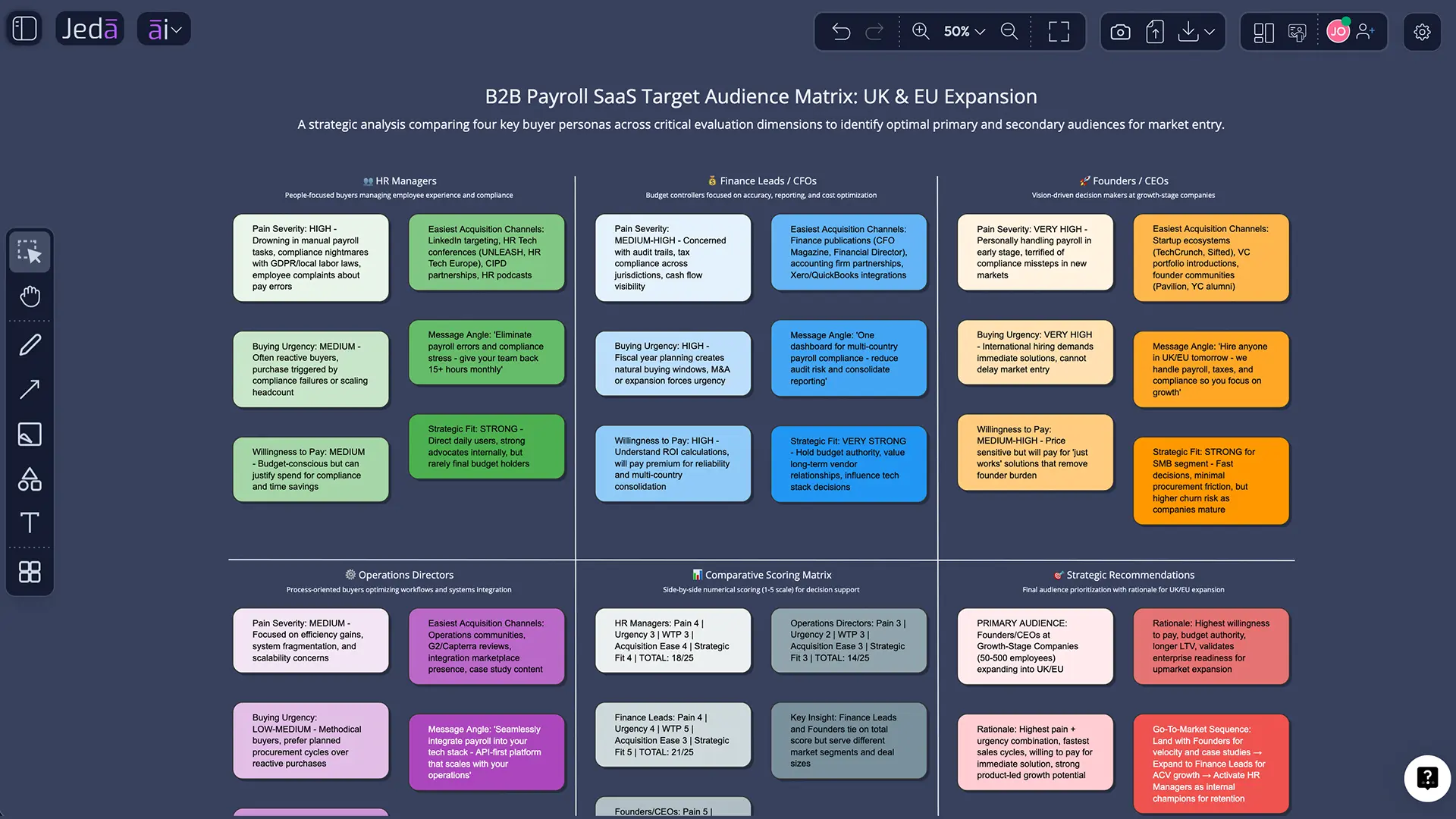
What does “generate target audience with AI” actually mean?
At the strategic level, target audience generation is not just naming a demographic. It is the process of identifying which segment inside a broader market is most likely to care, buy, adopt, or advocate. Classic segmentation thinking traces back to Wendell R. Smith’s 1956 work on market segmentation, and later STP frameworks helped turn segmentation, targeting, and positioning into a practical operating model for marketers. Personas then added a human layer by turning segments into usable archetypes for decision-making.
That distinction matters. A target market is broad. A target audience is narrower and campaign-ready. A buyer persona is even more specific: a semi-fictional representation of one priority segment. HubSpot’s framing is clean here—the target audience sits inside the target market, and personas come after segment selection. Shopify makes a similar point from another angle: audience analysis goes beyond naming a group and digs into motivations, preferences, decision patterns, channels, and bias.
So when you generate target audience with AI, the useful output is not “Women aged 25–34 in cities.” That’s lazy. The better output is something like this:
- HR leaders at 100–500 employee firms
- Feeling payroll complexity after regional expansion
- Need compliance confidence more than feature novelty
- Prefer proof, case studies, and ROI language over brand fluff
- Most reachable through LinkedIn, search, webinars, and operator communities
That is something your team can actually use.
Why use an AI target audience generator instead of doing it manually?
Manual audience work usually breaks in one of two places. Either the team stays too abstract, or it gets buried in slides no one updates. An AI target audience generator inside Jeda.ai fixes both problems because it combines reasoning, structure, and visual editing in one Visual AI workflow.
- Find sharper segments faster
Use AI to move from a broad market to focused segments with pains, buying triggers, urgency, and fit.
- See the logic, not just the answer
A Matrix output makes segment scoring visible, so your team can question, edit, and improve it.
- Go deeper with AI+
Select a promising audience cell and use the AI+ button to expand objections, channels, hooks, or offers.
- Bring evidence into the board
Use Document Insight or Data Insight to turn interviews, surveys, PDFs, and CSVs into audience signals.
- Convert one idea into many views
Use Vision Transform to turn a matrix into a mind map, diagram, flowchart, or infographic.
- Align teams in one workspace
Jeda.ai keeps audience strategy collaborative and editable inside the same AI Whiteboard.
There’s also a hard business reason to care. McKinsey reports that personalization can reduce acquisition costs by as much as 50%, lift revenues by 5% to 15%, and increase marketing ROI by 10% to 30%. BCG and Google found that marketing leaders integrating AI deeply into workflows reported 60% greater revenue growth than peers. Better audience definition is not a side quest. It is the front door to better messaging, targeting, and offer design.
Why Jeda.ai is a better fit than a plain text generator
A plain AI generator gives you text. Sometimes decent text. Sometimes recycled nonsense wearing a tie.
Jeda.ai gives you a working board.
You can generate a target audience as a Matrix, open it in an AI Workspace, refine it with your team, extend specific segments with the AI+ button, and convert it into a different visual when the job changes. That matters because audience work is never truly finished in one pass. You explore, compare, reject, tighten, and reframe. A static output fights that process. A visual board supports it.
How to create a target audience in Jeda.ai
Here’s the practical part. There are three useful ways to do this in Jeda.ai.
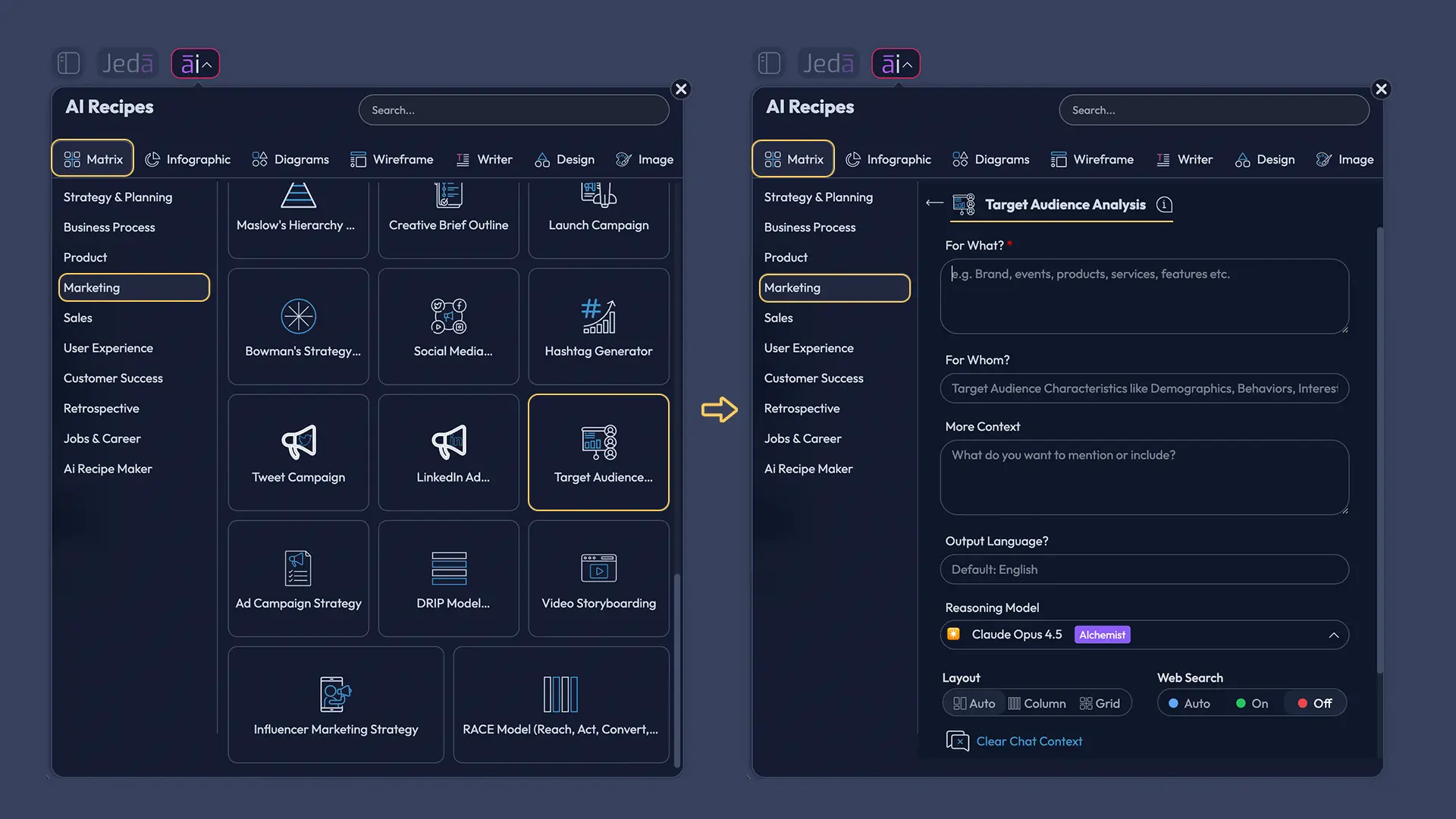
Method 1: Matrix recipe workflow in the AI Menu
This is the best path when you want structure from the beginning.
A note worth being honest about: the current Jeda.ai docs clearly confirm Matrix recipes in the AI Menu, but they do not explicitly confirm a recipe named “Target Audience.” So for this workflow, use the Matrix recipe path for audience analysis in your workspace. If your account shows a target-audience-specific matrix recipe, use it. If not, the generic Matrix recipe flow still works perfectly well.
- Open the AI Menu and choose Matrix
Click the AI Menu in the top-left, go to Matrix recipes, and begin an audience-analysis-style matrix workflow.
- Describe your offer clearly
Enter what you sell, who it helps, the problem it solves, and what makes the offer different.
- Add market context
Include category, geography, company size, pricing level, use case, and any constraints such as B2B, DTC, regulated, or premium.
- Ask for segment options
Prompt Jeda.ai to generate several audience segments with demographics, psychographics, pains, buying triggers, and likely objections.
- Score the segments visually
Have the Matrix compare each segment by urgency, willingness to pay, ease of reach, strategic fit, and lifetime value potential.
- Select the strongest audience
Choose one primary audience, one secondary audience, and one audience you should deliberately deprioritize.
- Use AI+ to deepen the winner
Select the strongest segment and use the AI+ button to expand messaging hooks, channel strategy, keyword themes, and proof points.
- Convert the result if needed
Use Vision Transform to turn the matrix into a mind map, diagram, or infographic for presentations and campaign planning.
Method 2: Prompt Bar workflow
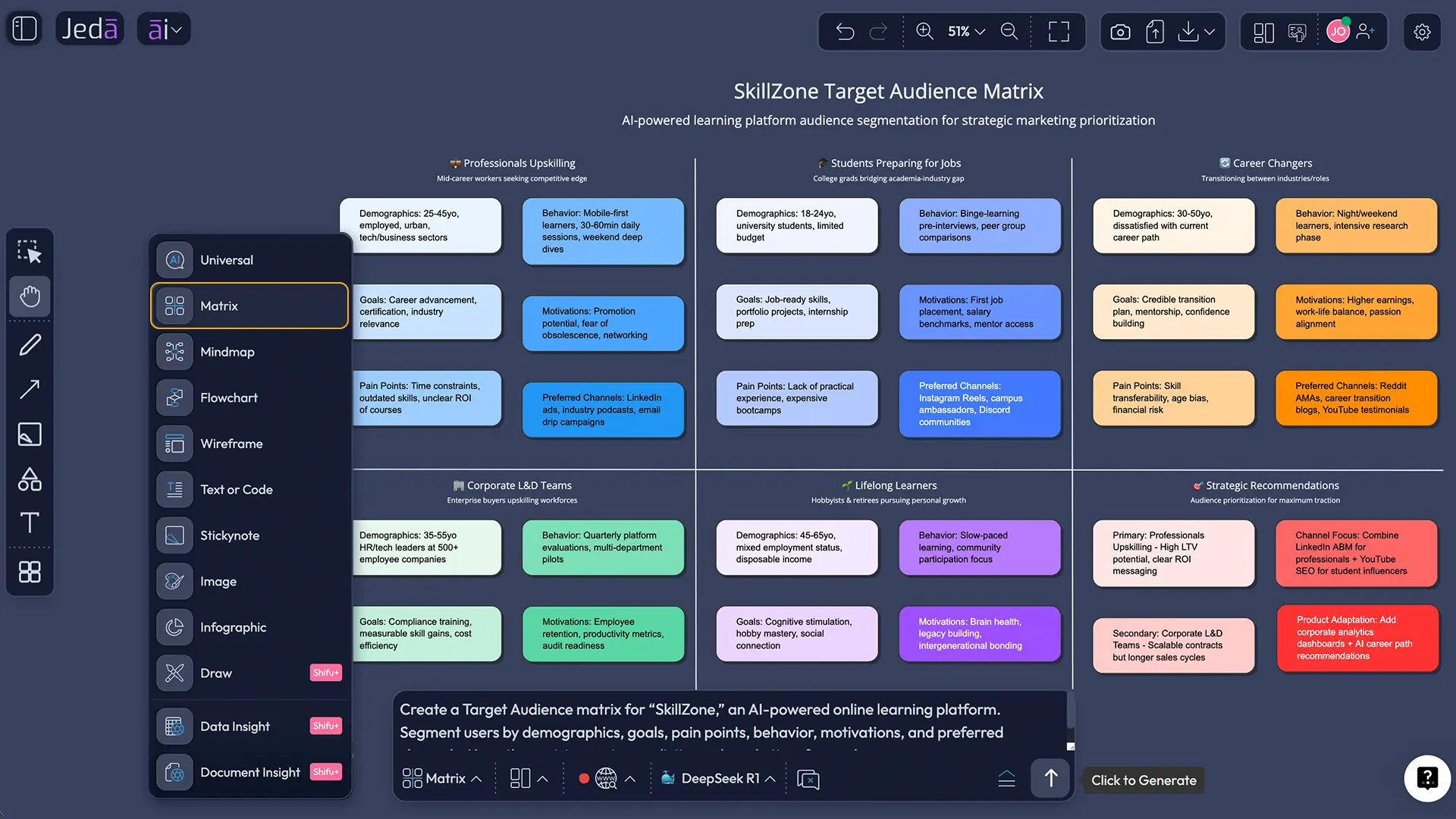
This is the fast route. You already know what you want, and you want the board on the canvas now.
Open the Prompt Bar at the bottom of the workspace. Select the Matrix command. Turn Web Search to Auto or On if the topic needs current market context. Then use a prompt like this:
“Generate a target audience matrix for a compliance-first payroll SaaS for UK mid-market firms. Compare likely audience segments by pain level, buying urgency, willingness to pay, easiest channels to reach them, and message angle. Recommend one primary audience and one secondary audience.”
That gets you a usable first pass fast. Then refine it.
If the brief is messy, click Dynamic Prompt first. The Jeda.ai user guide explicitly notes that Dynamic Prompt asks for extra information such as target audience, goals, competitive landscape, strengths, and weaknesses. That’s perfect for this job, because weak audience outputs usually come from thin context, not weak AI.
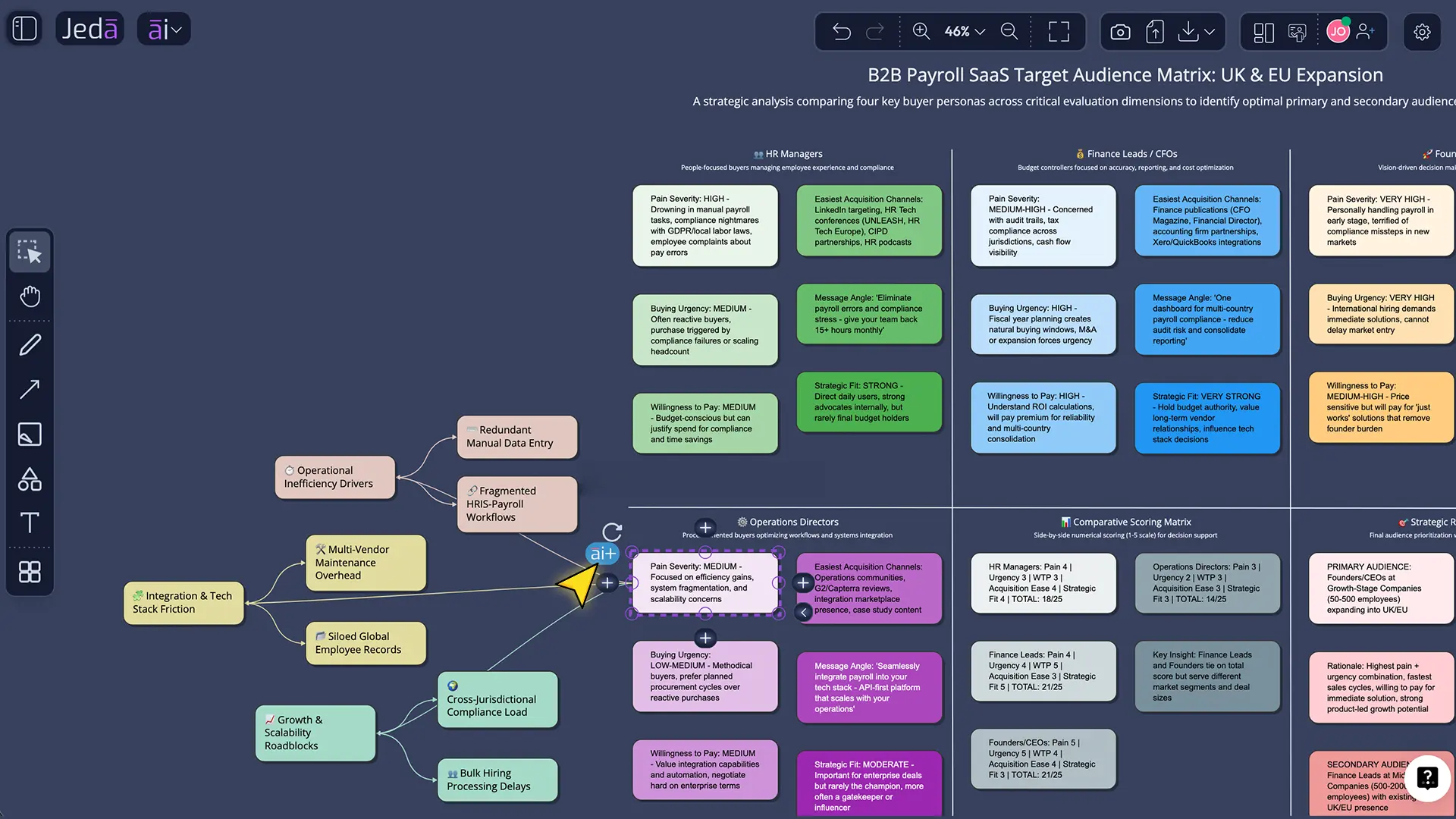
Method 3: AI+ button generated deep dive
This is where the board stops being a draft and starts becoming strategy.
Once the Matrix appears, click the most promising audience block. Then tap the AI+ button to extend it. Ask Jeda.ai to deepen that single segment in one of these directions:
- Expand jobs-to-be-done
- Add objections and trust barriers
- Write search-intent themes
- Suggest channel strategy
- Generate message hooks
- Break the audience into micro-segments
- Compare ICP versus actual buyer
This is the part many tools simply cannot do well because they treat the first answer as the final answer. Jeda.ai lets you keep going.
What a strong target audience output should include
A good audience board should help you choose. Not just describe.
Here’s the thing: the best audience is not always the biggest group. Sometimes it is the group with the clearest pain, shortest path to value, strongest urgency, and easiest channel access. Daniel Yankelovich and David Meer made a similar argument years ago when they pushed back on shallow psychographic segmentation and argued for segmentation that actually changes decisions. Still true. Still ignored.
Example: generate target audience with AI for a B2B payroll SaaS
Let’s make this concrete.
Say you sell payroll software built for companies expanding across the UK and EU. You could ask Jeda.ai to evaluate these segments:
- HR managers at 50–200 employee firms
- Finance leads at 200–1000 employee firms
- Founders at small remote-first startups
- Operations directors at multi-country employers
The Matrix would then compare each group by pain severity, regulatory urgency, budget control, buying committee complexity, and acquisition channel fit.
What usually happens? Founders sound attractive because they are easy to imagine, but they often are not the best first audience. Operations directors or HR leads at growing firms may have the strongest blend of pain, urgency, and fit. That is exactly why a visual matrix helps: you see the trade-offs instead of arguing in circles.
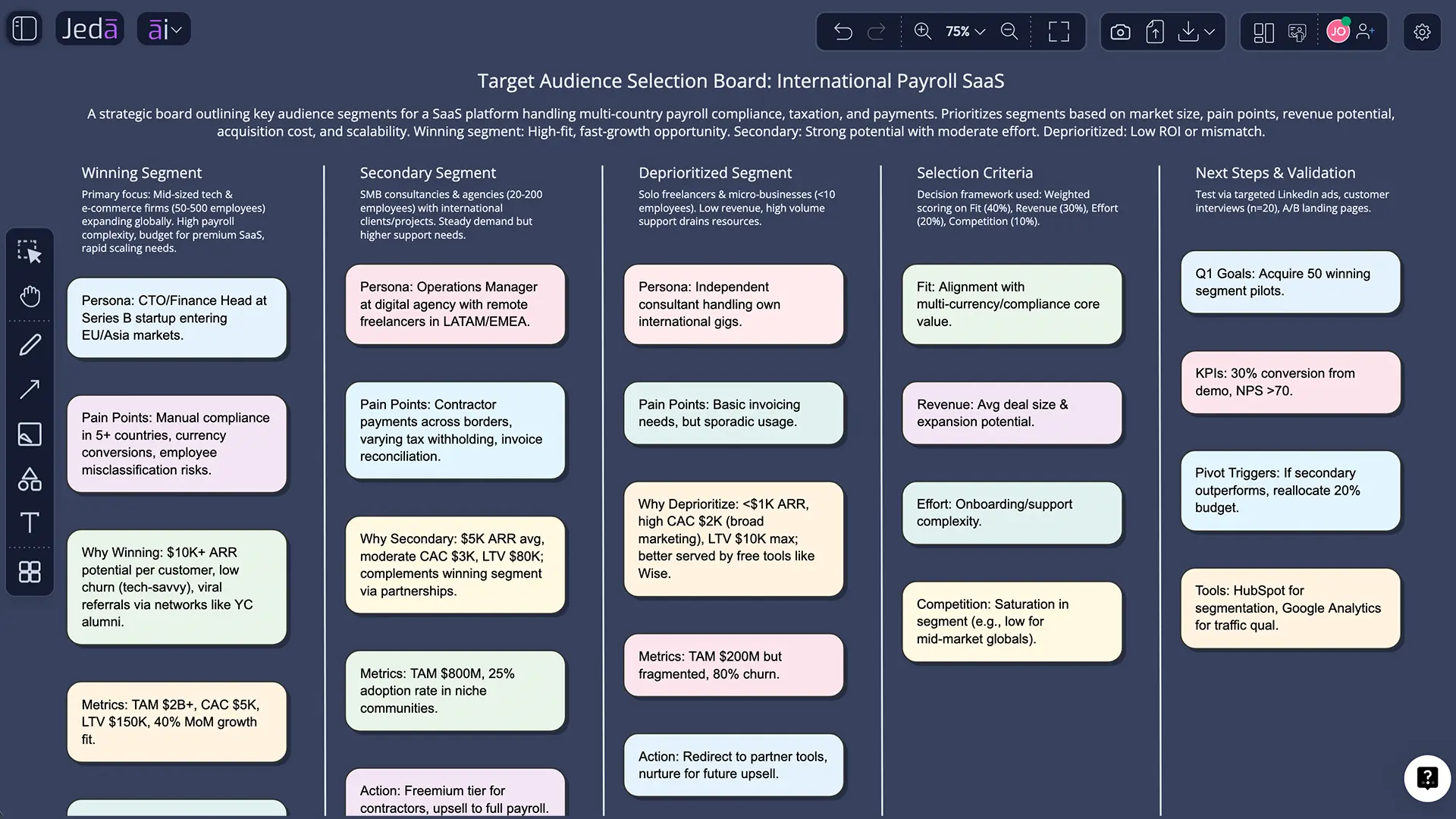
Once the primary audience is chosen, you can use Vision Transform to turn the board into a Mindmap for messaging pillars or an Infographic for internal presentation. Same insight. New format. No rebuild.
Use Document Insight and Data Insight when you already have evidence
This is where Jeda.ai starts to feel unfair.
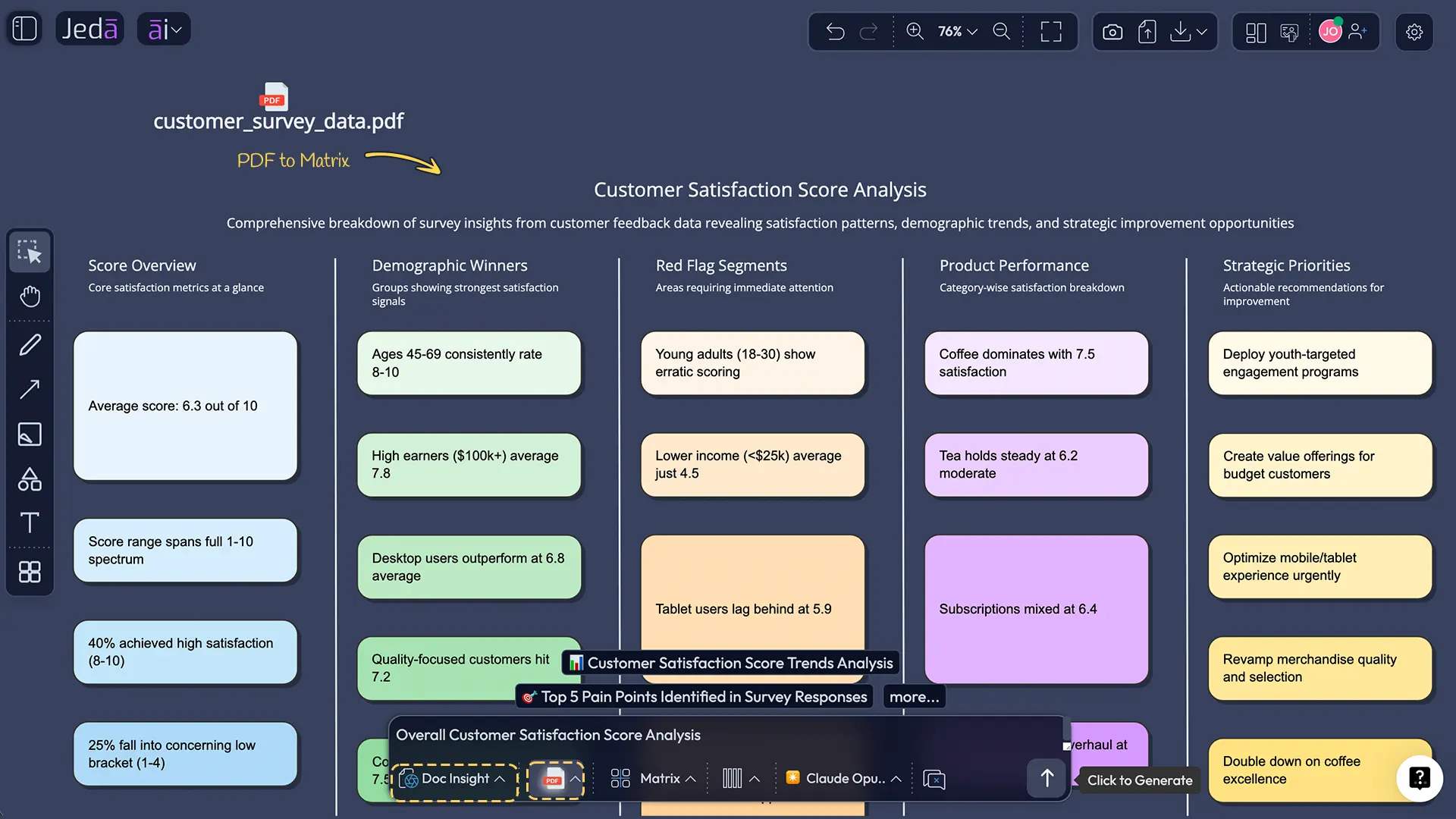
If you already have customer interview notes, research PDFs, survey exports, onboarding transcripts, or CRM summaries, don’t start from a blank prompt. Upload the file and let the platform extract patterns first.
- Use Document Insight for customer interviews, discovery notes, pitch decks, research summaries, or PDF reports.
- Use Data Insight for survey CSVs, CRM exports, NPS data, or campaign performance tables.
Then select Matrix as the output type and ask Jeda.ai to build a target audience analysis from the evidence. That gives you a far more grounded result than a purely synthetic first pass.
BCG’s 2024 research on AI-powered marketing makes the same point at enterprise scale: leaders are using AI for consumer insights, predictive audience work, and real-time segmentation, not just copy generation. In other words, the serious value is upstream, before the ad copy ever gets written.
Best practices for generating target audience with AI
First, give the model a business constraint. “Find my audience” is weak. “Find the best first audience for a premium skincare brand focused on post-acne recovery for women in Southeast Asia” is much better.
Second, make the AI compare segments instead of describing one segment in isolation. Comparison forces prioritization.
Third, separate market, audience, and persona. They are not interchangeable, and mixing them leads to sloppy messaging.
Fourth, pressure-test the result. Ask Jeda.ai what evidence would disprove the chosen audience. That one question saves teams from falling in love with flattering nonsense.
Fifth, keep the board editable. That is the real power of Jeda.ai as an AI Whiteboard. You can collaborate, move blocks, rewrite logic, and extend specific nodes without throwing the work away.
Common mistakes to avoid
The biggest mistake is treating demographics as the whole answer. Demographics matter, but behavior, triggers, trust barriers, and job context usually matter more.
Another mistake is picking the biggest segment instead of the most reachable or most urgent one. Big can be expensive. Big can be vague. Big can be a trap.
And one more. Teams often confuse a beautifully written persona with a validated audience strategy. Nice story. Wrong market. That happens more than people admit.
Frequently asked questions
- What is a target audience?
- A target audience is the specific group inside a broader market that your product, offer, or campaign is meant to reach. It is narrower than a target market and more actionable because it includes traits, behaviors, needs, and likely buying context.
- Is a target audience the same as a target market?
- No. A target market is the broader population a business could sell to, while a target audience is a more specific segment inside that market. In practice, you define the market first, then choose the audience you want to prioritize.
- Is a buyer persona the same as a target audience?
- Not exactly. A target audience is a segment. A buyer persona is a semi-fictional profile representing one person inside that segment. Good strategy usually moves in order: market, audience, then persona.
- How does AI improve target audience research?
- AI speeds up segmentation, compares multiple audience options, surfaces patterns in research data, and helps teams pressure-test assumptions. The biggest advantage is not speed alone. It is the ability to see trade-offs and refine them visually.
- Which Jeda.ai command should I use first for target audience generation?
- Start with the Matrix command when you need structured comparison and prioritization. Use Mindmap when you want idea expansion, and switch to Infographic or Diagram later if you need a presentation-ready or relationship-based view.
- Can Jeda.ai analyze customer interviews or surveys for this?
- Yes. Use Document Insight for PDFs, notes, and interview documents, or Data Insight for CSV and Excel files. Then render the output as a Matrix so the strongest audience segments become easy to compare and refine.
- What should I include in the prompt?
- Include the offer, customer problem, geography, price level, category, business model, likely use case, competitors, and what success looks like. The better the context, the less generic the audience output becomes.
- Can my team collaborate on the target audience board?
- Yes. Jeda.ai is built as a collaborative AI Workspace. Teams can review the same board, edit cells, extend promising segments with AI+, and use Follow Me when one person wants to present the logic live.
- Is the output editable after generation?
- Yes. Matrix, Mindmap, Diagram, Flowchart, and other smart-shape outputs are editable in Jeda.ai. That is one of the main differences between Jeda.ai and static audience generators that only give you text.
- Can I try this in Jeda.ai for free?
- Yes. Jeda.ai offers a Whitebelt free plan, and new accounts receive a limited 7-day Shifu trial according to the current user guide. That gives new users a practical way to test richer AI workflows before deciding whether to upgrade.
Sources & further reading
- [1]
Smith, Wendell R. (1956) . “Product Differentiation and Market Segmentation as Alternative Marketing Strategies” Journal of Marketing.
View Source ↗ - [2]
Wedel, Michel and Kamakura, Wagner A. (2000) . “Market Segmentation: Conceptual and Methodological Foundations” Springer.
View Source ↗ - [3]
Cooper, Alan (1999/2004) . “Users, Personas, and Goals” Carnegie Mellon University Reading.
View Source ↗ - [4]
Yankelovich, Daniel and Meer, David (2006) . “Rediscovering Market Segmentation” Harvard Business Review.
View Source ↗ - [5]
McKinsey & Company (2023) . “What is personalization?” McKinsey Explainers.
View Source ↗ - [6]
Boston Consulting Group (2024) . “The Blueprint for AI-Powered Marketing” BCG.
View Source ↗
Start Your AI Target Audience Generator Workflow Today
Join over 150,000+ users who use Jeda.ai to think visually, compare strategically, and turn raw ideas into editable audience strategy inside one AI Workspace.
Try Free Template