Beyondsoft just showed something most enterprise AI teams still miss: the biggest failure point is not the model. It is the handoff. The moment insight leaves one tool, gets pasted into another, reformatted for someone else, and then rewritten again for action, the system starts leaking time, clarity, and trust.
That is why the recent Beyondsoft workflow matters. It did not frame AI as one giant robot trying to do everything badly. It showed a more mature pattern: one conversation, purpose-built agents, and a human checkpoint at every meaningful decision. A manager spots an issue. One agent surfaces what matters. Another helps shape the story. A third prepares the operational next step. The human stays in control. The work keeps moving.
A recent walkthrough created by Gary Li, AI Expert at Beyondsoft, and developed in partnership with Tawhid Khan, founder and CEO of Jeda.AI, made that pattern visible in a practical way. Not as a theory deck. As an operating model.
Watch this video created by Gary Li, Beyondsoft AI Expert and in partnership with Tawhid Khan, founder and CEO, Jeda.AI using the visual analytics tool.
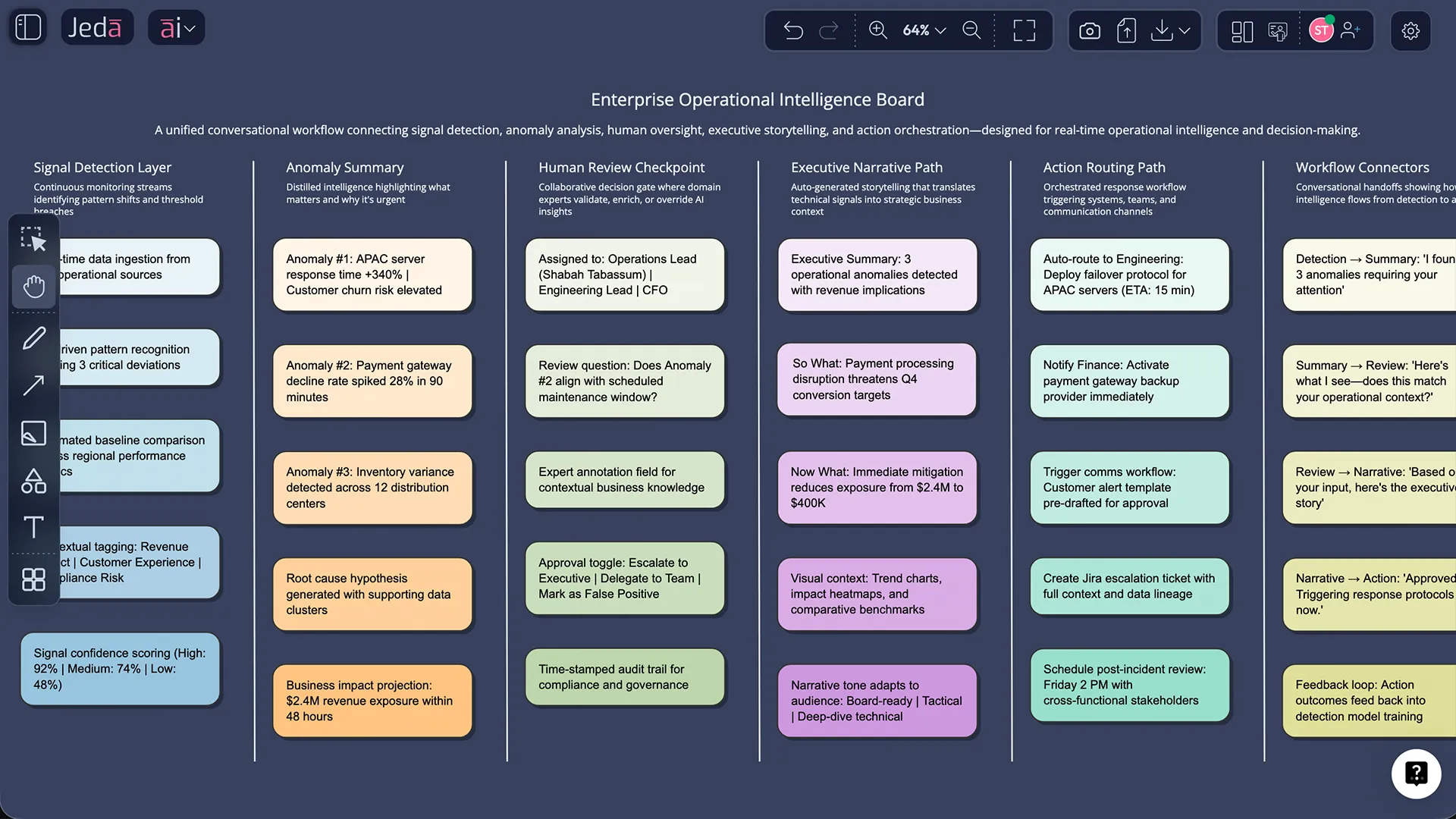
The real problem is not generation. It is transfer.
Most enterprise AI conversations are still too obsessed with generation quality. Better prompts. Better models. Better outputs. Sure. That matters.
But the more expensive question comes right after: what happens next?
If an analyst finds a pattern in one system, then a manager copies it into slides, then someone else rewrites it into a task, then another team translates that into operational work, the cost is not just friction. It is distortion. Every handoff strips context. Every tool switch forces reorientation. Every manual rewrite adds delay and risk.
That is where Jeda.ai earns its place. Not as a novelty canvas. As an AI Workspace built to keep reasoning, evidence, visuals, and collaboration in one working surface. You do not just generate a result and admire it. You keep moving with it.
And that changes the economics of decision-making.
What Beyondsoft’s workflow quietly proved
The Beyondsoft example was strong because it stayed grounded in work people actually recognize. A regional manager needs to understand what is changing across stores. Signals arrive from operations, business data, and field activity. Something abnormal shows up. The team needs clarity fast.
In a fragmented setup, that turns into dashboard hopping, note-taking, screenshot collecting, slide rewriting, and ticket creation. Messy. Familiar. Slow.
In a connected workflow, the operating logic shifts:
- the signal is surfaced in context
- the human reviews before escalation
- the narrative for stakeholders is built from the same source
- the follow-up action is created from the same source
- nothing important needs to be manually reconstructed
That is the pattern enterprise teams should care about. Not “AI for everything.” Better continuity between insight and action.
Where Jeda.ai fits in that chain
Jeda.ai is especially powerful in the first half of the workflow, where raw inputs become something a leadership team can actually use.
Operational data is noisy. Documents are dense. Screenshots are partial. Meetings leave residue everywhere. Most teams drown before they decide.
Jeda.ai changes that by turning scattered inputs into editable, decision-ready visual outputs inside one AI Whiteboard. Teams can pull in structured data with Data Insight, analyze reports or operational files with Document Insight, guide the task through the Prompt Bar, apply Web Search where live context matters, and use Multi-LLM reasoning when they want several perspectives before they commit. Then they can refine, challenge, and convert the result with AI+ and Vision Transform instead of starting from scratch again.
That is not cosmetic convenience. It is operational continuity.
- Data Insight
Turn multi-source operational data into anomaly summaries, patterns, charts, and decision-ready findings inside the same workspace.
- Document Insight
Convert reports, briefs, and working files into structured visuals that can feed downstream reviews without another rewrite cycle.
- Prompt Bar control
Guide the workflow in natural language from one conversational surface instead of bouncing between disconnected apps.
- Multi-LLM reasoning
Pressure-test a signal from different reasoning angles before it reaches an executive audience or operational team.
- AI+ and Vision Transform
Extend weak areas, deepen findings, or convert one format into another without losing the original thinking thread.
- Shared visual collaboration
Keep human checkpoints visible, editable, and reviewable on a live canvas where teams align before something ships.
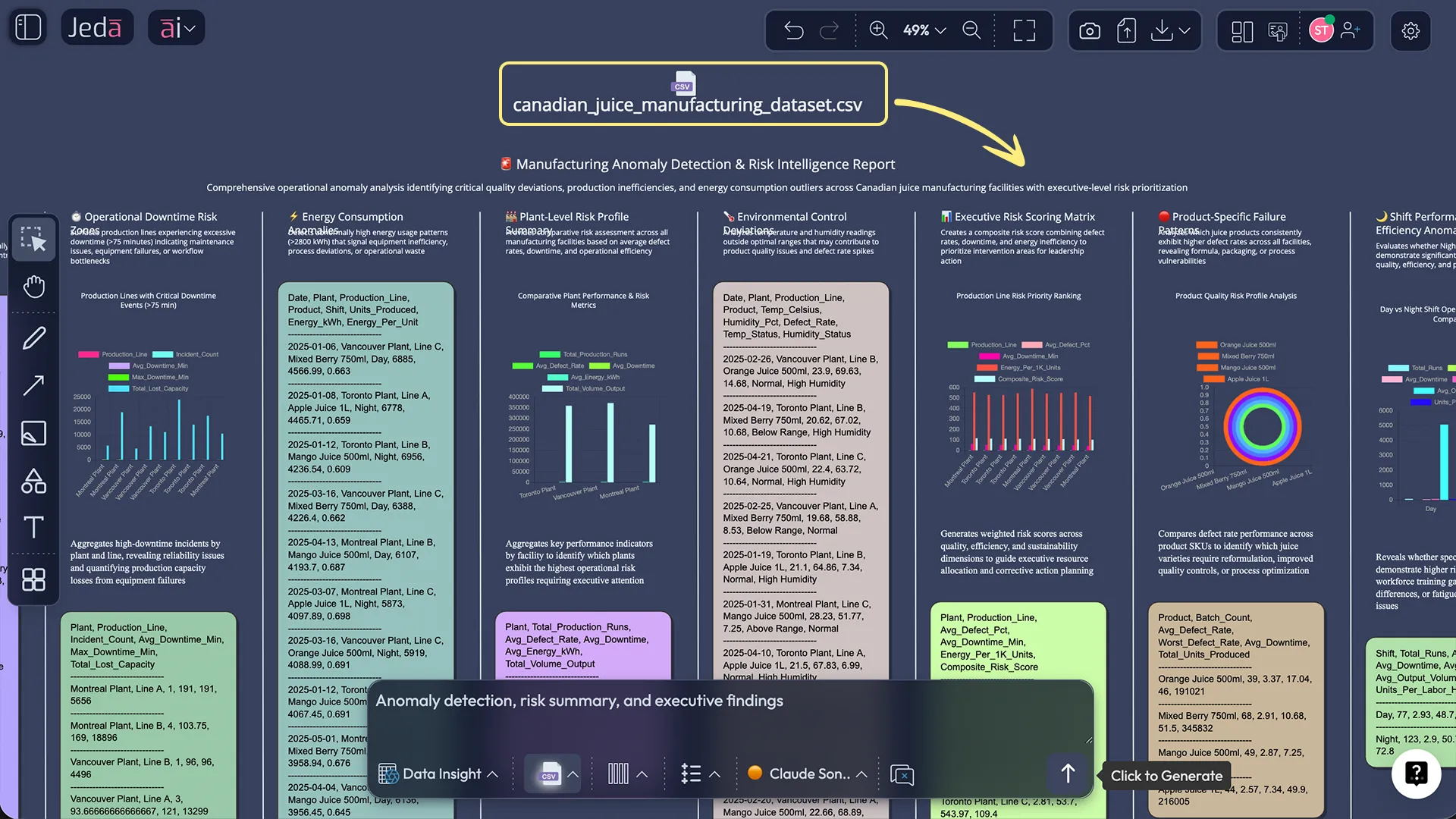
The new enterprise stack is conversational, visual, and reviewable
A lot of AI tooling still assumes that work happens in a line: input, output, export, done. Real enterprise work does not behave like that.
It loops. It branches. It gets questioned. It gets reframed for different audiences. It needs human approval. It needs a record.
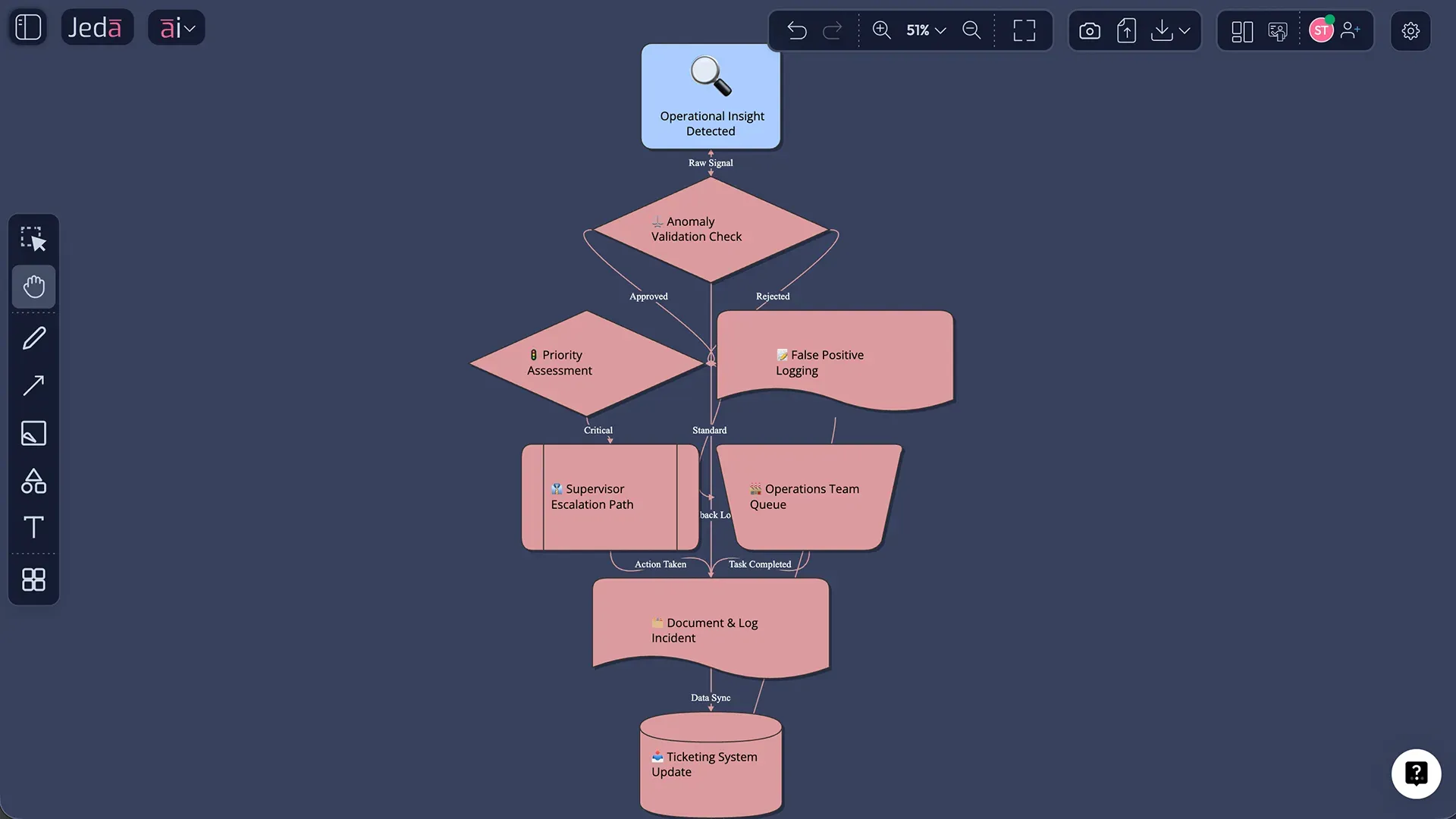
That is why a visual AI Workspace matters so much. Jeda.ai lets the same core insight evolve into different working forms without breaking the chain. A pattern found in raw data can become an operations matrix, a risk map, a flowchart, a decision board, or a presentation-friendly visual without leaving the workspace. The result is not just faster production. It is better organizational memory.
Consultants understand this instantly. So do transformation leaders. The board is not the decoration. The board is the working memory of the decision.
How to build a signal-to-action workflow in Jeda.ai
The simplest way to think about it is this: do not start with the deck. Start with the evidence layer, then keep the evidence attached as the workflow moves.
- Bring the operating signal into Jeda.ai
Upload structured data, documents, screenshots, or notes into Jeda.ai using Data Insight or Document Insight so the workflow starts from evidence, not recollection.
- Use the Prompt Bar to detect what matters
Select the right command, describe the business problem, and generate a first-pass view of anomalies, risks, trends, or opportunities on the canvas.
- Add a human checkpoint before escalation
Review the generated findings on the shared board, challenge weak assumptions, and keep only the signals that deserve executive or operational attention.
- Turn the analysis into a story
Use Jeda.ai to reframe the same context into a presentation flow, executive summary, matrix, infographic, or diagram without rebuilding the logic from zero.
- Deepen or convert with AI+
Tap AI+ to extend thin sections, use Vision Transform to switch formats, and keep the same decision thread intact as the work moves downstream.
- Share, export, and operationalize
Collaborate live on the canvas, then export the approved output as PNG, SVG, or PDF for stakeholder distribution and downstream execution.
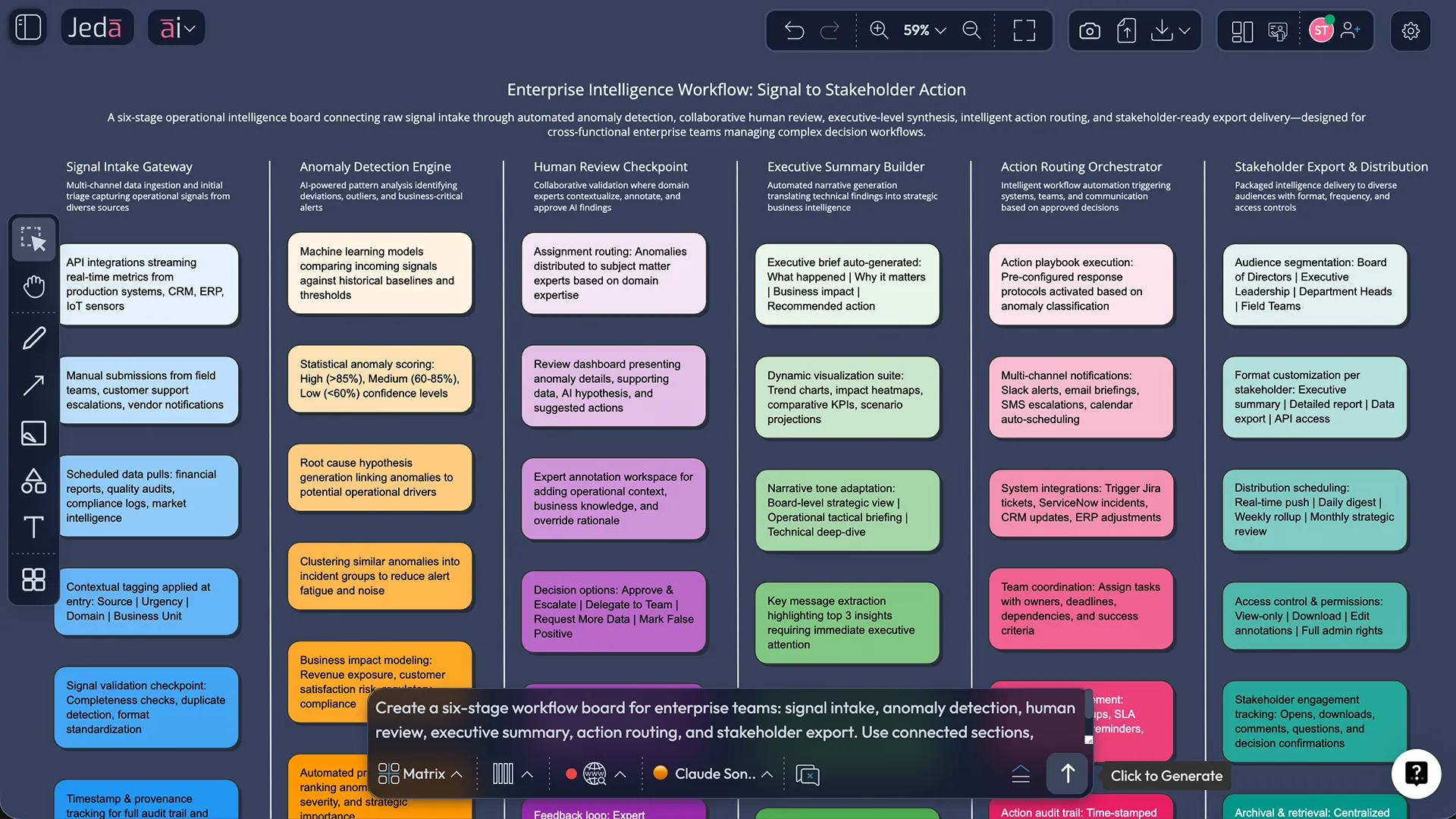
Why human-in-the-loop wins here
The best part of the Beyondsoft example was not the automation. It was the restraint.
The manager still reviewed the outline. The manager still refined the points. The manager still approved the action summary before it became a ticket. That matters because enterprise speed without enterprise judgment is just expensive chaos.
Jeda.ai supports that kind of operating model well because it makes review tangible. Teams can see the same board, the same assumptions, the same transformation from evidence to recommendation. They are not guessing what the AI did in another hidden pane. They are working with it in the open.
That makes governance more practical. It also makes adoption easier. People trust what they can inspect.
This is bigger than one workflow demo
The enterprise takeaway is not “three agents are cool.” That is the surface-level read.
The deeper point is that AI systems become genuinely valuable when they reduce cognitive drag between connected pieces of work. Spot the issue. understand it. shape it. review it. move it. That chain is where most teams still bleed time.
Jeda.ai is built for exactly that middle ground between raw intelligence and finished action. It gives teams an AI Whiteboard where reasoning becomes visible, collaborative, and reusable. The platform does not force every problem into plain text. It lets teams think in visual structures, challenge assumptions, organize evidence, and keep outputs editable long after the first generation.
That is why this kind of workflow feels important. It is not showing AI as spectacle. It is showing AI as work design.
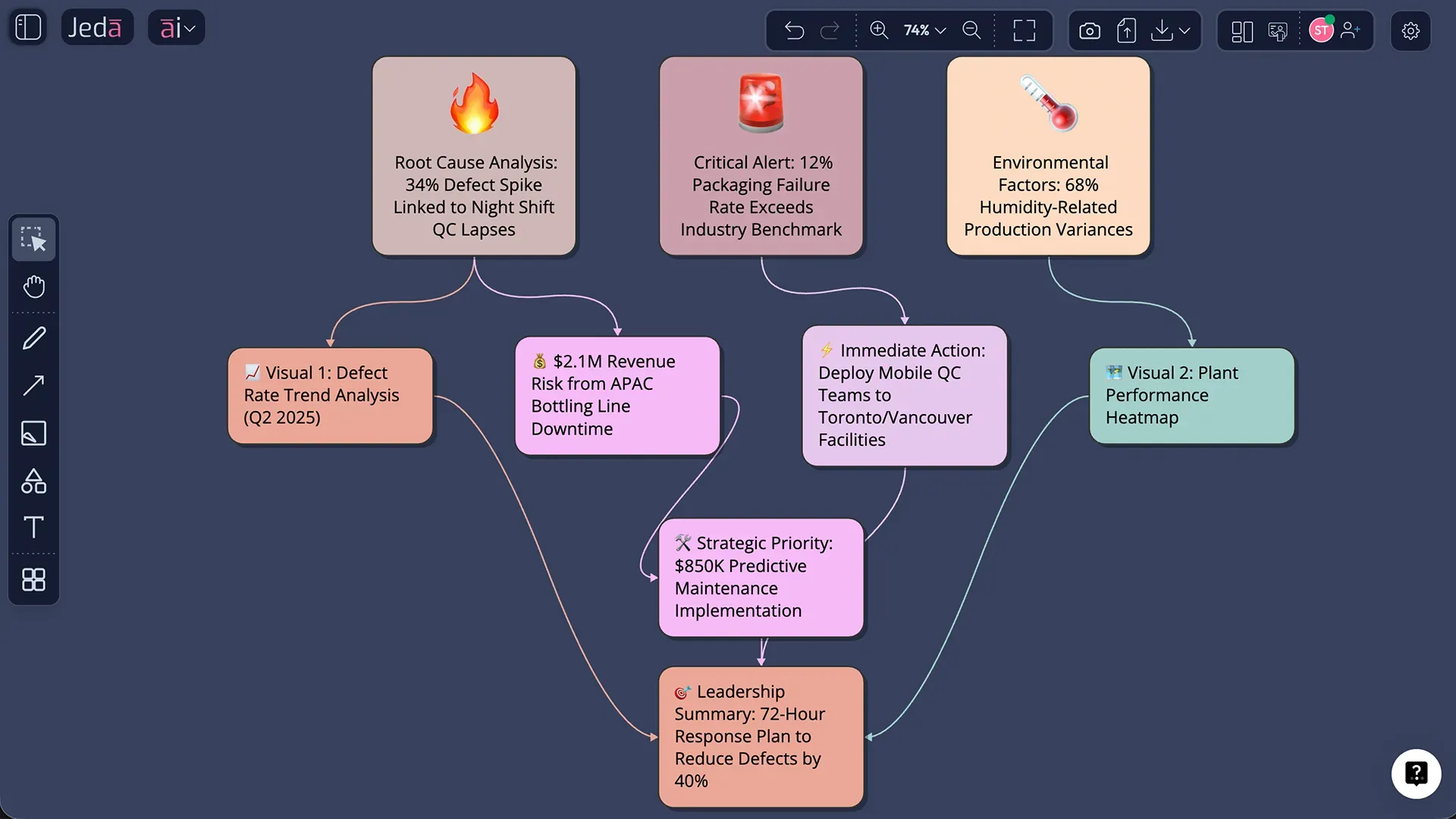
The next competitive edge is continuity
There will be no shortage of AI products promising better output. The harder thing to build is continuity. A system where a signal does not have to be rediscovered at every stage. A system where the person doing the work is not also acting as the integration layer between tools. A system where the board becomes the shared truth, not the final screenshot.
That is the promise sitting underneath this Beyondsoft and Jeda.ai context. A quieter promise. But a more durable one.
Because once teams feel what it is like to move from evidence to narrative to execution without the usual copy-paste gymnastics, they do not really want to go back.
What enterprise teams should do now
You do not need to rebuild your whole stack tomorrow. Start smaller.
Pick one workflow where your team repeatedly spots something important but struggles to operationalize it fast enough. Revenue leakage. Ops anomalies. Customer escalation patterns. Risk signals. Cross-functional reporting. Then ask a blunt question: where does context get lost between “we saw it” and “we acted on it”?
That is the right starting point.
And if the answer involves too many tabs, too many rewrites, too many static outputs, or too many manual handoffs, you already know the design problem. Jeda.ai helps solve it by giving teams one Visual AI workspace where signal detection, analysis, explanation, refinement, and stakeholder-ready output can stay connected.
Frequently Asked Questions
- What is the real bottleneck in enterprise AI transformation?
- Usually it is not model quality. It is the handoff between systems, teams, and formats. When context gets rebuilt at every step, speed drops and decisions lose fidelity.
- Why does context loss matter so much?
- Because every manual transfer forces people to reinterpret the work. That slows execution, increases distortion, and makes downstream teams less confident in what they are acting on.
- Why not use one giant AI agent for everything?
- Because enterprise work is rarely one undivided task. Specialized steps with clear checkpoints are easier to govern, easier to trust, and usually far more useful in real operations.
- Where does Jeda.ai help in this workflow?
- Jeda.ai helps teams ingest evidence, analyze signals, turn findings into visual narratives, collaborate on human review, and keep outputs editable as they move toward execution.
- Which Jeda.ai features matter most for this use case?
- Data Insight, Document Insight, the Prompt Bar, Multi-LLM reasoning, Web Search, AI+, Vision Transform, and shared canvas collaboration are the core pieces that keep the workflow connected.
- Can Jeda.ai support presentation-ready outputs?
- Yes. Teams can create executive-ready visuals and export approved work as PNG, SVG, or PDF for stakeholder reviews, internal reporting, and downstream execution.
- Does human review still matter in an orchestrated workflow?
- Absolutely. Human checkpoints are what keep the workflow reliable. The speed gain comes from removing reconstruction work, not from removing judgment.
- What kind of teams benefit most from this model?
- Enterprise operations leaders, consultants, transformation teams, analysts, and cross-functional managers benefit most because they live inside workflows where insight often dies before action begins.
Build Your Signal-to-Action Workflow in Jeda.ai
Use Jeda.ai to turn scattered evidence into decision-ready visuals, faster reviews, and cleaner downstream action inside one AI Workspace.
Explore Jeda.ai