“Buyer Persona with AI” usually means you want two things at once: speed and accuracy. Speed, because nobody has time to interview 40 people before Monday’s campaign launch. Accuracy, because “Marketing Mary, 32, likes coffee” is not a persona—it's a horoscope.
With Jeda.ai, you can turn messy inputs (interviews, CRM notes, survey exports, website behavior, competitor positioning) into a single, editable visual source of truth inside an AI Workspace and AI Whiteboard used by 150,000+ users. And then you can actually use the persona: messaging, objections, landing page wireframes, sales talk tracks, and a buying-journey flowchart—without tool-hopping.
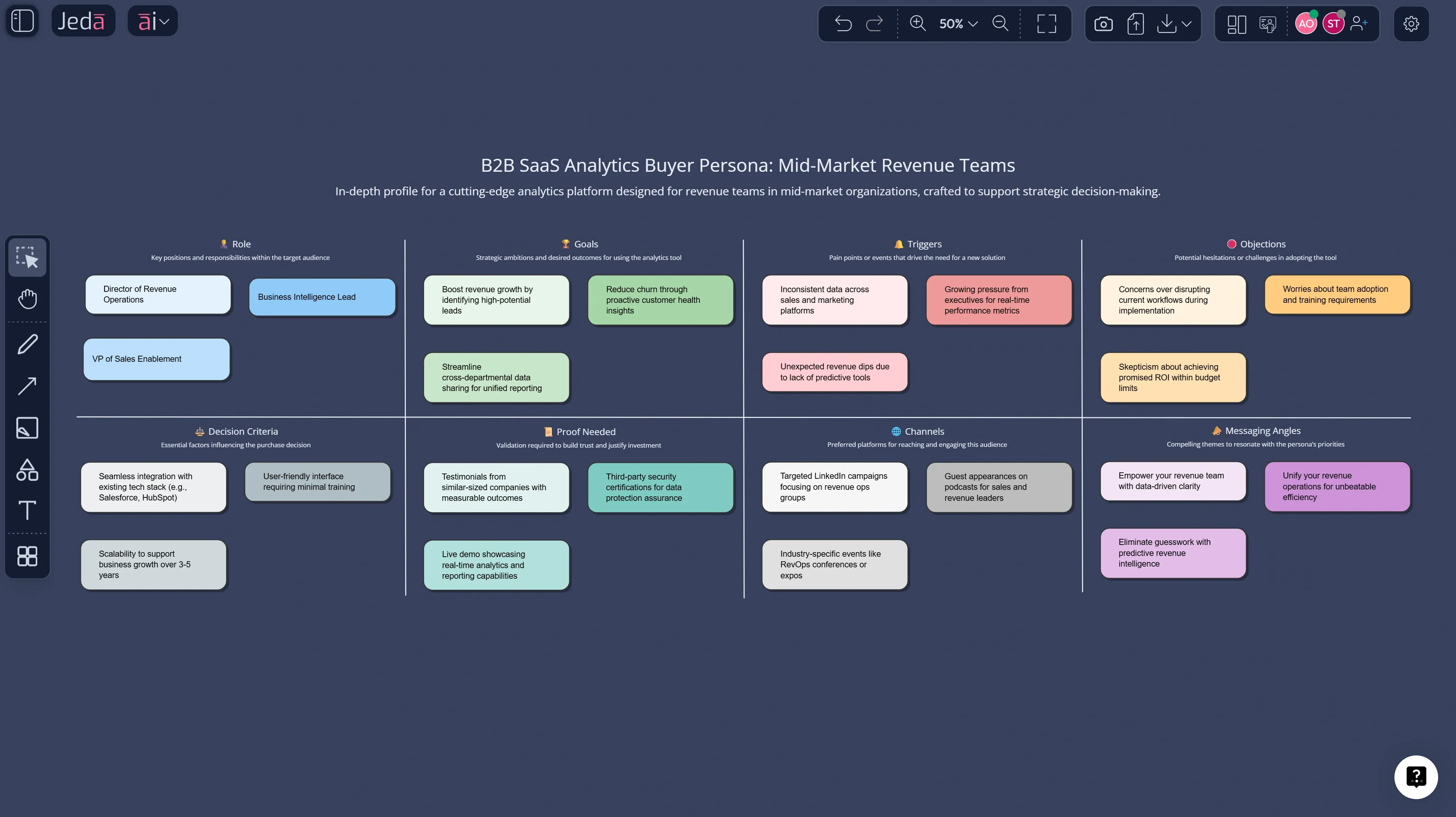
What is a buyer persona?
A buyer persona is a semi-fictional profile of your ideal customer, built from real research and real data, that explains how they buy, why they hesitate, and what triggers a decision. It’s different from a user persona in one key way: the buyer is the decision-maker (or influences the decision), even if they never touch the product.
Buyer personas are a close cousin of UX personas, popularized in software/design by Alan Cooper’s work on personas as a user-modeling tool. The takeaway for marketing: a persona is only useful if it’s specific enough to change decisions—copy, channels, offers, qualification criteria, and onboarding flow.
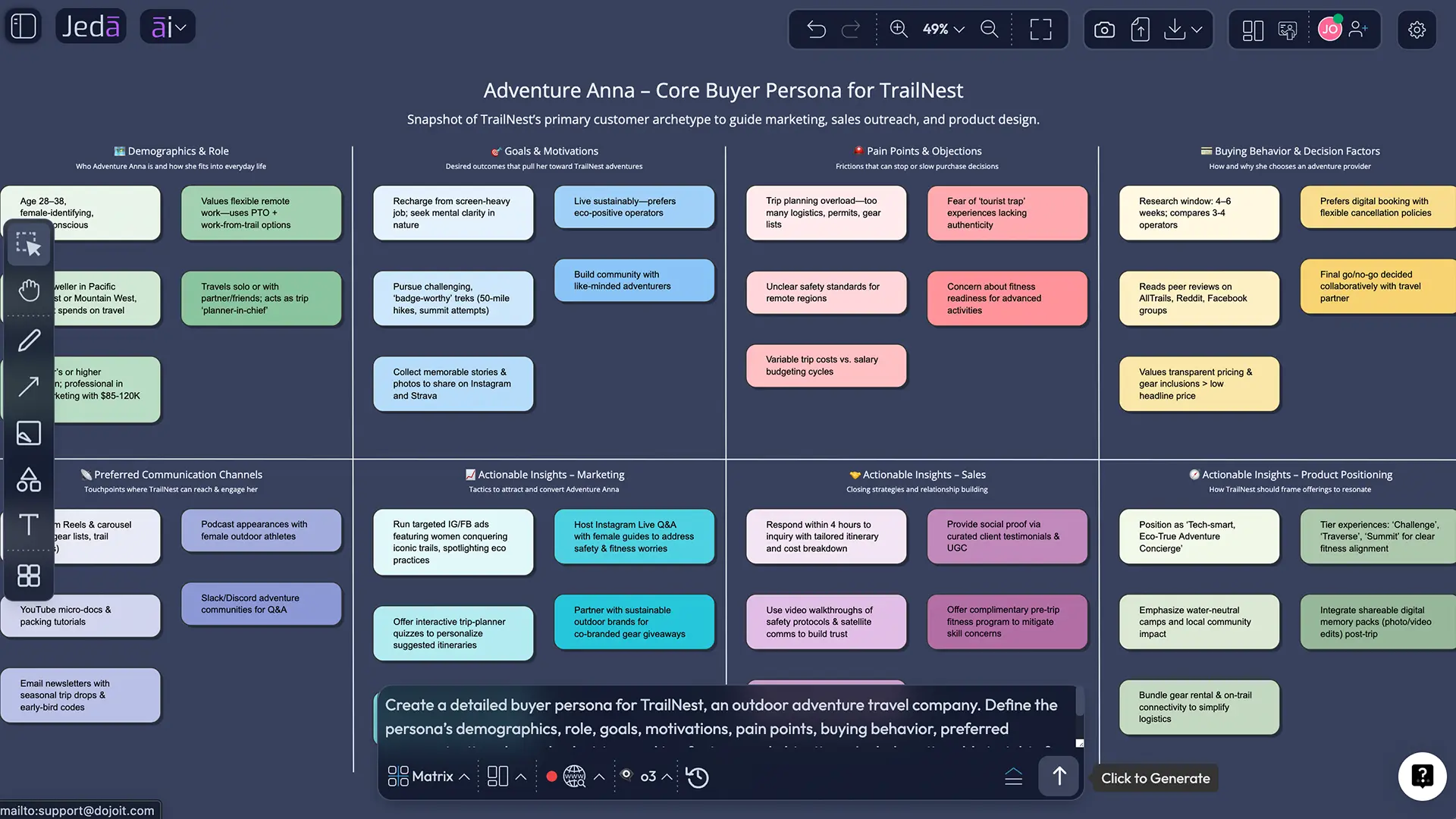
Why buyer personas fail in real teams
Most teams don’t fail because they “didn’t try hard enough.” They fail because the persona becomes:
- A static doc nobody opens after it’s “done”
- A single point of view (usually marketing’s), not a cross-functional artifact
- A fake certainty machine that isn’t tied to interviews, CRM reality, or behavior
- A dead end—it doesn’t translate into a campaign plan, sales playbook, or landing page
So the goal isn’t to “create a persona.” The goal is to create a persona board that is:
- grounded in evidence
- editable when reality changes
- connected to outputs you ship
That’s the sweet spot for Jeda.ai’s Visual AI approach: build the persona as a living board, not a PDF artifact.
What you can build in Jeda.ai from one persona
Here’s what teams typically create after the first persona draft—without switching tools:
- Persona Matrix
A structured Buyer Persona with AI: goals, pains, triggers, objections, messaging, channels, and proof points—all editable on the canvas.
- Buying Journey Flowchart
Map the real decision path: awareness → evaluation → risk review → approval → renewal. Use it to place content where it actually moves the deal.
- Motivation Mind Map
Expand hidden motives and internal politics. Great for B2B personas where multiple stakeholders shape the final yes/no.
- Sales Talk Track
Generate objection-handling, discovery questions, and a crisp positioning paragraph as editable Text blocks on the board.
- Data-Backed Segments
Upload a CSV (pipeline, survey, usage) with Data Insight and let Jeda organize patterns into persona segments you can name and refine.
- Landing Page Wireframe
Turn persona pain → offer → proof into a wireframe layout in one workspace, then export to PNG/SVG/PDF for fast reviews.
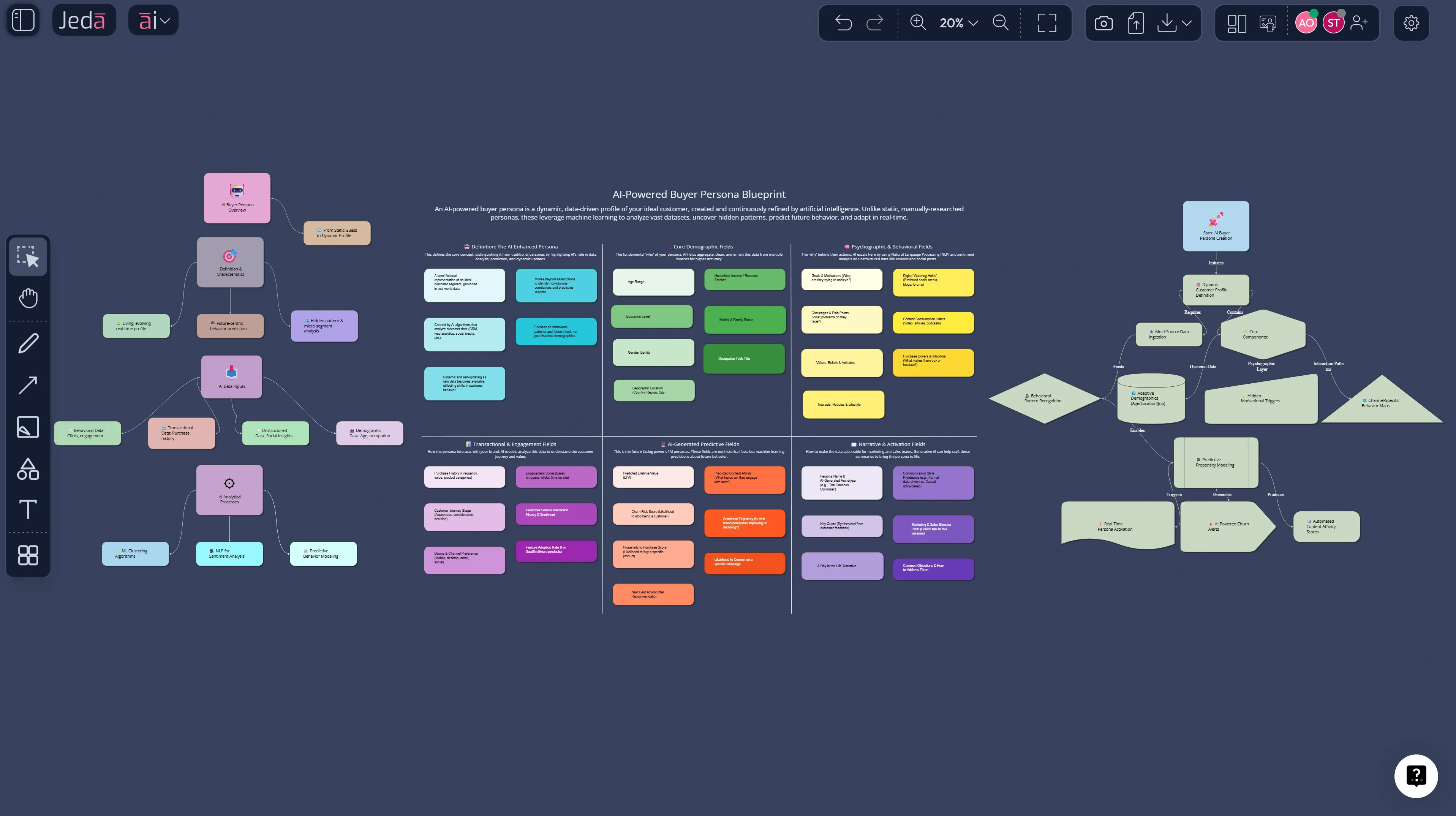
How to create a Buyer Persona with AI in Jeda.ai
Jeda.ai gives you two reliable ways to build a buyer persona, depending on whether you want guided structure (AI Menu recipe) or freestyle prompting (Prompt Bar).
Method 1 (Recommended): Recipe Matrix in the AI Menu
Use this when you want a guided template with fields that force clarity.
Where to find it: AI Menu → Matrix Recipes → look for a persona-style template such as People Analysis (works like a buyer persona builder).
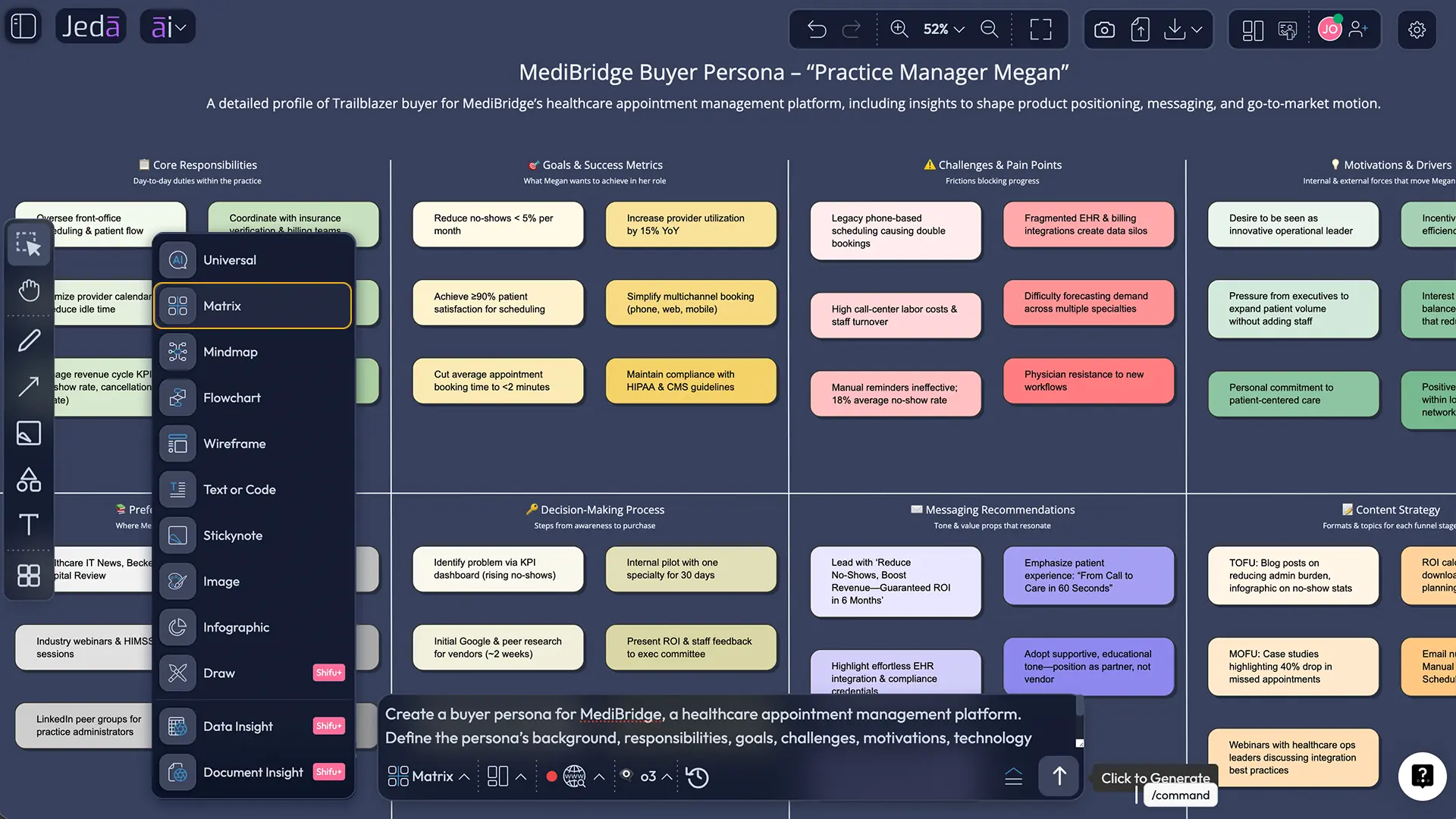
Method 2: Prompt Bar (Matrix command)
Use this when you already know your persona structure and want speed.
After you generate: deepen with AI+ (without overcomplicating it)
When you have a solid first persona, select any sticky note / smart shape and tap the AI+ button to expand it with more detail. Keep it simple: you’re extending what’s already there, not starting a second persona from scratch.
Convert formats with Vision Transform
A persona often needs multiple formats:
- Matrix (decision-ready fields)
- Infographic (shareable one-pager)
- Flowchart (buying journey)
- Mindmap (motives + stakeholders)
Select a section and use Vision Transform to convert it.
- Open a new workspace
Create a fresh board for your Buyer Persona with AI so the persona can live with campaigns, notes, and iterations in one place.
- Method 1: Use the Recipe Matrix
Open AI Menu → Matrix Recipes → choose a persona-style template (e.g., People Analysis). Fill the fields using interview notes, CRM patterns, and real language customers use.
- Method 2: Use the Prompt Bar
Open the Prompt Bar, select the Matrix command, and ask for a Buyer Persona with AI using your target segment, buying context, and key constraints.
- Ground it with evidence
Paste interview snippets or upload files: Document Insight for transcripts/PDFs, Data Insight for survey/CRM CSVs. Keep quotes and numbers on the board.
- Refine with Dynamic Prompt
If your persona feels generic, use Dynamic Prompt to answer clarifying questions (industry, budget range, decision drivers, risk tolerance, blockers) before regenerating.
- Expand selectively with AI+
Tap AI+ on any section (objections, triggers, proof, channels) to add depth. Stop once the persona changes a decision—more text isn’t the goal.
- Ship outputs and share
Convert sections via Vision Transform (persona → infographic, journey → flowchart), collaborate live, then export as PNG/SVG/PDF for reviews and distribution.
Copy-paste prompts that work (and don’t produce fluff)
These are designed to generate a persona you can actually use in campaigns and sales calls.
Prompt for Method 2 (Prompt Bar → Matrix)
Command: Matrix
Prompt:
Create a Buyer Persona with AI for: [product/service] targeting [segment].
Context: [B2B/B2C], average deal size [range], sales cycle [range], primary channel [inbound/outbound/partners].
Include: role + job-to-be-done, success metrics, buying triggers, top objections, risk concerns, decision criteria, proof needed, preferred channels, and messaging angles.
Write in plain language the buyer would actually say.
Prompt to generate a one-page shareable persona
Command: Infographic
Prompt:
Summarize this Buyer Persona with AI as a one-page persona card: name, role, primary goal, biggest fear, decision triggers, top objections, and “what messaging works.” Keep it concise and presentation-ready.
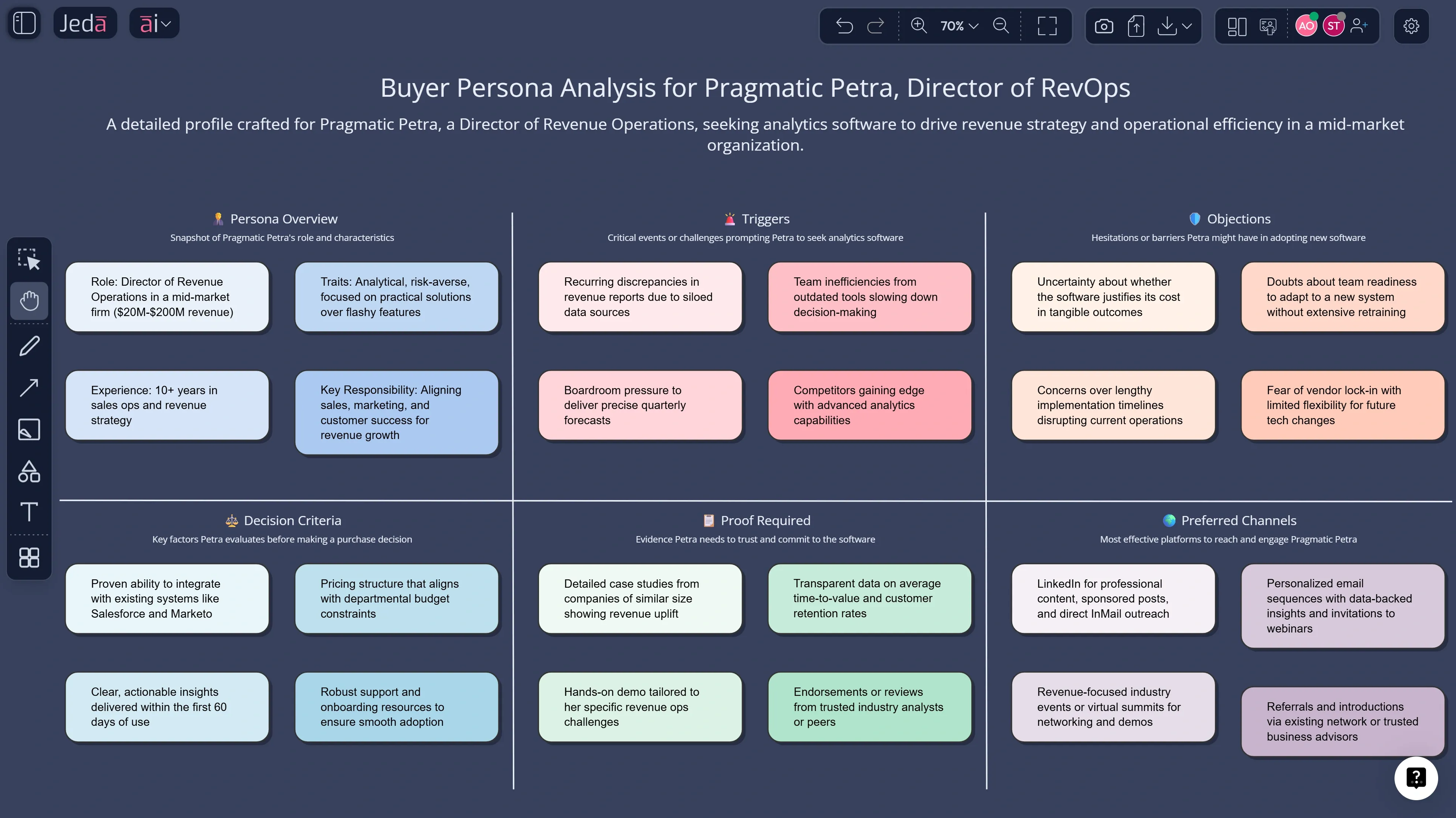
Example: a Buyer Persona with AI (B2B SaaS)
Let’s make this concrete with a common scenario: B2B SaaS analytics sold to mid-market companies.
Persona Matrix fields to include (minimum viable, high-impact):
Turn one persona into a full go-to-market board
This is where teams usually get stuck: the persona exists… and then nothing changes.
Here’s a practical board flow inside Jeda.ai’s AI Workspace:
- Persona Matrix (Matrix) — the source of truth
- Stakeholder Map (Diagram) — who blocks, who approves, who champions
- Buying Journey (Flowchart) — steps + content needs per step
- Message House (Matrix or Diagram) — claims, proof, and “what we don’t say”
- Landing Page Wireframe (Wireframe) — offer + proof in the right order
- Sales Talk Track (Text) — discovery questions + objection handling
- Campaign Concepts (Stickynotes + Mindmap) — angles, hooks, content cluster plan
- Optional: Persona Artwork (Art) — a static illustration for internal decks (note: art outputs are images, not editable smart shapes)
If you want the persona grounded in real inputs:
- Use Document Insight to extract themes from interviews, PDFs, and notes.
- Use Data Insight to cluster patterns from CSV/Excel (survey results, CRM exports, win/loss notes).
And if something changes (pricing, ICP, competitive pressure)? You update the board—no rewriting a 12-page doc.
Best practices that keep personas honest
- Use real language. Pull phrases from calls and tickets.
- Separate buyer vs user. Especially in B2B.
- Write decisions into the persona. “What makes them say yes?”
- Timebox it. A usable persona in 60–90 minutes beats a perfect persona in 6 weeks.
- Revisit quarterly. Markets move. Personas should too.
Common mistakes to avoid
Over-indexing on demographics
Age and location rarely change the buying decision as much as incentives, risk, and constraints.Making the persona too broad
If it matches everyone, it guides no one.Ignoring internal politics
In B2B, the “buyer” is often a committee. Map it.Forgetting proof requirements
If the buyer needs security review, ROI math, or references, build that into the persona—don’t discover it in the final week.Letting the persona live in a doc graveyard
Your persona should live where work happens: the AI Whiteboard, with campaigns, wireframes, and sales notes attached.
Frequently Asked Questions
- What is a Buyer Persona with AI?
- Buyer Persona with AI is a buyer profile generated and refined using AI plus real inputs like interviews, CRM notes, and survey data. The goal is a decision-ready persona that explains triggers, objections, and proof requirements, not a generic demographic profile.
- How is a buyer persona different from a user persona?
- A buyer persona describes the person who approves or influences the purchase. A user persona describes the person who uses the product. In B2B, these are often different people with different goals, risks, and language.
- What inputs do I need to create a good buyer persona?
- Start with 5–10 interview notes or call summaries, a few win/loss insights, and basic deal context (price range, sales cycle, segment). If you have them, add CRM fields or survey exports for extra grounding.
- Can I build buyer personas from PDFs or interview transcripts?
- Yes. Use Document Insight to upload PDFs or transcripts, extract themes, and turn them into a structured persona matrix or a buying-journey flowchart you can edit.
- Can I build buyer personas from CSV or Excel data?
- Yes. Use Data Insight to analyze survey or CRM exports and cluster patterns into segments. Then convert each segment into a persona board so the insights become actionable.
- How many buyer personas should I have?
- Most teams should start with 1–3 high-impact personas tied to revenue. If you need more than five, you may be describing segments, not decision-driving personas.
- How often should I update my buyer personas?
- Revisit them quarterly or whenever something major changes: pricing, product scope, new competitors, new acquisition channels, or a shift in who signs the deal.
- What should a buyer persona include to be useful for sales?
- Include buying triggers, objections, decision criteria, proof required, and the internal process (who else is involved). Sales needs a persona that predicts friction, not just interests.
- Do AI-generated personas replace customer research?
- No. AI speeds up synthesis and formatting, but the persona still needs real inputs. The best workflow is: collect signals → generate draft → validate with calls and data → keep refining.
- How do I share a persona with my team?
- Use a shared board in Jeda.ai so the persona stays editable. Then export a snapshot as PNG/SVG/PDF for docs or slides when you need a fixed version.
Sources & Further Reading
- [1]
HubSpot (2025) . “The definition of a buyer persona [in under 100 words]” HubSpot Blog.
View Source ↗ - [2]
Nielsen Norman Group (2025) . “Personas Make Users Memorable” NN/g.
View Source ↗ - [3]
Alan Cooper (1999) . “Users Personas and Goals (excerpt)” Carnegie Mellon University (PDF).
View Source ↗ - [4]
Adele Revella (2015) . “Buyer Personas: How to Gain Insight into your Customer's Expectations, Align your Marketing Strategies, and Win More Business” Wiley (via Amazon listing).
View Source ↗ - [5]
ProductPlan (n.d.) . “User Persona vs. Buyer Persona” ProductPlan.
View Source ↗ - [6]
Salesforce (2025) . “How to Create Buyer Personas: A Complete Guide” Salesforce.
View Source ↗
Start Your Buyer Persona with AI in Jeda.ai
Join over 150,000+ users who use Jeda.ai as their AI Workspace and AI Whiteboard for decision-ready, editable strategy artifacts.
Try Free Template