Most sales scripts fail before the rep even opens their mouth or hits send. They sound stiff, generic, and weirdly proud of features nobody asked about. Generate Sales Script with AI fixes that problem when you use it the right way: not as a shortcut to bland automation, but as a faster way to build sharper talk tracks, stronger personalization, and cleaner objection handling inside one AI Workspace.
That’s where Jeda.ai is useful. Instead of drafting in one tool, pasting into another, then losing the reasoning in a note somewhere else, you can generate, refine, extend, and organize scripts visually on an AI Whiteboard. Jeda.ai combines guided Matrix recipes, prompt-based generation, AI+ expansion, web-backed research, and collaborative editing in one place. The platform supports AI Recipes through the AI Menu, Prompt Bar generation, AI+ extension, Vision Transform, and collaboration/export workflows.
What does “Generate Sales Script with AI” actually mean?
It means giving AI enough context to draft a sales conversation or outreach email that sounds relevant to a real buyer, not like a template escaped from 2019.
For this topic, Jeda.ai maps neatly to two practical Sales recipes under the Sales category:
- Cold Call Sales Script
- Cold Email Sales Script
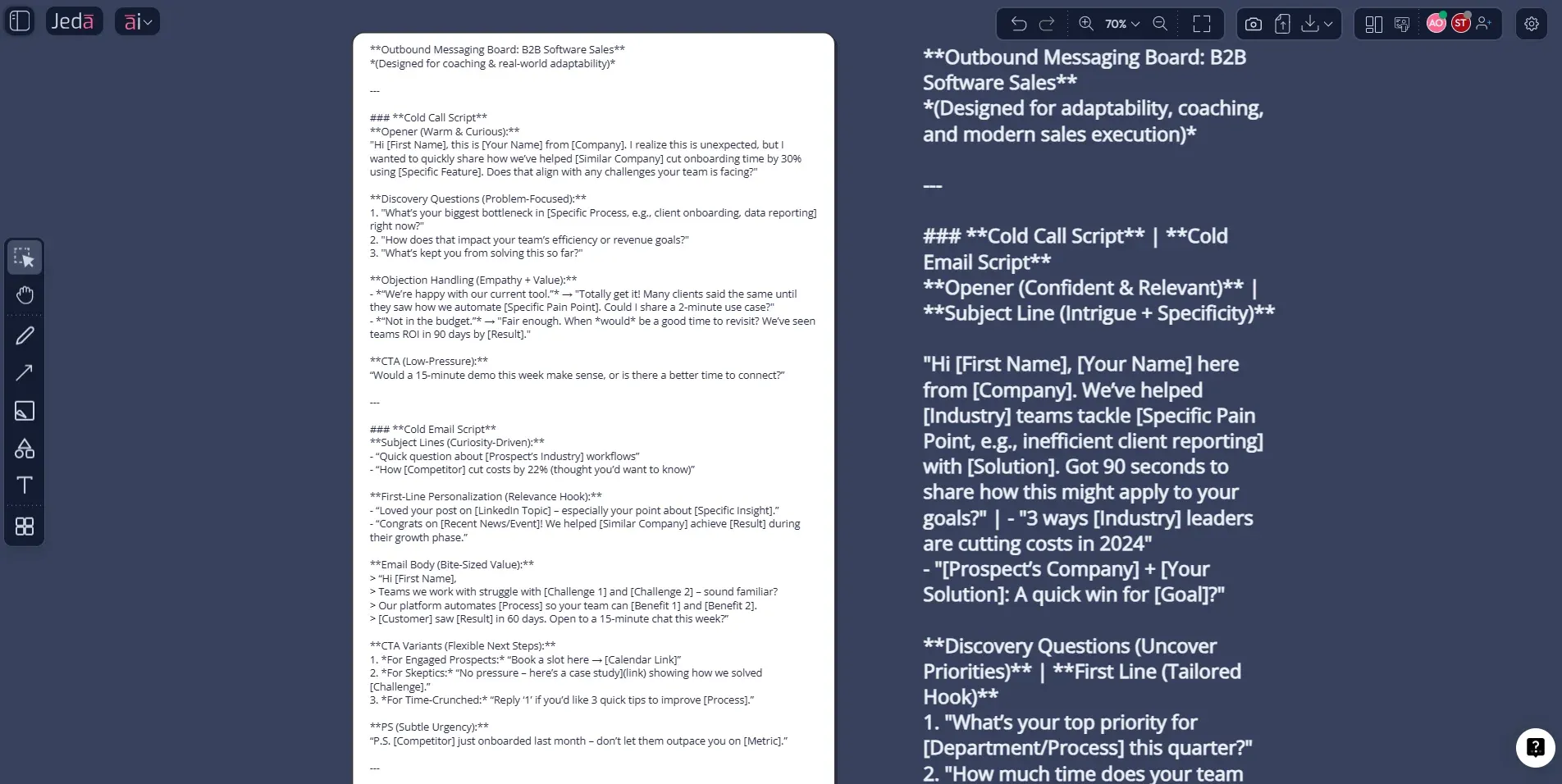
Both belong in Jeda.ai’s Sales Matrix recipes, where the AI Menu gives users a guided, structured path to generate sales messaging in a visual workspace, while the Prompt Bar gives more control when you want custom structure, tighter targeting, or extra variants. Jeda.ai’s AI Menu exposes recipe categories and guided fields, while the Prompt Bar lets users enter a prompt and generate directly on the canvas.
Why sales teams should use AI for script creation
Because the hard part usually is not writing words. It’s thinking clearly about audience, pain, context, proof, objections, tone, and next step. AI helps with the first draft. Good process makes it usable.
The top-performing cold calling and cold email guidance from current sales publishers keeps circling the same point: personalization, relevance, clear openings, and simple next steps beat bloated pitches. HubSpot’s recent cold-calling guidance frames cold calling as a one-to-one way to move prospects to the next step when done with qualification and intent, not a spray-and-pray script. Cognism’s 2026 cold-calling library emphasizes sharper openings, objection handling, and confident structure, while Mailchimp’s subject-line guidance recommends descriptive, short subject lines and personalization. Apollo’s recent outbound material also stresses deliverability, tighter targeting, and reply-focused email structure.
And that’s the real win. You can use AI to:
- turn product details into buyer-facing language,
- adapt one script for different personas,
- write alternate openings,
- pre-build objection responses,
- generate roleplay variants for reps.
- Draft faster
Go from blank page to usable sales talk track in minutes instead of building every opener, rebuttal, and CTA from scratch.
- Personalize by audience
Generate versions for SDRs, founders, account executives, agencies, consultants, or vertical-specific sales teams inside one board.
- Improve call openings
Draft stronger first 15 seconds for calls and clearer first lines for cold email without stuffing in every feature under the sun.
- Handle objections better
Use AI to create rebuttal branches for timing, budget, authority, or relevance before reps hit those objections live.
- Extend with AI+
Select a strong section, then use the AI+ button to expand discovery questions, follow-up lines, or voicemail variants.
- Coach as a team
Review scripts collaboratively on the canvas so sales, product marketing, and leadership can tighten messaging together.
Cold call vs cold email: use the right script for the right moment
A lot of teams mash these together. Bad move.
A cold call sales script should optimize for attention, relevance, confidence, and a next step inside a short live exchange. A cold email sales script should optimize for deliverability, curiosity, clarity, and reply friction. Same offer. Different physics.
How to create Generate Sales Script with AI in Jeda.ai
Jeda.ai supports both guided recipe creation and direct prompt-based creation. The AI Menu is the structured route. The Prompt Bar is the flexible one. After generation, use AI+ to deepen the script and Vision Transform if you want to reorganize the logic into a flowchart, objection tree, or coaching diagram. Jeda.ai supports Prompt Bar generation, AI Menu recipes, AI+ extension, and Vision Transform across editable canvas outputs.
- Open a workspace in Jeda.ai
Create or open a board in your AI Workspace. This gives your team one editable place to build, review, and refine sales messaging.
- Method 1 (recommended): Use the AI Menu recipe
Open the AI Menu at the top-left, go to Matrix Recipes, open the Sales category, then choose either Cold Call Sales Script or Cold Email Sales Script. Fill in your offer, target buyer, purpose, and context, then generate.
- Method 2: Use the Prompt Bar
Open the Prompt Bar at the bottom, choose the Text or Code command, and prompt Jeda.ai to write either a cold call sales script or a cold email sales script for your offer, ICP, tone, and CTA.
- Refine the strongest sections
Edit wording directly on the canvas. Tighten the opener, remove fluff, simplify proof points, and make the CTA feel easy to accept.
- Use AI+ for deeper variations
Select any part of the script and use the AI+ button to extend it into objection handling, voicemail, follow-up email, alternate persona versions, or discovery questions.
- Collaborate and export
Share the board with contributors for sales review, then export the final content as PNG, SVG, or PDF if you need a presentation or working asset.
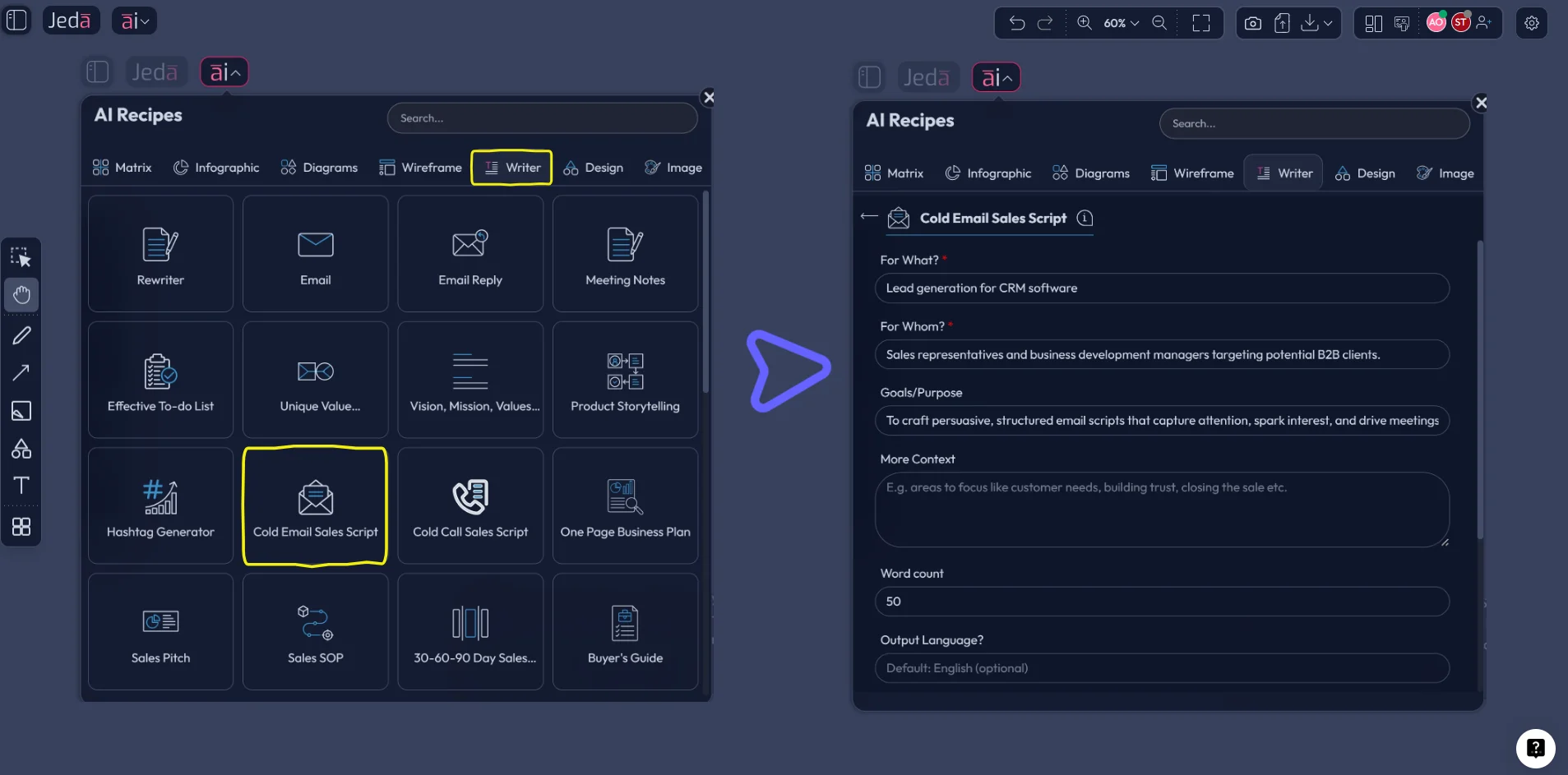
Method 1: Recipe Matrix inside the AI Menu
This is the cleaner route for teams that want consistency and want to stay aligned with Jeda.ai’s Matrix recipe structure.
Use the Matrix recipe when you need the AI to guide structure instead of guessing what your script should contain. In practice, that means giving the recipe the essentials:
- what you sell,
- who you sell to,
- what outcome you want,
- extra context such as pain points, objections, differentiators, tone, or industry.
From there, build one of these two outputs.
Cold Call Sales Script
Use this when your team needs:
- a stronger opener,
- concise qualification questions,
- live objection handling,
- a meeting-booking close,
- roleplay-ready script branches.
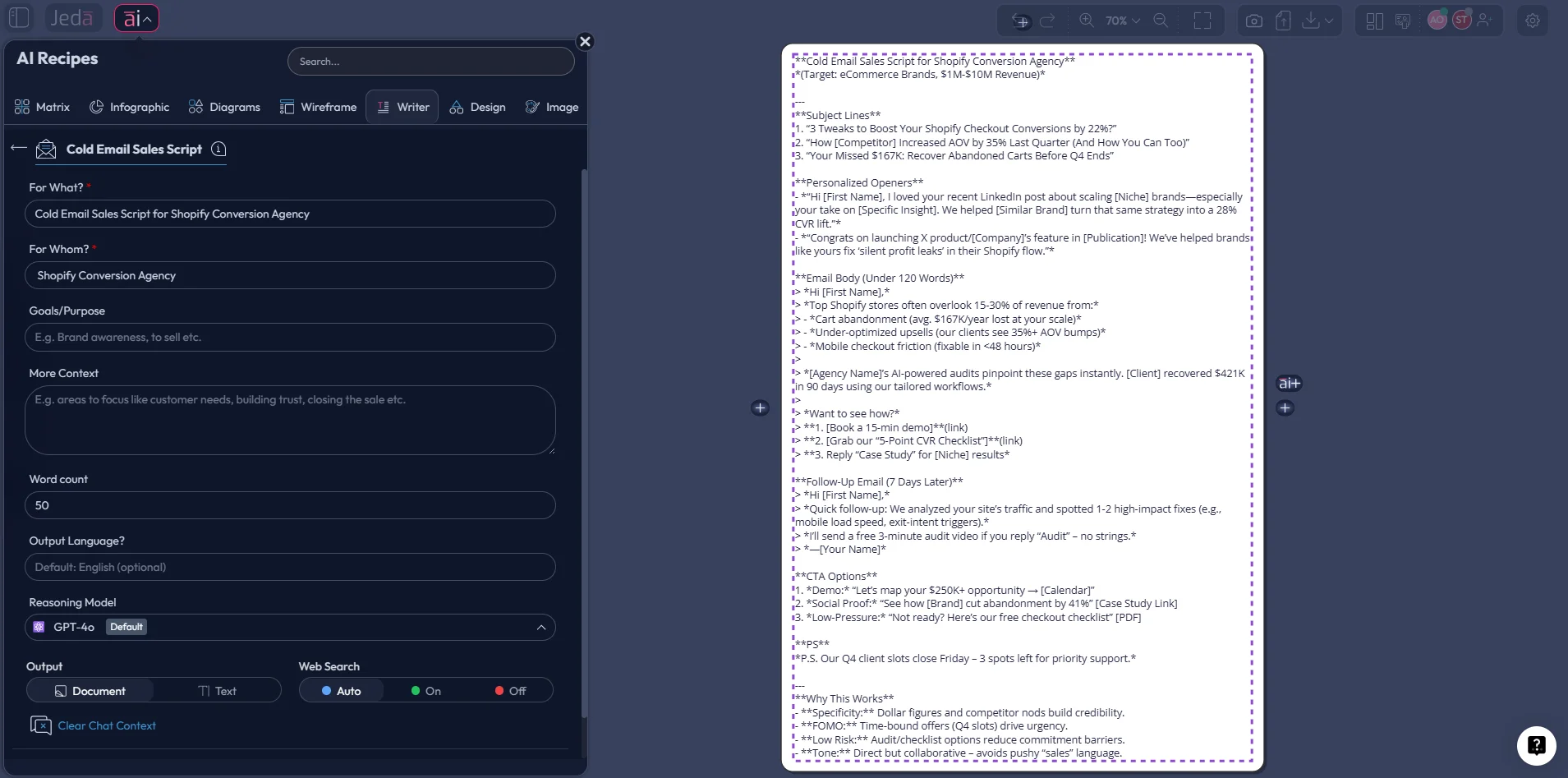
Cold Email Sales Script
Use this when your team needs:
- a sharper subject line,
- personalized first line options,
- shorter email structure,
- clear value framing,
- a low-friction reply CTA.
Method 2: Prompt Bar
This is better when you want tighter control or when the recipe gets you 80% there and you want the last 20% to sound like your team.
Copy-paste prompt for a cold call sales script
Prompt:
Write a Cold Call Sales Script for [product/service] targeting [buyer persona/company type].
Goal: [book a demo / qualify interest / reopen pipeline / introduce offer].
Include these sections: opening, relevance hook, problem framing, two discovery questions, value statement, objection handling for timing/budget/not interested, and a soft close for the next step.
Tone: professional, concise, confident, not pushy.
Use simple spoken language and keep the call natural, not robotic.
Copy-paste prompt for a cold email sales script
Prompt:
Write a Cold Email Sales Script for [product/service] targeting [buyer persona/company type].
Goal: [book a call / get a reply / test interest].
Include: 3 subject lines, 2 opening-line variants, one short email under 120 words, one slightly more consultative version, and 3 CTA options.
Personalize around [industry pain point / recent trigger / company context].
Tone: professional, clear, low-friction, relevant.
Avoid hype, jargon, and generic feature dumping.
What a strong AI-generated sales script should include
Not everything. That’s the trap.
A good script does four jobs:
- gets attention,
- proves relevance,
- lowers resistance,
- earns the next action.
HubSpot, Cognism, Apollo, and Mailchimp all reinforce versions of that logic through recent cold-calling, outbound email, subject-line, and deliverability guidance: shorter copy, relevance first, better targeting, stronger openings, and cleaner asks.
Example use cases inside Jeda.ai
Example 1: B2B SaaS cold call
A sales manager wants a tighter opener for mid-market IT leaders. The team uses the Cold Call Sales Script recipe, then uses AI+ to extend the “security objection” and “already have a tool” objection into alternate rebuttals.
Example 2: Agency cold email outreach
A founder wants outbound emails to eCommerce brands. They use the Cold Email Sales Script recipe, then use the Prompt Bar to generate versions for apparel, beauty, and home goods brands with different first-line personalization.
Example 3: Sales enablement board
A revenue team generates both call and email scripts in one board, then uses Vision Transform to convert the objection-handling section into a flowchart for rep coaching. Jeda.ai supports converting selected canvas content into other visual structures through Vision Transform, and its flowchart/diagram systems support connected logic and coaching layouts.
Best practices before you let AI anywhere near outbound scripts
Honestly, this part matters more than the tool.
If your targeting is weak, your script will still be weak — just faster. Current outbound guidance keeps pointing back to the same operational basics: know the audience, personalize where it counts, keep subject lines clear and short, protect deliverability, and aim for replies rather than theatrical copy.
Do this
- Feed AI a specific ICP, pain point, and desired CTA.
- Tell it what tone to avoid.
- Ask for multiple openers instead of one “perfect” opener.
- Generate objection branches separately.
- Review every draft like a human adult with standards.
Don’t do this
- paste a homepage and hope for magic,
- ask for “the best sales script ever,”
- overload the message with claims,
- keep generic personalization tokens,
- let AI invent case studies or proof.
Common mistakes to avoid
1. Using AI like a slot machine
Push button. Get miracle. That’s not how this works.
2. Writing for the company, not the buyer
If the script sounds like internal positioning language, it’s dead on arrival.
3. Making the CTA too big
Cold outreach usually earns a reply or a short call, not a wedding proposal.
4. Forgetting deliverability basics
A beautiful cold email that lands in spam is just performance art.
5. Skipping team review
Scripts improve fast when reps, managers, and product marketers all poke holes in them on the same board.
Frequently asked questions
- Can Jeda.ai generate both cold call and cold email scripts?
- Yes. For this topic, the Sales category supports both Cold Call Sales Script and Cold Email Sales Script Matrix recipe workflows, and you can also build either manually from the Prompt Bar for more control.
- Which method should I use first: Recipe Matrix or Prompt Bar?
- Start with the AI Menu recipe when you want guided structure and repeatability. Use the Prompt Bar when you want tighter control over tone, length, buyer segment, or script sections.
- What command should I use in the Prompt Bar for sales script generation?
- Use the Text or Code command for direct script writing. That keeps the output focused on messaging instead of forcing it into a visual structure too early.
- Can I use AI+ after a script is generated?
- Yes. Select a section on the canvas and use the AI+ button to extend the script into objection handling, voicemail, follow-up email variants, discovery questions, or persona-specific rewrites.
- Can Jeda.ai help with research before writing the script?
- Yes. Web Search is a platform feature in Jeda.ai, and higher plans also support Document Insight and Data Insight, which can feed stronger context into your script generation workflow.
- What makes a cold email script better than a generic template?
- A better cold email script is shorter, more relevant, and easier to reply to. Clear subject lines, personalization, and a simple CTA tend to outperform bulky, feature-heavy outreach.
- What makes a cold call script usable in the real world?
- A usable cold call script sounds natural when spoken aloud. It needs a clean opening, a credible reason for the call, a few smart questions, objection paths, and a low-pressure next step.
- Can teams collaborate on sales scripts in Jeda.ai?
- Yes. Jeda.ai supports shared workspaces, contributor/viewer roles, comments through collaborative review patterns, and real-time editing so sales leaders can coach scripts together on one board.
- Can I export my finished scripts?
- Yes. Jeda.ai supports export formats including PNG, SVG, and PDF for canvas outputs, which makes it easy to share finalized messaging boards or training assets.
- Does AI replace sales judgment here?
- No. AI accelerates drafting and variation. Human review still decides whether the message is credible, relevant, compliant, and actually worth sending.
Sources and further reading
- [1]
HubSpot (2025) . “The Best Cold Calling Script & How to Make Your Own” HubSpot Sales Blog.
View Source ↗ - [2]
Cognism (2025) . “Cold Calling Scripts: Hub of the Best Templates for 2026” Cognism.
View Source ↗ - [3]
Mailchimp (n.d.) . “Best Practices for Email Subject Lines” Mailchimp.
View Source ↗ - [4]
Mailchimp (n.d.) . “How to Write Email Opening Lines That Make People Click” Mailchimp.
View Source ↗ - [5]
Apollo.io (2026) . “Sales Email Examples That Actually Get Replies in 2026” Apollo.io.
View Source ↗ - [6]
Apollo.io (2026) . “How Do I Avoid Spam Filters in Cold Outreach? A 2026 Deliverability Playbook” Apollo.io.
View Source ↗ - [7]
HubSpot for Startups (n.d.) . “Mastering Effective Cold Sales Outreach for Startups” HubSpot.
View Source ↗
Start Building Better Outbound Scripts in One AI Workspace
Join over 150,000+ users using Jeda.ai to turn rough outreach ideas into clearer, faster, more coachable sales messaging.
Try Jeda.ai Free