Generative AI Agent - Jeda.ai is what you use when a plain chatbot stops being enough. You are not just asking for text. You are trying to turn notes, PDFs, spreadsheets, screenshots, and rough ideas into something a team can see, edit, challenge, and act on. That is where Jeda.ai starts to feel less like another AI tab and more like an AI Workspace and AI Whiteboard built for actual work.
Most “AI agent” tools still stop at the answer. Then you do the ugly part yourself—rebuild the thinking in diagrams, matrices, workflows, or slides. Jeda.ai closes that gap by turning prompts and evidence into editable visuals on one canvas.
What is a generative AI agent?
A generative AI agent does more than generate content from a prompt. It can reason through a goal, break work into steps, pull in context, use tools, and shape outputs that move the task forward. Google Cloud describes AI agents as software systems that pursue goals and show reasoning, planning, memory, and autonomy. IBM makes the practical point: agents combine LLMs with tools, memory, and planning so they can gather missing information, decompose tasks, and act with less hand-holding.
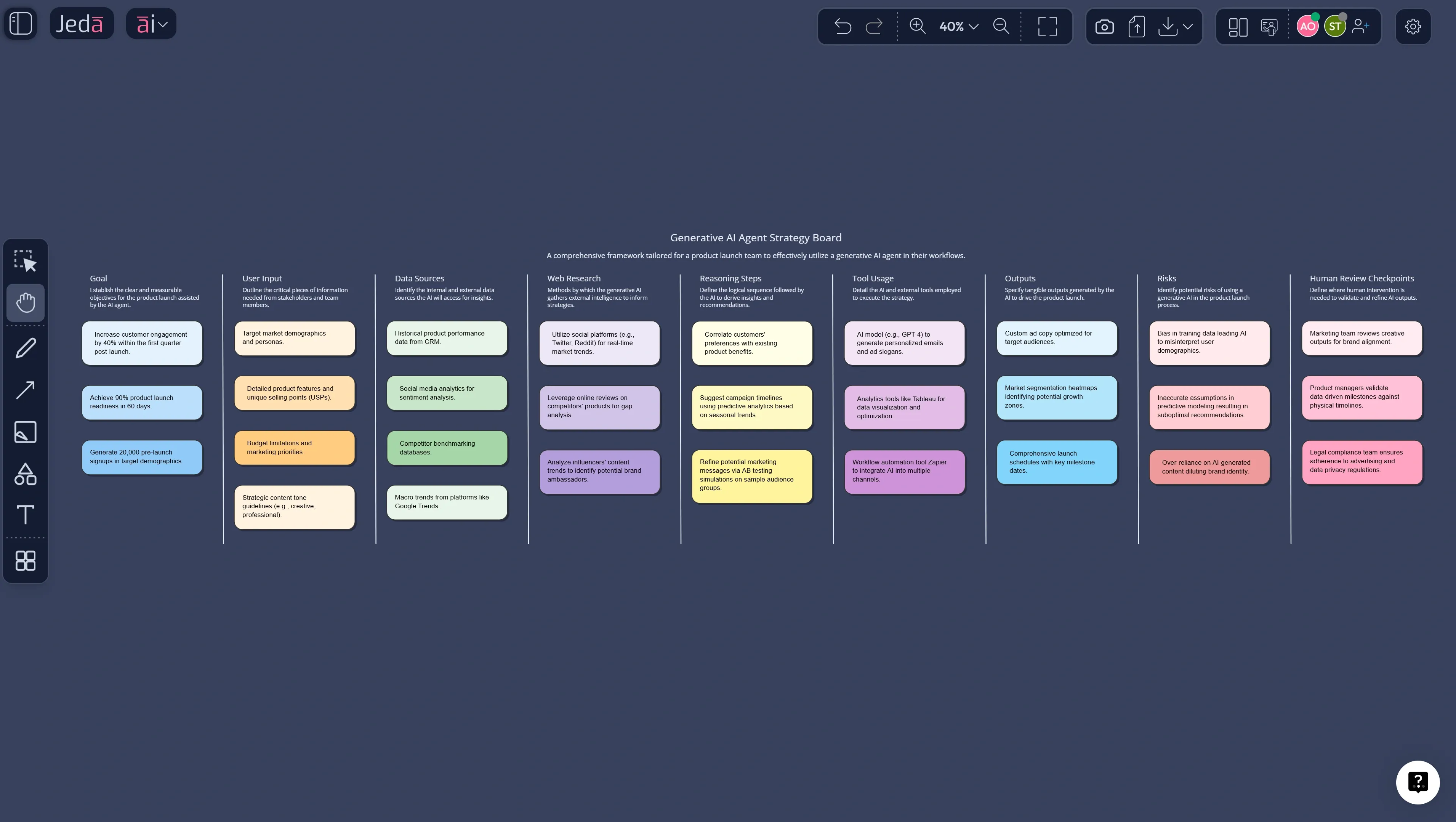
Inside Jeda.ai, that matters because the work does not stay trapped in prose. It becomes a matrix, a mind map, a process flow, a document-derived board, or an infographic the team can refine on the canvas. The value is not “AI wrote something clever.” The value is that the logic becomes visible.
That direction matches the research. Park and colleagues showed in Generative Agents that memory, reflection, and planning can produce believable multi-step behavior. Later surveys on agent architectures keep landing on the same conclusion: strong agents mix reasoning, planning, tool use, reflection, and guardrails instead of relying on raw model output alone.
Why Generative AI Agent - Jeda.ai feels different
The difference is simple: chat tools give you answers, while Jeda.ai helps you turn answers into editable work.
Jeda.ai can turn prompts, uploaded files, screenshots, and live web context into structured outputs across the same AI Workspace. So instead of asking for a paragraph and redrawing it later, you generate the board first and refine from there. McKinsey argues that agents create more value when they automate or shape complex workflows rather than assisting with isolated tasks. BCG says agents become useful when they can observe, plan, and act across tools and connected systems. Jeda.ai fits that reality well because its output is visual, editable, and collaborative—not just another block of text.
- Editable visuals-out
Generate matrices, mind maps, flows, diagrams, infographics, and structured notes that stay editable on the canvas.
- Evidence-in
Use PDFs, docs, spreadsheets, screenshots, and raw notes so the board starts from real context.
- Fresh context
Use Jeda.ai web search when the topic needs current information, not stale model memory.
- Branch and deepen
Use the AI+ button to extend only the sections that need more depth instead of rebuilding the whole board.
- Transform formats
Use Vision Transform to convert one visual into another when the team needs a new view of the same work.
- Built for teams
Collaborate on the same AI Whiteboard so decisions, revisions, and comments stay attached to the visual.
What can you build with Generative AI Agent - Jeda.ai?
Quite a lot. And that is the fun part.
You can use Jeda.ai for strategy boards, product planning, consultant workflows, research synthesis, design reviews, meeting distillation, and operating models. A product manager can turn user notes into a mind map, then into a prioritization matrix. A consultant can combine PDFs, spreadsheet findings, and live web context into a workshop board. A business leader can map goals, owners, dependencies, and risks without bouncing between docs, chat, slides, and a blank whiteboard.
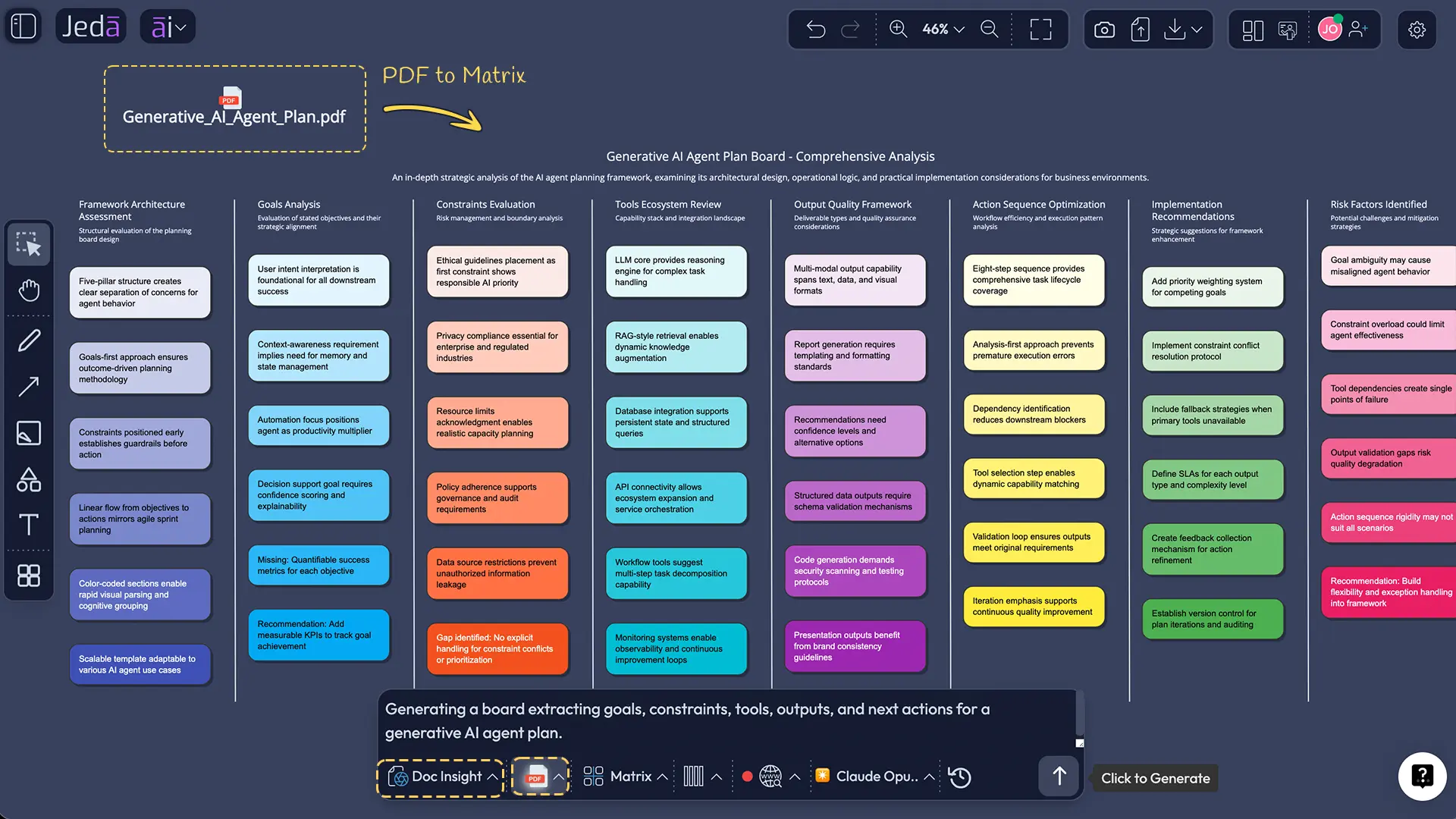
Because Jeda.ai supports Document Insight, Data Insight, Vision Transform, and multiple visual commands, the board can evolve instead of freezing after a first draft. That matters because the first agent output is rarely the final one.
How to create a Generative AI Agent workflow in Jeda.ai
You do not need to over-engineer this. Start with structure, then deepen what matters.
Method 1: Recipe Matrix workflow
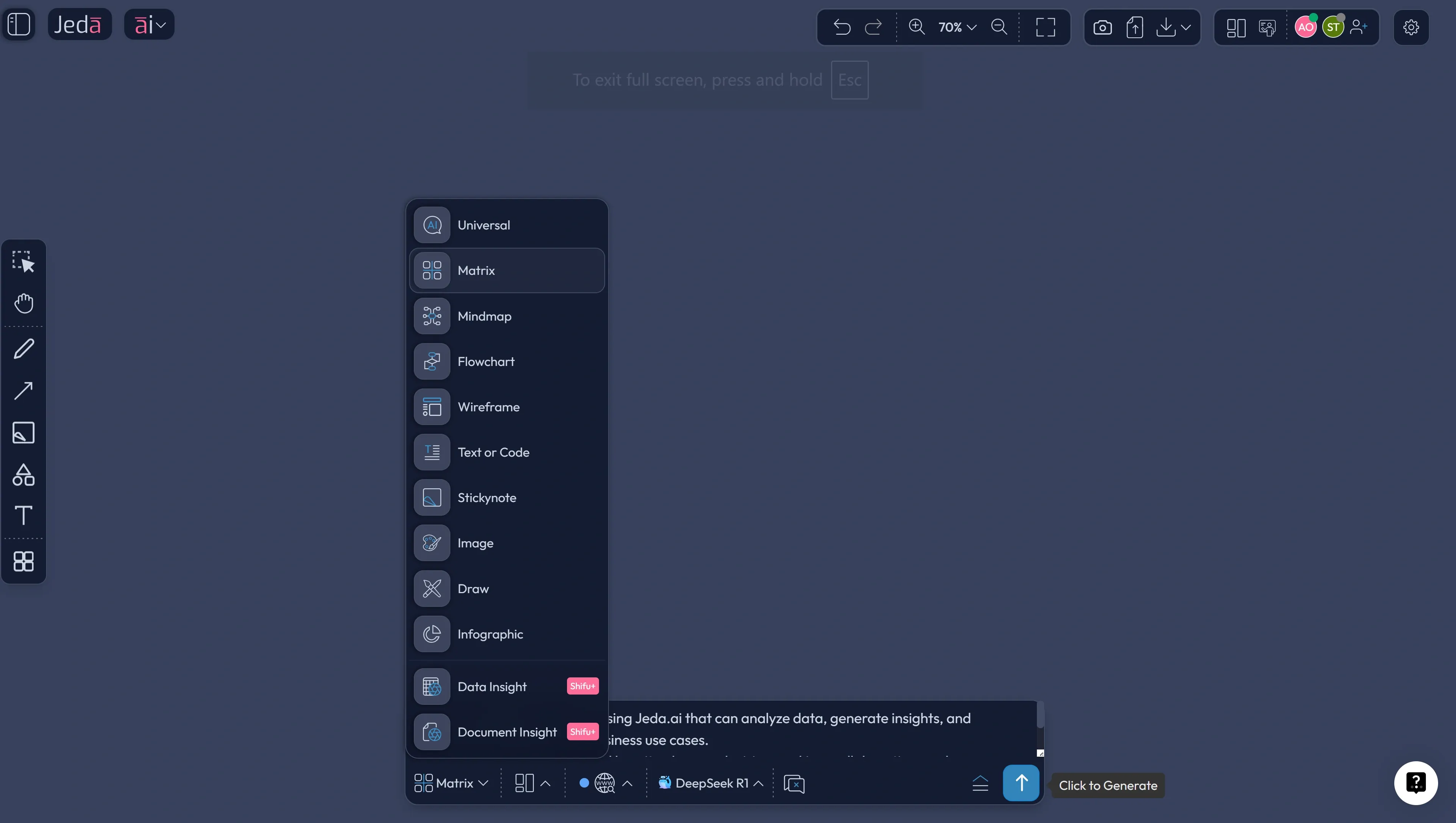
Open the AI Menu, go to Matrix Recipes, and start with a matrix-style workflow that helps you define goals, inputs, decisions, risks, outputs, and success criteria. Even if there is no recipe literally named “Generative AI Agent,” the matrix approach works because agent design is a structured thinking problem before it becomes a tooling problem.
Use this when you want a decision-grade first draft.
Method 2: Prompt Bar workflow
Use the Prompt Bar when you want more freedom. Select Matrix for structure, Mindmap for exploration, Flowchart for orchestration, or Document Insight and Data Insight when your source material already exists. Then add your prompt and generate directly on the canvas.
Use this when the idea is still moving.
AI+ button deep dive
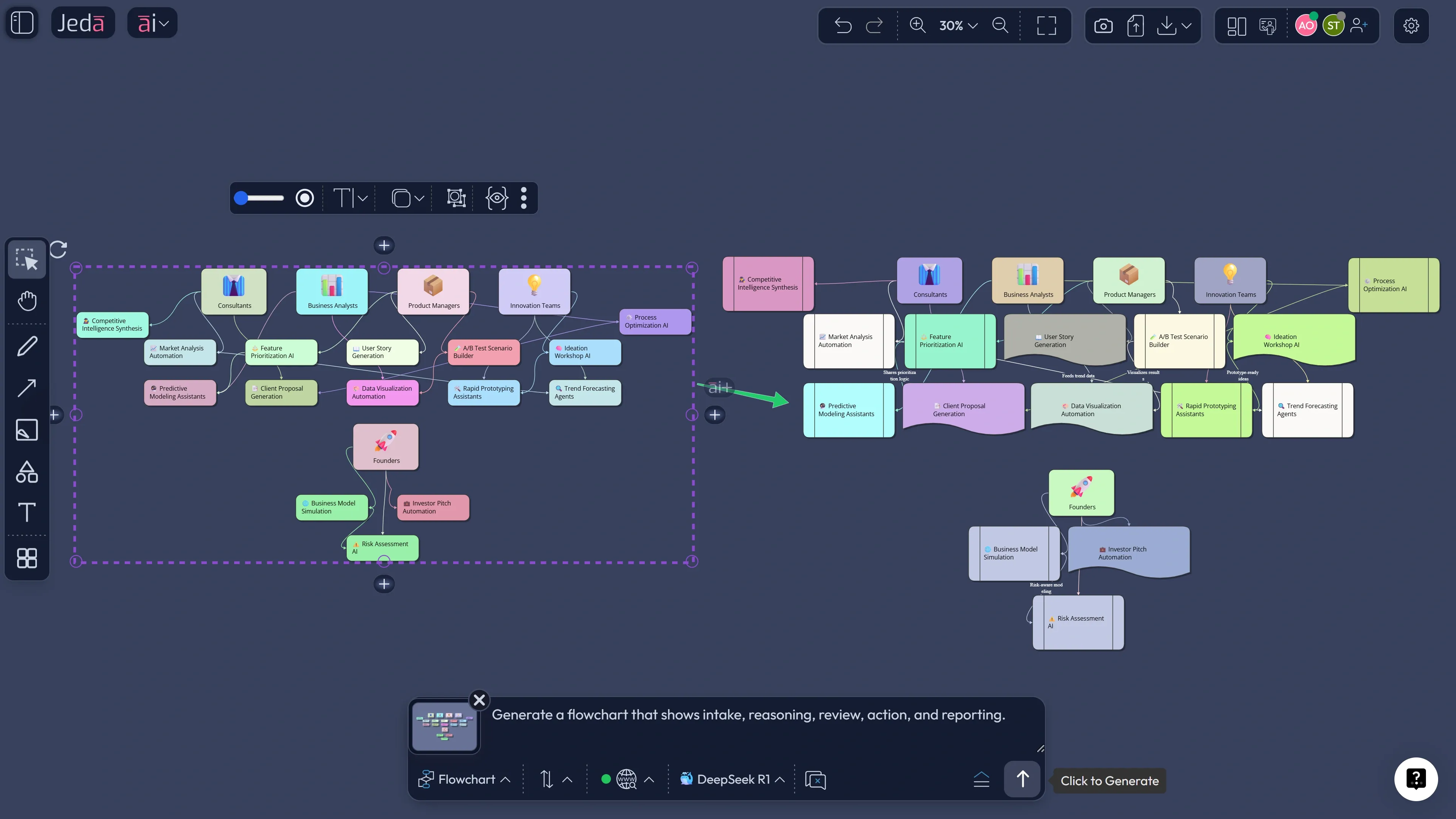
Once the first visual is on the board, select any smart shape and use the AI+ button to extend it. Expand the “tools” node. Expand the “risks” branch. Expand the “human review” section. This is how the board gets smarter without turning into spaghetti.
- Choose your starting mode
Open Jeda.ai and decide whether to begin with Matrix Recipes in the AI Menu or a free-form Prompt Bar workflow.
- Define the exact job
Be specific about the outcome: research synthesis, monitoring, planning, prioritization, or operational support. Vague goals make weak boards.
- Add real context
Bring in notes, PDFs, screenshots, spreadsheets, or live web context so the board reflects evidence instead of generic AI output.
- Generate the first structure
Use Matrix for trade-offs, Mindmap for expansion, Flowchart for process logic, or Document/Data Insight when the source material already exists.
- Review the board like an operator
Check goals, tool boundaries, human approvals, risks, and outputs. Ask what the system can do and what it should never do.
- Use AI+ to deepen branches
Extend only the nodes that matter most, such as risks, owners, approval checkpoints, edge cases, or next actions.
- Transform and share
Use Vision Transform if another visual format would clarify the work, then collaborate or export as PNG, SVG, or PDF.
Where Jeda.ai gets especially strong
The sweet spot is compound work. Not simple Q&A.
Jeda.ai is strongest when the job has multiple inputs, multiple possible outputs, and multiple people involved. That includes consulting, product discovery, research distillation, document analysis, and internal decision-making. The platform already gives you the pieces most agent workflows need in practice: visual commands, document and data ingestion, web search, model choice, transformation between formats, and collaborative editing on the same AI Whiteboard.
That is also why Jeda.ai’s broader positioning works. It is not a blank canvas hoping structure appears by magic. It is an AI Workspace built around evidence-in, editable visuals-out, and visible thinking—and it sits on top of 300+ strategic frameworks that help teams move from idea to structured decision faster.
Best practices before you trust any generative AI agent output
First, define the boundary. A strong board states what the system can decide, what it can recommend, and what still needs human approval. IBM explicitly recommends human approval for high-impact actions. McKinsey makes a similar point when it argues that governance, trust, and workflow redesign matter as much as the model.
Second, separate thinking from acting. Not every agent board should trigger action. Sometimes the right output is a decision map or a review flow that humans inspect first.
Third, keep evidence attached. Use uploaded files, screenshots, or web context so the logic stays grounded. Fourth, work branch-first. Generate the skeleton, then deepen only the sections worth your time with AI+.
Common mistakes to avoid
The first mistake is building an “AI agent” without a sharply defined job. “Help our business with AI” is not a job. It is a shrug.
The second is starting with action before structure. If you have not mapped inputs, risks, owners, and outputs on the AI Workspace, drift is almost guaranteed.
Third: forcing one format to do everything. A mind map is good for exploration. A matrix is better for trade-offs. A flowchart is better for process logic. Use the format that matches the thinking.
And finally, do not treat current information like an optional extra. When the work depends on market context, turn on web search or use fresh source material. Stale context gives you very polished nonsense.
Frequently asked questions
- What is the difference between generative AI and a generative AI agent?
- Generative AI creates content from prompts. A generative AI agent goes further by planning, using tools, handling context, and shaping multi-step outputs toward a goal. The practical difference is whether the system can structure work, not just write about it.
- Can I build a generative AI agent workflow in Jeda.ai without coding?
- Yes. Jeda.ai is designed for visual workflow building through the AI Menu, Prompt Bar, document and data inputs, and editable canvas outputs. You are defining goals, structure, and review logic visually rather than building a software agent from scratch.
- Which command should I use first in Jeda.ai for agent planning?
- Start with Matrix if you need decision structure, Mindmap if the idea is still fuzzy, and Flowchart if the goal is orchestration. When you already have source files, use Document Insight or Data Insight so the first draft starts from evidence.
- Does Jeda.ai support real-time web context for agent workflows?
- Yes. Web search in Jeda.ai is a platform feature available from the Prompt Bar. That helps when your board depends on current market context, updated facts, or fresh competitive signals.
- How does the AI+ button help with generative AI agent design?
- The AI+ button lets you deepen an existing visual without rebuilding it. Select a smart shape and extend only the section that needs more detail, such as risks, tools, approval checkpoints, or next actions. It is a clean way to refine branch by branch.
- Can Jeda.ai turn documents or datasets into an agent board?
- Yes. Document Insight can turn PDFs or documents into structured visuals, while Data Insight can analyze CSV or Excel files and generate strategic outputs. That makes Jeda.ai useful when your workflow needs to start from evidence instead of a blank prompt.
- What formats can I export from Jeda.ai?
- Jeda.ai supports export as PNG, SVG, and PDF. That makes the final board easy to circulate for review, presentation, or documentation while preserving the visual logic built on the workspace.
- Who gets the most value from Generative AI Agent - Jeda.ai?
- Teams working across messy inputs and visible decisions get the most value. That includes consultants, product managers, business analysts, founders, and innovation teams who need AI-generated thinking to become inspectable, editable, and collaborative.
Sources & further reading
- [1]
Park, Joon Sung et al. (2023) . “Generative Agents: Interactive Simulacra of Human Behavior” arXiv.
View Source ↗ - [2]
Masterman, Tula; Besen, Sandi; Sawtell, Mason; Chao, Alex (2024) . “The Landscape of Emerging AI Agent Architectures for Reasoning, Planning, and Tool Calling: A Survey” arXiv.
View Source ↗ - [3]
Kapoor, Sayash et al. (2024) . “AI Agents That Matter” arXiv.
View Source ↗ - [4]
OpenAI (2025) . “A Practical Guide to Building Agents” OpenAI.
View Source ↗ - [5]
McKinsey (2025) . “Seizing the agentic AI advantage” McKinsey & Company.
View Source ↗ - [6]
IBM (2025) . “What Are AI Agents?” IBM Think.
View Source ↗
Related Jeda.ai pages
Start Your Generative AI Agent Workflow Today
Join over 150,000+ users who use Jeda.ai to turn ideas, documents, and data into editable visual workflows on one AI Workspace.
Try Jeda.ai Free