Online Whiteboard for Smarter Decisions: Solve Decision Conundrum with Jeda.ai
Online whiteboard workflows are everywhere now. But most teams still make messy decisions. They brainstorm in one tool, argue in another, dump meeting notes into a doc, then rebuild the same logic again for slides. That is the real decision conundrum: too many ideas, too little structure, and no shared visual trail of how the team got to the final call.
Jeda.ai fixes that by turning an online whiteboard into an AI Workspace for decision-making, not just a place to throw sticky notes at the wall and hope one of them becomes strategy. Inside one AI Whiteboard, you can turn raw thinking into matrices, decision trees, flowcharts, mind maps, document summaries, and slide-ready visuals without the usual tool hopping. And yes, that matters when the clock is rude and the team is split across five tabs and three opinions.
A plain online whiteboard helps people talk. A decision-grade one helps people compare, prioritize, justify, and act.
What is an online whiteboard for decision-making?
An online whiteboard is a shared digital canvas where teams can brainstorm, organize, and collaborate in real time. The better ones do more than mimic a physical board: they let teams structure information visually with sticky notes, shapes, diagrams, and templates so complex discussions become easier to follow and faster to act on.
That matters because visual collaboration is not just about creativity. It is about reducing ambiguity. Atlassian positions online whiteboards as a way to organize ideas visually, collaborate in real time, and support decision-making on an infinite canvas. FigJam frames the category around brainstorming, diagramming, workshops, and strategy planning. Mural pushes the same space toward alignment and execution. In other words, the market has moved past “digital marker board” and into “shared visual operating system.”
Jeda.ai takes the next step. It combines that shared canvas model with Visual AI, 300+ strategic frameworks, AI recipes, live web search, document and data analysis, and editable outputs. So instead of asking your team to stare at chaos and manually turn it into a decision, Jeda.ai helps generate the structure first, then lets the team refine it together.
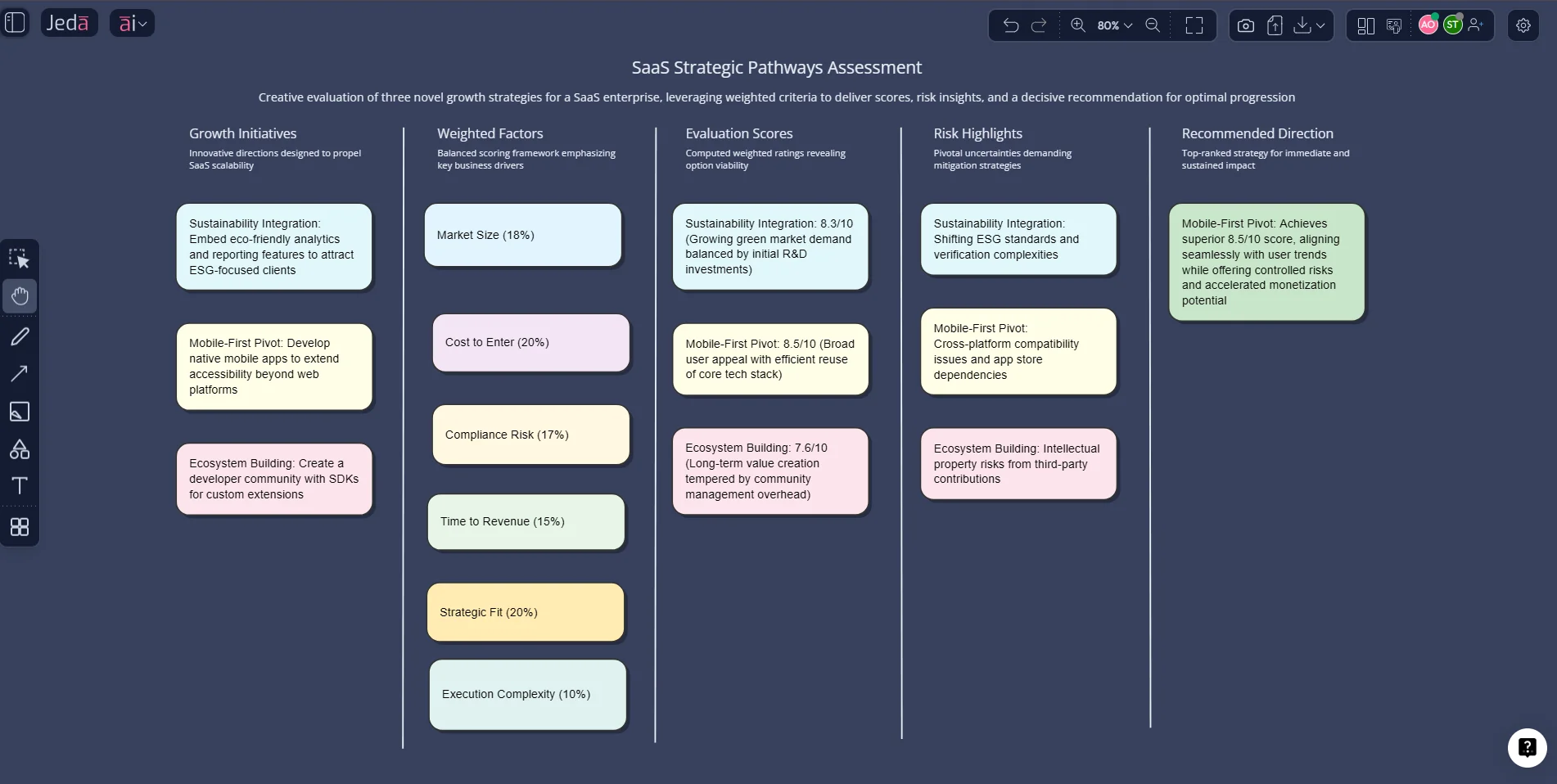
Why teams get stuck in decision conundrums
Most bad decisions do not fail because smart people were absent. They fail because the process was fuzzy.
Sometimes the problem is sprawl. Notes live in chat, evidence sits in a PDF, priorities are buried in a spreadsheet, and the final recommendation appears in slides like it floated down from heaven. Other times the problem is group dynamics. One loud voice takes over. The team confuses motion with clarity. Everyone leaves the call with a slightly different version of what got decided.
Visual methods help because they force the logic into the open. NN/g recommends affinity diagramming to cluster and organize findings, and it describes dot voting as a simple way to prioritize options and converge on ideas. It also notes that teams can use affinity diagrams and whiteboard methods to aggregate findings from group note-taking. Add cognitive diversity to the mix and teams tend to solve problems faster. That is the good news. The less fun news: without structure, whiteboards can become colorful graveyards of unfinished thoughts.
This is why AI Workspace matters more than blank canvas. In Jeda.ai, the canvas does not just capture debate. It helps shape it.
Why use Jeda.ai instead of a plain online whiteboard?
A generic online whiteboard gives you space. Jeda.ai gives you space plus reasoning paths.
- Framework-native decisions
Use Matrix Recipes like Pugh Decision Matrix, Eisenhower Matrix, Risk Analysis, and Root Cause Analysis instead of starting from a blank board.
- Map choices visually
Use Diagram Recipes such as Decision Tree, Influence Diagram, or Process Flow to show trade-offs, paths, and consequences clearly.
- AI inside the canvas
Generate first drafts with the Prompt Bar, refine with Dynamic Prompt, and expand any branch with the AI+ button.
- Evidence-in workflows
Bring in PDFs, screenshots, spreadsheets, and live web context with Document Insight, Data Insight, Vision Transform, and platform web search.
- Real-time collaboration
Invite stakeholders, use Follow Me in walkthroughs, and keep one shared source of truth instead of scattered comments and slides.
- Editable visuals-out
Turn discussions into editable matrices, mind maps, flowcharts, diagrams, and infographics that are ready for review and export.
There is a bigger strategic point here. Many competitors still pitch online whiteboards as places to brainstorm, sketch, and collaborate. Useful? Sure. But decision teams need more than energetic scribbling. They need a workflow that starts with ambiguity and ends with a defendable choice.
Jeda.ai’s own platform positioning leans into that exact gap: a collaborative Visual AI workspace for strategy, innovation, and design decisions, with 300+ strategic frameworks and decision-ready visuals in one place. That angle lines up neatly with current market demand around AI Whiteboard, AI Workspace, and decision-oriented online planning tools.
How to solve a decision conundrum in Jeda.ai
There are three practical ways to do it. Start with a structured recipe if the decision already fits a known pattern. Use the Prompt Bar when the problem is messy. Then use AI+ to deepen the logic where the team needs more confidence.
Method 1: Use AI Menu Recipes for a structured decision
This is the fastest route when your team already knows the decision shape.
Open the AI Menu at the top-left. Then choose a recipe that matches the problem:
- Pugh Decision Matrix when you need weighted comparison across criteria
- Eisenhower Matrix when you need urgency-vs-importance prioritization
- Risk Analysis when stakes and uncertainty are high
- Decision Tree when outcomes depend on branching scenarios
- Root Cause Analysis when the real problem is still hiding behind symptoms
For a classic “Which option should we choose?” debate, the cleanest pairing is often Pugh Decision Matrix + Decision Tree. One makes comparison visible. The other makes consequences visible. Nice combo. Less drama.
Method 2: Use the Prompt Bar when the problem is messy
When decisions are half-defined, the Prompt Bar is the better move.
Pick the Matrix command if you want criteria-based comparison. Pick Mindmap if the team first needs to unpack the problem space. Pick Flowchart or Diagram if the team needs to understand paths, dependencies, or decision branches. If the decision depends on files, upload a PDF or spreadsheet first and use Document Insight or Data Insight.
A solid starter prompt looks like this:
Compare three expansion options for a SaaS company entering Southeast Asia. Use criteria for market size, sales complexity, compliance risk, cost to launch, time to revenue, and strategic fit. Recommend one option and explain trade-offs.
The result is not the end. It is the opening move. Then the team edits, annotates, collapses weak paths, and sharpens the board together inside the AI Whiteboard.
Method 3: Use AI+ for the deep dive
This part gets underrated.
Once you generate a matrix, mind map, or decision tree, click a shape and use the AI+ button to extend that section. Expand only the weak spots: risk assumptions, stakeholder objections, missing data, upside scenarios, fallback plans. That is how you turn a fast first draft into a boardroom-safe recommendation.
- Choose the decision frame
Start in Jeda.ai and decide whether your problem needs a Matrix, Mindmap, Flowchart, or Diagram. Use Matrix when you need scoring, Diagram or Flowchart when you need branching logic.
- Use the AI Menu or Prompt Bar
Open the AI Menu for a recipe like Pugh Decision Matrix or Decision Tree, or use the Prompt Bar to describe the decision in plain language and generate the first visual draft.
- Bring in evidence
Upload PDFs, spreadsheets, screenshots, or notes. Use Document Insight, Data Insight, or web search to ground the board in current information instead of memory and opinions alone.
- Compare and prioritize visually
Review the generated visual with your team. Edit criteria, adjust labels, collapse weak paths, and use sticky notes or comments to capture disagreements and open questions.
- Deepen the logic with AI+
Select any node, branch, or matrix cell and tap the AI+ button to extend that section with more detail, risks, alternatives, or justification.
- Turn the board into the decision record
Use the final board as the shared source of truth, then export the visual for reporting or presentation. The important bit is that your reasoning stays visible, not hidden in someone’s memory.
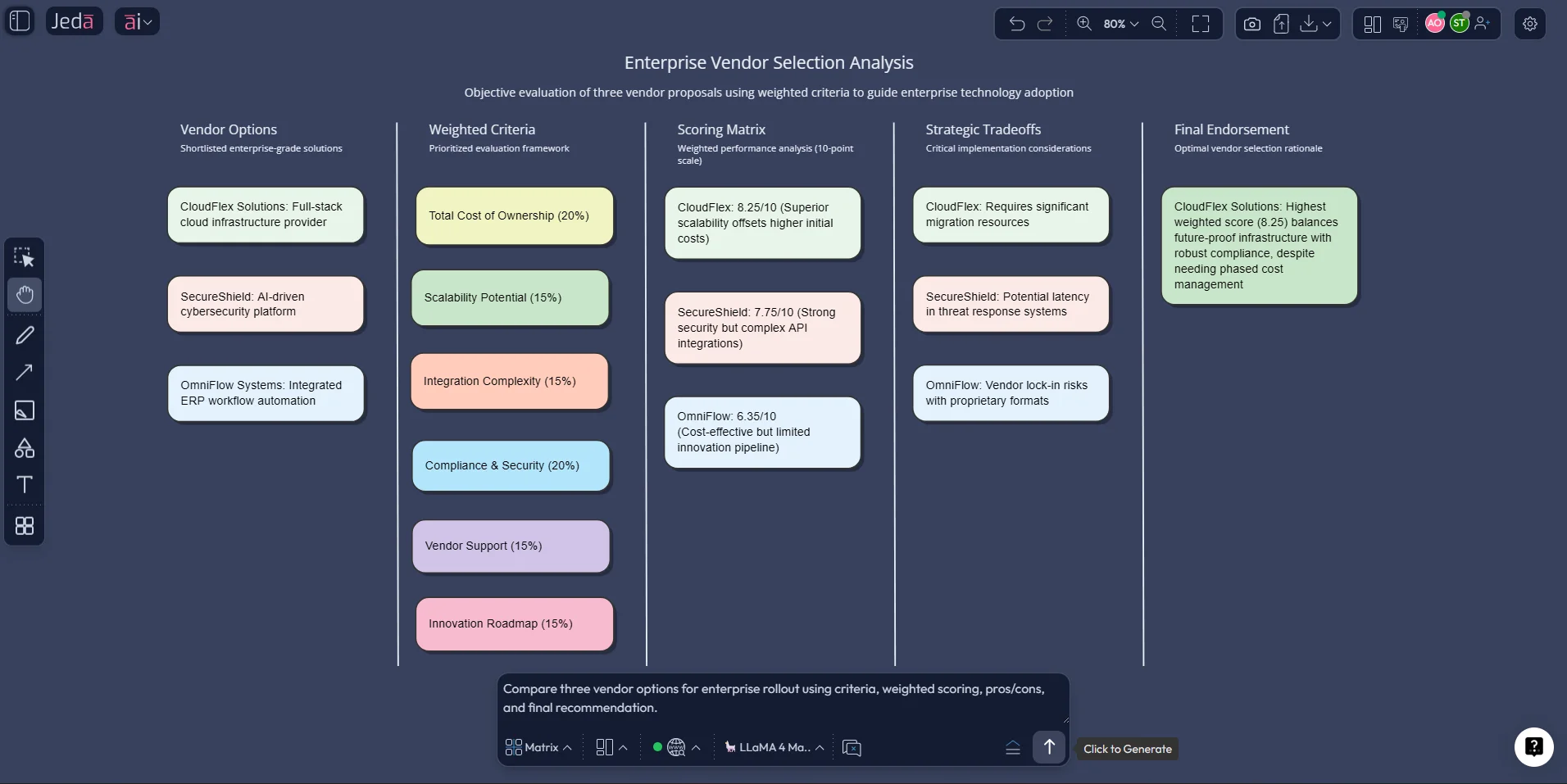
A simple decision workflow that actually works
Here is a practical pattern for real teams.
Start with a Mindmap to unpack the problem if the room is still fuzzy. Move to a Matrix once the options and criteria are clear. Then use a Decision Tree or Flowchart to show the likely consequences of the front-running option. That sequence sounds obvious. It also saves teams from trying to do prioritization before they have even defined the decision properly.
This is where Jeda.ai feels different from a generic online whiteboard. You are not forced to choose between free-form thinking and structured output. You can move between both on the same canvas using Vision Transform, editable Smart Shapes, and AI-assisted generation. That means your brainstorm does not die as a screenshot. It matures into a decision system.
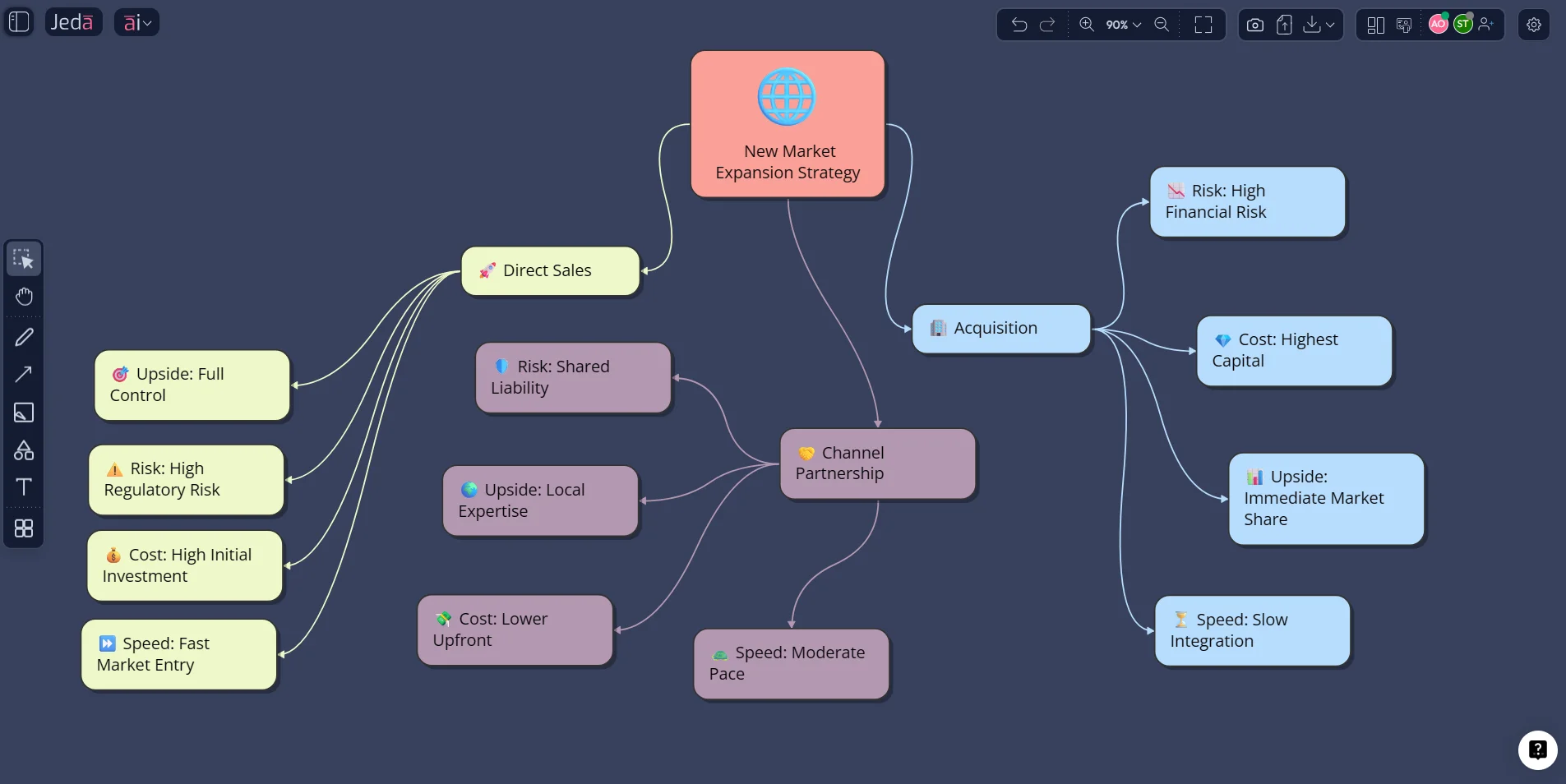
Best practices for solving decisions visually
And one more thing. Resist the urge to over-polish too early. Whiteboards are thinking tools first. Presentation tools second. Get the logic right before you make it pretty.
Common mistakes to avoid
1) Using a blank board when the problem already fits a framework
If the decision is clearly a weighted comparison, open a matrix recipe. Do not rebuild a decision model from scratch just because the team likes the romance of sticky notes.
2) Mixing ideation and prioritization at the same time
Brainstorming and choosing are not the same activity. Separate them. First gather. Then cluster. Then score. Then decide.
3) Letting the loudest person define the criteria
That is not strategy. That is office karaoke. Use the board to make criteria explicit and let the group challenge them before they are used.
4) Hiding the evidence outside the canvas
If the supporting document, chart, or screenshot lives somewhere else, the team will argue from memory. Bring the evidence onto the board.
5) Treating the final whiteboard as disposable
The finished board is your decision record. Keep it. Present from it. Revisit it when outcomes arrive.
Frequently asked questions
- What is the best online whiteboard for decision-making?
- The best online whiteboard for decision-making is one that supports both open collaboration and structured analysis. Teams usually need sticky notes and diagrams, but they also need decision matrices, evidence capture, and a clear visual record of why one option was chosen.
- Can an online whiteboard help teams make decisions faster?
- Yes. A good online whiteboard speeds decisions by making options, criteria, and trade-offs visible in one place. That reduces repetition, cuts down on side discussions, and helps teams move from raw ideas to prioritization and action more quickly.
- How does Jeda.ai solve a decision conundrum better than a blank whiteboard?
- Jeda.ai adds structure to the canvas with Matrix and Diagram recipes, AI generation, AI+, document and data analysis, and web search. Instead of starting from a blank board, teams can generate a decision-ready visual and then refine it collaboratively.
- Which Jeda.ai commands are best for difficult decisions?
- Use Matrix for criteria-based comparison, Mindmap for unpacking the problem, Diagram or Flowchart for consequences and paths, Stickynotes for raw brainstorming, and Document Insight or Data Insight when the decision depends on files or data.
- Does Jeda.ai have decision-making templates?
- Yes. Jeda.ai includes Matrix Recipes such as Pugh Decision Matrix, Eisenhower Matrix, Risk Analysis, and Root Cause Analysis, plus Diagram Recipes like Decision Tree and Influence Diagram for mapping choices and outcomes.
- Can I use AI to expand only one part of a decision board?
- Yes. Select a shape or node on the canvas and use the AI+ button to extend that specific section. This is useful for deepening a risk, adding alternative scenarios, or pressure-testing one branch without regenerating the entire board.
- Can Jeda.ai use live information during decision-making?
- Yes. Jeda.ai includes platform web search, which can be toggled from the Prompt Bar. That helps ground decisions in current context rather than relying only on model memory or stale notes.
- Can teams collaborate live on the same decision board?
- Yes. Jeda.ai supports real-time collaboration, participant invitations, and Follow Me mode for walkthroughs. That makes it useful for workshops, leadership reviews, and distributed decision sessions.
- What can I export from a Jeda.ai decision board?
- Jeda.ai supports exports such as PNG, SVG, and PDF according to the platform workflow documentation. The board can also be used directly in presentations or turned into slide-ready visuals after editing.
- Who should use an AI Workspace for visual decision-making?
- Strategy consultants, business leaders, product managers, business analysts, innovation teams, and design engineers all benefit from an AI Workspace because these roles regularly compare options, align stakeholders, and need visible reasoning behind recommendations.
Why this topic matters now
The category is shifting. Competitors increasingly promise online whiteboards for brainstorming, strategy planning, and collaboration. But the real battle is moving toward who helps teams turn that collaboration into defensible decisions.
That is why this page should exist. Not as another “what is an online whiteboard?” explainer. There are enough of those wandering around the internet already. This one should answer a better question:
How do you solve decision conundrum without switching apps, losing context, or rebuilding the same logic three times?
Jeda.ai’s answer is simple: use one AI Workspace, one AI Whiteboard, and one visual trail from ambiguity to action.
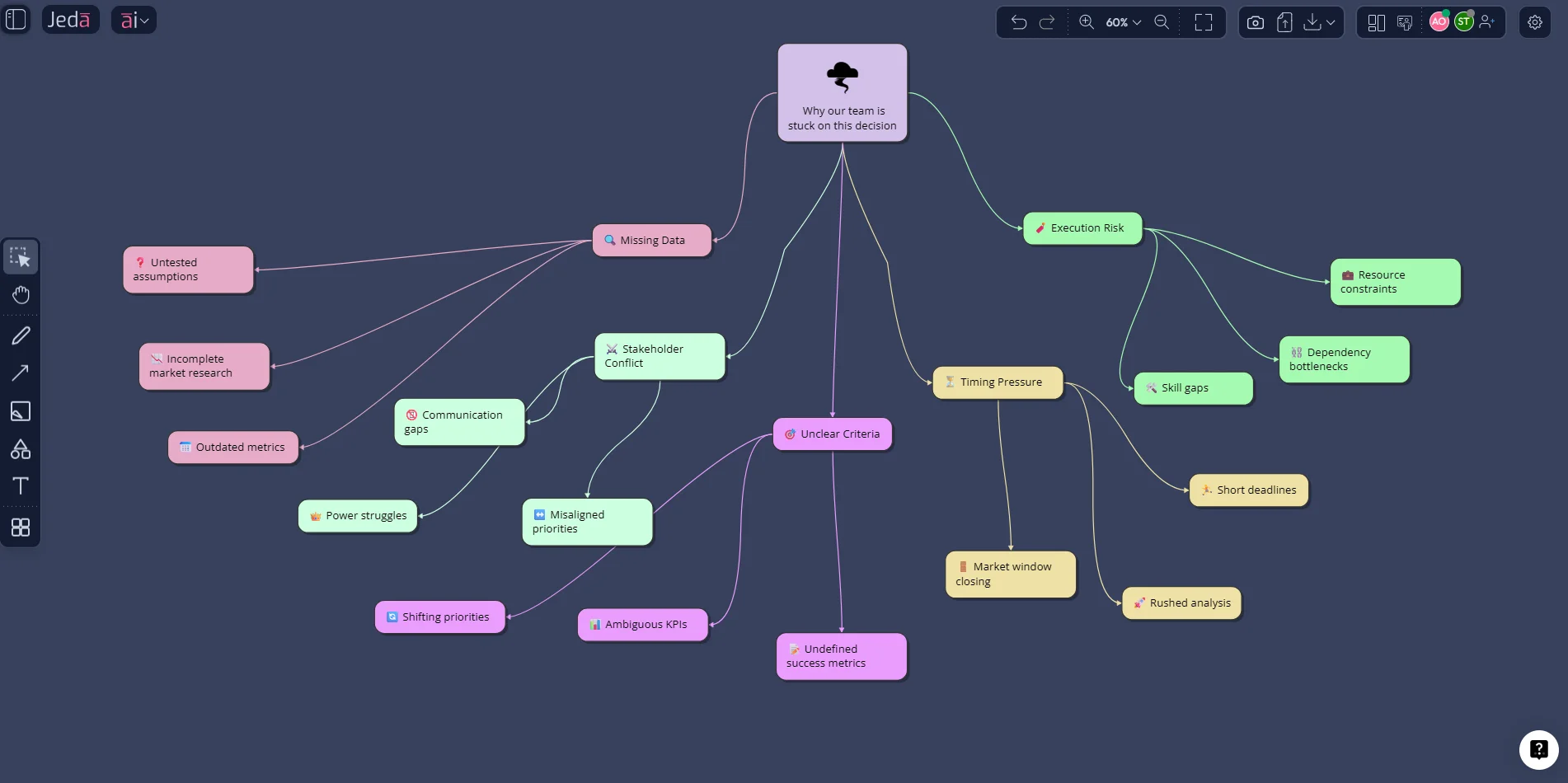
Sources & Further Reading
- [1]
Rachel Krause, Kara Pernice (2024) . “Affinity Diagramming for Collaboratively Sorting UX Findings and Design Ideas” Nielsen Norman Group.
View Source ↗ - [2]
Alison Reynolds, David Lewis (2017) . “Teams Solve Problems Faster When They’re More Cognitively Diverse” Harvard Business Review.
View Source ↗ - [3]
Santiago Comella-Dorda, Lavkesh Garg, Suman Thareja, Belkis Vasquez-McCall (2020) . “Revisiting agile teams after an abrupt shift to remote” McKinsey & Company.
View Source ↗ - [4]
Atlassian (2026) . “Free online whiteboard for teams” Atlassian.
View Source ↗ - [5]
Figma (2026) . “FigJam: The Online Collaborative Whiteboard for Teams” Figma.
View Source ↗
Solve Your Next Decision Conundrum in Jeda.ai
Join over 150,000+ users who use Jeda.ai’s AI Workspace to turn messy discussions into clear, collaborative, decision-ready visuals.
Try Free Template