Most content teams are not losing because they write badly. They are losing because planning is fragmented. Keywords sit in one sheet. SERP notes live in another tab. Audience pain points hide in sales calls, PDFs, screenshots, or CSV exports. Then someone opens a blank doc and hopes strategy appears by magic.
That is exactly where SEO content planning breaks.
Jeda.ai turns planning into a visual workflow inside one AI Workspace. You can map search intent, cluster topics, compare competitors, organize supporting questions, and turn those inputs into editable visuals on an AI Whiteboard using live web context, uploaded documents, data files, and multiple AI models.
And that changes the pace of planning. Fast.
What is SEO content planning?
SEO content planning is the process of deciding what to publish, why it matters, which audience it serves, what search intent it matches, and how each piece supports a larger topic cluster. In plain English: it is the strategy layer before writing.
Good planning usually includes five things:
- keyword and question discovery
- search-intent mapping
- topic clustering
- page-type selection
- publishing priority and internal-link logic
What has changed is the shape of search itself.
Google still wants helpful, reliable, people-first content rather than pages built mainly to manipulate rankings. It also keeps signaling that unique, non-commodity content is the safer bet for AI search experiences. So the modern job is not “plan for SEO, then maybe think about AI search later.” It is one workflow. One map. One source of truth.
Why SEO-friendly planning now has to be both SEO and AEO
Here is the blunt version: ranking is still valuable, but ranking alone is not enough.
Search engines still reward relevance, helpfulness, and trust. But answer engines are now pulling from content that is easy to interpret, quote, and cite. That means your planning needs to account for:
- direct-answer sections
- question-led headings
- topical maps, not isolated keywords
- strong evidence and source transparency
- structured page formats that support snippets, FAQs, and AI citations
Google’s guidance still points toward people-first content, not search-engine-first pages. Semrush now frames AEO as visibility in AI-generated answers, while Ahrefs has started explicitly advising teams to extend topical maps beyond keyword lists and adapt content planning for AI search. That is not a fringe trend anymore. It is the new table stakes.
Jeda.ai is useful here because it helps you plan visually before you draft. You can start with a matrix, turn it into a mind map, convert it into a flowchart, and extend promising areas with AI using the AI+ button. So instead of planning in disconnected notes, you build an editorial system your whole team can inspect, challenge, and improve.
- Visual topic mapping
Turn scattered keyword notes into editable matrices, clusters, and planning boards inside one AI Workspace.
- Current-search context
Use Jeda.ai Web Search to ground planning in live questions, fresh competitor angles, and changing search behavior.
- One workflow, many outputs
Move from Matrix to Mindmap to Flowchart to brief structure without rebuilding the logic from scratch.
- Evidence-in planning
Upload PDFs, docs, screenshots, or CSV files and use Document Insight or Data Insight to pull planning signals from real inputs.
- Multi-model reasoning
Run planning with up to three models and an aggregation model to compare angles before you commit to a content direction.
- Collaborative strategy review
Teams can review, edit, and align on priorities together instead of arguing across disconnected tabs and documents.
How Jeda.ai helps you plan SEO content without the usual chaos
A blank spreadsheet is not a strategy. It is a parking lot.
Jeda.ai works better when you treat planning as a sequence of decisions:
1. Capture demand
Use Web Search, uploaded docs, and customer inputs to collect queries, recurring pain points, and supporting evidence.
2. Structure the opportunity
Use Matrix for prioritization, Mindmap for cluster building, and Flowchart for editorial stages.
3. Pressure-test the angle
Run Multi-LLM mode if the topic is high stakes.
4. Expand what is promising
Use AI+ on strong nodes to extend clusters into FAQs, briefs, or pillar/subpage logic.
5. Transform and share
Use Vision Transform to convert the board, then export it as PNG, SVG, or PDF.
That is why Jeda.ai fits modern planning better than a tool stack that treats SEO, strategy, and collaboration as separate jobs.
How to create SEO-friendly content planning in Jeda.ai
There is no single prebuilt “SEO Content Planning” recipe listed in the current Jeda.ai references, so the smartest workflow is to combine existing Matrix Recipes with the Prompt Bar, then deepen the strongest sections with AI+. That gives you a repeatable process without pretending a nonexistent template magically solves strategy.
Method 1: Recipe Matrix
Use the AI Menu when you want structure first.
Open the AI Menu in the top-left corner, go to Matrix Recipes, and use a combination of real recipe categories that already exist in Jeda.ai. For this use case, the most practical starting points are:
- People Analysis for audience segments and search-intent differences
- Moat Analysis for content differentiation
- Risk Analysis for cannibalization, thin content, and weak topical coverage
- Project Planning for turning strategy into an editorial roadmap
- PESTEL Analysis if external search behavior or market shifts matter to the topic
This works because content strategy is still strategy. You are just applying those frameworks to organic growth.
Method 2: Prompt Bar
Use the Prompt Bar when you want flexibility.
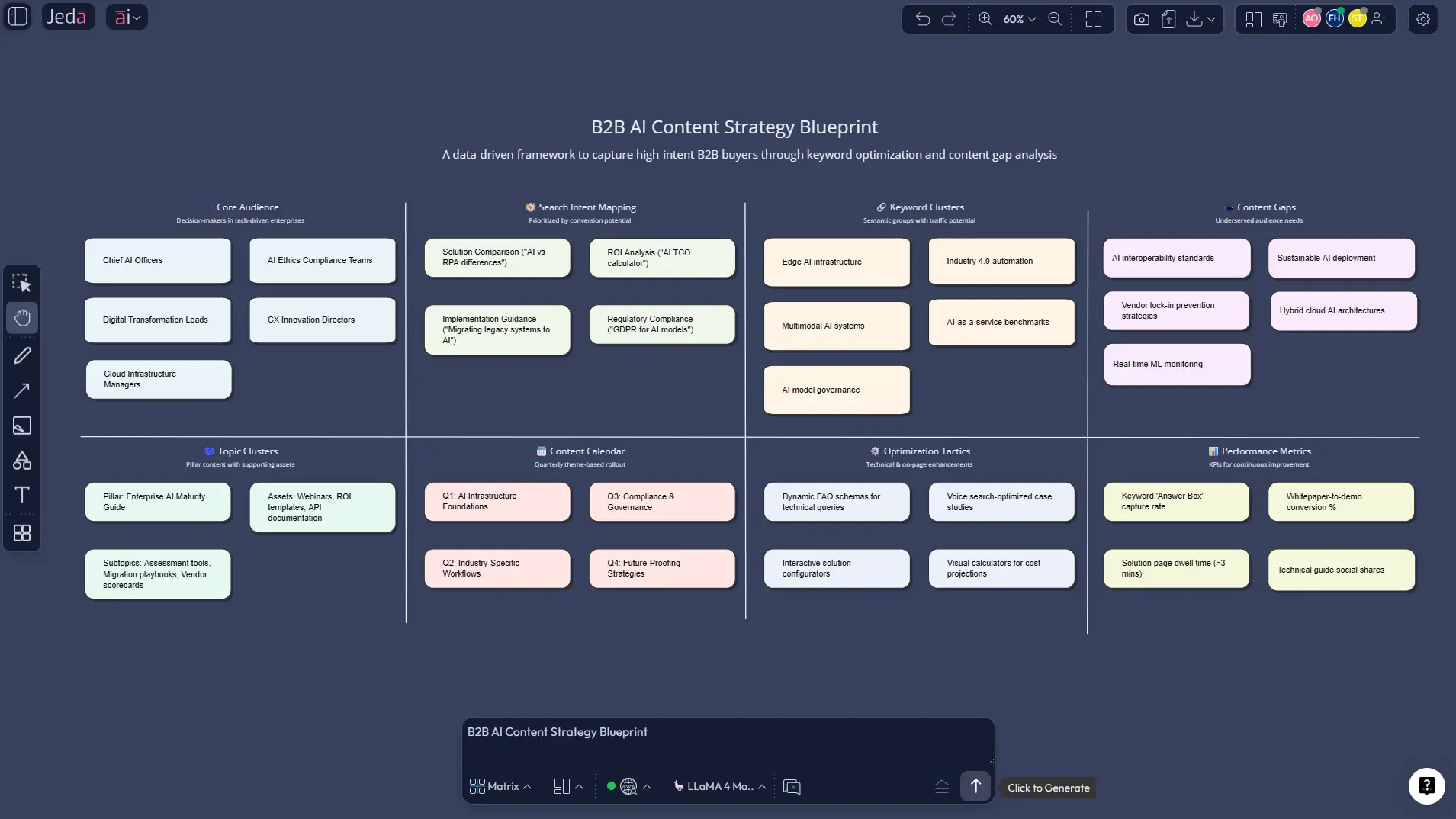
Select Matrix, Mindmap, or Flowchart from the command selector. Then write a prompt that tells Jeda.ai what to plan, who the audience is, what inputs matter, and what output you want. Add Web Search if the topic depends on current search behavior. If you already have source materials, attach a PDF or CSV and switch to Document Insight or Data Insight.
Method 3: AI+ button deep dive
Use AI+ when one part of the board deserves more detail.
Click a strong cluster or content lane and extend it. This is where you expand:
- cluster-supporting questions
- FAQ candidates
- internal-link opportunities
- supporting assets like infographics, briefs, or lead magnets
- alternate angles for top-of-funnel vs bottom-of-funnel pages
Honestly, this is one of the more useful moves in Jeda.ai. You do not need to regenerate the whole board just because one branch got interesting.
- Open the AI Menu or Prompt Bar
Start from Matrix Recipes if you want guided structure, or open the Prompt Bar if you want a flexible planning workflow.
- Build the planning board
Use Matrix for prioritization, Mindmap for cluster building, or Flowchart for editorial process design. Add Web Search when freshness matters.
- Bring in real inputs
Upload search reports, customer notes, PDFs, screenshots, or data files. Use Document Insight or Data Insight to extract usable planning signals.
- Refine with multiple models
Turn on Multi-LLM Agent for high-stakes topics so Jeda.ai can compare angles across models and use an aggregation model to pick the strongest result.
- Extend winning branches with AI+
Click promising nodes and use the AI+ button to grow them into FAQs, pillar maps, supporting pages, or stronger article angles.
- Transform and share
Use Vision Transform to convert the board into another format, then export the final planning visual as PNG, SVG, or PDF for the team.
Example prompts you can use in Jeda.ai right now
You do not need heroic prompt engineering. You need enough context to reduce ambiguity.
Prompt for Matrix
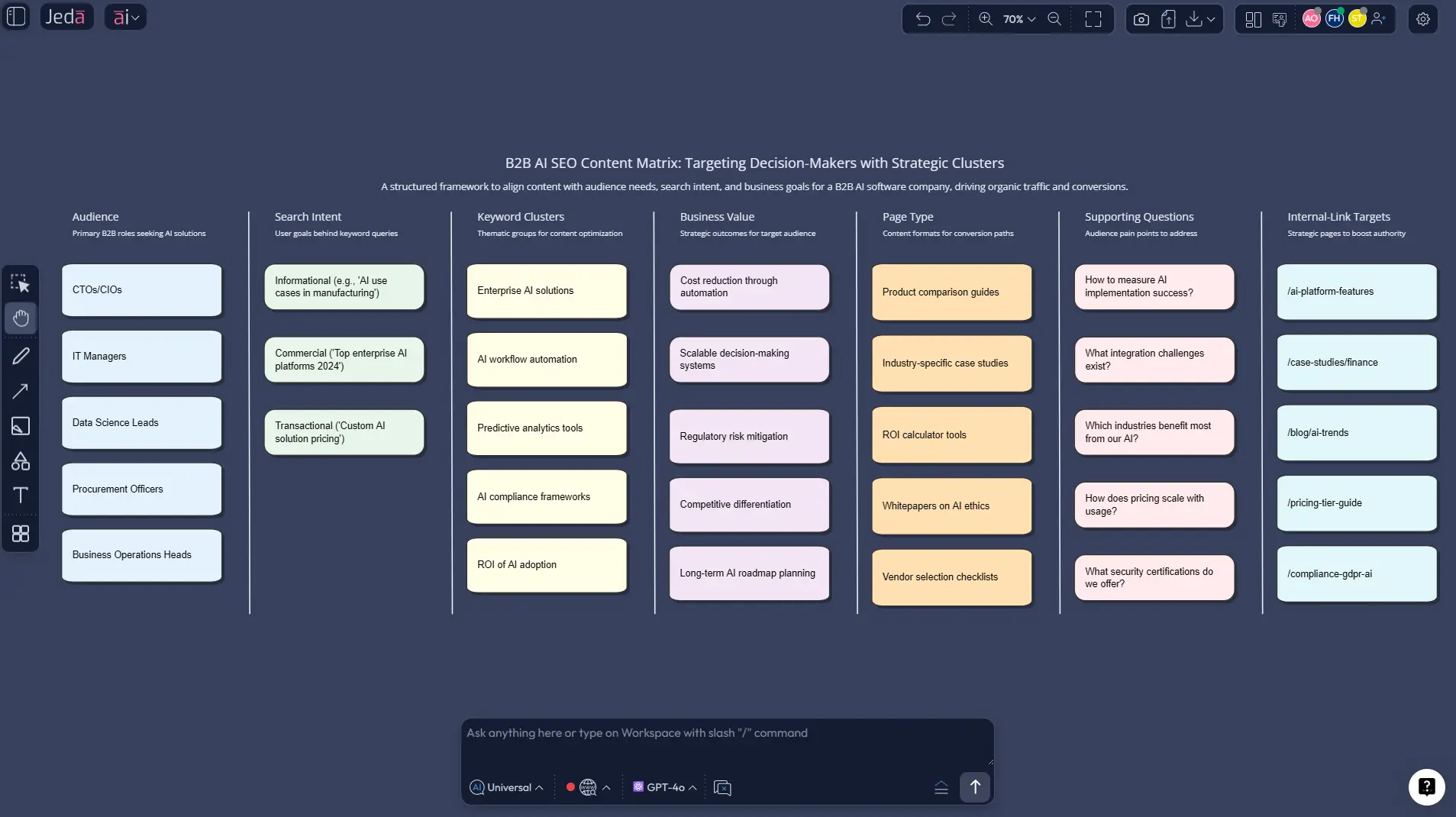
“Build an SEO content planning matrix for a B2B AI whiteboard platform. Include audience segment, search intent, priority keyword cluster, page type, funnel stage, internal-link target, and content differentiation angle. Use current web context.”
Prompt for Mindmap
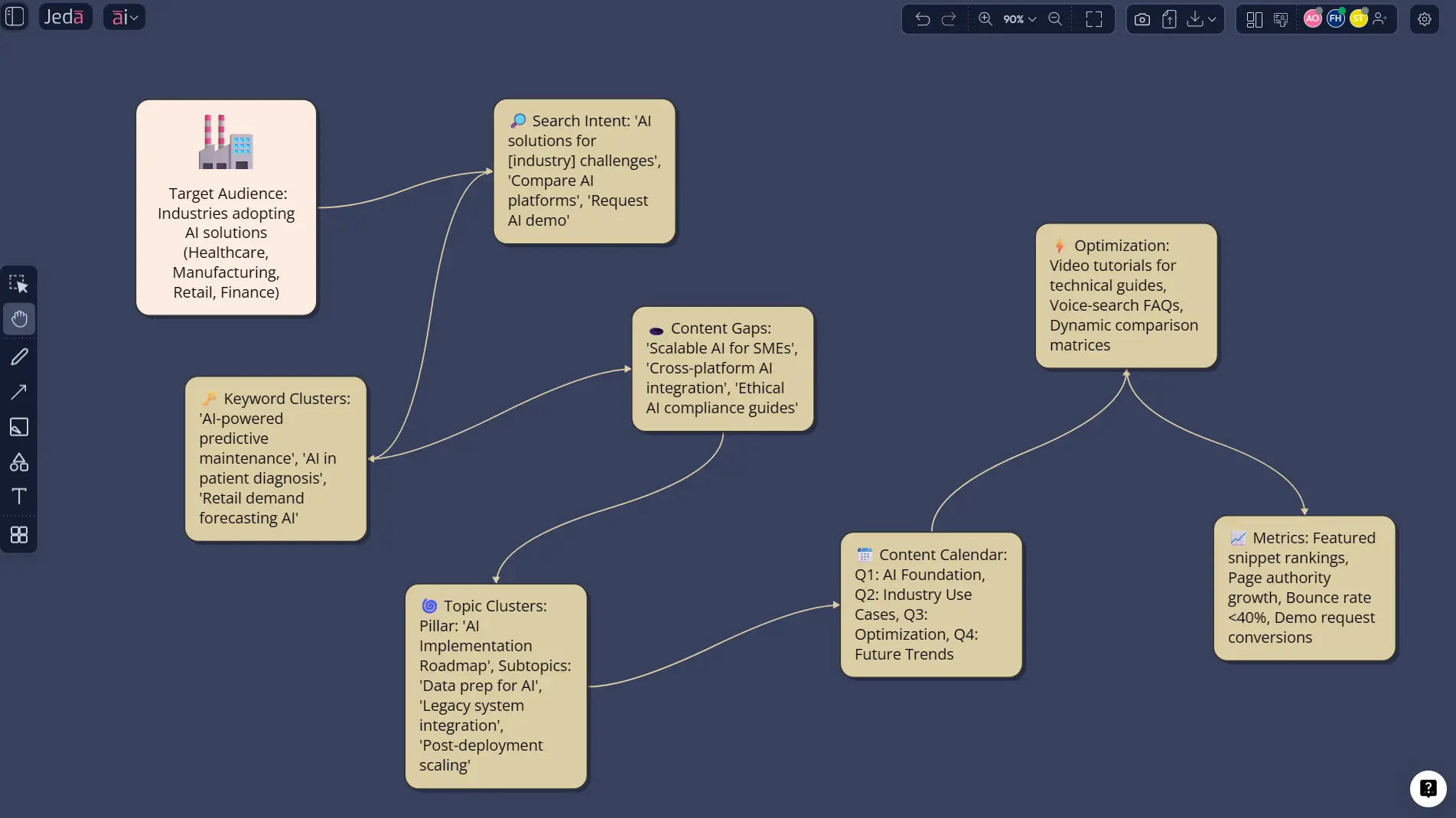
“Create a topic cluster mind map for answer-engine-ready SEO content around AI workspace, AI whiteboard, visual collaboration, and strategic frameworks. Group by user intent and buying stage.”
Prompt for Flowchart
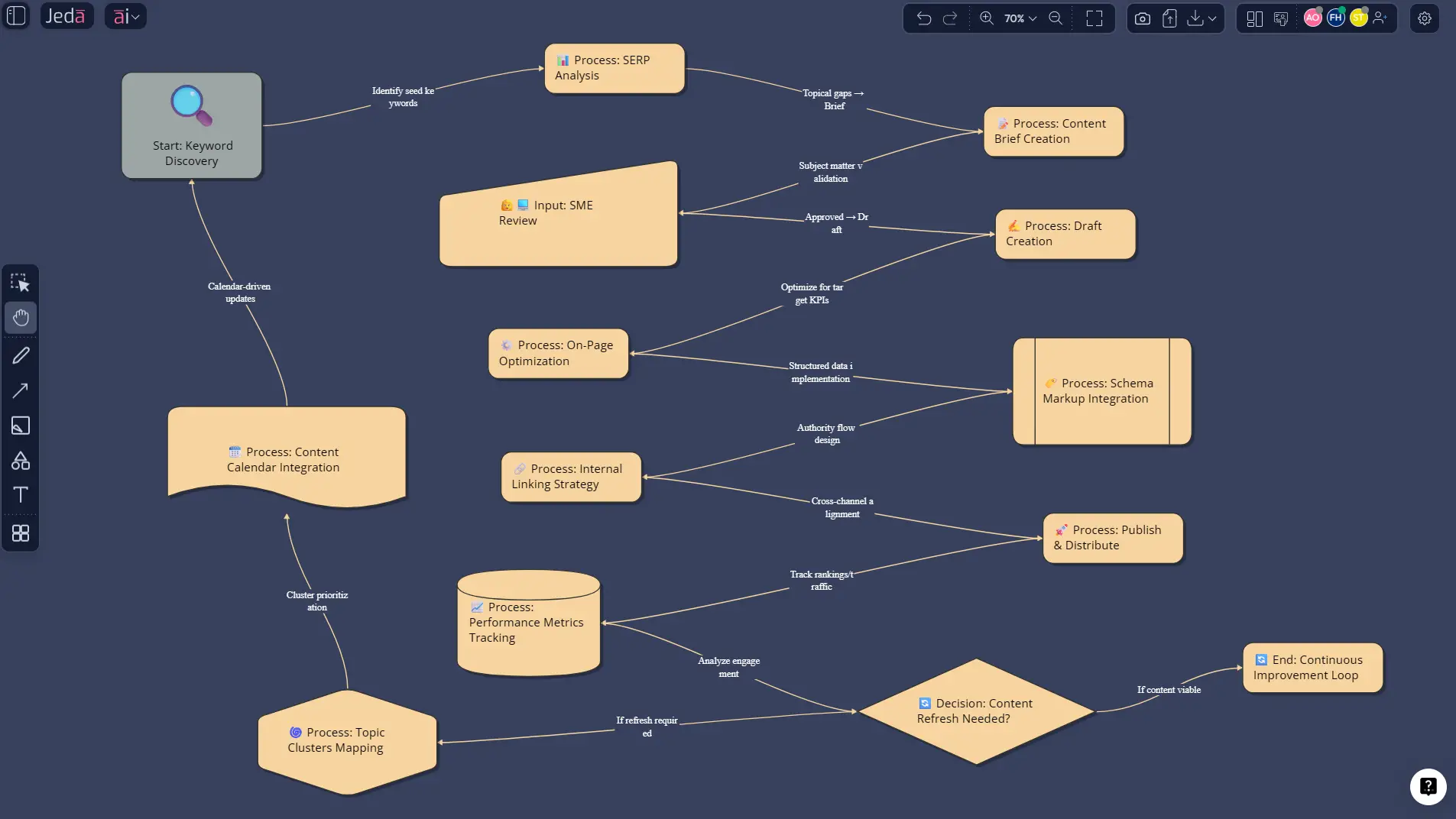
“Map a content planning workflow from keyword discovery to SERP analysis, brief creation, SME review, publishing, schema checks, internal linking, and performance refresh.”
Prompt for Document Insight
“Analyze this SEO strategy document and turn it into a content priority matrix with quick wins, pillar pages, comparison pages, and FAQ opportunities.”
Prompt for Data Insight
“Review this keyword export and create a priority matrix by search intent, business value, ranking difficulty, and citation potential.”
A practical planning model for teams using Jeda.ai
If you want a cleaner operating model, use this five-layer stack inside Jeda.ai:
- Demand layer — keywords, questions, SERP themes, fresh search patterns
- Audience layer — ICP, objections, jobs-to-be-done, stage of awareness
- Authority layer — pillar page, spoke pages, FAQs, internal links, sources
- Asset layer — blog post, comparison page, infographic, mind map, checklist
- Distribution layer — organic search, AI answers, LinkedIn, email, sales enablement
This is where Jeda.ai’s broader capability set becomes useful. The content map can become the brief, the brief can become the explainer, and the explainer can become the shareable artifact.
That matters because search visibility is not only a publishing problem. It is a planning-and-reuse problem.
Best practices for SEO-friendly content planning with Jeda.ai
Plan around intent clusters, not lonely keywords
A single keyword rarely deserves a single page anymore. Group related questions and subtopics into a page system.
Use question-led headings early
Question-style H2s and H3s make content easier for both humans and answer engines to parse.
Bring in proprietary inputs
Sales calls, support tickets, demo objections, and customer docs help Jeda.ai surface angles your competitors will miss.
Separate “rank” opportunities from “cite” opportunities
Some pages win clicks. Others win mentions in AI answers. Smart teams plan for both.
Turn every strong plan into multiple outputs
A matrix can become a blog brief, an infographic, a workshop board, and a sales enablement asset. Same core thinking. More return.
Common mistakes to avoid
The first mistake is planning content around tools instead of outcomes. Nobody wakes up wanting “a content calendar.” They want qualified demand, stronger topic authority, and pages that earn trust.
The second mistake is over-trusting volume. A query can be large and still be useless if it mismatches buyer intent.
Third: publishing isolated pages with no cluster logic. That is how teams end up with traffic that never compounds.
And then there is the classic AI-era mistake: generating content before thinking through inputs, proof, and angle. Jeda.ai works best when you use it to sharpen strategy, not skip it.
Frequently asked questions
- What is SEO-friendly content planning?
- SEO-friendly content planning is the process of organizing topics, keywords, search intent, page types, and internal links before writing. The goal is to publish content that is useful for readers, aligned with search demand, and easier for search engines and answer engines to interpret.
- How is SEO content planning different from AEO planning?
- SEO content planning focuses on ranking pages in search results. AEO planning focuses on helping your content get quoted or cited in AI-generated answers. In practice, strong teams now combine both by planning for rankings, snippets, FAQs, and answer-ready structure at the same time.
- Can Jeda.ai replace my keyword tool?
- Not entirely. Jeda.ai is strongest as the planning and reasoning workspace where you organize, compare, extend, and transform SEO inputs. Many teams will still use dedicated keyword tools for raw query discovery, then use Jeda.ai to turn that research into decisions and execution maps.
- Which Jeda.ai commands are best for content planning?
- Matrix is best for prioritization and scoring. Mindmap is best for topic clusters and supporting questions. Flowchart works well for editorial workflow design. Document Insight and Data Insight are useful when your planning inputs already exist inside files, reports, or datasets.
- When should I use Multi-LLM Agent for planning?
- Use Multi-LLM Agent when the topic is competitive, expensive, or strategically important. Running multiple models can help expose weak assumptions, uncover missed question angles, and improve the quality of your content direction before the writing phase starts.
- How does AI+ help with SEO planning?
- AI+ is ideal for deepening a promising branch without rebuilding the entire board. Once you identify a strong cluster, FAQ group, or pillar topic, you can extend that section with AI to generate more subtopics, supporting questions, and execution ideas.
- Can Jeda.ai use live search data while planning?
- Yes. Jeda.ai includes Web Search as a platform feature. You can set it to Auto, On, or Off in the Prompt Bar depending on whether the task needs live context, trend checking, or fresher competitor angles.
- What can I export from a finished planning board?
- Jeda.ai supports exports to PNG, SVG, and PDF. That is useful when you need to present a planning board to leadership, send a strategy visual to a client, or move a finalized map into design or presentation workflows.
Sources & further reading
- [1]
Google Search Central (2025) . “Creating Helpful, Reliable, People-First Content” Google for Developers.
View Source ↗ - [2]
Google Search Central (2025) . “Search Engine Optimization (SEO) Starter Guide” Google for Developers.
View Source ↗ - [3]
Google Search Central Blog (2025) . “Top ways to ensure your content performs well in Google's AI experiences on Search” Google for Developers.
View Source ↗ - [4]
Google Search Central (2025) . “A guide to Google Search ranking systems” Google for Developers.
View Source ↗ - [5]
Semrush (2025) . “How to Create an SEO Strategy: Beginner's Guide” Semrush Blog.
View Source ↗ - [6]
Ahrefs (2025) . “The Ultimate 82-Point Checklist for SEO & AI Visibility” Ahrefs Blog.
View Source ↗ - [7]
HubSpot (2026) . “AEO Grader - 2026” HubSpot.
View Source ↗ - [8]
AirOps (2026) . “How to Build AI Workflows for Content Planning in 2026” AirOps Blog.
View Source ↗
Start SEO-Friendly Content Planning in Jeda.ai
Join over 150,000+ users building strategy, analysis, and editorial systems in one Visual AI Workspace.
Try Jeda.ai Free