Atomic Age Illustrations with AI work best when they feel specific, not vaguely “retro.” You want the optimism, the clean geometry, the science-fiction sparkle, and the postwar design confidence that made the Atomic Age so visually sticky. Jeda.ai gives you a practical way to build that look inside one AI Workspace, not a messy relay race across prompt notes, image tabs, and scattered references. And because Jeda.ai is also an AI Whiteboard, you can keep your subject ideas, prompt drafts, and final image directions in one place. Jeda.ai now serves 150,000+ users, and while it’s widely known for 300+ strategic frameworks, it also includes image workflows for stylized art generation that are surprisingly precise when you feed them the right visual cues.
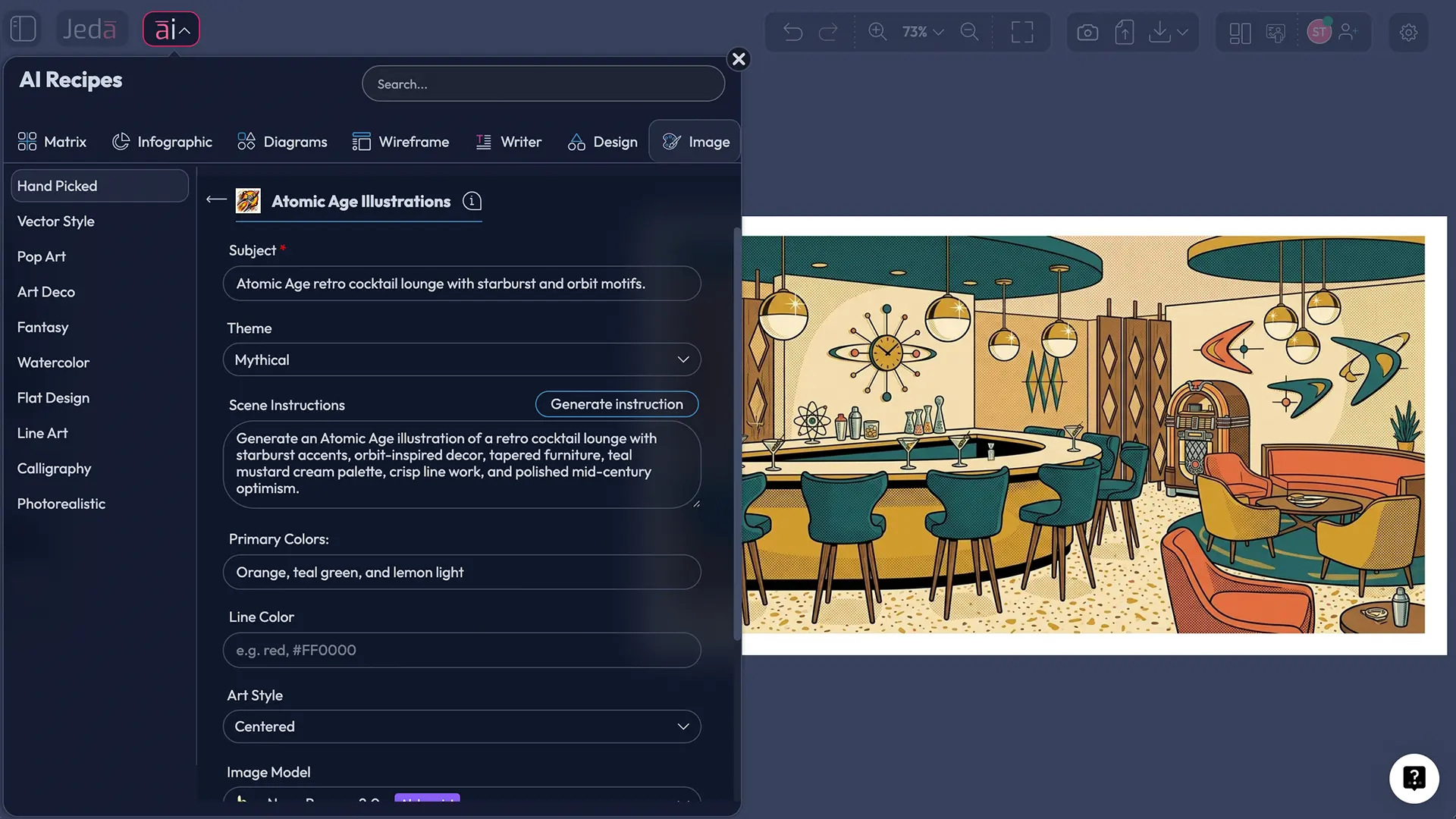
What are Atomic Age illustrations?
Atomic Age illustrations are modern images built from a postwar visual language that grew out of the 1940s through the 1960s. The term “Atomic Age” is tied to the era opened by nuclear science after World War II, and that mood bled into design, advertising, interiors, and consumer culture. Museums and design historians consistently frame the look around atomic iconography, abstract organic forms, bright optimism, and later space-race futurism. George Nelson’s Ball Clock is one of the clearest icons of the period: rods and spheres that echo atomic models, but turned into decorative design. That’s the weird magic of the style. Scientific anxiety on one side, cheerful domestic modernism on the other.
For illustration, that translates into a recognisable set of choices: orbit lines, starburst accents, molecule-like structures, rounded futuristic furniture, playful asymmetry, clean negative space, and a controlled palette that feels vintage without looking dusty. Sometimes the mood leans warm and cheerful. Sometimes it tilts more “future as imagined in 1958.” Both are valid.
The style also overlaps with mid-century modern and early Space Age design, but it is not identical to either. Mid-century modern can be calmer and more furniture-led. Space Age can be sleeker, colder, and more capsule-like. Atomic Age illustration lives in the sweet spot between them: scientific motifs, decorative punch, and retro-futurist confidence.
Why use Jeda.ai for Atomic Age Illustrations with AI?
The usual failure with retro-style image generation is simple: the prompt says “Atomic Age,” but the image comes back as generic vintage poster art, random sci-fi, or a 3D render that looks like it wandered in from the wrong decade. Jeda.ai helps because it gives you two controlled paths.
The first is the Recipe path. This is the better starting point when you want structure. You can specify the subject, choose a theme, shape the scene instructions, set primary colors, set line color, and then choose both the image model and the reasoning model. That recipe structure cuts a lot of noise.
The second is the Prompt Bar path. This is better when you want full art direction, more custom prompting, and optional Web Search support in the Prompt Bar for available models. It’s also useful when you want to iterate faster inside the same AI Workspace and compare multiple directions on the same AI Whiteboard.
Jeda.ai’s image flow matters here for another reason: Image outputs are static, so you want the generation stage to be deliberate. This is not the place for lazy, one-line prompting and wishful thinking. It’s the place for style control.
- Recognizable Period Cues
You can steer toward orbit motifs, starbursts, rounded futurism, and clean mid-century styling instead of generic retro output.
- Color Discipline
Primary colors and line color controls make it easier to keep the work era-true instead of letting the model drift into muddy nostalgia.
- Better Linework Direction
Atomic Age illustrations usually look stronger with intentional contour lines, poster-like edges, and simplified shapes. Jeda.ai lets you ask for that directly.
- Theme Variation
You can push the same core style into whimsical, dramatic, scenic, portrait, still life, or science-fiction directions without losing the Atomic Age backbone.
- Two Creation Methods
Use the Recipe when you want a guided setup. Use the Prompt Bar when you want direct control and faster style iteration.
- One Visual AI Workspace
Keep references, prompts, outputs, and selection notes together in Jeda.ai instead of bouncing between disconnected tools.
What actually makes an image feel Atomic Age?
Here’s the part people tend to skip. Bad idea.
You don’t get convincing Atomic Age illustrations by typing the phrase once and hoping the model reads your mind. You get them by stacking the right signals.
1) Start with the visual vocabulary
The strongest Atomic Age images usually borrow from a compact set of signals:
- atomic or molecular references
- starburst or radiating accents
- rounded geometric furniture and decor
- optimistic space-race cues
- stylized domestic or commercial settings
- crisp poster-like composition
That vocabulary is well aligned with how museums describe the era: atomic motifs, organic forms, and futuristic materials and silhouettes.
2) Keep shapes simple
Atomic Age illustration likes design confidence. Big shapes. Strong silhouettes. Clear spacing. It usually looks better when you simplify the scene instead of over-describing every object. Think poster logic, not clutter logic.
3) Use period-aware color choices
You do not need one rigid palette, but the style often responds well to combinations like:
- teal, mustard, cream, coral, charcoal
- aqua, red-orange, pale yellow, off-white
- white and silver for more space-leaning interpretations
- black linework with two or three accent colors
Too many colors and the image starts to wobble. Too much sepia and it starts cosplaying as “old” instead of feeling designed.
4) Tell the model what to avoid
This helps more than people think. Add guardrails such as:
- no photorealism
- no contemporary furniture
- no cyberpunk glow
- no grunge texture overload
- no hyper-detailed modern UI objects
That one move saves a shocking amount of cleanup.
How to create Atomic Age Illustrations in Jeda.ai
For this page, there are only two supported creation paths: Method 1: Recipe and Method 2: Prompt Bar. That’s intentional. This is not an AI+ expansion workflow.
Method 1: Recipe
Use the recipe when you want a structured setup and less prompt wrangling.
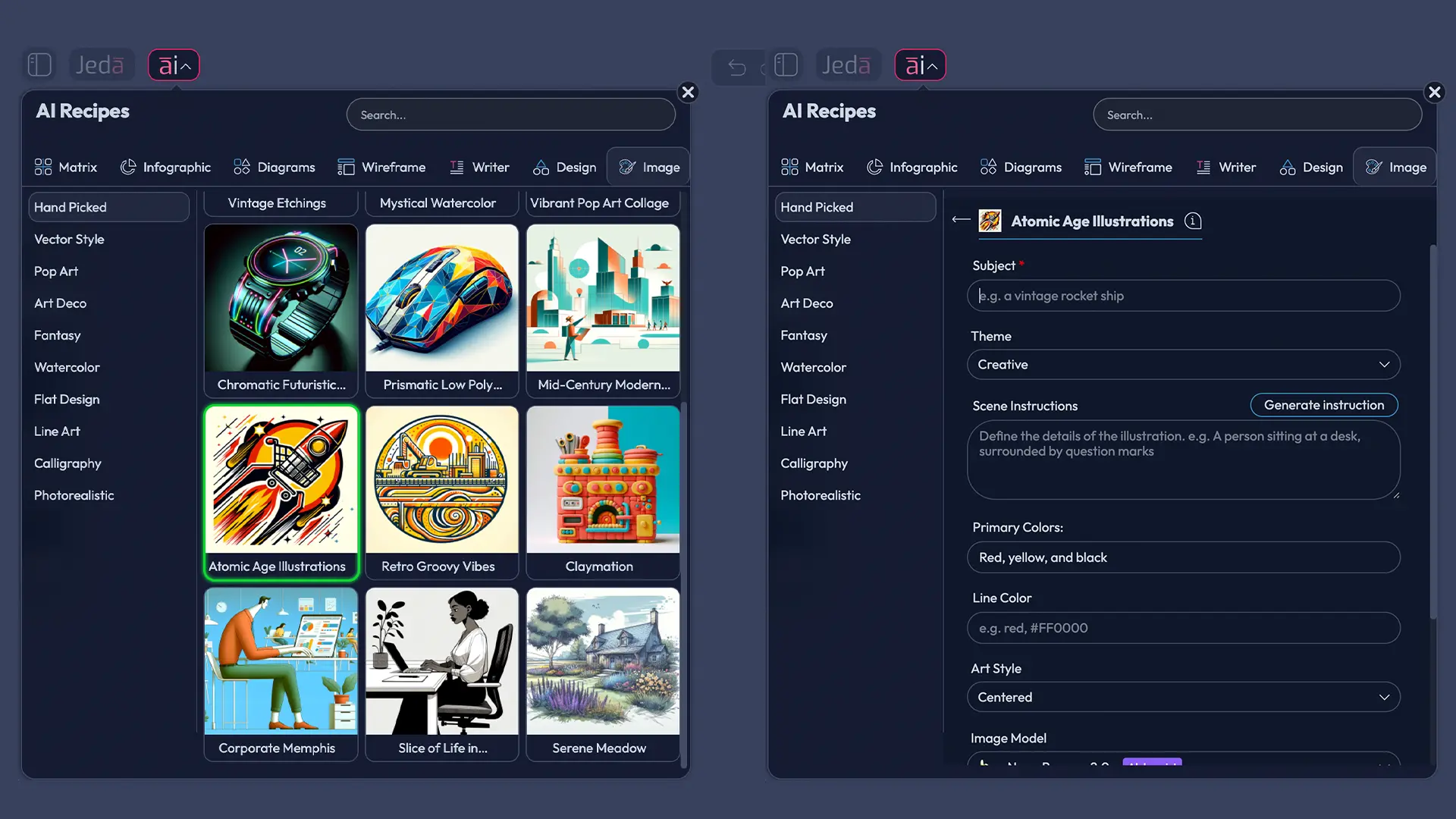
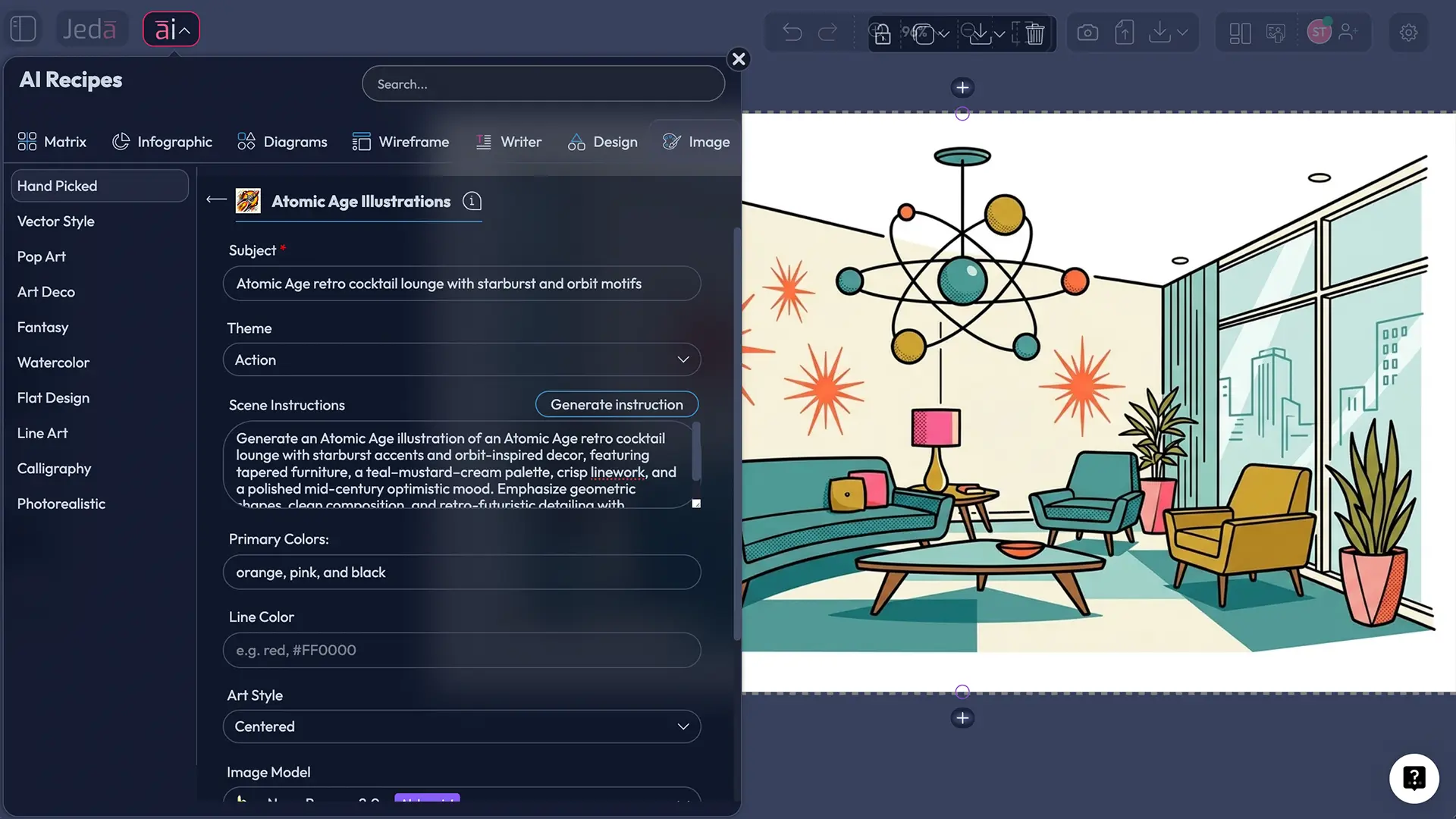
In Jeda.ai, open the AI Menu from the top-left area, go to the image recipe collection, then open the Hand Picked category and choose Atomic Age Illustrations. From there, fill the recipe fields in order:
- Subject — required
- Theme — choose from Creative, Realistic, Surrealistic, Absurd, Abstract, Fantasy, Mythical, Magical, Space Travel, Science Fiction, Futuristic, Whimsical, Funny, Sentimental, Uplifting, Action, Dramatic, Nostalgic, Scenic, Portrait, StillLife, or Nature
- Scene instruction — add custom direction manually or use the AI helper to generate it
- Primary colors
- Line color
- Image model
- Reasoning model
The trick is to make the Subject concrete and the Scene instruction visual. “Retro kitchen” is weak. “1950s breakfast nook with boomerang table edges, atomic wall clock, starburst wallpaper, and a teal-mustard palette” is much better.
Method 2: Prompt Bar
Use the Prompt Bar when you want full manual control.
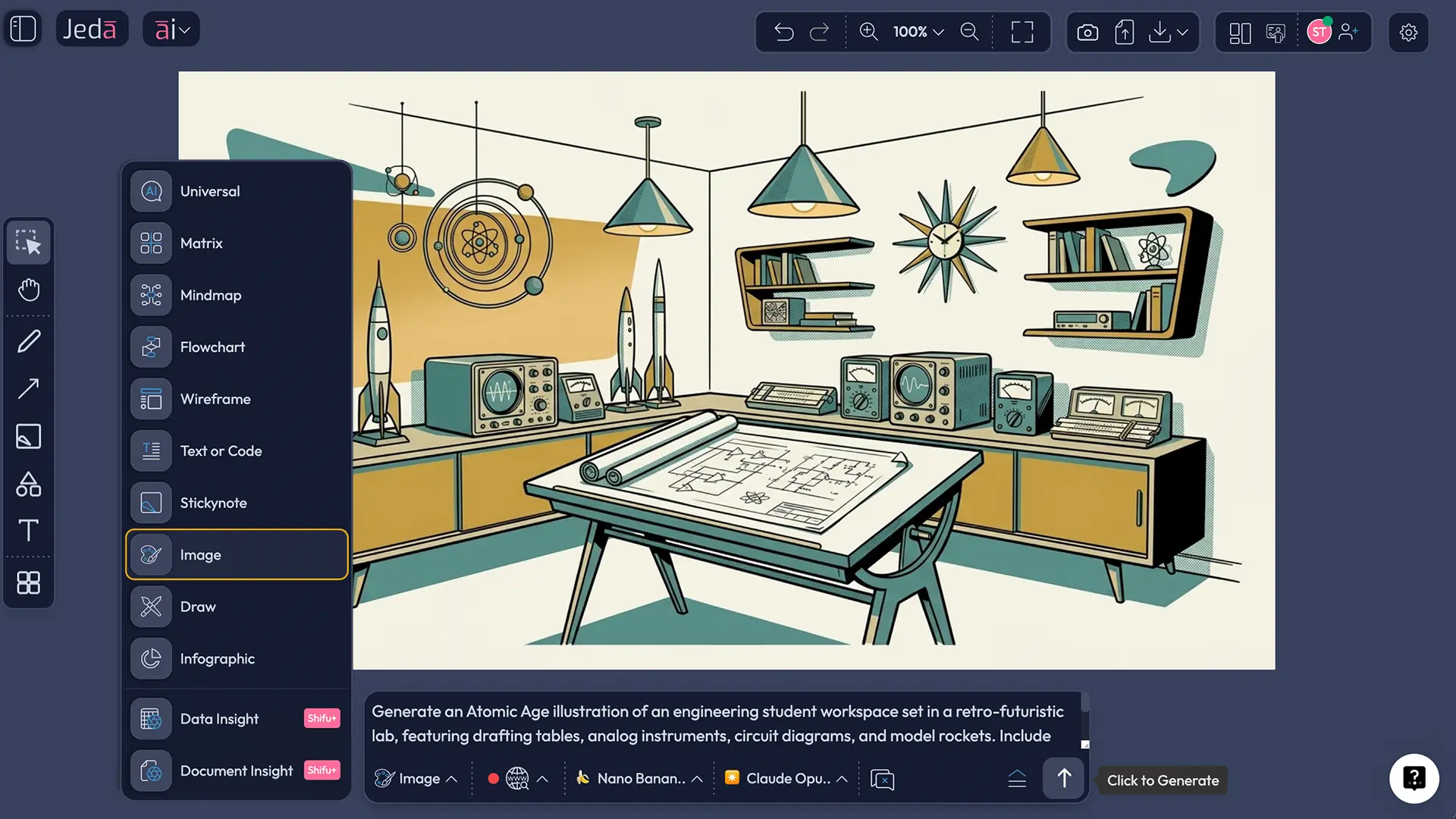
Open the Prompt Bar at the bottom of the canvas and choose the Image command. Then build the style into the prompt directly. In this method, you can also use Web Search from the Prompt Bar where available for model-supported grounding. For this Atomic Age illustration flow, the important technical distinction is simple:
- Image models are single-selection only here; parallel Multi-LLM runs are not the mode for the image generator itself
- Reasoning models can be used in parallel where supported, but aggregation is not part of this flow
That means your best move is usually one strong image model plus one carefully chosen reasoning setup, not model chaos for the sake of model chaos. More isn’t always more. Sometimes it’s just more expensive confusion dressed up as strategy.
Model setup for this recipe
For image generation, the available options for this Atomic Age flow are:
- GPT Image 1
- GPT Image 1.5
- Nano Banana
- Nano Banana Pro
- Imagen 4.0
- Nano Banana 2.0
For reasoning, the available options are:
- GPT-4o
- GPT-5 Mini
- Gemini 2.5 Flash
- GPT-5.4
- Grok 3
- DeepSeek R1
- Claude Sonnet 4.5
- LLaMA 4 Maverick
- Gemini 2.5 Pro
- Grok 4 Fast
- o3
- Claude Opus 4.5
Use the Image command in the Prompt Bar for Method 2. And keep the Web Search detail straight: for this page’s setup, treat it as a Prompt Bar workflow option, not a recipe step.
- Method 1 — Open the Atomic Age Illustrations recipe
From the AI Menu in the top-left area, go to the Hand Picked image recipes and select Atomic Age Illustrations.
- Enter a precise subject
Use a concrete subject such as a lounge, kitchen vignette, diner scene, robot mascot, travel poster, magazine cover, or portrait setup.
- Choose the right theme
Pick a theme that supports the mood you want. Science Fiction, Futuristic, Nostalgic, Whimsical, Scenic, and Portrait are usually strong fits for this style.
- Direct the scene visually
Use the scene instruction field to define composition, motifs, props, setting, decade feel, and what should be excluded.
- Set your palette and line treatment
Choose primary colors and a line color that reinforce the period look. Strong Atomic Age outputs usually benefit from a limited palette and intentional linework.
- Select image and reasoning models
Choose the image generation model and then the reasoning model. Keep the setup focused rather than overcomplicating it.
- Method 2 — Use the Prompt Bar with the Image command
Open the Prompt Bar, select Image, write the full Atomic Age art direction in one prompt, then choose the image and reasoning models manually.
- Generate, compare, and refine
Review the first output for period accuracy, silhouette quality, color discipline, and line consistency. Tighten the prompt and regenerate until the style locks in.
A prompt formula that usually works
Atomic Age art needs more than a style label. It needs a scene, period cues, visual structure, and an explicit rendering logic.
Use this formula:
Subject + setting + Atomic Age motifs + palette + line style + mood + composition + exclusions
Example:
“Atomic Age illustration of a 1950s rooftop cocktail party, starburst signage, orbit-inspired light fixtures, tapered furniture, teal mustard cream palette, charcoal linework, polished retro-futurist optimism, poster-style composition, clean negative space, no photorealism, no contemporary objects.”
That structure does a few useful things at once. It locks the period. It reduces model drift. And it gives the generator fewer places to misbehave.
Prompt examples you can use right away
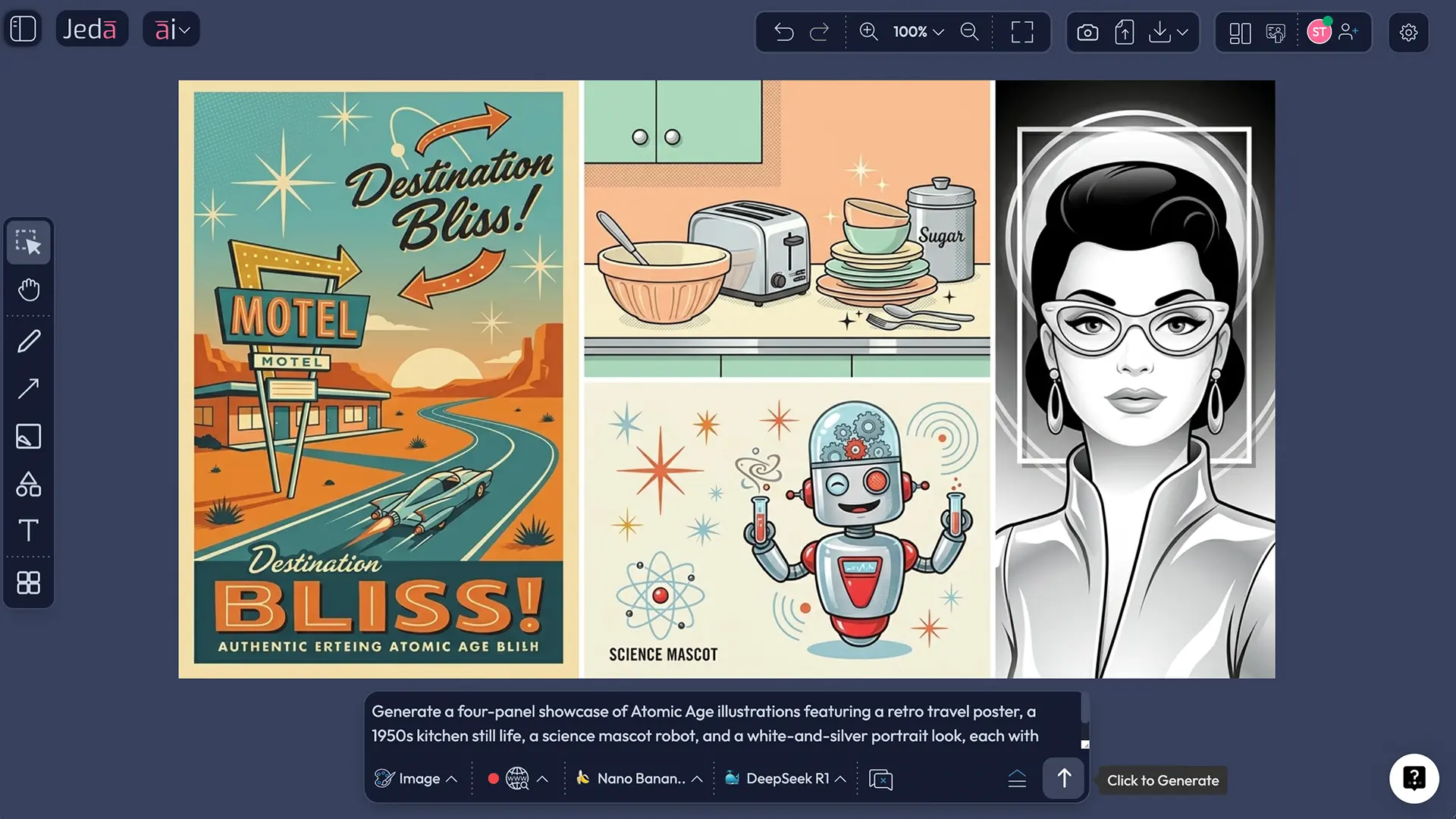
Atomic Age travel poster
“Atomic Age illustration of a retro-futurist moon resort advertisement, rockets on the horizon, orbit rings, geometric skyline, warm cream teal coral palette, crisp poster linework, optimistic 1958 travel-poster mood, no photorealism.”
Atomic kitchen still life
“Atomic Age illustration of a 1950s kitchen counter with chrome toaster, patterned canisters, atomic wall clock, stylized fruit bowl, mint mustard charcoal palette, clean flat shapes, mid-century poster composition.”
Retro science mascot
“Atomic Age illustration of a smiling lab assistant robot holding an atom model, white background, bright accent colors, simplified forms, bold contour lines, cheerful educational poster style, clean negative space.”
Magazine-cover portrait
“Atomic Age illustration portrait of a woman in a white-and-silver space-age outfit, starburst earrings, sculpted bob hairstyle, minimal futuristic backdrop, polished editorial composition, crisp lines, elegant retro-future mood.”
Best practices that make the output stronger
The best Atomic Age images usually follow a few blunt rules.
First, pick one hero subject. A diner scene. A rocket lounge. A futuristic homemaker portrait. A science mascot. One strong idea beats seven half-ideas fighting in the same frame.
Second, write the era into the objects. Don’t just say “futuristic.” Say “1950s retro-futurist” or “postwar Atomic Age.” Otherwise the model may sprint toward contemporary sci-fi and ruin your afternoon.
Third, treat linework as a design choice. If you want something that feels like an illustration instead of a digital painting, say so. Ask for crisp contour lines, poster-style edges, flat color blocking, or stylized print texture.
Fourth, limit the palette on purpose. Two to four dominant colors usually beat a rainbow explosion. Atomic Age imagery likes visual confidence, not visual panic.
Fifth, make the mood explicit. Optimistic, polished, educational, whimsical, cinematic, nostalgic, or dramatic all push the same style in different directions.
Common mistakes to avoid
The biggest mistake is being too generic. “Atomic Age art” on its own is not enough. It’s a label, not direction.
Another mistake is mixing too many eras. If you pile in 1980s synthwave, 1930s dieselpunk, and 2020s glossy 3D rendering, the image loses the specific design tension that makes Atomic Age illustration interesting in the first place.
And then there’s the palette problem. People often assume “vintage” means brown everything. It doesn’t. The stronger look is usually cleaner, brighter, and more deliberate.
One more thing. Don’t let the scene get overcrowded. Atomic Age design likes punchy composition. Leave some breathing room. Your image is not trying to win custody of every object in the room.
Frequently asked questions
- What defines Atomic Age illustrations?
- Atomic Age illustrations borrow from postwar design culture: atomic motifs, starburst energy, rounded futuristic forms, optimistic retro-science styling, and disciplined mid-century composition. The look often overlaps with early Space Age design, but it usually feels more decorative, domestic, and graphically simplified.
- Is Atomic Age the same as mid-century modern?
- Not exactly. Atomic Age sits inside the wider mid-century world, but it leans harder into science symbolism, retro-futurist optimism, and atomic or space-linked motifs. Mid-century modern can be quieter and more purely architectural or furniture-led.
- Which subjects work best for Atomic Age illustration prompts?
- Posters, interiors, portraits, mascot characters, diners, cocktail lounges, domestic still lifes, retro science scenes, and travel-style destination art usually work well. The style likes strong silhouettes, iconic objects, and settings that can carry period detail without becoming cluttered.
- Should I use the Recipe or the Prompt Bar?
- Use the Recipe when you want a guided setup with fixed visual controls like subject, theme, scene instruction, colors, and models. Use the Prompt Bar when you want tighter manual art direction and faster prompt iteration on the same canvas.
- Can I use Web Search for this workflow?
- Yes, but for this page’s setup it belongs to the Prompt Bar route where available. The useful move is grounding the prompt-bar workflow when you need sharper subject context or model-supported reference awareness, not treating web search as a substitute for good art direction.
- Can I run multiple image models at once?
- Not in this Atomic Age illustration flow. The image generation model is chosen as a single generator. On the reasoning side, parallel model use may be available where supported, but aggregation is not part of this setup.
- Can I edit the generated image like a Smart Shape?
- No. Image outputs in Jeda.ai are static. That makes prompt quality more important, because the generation stage is where you lock the composition, style, palette, and line character before moving on.
- What colors usually look best for Atomic Age illustrations?
- Teal, aqua, coral, mustard, cream, charcoal, white, and silver are strong starting points. The exact mix depends on whether you want a warmer domestic feel, a cleaner poster look, or a more space-leaning interpretation of the style.
- How do I stop the image from turning into generic retro art?
- Name the era, define the setting, specify atomic motifs, limit the palette, and include exclusions. Good prompts tell the model what to show and what not to show. That second part is where a lot of the quality comes from.
- Why create Atomic Age images in Jeda.ai instead of a plain image generator?
- Because Jeda.ai gives you a working Visual AI process around the generation itself. You can create inside one AI Workspace, compare alternatives on one AI Whiteboard, keep prompt experiments visible, and move faster without losing the thread of what you were trying to make.
Sources & further reading
- [1]
Encyclopaedia Britannica Editors (2026) . “Atomic Age” Encyclopaedia Britannica.
View Source ↗ - [2]
Brooklyn Museum (2001) . “Vital Forms: American Art and Design in the Atomic Age, 1940-1960” Brooklyn Museum.
View Source ↗ - [3]
Atomic Heritage Foundation / National Museum of Nuclear Science & History (2018) . “Atomic Age Design” Nuclear Museum.
View Source ↗ - [4]
Catherine Acosta (2016) . “In Good Time” Cooper Hewitt, Smithsonian Design Museum.
View Source ↗ - [5]
Victoria and Albert Museum (2024) . “Space-Age chairs” V&A.
View Source ↗ - [6]
Victoria and Albert Museum (2024) . “An introduction to 1960s fashion” V&A.
View Source ↗
Start Creating Atomic Age Illustrations with AI
Join over 150,000+ users using Jeda.ai to create visuals, strategy boards, and polished outputs inside one AI Workspace.
Try Jeda.ai Free