Mid Century Modern Minimalism AI Art still works because it feels nostalgic without looking dated. Mid-century modern design is tied to clean lines, organic and geometric forms, and practical beauty, while minimalism strips the composition back to what matters. The result is warm, calm, poster-friendly visual language that looks at home in a landing page, moodboard, deck cover, or print. It is a natural fit for a Visual AI workflow where style consistency matters as much as speed.
Inside Jeda.ai, you can build that look without improvising from scratch. The AI Workspace gives you two routes: a guided recipe from the AI Menu, or the Prompt Bar when you want tighter control, model selection, and web-grounded reference support. For teams already using an AI Workspace or AI Whiteboard, this recipe is a quick way to create polished art without leaving the same canvas. Jeda.ai is used by 150,000+ users, and while it is known for 300+ strategic frameworks, it also gives creative teams a surprisingly efficient AI art workflow.
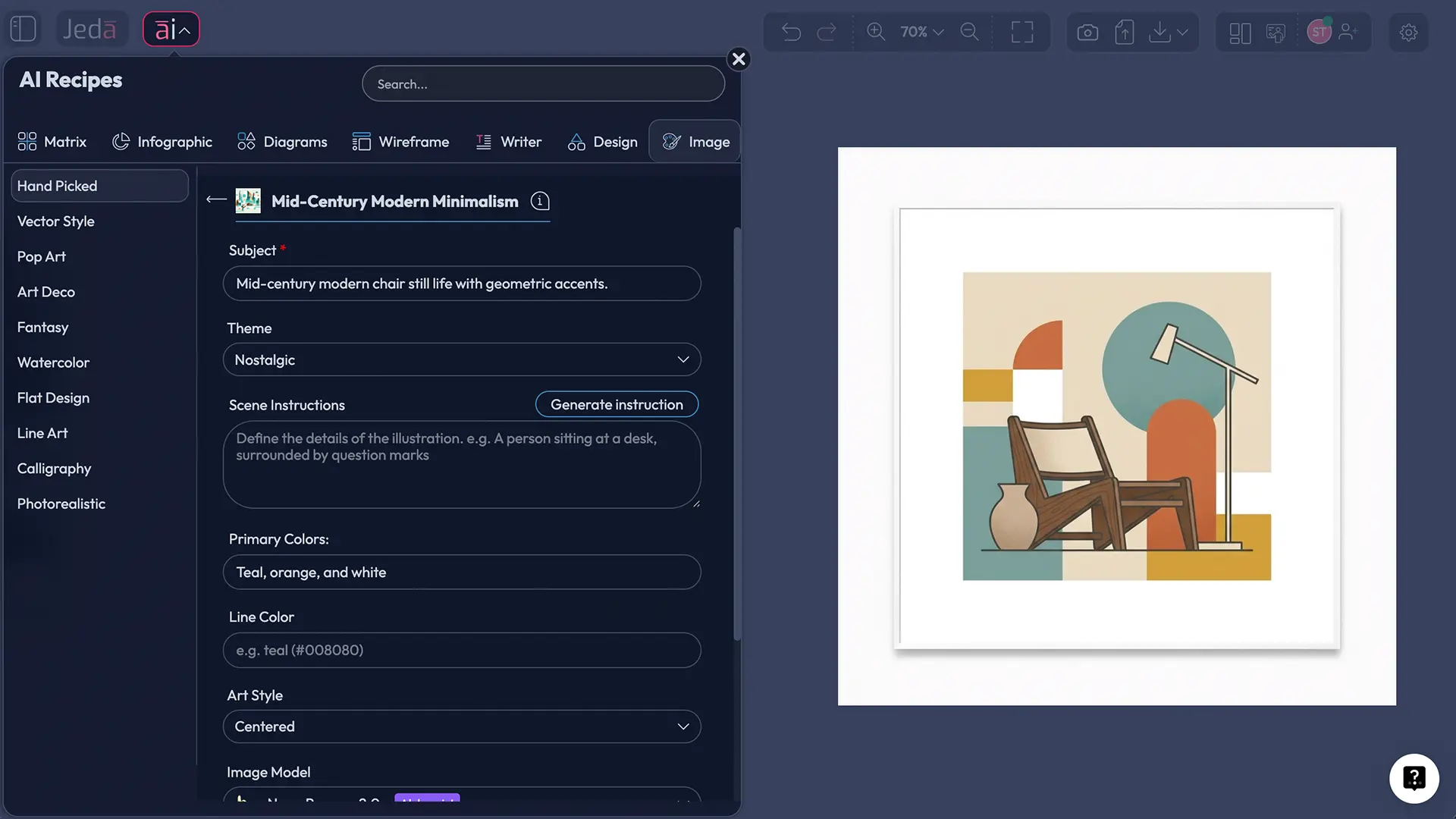
What is Mid Century Modern Minimalism AI Art?
Mid-century modern design is commonly defined by clean lines, organic and geometric shapes, and a balance between beauty and function. Britannica places the style broadly between about 1933 and 1965, and museum scholarship around MoMA’s “Good Design” era shows how the movement popularized simple, well-designed objects meant for everyday life. Minimalism adds a second filter: strip the image down, keep only the forms that matter, and let negative space do real work.
So when you combine the two for AI art, you usually get a few recognizable traits:
- Geometric Simplicity
Arches, circles, rectangles, and sunburst or atomic motifs anchor the composition without clutter.
- Earthy-but-Intentional Color
Beige, olive, rust, mustard, walnut brown, muted teal, and black line accents do most of the heavy lifting.
- Negative Space
The image breathes. Background space is not empty filler; it is part of the design.
- Organic Balance
Hard geometry gets softened with plants, abstract curves, still-life shapes, or human silhouettes.
- Poster-Friendly Composition
This style naturally fits wall art, editorial covers, hero images, slide openers, and branded visual systems.
- Prompt-Friendly Structure
Because the visual language is so clear, AI models respond well when you define subject, palette, and scene direction precisely.
And that is why the style keeps winning. It looks designed, not random. It looks tasteful, not timid. It also adapts well to brand storytelling, print collateral, product moodboards, and social creative where visual noise is already doing far too much.
Why use Mid Century Modern Minimalism AI Art with Jeda.ai?
A lot of AI image tools can produce “retro-ish” art. That is not the same as getting a usable visual direction. Here is the practical edge of doing it in Jeda.ai.
First, the guided recipe removes the usual prompt drift. You do not just type one vague line and hope the model has a spiritual awakening. You fill in a required Subject, choose a Theme, add Scene instruction details, define Primary colors and Line color, then pick the image model and reasoning model that fit the job. The structure matters.
Second, Jeda.ai lets you handle this work in the same AI Workspace where you already brainstorm, plan, present, and collaborate. That matters more than people admit. Your creative reference, final image, mood notes, and surrounding project context can live on the same AI Whiteboard instead of being scattered across five apps and one questionable folder called “final-final-v2.”
Third, the model setup is flexible. The image side supports options such as GPT Image 1, GPT Image 1.5, Nano Banana, Nano Banana Pro, Imagen 4.0, and Nano Banana 2.0, while the reasoning side supports models such as GPT-4o, GPT-5 Mini, Gemini 2.5 Flash, GPT-5.4, Grok 3, DeepSeek R1, Claude Sonnet 4.5, LLaMA 4 Maverick, Gemini 2.5 Pro, Grok 4 Fast, o3, and Claude Opus 4.5. Image generation itself is single-model, but the reasoning layer can run multiple reasoning models in parallel for richer direction-setting before generation. One helpful caveat: this is an image workflow, so the final art output is static and not editable like Smart Shapes. That is by design.
If you are building a broader creative stack, it also fits neatly beside related Jeda.ai resources such as AI Workspace, AI Whiteboard, Corporate Memphis AI Art, and Slice of Life Art in Monochrome.
How to create Mid Century Modern Minimalism AI Art in Jeda.ai
There are two solid routes here. Recipe first. Prompt Bar second. No AI+ extension step for this one.
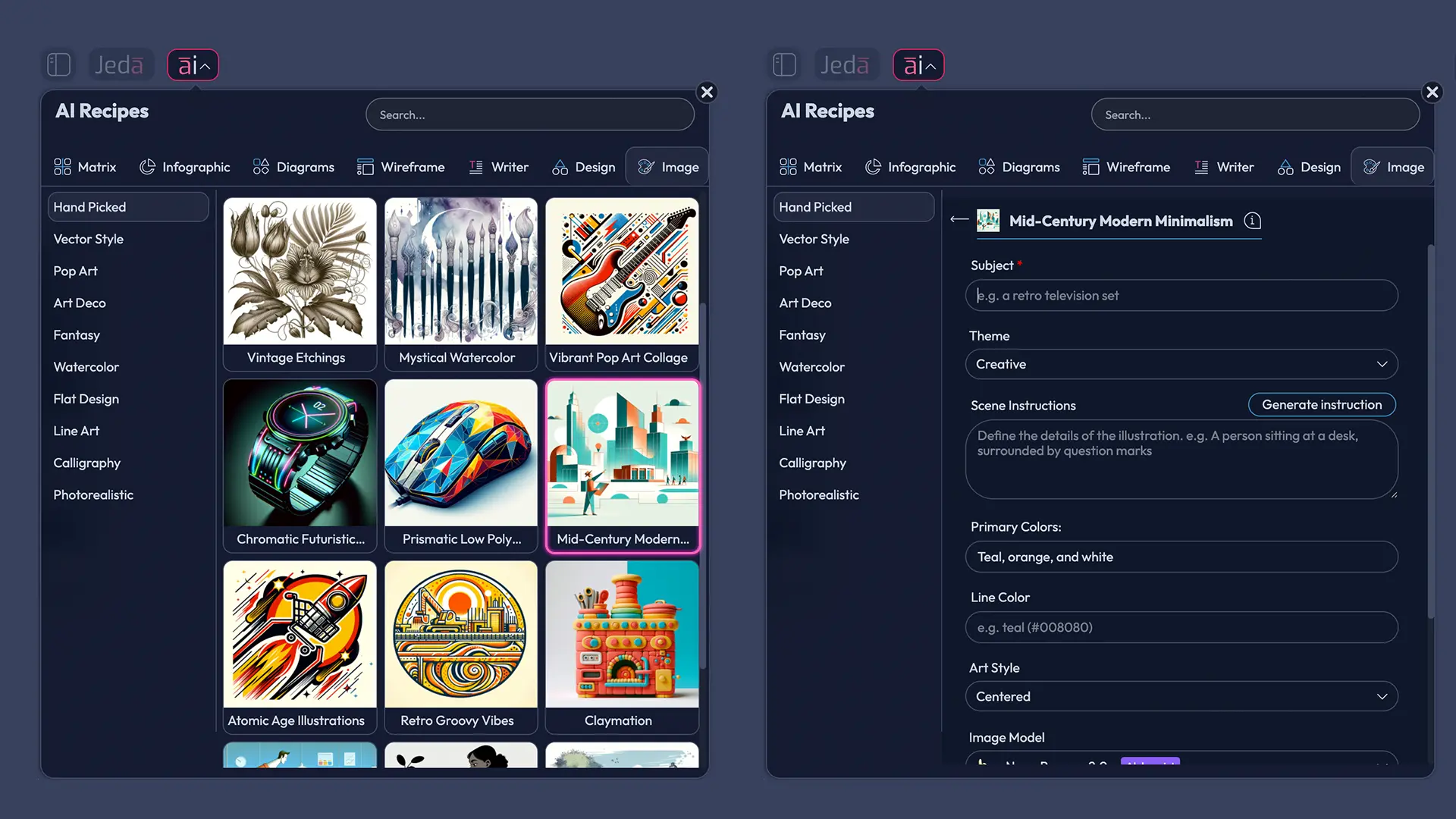
Method 1: Use the Recipe
This is the cleaner path when you want speed and consistency. Open the recipe, fill the fields, pick your models, and generate.
- Open the AI Menu
In Jeda.ai, click the AI Menu in the top-left corner of the canvas to open the Recipes panel.
- Go to the Image category
Choose the Image recipe category, then open the Hand Picked collection and select Mid Century Modern Minimalism.
- Enter the Subject
Add the core subject you want the artwork to revolve around. Keep it concrete: lounge chair, still life vase, abstract sun, record player, reading nook, desert house, or geometric poster.
- Choose the Theme
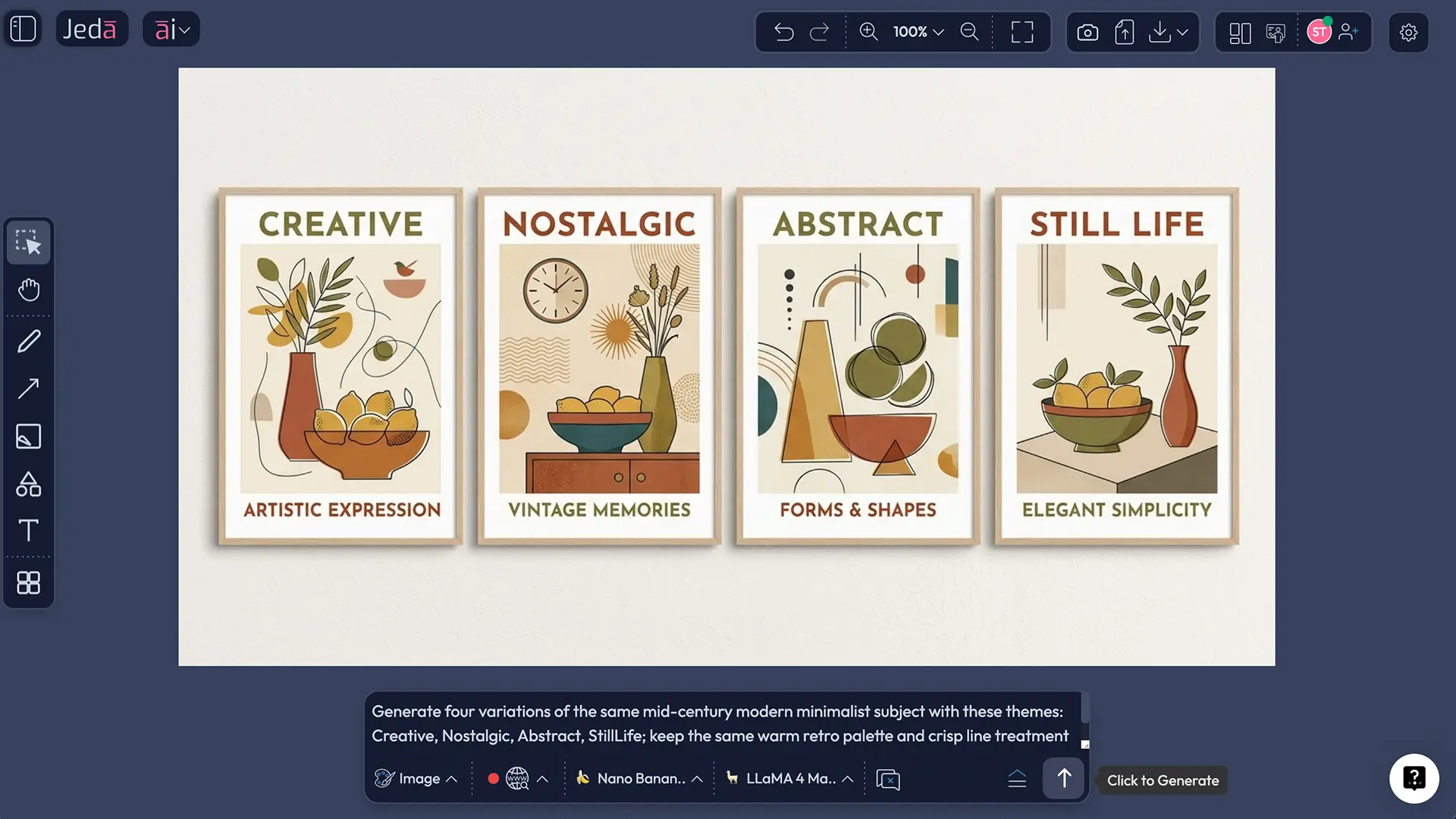
Pick the emotional and stylistic mood that best fits the image. For this recipe, you can choose from options such as Creative, Realistic, Surrealistic, Abstract, Nostalgic, Scenic, StillLife, Nature, and more.
- Write the Scene instruction
Use the scene instruction box to guide composition, background, camera framing, texture, objects, atmosphere, and visual restraint. This is where you make the result feel curated instead of generic.
- Set Primary colors and Line color
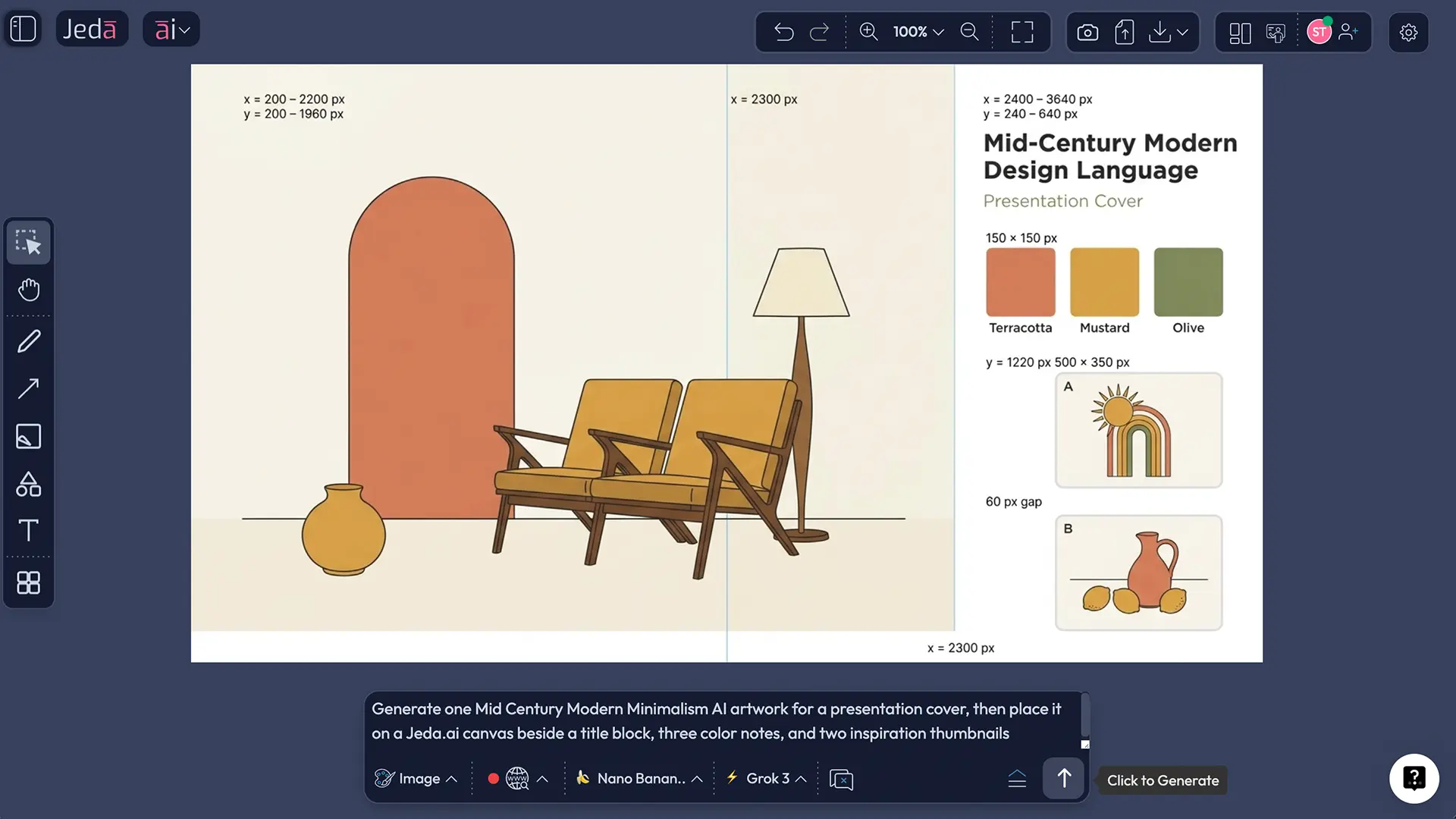
Define a limited palette. Mid-century modern minimalism usually works best with warm neutrals, rust, olive, mustard, walnut brown, muted teal, cream, and a dark line color for crisp separation.
- Pick the image and reasoning models
Choose one image model for rendering and a reasoning model for direction. If you want broader ideation, use parallel reasoning models before generation.
- Generate and review variations
Click Generate, compare the output for balance, negative space, palette discipline, and silhouette quality, then rerun with tighter scene language if needed.
Method 2: Use the Prompt Bar
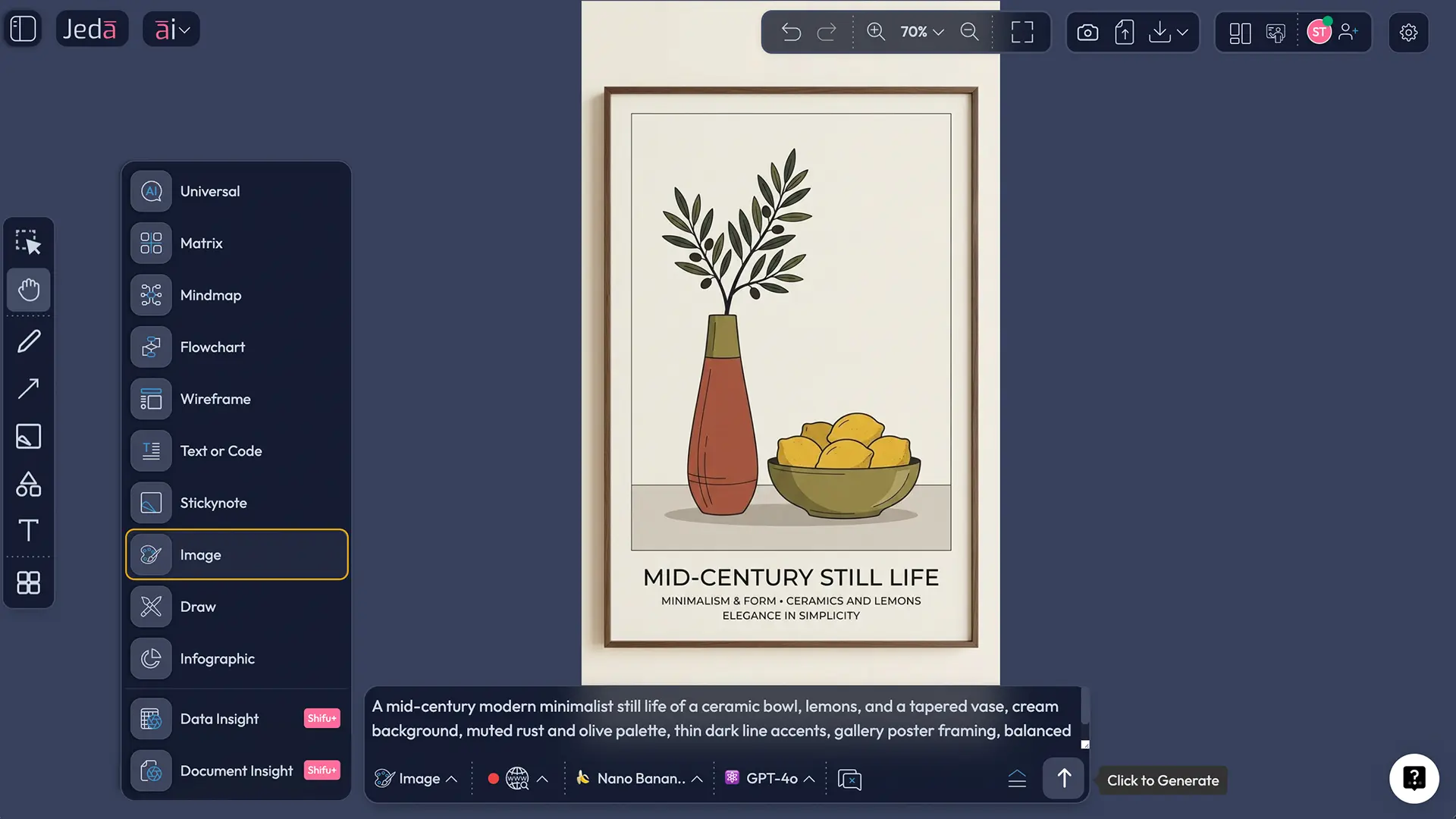
The Prompt Bar is better when you want precise control, quicker iteration, or live web grounding for references and objects. In Jeda.ai, the command name for this route is Image.
- Open the Prompt Bar
Go to the bottom-center Prompt Bar in Jeda.ai and select the Image command.
- Choose your image model
Pick the image model that fits your goal. Use one image model at a time, then pair it with a reasoning model to shape the visual direction.
- Write a structured prompt
Include the subject, style language, theme, palette, line treatment, composition, background, and intended mood. The better the structure, the better the restraint.
- Turn on web search if references matter
If you want current or historically grounded references, use the web search toggle in the Prompt Bar. This is the route to use when live external context helps the image brief.
- Set the reasoning model
Pick a reasoning model for prompt support. If needed, use parallel reasoning models to explore multiple directions before you commit.
- Generate and refine
Run the image, then refine by tightening only one or two variables at a time: subject scale, negative space, palette, or scene wording. Do not rewrite the whole prompt every round unless the result is fully off-track.
A prompt structure that actually works
Mid-century modern minimalism does not like mushy prompts. It likes direction. Think like an art director.
A strong prompt usually has five parts: subject, scene, style anchor, color system, and line instruction.
That one prompt can be reworked into a dozen use cases. Swap the subject, keep the style skeleton, and you get new outputs without losing the visual language.
Best theme and color combinations for this recipe
The Theme dropdown is not decorative fluff. It changes the vibe. So use it like you mean it.
Theme pairings that tend to work well
Palettes that feel unmistakably mid-century modern
- Warm walnut: cream, walnut brown, muted black, mustard
- Palm Springs quiet luxury: sand, clay, sage, dusty pink
- Atomic retro: teal, rust, mustard, charcoal, ivory
- Gallery neutral: bone, taupe, espresso, olive
- Bauhaus-adjacent: beige base with sharper accents of red, blue, yellow, and black
Mid-century modern visuals often balance earthy neutrals with brighter accents. That is one reason they stay flexible. You can keep them calm for brand work or push them harder for poster art.
Where this style works in real projects
This style is not just “nice wall art.” It works well for brand storytelling, presentation covers, product moodboards, editorial graphics, and print-first poster layouts. On an AI Whiteboard, it is especially useful for concept boards because the palette, silhouette, and emotional tone read fast.
Common mistakes to avoid
This is where many otherwise-good generations go sideways.
1. Overloading the scene
Minimalism is not “add thirty tasteful objects.” It is restraint. If the scene feels busy, the style breaks.
2. Making every color loud
Mid-century work usually uses contrast with discipline. One or two accent colors can sing. Seven of them just start a bar fight.
3. Forgetting the line instruction
If you want a crisp poster-like result, say so. Thin charcoal or black line accents can change the whole image behavior.
4. Using vague subjects
“Living room” is weak. “Walnut sideboard with ceramic vase and sunburst clock” is useful.
5. Changing too much between iterations
When refining, change one lever at a time. Palette. Subject scale. Background emptiness. Not all three plus mood plus angle plus texture. That way lies prompt soup.
Frequently asked questions
- What is Mid Century Modern Minimalism AI Art?
- It is AI-generated artwork that blends mid-century modern design language—clean lines, geometric and organic forms, practical composition—with minimalist restraint, negative space, and a reduced palette. The look feels retro, calm, and highly usable for posters, moodboards, and branded visuals.
- Does Jeda.ai have a recipe for Mid Century Modern Minimalism AI Art?
- Yes. In Jeda.ai, you can open the AI Menu, go to the Image category, browse the Hand Picked collection, and select the Mid Century Modern Minimalism recipe for a guided generation flow.
- What is the difference between the Recipe and the Prompt Bar?
- The Recipe gives you a guided form with structured inputs such as Subject, Theme, Scene instruction, colors, and model selection. The Prompt Bar gives you more manual control, faster iteration, and access to the web search toggle when live reference grounding matters.
- What should I write in the Subject field?
- Use a concrete focal object or scene. Good examples include lounge chair, ceramic vase, abstract sun, desert home facade, record player, reading nook, still-life fruit bowl, or stylized portrait. Specific subjects produce cleaner results than broad category words.
- How should I use the Scene instruction box?
- Use it to direct composition, background, object placement, negative space, texture, and atmosphere. This field is where you turn a generic style prompt into something art-directed and commercially usable.
- Can I use multiple models for this recipe?
- You choose one image model for rendering. On the reasoning side, Jeda.ai supports multiple reasoning models in parallel for broader ideation, but this workflow does not rely on an aggregation step for the final image output.
- Are the generated images editable on the canvas?
- Not in the same way as Smart Shapes. Image outputs in Jeda.ai are static image results, so they are not editable like generated diagrams, mind maps, or matrix objects.
- What colors usually work best for mid-century modern minimalist art?
- Warm neutrals and earthy accents are the safest starting point: cream, beige, walnut brown, mustard, olive, rust, muted teal, and charcoal. A limited palette almost always looks better than a loud rainbow treatment for this recipe.
Sources & further reading
- [1]
Alicja Zelazko (2025) . “What Is Mid-Century Modern Design?” Encyclopaedia Britannica.
View Source ↗ - [2]
Tate (2026) . “Minimalism” Tate.
View Source ↗ - [3]
Museum of Modern Art (2009) . “What Was Good Design? MoMA's Message, 1944–56” MoMA.
View Source ↗ - [4]
Museum of Modern Art (2011) . “Living in a Modern Way: California Design 1930–65” MoMA.
View Source ↗ - [5]
Chinmay Kulkarni, Stefania Druga, Minsuk Chang, Alex Fiannaca, Carrie Cai, Michael Terry (2023) . “A Word is Worth a Thousand Pictures: Prompts as AI Design Material” arXiv.
View Source ↗ - [6]
Jon McCormack, Maria Teresa Llano, Stephen James Krol, Nina Rajcic (2024) . “No Longer Trending on Artstation: Prompt Analysis of Generative AI Art” arXiv.
View Source ↗
Start Mid Century Modern Minimalism AI Art in Jeda.ai
Join over 150,000+ users using Jeda.ai’s AI Workspace and AI Whiteboard to turn ideas into polished visuals, strategy boards, and creative assets.
Try Free Template