Most AI image prompts chase spectacle. Bigger worlds. Wilder lighting. More drama. That’s fun, sure. But Slice of Life AI Art works because it does the opposite. It takes an ordinary human moment—waiting for tea, fixing a bicycle chain, sharing an umbrella, staring out of a bus window—and turns it into something quietly memorable.
That’s exactly why the Slice of Life in Monochrome recipe matters inside Jeda.ai. Instead of wrestling with an empty prompt box and hoping the model reads your mind, you can use a guided image recipe in a Visual AI workflow to shape a mood, scene, palette, and line treatment with more control. In Jeda.ai’s AI Workspace and AI Whiteboard, you can generate static image outputs from the recipe or from the Prompt Bar using the Image command, while using web search in the Prompt Bar when you want current visual references or grounded context. The platform’s workflow and component rules come from the resource-page engine and user guide.
A quick note on the art language. Slice-of-life refers to a realistic or naturalistic presentation of ordinary life rather than heightened fantasy or plot-heavy spectacle. Merriam-Webster defines it as the accurate transcription of a segment of actual life experience. Monochrome, meanwhile, refers to an artwork or image made in one hue or in varying tones of a single color; in photography that often means black, white, and gray. Tate and Britannica line up neatly on that point.
What is Slice of Life AI Art?
Slice of Life AI Art is image generation focused on believable, intimate, everyday scenes rather than epic visual fireworks. Think laundromats, alley tea stalls, late-night diners, train platforms, kitchen tables, school corridors, rainy sidewalks. The point is not scale. The point is recognition.
And when you render those moments in monochrome, the image changes character. Color stops doing the emotional heavy lifting, so composition, contrast, texture, shadow, gesture, and negative space have to do the work. Adobe’s black-and-white photography guidance makes the same practical point: once color drops out, shapes, tonal differences, texture, and lighting become the main storytelling tools.
That makes this recipe especially good for:
- Quiet storytelling
Show a believable human moment without needing spectacle or fantasy overload.
- Stronger mood control
Monochrome pushes attention toward light, shadow, texture, framing, and expression.
- Art-direction clarity
Subject, scene instruction, primary colors, and line color give you more precise control.
- Reference-backed prompting
Use Prompt Bar web search when you want era cues, location details, or stylistic references.
- Fast exploration
Swap themes like Realistic, Sentimental, Scenic, Dramatic, or Nostalgic without rebuilding the prompt from zero.
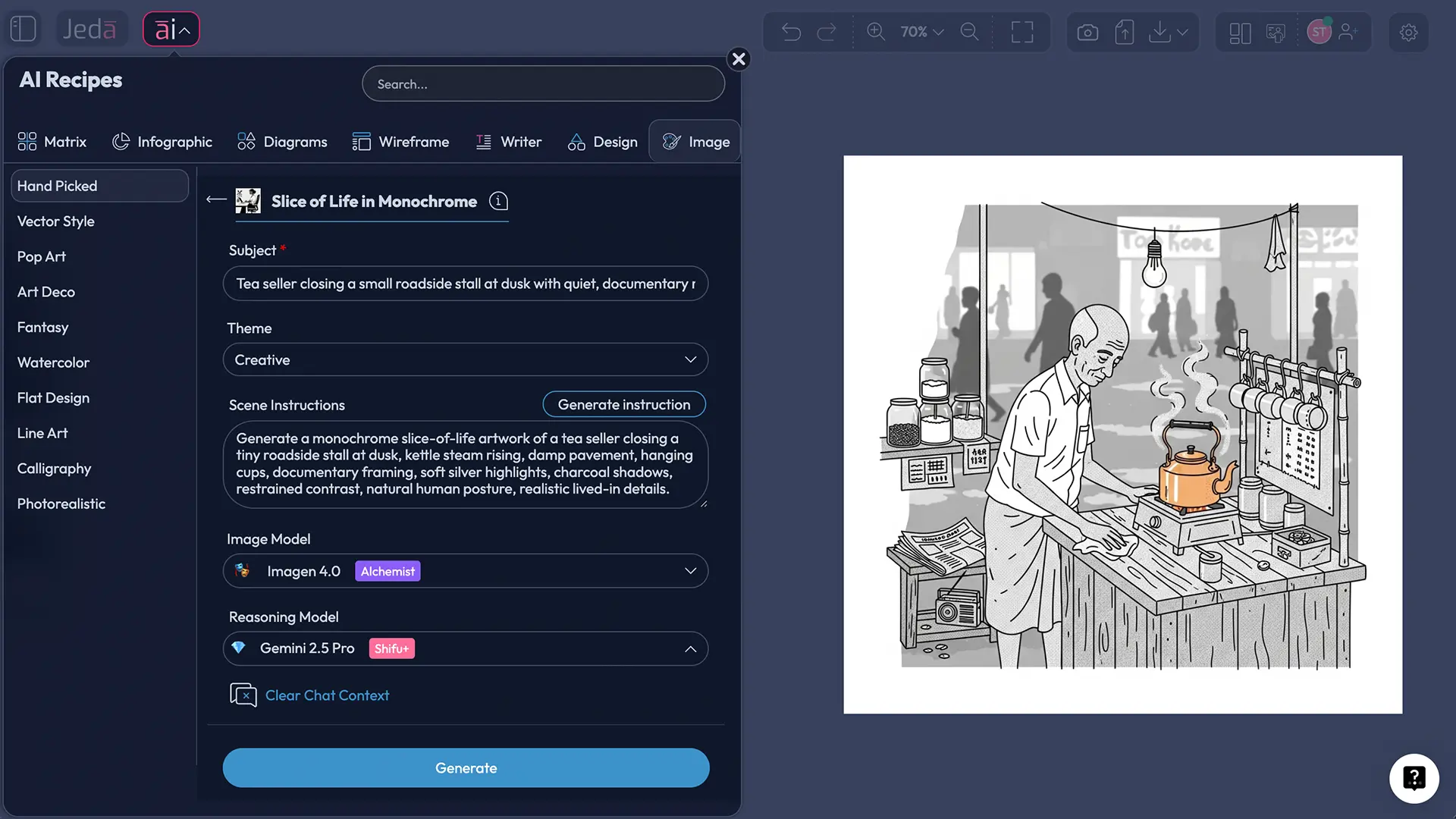
Why monochrome works so well for everyday scenes
Because ordinary life is already dense with visual information. Too dense, sometimes. Color can make an image richer, but it can also make it busier. Monochrome strips away one layer and forces the eye to pay attention to what actually matters.
A hand reaching for a cup. Steam near a window. Wet pavement. A tired look. Wrinkled fabric. The angle of fluorescent light in a convenience store at 11:40 p.m.
That’s not nothing. That’s the whole scene.
Tate’s definition of monochrome is blunt and useful: one color. Britannica adds the black-and-white and gray interpretation used in film and photography. In practical image generation terms, that means you can build stronger outputs by thinking in values and contrast first, then using theme and line work to guide tone.
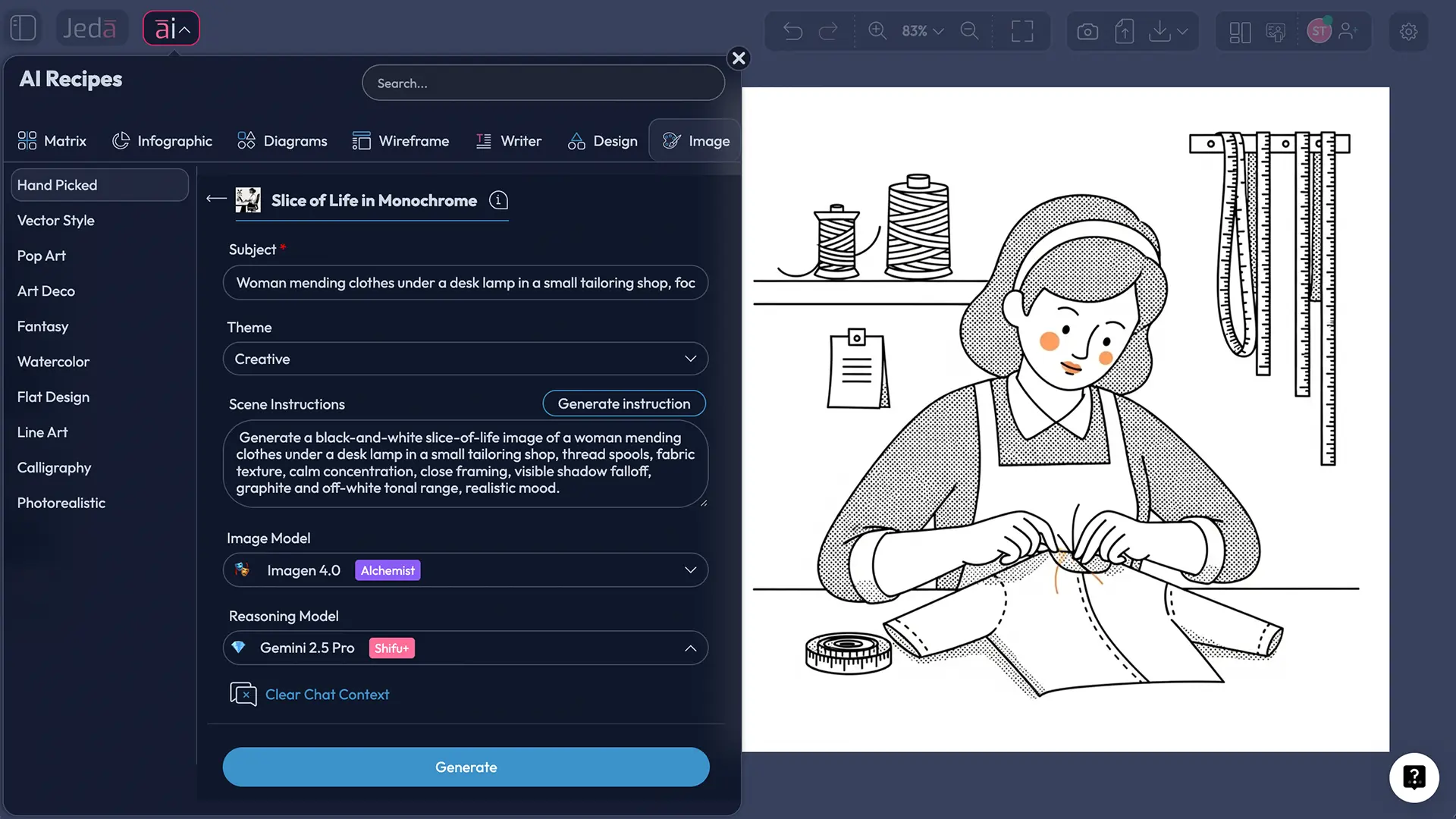
What you can control in the Slice of Life in Monochrome recipe
This Jeda.ai image recipe sits under the Hand Picked category and uses a guided structure rather than a blank start. The available inputs you gave matter because they shape the output more than people expect.
You start with a required Subject. That is the human or focal anchor of the image: “elderly tailor,” “schoolboy on a bicycle,” “street food vendor,” “woman reading by train window,” “father and daughter at bus stop.” Then you choose a Theme such as Creative, Realistic, Surrealistic, Absurd, Abstract, Fantasy, Mythical, Magical, Space Travel, Science Fiction, Futuristic, Whimsical, Funny, Sentimental, Uplifting, Action, Dramatic, Nostalgic, Scenic, Portrait, StillLife, or Nature. After that, the Scene instruction field lets you specify the exact visual situation, while Primary colors and Line color let you keep the monochrome treatment disciplined rather than muddy. The Prompt Bar also supports the Image command, image-model selection, reasoning-model selection, and a web-search toggle. Image outputs are static rather than editable objects.
Here’s the useful split:
- Subject decides who or what the viewer emotionally tracks.
- Theme decides the emotional lens.
- Scene instruction decides specificity.
- Primary colors decide tonal restraint.
- Line color decides edge character.
- Image model decides rendering style and fidelity.
- Reasoning model helps shape the prompt logic behind the image.
That division is half the battle. Most weak prompts fail because they blur all of those into one giant sentence and then pray to the pixel gods.
How to create Slice of Life AI Art in Jeda.ai
You asked for two methods, and for this recipe page that’s the right move.
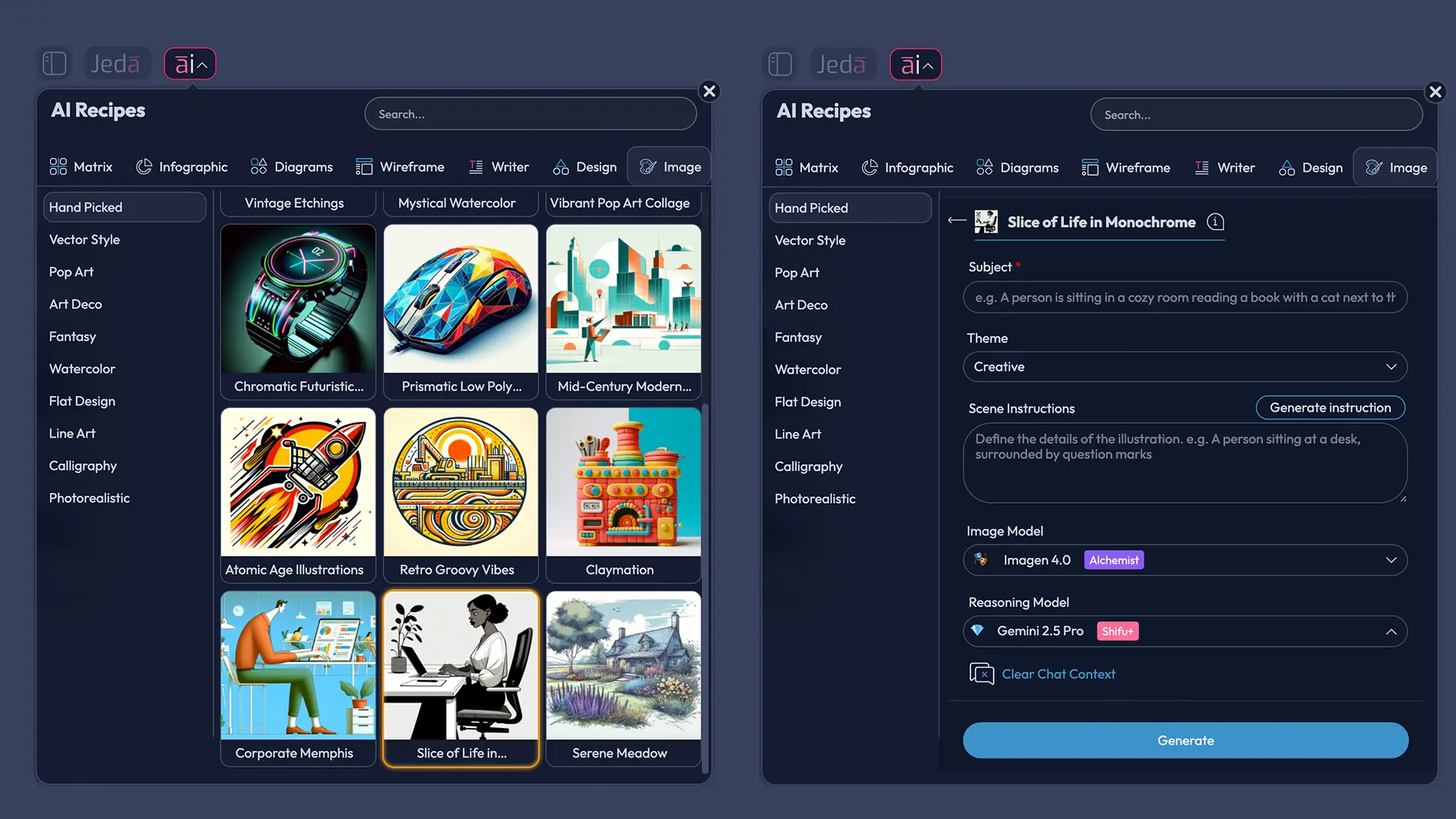
Method 1: Use the Recipe
This is the faster route when you want a guided workflow with fewer prompt-writing mistakes.
- Open the AI Menu
In Jeda.ai, open the AI Menu from the top-left area of the workspace and go to the Image Recipes section, then find the Hand Picked category.
- Choose Slice of Life in Monochrome
Open the Slice of Life in Monochrome recipe and start with the required Subject field. Pick one clear everyday focal point such as a vendor, commuter, tailor, child, cook, or reader.
- Set theme and scene direction
Choose a Theme such as Realistic, Nostalgic, Sentimental, Scenic, or Dramatic, then write a scene instruction that defines place, gesture, light, weather, framing, and emotional mood.
- Refine tone with color controls
Use Primary colors and Line color to keep the image in a disciplined monochrome range. Think in charcoal, graphite, off-white, silver, smoke, or cool gray instead of color-heavy palettes.
- Select the image model
Pick the image generation model that fits your goal, then generate the artwork. Jeda.ai supports multiple image models for image creation, and the output appears as a static image asset.
- Review and regenerate with precision
Check whether the image feels lived-in rather than staged. Tighten the scene instruction if needed by clarifying action, setting, time of day, framing, and texture cues.
Method 2: Use the Prompt Bar
This method is better when you want more creative freedom, want to test different reasoning models, or need web-backed reference context.
In the Prompt Bar, select Image, choose the image model, choose a reasoning model, and turn Web Search on when you need era details, location cues, or reference grounding. Then write a prompt that names the subject, setting, monochrome treatment, shot type, emotional mood, and key textures. The Prompt Bar supports web search as a platform feature, and the Image workflow uses separate selectors for image and reasoning models. The user guide also confirms the currently listed image models and reasoning models.
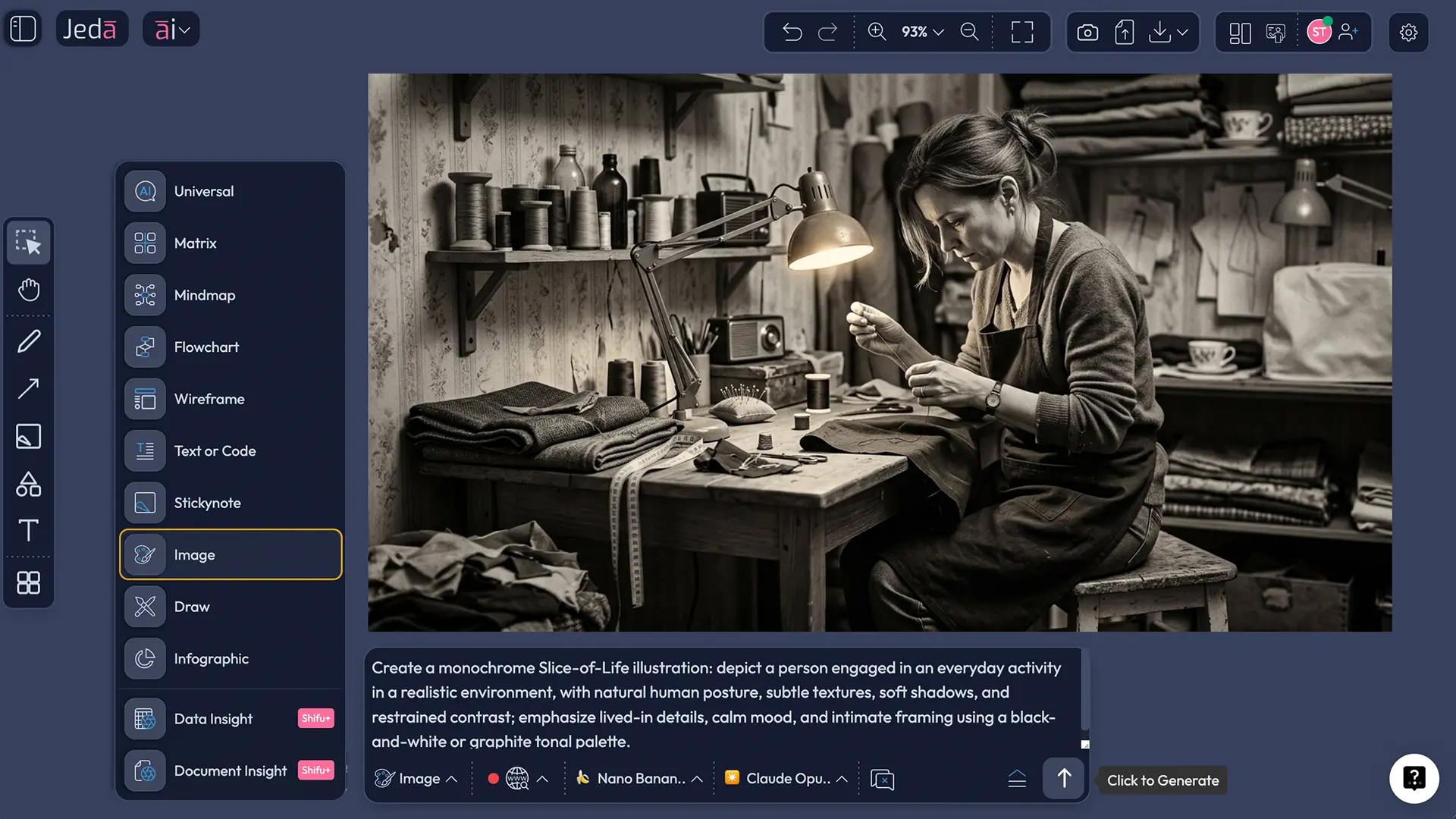
A strong Prompt Bar structure looks like this:
Subject + everyday action + setting + monochrome mood + composition + texture + exclusions
Example:
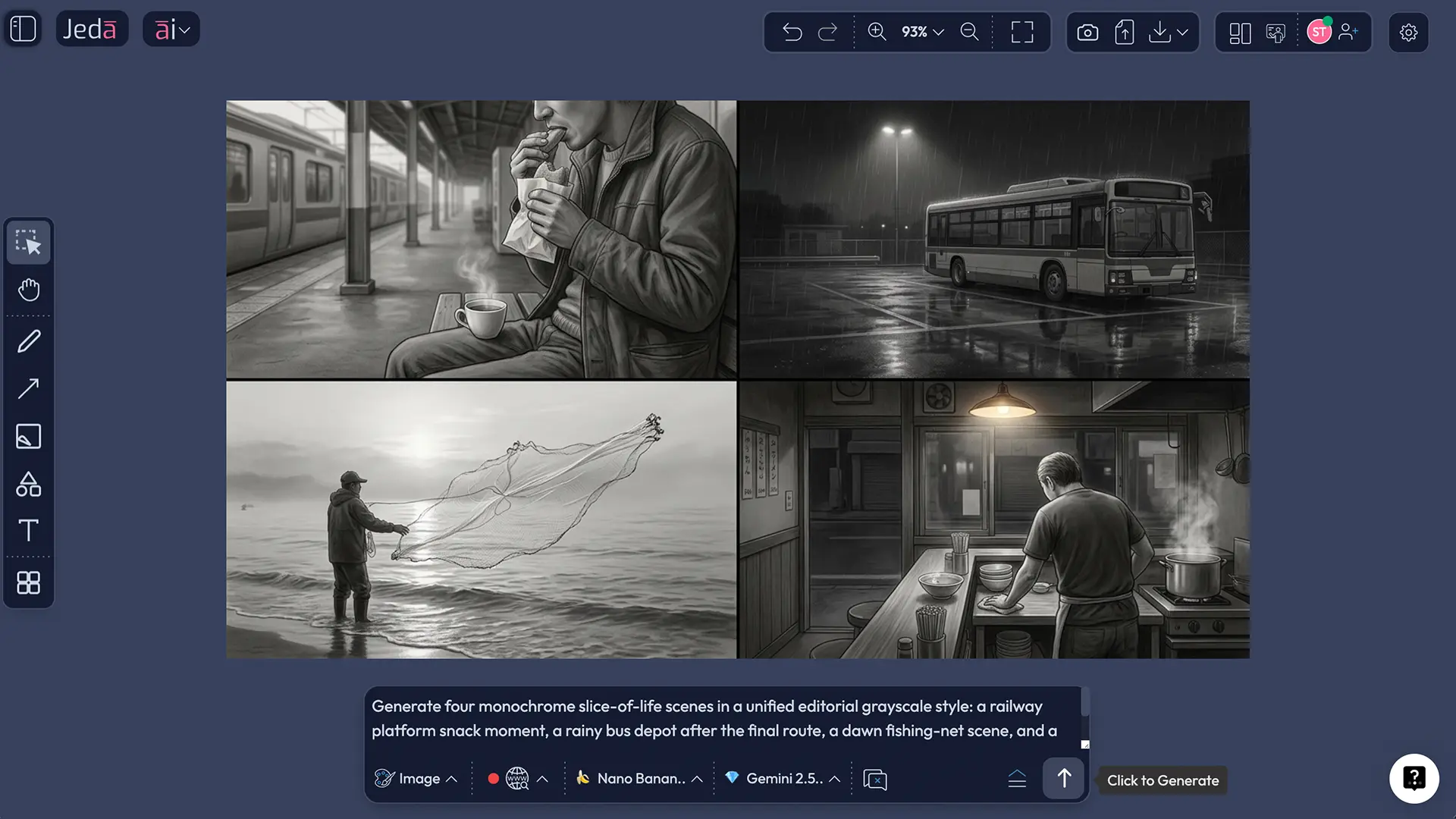
Create a slice-of-life monochrome image of an exhausted ramen cook closing a tiny shop after midnight, steam still rising from the last pot, reflective wet pavement outside, documentary framing, soft grain, restrained highlights, graphite-and-silver tonal range, subtle linework, no neon color, no cinematic sci-fi styling.
Best prompt patterns for Slice of Life AI Art
The trick is to be concrete without choking the model.
What to include
What to avoid
Common mistakes:
- Confusing monochrome with flatness. Monochrome needs tonal depth, not lifeless gray fog.
- Using vague subjects. “A person in a place” is the fastest route to bland output.
- Overdirecting every object. Let the model solve some scene details.
- Forgetting texture cues. Steam, concrete, fabric, glass, rain, paper, dust, and metal matter more in monochrome.
- Choosing the wrong theme. Funny or Whimsical can work, but they change the emotional grammar fast.
Example prompts you can use right away
Realistic
A monochrome slice-of-life image of a woman repairing a school uniform under a single desk lamp, late evening tailoring shop, spools of thread, worn wooden table, soft silver highlights, deep charcoal shadows, documentary photography feel, subtle grain, quiet concentration.
Nostalgic
Create a slice-of-life monochrome scene of two brothers sharing roasted corn beside a railway platform at dusk, drifting steam, old metal bench, distant signal lights rendered in grayscale, gentle contrast, sentimental mood, textured sky, natural candid composition.
Dramatic
Generate a monochrome slice-of-life image of a bus driver alone at the depot after the final route, rain on windshield, harsh overhead light, reflective concrete, cinematic but realistic, strong contrast, restrained linework, no exaggerated action.
Scenic
Create a scenic monochrome slice-of-life artwork of early-morning fishermen sorting nets in shallow fog, layered textures, subtle backlight, wide composition, clean grayscale range, quiet atmosphere, grounded realism.
Choosing models inside Jeda.ai
For this workflow, you noted that parallel multi-LLM is not possible for image models, while the reasoning-model list can support parallel selection without aggregation in the contexts you specified. The Jeda.ai user guide confirms the image-model lineup shown for the Image command and explains that image generation uses a dedicated image model plus a reasoning model in the Prompt Bar. It also confirms that web search is a platform feature and that image outputs are static assets rather than editable smart shapes.
A practical way to think about the choice:
- Use a faster image model when you’re iterating on scene direction.
- Use a higher-end image model when the subject and mood are already locked.
- Use a strong reasoning model when the scene needs subtle narrative control, period cues, or grounded reference handling.
- Use Prompt Bar web search when the scene depends on current places, authentic location cues, or real visual reference logic.
Frequently Asked Questions
- What is Slice of Life AI Art?
- Slice of Life AI Art focuses on believable, everyday human moments rather than spectacle. It usually works best when the prompt names one ordinary action, one grounded setting, and one emotional mood so the image feels observed instead of staged.
- Why use monochrome for slice-of-life images?
- Monochrome removes color distractions and shifts attention toward contrast, texture, lighting, gesture, and composition. That makes ordinary scenes feel more intentional and often more emotionally focused, especially when the prompt already contains strong physical details.
- Is Slice of Life in Monochrome a Jeda.ai recipe?
- Yes. In this page brief, it is positioned as an Image Recipe called Slice of Life in Monochrome under the Hand Picked category, with guided inputs such as Subject, Theme, Scene instruction, Primary colors, and Line color.
- Can I create this style from the Prompt Bar instead of the recipe?
- Yes. Select the Image command in the Prompt Bar, choose your image model and reasoning model, optionally enable web search, and write a more detailed prompt that defines subject, everyday action, setting, mood, and tonal treatment.
- Does Jeda.ai support web search for this workflow?
- Yes, through the Prompt Bar. Web search is a platform feature in Jeda.ai, and for this recipe page the workflow notes specify using it from the Prompt Bar rather than from the guided recipe form.
- Can I edit the generated image like a diagram or matrix?
- No. Jeda.ai’s generated images are static image outputs rather than editable smart-shape visuals. That makes them great for visual creation, but not for node-level editing like a flowchart, matrix, or mind map.
- What kind of subjects work best for Slice of Life AI Art?
- Subjects with ordinary actions usually work best: commuters, cooks, readers, drivers, vendors, students, repair workers, parents, neighbors, or solitary figures in lived-in spaces. The more specific the action, the stronger the image usually gets.
- How do I keep the image from becoming generic?
- Use concrete scene anchors. Add one setting, one action, one lighting cue, one texture cue, and one mood direction. Avoid generic language like ‘beautiful scene’ or ‘nice atmosphere,’ because that gives the model too much empty space.
- Which themes fit this recipe best?
- Realistic, Nostalgic, Sentimental, Scenic, Portrait, StillLife, and Dramatic are usually the strongest fits. Funny, Whimsical, or Absurd can work too, but they shift the image away from quiet realism and into stylized interpretation.
- Who is this page useful for?
- It helps creators, marketers, storytellers, brand teams, and visual experimenters who want emotionally grounded AI imagery. It is also useful for anyone building moodboards or editorial visuals inside an AI Workspace without starting from scratch.
Sources & further reading
- [1]
Merriam-Webster (2026) . “slice-of-life” Merriam-Webster Dictionary.
View Source ↗ - [2]
Tate (2026) . “Monochrome” Tate Art Terms.
View Source ↗ - [3]
Britannica Dictionary (2026) . “Monochrome” Britannica Dictionary.
View Source ↗ - [4]
Adobe (2026) . “Black-and-white photography tips for beginners” Adobe Creative Cloud.
View Source ↗ - [5]
Adobe (2026) . “Mastering photography composition techniques” Adobe Creative Cloud.
View Source ↗
Start Your Slice of Life AI Art Workflow
Join over 150,000 users using Jeda.ai to create visuals, ideas, and image-driven storytelling inside one AI Workspace.
Try Jeda.ai Free