You ask an AI for a SWOT analysis. Four quadrants appear. Looks complete, right? But something feels off. The strengths are generic—"we have great people, solid technology." The opportunities are surface-level—"growing demand for automation." Missing is the strategic depth that would actually inform a decision. So what went wrong? The problem isn't the AI. It's the precision of your prompt. Jeda.ai's Dynamic Prompt feature—a Shifu+ capability—closes that gap by asking you clarifying questions before generation, so the AI creates more targeted, strategic analysis in seconds. Over 150,000 professionals use Jeda.ai's AI Workspace to accelerate their thinking. Now you'll learn to refine your prompts strategically.
What Is Dynamic Prompt?
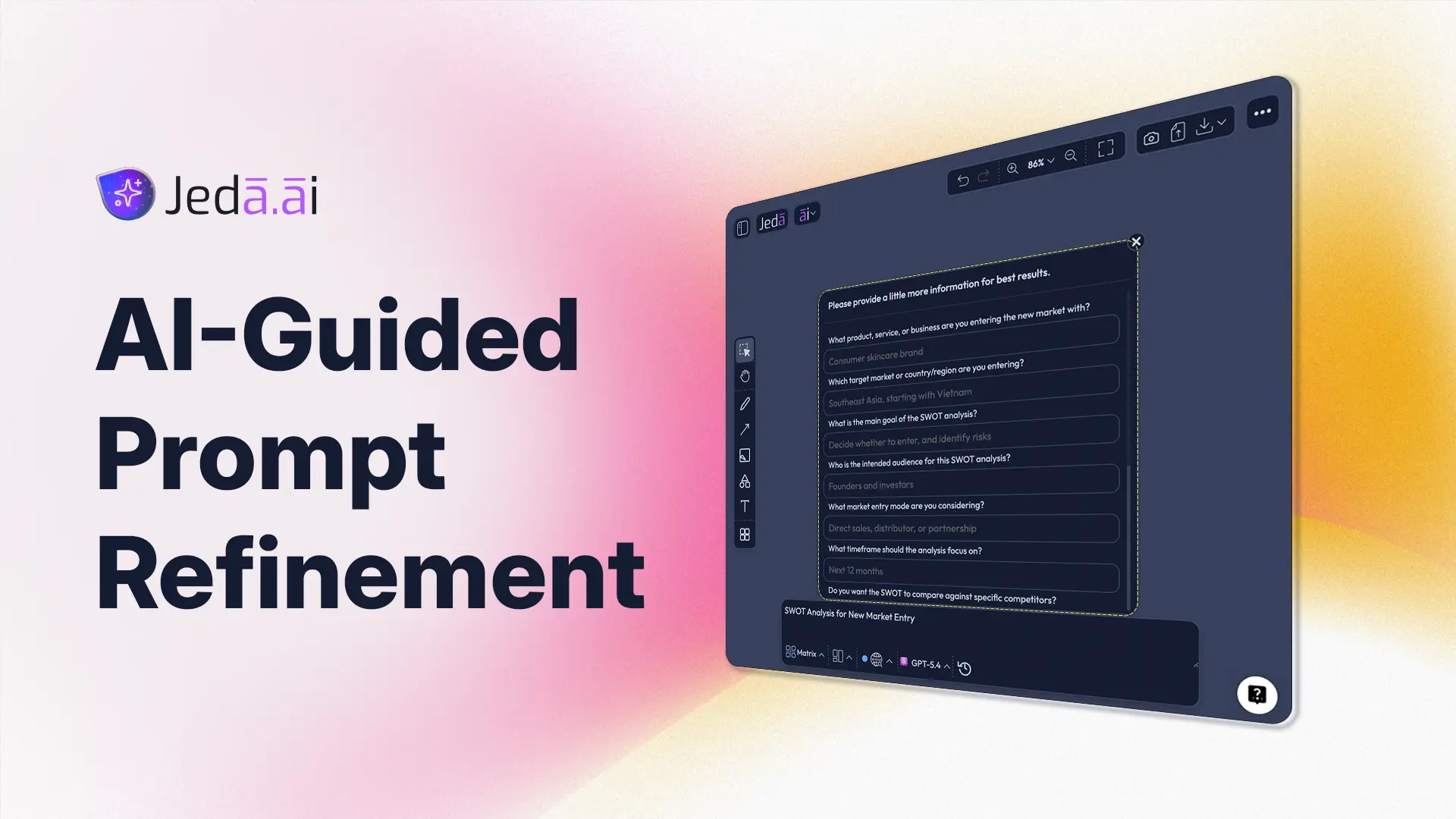
Dynamic Prompt is a Shifu+ feature that opens a guided form asking clarifying questions (audience, goals, competitive landscape, context) before you generate a visual framework. Instead of you guessing what context matters, the form ensures the AI has all the strategic information it needs. Click the Dynamic Prompt button (🪄 cursor icon on the Prompt Bar), answer four simple questions, and when you click Generate, the AI uses all that context to create deeper, more targeted analysis.
Here's what makes it different from just typing a more detailed prompt: You might write, "Create a SWOT analysis for our new product." That works. But you won't think to mention your three main competitors, your launch timeline, or the regulatory environment you're navigating. The Dynamic Prompt form asks exactly those questions. It's the difference between "I got an analysis" and "I got an analysis that actually informs strategy."
The Core Problem
When users write prompts without guidance, they often miss critical context. They think about what's top-of-mind, not what the AI needs to produce strategic output. Free-form prompts result in generic frameworks—templates that could apply to anyone, anywhere. They don't feel earned; they feel generated. And in strategy work, that gap between "looks complete" and "actually useful" is significant.
How Dynamic Prompt Works
The mechanism is simple but powerful. You type a prompt into the Prompt Bar—say, "Create a competitive positioning matrix for our new SaaS feature." Instead of hitting Generate immediately, you click the Dynamic Prompt button. A guided form slides in on the right side with four fields:
- Audience: Who is this analysis for? Executives deciding budget? A product team defining messaging? The specificity here changes everything.
- Goals: What decision does this analysis support? Are you trying to find a market gap? Justify a price point? Ensure competitive alignment? Clarity here focuses the AI.
- Competitive Landscape: Name 3–5 direct competitors or market forces that matter. This grounds the analysis in reality, not theory.
- Additional Context: Industry trends, regulatory changes, internal constraints—whatever else shapes the strategy.
You fill in these fields, click Generate, and the AI incorporates all this context into your framework. It's chain-of-thought prompting applied to visual strategic analysis—what research by Wei et al. (2023) shows significantly improves LLM reasoning and output quality.
Why Guided Prompts Beat Free-Form Prompts
You could spend 10 minutes crafting the perfect free-form prompt, mentioning all the context you think matters. Or you could spend 2 minutes answering a structured form that asks the right questions. Research by Deng et al. (2024) on prompt engineering shows that structured prompting outperforms unstructured free-text prompts for complex analytical tasks. Here's why:
- Structured Context
Dynamic Prompt's form ensures nothing critical is missed. Free-form prompts rely on you knowing what context matters.
- Strategic Depth
Answering guided questions surfaces competitive nuances and strategic constraints. Generic prompts miss the edges where real strategy lives.
- Consistency
The same form, applied across your team, means everyone's prompts capture the same depth. No hit-or-miss analysis.
Real teams report 30–50% improvement in framework depth and strategic relevance when using Dynamic Prompt versus free-form prompts. That's not a small difference. When a SWOT analysis informs a product roadmap, moving from surface-level to strategic can shift resource allocation by millions.
Use Cases: When Dynamic Prompt Shines
Dynamic Prompt is most powerful when the decision is complex, the competitive landscape is nuanced, or the audience is demanding. Let's walk through three scenarios.
SWOT Analysis for New Market Entry
Picture a product manager. Her company—a project management SaaS—is entering the European market. She needs a SWOT analysis to brief leadership.
Without Dynamic Prompt, her prompt might be: "Create a SWOT analysis for European market entry."
The result: Strengths (brand recognition, product maturity), Weaknesses (no local presence, regulatory uncertainty), Opportunities (growing demand), Threats (established competitors). True, but generic. Doesn't capture CloudFlow's specific market position or timeline.
With Dynamic Prompt, she fills in the form:
- Audience: C-suite deciding regional budget (€2M, 18-month commitment)
- Goals: Determine if Europe is a differentiation opportunity or table-stakes for survival
- Competitive Landscape: Asana (strong in US, growing in Europe), Monday.com (local partnerships), Jira (enterprise locked-in)
- Additional Context: GDPR compliance adds 3-month delay; hiring local sales takes 6 months
Result: A SWOT that's grounded in reality.
- Strengths: "Installed base of 50K+ US users—case studies and references for European enterprise deals," "GDPR-compliant architecture built in (competitors still retrofitting)"
- Weaknesses: "No local hiring capacity in 2025 (sales ramp is 6 months vs. 3-month competitor launch window)," "Brand recognition is zero outside US"
- Opportunities: "GDPR as compliance moat—enterprise buyers trust established certifications," "Gartner forecasts 40% of European firms will overhaul PM tools by 2026"
- Threats: "Monday.com's local partnerships threaten distribution," "Asana's 3-year European roadmap already funds competitive feature parity"
This SWOT actually informs strategy. It shows where to invest (GDPR as differentiator), where to partner (sales capacity), and what risks to hedge (local distribution).
Competitive Positioning Strategy
Marketing team. New feature launch. They need to position it against five competitors.
Free-form prompt: "Create a competitive positioning matrix for our new AI workflow feature."
Result: Generic features compared (AI capability, ease of use, cost). Everyone looks similar. No differentiation angle emerges.
With Dynamic Prompt:
- Audience: Product marketing (messaging for launch campaign and sales collateral)
- Goals: Identify the one thing we own that competitors can't easily copy
- Competitive Landscape: Asana Intelligence (launches Q2, broad automation), Monday.com AI Assistant (specific to Monday templates), Jira Automation (enterprise, rule-based, not generative), Notion AI (document-first, not workflow)
- Additional Context: We built with Claude + Anthropic partnership; competitive advantage is reasoning quality, not just feature breadth
Result: A positioning matrix that clarifies differentiation.
- Our feature: "AI that understands workflow context—not just executing rules, but reasoning about what comes next in your process"
- Asana Intelligence: "Broad automation, good for power users—but doesn't reason about your workflow"
- Monday.com AI: "Template-locked; can't adapt to custom workflows"
- Jira: "Rule-based automation; no reasoning layer"
- Notion AI: "Document intelligence, not workflow intelligence"
That clarity—we own "workflow reasoning" while competitors own "automation breadth"—changes the entire go-to-market strategy. Sales can now explain why customers should choose us, not just that we have AI.
Complex Business Model Refinement
Startup pivoting its revenue model. CEO needs a Business Model Canvas that reflects the new economics.
Without guidance: "Create a Business Model Canvas for our subscription + usage-based hybrid model."
Result: A template canvas. Revenue streams shows "subscriptions + usage fees"—obvious, but no strategic insight.
With Dynamic Prompt:
- Audience: Executive leadership and board (deciding on unit economics and fundraising messaging)
- Goals: Surface the key financial and operational levers in our hybrid model
- Competitive Landscape: SaaS incumbents on pure subscription (predictable revenue, churn risk), consumption-based pricing (unpredictable revenue, high-touch support), Jeda.ai's approach (multi-tier plans with usage limits)
- Additional Context: We need predictable revenue to satisfy investors; customers want transparent cost control; we have 40% annual churn on pure subscription
Result: A Business Model Canvas that reveals the why behind the model.
- Revenue Streams: "Subscription ($500–2K/month based on features) + Usage overage ($10 per 100 requests)" — shows the lever (stickiness at base level, revenue upside from engagement)
- Cost Structure: "Team expansion (support for usage tracking) 15% increase," "Payment infrastructure complexity" — shows the tradeoff
- Customer Segments: "SMBs wanting predictable cost" (subscription base) + "Power users wanting unlimited potential" (usage upside)
- Value Proposition: "Transparent cost control" (we're solving churn from "surprise bills" competitors cause)
That clarity—we're not just slapping "usage fees" onto subscriptions, we're solving a specific customer pain—changes pricing strategy, sales messaging, and investor narrative.
How to Use Dynamic Prompt in Jeda.ai
Two methods get you to Dynamic Prompt. Use Method 1 if you want a pre-structured recipe; use Method 2 if you want custom control. Both access the same guided form.
Method 1 — AI Menu (Recommended)
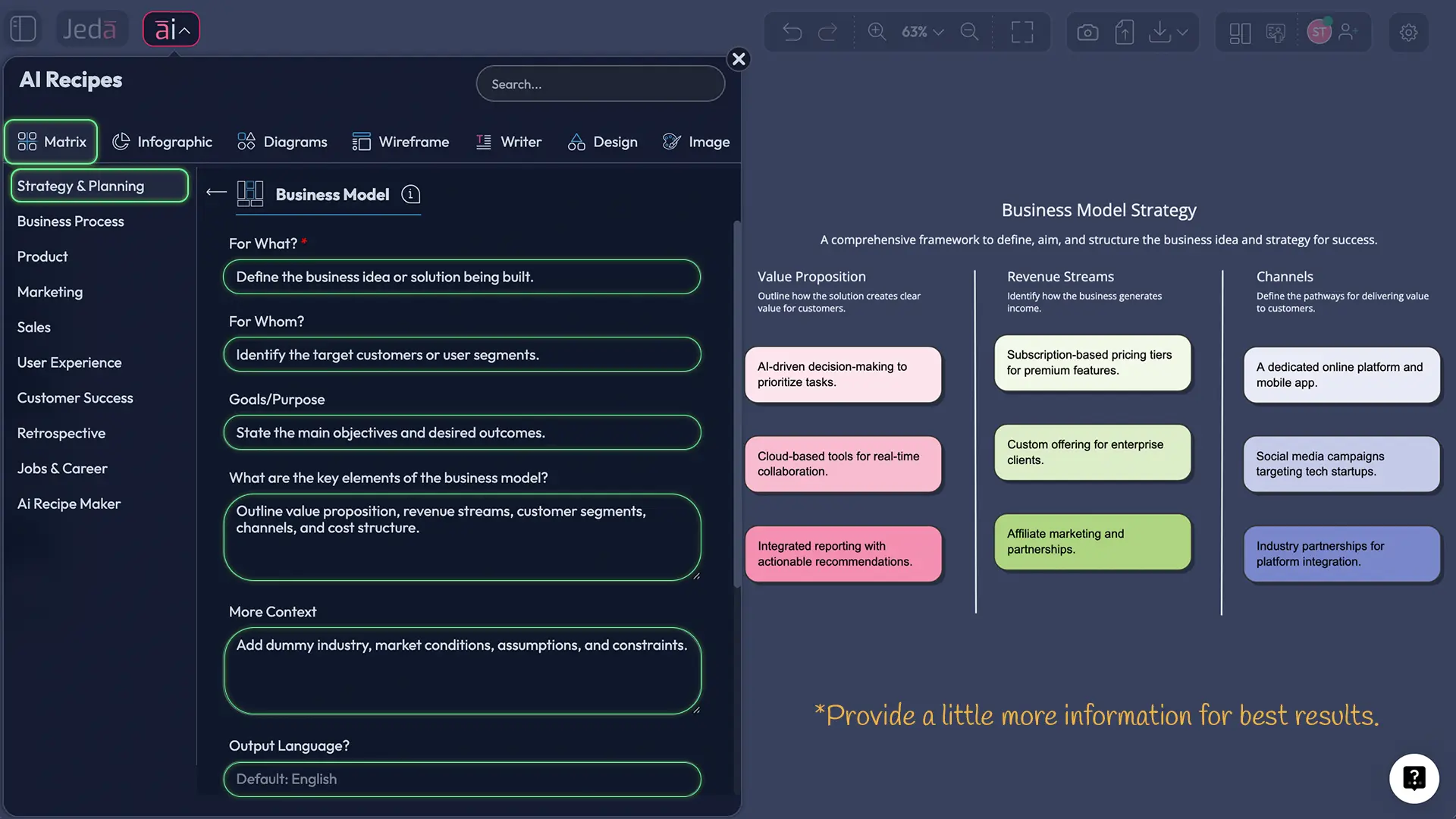
The AI Menu gives you pre-tested, pre-structured recipes that work beautifully with Dynamic Prompt's guided form approach. Here's how:
- Click the "ai∨" button at the top-left corner of your canvas.
- The AI Recipes panel opens. Select the Matrix category (or Diagram/Mindmap for other frameworks).
- Browse available recipes: SWOT Analysis, Business Model Canvas, Lean Canvas, Competitive Positioning, Risk Analysis, and more.
- Click the recipe you want. A guided form opens—this form is the Dynamic Prompt interface.
- Fill in the recipe-specific fields:
- For What? (What are you analyzing?)
- For Whom? (Who's the audience?)
- Goals/Purpose? (What decision does this inform?)
- Internal Factors (Strengths/Weaknesses context)
- External Factors (Opportunities/Threats context)
- More Context (Anything else we should know?)
- At the bottom, you'll see options:
- Output Language (default: English)
- Reasoning Model (choose an LLM or enable Multi-LLM Agent for Shifu+)
- Layout (Auto, Column, or Grid for Matrix output)
- Advance (toggle this if you want to add files or enable Web Search)
- Click Generate.
- Your framework appears on the canvas in seconds, deeply informed by all the context you provided.
- Once it's on the canvas, use ai+ to extend any section deeper, or use Vision Transform to convert it to a different visual type (e.g., matrix → flowchart for stakeholder communication).
AI Menu recipes are pre-tested templates, so they work beautifully with Dynamic Prompt's guided approach. This method is recommended for most teams.
Method 2 — Prompt Bar with Dynamic Prompt
Use this method when you want freeform control without a templated recipe. The workflow is slightly different but equally powerful:
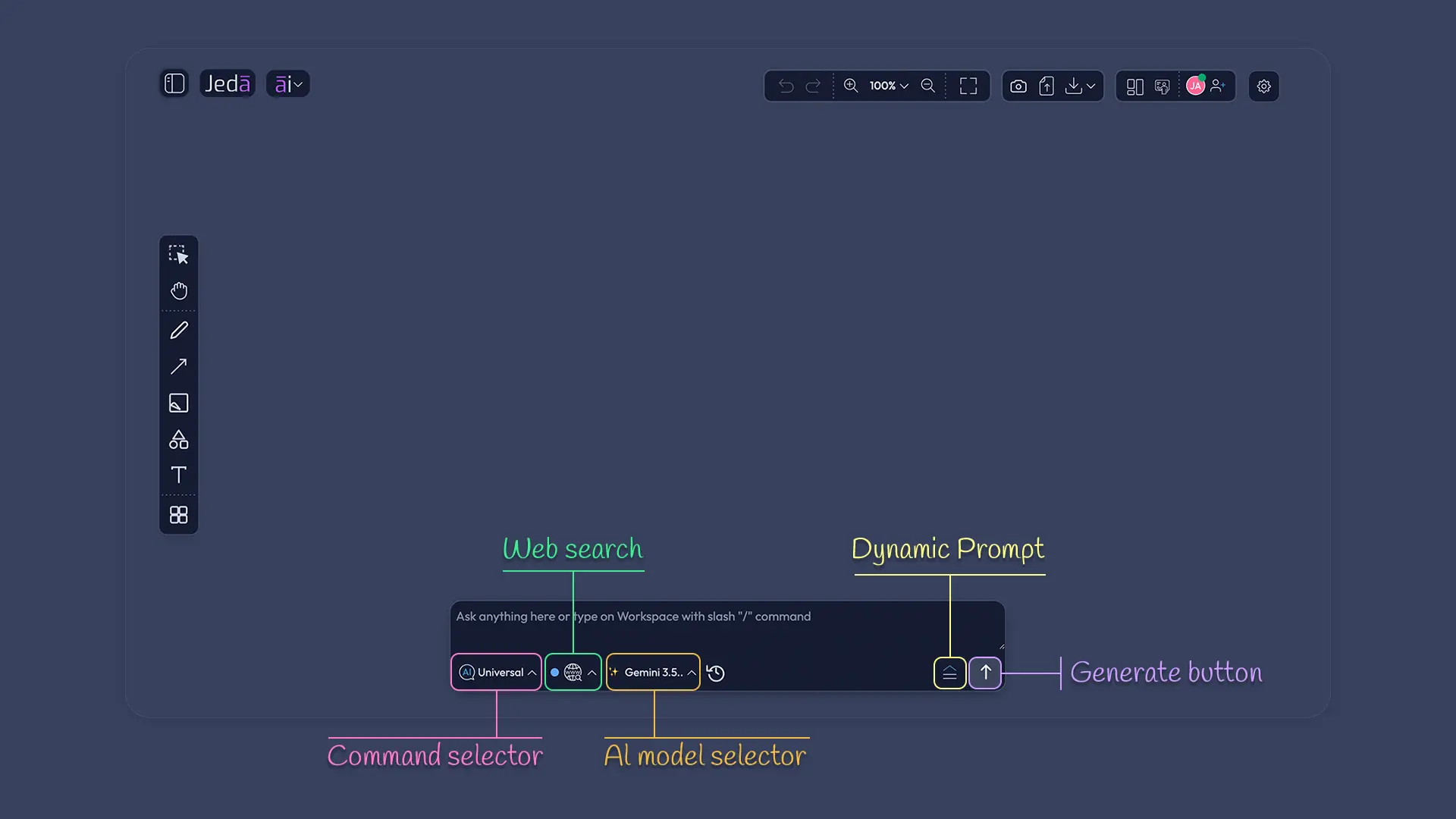
- Find the Prompt Bar at the bottom center of your canvas. It's a large input field.
- Click the Command Selector (left side of the bar) and choose your command: Matrix, Mindmap, Flowchart, Diagram, or another visual type.
- Type your initial prompt. Be specific: "Create a competitive positioning matrix for a B2B SaaS company entering the enterprise segment" is better than "Create a competitive positioning matrix."
- Critical step: Instead of clicking Generate, click the Dynamic Prompt button (🪄 cursor icon, marked Shifu+, to the right of the AI Model Selector).
- A guided form slides open on the right side. It shows fields:
- Audience: Who is this for?
- Goals: What decision supports this?
- Competitive Landscape: Name competitors or market forces
- Additional Context: Anything else the AI should know?
- Fill in your answers. Be specific. Don't say "competitors are tough"—name them. Don't say "market is changing"—explain how.
- Click Generate (in the form, not the Prompt Bar).
- The AI uses all your context to create your framework.
- Extend with ai+ or transform with Vision Transform as needed.
Prompt Bar + Dynamic Prompt gives you flexibility while ensuring the form guides you toward strategic depth.
- Step 1: Choose your method (AI Menu or Prompt Bar)
Use AI Menu for pre-structured recipes (SWOT, BMC, Lean Canvas) or Prompt Bar for custom prompts. Both access Dynamic Prompt.
- Step 2: Type or select your initial prompt
In AI Menu: click a recipe. In Prompt Bar: type your analysis request.
- Step 3: Access the Dynamic Prompt form
In AI Menu: the form is built-in (when you click a recipe). In Prompt Bar: click the Dynamic Prompt button (cursor icon) to open the guided form.
- Step 4: Fill in the clarifying questions
Answer: Audience? Goals? Competitive landscape? Additional context? The specificity here directly improves output depth.
- Step 5: Click Generate
The AI synthesizes all your context and creates a strategic framework in seconds.
- Step 6: Iterate and extend
Use ai+ to deepen any section. Use Vision Transform to convert to a different visual type.
Real-World Case Study: SWOT Analysis with Dynamic Prompt
Let's make this concrete. You're at a product management review. Your company—let's call it CloudFlow, a project management SaaS—is planning a pivot. You're considering adding AI-powered workflow automation to your core offering.
The challenge: Competitive landscape is shifting fast. Asana is pushing hard into AI. Monday.com is partnering with automation platforms. Jira, your biggest enterprise threat, just announced Copilot integration. Meanwhile, your team has deep expertise in workflow design (10-year pedigree) but limited ML experience. And your board is asking: "Is this a differentiator or table-stakes?"
The Free-Form Approach (What You'd Get Without Dynamic Prompt):
Your prompt: "Create a SWOT analysis for our AI workflow automation feature."
AI generates:
- Strengths: "Advanced technology," "AI improves efficiency," "Trusted brand"
- Weaknesses: "Complex implementation," "Requires ML expertise," "Training overhead"
- Opportunities: "Growing AI demand," "Market expansion"
- Threats: "Competitor innovation," "Regulatory uncertainty"
Verdict: Circular. Doesn't answer the board question. Could describe any SaaS company pivoting to AI.
The Dynamic Prompt Approach (What You'd Get With Guided Form):
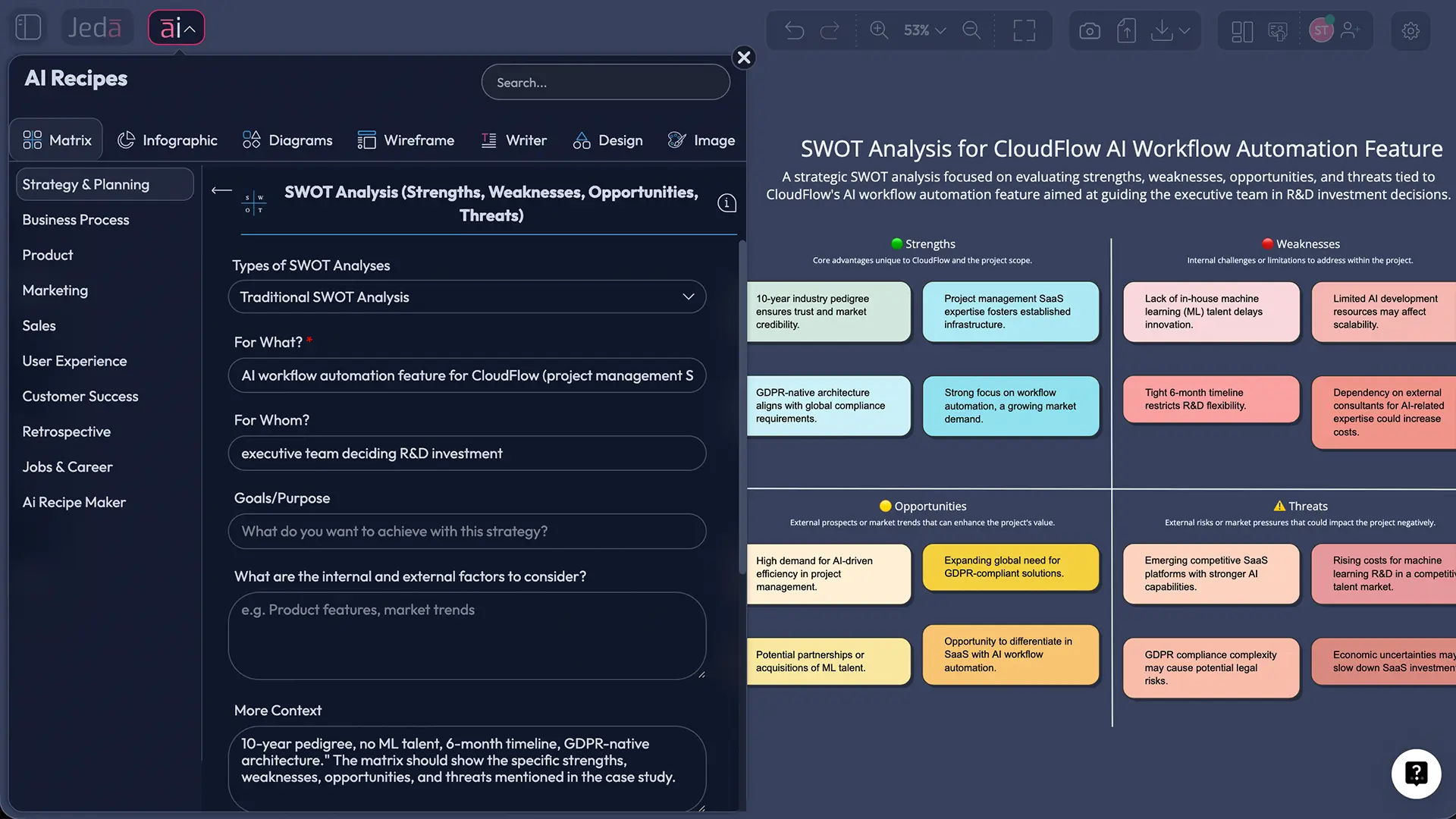
You open Jeda.ai, click AI Menu → Matrix → SWOT Analysis. The form opens:
- For What? "AI-powered workflow automation feature for CloudFlow (mid-market and enterprise project management SaaS)"
- For Whom? "Executive team and board (deciding €2M R&D investment and 18-month roadmap commitment)"
- Goals/Purpose? "Determine if AI automation is a competitive moat or if we're chasing table-stakes. Inform product roadmap and fundraising narrative."
- Internal Factors (Strengths/Weaknesses):
- Strengths: "10-year product maturity and 100K+ installed user base. Strong API and integrations. Workflow design expertise (rare). GDPR-compliant infrastructure (competitors are still retrofitting)."
- Weaknesses: "No ML engineers on staff. Feature launches take 6+ months for our team vs. 3 months for larger competitors. Technical debt in legacy code limits rapid iteration."
- External Factors (Opportunities/Threats):
- Opportunities: "Gartner forecasts 60% of PM tool buyers will prioritize AI-native workflow by 2026. Our installed base is primed to adopt. 'Workflow understanding' (not just rule automation) is a genuine gap competitors haven't filled."
- Threats: "Asana Intelligence ships Q2 with broad automation. Monday.com just partnered with Zapier for no-code automation. Jira Copilot (announced) will own enterprise. 3–6 month window to differentiate before market consolidates."
AI generates:
Strengths:
- "Installed base of 100K+ users—built-in customer validation and case studies for sales"
- "10-year workflow design expertise—rare, defensible; competitors will take 2+ years to match"
- "GDPR-native architecture signals compliance maturity (enterprise buyers trust proven certifications)"
- "API-first design enables rapid integration with existing enterprise stacks"
Weaknesses:
- "No ML talent on staff—need 2–3 senior ML engineers; 6-month hiring + 3-month delay"
- "Feature development velocity (6 months) slower than competitors (3 months); risk of arriving late"
- "Legacy codebase creates technical debt; refactoring required before ML integration (3-month delay)"
- "Limited AI/ML go-to-market messaging—need external positioning help"
Opportunities:
- "Gartner data shows 60% of buyers will expect AI by 2026—first-mover advantage if we ship in 6 months"
- "Workflow reasoning (not just rule automation) is a genuine gap—we can own 'intelligent workflows' vs. competitors' 'automated workflows'"
- "Installed base is warm audience—upgrade upsell, not new logo acquisition"
- "Enterprise buyers are fatigued by AI hype—education and trust (via our pedigree) is a differentiator"
Threats:
- "Asana Intelligence (Q2 launch) will commoditize basic automation—we can't compete on breadth, only depth"
- "Monday.com's Zapier partnership accelerates their no-code automation—timeline pressure"
- "Jira's Microsoft/Copilot deal threatens enterprise lock-in; hard to win logos against embedded competitor"
- "2–3 well-funded startups (acquired by larger platforms) will consolidate the AI automation market; consolidation window is narrow (6–12 months)"
Then, the real insight emerges:
The SWOT shows this is not a table-stakes feature. It's a differentiation play with a narrow window. The move isn't "build AI automation like everyone else." It's:
- Hire the ML talent NOW (6-month timeline is the real constraint).
- Own 'workflow reasoning' as messaging—you're not competing on breadth (Asana, Monday.com, Jira) but on depth (understanding your workflow's intent).
- Leverage your installed base as a moat—upgrade revenue is faster and cheaper than new logo acquisition.
- Expect consolidation in 12 months—move fast to avoid being acquired as a feature (rather than remaining an independent product).
That clarity—SWOT guided by strategic questions—changes the entire board conversation. Instead of "Should we build AI automation?", the board now debates "Do we hire the ML team now or partner with a startup for faster launch?" Different question. Better decision.
Advanced Techniques for Dynamic Prompt
Once you're comfortable with the basics, three techniques unlock deeper value.
Combining Dynamic Prompt with AI Recipes
All Matrix AI Recipes (SWOT, Business Model Canvas, Lean Canvas, Competitive Positioning, Risk Analysis, etc.) have built-in guided forms. These forms are Dynamic Prompt. But you can layer even more depth by enabling advanced options:
- Web Search (Shifu+): Toggle the Web Search option on in the recipe form. The AI will search for real-time market data (competitor announcements, earnings reports, industry news) and ground your SWOT or positioning matrix in current reality, not cached knowledge.
- Multi-LLM Agent (Shifu+): Choose multiple reasoning models (GPT, Claude, Grok) to generate your framework. The Aggregator Model synthesizes the best insights from all three. For complex strategic analysis, this increases depth and reduces bias.
- Vision Transform on the result: After your framework generates, select it and use Vision Transform to convert it to a different format—SWOT → Mindmap (for brainstorm communication) or SWOT → Flowchart (for implementation planning).
Chaining Dynamic Prompt + Vision Transform for Iterative Refinement
Advanced workflow: Generate a framework with Dynamic Prompt (rich context). Then convert it to a different visual type for a new audience or purpose.
Example: You create a SWOT with Dynamic Prompt (detailed, analytical). But you need to present it to non-strategic stakeholders (operations team). Use Vision Transform to convert the SWOT → Mindmap. The strategic context you captured in Dynamic Prompt carries through, but the mindmap format is more accessible and brainstorm-friendly. The team sees the same strategic depth, just visualized differently.
Or: Generate a competitive positioning matrix (Dynamic Prompt). Convert → flowchart to show execution dependencies. The strategy (from Dynamic Prompt) now has a roadmap (from Vision Transform).
Using Dynamic Prompt in Team Collaboration
Teams working in shared Jeda.ai workspaces can use Dynamic Prompt to reduce misalignment. Instead of one person generating a SWOT alone, the team fills out the Dynamic Prompt form together, ensuring everyone answers the same clarifying questions. The resulting framework reflects collective strategic input, not individual interpretation.
This is where Cialdini's "principle of relevance" applies: When people understand why they're answering questions (and participate in answering them), they're more likely to buy into the resulting analysis. Shared framework generation increases team adoption.
Common Questions About Dynamic Prompt
- What is a Dynamic Prompt in Jeda.ai?
- A Shifu+ feature that opens a guided form asking clarifying questions (audience, goals, competitive landscape, context) before you generate a visual framework. Ensures the AI has the strategic context it needs for deeper output.
- How does Dynamic Prompt improve my analysis quality?
- By capturing structured context upfront—audience, goals, competitive landscape, constraints—Dynamic Prompt ensures the AI generates frameworks grounded in your strategic reality, not generic templates. Research shows 30–50% improvement in strategic depth vs. free-form prompts.
- Can I use Dynamic Prompt with any framework?
- Dynamic Prompt is most powerful with strategic frameworks (SWOT, Business Model Canvas, Lean Canvas, Competitive Positioning, Risk Analysis). It works with any command via the Prompt Bar, but AI Menu recipes (Matrix category) are pre-optimized for Dynamic Prompt.
- Is Dynamic Prompt only for SWOT analysis?
- No. While SWOT is a common use case, Dynamic Prompt works with Competitive Positioning, Business Model Canvas, Lean Canvas, Risk Analysis, Decision Trees, and any custom framework you'd prompt for. Any analysis benefiting from strategic context benefits from Dynamic Prompt.
- How long does it take to use Dynamic Prompt?
- 2–3 minutes. Typing the form answers (audience, goals, landscape, context) takes 1–2 minutes. Generation takes 30–60 seconds. Total: 2–3 minutes vs. 5–10 minutes of crafting a detailed free-form prompt.
- Can I combine Dynamic Prompt with AI Recipes?
- Yes. AI Menu recipes (SWOT, BMC, Lean Canvas) have built-in guided forms—these *are* the Dynamic Prompt interface. You can also enable Web Search (Shifu+) or Multi-LLM Agent for additional depth.
- Is Dynamic Prompt available on all plans?
- No. Dynamic Prompt is a Shifu+ feature ($39/month). White Belt (Free) and Black Belt ($10/month) plans do not have access. However, all plans have access to AI Menu recipes, and Shifu+ plans unlock advanced guided forms and Web Search.
- What questions does the Dynamic Prompt form ask?
- Four main fields: (1) Audience—Who is this for? (2) Goals—What decision does it support? (3) Competitive Landscape—Name competitors or market forces. (4) Additional Context—Regulatory, internal, or market factors. AI Menu recipes may have slightly different fields optimized for each framework.
- How is Dynamic Prompt different from just typing a better prompt?
- Free-form prompts rely on you knowing what context matters. A detailed free-form prompt might take 5–10 minutes and still miss critical factors. Dynamic Prompt's form guides you through the strategic questions that matter, ensuring consistency and depth in 2–3 minutes.
- Can teams use Dynamic Prompt collaboratively?
- Yes. In shared Jeda.ai workspaces, teams can fill out the Dynamic Prompt form together, ensuring everyone contributes to the strategic context. This increases team alignment and buy-in on the resulting framework.
- Does Dynamic Prompt support Web Search?
- Yes (Shifu+). In AI Menu recipes, enable the Web Search toggle in the advanced options. The AI will search for real-time market data and ground your framework in current competitive intelligence.
- What should I include in the 'Additional Context' field?
- Anything that shapes strategy: regulatory constraints, internal resource limits, timeline pressure, recent company announcements, market disruptions, or specific assumptions you want the AI to work with. Specificity here directly improves output relevance.
Sources & Further Reading
- [1]
Wei, J., Wang, X., Schuurmans, D., et al. (2023) . “Chain-of-Thought Prompting Elicits Reasoning in Large Language Models” arXiv.
View Source ↗ - [2]
Brown, T. B., Mann, B., Ryder, N., et al. (2020) . “Language Models Are Few-Shot Learners” NeurIPS 2020.
View Source ↗ - [3]
Deng, Y., Xie, Y., Chen, Y., & Feng, A. (2024) . “The Art of Prompting: A Survey on Prompt Engineering for Large Language Models” ACM Computing Surveys.
View Source ↗ - [4]
Porter, M. E. (1979) . “How Competitive Forces Shape Strategy” Harvard Business Review.
View Source ↗
Refine Your Strategic Thinking with Dynamic Prompt
Join over 150,000 professionals who trust Jeda.ai's AI Workspace for deeper, more strategic analysis.
Try Dynamic Prompt Free