What Is Multi-LLM Agent?
Your Strategic Reasoning Team
Imagine having three world-class consultants on your team—one who spots market trends instantly, another who weighs ethical trade-offs carefully, and a third who tears into logical rigor relentlessly. You wouldn't have just one of them analyze your strategy. You'd hear from all three. That's what Multi-LLM Agent does in Jeda.ai.
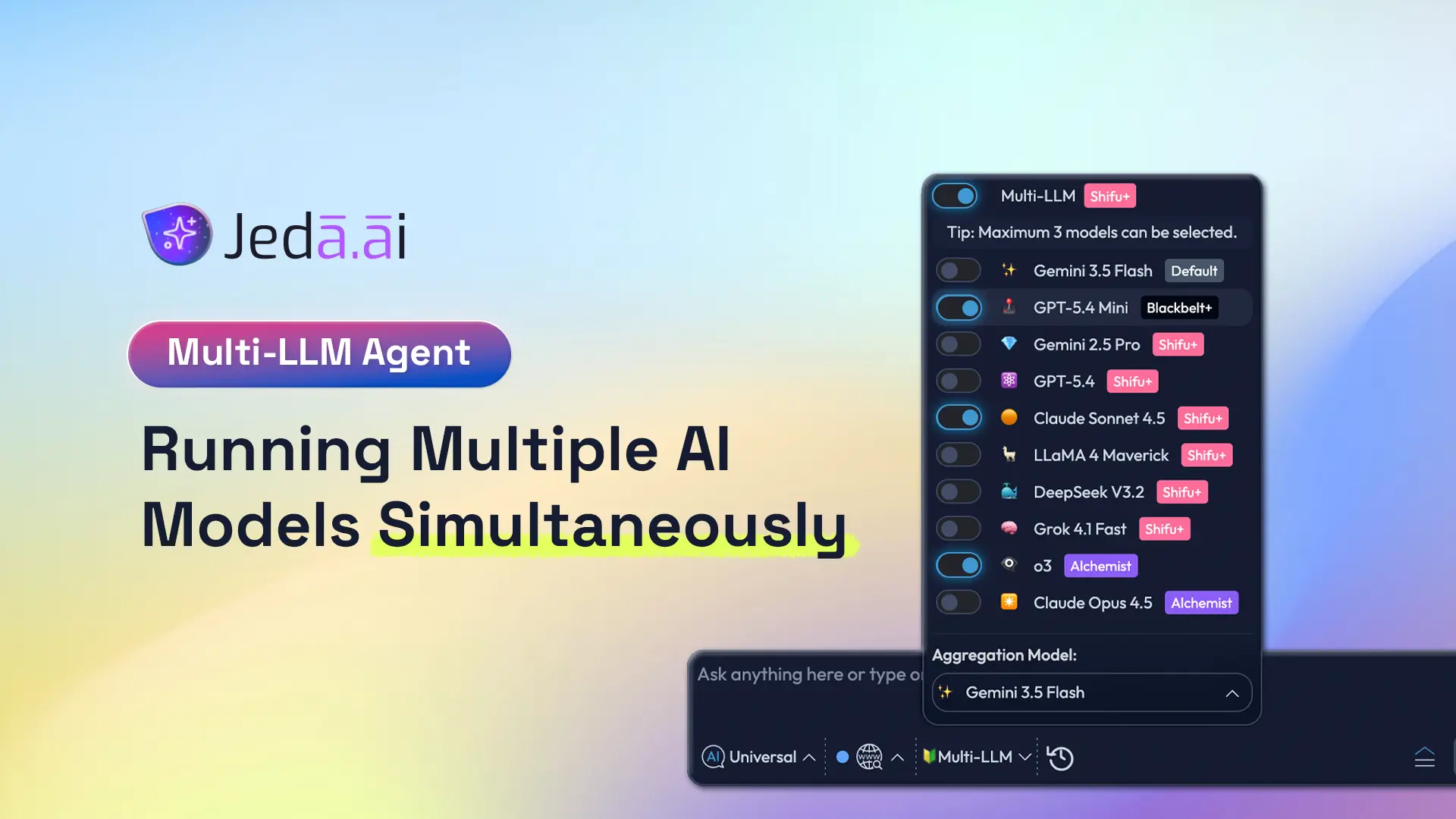
Multi-LLM Agent runs your prompt across up to 3 leading AI models simultaneously. Instead of defaulting to a single model, you access GPT for breadth, Claude for nuance, and Grok for analytical depth. All three respond to the same prompt in parallel—taking roughly the same time as running one model alone. Then an aggregation model synthesizes their responses, giving you a comprehensive perspective no single AI could deliver.
Multi-LLM vs. Single Model
Let's be direct: a single model is fast and confident. One voice, one perspective, one answer. But strategic decisions—SWOT analysis, competitive positioning, risk assessment—benefit from multiple viewpoints.
Single-model analysis is like asking one person: "What should we do?" You get an answer, but you miss angles that different thinking styles would catch.
Multi-LLM analysis is like asking a panel: "What should we do?" GPT will spot market opportunities you didn't see. Claude will flag risks and ethical concerns. Grok will validate that your math actually works. Then an aggregation model synthesizes all three into a single, defensible answer.
The trade-off? Multi-LLM takes slightly longer to think through responses (since you're generating 3 in parallel), but the time is still measured in seconds, not minutes. For strategy work, that's a phenomenal deal.
The Three Model Types You'll Use
GPT-5.4: The Breadth Engine
GPT excels at identifying patterns, trends, market signals, and opportunities. It thinks in terms of landscapes—big pictures, competitive dynamics, customer insights, emerging categories. When you ask GPT "What's happening in this market?", you get a wide-angle lens that captures what others are building, what customers want, and where momentum is flowing.
Claude Sonnet 4.5: The Nuanced Reasoner
Claude is known for balanced, thoughtful reasoning. It considers trade-offs, flags ethical concerns, and articulates uncertainties. Claude doesn't pretend false confidence. When you ask Claude "What could go wrong?", it gives you a sober assessment of risks, regulatory concerns, stakeholder impacts, and second-order effects. This is your insurance policy against blind spots.
Grok 3: The Analytical Depth Engine
Grok is built for rigorous logical reasoning and quantitative analysis. It digs into constraints, validates assumptions, and tests whether things actually work mathematically. When you ask Grok "Does this business model scale?", it evaluates unit economics, operational feasibility, and technical constraints with precision. This is your sanity check.
Why Run Multiple AI Models?
Strategic Decision Confidence
Here's a concrete example. Your team is building a SWOT analysis for market entry. You ask GPT: "What are our strategic opportunities?" You get a comprehensive list of market gaps, underserved segments, and positioning angles. Looks great.
You then ask Claude the same question. Claude flags that while opportunities exist, they're in regulatory gray zones—which limits your upside. You then ask Grok: "Can we build a sustainable business model around these opportunities?" Grok identifies capital requirements and scaling constraints you hadn't quantified.
Now you don't just have a list of opportunities. You have opportunities validated against realistic constraints and risk awareness. That's the power of multi-model thinking.
Single-model analysis is confident. Multi-model analysis is defensible. For a Board conversation or investor pitch, defensibility matters.
Blind Spot Detection
Every model has blind spots. GPT's obsession with trend spotting can miss boring, important risks. Claude's caution can underestimate how fast a market moves. Grok's rigor can miss the creative leap that reshapes an industry. You don't know which blind spot will trip you up—so why leave your decision on the table?
Running Multi-LLM is like adding insurance to your thinking. The aggregation model synthesizes diverse viewpoints, catching what one model would have missed.
Time-to-Insight ROI
Here's what Multi-LLM changes. Traditional strategic planning cycles take weeks:
- Monday: Assign framework work to team
- Wednesday: First draft SWOT completed
- Friday: Consultant reviews, requests changes
- Following Wednesday: Revised version with deeper analysis
- Following Friday: Final sign-off
Multi-LLM compresses this:
- Monday morning: Team opens Jeda.ai, enables Multi-LLM Agent
- Monday 10:15 AM: Generates comprehensive SWOT (30 seconds)
- Monday 10:30 AM: Team reviews, validates, suggests iteration
- Monday 11:00 AM: Refined SWOT generated (another 30 seconds)
- Monday noon: Stakeholder presentation ready
Same week instead of next week. Same rigor, faster execution. That acceleration compounds across every strategic initiative your team tackles.
Understanding Model Strengths
GPT-5.4 — The Breadth Engine
What it excels at:
- Market trends and emerging signals
- Customer insights and competitive landscape
- Opportunity identification and market sizing
- Pattern recognition across industries
Best use cases:
- SWOT Opportunities quadrant
- Market analysis and sizing
- Trend forecasting
- Competitive positioning
- Ideation and brainstorming
When to rely on it: Use GPT-5.4 when you need market context, trend awareness, and broad perspective. If you're asking "What's happening in our market?", GPT is your go-to.
Limitation: GPT's enthusiasm for trends can sometimes overlook practical constraints or downside risks. It's optimistic by nature.
Claude Sonnet 4.5 — The Nuanced Reasoner
What it excels at:
- Risk and threat identification
- Ethical and compliance considerations
- Stakeholder impact analysis
- Balanced, evidence-weighted reasoning
Best use cases:
- SWOT Threats quadrant
- Risk analysis and mitigation
- Regulatory or compliance assessment
- Stakeholder communication strategy
- Ethical review of business decisions
When to rely on it: Use Claude when analyzing what could go wrong, who might be negatively affected, or where your assumptions might be brittle. If you're asking "What risks are we taking?", Claude provides the reality check.
Limitation: Claude can be conservative. Its risk awareness is valuable but shouldn't dominate your entire strategic direction.
Grok 3 — The Analytical Depth Engine
What it excels at:
- Quantitative reasoning and mathematics
- Logical rigor and constraint analysis
- Systems thinking and technical feasibility
- Data-driven decision frameworks
Best use cases:
- Financial analysis and unit economics
- Process workflows and execution fidelity
- Technical architecture and scalability
- Data-driven strategic frameworks
- Bottleneck and constraint identification
When to rely on it: Use Grok when validating whether an idea actually works—mathematically, operationally, technically. If you're asking "Does this scale? Does the math work?", Grok is essential.
Limitation: Grok's rigor can sometimes miss creative leaps or market dynamics that don't fit a neat logical model.
Model Selection Guide
| Task | Recommended Model(s) | Why | Secondary Consideration | |
|---|---|---|---|---|
| SWOT Analysis (Comprehensive) | SWOT Analysis (Comprehensive) | All 3 with Claude aggregation | Each quadrant benefits from different perspectives; Claude synthesis balances all views | Most common use case |
| Competitive Analysis Matrix | Competitive Analysis Matrix | GPT-5.4 + Claude | GPT identifies competitive moves; Claude flags ethical/regulatory nuances | Add Grok if validating financial claims |
| Risk Assessment | Risk Assessment | Claude + Grok | Claude identifies qualitative risks; Grok validates quantitative risk models | Claude leads; Grok supports |
| Market Opportunity Evaluation | Market Opportunity Evaluation | GPT-5.4 Primary | GPT's breadth identifies market signals; others validate feasibility | Add Claude/Grok for validation |
| Financial Planning / Budgeting | Financial Planning / Budgeting | Grok Primary | Grok's quantitative reasoning ensures mathematical accuracy | Claude reviews for risks |
| Ideation / Brainstorming | Ideation / Brainstorming | GPT-5.4 Primary | GPT generates diverse, expansive ideas | Claude/Grok refine |
| Ethical Review / Stakeholder Impact | Ethical Review / Stakeholder Impact | Claude Primary | Claude explicitly considers ethical dimensions and stakeholder concerns | Add Grok for operational impact |
| Lean Canvas or Business Model | Lean Canvas or Business Model | All 3 | Business models need market insight (GPT), risk awareness (Claude), financial rigor (Grok) | Claude aggregation recommended |
Aggregation Models Explained
What Aggregation Does
Imagine you run your prompt across 3 models. You get 3 different responses. Now what? Do you read all three? Do you pick your favorite? Do you manually synthesize them?
The aggregation model removes that burden. It receives all 3 responses, evaluates their quality and relevance to your specific prompt, and either:
- Selects the single best response and presents it as your answer
- Synthesizes across all three, pulling the most relevant insights from each
An aggregation model is like hiring a synthesis specialist whose only job is combining expert opinions into one clear recommendation.
Four Aggregation Options
Option 1: No Aggregation
You get all 3 responses separately. Read GPT's answer. Read Claude's answer. Read Grok's answer. You decide which is best, or synthesize manually.
When to use it:
- You want to see exactly how each model thinks
- You're comparing model approaches (e.g., "How would GPT approach this vs. Claude?")
- You're evaluating model differences
- You want complete transparency and don't need synthesis
Benefit: Full transparency. You see raw outputs, unfiltered.
Drawback: Requires more effort from you. You must synthesize.
Option 2: GPT-4o as Aggregator
GPT (a capable but not the most advanced model) reviews all 3 responses and synthesizes using its breadth-focused approach. Emphasizes trends, opportunities, and big-picture insights.
When to use it:
- You want a synthesized answer with a broad perspective
- You want to emphasize opportunities and trends
- You want fast aggregation
- Your analysis is exploratory, not high-stakes
Benefit: Fast, comprehensive synthesis with trend focus.
Drawback: May deprioritize risks or analytical rigor in favor of optimism.
Option 3: GPT-5 Mini as Aggregator
A lighter-weight synthesizer. Still GPT-based (breadth focus) but with smaller resource footprint.
When to use it:
- You want aggregation without using full GPT-5.4 resources
- Cost optimization matters to your team
- You need quick synthesis on straightforward analyses
- You're iterating rapidly
Benefit: Efficient, cost-effective synthesis.
Drawback: Less thorough than full GPT-5.4 aggregation.
Option 4: Claude Sonnet 4.5 as Aggregator
Claude reviews all 3 responses and synthesizes using its nuanced, balanced approach. Weighs trade-offs, flags concerns, and provides a balanced perspective.
When to use it:
- You want balanced, thoughtful synthesis
- Risk awareness is important to your decision
- Stakeholder concerns matter (Claude considers impacts)
- You're making high-stakes decisions
- You want a recommendation that acknowledges complexity
Benefit: Balanced, nuanced synthesis. Acknowledges trade-offs and uncertainty.
Drawback: More cautious than GPT aggregation. May not emphasize opportunities as strongly.
Recommendation: If you're unsure, start with Claude Sonnet 4.5 as your aggregator. It provides the most balanced perspective and works well across most strategic analysis tasks.
How to Enable Multi-LLM Agent in Jeda.ai
Prerequisites
Plan requirement: Multi-LLM Agent is available on Shifu+ ($39/month) and Alchemist ($298/month) plans only.
If you're on Whitebelt (Free) or Blackbelt ($10/month), you won't see the Multi-LLM toggle. To unlock it:
- Upgrade to Shifu+ ($39/month) for access to 7+ models + Multi-LLM Agent
- Or start your 7-day free Shifu trial immediately after signup (new accounts get this automatically)
Step-by-Step Walkthrough
- Open Your Workspace
Log into Jeda.ai and click on a workspace. You'll see the Prompt Bar at the bottom center with the command selector and model selector.
- Click the AI Model Selector
In the Prompt Bar, locate the AI Model Selector (shows current model name + down arrow, e.g., 'GPT-4o ∧'). Click it to open the model list.
- Toggle Multi-LLM Agent ON
At the top of the model list, you'll see 'Multi-LLM Agent' with a toggle switch. Click the toggle to turn it ON. Individual toggle switches now appear next to each available model.
- Select Up to 3 Models
Click the toggle switch next to each model you want to include (up to 3). Toggled switches turn blue. Common starting selection: GPT-5.4, Claude Sonnet 4.5, Grok 3.
- Scroll to Aggregation Model
Scroll to the bottom of the model panel. You'll see 'Aggregation Model' dropdown with options: No Aggregation, GPT-4o, GPT-5 Mini, Claude Sonnet 4.5. Select your choice.
- Type Your Prompt
Close the model panel. The Prompt Bar now shows '🤝 Multi-LLM ∨'. Type your prompt into the input field (e.g., 'SWOT analysis for AI workplace collaboration tools').
- Click Generate
Click the Generate button (↑ arrow) at the right end of the Prompt Bar. Jeda.ai runs your prompt across all 3 models simultaneously.
- Review Results in AI Task Panel
A panel slides in on the right side showing results in real time. Once generation completes (10–20 seconds), you'll see the synthesized output on your canvas. If you chose 'No Aggregation', you'll see all 3 responses in the panel.
Multi-LLM with Matrix and Mindmap Commands
Using Multi-LLM with the Matrix Command
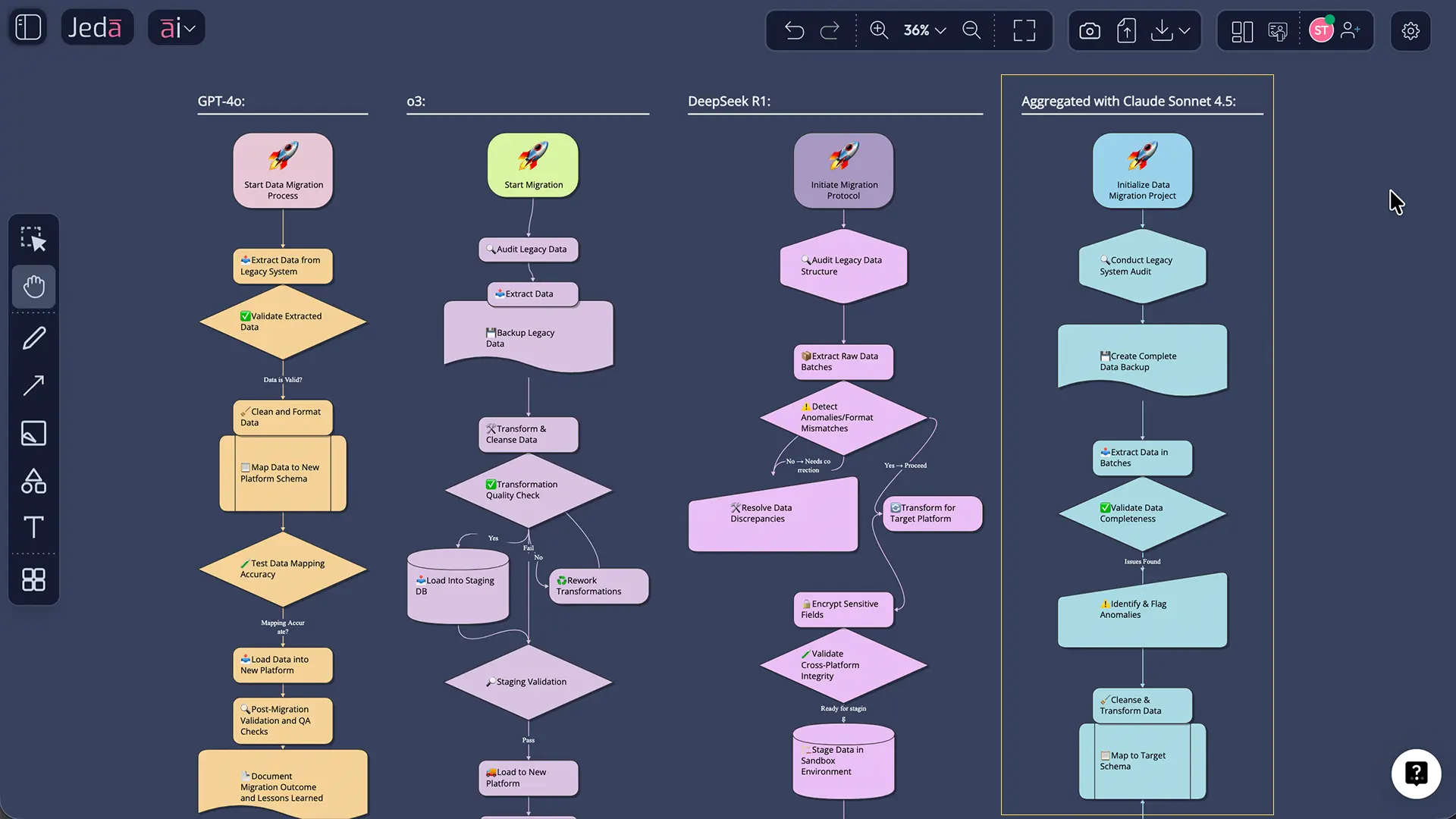
SWOT analysis is where Multi-LLM shines. A SWOT matrix traditionally requires one analyst (or one tool) to populate all four quadrants. With Multi-LLM, you get:
- Strengths & Opportunities: GPT identifies market advantages and growth vectors
- Threats & Weaknesses: Claude identifies risks, regulatory concerns, and capability gaps
- Financial & Operational: Grok validates feasibility and constraint mapping
Then the aggregation model synthesizes everything into a single, comprehensive matrix.
Workflow:
- Select the Matrix command from the Prompt Bar
- Enable Multi-LLM Agent (toggle ON)
- Select 3 models (e.g., GPT-5.4, Claude, Grok)
- Choose aggregation model (Claude recommended for balance)
- Enter prompt: "Create a comprehensive SWOT analysis for B2B SaaS product entering the mid-market segment, considering market dynamics, competitive positioning, and financial constraints"
- Generate
- Result: A SWOT matrix with all four quadrants populated using diverse reasoning perspectives
Other matrix use cases:
- Competitive Analysis Matrix: Rows=competitors, columns=evaluation criteria. Multi-LLM provides comprehensive competitive intelligence.
- Risk/Opportunity Matrix: Rows=scenarios, columns=probability/impact. Multi-LLM improves accuracy of risk assessment.
- Business Model Canvas: Multi-LLM validates each canvas element (value proposition, revenue model, cost structure) across multiple reasoning styles.
Using Multi-LLM with the Mindmap Command
Brainstorming with Multi-LLM produces balanced idea maps. Instead of a purely optimistic brainstorm (GPT), you get:
- Central Concept → Opportunity Branch: GPT identifies growth vectors
- Central Concept → Risk Branch: Claude flags execution risks and stakeholder concerns
- Central Concept → Feasibility Branch: Grok tests logical constraints
The result is a mindmap that's not just creative—it's realistic.
Workflow:
- Select the Mindmap command
- Enable Multi-LLM Agent
- Select 3 models
- Choose aggregation (Claude for balanced ideation)
- Enter prompt: "Brainstorm go-to-market strategies for a new AI workplace collaboration tool, considering market position, customer acquisition, and execution constraints"
- Generate
- Result: A mindmap with branches representing diverse strategic approaches, not just optimistic ideas
Other Command Compatibility
| Command | Multi-LLM Compatible? | Best Use |
|---|---|---|
| Flowchart | ✓ Yes | Identify edge cases and error paths with Claude + Grok |
| Diagram | ✓ Yes | Capture system dependencies and risk points |
| Stickynote | ✓ Yes | Generate diverse brainstorm outputs; compare approaches |
| Wireframe | ✓ Yes | Design from multiple UX perspectives |
| Text/Code | ✓ Yes | Generate alternative explanations or documentation |
| Image | ✗ No (reasoning model only) | Multi-LLM works on reasoning model for 3 images; not image generation model |
| Document Insight | ✗ No | Document analysis uses dedicated parsing; not multi-model compatible |
| Data Insight | ✗ No | Data analysis uses dedicated inference; not multi-model compatible |
Important: Multi-LLM works with reasoning models only. When you select the Image command, you'll see two selectors side-by-side: one for image generation model (no Multi-LLM) and one for reasoning model (supports Multi-LLM). You can use Multi-LLM on the reasoning model to generate up to 3 images with varied perspectives.
Plan Tiers and Multi-LLM Availability
Shifu+ ($39/month) — Multi-LLM Unlocked
Available models:
- GPT-5.4 (advanced reasoning, breadth focus)
- Grok 3 (analytical depth)
- DeepSeek R1 (specialized reasoning)
- Claude Sonnet 4.5 (nuanced reasoning)
- LLaMA 4 Maverick (specialized reasoning)
- Gemini 2.5 Pro (multi-modal capable)
- Grok 4 Fast (quick analytical reasoning)
Image models:
- GPT Image 1.5
- Nano Banana
Multi-LLM Agent: ✓ YES — Select up to 3 models, choose from all aggregation options
Aggregation model options:
- No Aggregation
- GPT-4o
- GPT-5 Mini
- Claude Sonnet 4.5
Recommended starter setup:
- Models: GPT-5.4, Claude Sonnet 4.5, Grok 3
- Aggregation: Claude Sonnet 4.5 (balanced synthesis)
- Use case: Comprehensive SWOT, competitive analysis, strategic frameworks
Alchemist ($298/month) — Top-Tier Intelligence
Includes all Shifu+ models plus:
- o3 (most advanced reasoning available)
- Claude Opus 4.5 (deepest nuance and strategic thinking)
Image models:
- Nano Banana Pro
- Imagen 4.0
- Nano Banana 2.0
Multi-LLM Agent: ✓ YES — Same setup as Shifu+
Recommended for:
- Highest-stakes decisions (Board-level strategy)
- Most complex frameworks
- Teams needing state-of-the-art reasoning capability
- Organizations where decision quality directly affects revenue/strategy
Premium setup:
- Models: o3, Claude Opus 4.5, Grok 3
- Aggregation: Claude Opus 4.5 (deepest synthesis)
Blackbelt ($10/month) & Whitebelt (Free)
Multi-LLM Agent: ✗ NOT available
These plans include basic reasoning models (GPT-4o on Whitebelt; GPT-5 Mini + Gemini 2.5 Flash on Blackbelt) but no Multi-LLM Agent feature.
To unlock Multi-LLM:
- Upgrade to Shifu+ ($39/month)
- Or start your 7-day free Shifu trial immediately (new accounts receive this automatically upon signup)
Free Trial Access
New Jeda.ai accounts receive a 7-day free Shifu trial with full access to:
- Multi-LLM Agent feature
- All Shifu+ models
- All aggregation options
- Unlimited AI tasks during trial period
- Data Insight, Document Insight, Web Search
No credit card required. After trial expires, account downgrades to Whitebelt (Free). Upgrade anytime to any paid plan.
- Shifu+ Plan
Multi-LLM Agent with 7+ models, all aggregation options. $39/month
- Alchemist Plan
Top-tier o3 + Claude Opus, Multi-LLM with premium models. $298/month
- 7-Day Free Trial
Full Shifu access, no credit card required, Multi-LLM Agent included. New accounts only
- Whitebelt/Blackbelt
Single-model analysis only, no Multi-LLM Agent feature. Upgrade to access
Real-World Workflow Example: Market Entry SWOT Analysis
The Scenario
Your team is evaluating whether to enter a new market segment: mid-market insurance technology. This is a high-stakes decision. A wrong call costs 6 months and significant resources. You need a SWOT analysis that considers market opportunity, competitive threats, technical feasibility, and financial viability.
Traditional approach:
- Assign to strategy team (3 days of work)
- Competitor research, threat assessment
- Financial model review
- Synthesis and presentation
- Stakeholder questions, iteration
The Multi-LLM Workflow
9:00 AM: Setup (2 minutes)
- Open Jeda.ai workspace
- Enable Multi-LLM Agent
- Select: GPT-5.4 (market opportunity), Claude Sonnet 4.5 (risks), Grok 3 (financial feasibility)
- Aggregation: Claude Sonnet 4.5
- Select Matrix command
9:02 AM: Generation (1 minute)
Prompt: "Create a comprehensive SWOT analysis for a B2B SaaS insurance technology platform entering the mid-market (500–5,000 employee) segment. Consider regulatory requirements, competitive positioning (vs. Guidewire, Sapiens, Insurity), target customer pain points, required feature set, go-to-market strategy, technology partnerships, and financial model validation. Address market size, growth trajectory, talent acquisition challenges, and 18-month cash burn assumptions."
Click Generate.
9:03 AM: Results Arrive (20 seconds later)
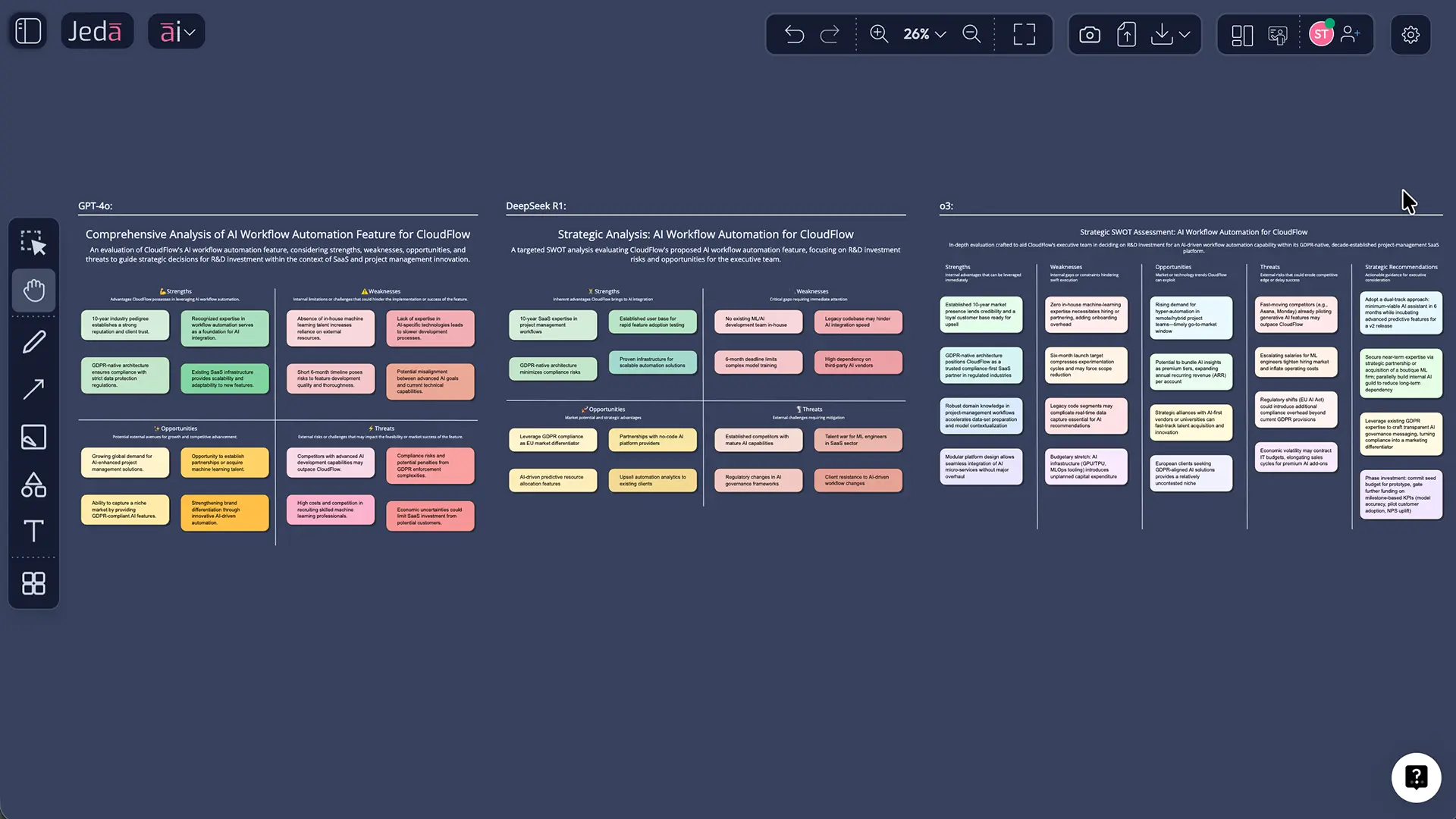
The canvas displays a complete SWOT matrix:
Opportunities (GPT focus + Claude/Grok validation):
- Underserved mid-market segment (GPT identified; Grok validated TAM at ~$4.2B)
- Workflow automation gap vs. enterprise platforms (GPT trend; Claude confirmed customer need)
- White-label integration model with brokers (GPT opportunity; Grok validated technical feasibility)
Threats (Claude focus + GPT/Grok context):
- Regulatory compliance cost (Claude emphasized; Grok quantified ~$2.5M R&D investment needed)
- Incumbent consolidation (Guidewire acquiring adjacent players) (GPT market data; Claude risk assessment)
- Talent acquisition in competitive market (Claude stakeholder impact; Grok validated hiring complexity)
Strengths (Balanced across models):
- Proprietary workflow engine (Grok validated technical advantage)
- Flexible pricing model vs. incumbents (GPT identified as market differentiator; Claude confirmed customer preference)
- Experienced team with prior insurance tech exits (Claude validated credibility signal)
Weaknesses (Balanced assessment):
- Limited brand awareness vs. $100M+ incumbents (GPT addressed; Claude assessed perception risk)
- Capital requirements for 18-month runway (Grok quantified $6.5M needed; Claude flagged investor expectations)
- Regulatory certification timeline risk (Claude primary concern; Grok validated 12–14 month timeline)
9:04 AM: Team Review (5 minutes)
The team reviews the matrix. Questions emerge:
- "Can we really achieve that certification timeline?"
- "What if we partner with an incumbent for compliance?"
- "How much of this is actually addressable in 18 months?"
9:09 AM: Iteration (2 minutes)
Use AI+ button to extend specific cells. E.g., "Expand Opportunities: Partnership Models—detail co-selling with 5 major brokers, revenue sharing assumptions"
Regenerate with same Multi-LLM setup. New insights appear.
9:15 AM: Ready for Stakeholder Meeting
Export as PNG or SVG (top-right toolbar → Download). Share with Board/executive team. The SWOT is comprehensive, defensible, and ready for high-stakes conversation.
Total time: 15 minutes Quality: Equivalent to 3 days of traditional analysis Confidence: Synthesized reasoning from 3 leading AI models
Comparison: Multi-LLM vs. Single Model
When should you use Multi-LLM vs. a single model?
| Scenario | Use Multi-LLM | Use Single Model | Decision Logic | |
|---|---|---|---|---|
| Strategic framework (SWOT, competitive analysis) | Strategic framework (SWOT, competitive analysis) | ✓ Recommended | ✗ Not recommended | Strategy decisions need diverse perspectives; Multi-LLM is the strong choice |
| Quick brainstorm or ideation | Quick brainstorm or ideation | ✓ Recommended | Can work | Multi-LLM adds risk awareness to optimistic brainstorming; valuable even for brainstorms |
| Routine process documentation | Routine process documentation | Can work | ✓ More efficient | Lower stakes; single model is faster and sufficient |
| Risk or threat analysis | Risk or threat analysis | ✓ Recommended | ✗ Not recommended | Risks need nuanced assessment (Claude) + rigor (Grok); Multi-LLM essential |
| Financial or quantitative analysis | Financial or quantitative analysis | ✓ Include Grok | ✗ Use Grok specifically | Grok required for rigor; add Claude for risk assessment |
| Stakeholder communication strategy | Stakeholder communication strategy | ✓ Recommended | Can work | Multi-LLM (especially Claude) considers stakeholder impacts; valuable |
| Exploring 'No Aggregation' mode | Exploring 'No Aggregation' mode | ✓ Yes | N/A | Seeing all 3 responses teaches you how models differ; educational value |
| Time-sensitive quick answer needed | Time-sensitive quick answer needed | Can work* | ✓ Faster | Multi-LLM takes ~same time (parallel), so choose based on analysis depth, not speed |
Key insight: Multi-LLM is fast. Because models run in parallel, you're not paying a time penalty. So the choice should be based on analysis quality, not speed. Default to Multi-LLM for strategic work.
Frequently Asked Questions
- Do I need to understand how each model works to use Multi-LLM Agent?
- No. The workflow is straightforward: toggle Multi-LLM ON, select up to 3 models, choose aggregation, generate. However, understanding model strengths (GPT for breadth, Claude for nuance, Grok for rigor) helps you select the best combination for your specific task. Start simple; optimize as you learn.
- What happens if I select 'No Aggregation'? Will I get 3 separate outputs?
- Yes. The AI Task Panel displays all 3 responses in sequence. You review each independently and decide which is best, or manually synthesize them. Use 'No Aggregation' when you want to compare approaches, evaluate how models differ, or make a manual selection.
- Does running 3 models simultaneously take 3x longer?
- No. Since models run in parallel (not sequentially), total generation time is roughly the same as running 1 model. Expect 10–20 seconds for most analyses. This parallel efficiency is one of Multi-LLM's biggest advantages.
- Can I use Multi-LLM with all Jeda.ai commands?
- Multi-LLM works with all reasoning commands: Matrix, Mindmap, Flowchart, Diagram, Text, Stickynote, Wireframe, and others. It does NOT work with image generation models. When you select the Image command, you see two selectors: image generation (no Multi-LLM) and reasoning model (supports Multi-LLM for generating up to 3 images with varied perspectives).
- Which aggregation model should I choose?
- Start with Claude Sonnet 4.5. It provides balanced, nuanced synthesis that considers trade-offs and risks—ideal for most strategic analysis. Use GPT-4o if you want broader, trend-focused synthesis. Use 'No Aggregation' if you want to compare all 3 approaches directly. Experiment to find your preference.
- Is Multi-LLM available on the free Whitebelt plan?
- No. Multi-LLM Agent is a Shifu+ feature ($39/month and up). However, new accounts receive a 7-day free Shifu trial with full Multi-LLM access, so you can test it immediately after signup without paying.
- Can I use Multi-LLM with AI Recipes?
- Yes. When you open an AI Recipe (e.g., SWOT, Lean Canvas, Competitive Analysis), you'll see a 'Reasoning Model' selector in the recipe form. Enable Multi-LLM Agent there, select up to 3 models, choose an aggregation model, and generate. The recipe runs with Multi-LLM enabled.
- What's the difference between running Multi-LLM on one prompt vs. separate prompts?
- Multi-LLM on a single prompt (one SWOT matrix) is more efficient. All 3 models analyze the same structure, and the aggregation model synthesizes one output. Running separate prompts gives flexibility but requires more synthesis effort. For efficiency, use Multi-LLM on a single prompt.
- Can Multi-LLM help with team brainstorming sessions?
- Absolutely. Enable Multi-LLM, generate a Mindmap or Stickynote cluster, and share the workspace with your team. Everyone sees the multi-model output. Teams can then discuss, iterate, and use AI+ to extend ideas deeper. Real-time collaboration makes this powerful.
- Does Multi-LLM work with Data Insight or Document Insight?
- No. Data Insight and Document Insight are specialized commands for analyzing files directly; they don't support Multi-LLM Agent. However, you can use Multi-LLM with AI Recipes that incorporate document/data analysis via the Advance toggle in recipe forms.
- How do I compare what each model generates without aggregation?
- Select 'No Aggregation' as your aggregation setting. After generation, the AI Task Panel displays all 3 responses in sequence. Read each one and note the differences. This is an excellent way to understand how GPT, Claude, and Grok approach problems differently.
- Can I switch aggregation models after generating results?
- Yes. Open the AI Model Selector, change your aggregation model setting, and regenerate. Your next result will use the new aggregator. Previous results remain unchanged, so you can compare outputs from different aggregation approaches.
Taking Your Multi-LLM Analysis Further
Multi-LLM generates the foundation. From there, you can extend and refine:
Use AI+ to deepen specific elements. Selected a cell in your SWOT? Click the ai+ button. Ask: "Expand this Opportunity with specific customer segments and go-to-market angles." Generate a more detailed version of just that quadrant.
Share and iterate with your team. Push the workspace link to stakeholders. They can review, comment, and suggest refinements. Teams catch angles individuals miss—just like Multi-LLM does with models.
Export for presentations. Download your SWOT as PNG (quick share) or SVG (editable in design tools). Use it in presentations, Board decks, or investor pitches.
Reference it during execution. Keep your workspace active during project work. Return to the SWOT when decisions arise: "Does this decision align with our identified opportunities and threats?"
Over 150,000+ users have discovered that visual strategic thinking with AI (not just individual AI models) is how modern organizations make better decisions, faster. Multi-LLM multiplies that advantage by bringing 3 reasoning styles to every analysis.
Ready to Think Strategically with Multiple AI Models?
Start your 7-day free Shifu trial and unlock Multi-LLM Agent today.
Get Started Free