An AI business plan generator is useful when you need clarity fast, not a week-long writing retreat and a pot of coffee the size of a bathtub. A one-page plan works because it forces the signal to beat the noise. The U.S. Small Business Administration notes that lean startup plans are high-level, quick to write, and often fit on a single page, which makes them a smart starting format before you build a longer lender-ready document. Jeda.ai turns that idea into something you can actually use inside an AI Workspace and AI Whiteboard—draft it, refine it, visualize it, and share it with a team without bouncing across five tabs.
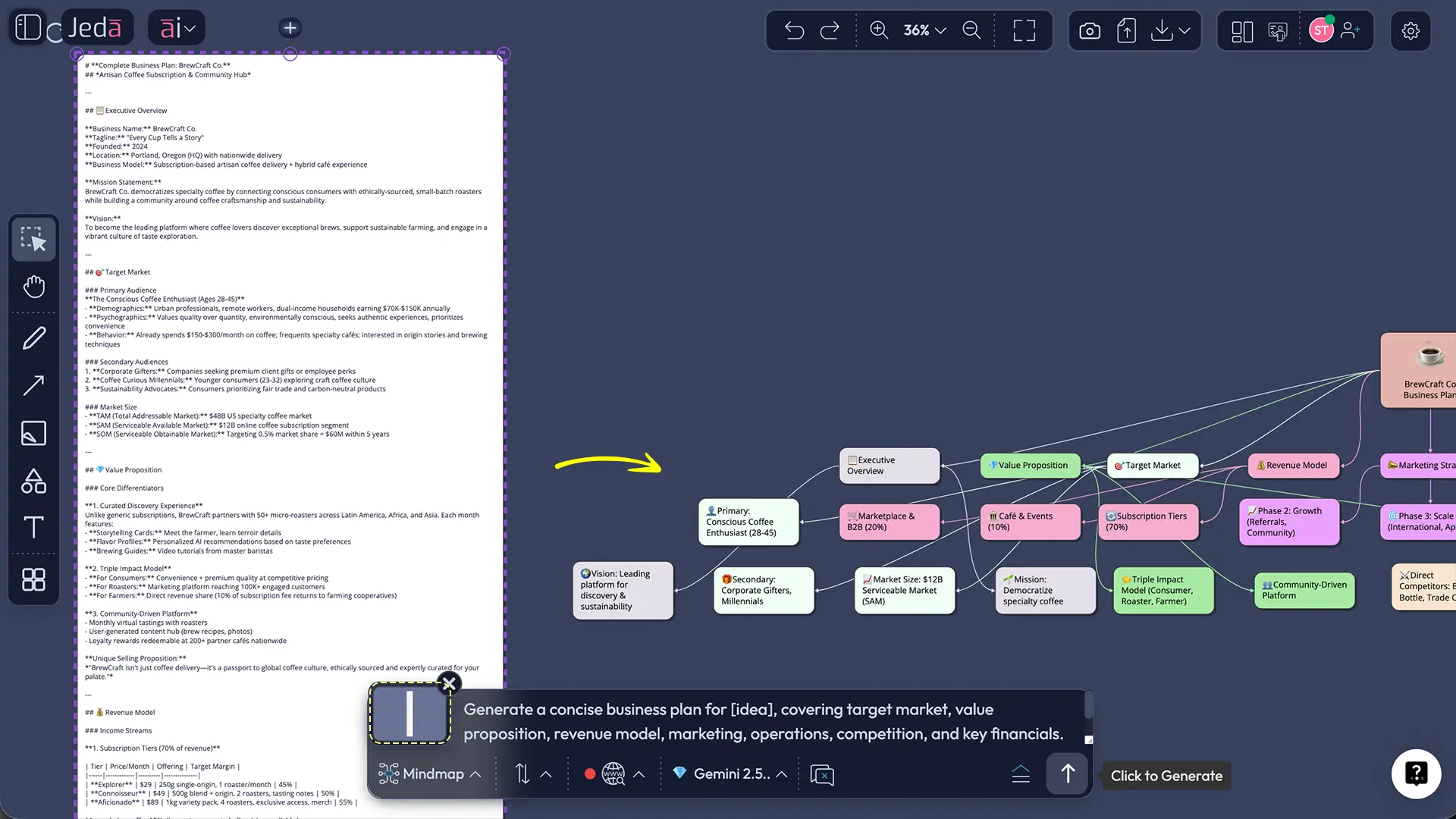
Jeda.ai gives you a practical middle ground between blank-page panic and overbuilt planning software. You can start with the Writer recipe for a one-page plan, draft directly from the Prompt Bar, then expand sections with the AI+ button, convert ideas with Vision Transform, and review the plan collaboratively on canvas. It is a clean example of Visual AI applied to real planning work. If you want the broader product context, this fits naturally inside Jeda.ai’s AI Workspace and AI Whiteboard. That matters when the plan is still changing. Which, let’s be honest, it usually is.
What is a one-page business plan?
A one-page business plan is a compressed version of a traditional plan. It keeps the fundamentals—problem, solution, customer, business model, route to market, numbers, team, and milestones—but strips out the padding. LivePlan describes it as a simplified version of a standard plan, while the SBA separates this kind of lean startup format from more detailed traditional plans used for lenders or formal fundraising.
That distinction matters.
A one-page plan is not a shortcut because you are lazy. It is a shortcut because early-stage strategy changes fast. You need something you can read in two minutes, challenge in ten, and update in fifteen. The format also overlaps with familiar one-page planning tools such as the Business Model Canvas and Lean Canvas, both of which made concise planning popular by forcing founders to summarize how value gets created, delivered, and captured on a single page.
Why use an AI business plan generator for a one-page plan?
Because speed is only half the story. The other half is iteration.
Founders rarely get version one right. Academic research on planning does not say “write a giant plan and frame it.” It says planning helps when it improves decisions, sharpens alternatives, and supports revision. That fits one-page planning perfectly. You draft the plan, test assumptions, tighten weak spots, and keep moving.
Jeda.ai makes that loop easier because the output does not have to stay plain text forever. In the same AI Workspace, you can turn the plan into a visual summary, a decision map, or a planning board for the team. So the plan becomes usable, not decorative.
- Faster first draft
Turn scattered thoughts into a structured one-page plan before momentum disappears.
- Sharper focus
The format forces you to define customer, offer, and revenue logic without fluff.
- Built for revision
Update assumptions quickly as interviews, pricing, and market feedback change.
- Team-friendly review
Use the AI Whiteboard to discuss the plan in one shared place instead of email threads.
- Visual follow-through
Convert the draft into a mind map, matrix, or workflow when the team needs action.
- AI+ expansion
Extend thin sections like go-to-market, risks, or milestones without rewriting the whole thing.
Jeda.ai also fits the way real teams work. The platform supports Writer recipes in the AI Menu, Prompt Bar generation at the bottom of the canvas, Multi-LLM reasoning on higher plans, Vision Transform, and the AI+ button for extending existing visuals and structured outputs. It also gives you access to 300+ strategic frameworks when the business plan needs more than just words—for example, a quick SWOT, priority grid, or decision comparison. That mix of text plus visual reasoning is the part many “AI business plan generator” tools skip.
What should a one-page business plan include?
There is no sacred tablet here, but the strongest one-page plans keep the same bones.
The core sections that matter
- Problem — What pain or gap exists?
- Solution — What are you offering?
- Target market — Who cares enough to buy?
- Business model — How do you make money?
- Go-to-market — How do customers find and buy from you?
- Competitive edge — Why will you win, or at least not get crushed?
- Team and resources — Who is doing the work?
- Financial snapshot and milestones — What numbers and near-term goals matter?
LivePlan recommends keeping each section to one or two sentences or a few bullets. That is a good rule. The page should feel tight, not starved. Enough detail to judge the idea. Not enough detail to numb the room.
How to create a one-page business plan in Jeda.ai
Jeda.ai supports two reliable paths for this topic. Since this is a Writer recipe, the AI Menu route is the better starting point. The Prompt Bar route is great when you already know what you want and just need the draft on canvas.
Method 1: Recipe Matrix (AI Menu → Writer Recipe)
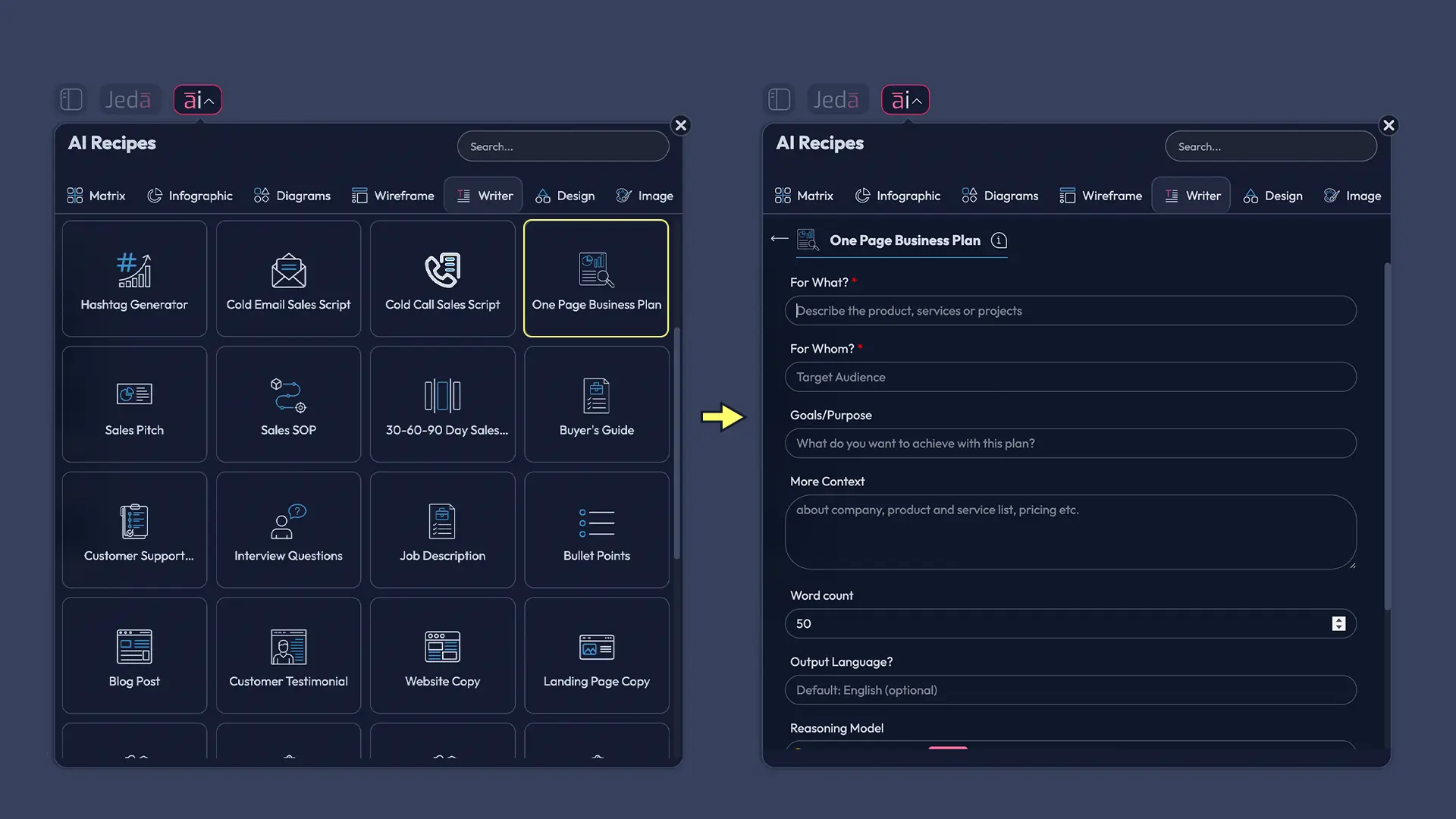
This is the recommended route for people who want structure before writing. In Jeda.ai, AI Recipes live in the top-left AI Menu, and the Writer category is where business-writing templates live. The recipe flow gives you guided fields, reasoning model selection, language options, file-based analysis on higher plans, web search control, and built-in Vision Transform support when you start from selected content.
- Open the AI Menu
Click the ai∨ button at the top-left of the Jeda.ai canvas to open AI Recipes.
- Choose Writer recipes
Select the Writer category, then open the One Page Business Plan recipe.
- Fill the business context
Add what the business does, who it serves, the goal of the plan, and any extra context that sharpens the output.
- Pick your model and output style
Choose a reasoning model and generate the result as a clear document-style text block on canvas.
- Review the first draft
Check whether the problem, customer, revenue model, and milestones are specific enough to survive a tough read.
- Use AI+ to deepen weak sections
Select a section or connected visual and use the AI+ button to expand details like market assumptions, risks, or launch steps.
- Turn text into action visuals
Use Vision Transform to convert the plan into a mind map, matrix, or team discussion board when you need alignment.
Method 2: Prompt Bar
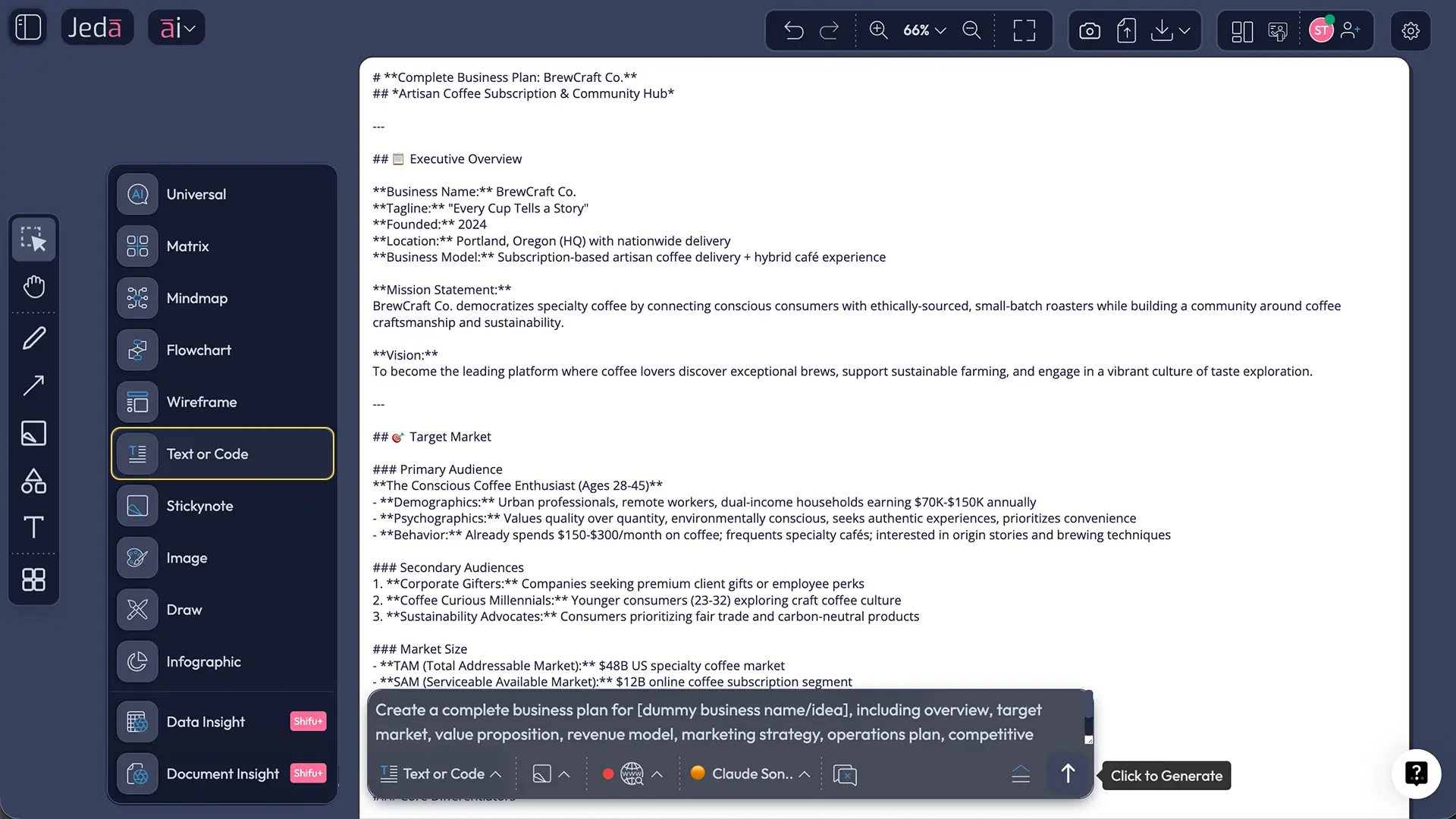
This is the faster, freer route. The Prompt Bar sits at the bottom center of the workspace, and it is the primary AI input area in Jeda.ai. For a one-page business plan, choose Text or Code, switch the output format to Document, write a focused prompt, and generate.
A solid prompt looks like this:
Create a one-page business plan for a subscription-based bookkeeping assistant for freelancers. Include the problem, solution, target market, pricing model, customer acquisition, competitive edge, milestones, and a short financial snapshot. Keep each section concise and investor-readable.
That prompt gives the model enough shape to do useful work without drowning it in trivia. You can always add more context after the first pass.
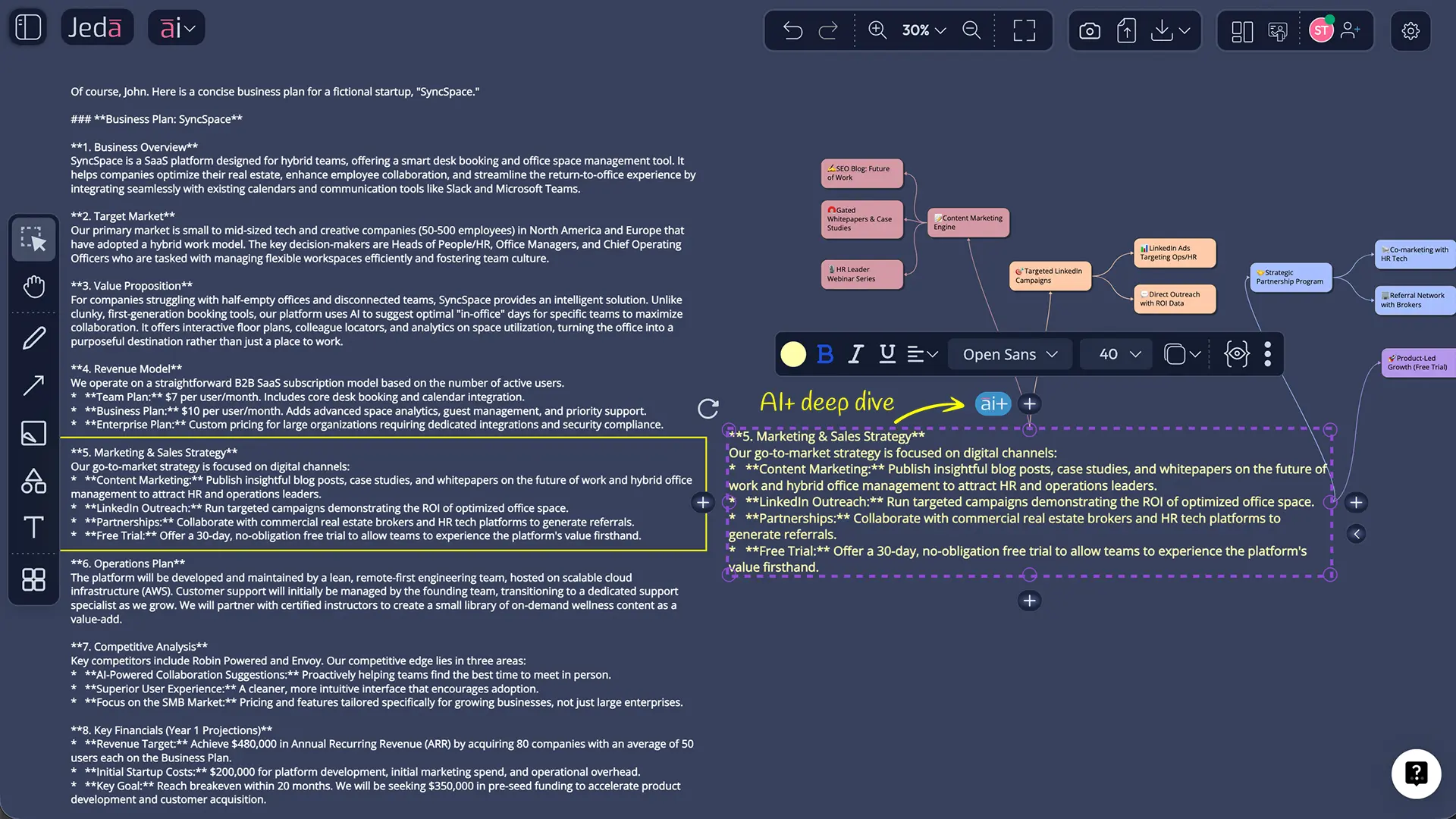
AI+ button deep dive
The AI+ button is best when the draft is decent but thin. Maybe the pricing logic feels generic. Maybe the milestone section sounds like it was written by someone who has never launched anything harder than a toaster. That is where AI+ helps.
Use it to extend:
- go-to-market channels
- assumptions and risks
- milestone sequencing
- pricing rationale
- customer objections
- competitor differentiation
What it is not great for is microscopic instruction like “rewrite bullet three with exactly 17 words and a sassier tone.” AI+ works better as continuation and elaboration. Think “go deeper,” not “perform surgery with tweezers.”
One-page business plan template and example
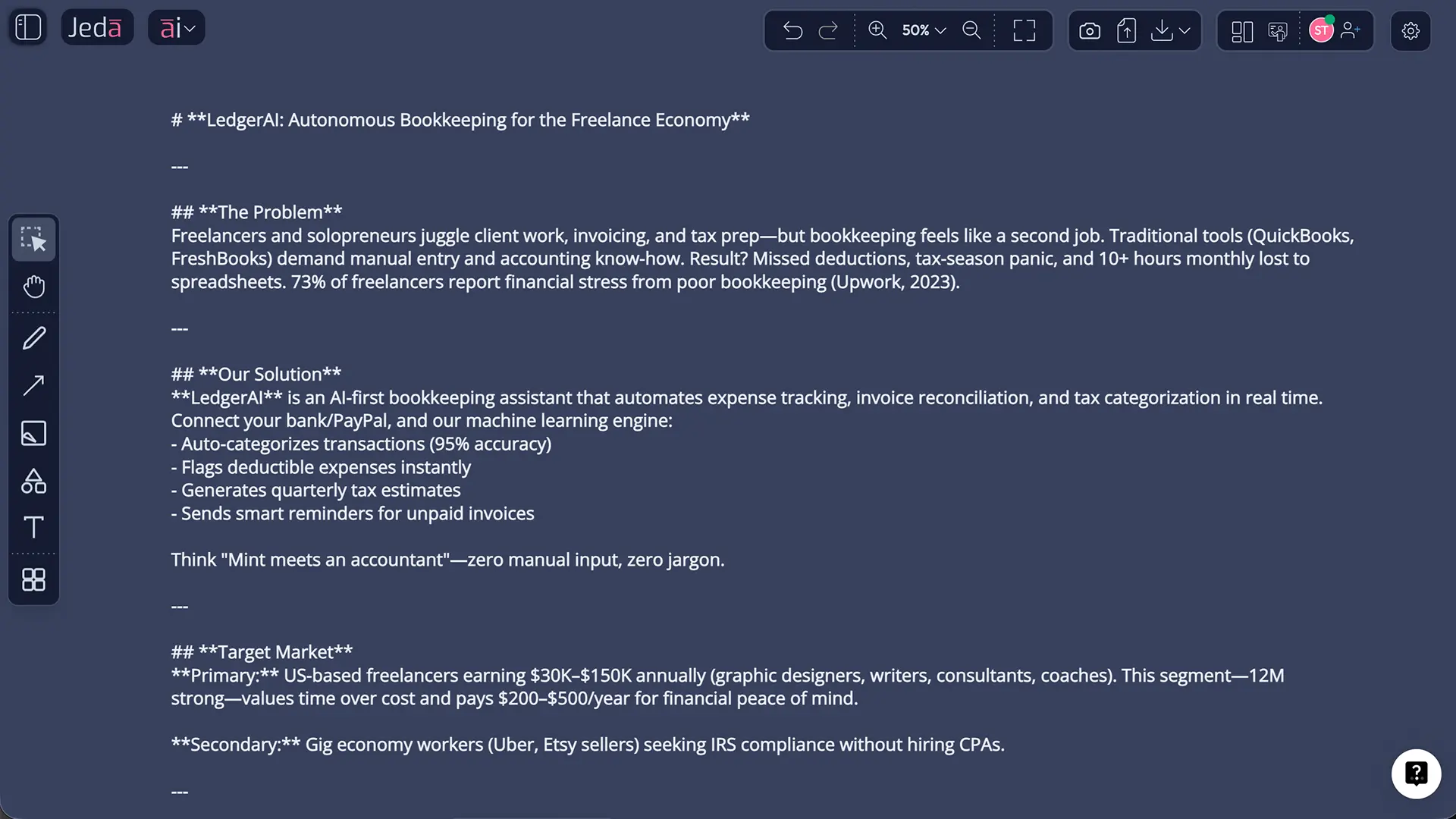
A good template should read like a thinking tool, not a school assignment. Here is a compact example.
That example is short on purpose. The point of the page is to expose whether the business logic hangs together. After that, you can use Jeda.ai to stretch the strongest ideas into a deeper plan, a pitch flow, a launch roadmap, or a decision board inside the AI Whiteboard.
Best practices that make the page actually useful
Common mistakes to avoid
The most common one? Treating “one-page” as “vague.” That misses the point.
Another mistake is stuffing the plan with generic praise about your product instead of showing business logic. Investors, advisors, and even co-founders will forgive an early idea. They will not forgive fog.
And one more: pretending the one-page format replaces every other plan forever. It does not. The SBA is pretty clear here—lean startup plans are fast and high-level, while traditional plans are more detailed and still expected in some lending or formal funding situations. Use the one-page version to think faster. Expand when the audience needs more depth.
Frequently asked questions
- What is an AI business plan generator?
- An AI business plan generator is a tool that turns prompts, business details, and supporting context into a structured plan draft. The better versions do more than write paragraphs—they help you revise assumptions, organize sections clearly, and adapt the plan as your strategy changes.
- What is a one-page business plan?
- A one-page business plan is a concise version of a standard plan that captures the essentials on a single page. It usually covers the problem, solution, target market, revenue model, competitive edge, team, and near-term milestones without the length of a lender-style document.
- Can AI write a one-page business plan well enough to use?
- Yes, as a starting draft. AI is strong at structure, section prompts, and first-pass wording. It still needs your judgment for real market insight, financial realism, and customer truth. The best workflow is draft with AI, then pressure-test every assumption.
- What should I include in a one-page business plan?
- Include the problem, the solution, your customer, the way you make money, how you will reach buyers, your edge over alternatives, who is executing, and the short financial or milestone picture. If any section cannot stay concise, your thinking probably needs another pass.
- Is a one-page business plan enough for investors or lenders?
- Sometimes for an intro, rarely for the full process. A one-page plan works well for initial conversations, internal alignment, and early validation. Formal investors or lenders may still want a more detailed plan, financial model, or due-diligence package depending on the ask.
- How is a one-page business plan different from a Lean Canvas or Business Model Canvas?
- They overlap, but they are not identical twins. A one-page business plan reads more like a compact strategy document. Lean Canvas and Business Model Canvas are one-page modeling tools built around defined blocks that help summarize and test a business model visually.
- Which Jeda.ai method is better for this topic: Recipe Matrix or Prompt Bar?
- Use the AI Menu Writer recipe when you want guided structure and less guesswork. Use the Prompt Bar when you already know the sections you want and prefer speed. Most teams start with the recipe, then refine or extend sections from the Prompt Bar and AI+.
- Can I turn the plan into a visual board inside Jeda.ai?
- Yes. After generating the one-page plan, you can use Vision Transform to convert it into a mind map, matrix, or other structured visual. That makes Jeda.ai especially useful when the plan needs discussion, prioritization, or a team decision path instead of static text.
- Can Jeda.ai help me go beyond the first draft?
- Yes. Jeda.ai can help extend weak sections with the AI+ button, compare strategic options using framework-style visuals, and collaborate on revisions inside the same AI Workspace. That is the real win: your plan stays editable and usable instead of becoming a frozen document.
Sources & further reading
- [1]
U.S. Small Business Administration (2025) . “Write your business plan” SBA.gov.
View Source ↗ - [2]
LivePlan (2024) . “How to Write a One-Page Business Plan” LivePlan Blog.
View Source ↗ - [3]
Alexander Osterwalder and Yves Pigneur (2010) . “Business Model Generation / Business Model Canvas” Strategyzer.
View Source ↗ - [4]
IMD Business School (2024) . “Mastering the Business Model Canvas: A comprehensive guide for managers” IMD.
View Source ↗ - [5]
Joern Brinckmann, Dietmar Grichnik, and Diana Kapsa (2010) . “Should entrepreneurs plan or just storm the castle? A meta-analysis on contextual factors impacting the business planning–performance relationship in small firms” Journal of Business Venturing.
View Source ↗ - [6]
Anne Chwolka and Michael G. Raith (2012) . “The value of business planning before start-up — A decision-theoretical perspective” Journal of Business Venturing.
View Source ↗ - [7]
Gary J. Castrogiovanni (1996) . “Pre-startup planning and the survival of new small businesses: Theoretical linkages” Journal of Management.
View Source ↗ - [8]
Ash Maurya (2024) . “What is Lean Canvas?” LeanFoundry.
View Source ↗
Build your one-page plan in Jeda.ai
Join over 150,000+ users who use Jeda.ai to draft, refine, and visualize strategy inside one collaborative AI Workspace.
Try Free Template