Feature Requirement Document with AI sounds like a niche phrase. It isn’t. It’s the moment where a fuzzy feature request turns into something engineering can actually build, QA can actually test, and stakeholders can stop arguing about in Slack. In practice, teams use overlapping labels here — feature requirement document, PRD, feature spec, even FRD when the document becomes more technical — but the job is the same: define what the feature is, why it matters, what must happen, and what is explicitly out of scope.
That sounds simple. It rarely is.
Most requirement docs fail for boring reasons: unclear scope, stale assumptions, missing edge cases, disconnected feedback, and zero traceability once the build starts. ISO/IEC/IEEE 29148 frames requirements as a full life-cycle discipline, not a one-time writing task. IIBA’s BABOK does the same by emphasizing specification, validation, and traceability. Atlassian, Aha!, and Jama all land on the same blunt truth: when the document is weak, alignment breaks before the feature does. And when the document is strong, teams move faster with less rework.
That’s where Jeda.ai gets interesting. Instead of treating a requirement doc like a static file that dies in a folder, Jeda.ai turns it into a living asset inside an AI Workspace and an AI Whiteboard. You can generate the first draft, ground it with discovery files, expand weak sections with AI+, convert selected sections into flows or diagrams, and keep product, design, engineering, and QA in the same visual system. Less copy-paste. Fewer ghost versions. Far less “wait, which doc are we using?”
What is a Feature Requirement Document?
A Feature Requirement Document is the feature-level build brief that translates intent into execution. It usually sits somewhere between a high-level product strategy doc and downstream engineering tickets. Put differently: the PRD says what problem matters; the feature requirement document gets painfully clear about what this feature must do, who it serves, how success will be judged, and where the edges are.
That overlap is why the terminology gets messy.
Atlassian describes a PRD as the document that defines a product’s purpose, features, functionality, and behavior. Aha! makes the same point from a planning angle: a strong PRD aligns engineering, design, and stakeholders before work begins. Jama takes it one step deeper and describes the FRD as a more technical follow-on to the higher-level PRD. So, for practical product teams, a feature requirement document is often the document you write when the feature is real enough to scope, debate, and implement — but still early enough to avoid building the wrong thing.
A strong one usually answers seven questions fast:
Why teams still struggle with requirement documents
Bad requirement docs don’t usually fail because people are lazy. They fail because the work itself is messy.
Customer evidence lives in one place. Design mocks live somewhere else. Edge cases are buried in comment threads. Engineering assumptions change after the first estimate. Then someone exports a PDF, everyone politely nods, and the document starts decomposing in public.
IBM Research examined 32 software projects and found that the quality of requirement specifications related directly to project outcomes, including cost and schedule performance. One detail is especially brutal: projects with weak purpose, overview, and context sections were more likely to overrun. That tracks with reality. Teams rarely die from a missing bullet. They die from a missing shared understanding.
There’s another problem. Templates help, but plain document tools don’t solve traceability. Jama points out that generic document platforms make collaboration cumbersome and are not built for systematic requirements traceability. So even when the writing looks neat, the operational reality underneath can still be chaos wearing a blazer.
And that’s the gap an AI-first workflow can close.
Why use Jeda.ai for a Feature Requirement Document with AI?
Jeda.ai is not just a writing surface. It’s an AI Workspace built for structured thinking, team input, and visual follow-through. That matters because a good feature requirement document is never “just text.” It connects discovery, scope, flows, design, risk, rollout, and open decisions.
Here’s what changes when you generate the document inside Jeda.ai instead of in a dead-end doc:
- Start with structure
Use a Writer Recipe or the Text command to generate a clean draft with the sections serious teams actually need.
- Ground the draft with evidence
Bring in customer interviews, support notes, competitor research, PRDs, or technical briefs through Document Insight and Data Insight.
- Align cross-functional teams
Product, engineering, design, QA, and stakeholders can work in the same AI Whiteboard instead of juggling disconnected files.
- Deepen weak sections with AI+
Select a thin section such as permissions or analytics, then use AI+ to expand it after the first draft is already on the board.
- Convert specs into visuals
Use Vision Transform to turn rollout logic into a flowchart, dependency clusters into a diagram, or user steps into a mind map.
- Use current context when needed
Jeda.ai web search is a platform feature, so you can ground the document with fresh market or policy context when the feature depends on it.
This is the bigger shift. A static document explains. A Visual AI workflow lets the document think with the team.
And one more thing: because Jeda.ai already supports 300+ strategic frameworks, your requirement doc doesn’t have to live alone. The same board can connect to prioritization, rollout planning, stakeholder mapping, post-launch review, and related product strategy work inside the same AI Workspace.
What a strong Feature Requirement Document should include
There’s no sacred one-size-fits-all template, and anyone who tells you otherwise probably sells templates for a living. Still, the best docs keep circling the same core building blocks.
Based on current PRD/FRD guidance from Atlassian, Product School, Jama, IIBA, and requirements-engineering standards, these are the sections worth keeping:
1) Context and project specifics
Name the feature. Add owners, participants, current status, target release, and linked references. This gives people enough context to know whether they’re looking at an idea, a validated candidate, or a build-ready spec.
2) Problem, goals, and strategic fit
Why are you building this now? What business or user problem does it solve? What metric or decision does it move? Weak docs skip this and jump straight into features. That’s usually how zombie scope gets born.
3) Users, stories, and scenarios
Who uses the feature? In what context? What job are they trying to get done? This is where the document becomes human instead of just procedural.
4) Functional requirements and acceptance criteria
This is the heart of the document. What must the system do? Under what conditions? How do we know it works? Be precise. Not theatrical.
5) UX references, flows, and interaction notes
Include wireframes, journey links, or interaction rules when behavior matters. A sentence is fine for simple work. A flow is better when the path can fork.
6) Dependencies, assumptions, and edge cases
Permissions, APIs, analytics events, data rules, fallback behavior, feature flags, migration constraints, compliance assumptions. The ugly bits. Ignore them at your own peril.
7) Open questions, non-goals, and rollout plan
What still needs a decision? What are we explicitly not doing in this release? How will rollout, monitoring, and feedback loops work after launch?
How to create a Feature Requirement Document with AI in Jeda.ai
This topic maps cleanly to Jeda.ai’s Writer Recipes and the Text command. So the best workflow is simple: generate the structured draft first, then deepen or convert the parts that need more operational detail.
Method 1: Recipe Matrix
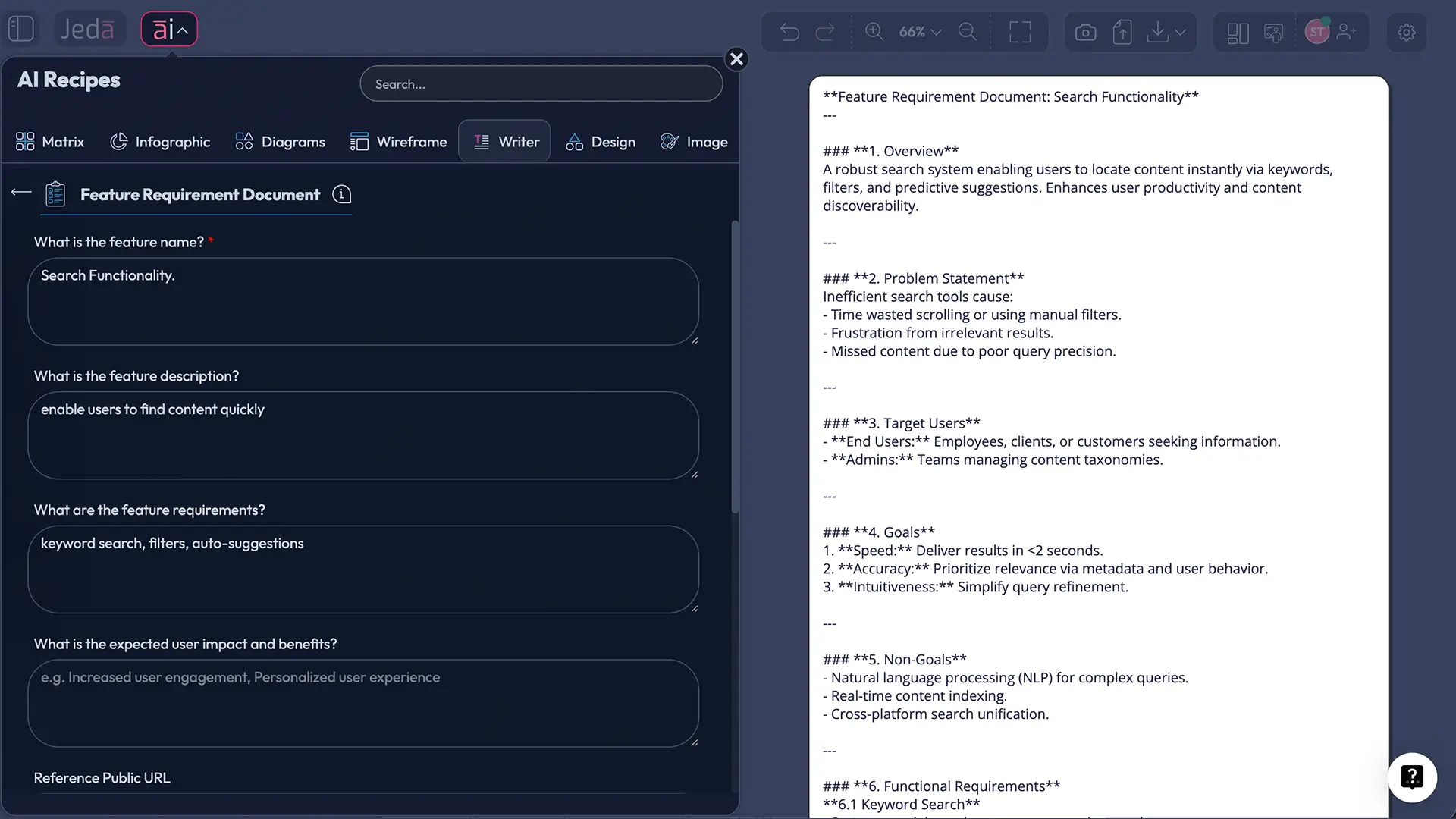
Yes, this is a Writer Recipe, not a matrix framework. But the workflow pattern is the same: guided prompt, structured fields, faster first draft.
- Open a board in your AI Workspace
Create or open a board in Jeda.ai. This becomes the shared source of truth for the feature discussion and downstream decisions.
- Method 1: Recipe Matrix
Open the AI Menu at the top-left, switch to Writer Recipes, choose the Feature Requirement Document recipe, fill in the guided fields, and click Generate.
- Method 2: Prompt Bar
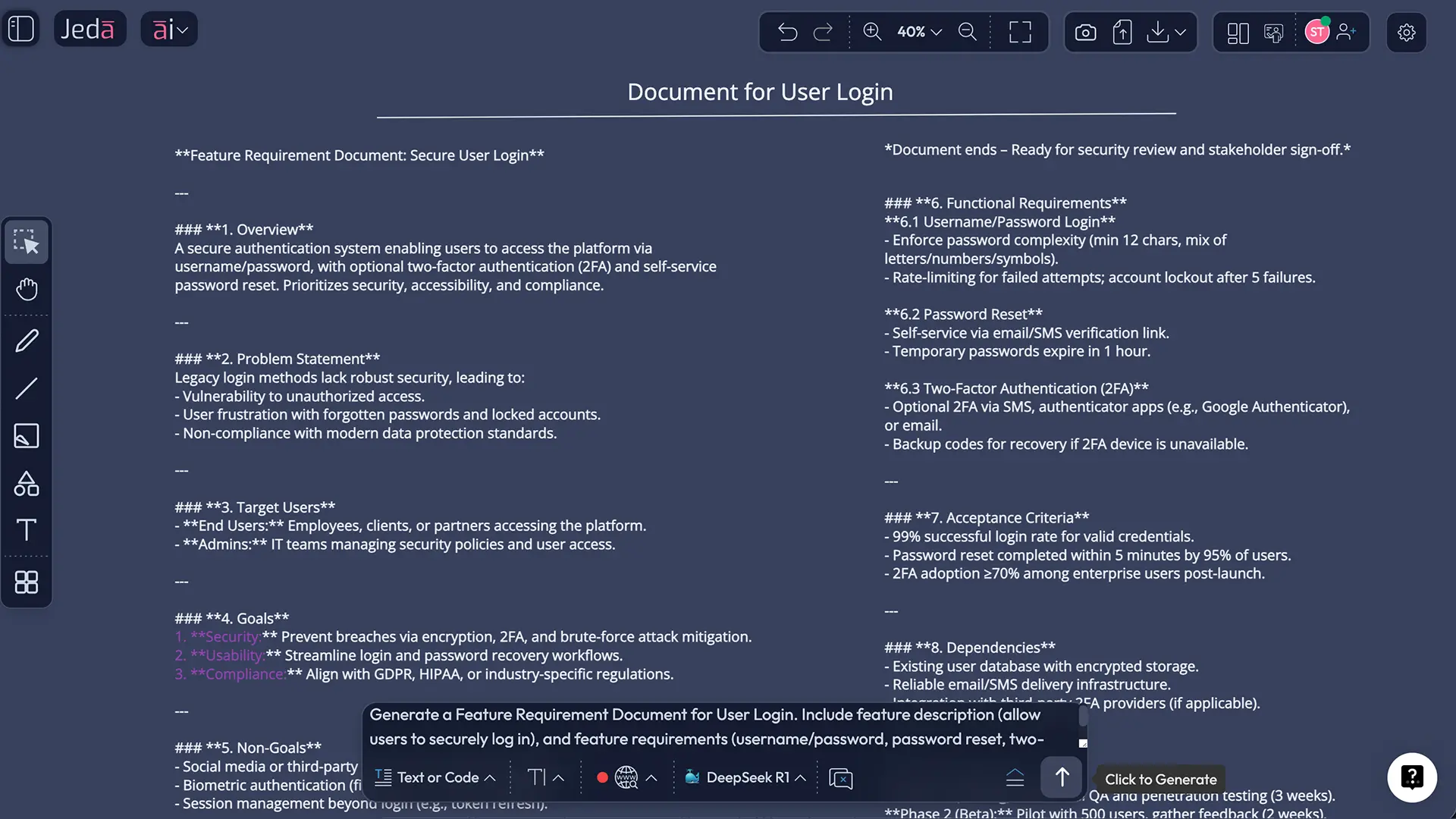
Open the Prompt Bar at the bottom, select the Text command, switch the output to Document, paste your Feature Requirement Document prompt, and generate the draft.
- Ground the draft with discovery material
Add briefs, customer interviews, support feedback, competitor notes, PRDs, or technical inputs. Use Document Insight or Data Insight when those files should shape the document.
- Extend thin sections with AI+
Select a section such as analytics, permissions, fallback behavior, or rollout assumptions, then use the AI+ button to deepen that specific part after the initial draft exists.
- Convert document sections into operational visuals
Use Vision Transform to turn user interactions into a flowchart, dependencies into a diagram, or decision branches into a mind map without leaving the board.
- Review, collaborate, and export
Use the shared board to review the doc with engineering, design, QA, and stakeholders, then export the output as PNG, SVG, or PDF when you need a portable artifact.
Method 2: Prompt Bar
Use this when you want tighter control, when the brief is already clear, or when you want to adapt the structure to your own team’s format.
Create a Feature Requirement Document for: [feature name].
Company / product: Primary users: Problem to solve: Business goal: Target release: Constraints or dependencies: Relevant discovery inputs: Design or workflow notes: Known edge cases: Success metrics:
Write the document in a concise, implementation-ready format with these sections:
- Overview
- Problem statement
- Users and use cases
- Goals and non-goals
- Functional requirements
- Acceptance criteria
- UX / interaction notes
- Dependencies and assumptions
- Analytics and rollout
- Risks and open questions
Keep the writing specific, avoid filler, and flag anything unclear as “Open question”.
A practical note on AI+: use it to extend something that already exists. It’s great for a deeper permissions section or a more rigorous rollout plan. It is not the place to dump an unrelated fresh brief and hope for magic. Even AI has boundaries. Shocking, I know.
Example: turning a fuzzy request into a build-ready document
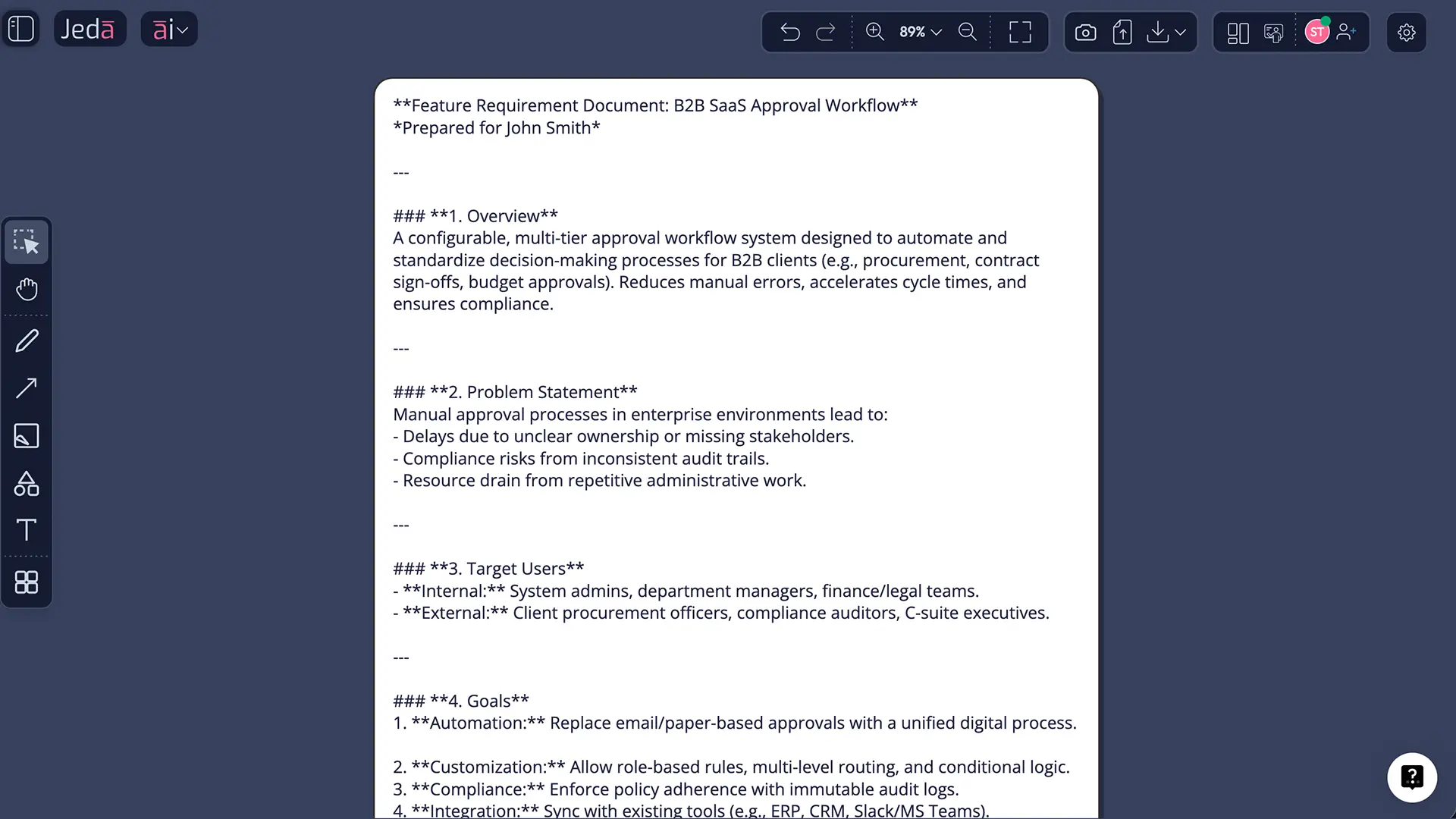
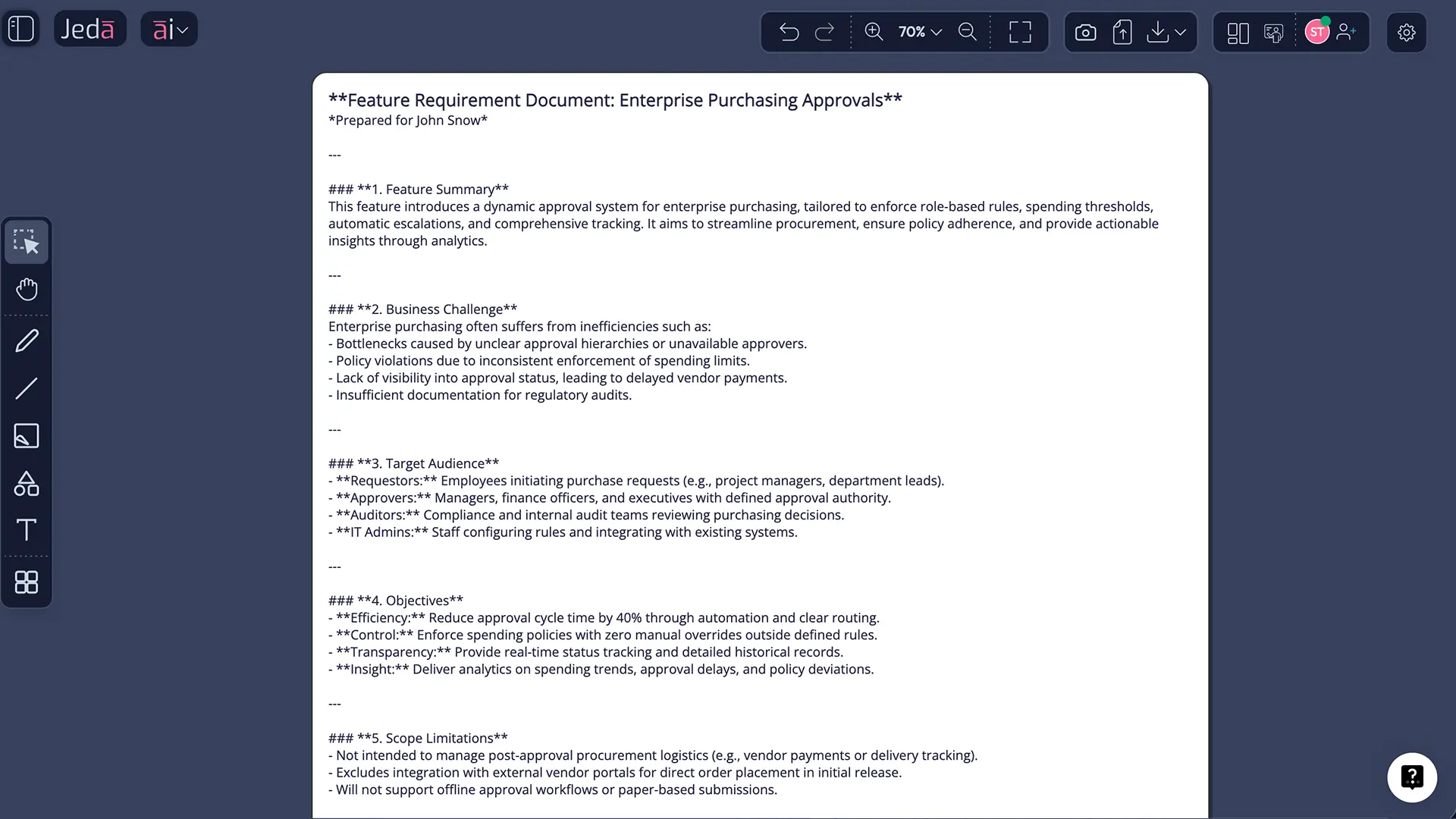
Let’s use a common product ask: role-based approval workflow for enterprise purchasing.
The sloppy version sounds like this: “We need approvals for big purchases.”
The usable version says:
- which user roles can request, approve, or override,
- what thresholds trigger approval,
- what happens if an approver is unavailable,
- what audit records must exist,
- how notifications work,
- which edge cases block or escalate the request,
- which metrics indicate the feature is doing its job.
That’s exactly the sort of gap Jeda.ai closes well. Start with the Writer Recipe or Prompt Bar draft. Add customer feedback or policy notes through Document Insight. Use AI+ to deepen policy exceptions. Then convert the approval logic into a flowchart with Vision Transform so implementation and QA can work from the same logic model.
And once the feature exists as a structured doc, the board gets better, not worse. You can link it to related work such as AI Workspace, AI Whiteboard, Product Requirements Template with AI, or Visual AI for Product Management. No tool-hopping tax. No second-spec syndrome.
Best practices that save teams from themselves
A few habits matter more than the rest:
The anti-patterns are equally predictable:
- writing the doc alone and asking for “sign-off” after decisions are already made,
- burying assumptions,
- skipping success metrics,
- mixing design solutions into problem statements,
- pretending edge cases are future-you’s problem,
- and never updating the document once the first draft is shared.
Atlassian explicitly warns against iron-clad sign-off rituals and frozen requirements that never get updated. Product School describes the best PRDs as living documents. The standards crowd says the same thing in less friendly language.
Frequently asked questions
- What is a Feature Requirement Document with AI?
- A Feature Requirement Document with AI is a structured feature-spec workflow where AI helps draft, organize, and refine the document. The goal is not to replace product thinking. The goal is to reduce blank-page friction, expose gaps faster, and create a requirement artifact teams can actually use.
- Is a Feature Requirement Document the same as a PRD?
- Not exactly. A PRD often frames the broader feature or product intent, while a feature requirement document usually goes closer to implementation detail. In practice, teams use overlapping labels. What matters is whether the document clearly covers scope, behavior, assumptions, and acceptance criteria.
- What should a strong feature requirement document include?
- At minimum, include context, problem, target users, goals, non-goals, requirements, acceptance criteria, dependencies, risks, and open questions. If interaction complexity matters, add design references or a flow. If rollout risk matters, include launch and monitoring notes too.
- Who should own the document?
- Usually product owns the document, but it should never be written in isolation. Engineering, design, QA, analytics, and relevant stakeholders should shape it while the feature is still flexible enough to improve. Ownership is clear. Authorship is shared.
- Can Jeda.ai use customer interviews or briefs to improve the draft?
- Yes. Bring source material into the board through uploads, Document Insight, or Data Insight when relevant. That lets the Feature Requirement Document start from real evidence instead of vague memory and makes the resulting draft much easier to defend.
- How should we use AI+ on this workflow?
- Use AI+ after you already have a first-pass document. It works best for expanding a selected section such as permissions, analytics, rollout, or exception handling. Think of it as a deepening tool, not the first place to dump an entirely unrelated prompt.
- Can we turn the document into a flowchart or diagram?
- Yes. Use Vision Transform on a selected section to convert user interaction logic into a flowchart, dependencies into a diagram, or clustered behavior into a mind map. That is one of the fastest ways to make a written requirement operational for other teams.
- Does web search belong to a specific AI model in Jeda.ai?
- No. In Jeda.ai, web search is a platform feature rather than a property of a single model. Turn it on when your requirement document depends on current policies, market context, or competitor details that should not rely on stale model memory.
- Can distributed teams collaborate on the same requirement document?
- Yes. Jeda.ai supports real-time collaboration inside the same board, so product, design, engineering, QA, and stakeholders can review the same requirement artifact together. That shared context is one reason an AI Whiteboard often ages better than a static document.
- Can we export the final requirement artifact?
- Yes. Export outputs from Jeda.ai as PNG, SVG, or PDF. Those formats work well for sharing, reviews, archives, and downstream communication. The key is that the working version can stay live in the AI Workspace even after you export a snapshot.
Sources and further reading
- [1]
ISO / IEC / IEEE (2018) . “ISO/IEC/IEEE 29148:2018 — Systems and software engineering — Life cycle processes — Requirements engineering” ISO / IEEE Standards.
View Source ↗ - [2]
IEEE Standards Association (2018) . “IEEE/ISO/IEC 29148-2018” IEEE SA.
View Source ↗ - [3]
International Institute of Business Analysis (n.d.) . “A Guide to the Business Analysis Body of Knowledge (BABOK® Guide)” IIBA.
View Source ↗ - [4]
Atlassian (2026) . “What is a Product Requirements Document (PRD)?” Atlassian Agile Coach.
View Source ↗ - [5]
Jama Software (n.d.) . “Functional requirements examples and templates” Jama Software Requirements Management Guide.
View Source ↗ - [6]
IBM Research (2007) . “How does requirements quality relate to project success or failure?” IBM Research.
View Source ↗ - [7]
Product School (2024) . “The Only PRD Template You Need (with Example)” Product School.
View Source ↗
Start Your Feature Requirement Document with AI Today
Join over 150,000+ users who use Jeda.ai to turn fuzzy feature requests into aligned, build-ready decisions inside one AI Workspace.
Try Free Template