A Job Description with AI should do more than turn a job title into polished paragraphs. It should force a hiring team to decide what the role exists to accomplish, which duties are truly essential, what evidence of capability matters, and where an impressive-sounding requirement is simply inherited clutter. Jeda.ai brings that work into an AI Workspace where the draft can sit beside role maps, hiring plans, interview criteria, and team feedback on one AI Whiteboard. More than 150,000+ users already work in Jeda.ai across writing, analysis, and visual planning—but the machine still should not get the final vote.
That last point matters. A fluent job description can still be vague, exclusionary, legally risky, or detached from the actual work. A polished hallucination is still a bad hiring brief.
What Is a Job Description with AI?
A Job Description with AI is a role document drafted or refined by a generative model using information supplied by a hiring manager, recruiter, founder, or people team. The AI can organize responsibilities, qualifications, outcomes, working conditions, and company context into a usable first draft. The quality of that draft depends heavily on the quality of the role definition behind it.
A conventional generator often asks for a title and returns familiar boilerplate. A stronger workflow begins with job analysis: What decisions will this person own? What outcomes should exist after six or twelve months? Which tasks are essential rather than occasional? Which capabilities can be learned after hiring? O*NET offers a useful evidence base because it organizes occupations through tasks, skills, knowledge, abilities, and work activities instead of relying on fashionable titles alone.
Jeda.ai treats the job description as part of a wider thinking process. The Writer recipe produces editable text on the canvas, while the surrounding Visual AI environment lets a team compare versions, map reporting lines, discuss trade-offs, and preserve the reasoning behind the final wording. The broader AI Workspace also connects this hiring work with 300+ strategic frameworks for analysis and planning.
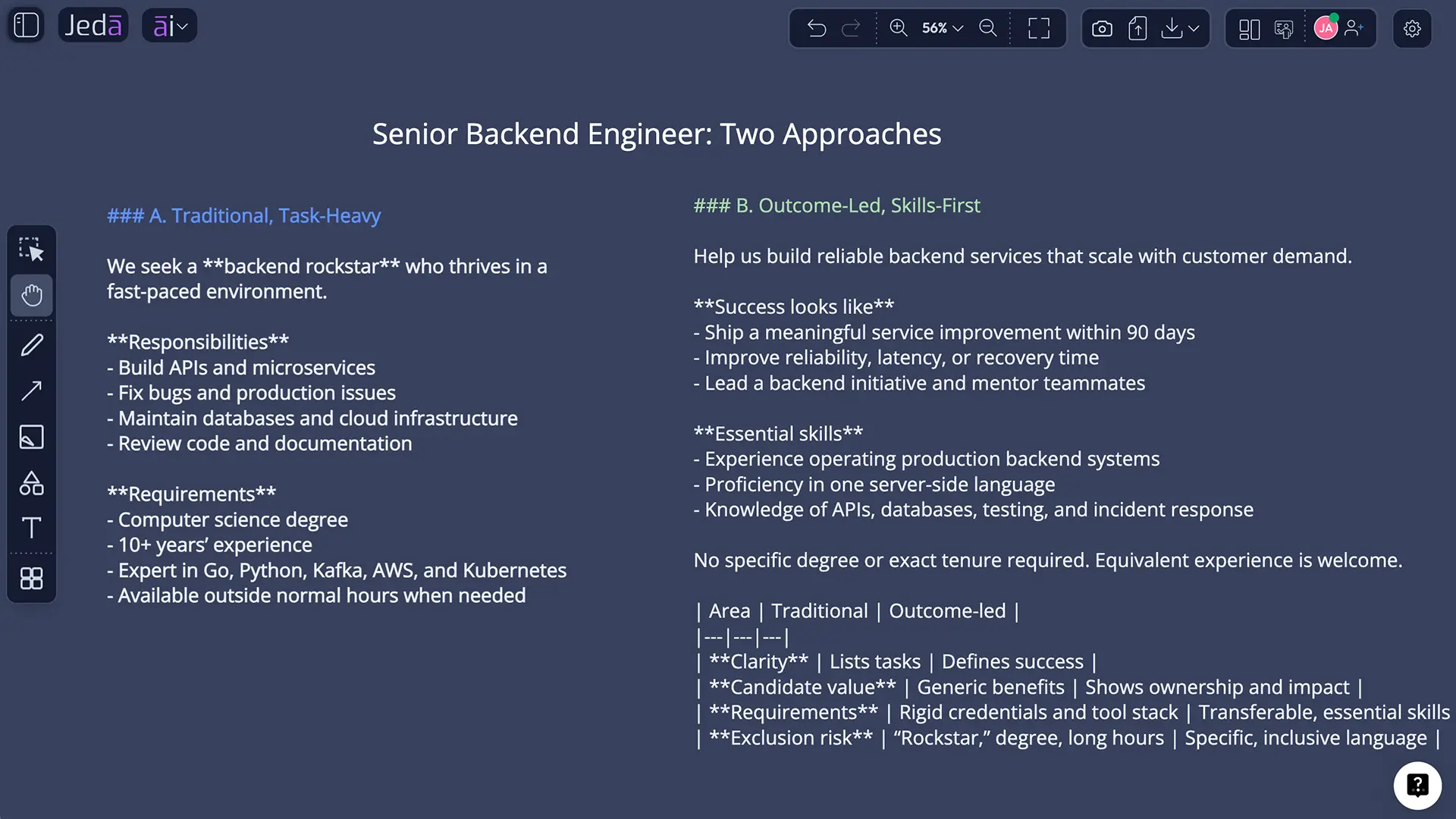
Why the Role Definition Matters Before AI Writes Anything
A job description is not just recruitment copy. It is an operating agreement in miniature. It influences who applies, what interviewers assess, how managers explain expectations, and which duties later appear essential or peripheral.
The U.S. Equal Employment Opportunity Commission advises employers to examine the actual job carefully when identifying essential functions, especially before recruiting, advertising, or hiring. That does not mean every job description becomes a legal shield. It means invented duties, inflated requirements, and vague catch-all phrases can create real consequences.
Language also shapes belonging. Research by Danielle Gaucher, Justin Friesen, and Aaron Kay found that gendered wording in job advertisements can affect how appealing a role feels and whether potential applicants perceive that they belong. AI can detect patterns and suggest alternatives, but it can also reproduce the biases contained in examples, source data, and organizational habits. NIST describes this broader problem as a risk-management issue involving validity, transparency, fairness, accountability, and harmful bias.
So the productive question is not, “Can AI write this?” Of course it can. The better question is, “What decisions must humans make before this text deserves to represent the role?”
- Role clarity
Define the purpose, decisions, outcomes, and boundaries of the role before listing tasks.
- Candidate relevance
Separate essential capabilities from preferences so qualified people can assess fit honestly.
- Human accountability
Review AI output for accuracy, accessibility, bias, internal policy, and jurisdiction-specific requirements.
What Should a Strong AI-Generated Job Description Include?
A useful job description is selective. It tells candidates what matters without pretending one person will perform the work of an entire department. Most strong drafts include the following elements:
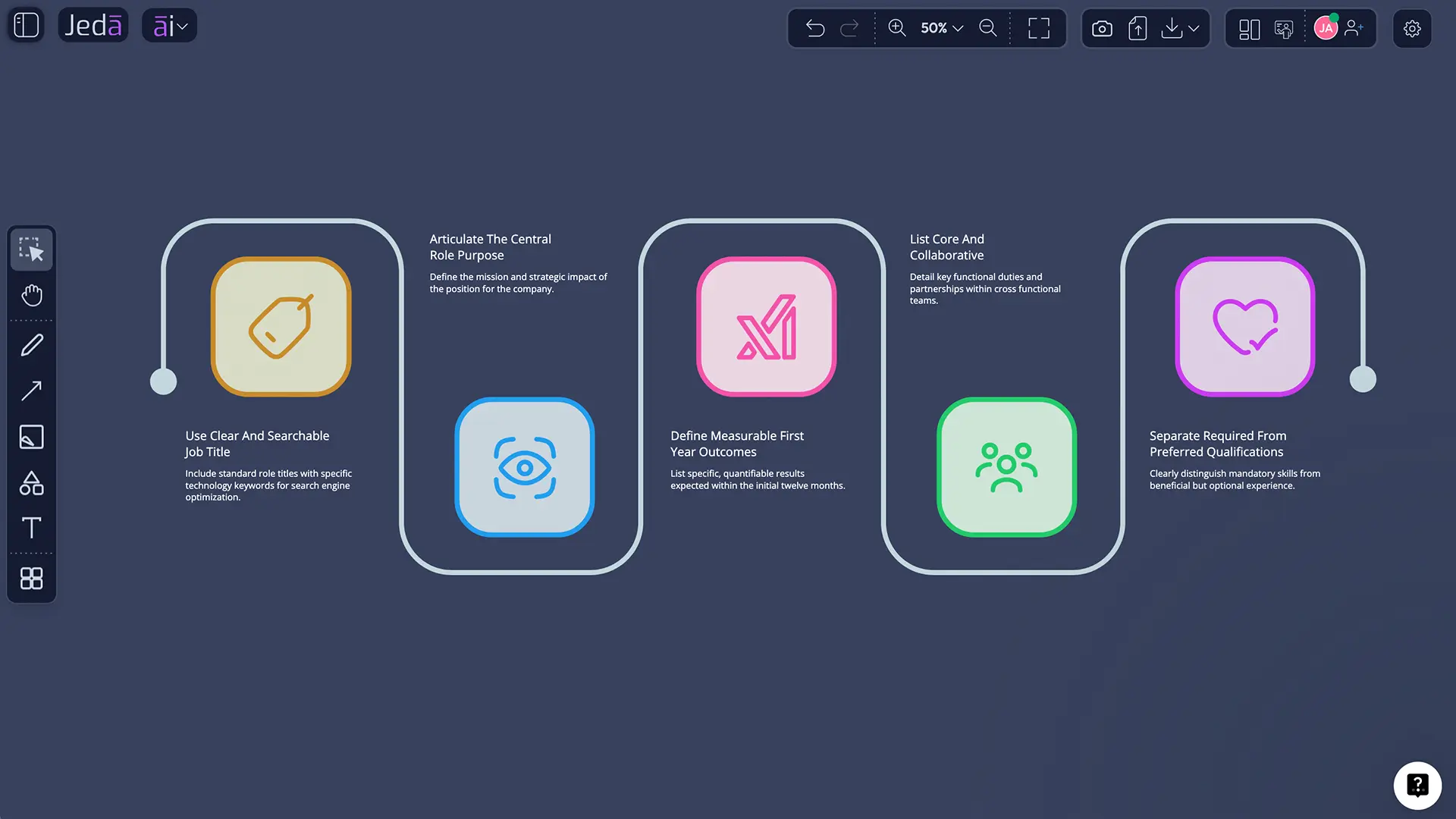
- A searchable, recognizable job title. Internal titles such as “growth wizard” may sound lively but often obscure the actual occupation.
- A concise role purpose. Explain why the role exists and how it contributes to a team, customer, product, or business outcome.
- Outcome-oriented responsibilities. Describe the work through decisions, deliverables, and observable results—not a landfill of verbs.
- Essential qualifications. Include only the experience, knowledge, licenses, or capabilities needed to perform the work.
- Preferred qualifications. Keep these separate so preferences do not masquerade as barriers.
- Working context. State reporting relationships, location or work arrangement, schedule expectations, travel, physical requirements where relevant, and compensation information where required or appropriate.
- Candidate value. Explain what the person can learn, influence, build, or own. A hiring document that only states employer demands is not a compelling exchange.
- A clear application path. Tell candidates what to submit, what the process may involve, and how accommodations can be requested when applicable.
SHRM’s current guidance similarly frames a job description around duties, responsibilities, qualifications, and expectations. AI can arrange these sections quickly. It cannot independently verify that they are true.
| Drafting speed | Role specificity | Bias review | Accountability | |
|---|---|---|---|---|
| Jeda.ai-assisted workflow | Fast | Context-driven | Human-led with AI support | Hiring team |
| Generic one-shot generator | Very fast | Often generic | Variable | Easy to overlook |
| Manual blank-page drafting | Slow | Depends on author | Depends on process | Hiring team |
How to Create a Job Description with AI in Jeda.ai
Jeda.ai provides a dedicated Job Description Writer recipe. There is no sub-recipe or secondary category inside the Writer tab, so you can reach it in two practical ways: navigate through the Writer recipe library or search for the recipe directly.
Method 1: Navigate Through the Writer Tab
Use this method when you want to browse the Writer recipes and confirm that you are opening the dedicated Job Description workflow.
- Open the AI Menu
From the top-left of the Jeda.ai canvas, open the AI Menu to view the available recipe tabs.
- Select Writer
Choose the Writer tab. Job Description appears as a recipe card alongside other writing workflows; no subcategory is required.
- Open Job Description
Select the Job Description recipe to open its guided form.
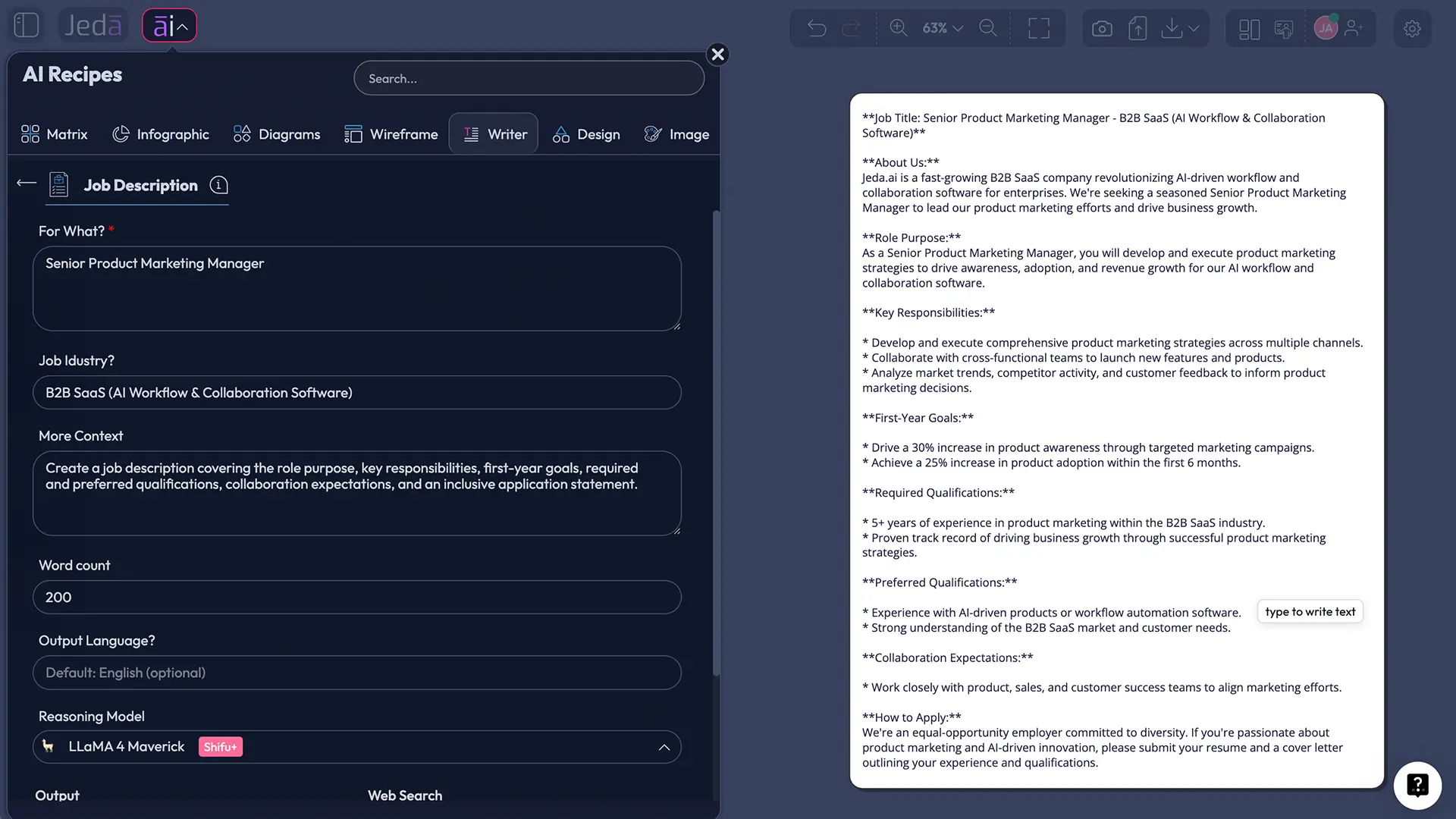
- Complete For What
Enter the role or hiring need. This mandatory field works best when it includes title, seniority, scope, ownership, and intended outcomes.
- Add optional context
Provide Job Industry, More Context, Word Count, and Output Language when they help the model produce a more accurate draft. English is the default language.
- Choose reasoning models
Select one, two, or three reasoning models. When using multiple models, you can enable Aggregate and choose one additional model to evaluate the drafts and produce a consolidated result.
- Set output and web search
Choose Document or Text output, then set Web Search to Auto, On, or Off. Use Clear Chat Context when prior conversation history could contaminate the new role.
- Generate and review
Generate the preview, then manually edit the content, apply text formatting, verify every claim, and obtain the appropriate internal review before publishing elsewhere.
Method 2: Search for the Recipe Directly
This is the faster route when you already know the recipe name.
- Open the AI Menu search
Open the AI Menu and place the cursor in the recipe search field.
- Search Job Description
Type Job Description and select the matching Writer recipe from the results.
- Configure the same fields
Complete For What, add optional industry and context, choose model settings, set output format, and select a Web Search mode.
- Clear unrelated context if needed
Use Clear Chat Context before generation when the workspace history contains a different company, role, or hiring discussion.
- Generate, edit, and approve
Create the preview, revise it manually, format the text, and send it through the same approval process used for human-written job descriptions.
How Should You Use the Recipe Fields?
The mandatory For What field carries most of the intellectual load. Treat it as a compact role brief. Include the job title, level, team, scope, decision rights, core outcomes, and any non-negotiable conditions. When the role is new, explain why it is being created. When it replaces an existing position, identify what is changing.
Job Industry helps disambiguate titles. A product manager in healthcare, fintech, manufacturing, and consumer gaming may share a label while facing very different regulations, stakeholders, and delivery cycles.
More Context is where you add company stage, team structure, tools, reporting line, work arrangement, salary range, success measures, must-have licenses, accessibility requirements, and cultural context. Do not dump confidential employee data, applicant information, or unapproved internal material into a drafting workflow.
Word Count can prevent the classic AI failure mode: a job description long enough to qualify as light cardio. Set a practical limit, then remove repetition after generation.
Output Language defaults to English. When generating another language, ask a fluent reviewer to check local terminology, tone, labor-market conventions, and legal wording. Translation accuracy and employment accuracy are not the same thing.
When Should You Use Multiple Models and Aggregate?
One model is usually enough for a straightforward, well-defined role. Two or three models become useful when the position is ambiguous, senior, technical, cross-functional, or politically sensitive inside the organization. Different models may emphasize operating outcomes, candidate appeal, technical requirements, or narrative clarity.
With multiple models selected, the Aggregate feature uses one additional AI model to evaluate the candidate outputs and generate a consolidated version. This is not a democratic vote among machines. It is another layer of model judgment. Review the consolidated draft against the original role brief and, when useful, compare it with the separate drafts before accepting any wording.
Which Web Search Mode Should You Choose?
Auto is the balanced default. Jeda.ai decides when current external context may improve the response.
On is useful when the role depends on recent technologies, changing certification names, emerging skills, current occupational terminology, or public labor-market information. Search results can help you discover what changed; they do not automatically make the final job description accurate or lawful. Verify sensitive claims against official sources.
Off is appropriate when you want the draft based only on the information you provide, when the role is highly internal, or when external context would add noise. For confidential hiring work, follow your organization’s data-handling policy regardless of the selected mode.
And use Clear Chat Context deliberately. A model that just drafted a sales role may carry assumptions into a research role. Clearing context is a small control with an outsized effect on relevance.
What Is the Difference Between Document and Text Output?
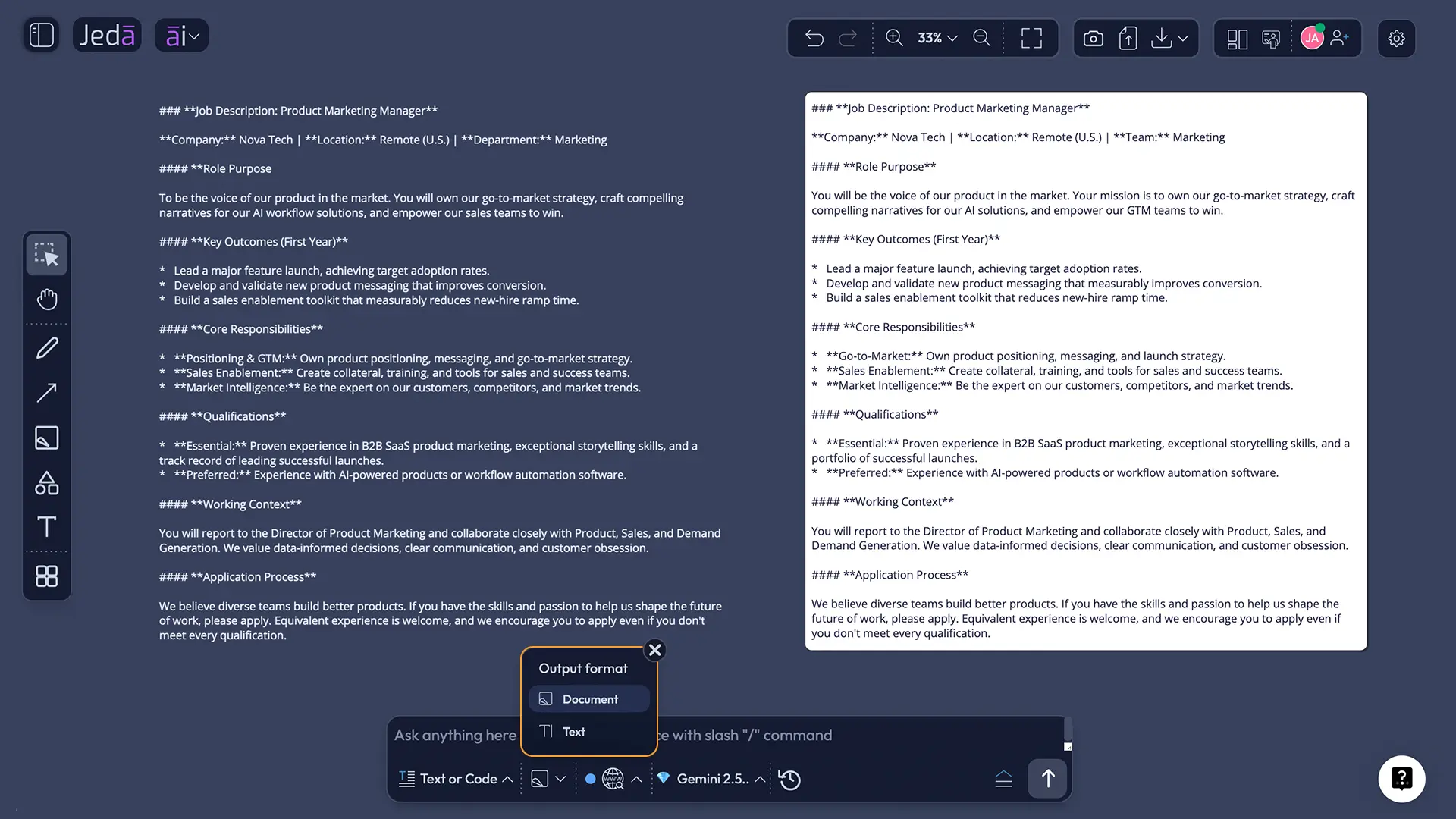
The two output formats change how the generated content appears on the Jeda.ai AI Whiteboard.
Document displays the job description inside a styled container with a background and border. It is useful when the draft should read as a self-contained hiring brief on the canvas.
Text places the content as a plain text object without the document-style container. It works well when you want lighter visual treatment or plan to arrange the copy beside diagrams, scorecards, notes, or an org chart.
Neither choice generates a DOCX file. The output is a preview on the canvas. You can edit it, format it, and copy the content for use in your approved publishing or applicant-tracking workflow.
A Worked Input for a Better Job Description Draft
Suppose a growing B2B software company needs a Product Marketing Manager. Entering the title alone will likely produce generic responsibilities such as “develop go-to-market strategies” and “collaborate cross-functionally.” Those phrases are not wrong. They are simply too empty to guide hiring.
A better For What input might specify:
- Mid-senior Product Marketing Manager for a B2B SaaS product
- Own positioning, launches, sales enablement, and competitive intelligence
- Partner with product, sales, customer success, and demand generation
- Improve activation, feature adoption, win-rate insight, and launch readiness
- First dedicated product marketing hire, reporting to the VP of Marketing
In More Context, add the target customer, sales motion, team size, major product category, expected first-year outcomes, location, work arrangement, and which qualifications are truly essential.
How to Edit and Audit the Draft Before Publishing
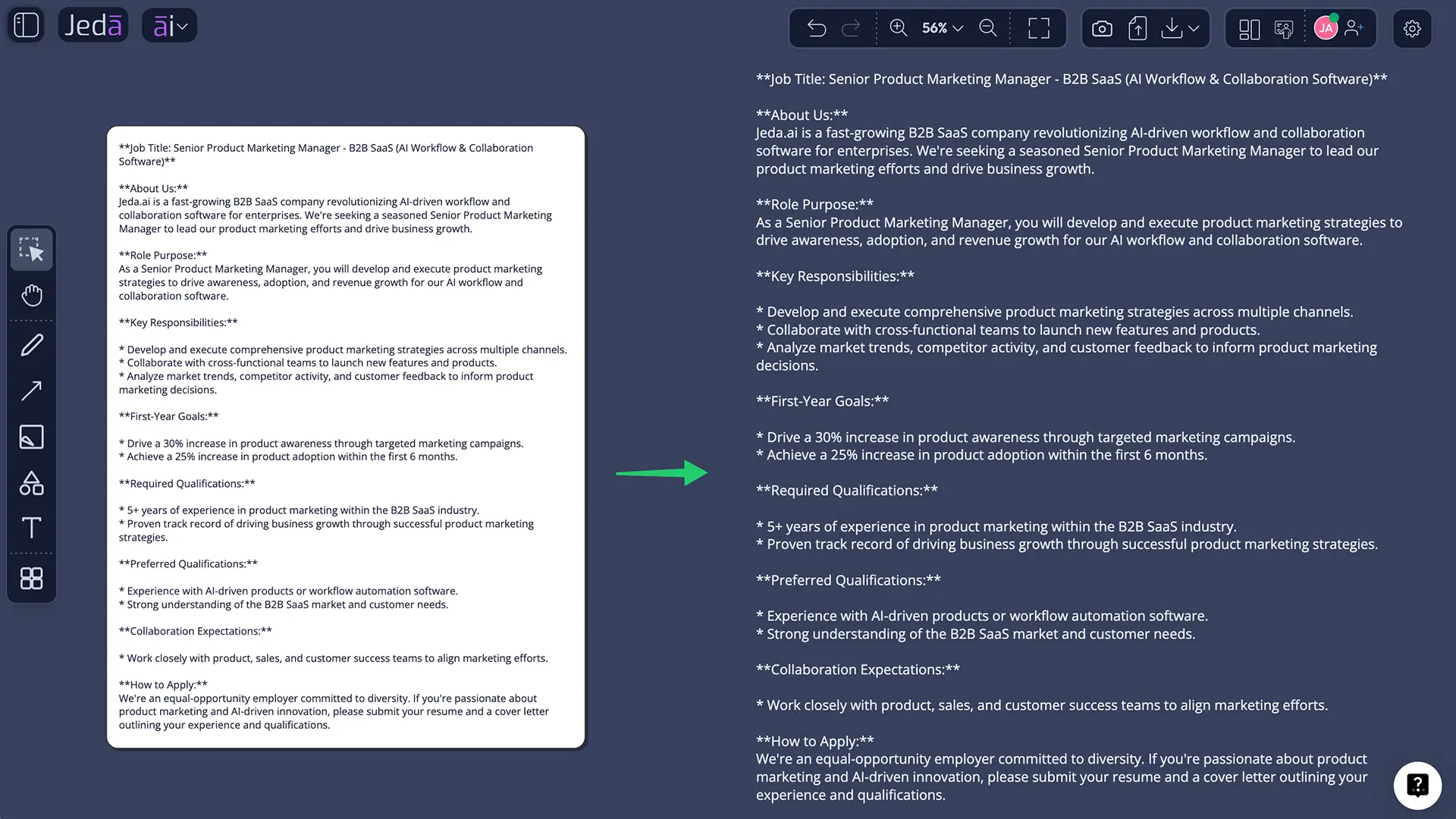
After generation, every section can be manually edited. Jeda.ai also supports text formatting such as font, size, color, bold, italic, underline, alignment, and links. That flexibility is not cosmetic. It helps reviewers distinguish required from preferred qualifications, surface outcomes, and make the document easier to scan.
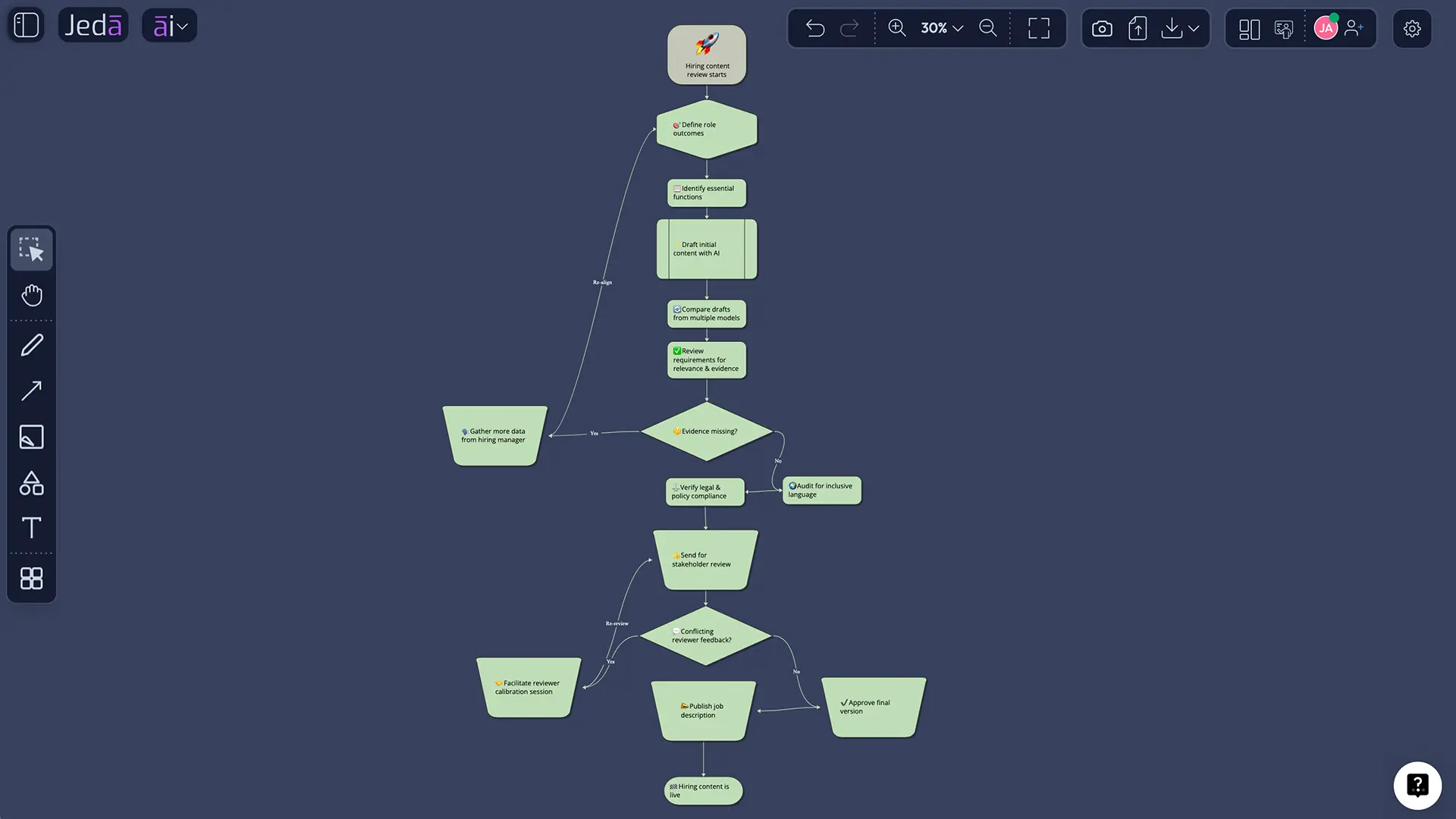
Run a final audit before the description leaves the AI Workspace:
A compatible Smart Shape output may also support the AI+ button for extending related content. Vision Transform can convert selected content into another visual format—for example, a responsibility map or hiring-process flowchart. Useful, yes. But manual review remains the decisive step.
Common Mistakes When Writing a Job Description with AI
Treating the first draft as finished
Generative models optimize for plausible language, not organizational truth. The first result is material for review, not an approved vacancy.
Describing the previous employee instead of the future role
Legacy descriptions accumulate tasks, tools, and preferences over years. Ask whether each requirement still serves the position’s purpose.
Combining several jobs into one heroic fantasy
AI will faithfully organize an impossible workload if you provide one. If the description asks a single person to lead strategy, execute every channel, manage operations, build analytics, and provide 24/7 support, the problem is job design—not prose.
Using Web Search as a compliance engine
Current search context can reveal updated terminology and public guidance. It cannot replace jurisdiction-specific review, internal policy, or qualified legal advice.
Confusing length with precision
Long lists often hide weak prioritization. A shorter description with clear outcomes and honest constraints is usually more informative than a magnificent wall of bullets.
Frequently Asked Questions
- Can AI write a complete job description?
- Yes, AI can produce a complete first draft, including role purpose, responsibilities, qualifications, and working context. The hiring team must still verify the role scope, essential functions, factual details, inclusive language, internal policy, and jurisdiction-specific requirements before the description is approved or published.
- What information should I provide to generate a better job description?
- Provide the title, seniority, team, reporting line, purpose, core outcomes, decision rights, recurring responsibilities, essential qualifications, preferred skills, work arrangement, location, and relevant company context. The more clearly you define the work, the less likely the AI is to return generic boilerplate.
- How do I find the Job Description recipe in Jeda.ai?
- Open the AI Menu and either select the Writer tab or use the recipe search field. Choose the Job Description recipe directly; it does not require a sub-recipe or secondary category. Complete the guided form, configure models and output settings, then generate the preview.
- What is the mandatory field in the Job Description recipe?
- For What is the mandatory field. It should identify the role and ideally describe seniority, scope, ownership, outcomes, and major constraints. Optional fields include Job Industry, More Context, Word Count, and Output Language, with English used as the default language.
- Can I use more than one reasoning model?
- Yes. You can select one, two, or three reasoning models. When multiple models are selected, you may enable Aggregate and choose one additional AI model to assess the generated results and create a consolidated output. Human reviewers should still compare the result with the original role brief.
- Should Web Search be Auto, On, or Off?
- Use Auto for a balanced default, On when the role depends on recent public information such as current technologies or occupational terminology, and Off when you want the response restricted to your supplied context. Always verify external claims through authoritative sources before publishing.
- Does Document output create a Word file?
- No. Document is a visual output format that displays the generated job description inside a styled container on the Jeda.ai canvas. Text displays it as a plain text object. Both are previews rather than DOCX files, and both can be manually edited and formatted.
- Can I edit an AI-generated job description in Jeda.ai?
- Yes. After generation, you can manually revise the wording and use text formatting controls for font, size, color, emphasis, alignment, and links. Editing is essential because the generated draft may contain generic language, inaccurate assumptions, unnecessary requirements, or tone that does not match the organization.
- How can AI-generated job descriptions reduce bias?
- AI can help flag gendered wording, unnecessary credentials, inconsistent requirements, and exclusionary phrases, but it can also reproduce bias from prompts and training data. Use a structured checklist, compare wording across roles, involve multiple reviewers, and keep responsibility for the final decision with the employer.
- Is an AI-generated job description legally compliant?
- Not automatically. Employment requirements vary by jurisdiction, role, and organization. AI output should be treated as a draft, not legal advice. Verify essential functions, accommodation language, compensation disclosures, equal-opportunity statements, data handling, and other obligations with HR or qualified counsel where appropriate.
Sources and Further Reading
- [1]
Society for Human Resource Management (2026) . “Writing Clear and Effective Job Descriptions: A Beginner’s Guide” SHRM.
View Source ↗ - [2]
U.S. Equal Employment Opportunity Commission (n.d.) . “The ADA: Your Responsibilities as an Employer” EEOC.
View Source ↗ - [3]
National Institute of Standards and Technology (2023) . “Artificial Intelligence Risk Management Framework (AI RMF 1.0)” NIST.
View Source ↗ - [4]
Gaucher, Danielle; Friesen, Justin; Kay, Aaron C. (2011) . “Evidence That Gendered Wording in Job Advertisements Exists and Sustains Gender Inequality” Journal of Personality and Social Psychology.
View Source ↗
Create a Clearer Job Description with AI
Join 150,000+ users using Jeda.ai to draft, compare, edit, and refine hiring content in one AI Workspace and AI Whiteboard.
Try Jeda.ai Free