A press release with AI should not be a faster way to publish vague company noise. That bar is lying on the floor. The real value is sharper: use AI to turn an announcement into a credible, structured, reviewable media asset before it reaches journalists, buyers, investors, employees, or partners. In Jeda.ai, that means the Press Release Writer recipe sits inside an AI Workspace where teams can draft, compare reasoning models, use Web Search when facts need freshness, edit the final preview, and keep the thinking close to strategy boards, launch notes, and brand context.
And yes, speed matters. But trust matters more. A weak release can now be produced in seconds, which means weak releases are about to become wallpaper. Press Release with AI only works when the workflow protects the story from the usual sins: generic claims, missing proof, over-polished language, buried news value, and no human judgment. Tiny problem, apparently.
What is Press Release with AI?
Press Release with AI is the process of using artificial intelligence to draft a structured announcement from a headline, subheadline, core facts, tone, length, and language preference. A good workflow does more than fill a template. It helps the team decide what the announcement is actually about, what must be proven, what should be quoted, and what should be cut before the release becomes public.
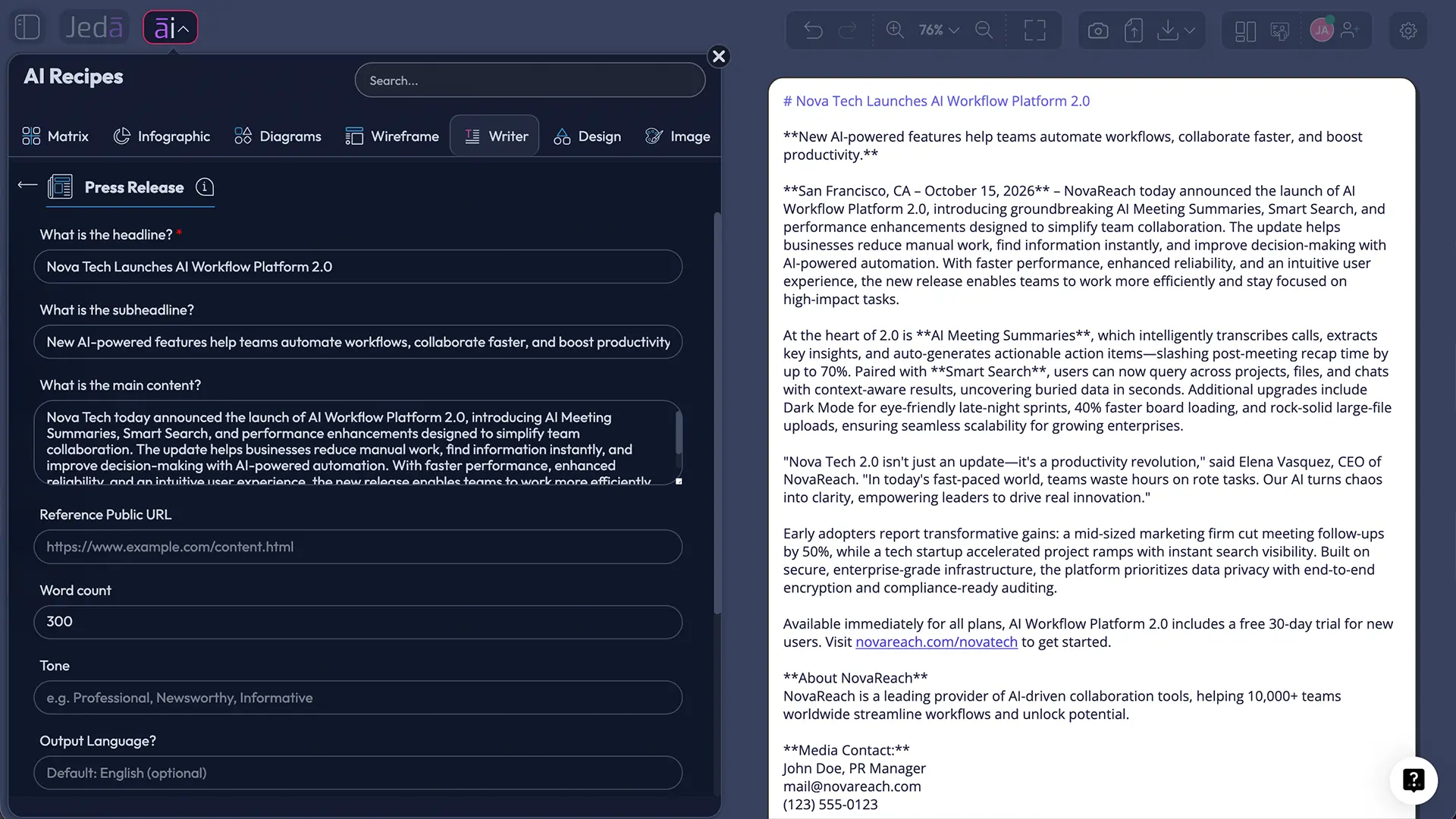
In Jeda.ai, Press Release with AI is handled as a Writer recipe. There is no sub-recipe or category inside the AI Writer tab for this specific workflow; users can navigate to the Press Release recipe or search for it directly from the AI Menu. The mandatory field is simple: What is the headline. Optional fields include What is the subheadline, What is the main content, Tone, Word Count, and Output Language, with English as the default.
That field structure is important. It keeps the workflow focused on the news, not on a giant prompt that tries to do everything at once. Jeda.ai gives teams the first draft, then leaves room for manual editing, formatting, and human review. The output can be shown as Document or Text, but it is a preview and workspace output. It does not generate native document files.
- Structured announcement
Start from a headline and supporting details instead of staring at an empty editor with a half-formed launch note.
- Fresh context
Use Web Search in Auto, On, or Off mode when the release depends on current market language, public facts, or timely context.
- Model comparison
Choose one, two, or three reasoning models and use an aggregation model when the release needs stronger judgment across options.
- Document or Text preview
Preview the output as a document-style block or plain text, then edit and format it manually before publishing elsewhere.
- Context reset
Use Clear Chat Context before a sensitive announcement so older workspace conversations do not pollute the draft.
- Team review
Keep launch messaging inside the AI Workspace where collaborators can revise claims, sharpen quotes, and align before distribution.
Why Press Release with AI needs a decision workflow, not just a generator
Most AI press release tools solve the easy part: arrange words in a recognizable format. Headline, dateline, lead paragraph, quote, boilerplate, contact. Fine. That structure is useful. It is not strategy.
The harder work starts before the draft. Is the announcement actually newsworthy? Who needs to care? What proof can the company safely include? Which claim is too broad? Which quote sounds like it was assembled in a microwave? Press Release with AI should help answer those questions before the release becomes another “we are thrilled to announce” artifact drifting through the internet like a sad balloon.
Jeda.ai is useful here because the Press Release recipe sits inside a broader Visual AI workspace, not a standalone text box. Teams can keep the release near the campaign plan, positioning matrix, launch checklist, product roadmap, customer proof, competitive notes, and stakeholder feedback. The release becomes part of the decision system. Not a lonely text file.
Where AI helps in the press release process
AI is strongest when the inputs are specific. Give it a real headline, the announcement type, stakeholder context, quote direction, product details, launch date, market proof, and the desired next action. The result improves dramatically.
That is the gap Jeda.ai is designed to close. The platform does not force every user into one model, one tone, or one frozen output. For a sensitive funding announcement, you may want a restrained executive voice. For a product release, you may want a clearer buyer benefit. For a partnership announcement, you may need a careful balance between both brands. Press Release with AI lets the team test those lanes before choosing the final direction.
| Typical generator | Jeda.ai Press Release recipe | Why it matters | |
|---|---|---|---|
| Input structure | Generic prompt box | Guided headline-first fields | The draft starts with news value, not prompt gymnastics. |
| Reasoning | Single model by default | One, two, or three reasoning models plus optional aggregation | Teams can compare angles before locking the public message. |
| Freshness | Often static | Web Search Auto, On, or Off | Current context matters for timing, market language, and factual grounding. |
| Output | Copy-only result | Document or Text preview inside the workspace | The team can review, format, and refine before publication. |
| Workflow | Draft and leave | Connected to AI Workspace review and editing | The release stays close to strategy, planning, and launch assets. |
How to create a press release with AI in Jeda.ai
Use the guided recipe when the announcement matters. The Prompt Bar is useful for quick drafting, but the Press Release recipe gives you the right fields in the right order. That is the whole point of a recipe: less blank-page drama, fewer missing pieces.
Method 1: Search the Press Release recipe directly
Open Jeda.ai, enter a workspace, click the AI Menu, and use the search bar to find Press Release. Open the Writer recipe and fill in the required headline field first. Then add the subheadline, main content, tone, word count, and output language when those details are available.
This method is best when you already know the announcement type: product launch, funding, event, partnership, executive appointment, research report, feature release, award, expansion, or company update.
Method 2: Navigate through the Writer area
Open the AI Menu, choose Writer, and navigate to the Press Release recipe. Since this Press Release workflow does not depend on a sub-recipe or category inside the AI Writer tab, the direct recipe is the destination. Fill the form, choose the output format, configure reasoning, and generate.
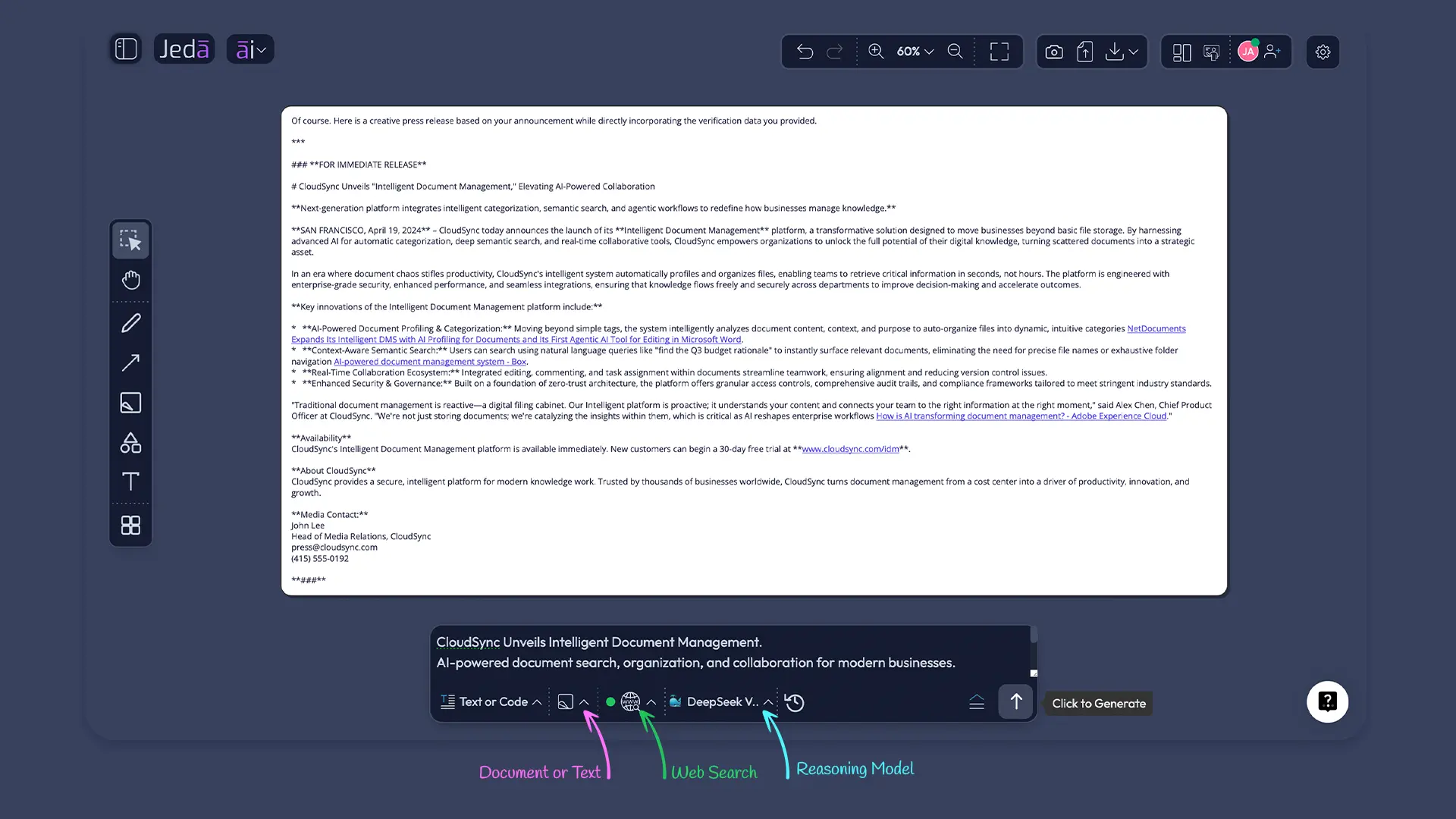
Before generating, check whether the draft should use Web Search. Auto lets Jeda.ai decide, On forces current research, and Off keeps the output grounded only in the provided context. For sensitive or confidential announcements, that choice matters.
Method 3: Use the Prompt Bar for a quick draft
Open the Prompt Bar at the bottom of the canvas, select a text-style output, and ask Jeda.ai to draft a press release from your announcement notes. This is faster when you do not need the guided fields. It is also useful after the first recipe output, when you want a shorter version, a sharper quote, or a cleaner media pitch derived from the same release.
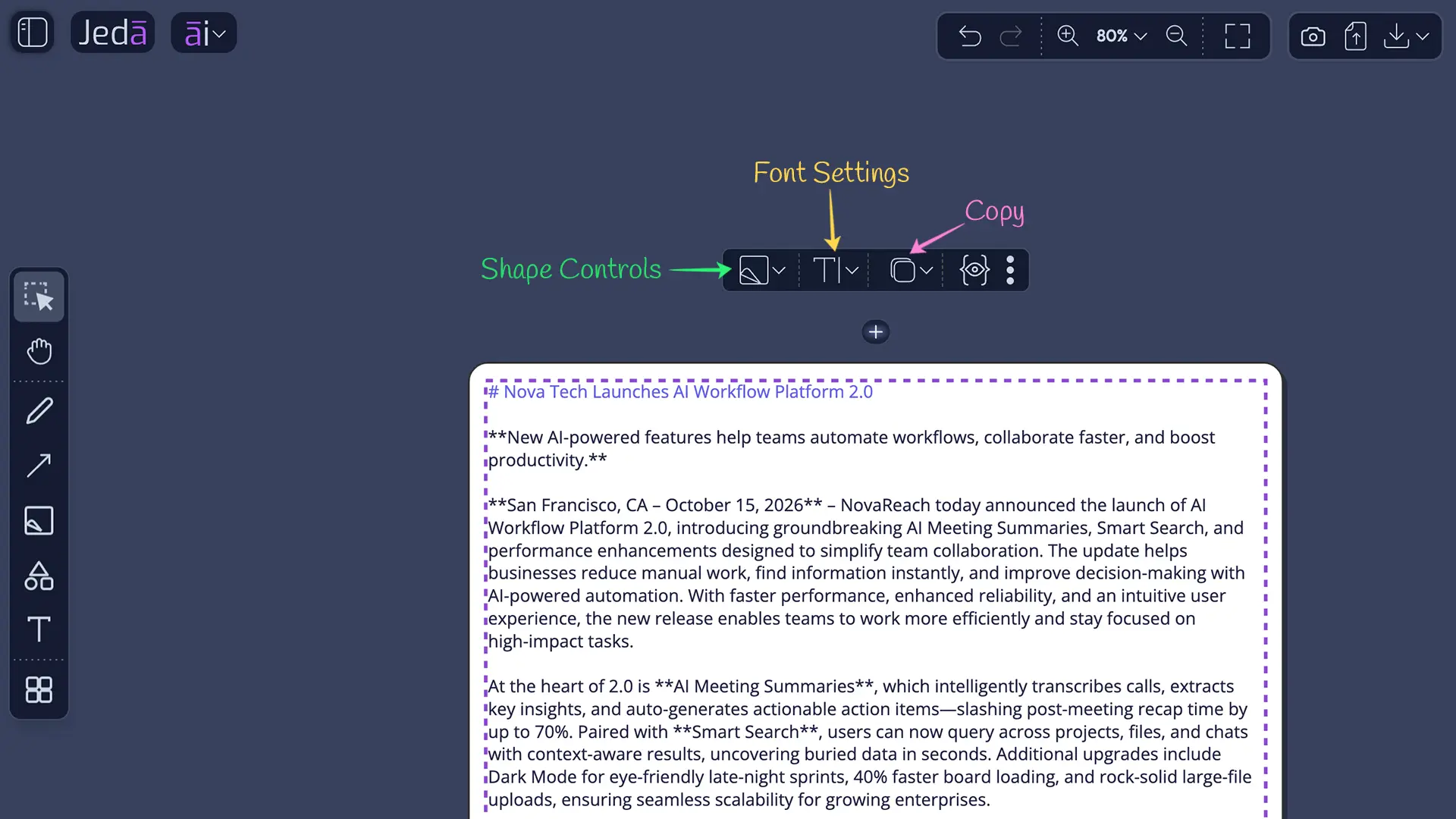
After the draft appears, manually edit the copy. Use the formatting tools to adjust headings, spacing, emphasis, and readability. If the release is part of a larger launch plan, keep it on the AI Whiteboard next to campaign messaging, a positioning matrix, FAQ notes, and stakeholder comments. That is where Jeda.ai starts to feel less like a writer and more like an operating surface for the announcement.
- Open the AI Menu
Start in a Jeda.ai workspace and click the AI Menu from the top-left area of the canvas.
- Find Press Release
Search directly for the Press Release Writer recipe or navigate through the Writer area and open the recipe.
- Add the headline
Complete the required What is the headline field. The headline should state the actual news, not just the company name.
- Add optional context
Add the subheadline, main content, tone, word count, and output language when those details help shape the release.
- Choose reasoning settings
Select one reasoning model, or choose two or three models and use an aggregation model when you want the strongest consolidated version.
- Set Web Search
Use Auto, On, or Off depending on whether the release needs current public context or should rely only on supplied information.
- Pick output format
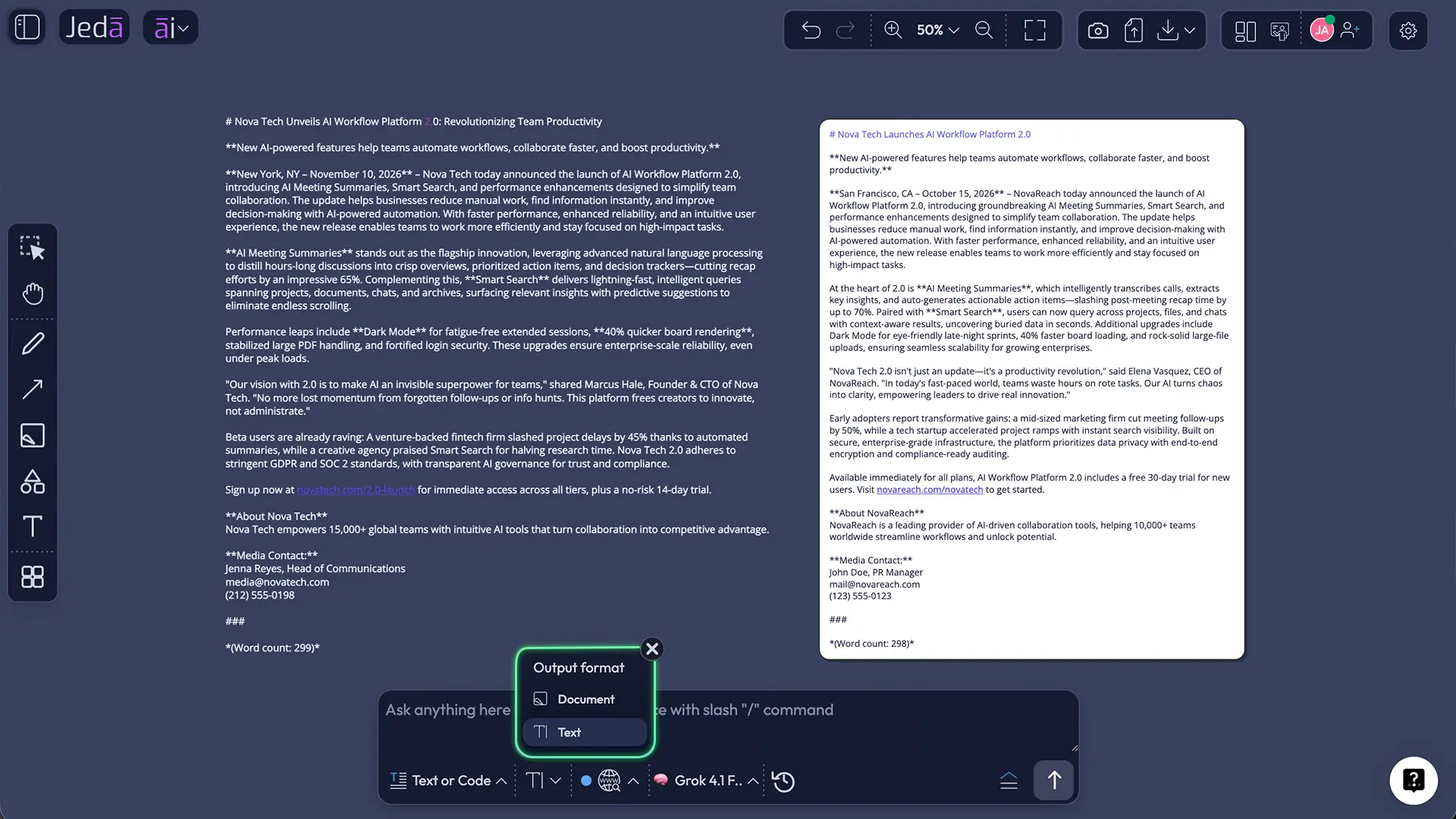
Choose Document for a styled preview or Text for a plain text output. This is a preview, not a native document file export.
- Generate, edit, and format
Generate the release, then manually review facts, quotes, claims, formatting, and the final call to action before publishing.
What to enter in the Press Release recipe
The headline is not a decoration. It is the filter for the entire release. If the headline is foggy, the release will be foggy. Start with the strongest version of the actual news.
Weak headline: “Company Announces New AI Platform.”
Better headline: “Acme Launches AI Workspace to Help Consulting Teams Turn Client Research Into Editable Strategy Boards.”
The second headline carries audience, category, use case, and outcome. It gives the AI something useful to work with.
For the subheadline, write the supporting angle. Add what changed, who benefits, and why now. The main content field should include proof: launch date, product details, availability, pricing if public, customer quote direction, executive quote direction, target audience, and distribution goal. If the release is meant for journalists, avoid sales copy. If it is meant for a newsroom page and customer audience, it can carry slightly more product context.
Why multi-model reasoning changes the draft quality
A press release is a strange object. It must be concise, credible, quotable, structured, and boring in the right places. Too much personality and it sounds unserious. Too little and it dies in the inbox.
That is why reasoning model choice matters. Jeda.ai lets users run one model or compare two or three models at a time. When multiple models are selected, the aggregation feature can use one additional AI model to pick the best result or generate a consolidated output. For business leaders and consultants, this is a practical review mechanism. One model might produce a stronger strategic angle. Another may write a cleaner lead. Another may avoid hype better.
Use multi-model generation when the announcement is high-stakes: funding, acquisition, major product launch, leadership change, regulatory milestone, or partnership. Use a single model when the release is routine and the facts are already clean.
How Web Search should be used in a release workflow
Web Search is not a magic credibility wand. It is a context tool. In Jeda.ai, Web Search can be set to Auto, On, or Off inside the recipe workflow. Use it carefully.
Turn Web Search On when the announcement depends on current market context, public trend language, named competitors, recent regulation, new industry data, or current media framing. Keep it Off when the release includes confidential information that should only come from your supplied notes. Use Auto when you want Jeda.ai to decide whether outside context is necessary.
For thought leadership announcements, Web Search can help the release avoid stale framing. For legal, financial, or private launch information, the safer move is to feed the correct facts manually and keep the draft contained.
Press Release with AI for consultants and decision makers
Consultants do not need another writing toy. They need a repeatable way to turn client announcements, research launches, partnership news, product releases, and executive updates into clear public narratives. Press Release with AI gives them a faster first draft, but the bigger value is alignment.
A strategy consultant can place the release beside a market-entry matrix, stakeholder map, launch risks, proof claims, and customer segments inside the same AI Whiteboard. That makes review less chaotic. Instead of debating a paragraph in isolation, the team can see whether the announcement matches the strategy.
Decision makers get the same benefit. A CEO, founder, dean, partner, or product leader can review the draft against business context: who the release serves, what it signals to the market, and whether the announcement overpromises. Jeda.ai already supports 150,000+ users building visual strategy, planning, and content workflows. Press Release with AI extends that same work pattern into communications.
This is especially useful for MBA cohorts and executive education teams. A press release is a compact case study in positioning. Students can compare three model-generated releases from the same facts, inspect the assumptions, critique the quotes, and rewrite the final version manually. The lesson is not “AI writes PR.” The lesson is “message quality depends on input quality, judgment, and review.” Much less shiny. Much more useful.
Common mistakes to avoid
The first mistake is treating AI output as finished copy. It is not. It is a draft with momentum. Read it like a skeptical editor.
The second mistake is asking for “a professional press release” without giving the news. That prompt produces generic filler because the model has no hard facts to protect. Give Jeda.ai the announcement details, not just the desired format.
The third mistake is using Web Search when the release should be private. Current context is useful, but confidential launches need controlled inputs.
The fourth mistake is choosing Document output and assuming a downloadable document file has been created. In this workflow, Document and Text are output formats for previewing and editing. Publish, export, or distribute through your normal external process after review.
The fifth mistake is skipping Clear Chat Context before a new announcement. Old conversation history can shape the draft in weird ways. Not always. But often enough to make the button worth clicking.
A practical Press Release with AI checklist
A strong release answers four questions fast: what happened, why it matters, who is affected, and what happens next. Everything else supports those answers.
Before publishing, review the release like a newsroom editor and a business owner at the same time. The editor asks whether the story is clear. The business owner asks whether the story is useful. The legal reviewer asks whether it is safe. The customer asks whether it matters. Annoying committee? Yes. Better than a public correction? Also yes.
Frequently Asked Questions
- What is Press Release with AI?
- Press Release with AI means using artificial intelligence to draft a structured announcement from a headline, supporting details, tone, word count, and language preference. The best workflows still require human review, fact checking, quote approval, and editing before publication.
- Does Jeda.ai have a Press Release recipe?
- Yes. Jeda.ai includes a Press Release Writer recipe. It can be found by searching directly in the AI Menu or navigating to the Writer area. The required field is What is the headline, with optional fields for subheadline, main content, tone, word count, and output language.
- What fields are available in the Press Release recipe?
- The mandatory field is What is the headline. Optional fields include What is the subheadline, What is the main content, Tone, Word Count, and Output Language. English is the default output language unless the user selects another language.
- Can I choose different AI models for a press release?
- Yes. Users can choose one reasoning model or select two or three models at once. When multiple models are used, Jeda.ai can also use an aggregation model to select or synthesize the strongest final release draft.
- Does Web Search work with the Press Release recipe?
- Yes. Web Search can be set to Auto, On, or Off. Use it when current public context matters, such as market trends, recent events, or timely industry language. Turn it off when the release should rely only on supplied private or approved information.
- Does the recipe create downloadable document files?
- No. The Document and Text options control the preview style of the generated output inside the workspace. The recipe does not generate native document files. Users should manually review, edit, format, and distribute the final release through their chosen external process.
- Why use Jeda.ai instead of a basic AI press release generator?
- Basic generators usually produce a single text draft. Jeda.ai gives teams a broader AI Workspace where they can draft, compare models, use Web Search, edit the preview, and keep launch messaging near strategy boards, planning assets, and team review context.
- Who should use Press Release with AI?
- Press Release with AI is useful for founders, consultants, product marketers, communications teams, agencies, business leaders, and MBA cohorts. It works best when the user supplies real announcement facts and treats the AI output as a reviewable draft rather than final copy.
- How should teams review an AI-generated press release?
- Teams should verify the headline, facts, claims, quote accuracy, boilerplate, links, media contact details, and call to action. They should also check tone, remove generic language, and confirm whether Web Search or Clear Chat Context settings were appropriate for the announcement.
- Can Press Release with AI be used for thought leadership announcements?
- Yes. Thought leadership releases benefit from AI when the team provides a strong point of view, audience context, proof, and current market framing. The draft should still be edited for originality, credibility, and restraint before publication.
- [1]
Public Relations Society of America (2026) . “How to Write a Press Release That Actually Gets Published” PRSA.
View Source ↗ - [2]
Cision (2025) . “2025 State of the Media Report” Cision.
View Source ↗ - [3]
Muck Rack (2025) . “The State of AI in PR 2025” Muck Rack.
View Source ↗ - [4]
McKinsey & Company (2025) . “The State of AI: Global Survey 2025” McKinsey QuantumBlack.
View Source ↗ - [5]
The Associated Press (2026) . “AP Updates Newsroom Standards for Artificial Intelligence” The Associated Press.
View Source ↗ - [6]
Google Search Central (2025) . “Learn About Article Structured Data” Google for Developers.
View Source ↗
Create a Press Release with AI in Jeda.ai
Join 150,000+ users using Jeda.ai to turn announcements, strategy, and planning context into clearer AI Workspace outputs. Start with the Press Release recipe, then edit without mercy.
Try Jeda.ai Free