The product requirements document occupies a singular position in the software development lifecycle. It is simultaneously the most debated artifact in product management discourse and the most consistently relied-upon tool for cross-functional alignment. What has changed materially in recent years is not the underlying logic of requirements specification, but the mechanism by which those specifications are elicited, structured, and communicated. In Jeda.ai's AI Workspace, product teams can generate a complete, visually structured product requirements template from a single prompt — collapsing what traditionally required multiple stakeholder workshops and several document drafts into a coordinated AI-assisted process. Over 150,000+ product professionals, engineers, and strategists rely on this approach to reduce requirements ambiguity and accelerate specification cycles.
What Is a Product Requirements Template?
A product requirements document (PRD) — also referred to as a product requirements template when used as a reusable structural artifact — is a specification that defines what a product must do, for whom, and under what constraints. Critically, it addresses what the product should accomplish rather than how it should be implemented; the latter concern belongs to the functional specification and, at a more technical level, the Software Requirements Specification (SRS).
The institutional genealogy of the PRD extends to the waterfall development model, formally articulated by Winston Royce (1970) in his foundational paper on large-scale software development, which established phase-gate documentation as an engineering discipline. The IEEE subsequently codified requirements documentation practice in IEEE Std 830-1984 and its later revisions, culminating in the current international standard, ISO/IEC/IEEE 29148:2018. That standard defines the stakeholder requirements specification (StRS), system requirements specification (SyRS), and software requirements specification (SRS) as distinct but interoperable artefacts within a systems engineering lifecycle.
The Agile Manifesto (Beck et al., 2001) introduced a significant corrective to the monolithic PRD paradigm, prioritizing working software over comprehensive documentation. This did not eliminate the PRD. It restructured it. The modern PRD — whether in Agile, hybrid, or waterfall environments — is leaner, more iterative, and more user-centered than its waterfall antecedent. It retains the PRD's core function: establishing a shared understanding of product scope among product, engineering, design, and business stakeholders, before development resources are committed.
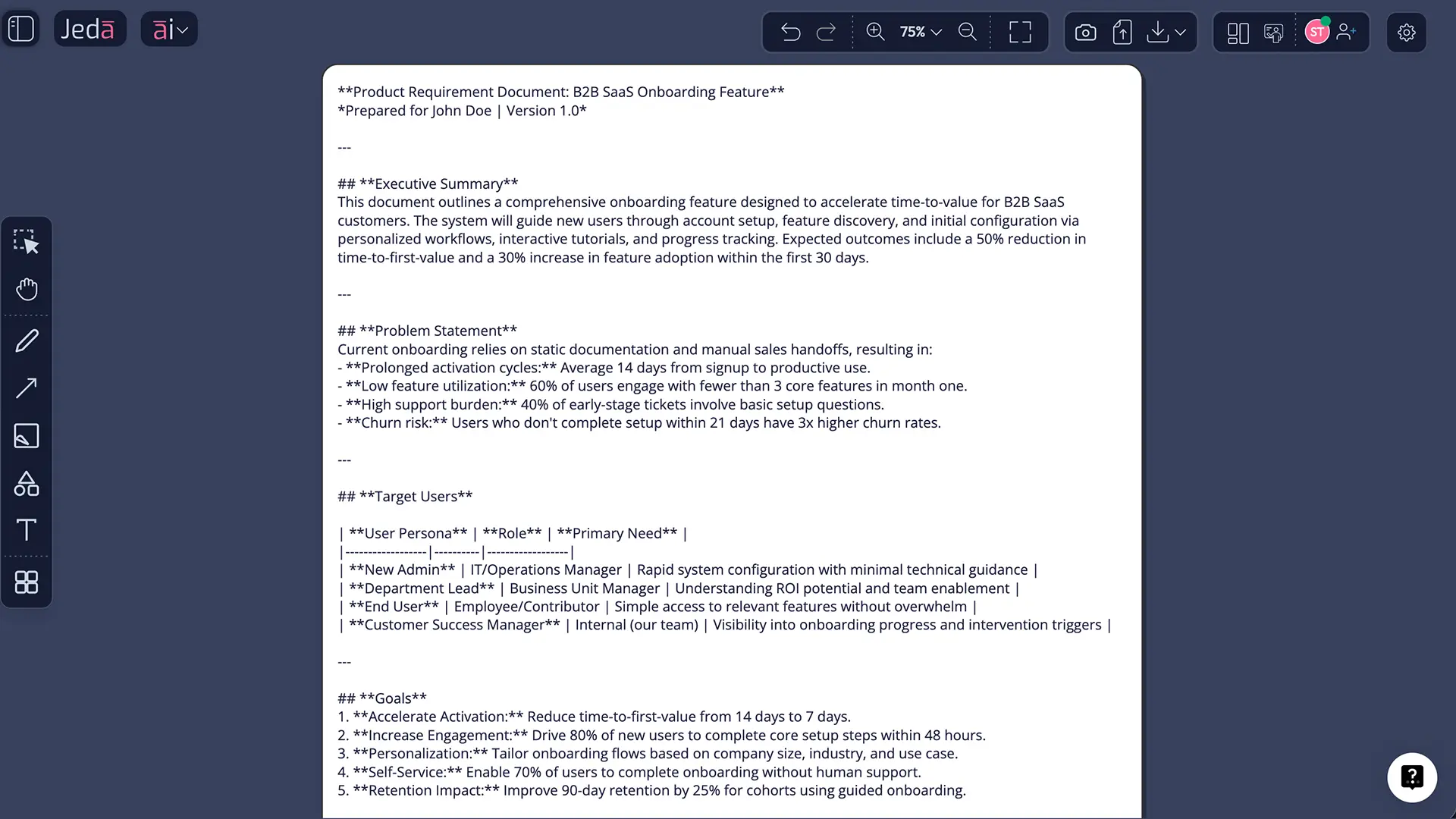
Jeda.ai's AI Whiteboard instantiates this modern conception of the PRD as a visual, collaborative, and iterative matrix — not a locked Word document.
Core Components of a Product Requirements Template
The scholarly and practitioner literature identifies a consistent set of components that constitute a well-formed PRD, regardless of development methodology. Wiegers and Beatty (2013) characterize these as the minimum viable specification set required to achieve requirements completeness — the property by which a PRD captures all intended stakeholder needs without gaps that would generate downstream engineering ambiguity.
- Purpose & Product Overview
Defines the strategic rationale for the product or feature — the problem being solved, the target market segment, and the alignment with organizational objectives. This section functions as the hypothesis under which all subsequent requirements are organized.
- User Personas
Structured representations of primary and secondary user archetypes, derived from user research. Personas anchor functional requirements to identifiable human needs rather than abstract technical specifications.
- User Stories & Use Cases
Granular behavioral specifications framed from the user's perspective, following the canonical structure: 'As a [persona], I want to [action] so that [outcome].' In ISO/IEC/IEEE 29148 terminology, these correspond to stakeholder requirements.
- Functional Requirements
Explicit descriptions of product behaviors and capabilities — what the system shall do under specified conditions. Functional requirements are deterministic: they admit a clear binary test of fulfillment or non-fulfillment.
- Non-Functional Requirements
Systemic quality attributes that constrain how the product performs rather than what it does. These include performance thresholds, security standards, accessibility compliance (e.g., WCAG 2.1), scalability parameters, and reliability targets.
- UX & Design Notes
High-level guidance on user experience principles and interaction paradigms, sufficient to constrain the design solution space without prescribing pixel-level implementation. This section bridges requirements and design inquiry.
- Assumptions & Constraints
Explicit documentation of conditions presumed to hold during development (assumptions) and boundaries that limit the solution space (constraints). Failure to document these is among the most frequent sources of PRD-derived project failure.
- Acceptance Criteria
Testable conditions that define the minimum threshold for a requirement to be considered satisfied. In Agile environments, acceptance criteria are frequently specified using the Given-When-Then (GWT) format derived from Behaviour-Driven Development (BDD).
Why Use AI to Build Product Requirements Templates?
The conventional PRD process is structurally inefficient. Requirements elicitation typically involves a sequence of stakeholder interviews, affinity mapping workshops, and iterative document drafts — a process that, even in lean product organizations, rarely resolves in fewer than five to ten working days for a non-trivial feature set. The principal source of this inefficiency is not cognitive: it is representational. Static text documents are poorly suited to the inherently relational and hierarchical nature of requirements information.
AI changes both the speed and the form of requirements documentation simultaneously. In Jeda.ai's Visual AI workspace, a product manager can generate a structured requirements matrix — populated with personas, functional requirements organized by priority, non-functional constraints, and acceptance criteria — in under 60 seconds. The AI does not replace the intellectual work of requirements elicitation; it eliminates the representational bottleneck that separates elicitation from structured specification.
Three empirical considerations reinforce this approach. First, requirements defects are among the most cost-amplifying errors in the development lifecycle: a requirement ambiguity identified during development costs an order of magnitude more to resolve than one caught during elicitation (Wiegers & Beatty, 2013). Second, visual representations of requirements have been shown to improve stakeholder comprehension and reduce interpretive divergence relative to text-based specifications. Third, the iterative nature of modern AI generation — where any section can be extended using the AI+ button without reconstructing the entire document — aligns directly with the Agile principle of progressive elaboration.
- Rapid Specification Generation
Generate a complete PRD matrix from a natural-language prompt in under 60 seconds. Jeda.ai's AI Workspace applies requirements engineering structure automatically, reducing the time from elicitation to first draft by up to 90%.
- Iterative by Design
Use the AI+ button to progressively elaborate any requirements section — adding depth to acceptance criteria, expanding non-functional parameters, or refining user stories — without rebuilding the entire specification.
- Visual Alignment
A visual PRD matrix reduces interpretive divergence among stakeholders. Engineering, design, and product teams share the same structured representation, reducing the misalignment that propagates from text-based documentation.
- Cross-Functional Collaboration
Jeda.ai's AI Whiteboard supports real-time, multi-user collaboration with live cursors and Follow Me mode. PRD review sessions become interactive and synchronous rather than asynchronous comment threads on static documents.
- Agile-Compatible Iteration
Update and extend requirements matrices between sprints without starting over. The canvas-based format makes scope changes visible, traceable, and immediately communicable to the full development team.
- Exportable Specification Artefacts
Export finalized PRD matrices as PNG, SVG, or PDF for audit trails, stakeholder reviews, or integration into project management toolchains. Outputs are production-ready from first generation.
How to Create a Product Requirements Template in Jeda.ai
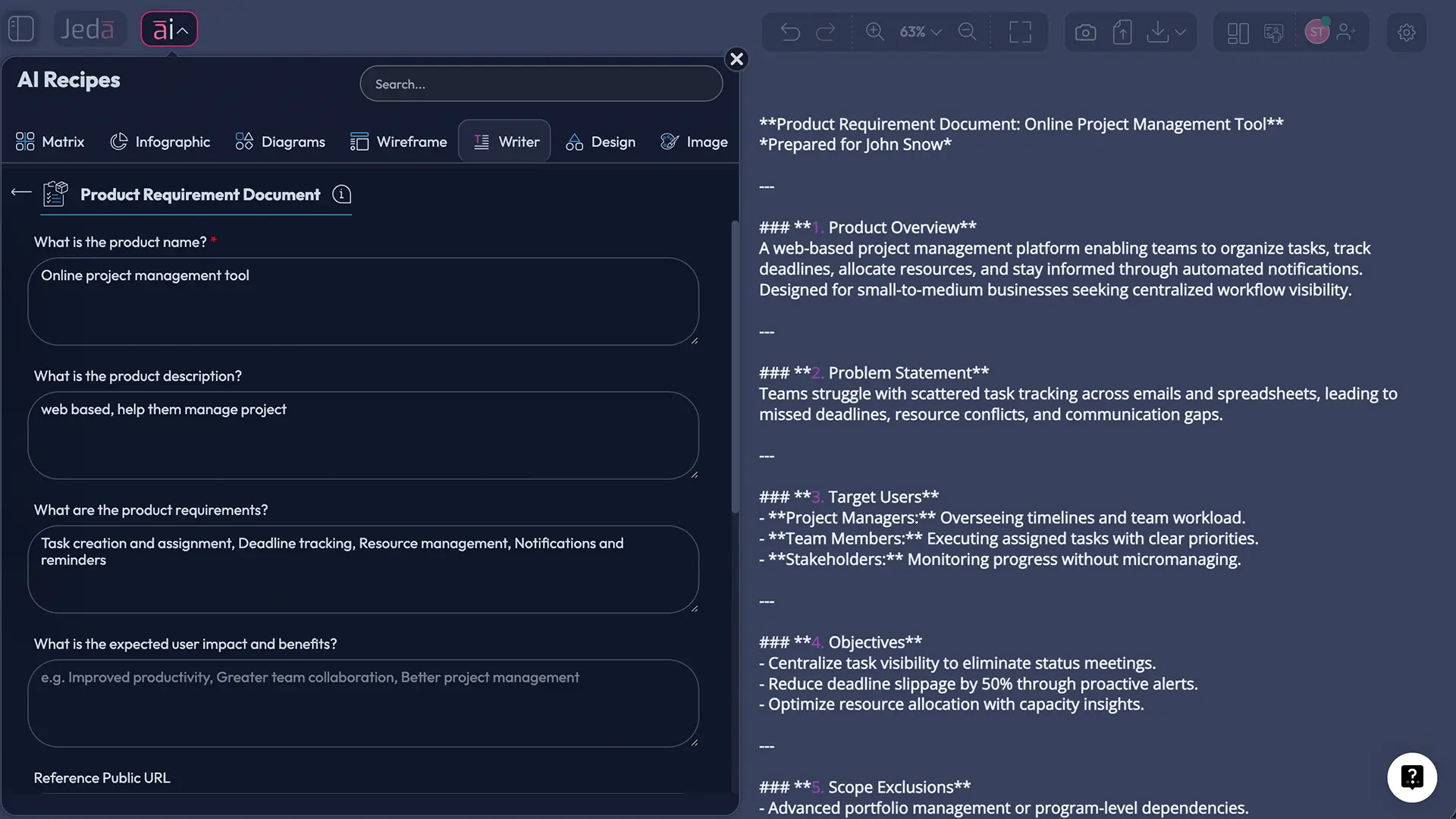
Two methodologically distinct paths exist for generating a product requirements template in Jeda.ai's AI Workspace. The AI Menu approach — using pre-structured Matrix Recipes — is recommended for teams that want a complete PRD framework generated against a predefined requirements engineering structure. The Prompt Bar approach offers greater specificity for teams with well-defined product contexts.
Method 1: AI Menu — Recipe Matrix (Recommended)
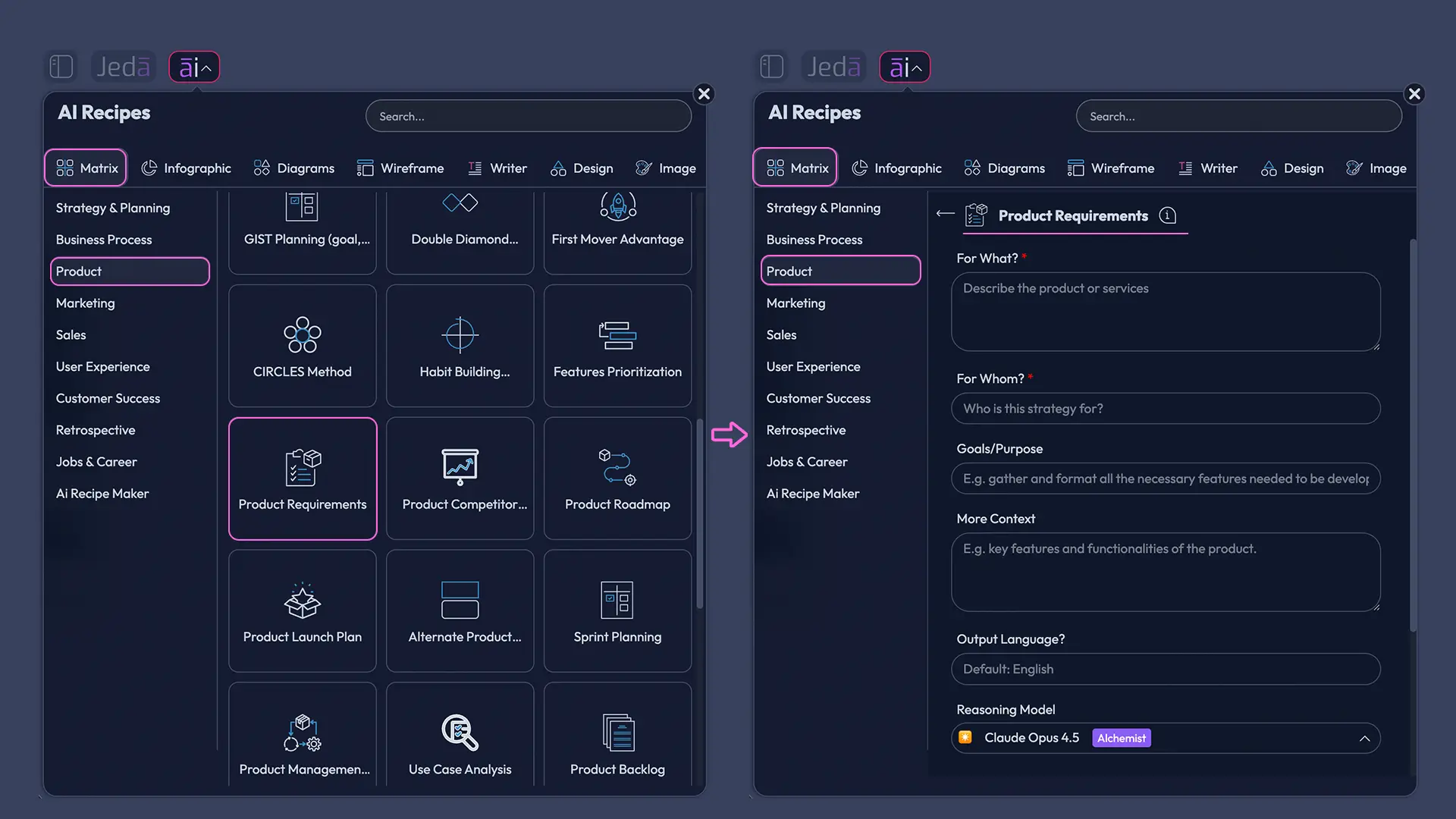
The AI Menu provides access to 300+ strategic frameworks through a curated recipe library. For product requirements, the Matrix Recipes category contains a dedicated template structured around the canonical PRD component set.
- Open Jeda.ai AI Workspace and access your canvas
Log in to Jeda.ai and open a new canvas or navigate to an existing product workspace. The AI Workspace canvas is the primary environment for all visual specification work.
- Click the AI Menu button (top-left corner)
Locate the AI Menu button in the top-left area of the canvas interface. Click it to open the full recipe library — 300+ pre-structured frameworks organized by output type and domain.
- Select Matrix Recipes from the category list
In the AI Menu panel, navigate to the Matrix Recipes category. This section contains all structured matrix and framework templates, including product strategy, requirements, and operational frameworks.
- Choose the Product Requirements Template
Browse the Matrix Recipes and select the Product Requirements Template. This recipe is pre-structured around the eight core PRD components: purpose, personas, user stories, functional requirements, non-functional requirements, UX notes, assumptions, and acceptance criteria.
- Enter your product context
Complete the template input fields with your product name, target user segment, primary feature scope, platform context (web, mobile, API), and any known constraints or compliance requirements. The more precisely you specify the context, the more targeted the generated matrix.
- Click Generate
Submit the recipe. Jeda.ai's AI generates a fully populated product requirements matrix within seconds — organized by PRD component, with requirements statements, user story drafts, and acceptance criteria placeholders appropriate to your specified context.
- Extend with AI+ and iterate
Select any section of the generated matrix and tap the AI+ button to initiate a contextual deep dive. The AI automatically expands that requirements area with additional specification depth — no specific instructions are needed. Edit text, restructure components, and add custom nodes directly on the canvas.
Method 2: Prompt Bar
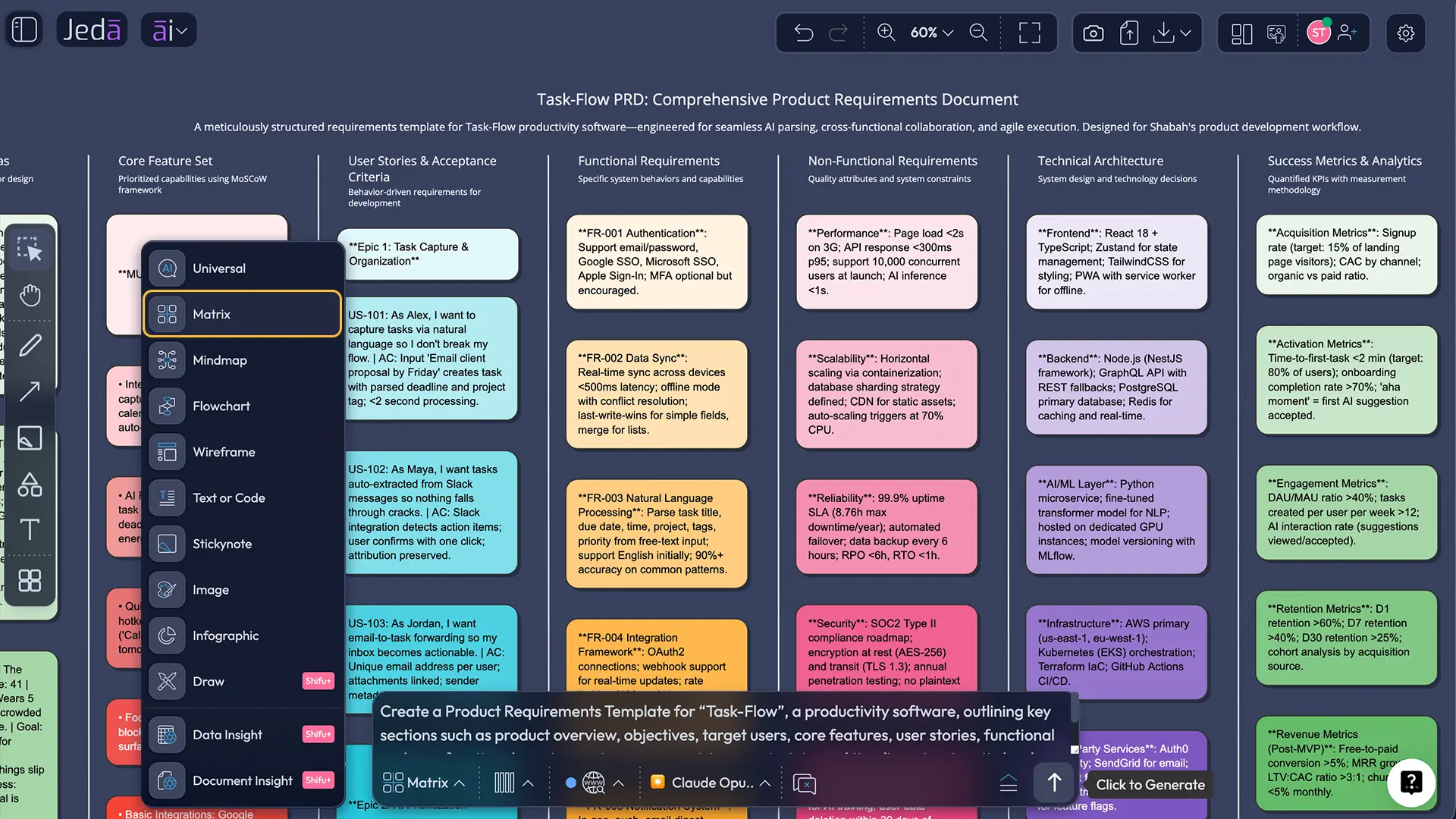
For product teams with highly specific requirements contexts, the Prompt Bar provides direct, natural-language generation of a custom PRD matrix.
- Open the Prompt Bar
Locate the Prompt Bar at the bottom of the Jeda.ai canvas. This is the primary direct-input interface for generating structured visual outputs from natural-language specifications.
- Select the Matrix command
In the Prompt Bar, open the command selector and choose Matrix. This instructs the AI to structure its output as a requirements grid — appropriate for the multi-component, hierarchical structure of a PRD.
- Type your PRD prompt
Compose a requirements-rich prompt that specifies: the product domain, target user segment, key feature areas, platform constraints, and any non-functional priorities (e.g., 'Product requirements matrix for a B2B SaaS project management tool targeting SMB teams of 10–50 users, covering user personas, functional requirements by priority tier, non-functional requirements including performance and security, UX principles, and acceptance criteria'). Specificity in the prompt directly improves the structural quality of the generated output.
- Press Enter to generate
Submit the prompt. Jeda.ai generates a structured PRD matrix on the canvas in real time, organized across all specified requirement dimensions and populated with context-appropriate requirements statements.
- Edit and extend on the canvas
All generated content is fully editable: text, labels, component structure, and visual layout. Modify requirements statements to reflect team-specific language, add missing use cases, and reorder components to reflect your organization's PRD conventions.
- Use AI+ for contextual deep dives
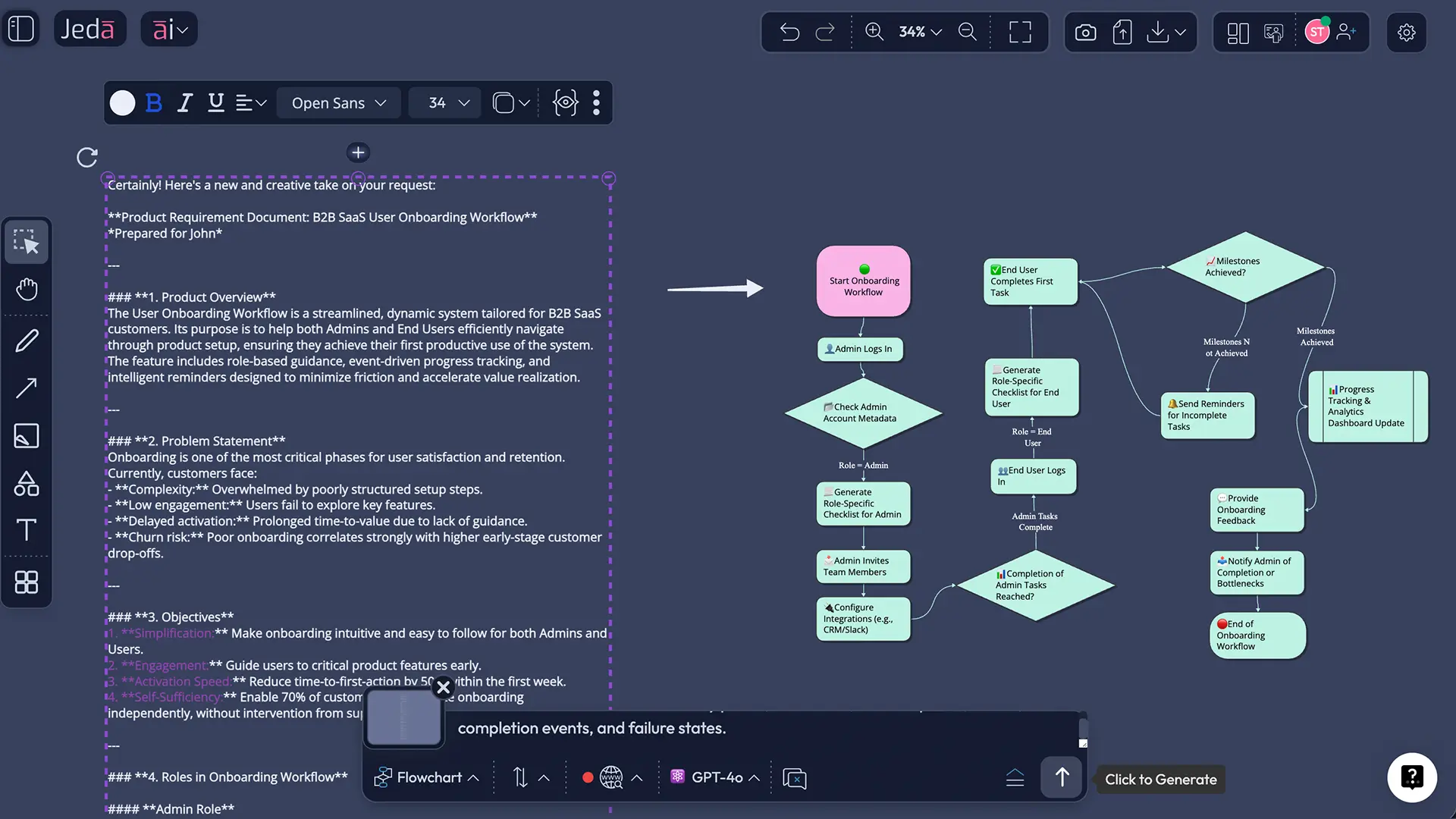
Select any requirements section — for example, the non-functional requirements cluster or a specific user story group — and tap the AI+ button. The AI automatically extends that section with additional specification depth. No specific instructions are needed; the AI+ deep dive is contextually inferred from the selected content. Use Vision Transform to convert the matrix into a Flowchart for process-flow views, or a Diagram for system architecture overlays.
PRD Template Examples & Use Cases
The structural properties of a product requirements template apply across development methodologies and product categories. Three illustrative cases demonstrate the range of contexts in which Jeda.ai's AI Workspace has been applied to requirements specification.
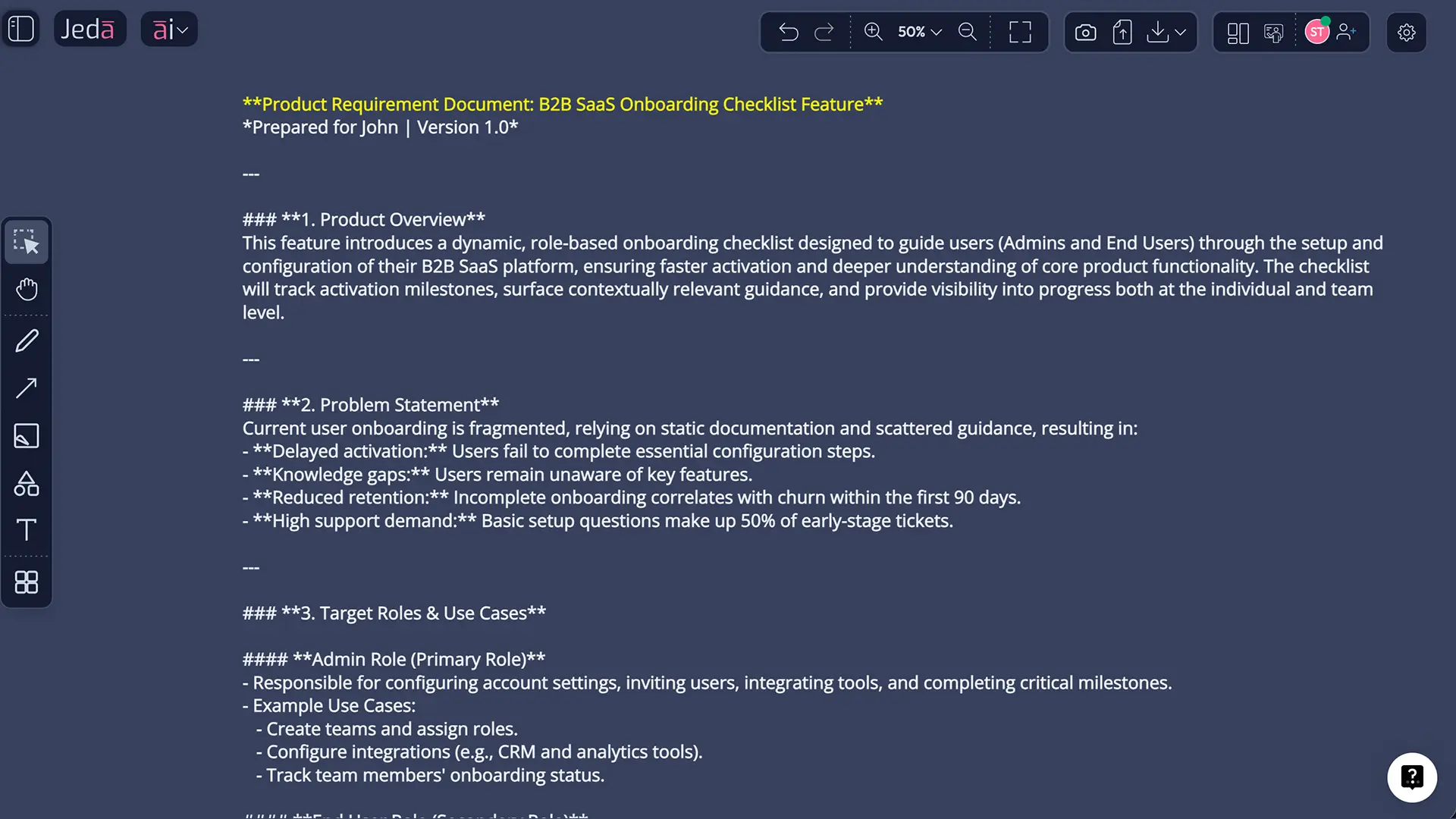
Case 1 — SaaS Feature PRD (Agile Context) A product team at a B2B workflow automation company used Jeda.ai to generate a requirements matrix for a new notification rules engine. The Prompt Bar Matrix prompt specified user personas (IT administrators and end-users), functional requirements by priority tier, performance thresholds (notification delivery under 500ms at p99), and WCAG 2.1 AA compliance as a non-functional requirement. The generated matrix structured requirements across six epics — replacing what had previously been a 22-page Word document reviewed across four stakeholder sessions. The first sprint planning session proceeded from the AI-generated matrix directly, with the team editing requirements in real time on the canvas during the meeting.
Case 2 — Hardware Product PRD An industrial design engineering team applied a Jeda.ai Matrix Recipe to structure the PRD for a connected IoT sensing device. The AI Menu's Product Requirements Template was extended using AI+ on the environmental constraints component — automatically generating regulatory compliance requirements (IP67 ingress protection, FCC Part 15, CE marking) appropriate to the specified product category. The visual matrix format enabled the mechanical, electrical, and firmware sub-teams to review their respective requirements sections simultaneously during a single cross-functional review session.
Case 3 — Agile Sprint Mini-PRD Consistent with the lightweight PRD conventions advocated by practitioners such as Cagan (2006) and the practitioner community that followed the Agile Manifesto, a three-person startup team used Jeda.ai to produce a sprint-scoped mini-PRD. The Prompt Bar generated a focused matrix covering a single epic — user authentication — with four user stories, functional requirements per story, and Given-When-Then acceptance criteria. The total generation and editing time was under 20 minutes.
Best Practices for AI-Assisted Requirements Documentation
The integration of AI generation into requirements engineering practice does not reduce the intellectual demands of the PRD process; it redirects them. The following practices, derived from both the requirements engineering literature and observed practitioner usage in Jeda.ai's AI Workspace, support the production of high-quality, actionable requirements specifications.
Common Errors in Product Requirements Documentation
The requirements engineering literature documents a consistent taxonomy of PRD failures. Understanding these failure modes is prerequisite to avoiding them in AI-assisted specification workflows.
1. Requirements stated as solutions rather than needs. The most pervasive error in PRD authorship is the conflation of what a product should do with how it should be built. A requirement that states "the system shall use a PostgreSQL database" is an implementation decision, not a requirement. The correct statement specifies the capability: "the system shall persist user data durably with recovery point objectives under 1 hour." When prompting Jeda.ai, frame requirements in terms of outcomes and capabilities; the AI will maintain this distinction in the generated matrix.
2. Absence of measurable acceptance criteria. Requirements without testable acceptance criteria cannot be unambiguously verified as satisfied. A requirement that "the application shall load quickly" is not a requirement — it is an aspiration. The correctable form specifies: "the application home screen shall render fully within 2.0 seconds at the 95th percentile under standard network conditions." AI+ extension of the acceptance criteria section automatically generates measurable criteria in the GWT format when invoked.
3. Implicit assumptions left undocumented. Requirements that hold under unstated assumptions become silent failure modes when those assumptions do not hold in the deployment environment. Every assumption about user environment, third-party integrations, regulatory context, or organizational process should appear explicitly in the assumptions component of the PRD matrix.
4. Scope conflation across product and feature levels. Product-level PRDs and feature-level PRDs serve distinct functions and require different levels of requirements abstraction. A product-level PRD should anchor requirements to user value and market positioning; a feature-level PRD should specify functional behavior in sprint-actionable detail. When using Jeda.ai, adjust your prompt's specificity level to the scope of the requirements being documented.
5. Single-author requirements with no stakeholder validation. Requirements generated by a product manager without input validation from engineering, design, and business stakeholders are consistently associated with higher rates of requirements churn (Wiegers & Beatty, 2013). Jeda.ai's collaborative AI Whiteboard — with real-time cursors and Follow Me mode — facilitates live multi-stakeholder PRD review as a standard step in the generation-to-approval workflow.
Frequently Asked Questions
- What is a product requirements template with AI?
- A product requirements template with AI is a structured specification framework — covering user personas, functional requirements, non-functional requirements, and acceptance criteria — generated and structured by an AI system. In Jeda.ai's AI Workspace, a complete PRD matrix is generated from a natural-language prompt in under 60 seconds, then refined collaboratively on the canvas.
- What are the key components of a product requirements document?
- A PRD comprises eight canonical components: product purpose and overview, user personas, user stories and use cases, functional requirements, non-functional requirements (performance, security, accessibility), UX and design guidance, assumptions and constraints, and acceptance criteria. These components correspond to the stakeholder requirements specifications defined in ISO/IEC/IEEE 29148:2018.
- How do I create a product requirements template with AI in Jeda.ai?
- In Jeda.ai, open the AI Menu and select the Product Requirements Template from Matrix Recipes — the AI generates a fully structured PRD matrix from your product context in seconds. Alternatively, use the Prompt Bar: select the Matrix command, describe your product and requirements scope, and press Enter to generate. Extend any section with the AI+ button for deeper specification.
- What is the difference between a PRD and a technical specification?
- A PRD defines what the product must do from the user's perspective — it specifies capabilities, behaviors, and constraints without prescribing implementation. A technical or functional specification (SRS per IEEE 830 / ISO 29148) defines how those capabilities will be implemented in system terms. The PRD precedes and informs the technical specification in the development lifecycle.
- How does AI improve the product requirements process?
- AI accelerates requirements specification by generating structured PRD matrices from natural-language context descriptions, reducing the time from elicitation to first draft by up to 90%. AI also improves quality by maintaining consistent requirements structure, generating measurable acceptance criteria, and enabling iterative elaboration of any section via the AI+ button without reconstructing the entire document.
- What is the IEEE standard for product requirements specifications?
- The current international standard is ISO/IEC/IEEE 29148:2018, which defines requirements engineering processes for both software and hardware systems across the full development lifecycle. It superseded IEEE Std 830-1998, which previously governed software requirements specifications. Jeda.ai PRD matrices can be structured to align with the quality attribute categories defined in ISO 29148.
- How is a PRD different from user stories in Agile?
- User stories are granular, sprint-scoped specifications of individual user behaviors ('As a [persona], I want to [action] so that [outcome]'). A PRD is a higher-level document that contextualizes user stories within a broader product scope — including non-functional requirements, system constraints, and acceptance criteria. In Agile practice, user stories are commonly embedded within the functional requirements section of a lean PRD.
- What is the AI+ button in Jeda.ai and how does it work with PRD templates?
- The AI+ button in Jeda.ai enables contextual deep-dive generation on any selected section of a canvas. When applied to a PRD matrix, selecting a requirements cluster and tapping AI+ automatically generates expanded specification content — additional user stories, refined acceptance criteria, or elaborated non-functional constraints. No specific instructions are required; the AI infers the extension context from the selected content.
- Can I visualize product requirements using a diagram instead of a matrix?
- Yes. After generating a PRD matrix in Jeda.ai, use Vision Transform to convert it into a Diagram or Flowchart. This is particularly useful for mapping user journeys (Flowchart), visualizing system dependencies (Diagram), or presenting requirements to engineering teams in a process-oriented format. All converted outputs remain fully editable on the canvas.
- What methodologies are compatible with AI-generated product requirements templates?
- Jeda.ai's product requirements templates are compatible with Agile (Scrum, Kanban, SAFe), waterfall, and hybrid development methodologies. The AI Menu's Matrix Recipes generate templates appropriate to each methodology's requirements abstraction level — product-level and sprint-level PRDs can both be generated, with prompt specificity calibrated to the scope of requirements being documented.
Sources & Further Reading
- [1]
IEEE Computer Society (1998) . “IEEE Recommended Practice for Software Requirements Specifications (IEEE Std 830-1998)” IEEE.
View Source ↗ - [2]
ISO/IEC/IEEE (2018) . “Systems and Software Engineering — Life Cycle Processes — Requirements Engineering (ISO/IEC/IEEE 29148:2018)” International Organization for Standardization / IEEE.
View Source ↗ - [3]
Beck, Kent et al. (2001) . “Manifesto for Agile Software Development” Agile Alliance.
View Source ↗ - [4]
Wiegers, Karl E. and Beatty, Joy (2013) . “Software Requirements (3rd Edition)” Microsoft Press.
View Source ↗ - [5]
Royce, Winston W. (1970) . “Managing the Development of Large Software Systems” Proceedings of IEEE WESCON.
View Source ↗
Generate Your Product Requirements Template with AI
Join over 150,000+ product professionals who use Jeda.ai to build, visualize, and iterate requirements specifications — from elicitation to sign-off.
Try Free Template