AI sales pitch generator pages are everywhere now. Most of them do one thing: spit out a decent first draft and call it a day. That’s useful for about eight minutes. After that, your team still has to tighten the hook, match the buyer’s context, add proof, shape the talk track, and turn the message into something they can actually use in calls, emails, demos, and decks.
That’s where Jeda.ai pulls ahead. Inside one AI Workspace, you can generate the pitch, pressure-test the message, expand weak sections with the AI+ button, turn the copy into a visual outline on an AI Whiteboard, and collaborate with the rest of the team before the pitch ever reaches a prospect. For teams that need more than clever wording, that matters. A lot.
And the timing is right. Modern buyers do their homework before speaking with sales, so the pitch can’t be a feature recital anymore. It has to be concise, buyer-aware, and backed by real context. Jeda.ai gives teams a Visual AI workflow for that job — not just a text box with good manners.
What is an AI sales pitch generator?
An AI sales pitch generator helps you turn a handful of inputs — product, audience, goal, pain points, proof, and tone — into a usable sales message. The best ones don’t stop at a generic paragraph. They help you shape a complete pitch structure: hook, problem framing, value proposition, proof, objection handling, and next step.
That distinction matters.
A weak generator gives you smooth copy that sounds like it was written by a confident intern with no quota. A strong one helps you create a pitch that actually moves the deal forward.
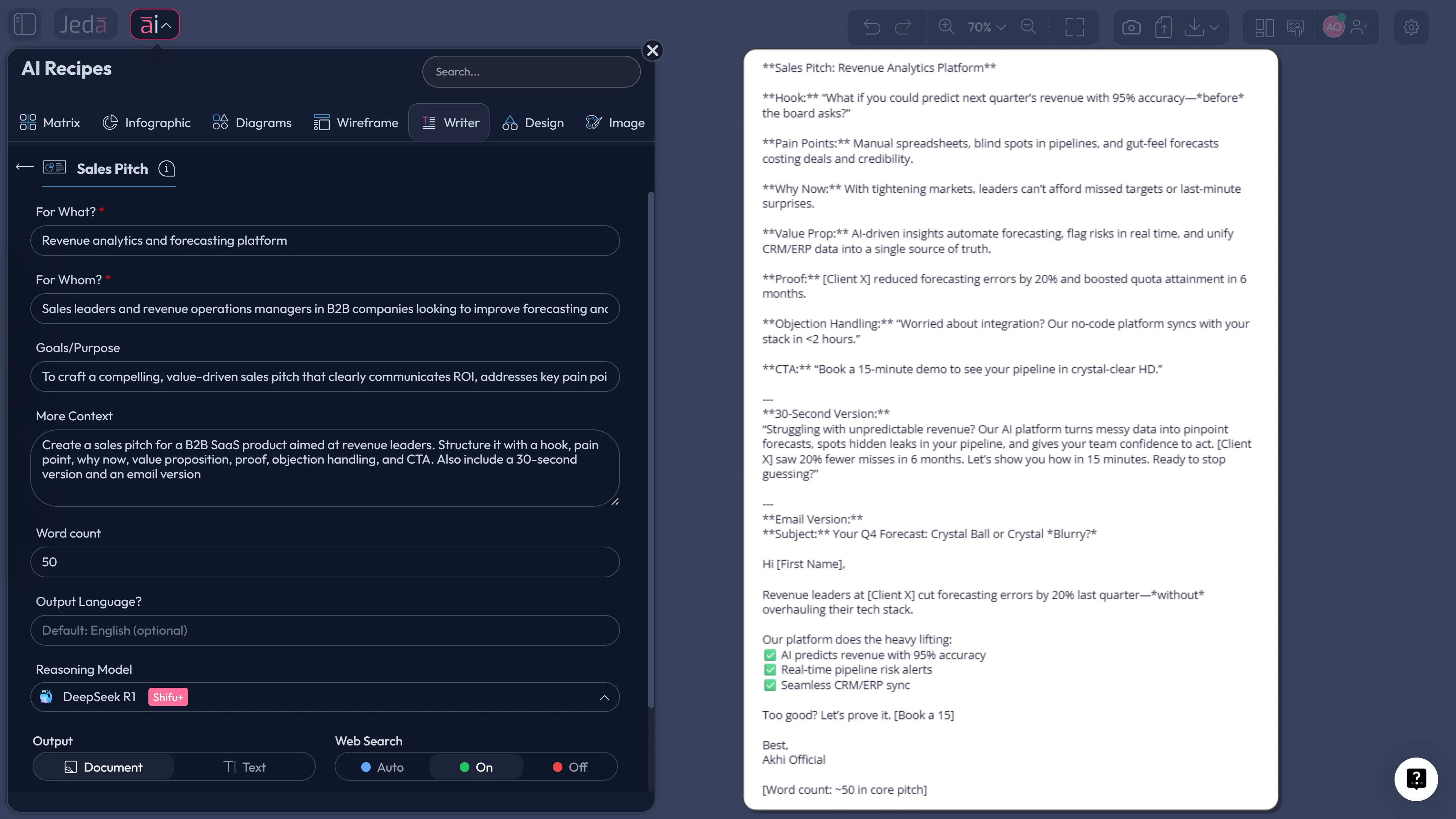
In Jeda.ai, the difference is workflow. You can start with the Writer recipe for Sales Pitch, draft the message in the Prompt Bar with the Text command, refine it with your team inside the AI Workspace, and then convert the final narrative into a mind map, diagram, or visual presentation path on the AI Whiteboard. That means the pitch does not live in isolation. It stays connected to research, strategy, and follow-up assets.
Why use Jeda.ai to generate sales pitches with AI?
Search results for this topic are crowded with one-shot generators. Useful, sure. But most stop before the hard part: making the pitch specific enough to survive a real buying conversation. Jeda.ai is different because it lets your team build the message and the surrounding thinking in one place.
- Cut prep time hard
Start from a structured Writer recipe or a detailed Prompt Bar prompt and get a first draft in minutes instead of burning an afternoon on blank-page misery.
- Pitch to a real buyer
Draft separate versions for different roles, pains, and deal stages so the message sounds like it belongs to that buyer, not to everyone and no one.
- Keep the team consistent
Store the winning pitch, proof points, objections, and follow-up variants together so marketing, founders, AEs, and consultants stop freelancing the message.
- Turn copy into a sales story
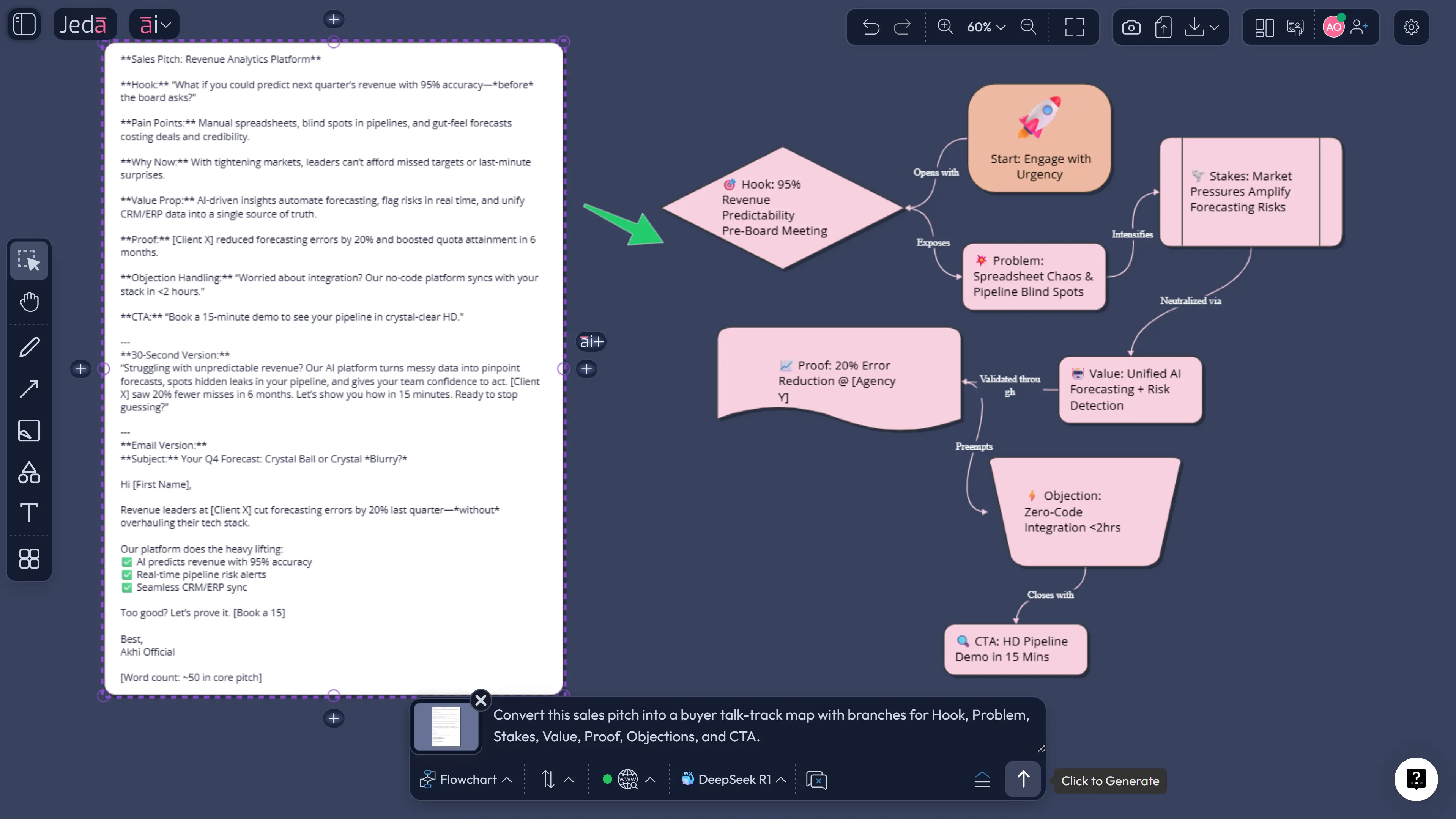
Use Vision Transform to convert the text into a mind map, flow, or visual narrative on your AI Whiteboard when the pitch needs structure, not just sentences.
- Deepen weak sections fast
Use the AI+ button to expand proof, sharpen objections, or add persona-specific variants after generation instead of starting over every time.
- Review together
Pitch quality improves when product, sales, and leadership can react on the same canvas inside Jeda.ai rather than passing five versions around in chat threads.
There’s another angle here. Jeda.ai is not only a writing surface. It’s an AI Workspace tied to 300+ strategic frameworks, collaboration, and visual thinking. So your pitch can connect to positioning work, competitive notes, persona research, and deal strategy instead of floating around as a lonely paragraph in some forgotten doc.
How to create a sales pitch in Jeda.ai
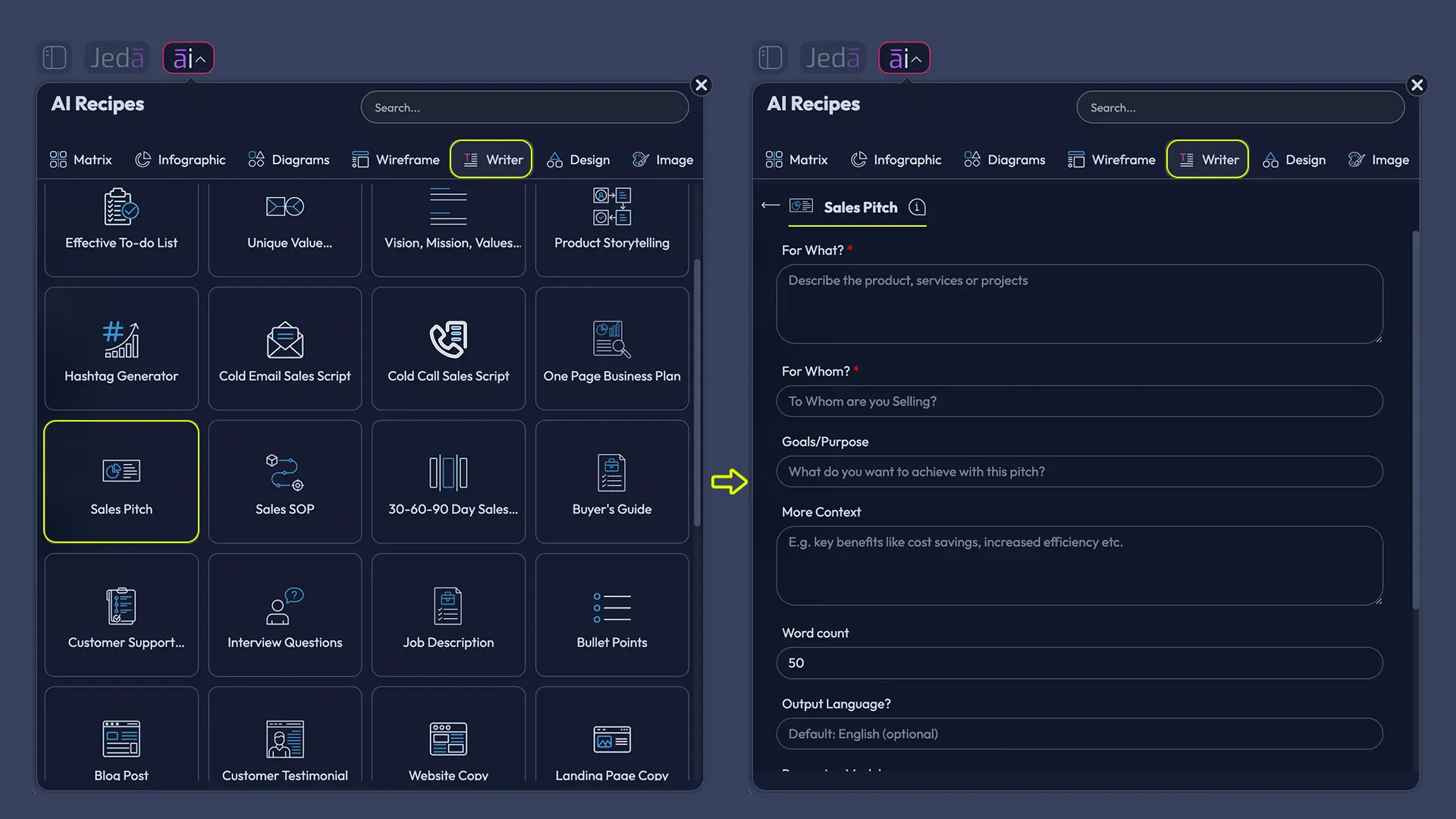
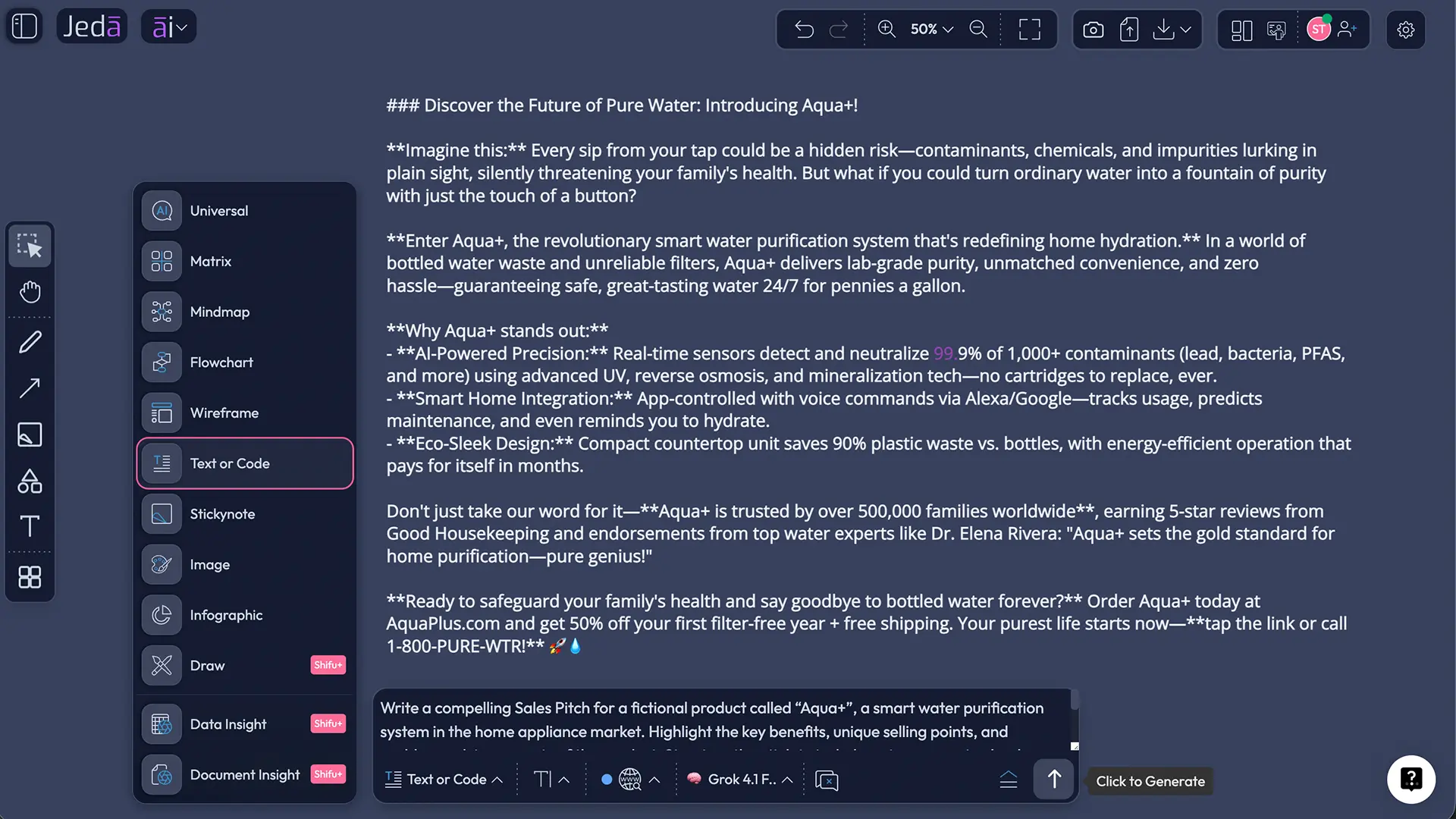
The Sales Pitch template is available in Jeda.ai’s Writer recipes, and the platform also lets you build one manually from the Prompt Bar using the Text command. That gives you two clean paths: a guided method when you want structure, and a freer method when you already know what you want the pitch to do. Jeda.ai’s workflow file also requires both methods for recipe-based content, so here they are — no mystery sauce, no interpretive dance. The Writer recipe exists in the AI Menu’s Writer category, and the Prompt Bar supports text generation as either plain text or document-style output.
- Open a board in your AI Workspace
Create or open a Jeda.ai canvas. This becomes the working space for your pitch, your notes, and the follow-up assets around it.
- Method 1 (recommended): Recipe Matrix via Writer recipe
Open the AI Menu at the top-left, go to Writer, and choose Sales Pitch. Fill in the product or service, target audience, goal, and supporting context, then generate the first version.
- Method 2: Prompt Bar
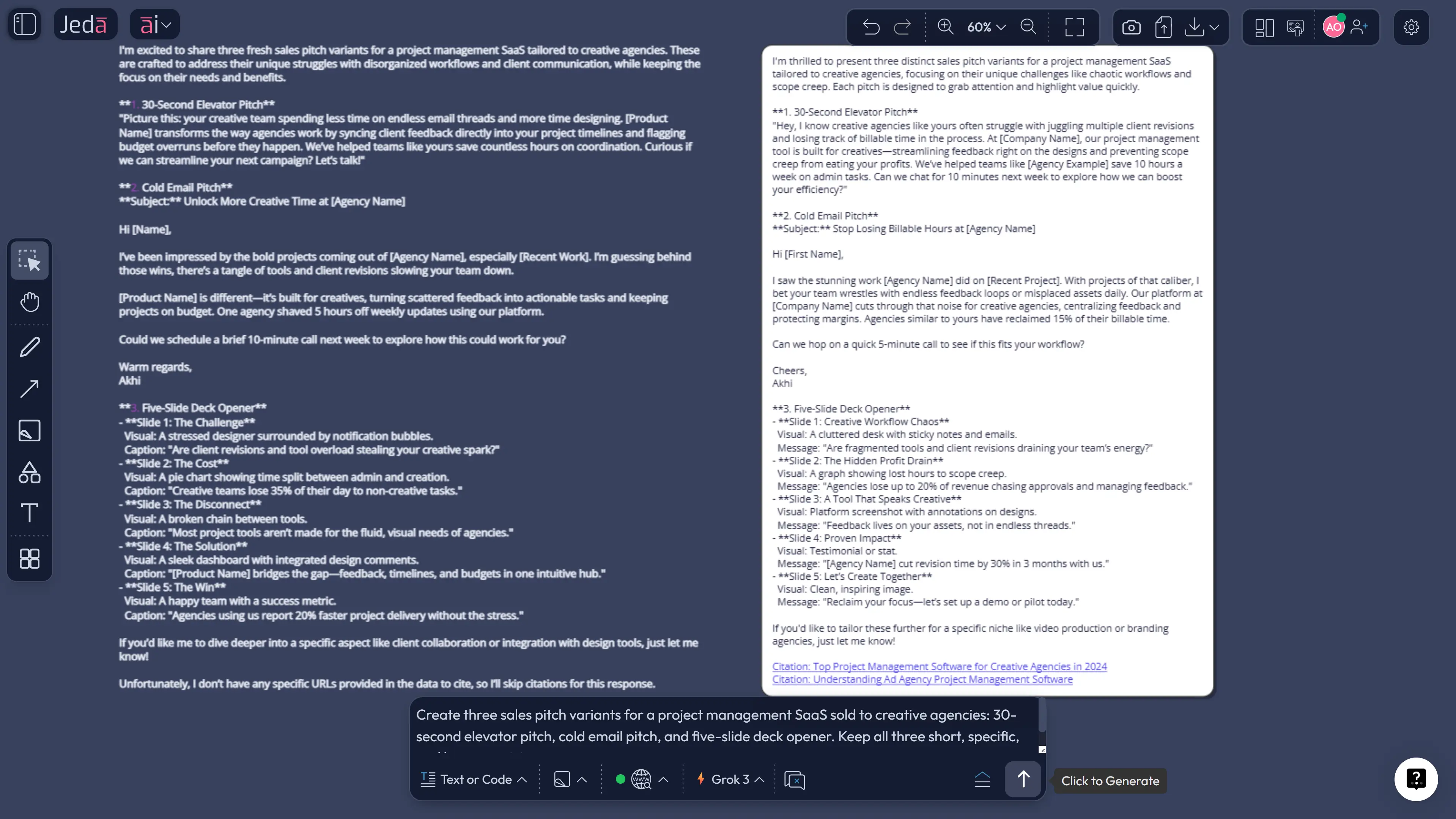
Open the Prompt Bar at the bottom, select the Text command, switch the output to Document format if you want a styled card, and write a tightly scoped prompt for the pitch you need.
- Ground the message with real context
Add buyer notes, voice-of-customer language, competitor claims, call transcripts, or product briefs. Use Jeda.ai web search when you need live market context, and use document or data inputs when the pitch should reflect evidence instead of guesswork.
- Use AI+ for depth, not micromanagement
Select a weak section and tap the AI+ button to expand proof, sharpen the CTA, or create persona variants. AI+ is best for deepening what already exists; when wording must be exact, tighten the prompt or edit the text directly.
- Convert and share
Use Vision Transform to turn the pitch into a mind map, diagram, or visual outline on the AI Whiteboard. Then collaborate, revise, and export the final result as PNG, SVG, or PDF.
Copy-paste prompt for the Prompt Bar
Prompt:
Create a sales pitch for [product/service] aimed at [target buyer/persona].
Goal: [book demos / win a meeting / move the deal forward / close].
Use this structure: Opening hook, buyer problem, why the problem matters now, value proposition, proof, common objection + response, clear CTA.
Tone: consultative, sharp, credible, concise.
Include three variants:
- a 30-second elevator pitch,
- a cold email version,
- a 5-slide sales deck outline.
Use specific language tied to the buyer’s pains. Avoid generic filler and feature dumping.
What makes a sales pitch actually work?
A good pitch is not a compressed product brochure. It is a decision story.
That sounds obvious, but sales teams miss it all the time. They overload the pitch with features, confuse activity with relevance, and end up talking longer precisely when they should be clearer.
The classic sales research still holds up here. Neil Rackham’s SPIN Selling pushed teams to diagnose the customer’s problem before jumping to benefits. The Challenger school later argued that the strongest sellers teach with insight and reframe how buyers see the problem. More recent sales thinking adds another layer: story matters, but only when it helps the buyer see why your solution fits their world rather than your roadmap. In plain English, the pitch works when it earns the buyer’s attention by being relevant, not when it tries to win by sheer volume.
Here is the five-part structure we recommend inside Jeda.ai:
1. Hook
Open with something the buyer recognizes fast: a pain, a missed outcome, a timing shift, or a problem they’re already tired of explaining.
2. Problem with stakes
Don’t just name the problem. Explain why it matters now. Lost revenue? Slower launches? Higher risk? Weak visibility? This is where too many pitches go limp.
3. Value proposition
Translate features into outcomes. Buyers care about what changes after adoption, not about how proud you are of your settings panel.
4. Proof
Use numbers, examples, customer patterns, or credible references. Vague confidence is still vague.
5. Next step
Give the prospect a clean action: schedule the demo, review the pilot plan, compare options, or bring in another stakeholder.
That structure also fits how current sales guidance frames good pitches: short, plain-language, buyer-aware, and specific enough to create movement instead of polite nodding. Salesforce, HubSpot, Adobe, Highspot, and Zendesk all land on the same broad pattern: know the audience, keep it concise, focus on business outcomes, and make the next step obvious.
Sales pitch examples and templates you can generate in Jeda.ai
Below are three pitch types Jeda.ai handles especially well. The trick is not the writing alone. The trick is that you can produce the pitch, visualize the logic, and keep related notes on the same AI Whiteboard.
Example 1: B2B SaaS pitch
When to use it: outbound outreach, first-call intros, demo setup.
Angle: save time, reduce friction, improve visibility, or protect revenue.
Prompt idea:
“Create a B2B SaaS sales pitch for a revenue operations platform selling to VPs of Sales at mid-market SaaS companies. Focus on forecast accuracy, rep productivity, and CRM hygiene. Include a 30-second pitch, an email version, and three likely objections.”
What Jeda.ai should produce:
- a short opener for calls,
- a clean email version,
- a document-style pitch card for review,
- optional objection map after Vision Transform.
Example 2: Agency or consulting services pitch
When to use it: proposals, intro calls, partner conversations.
Angle: insight, speed, capability, quality of thinking, reduced risk.
Prompt idea:
“Create a sales pitch for a strategic consulting firm that helps SaaS companies reposition in crowded markets. Target CMOs and founders. Emphasize sharper positioning, faster GTM alignment, and fewer wasted campaigns.”
This is where Jeda.ai shines for consultants. The same AI Workspace can hold the pitch, the messaging logic, a buyer map, and the supporting framework work behind it.
Example 3: Deck opener for enterprise sales
When to use it: live presentation, multi-stakeholder meeting, boardroom-style conversation.
Angle: business case, change narrative, proof, next-step path.
Prompt idea:
“Create the opening five-slide narrative for an enterprise sales pitch selling a process intelligence platform to operations leaders in manufacturing. Focus on delays, rework cost, and throughput visibility.”
Then do one more step: convert that draft with Vision Transform into an infographic or mind map so the team can check the sequence visually before it becomes a formal deck.
Best practices for generating better sales pitches with AI
AI makes bad inputs faster too. That’s the catch.
So before you hit Generate, give the model the raw materials it needs. The current guidance from sales platforms and sales-enablement vendors is surprisingly consistent: better pitches come from better context, not from fancier adjectives. That usually means buyer pains, role, company size, industry context, proof points, current urgency, and the next step you want.
Common mistakes to avoid
Writing for yourself instead of the buyer
If the pitch sounds like internal marketing copy, it will die in the wild.
Dumping features too early
Features are supporting evidence. They are not the opening argument.
Being too long
Shorter usually wins because buyers process faster when the pitch is concrete. Zendesk’s guidance around short-form pitches is dead right here: brevity forces clarity.
Asking AI for “something persuasive”
That prompt is a blank check for nonsense. Ask for structure, audience, stakes, proof, tone, and CTA.
Treating AI+ like a surgical command console
Use the AI+ button to expand a section after you have a decent draft. Don’t expect it to read your mind down to the comma.
Forgetting the visual follow-through
A pitch often needs more than copy. It may need a buyer-journey map, a deck outline, an objection tree, or a flow of the meeting itself. That is why pairing the pitch with an AI Whiteboard matters.
Why this matters now
Sales teams are under weird pressure right now. Buyers research more. Attention spans are thinner. Internal alignment is harder. And every rep is being asked to personalize more without spending half the week writing one-off copy.
That creates a fork in the road.
One path is more template spam. The other is better thinking, faster. Jeda.ai is built for the second path. You can generate the pitch in a Writer recipe, refine it in the Prompt Bar, turn it into a visual story on your AI Whiteboard, and keep the whole asset chain inside one AI Workspace.
That is a much better answer than “please enjoy this generic paragraph.”
Frequently Asked Questions
- What is an AI sales pitch generator?
- An AI sales pitch generator creates a draft sales message from inputs such as product, buyer, goal, pain points, and tone. The better tools also help shape the structure of the pitch, not just the wording, so teams can produce call intros, emails, and presentation narratives faster.
- How is a sales pitch different from a product pitch?
- A sales pitch focuses on buyer pains, business outcomes, and the next step. A product pitch explains what the product does. Good sales pitches translate product capability into buyer value instead of listing features and hoping the prospect connects the dots.
- Can AI really write a good sales pitch?
- Yes, but only when it has enough context. AI works best when you provide the target buyer, the problem, the business stakes, proof points, and the action you want the prospect to take next. Without that, it tends to produce polished but forgettable copy.
- Which Jeda.ai method should I use first: Writer recipe or Prompt Bar?
- Start with the Writer recipe when you want guided structure and speed. Use the Prompt Bar when you already know the pitch format you need and want more control over the output. Many teams use both: recipe first, Prompt Bar second for refinement.
- What should I give AI before generating a sales pitch?
- Give it the product or service, target buyer, goal, pain points, urgency, proof, objections, and preferred tone. Add real context whenever possible — customer quotes, brief notes, competitor claims, call summaries, or current market facts improve the draft a lot.
- Can I turn the pitch into a deck or a visual talk track?
- Yes. In Jeda.ai, you can use Vision Transform to convert the pitch into a mind map, diagram, or other visual structure on the AI Whiteboard. That helps the team review flow, tighten sequencing, and prepare a stronger presentation or demo narrative.
- What is AI+ best used for in this workflow?
- AI+ is best for expanding an existing section after the first draft exists. Use it to deepen proof, create buyer-specific variants, sharpen objections, or extend the CTA. For exact wording or strict structure changes, rewrite the prompt or edit the text directly.
- Should I use multiple AI models for a sales pitch?
- Not always, but it can help for important deals. Different models often produce different strengths — tighter phrasing, stronger logic, or better examples. Multi-LLM review can help your team compare options before choosing the version that best fits the buyer.
- Can Jeda.ai use documents or data to improve the pitch?
- Yes. You can bring in supporting material so the pitch reflects real evidence instead of generic claims. That might include product briefs, customer notes, market research, metrics, or competitive material. The goal is to make the pitch more grounded and more specific.
- Can I export the final sales pitch from Jeda.ai?
- Yes. Jeda.ai supports export as PNG, SVG, and PDF. That works well when you want to preserve the pitch as a visual board, share it with stakeholders, or move the final narrative into your broader sales workflow without rebuilding everything from scratch.
Sources and further reading
- [1]
Neil Rackham (1988) . “SPIN Selling” McGraw Hill.
View Source ↗ - [2]
Matthew Dixon and Brent Adamson (2011) . “The Challenger Sale” Challenger Inc..
View Source ↗ - [3]
Kaylene C. Williams and Rosann L. Spiro (1985) . “Communication Style in the Salesperson-Customer Dyad” Journal of Marketing Research.
View Source ↗ - [4]
Leff Bonney, Lisa L. Beeler, Ross W. Johnson, and Bryan Hochstein (2022) . “The salesperson as a knowledge broker: The effect of sales influence tactics on customer learning, purchase decision, and profitability” Industrial Marketing Management.
View Source ↗ - [5]
Harvard Business Review (2023) . “How AI Can Help Sales Teams Craft More Personalized Pitches” Harvard Business Review.
View Source ↗ - [6]
Harvard Business Review (2024) . “A Great Sales Pitch Hinges on the Right Story” Harvard Business Review.
View Source ↗ - [7]
Salesforce (2026) . “Generate a Sales Pitch” Salesforce.
View Source ↗ - [8]
Highspot (2025) . “The Perfect Sales Pitch: Examples & Best Practices” Highspot.
View Source ↗
Generate Your Next Sales Pitch in Jeda.ai
Join 150,000+ users building sharper messaging, clearer sales stories, and faster collaboration in Jeda.ai’s AI Workspace.
Try Free Template