Cold Call Sales Script with AI sounds simple. Add a product, add a target buyer, hit generate, and boom — instant confidence, right? Not quite. A useful script is not a magic paragraph. It is a call path your rep can actually say out loud without sounding like they are reading legal terms for a toaster warranty.
That is where Jeda.ai fits. Inside the Jeda.ai AI Workspace, the Cold Call Sales Script recipe helps you turn a sales situation into a structured Writer output: opener, reason for calling, relevance hook, discovery prompts, objection responses, and next-step close. It sits inside the same Visual AI environment used by 150,000+ users for thinking, planning, and editable work. Then you can manually edit the result, format the text, and keep refining it inside the same AI Whiteboard where your team is planning the wider campaign.
And yes, cold calls still matter. Salesforce’s 2026 State of Sales report says 87% of sales organizations use AI in some form, and 55% of sales professionals already use AI for prospecting. The same report says 48% of sales reps lack enough bandwidth for adequate cold outreach. Translation: teams need better prep, not more random dialing.
What Is a Cold Call Sales Script with AI?
A cold call sales script with AI is a structured call plan generated from your sales context: what you sell, who you are calling, what outcome you want, and what the buyer probably cares about. The AI helps draft the first usable version faster, while the sales team still edits the language, checks the claims, and adapts the tone.
Good scripts are not cages. They are rails.
A strong script gives the rep a starting line, a reason for the call, a short value statement, a few discovery questions, calm objection responses, and a direct ask. HubSpot’s sales script guidance says the best scripts should not sound like scripts; they should sound like confident, relevant conversations. That is the whole ballgame. If the output sounds too polished, too stiff, or too generic, edit it before anyone touches a phone.
Jeda.ai’s Writer recipe is useful because it starts with fields instead of a blank page. You define For What and For Whom first. That forces the script to answer the only question that matters during the first few seconds of a call: “Why should this person care right now?”
In plain English, you are not asking Jeda.ai to “write a sales thing.” You are asking it to build a call path for a specific prospect, product, and sales goal.
Why Cold Call Scripts Need Better Context Now
Cold calling is brutal because attention is expensive. People are busy, guarded, and allergic to vague pitches. Fair, honestly. Most weak calls fail because the rep opens with a generic greeting, lists features too early, or asks for time before giving the buyer a reason to stay.
Gong’s cold calling research shows that opening lines and early context have measurable impact. Gong reports that “How have you been?” performed at a 10.01% success rate in one dataset, while “Did I catch you at a bad time?” can hurt meeting-booking odds. More recent Gong Labs analysis of 300M+ cold calls found permission-based and context-led openers performing better than weaker openers.
That does not mean every rep should blindly copy one line from a blog post. Please don’t. That way lies cringe.
The lesson is sharper: the first few seconds must reduce suspicion and increase relevance. AI can help draft those options quickly, but the output still needs human judgment. A script for a CFO should not sound like a script for a campus program director. A founder calling SMB owners needs different phrasing than an enterprise SDR calling a VP of Operations.
This is exactly why the Jeda.ai Cold Call Sales Script recipe uses structured fields. It gives the AI the bones of the situation before it writes the talk track.
When Should You Use the Cold Call Sales Script Recipe?
Use it when your team needs a repeatable script but does not want another dead template living in a folder nobody opens.
The recipe is a good fit when you are:
- launching a new outbound campaign;
- preparing SDRs or BDRs for a new buyer segment;
- testing different openers for the same offer;
- creating talk tracks for founders doing early sales;
- building call scripts for consultants, agencies, or sales trainers;
- preparing objection responses before a campaign starts;
- translating a messy offer into a buyer-friendly conversation.
It is especially useful for teams that sell strategic, consultative, or high-consideration products. Those calls cannot survive on a single punchy opener. They need a buyer-specific reason, a tight problem statement, and a graceful path from interruption to conversation.
Jeda.ai is not just generating words here. The broader AI Workspace helps you keep the script near the campaign strategy, buyer notes, sales objections, positioning ideas, visual planning assets, and 300+ strategic frameworks that support deeper go-to-market thinking. That matters because sales scripts age fast. A competitor changes pricing. A buyer objection appears three times in one week. The team learns that one phrase bombs. You edit the script. You do not start over from scratch.
What the Jeda.ai Cold Call Sales Script Recipe Includes
The Cold Call Sales Script is a Writer recipe inside Jeda.ai’s AI Recipe menu. There is no sub-recipe or nested category for this specific Writer recipe. You can either navigate to it inside the Writer tab or search for it directly.
The form is simple on purpose.
| Field / setting | Type | How to use it |
|---|---|---|
| For What | Mandatory | Describe the offer, product, service, campaign, or call objective. Example: “Outbound call for a visual AI workspace used by strategy consultants.” |
| For Whom | Mandatory | Define the exact buyer or audience. Example: “Independent management consultants in the United States.” |
| Goals / Purpose | Optional | Add what the call should accomplish: book a demo, qualify interest, test a pain point, revive old leads, or invite someone to a pilot. |
| More Context | Optional | Add differentiators, buyer pain, competitors, proof points, constraints, forbidden claims, tone notes, or objections to prepare for. |
| Word Count | Optional | Set length expectations. Short scripts are better for first calls. Longer scripts help with training and objection libraries. |
| Output Language | Optional | English is the default. Change it only when the sales team actually needs another language. |
| Reasoning Models | Generation setting | Choose one, two, or three reasoning models. If multiple models are selected, use Aggregate to consolidate stronger options with an additional model. |
| Output Format | Preview setting | Choose Document or Text. This changes the preview style; it does not export or generate a native document file. |
| Web Search | Grounding setting | Choose Auto, On, or Off. Use On when market, competitor, or current buyer context matters. |
| Clear Chat Context | Context control | Use it before starting a new campaign or buyer segment so old context does not muddy the output. |
A neat detail: after generation, manual editing is allowed. You can rewrite lines, shorten the opener, bold sections, adjust formatting, and make the script sound like your actual team. That is not a small thing. AI gets you the draft; humans keep it sellable.
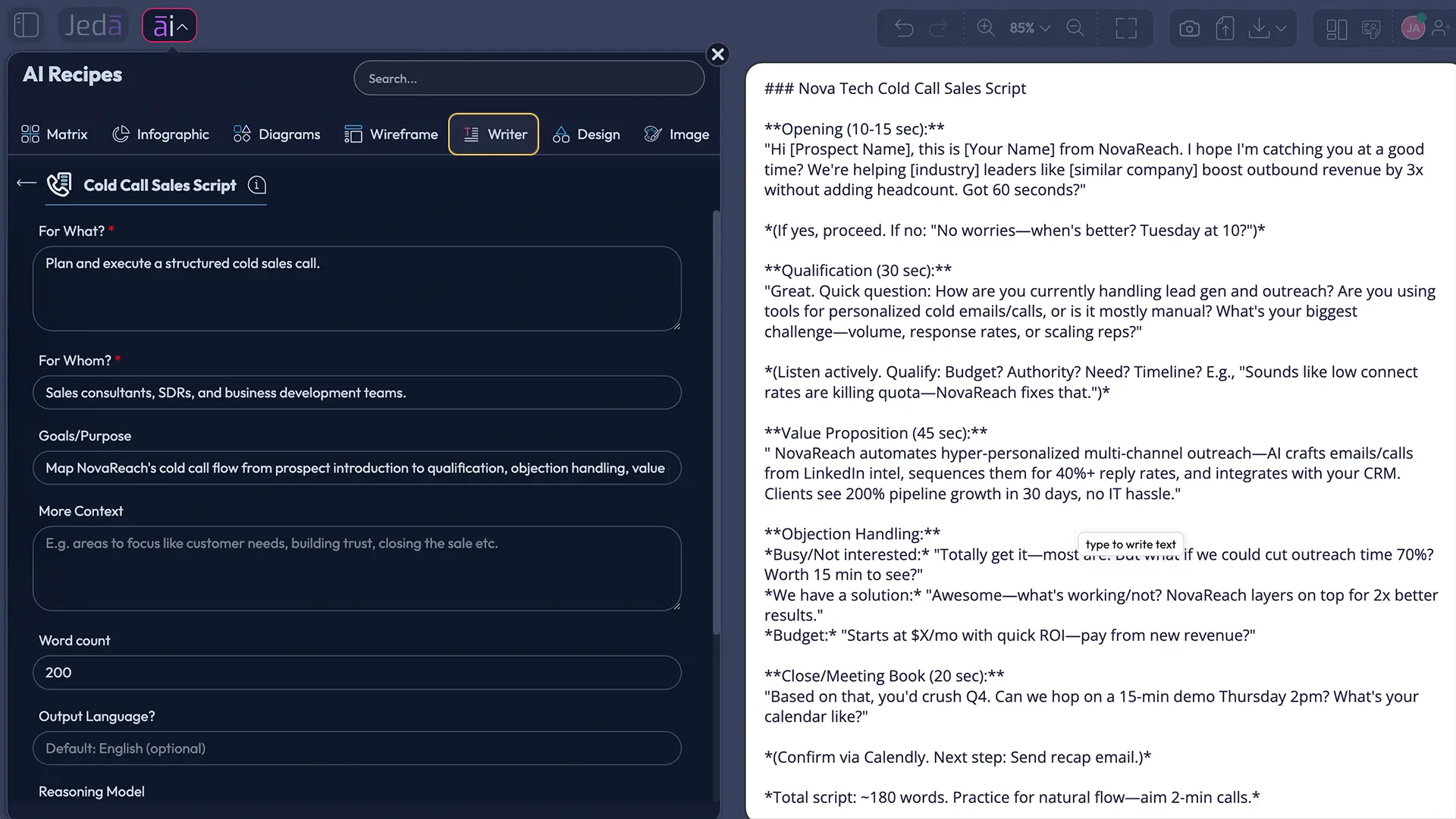
How to Create a Cold Call Sales Script with AI in Jeda.ai
There are two clean ways to use the recipe, plus one direct Prompt Bar route if you want to skip the recipe form. Use the recipe when you want guided structure. Use the Prompt Bar when you already know the exact script format you want.
Method 1: Search for the Cold Call Sales Script recipe directly
Use this method when speed matters and you already know the recipe name.
- Open a Jeda.ai workspace.
- Click the AI Menu in the top-left area of the canvas.
- Use the search bar in the AI Recipes panel.
- Search for Cold Call Sales Script.
- Open the Writer recipe.
- Fill in For What and For Whom.
- Add optional details under Goals / Purpose, More Context, Word Count, and Output Language if needed.
- Choose one, two, or three reasoning models.
- If you select multiple models, enable the Aggregate option and choose the additional aggregation model.
- Set Web Search to Auto, On, or Off.
- Select Document or Text as the preview output format.
- Click Generate.
- Review the generated script and manually edit wording, formatting, and emphasis.
- Use Clear Chat Context before generating a scr0[ipt for a different campaign, market, or buyer group.
This is the fastest route. No menu archaeology. No “where did they hide the thing?” ritual. Search, fill, generate, edit.
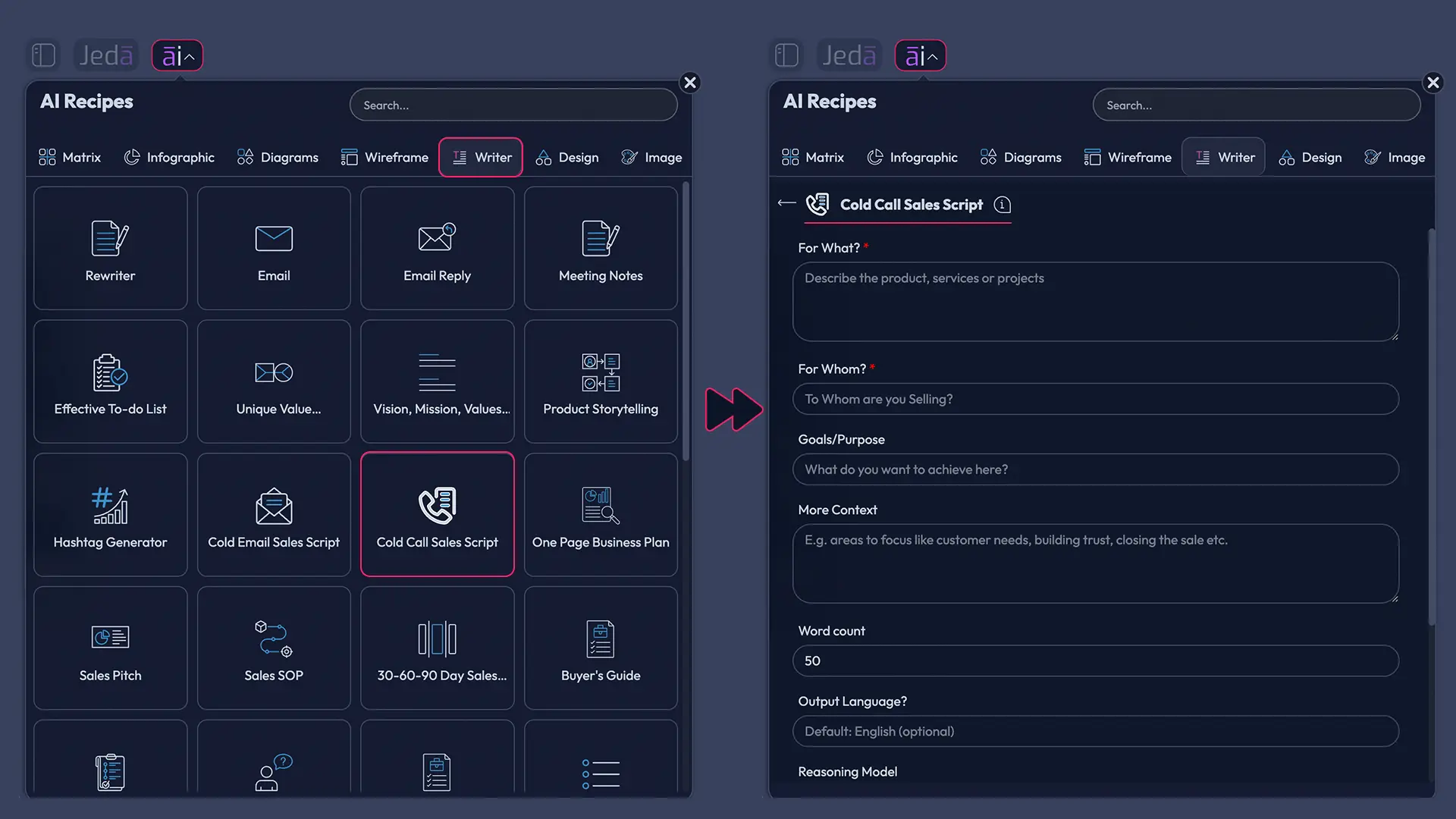
Method 2: Navigate through the Writer recipe tab
Use this method when you are browsing Writer recipes or training someone new.
- Open a Jeda.ai workspace.
- Click the AI Menu in the top-left area.
- Select the Writer tab.
- Find and open Cold Call Sales Script.
- Enter the mandatory fields: For What and For Whom.
- Add optional context: campaign goal, target pain, offer proof, disallowed claims, preferred tone, and common objections.
- Choose your reasoning model setup.
- Turn Web Search On if you want the script to reflect current market or competitor context.
- Pick Document or Text for the preview format.
- Generate the script.
- Edit the output manually until it sounds natural enough to say on a real call.
This route is better for onboarding because it shows where the recipe lives. It also reinforces that this is a Writer recipe, not a Matrix, Diagram, or Sales subcategory workflow.
Method 3: Use the Prompt Bar for a direct script draft
Use the Prompt Bar when you do not need the guided recipe fields.
- Open the Prompt Bar at the bottom of the canvas.
- Choose Text or Code as the command.
- Select Document or Text as the preview format.
- Enter a detailed prompt that includes the offer, audience, goal, tone, constraints, and objections.
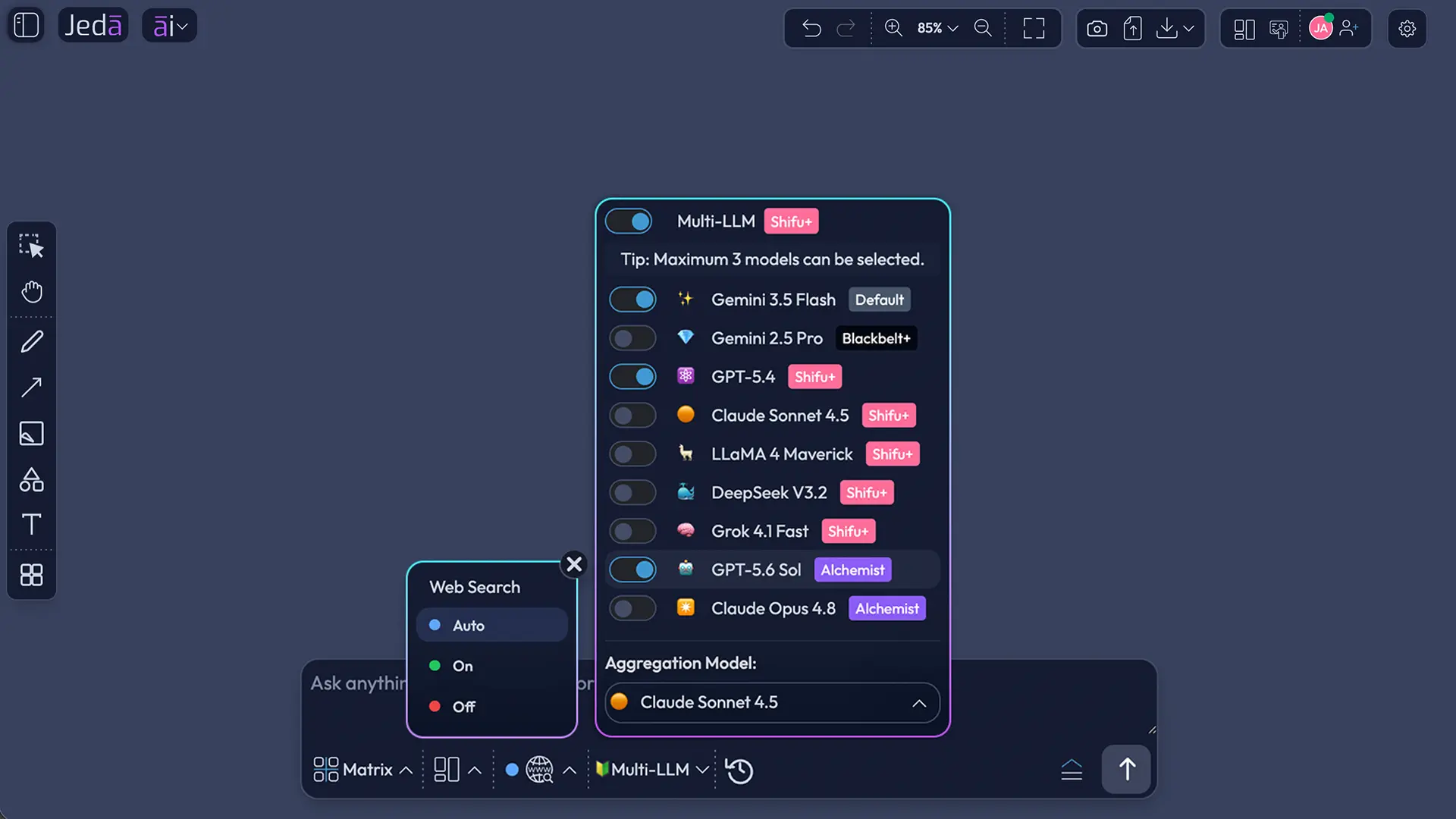
- Choose your reasoning model or Multi-LLM setup.
- Set Web Search to Auto, On, or Off.
- Generate the draft.
- Edit the result manually.
A solid prompt might look like this:
Create a conversational B2B cold call sales script for a startup founder selling an AI workspace to independent strategy consultants. The goal is to book a 20-minute demo. Include a permission-based opener, a relevance hook, three discovery questions, responses to “send me info” and “not interested,” and a direct meeting close. Keep it under 500 words. Avoid hype and unsupported ROI claims.
The Prompt Bar route is flexible, but the recipe is safer when you want consistent outputs across a team.
What a Strong AI-Generated Cold Call Script Should Include
A good cold call sales script with AI should have enough structure to guide the rep and enough breathing room to let the buyer talk. If the rep speaks for 90 seconds straight, the script has already failed. Put it in a drawer and let it think about what it did.
Here is the structure to aim for:
- Permission-based opener — Respect the interruption. Ask for a short window without sounding timid.
- Context line — Show why this prospect is on the list.
- Problem hook — Name one likely pain, not five generic benefits.
- Short credibility line — Mention the relevant outcome, proof point, or use case without puffery.
- Discovery question — Invite the prospect to talk.
- Objection responses — Prepare calm replies for “not interested,” “send info,” “we already use something,” and “no budget.”
- Close — Ask for a specific next step, usually a short meeting or permission to send a targeted note.
- Voicemail fallback — Keep it short and curiosity-led.
- Follow-up note — Write the email or LinkedIn message that supports the call.
HubSpot’s script guidance points to a similar idea: scripts help reps stay grounded, but the best reps use them to guide conversation rather than control it. Their guidance also emphasizes anchoring to one problem instead of cramming the call with too many value props.
For Jeda.ai users, that means the More Context field matters. Feed the recipe the buyer’s actual situation. Add what the rep should avoid. Add the competitor angle. Add the proof points. Add the call objective.
Less fluff in. Better script out.
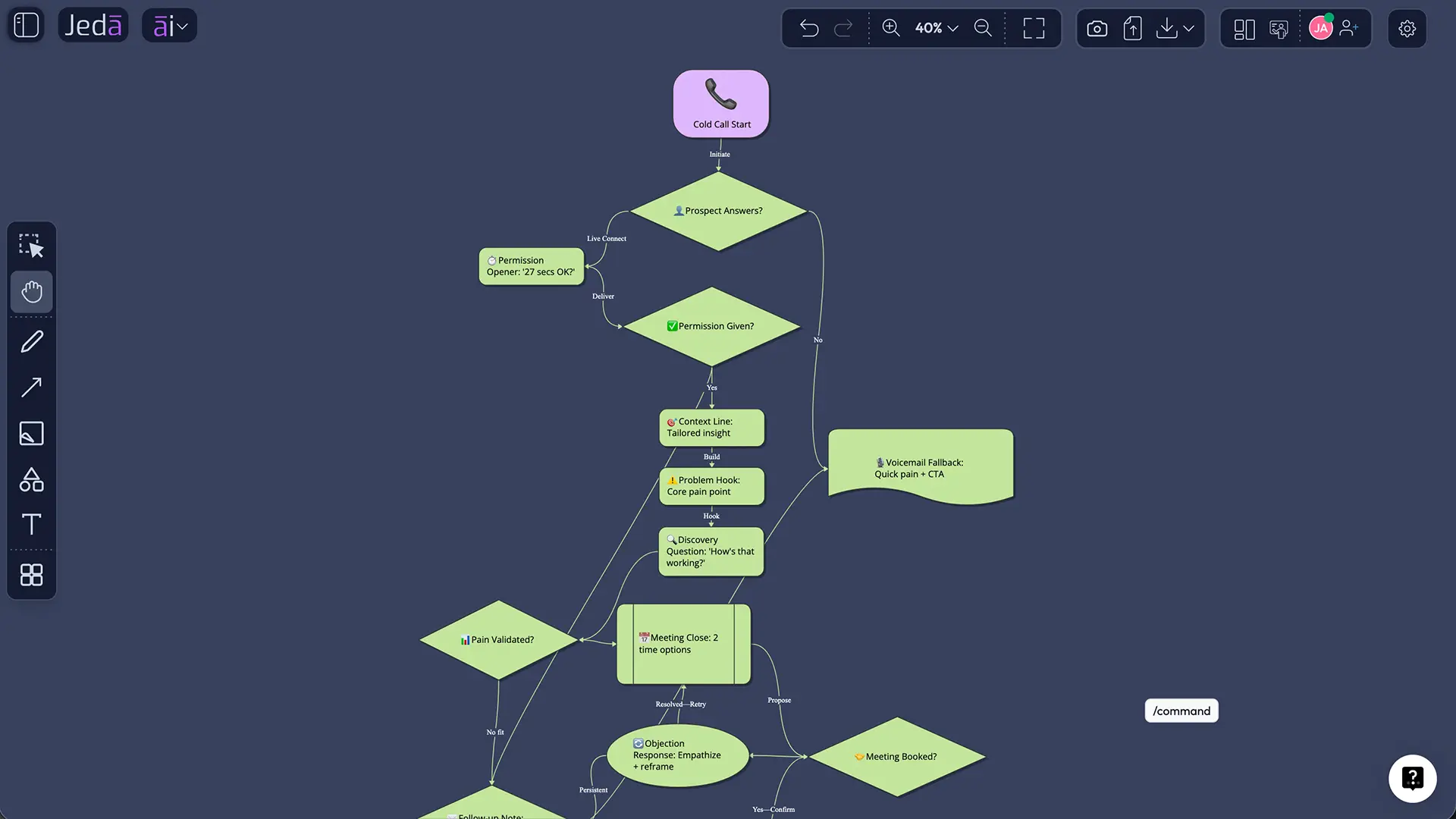
Example: Cold Call Sales Script Prompt for Jeda.ai
Here is a practical example you can adapt inside the recipe.
For What:
Outbound cold call script for Jeda.ai, an AI Workspace that helps consultants and sales teams create structured visual strategy assets, scripts, frameworks, and editable outputs.
For Whom:
Independent business consultants and boutique consulting firms in the United States that run strategy workshops, client discovery calls, and sales outreach.
Goals / Purpose:
Book a 20-minute demo. The call should qualify whether the consultant currently builds client deliverables manually in slides, documents, or whiteboards and whether they want a faster workflow.
More Context:
Jeda.ai offers an AI Whiteboard, Writer recipes, editable canvas outputs, Multi-LLM reasoning, Web Search options, manual text editing, and formatting. Avoid promising guaranteed sales results. Make the tone warm, confident, and respectful. Include responses for “send me info,” “we already use ChatGPT,” and “I’m not interested.”
Word Count:
600 words.
Output Language:
English.
What should the output include? A short opener, a relevance hook, three questions, objection responses, close options, and a voicemail fallback.
Now the sales manager has something usable to review. The rep gets a path. The founder gets a first draft that does not begin with “I hope this call finds you well,” which should frankly be illegal in at least twelve time zones.
Where AI Helps—and Where It Still Needs a Human
AI is very good at turning messy context into structured first drafts. It can generate variants, reframe objections, create softer or firmer tones, and produce script versions for different buyer groups. It is also good at remembering the pieces humans forget when they are rushing: voicemail, follow-up, objection handling, and close language.
But it does not know your prospect unless you give it context.
Microsoft research on how people use generative AI found that common work activities include gathering information and writing, and it specifically identified sales as an occupation where work often involves providing and communicating information. That lines up neatly with sales script creation.
Another Microsoft paper on AI-powered sales research argues that enterprise sales AI needs groundedness, relevance, explainability, schema accuracy, and chart clarity when business data is involved. Different use case, same warning: sales AI needs context and quality checks, not blind trust.
So keep the human in the loop.
Before a rep uses any generated script, review it for:
- claims the company cannot prove;
- awkward phrases no human on your team would say;
- buyer assumptions that feel too broad;
- fake urgency;
- weak meeting asks;
- objection responses that argue instead of clarifying.
And once calls start, update the script from actual call feedback. If three prospects object to the same phrase, fix it. If one opener earns better conversations, save it. The script should evolve like a living sales asset, not sit frozen like a museum fossil with a quota.
How Web Search Changes the Script
Web Search should be On when the script depends on current facts: a competitor launch, industry trend, recent funding, new regulation, hiring surge, market benchmark, or buyer-specific trigger.
Use Auto when the topic may or may not need current data. Use Off when you are drafting a generic training script, internal roleplay, or a script based entirely on your own notes.
Salesforce’s 2026 report makes the case for AI-assisted prospecting, but it also warns that disconnected systems slow down AI initiatives. If the source context is messy, the output will be messy too.
Practical rule: if the rep would normally research before the call, turn Web Search On. If the rep is practicing a general call structure, Auto or Off is fine.
How Multi-Model Reasoning Helps Sales Scripts
A single model can write a good cold call script. Multiple models can give you more angles.
In Jeda.ai, you can choose one, two, or three reasoning models for the recipe. If you select multiple models, you can toggle Aggregate and choose an additional model to pick the best parts and generate a consolidated output. For sales scripts, that can be useful because one model may write a sharper opener, another may produce better objection responses, and another may be stronger at structuring the call flow.
Use Multi-LLM when:
- the campaign is high-stakes;
- the audience is unfamiliar;
- the offer is complex;
- the first draft keeps sounding generic;
- you need several script angles before choosing one.
Use one model when:
- you are drafting something simple;
- the sales motion is familiar;
- speed matters more than comparison;
- you already have strong internal context.
The goal is not to worship the model menu. The goal is to get a script your team can actually use.
Editing the Script After Generation
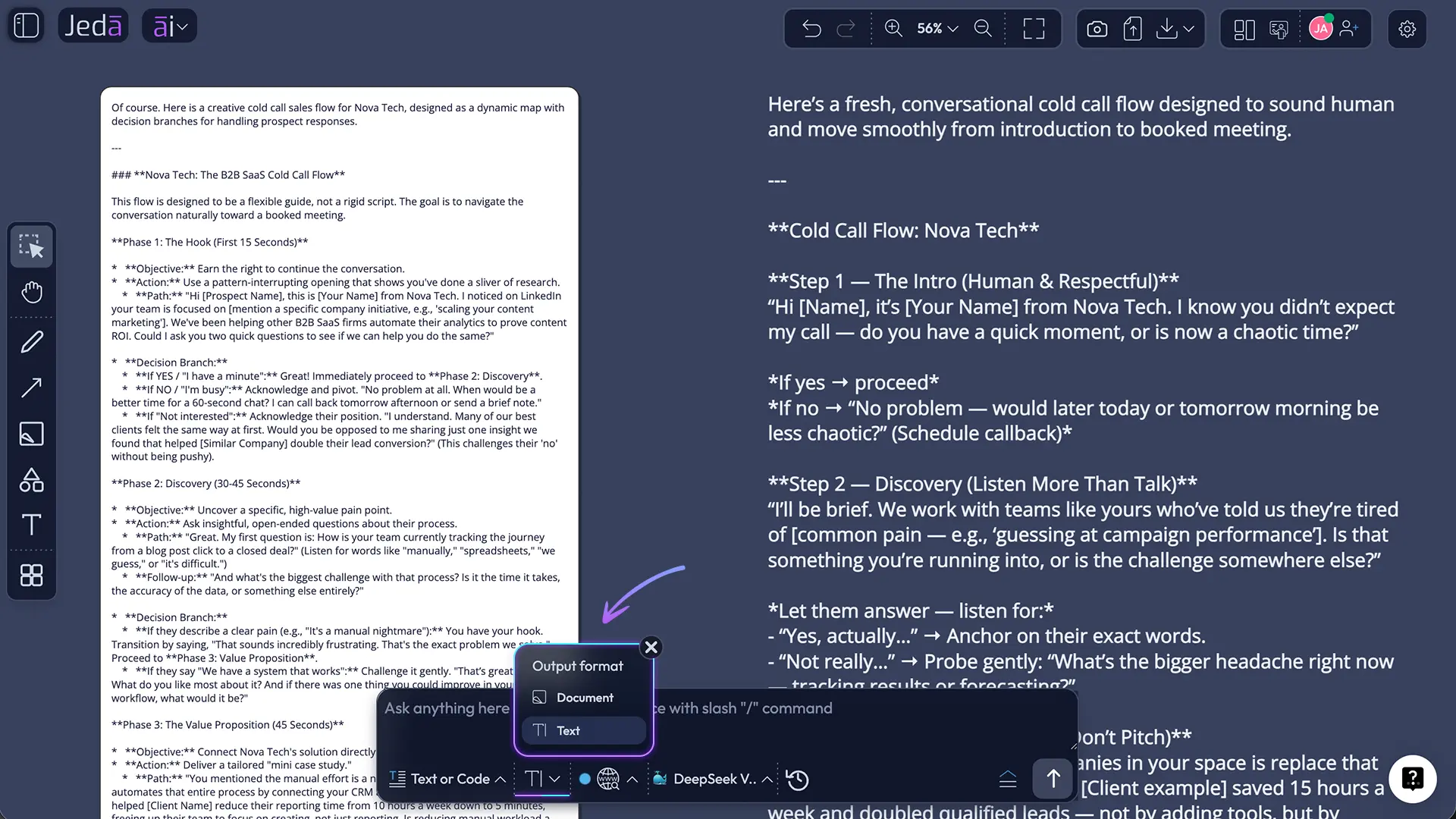
The generated result is only the first pass. In Jeda.ai, manual editing is part of the workflow. You can revise the script directly, adjust text formatting, make sections easier to scan, and prepare the version your team will use.
Useful edits include:
- bolding the opener, discovery questions, and close;
- labeling objections clearly;
- trimming sentences that sound too formal;
- adding placeholders for prospect name, company, trigger, and proof point;
- creating separate versions for founder-led sales, SDR outreach, and consultant selling;
- rewriting any line that feels like a robot wearing a blazer.
Choose Document when you want the script to read like a structured call sheet. Choose Text when you want a cleaner plain-text output. Remember: this is preview formatting. It does not create a native document file. For sharing outside the workspace, use the export options available in Jeda.ai or copy the text into your team’s sales tools.
Common Mistakes to Avoid
The first mistake is asking AI for a “great cold call script” without giving it a real buyer. That output will be vanilla. Vanilla is fine for ice cream. Terrible for outbound.
The second mistake is overloading the call with features. A cold call is not a product tour. It is a tiny door-opening conversation.
The third mistake is reading the script word for word. Buyers can hear it. They may not know exactly what is wrong, but they feel the stiffness. Use the script as a map, not a teleprompter.
The fourth mistake is skipping objection handling. “Send me info” is not a surprise. “Not interested” is not a plot twist. Prepare for both.
The fifth mistake is forgetting the close. Every script should define the next step clearly: book a meeting, ask one qualifying question, send a targeted note, or earn permission to follow up.
Frequently Asked Questions
- What is a cold call sales script with AI?
- A cold call sales script with AI is a structured call plan generated from your offer, target audience, goal, and context. It usually includes an opener, reason for calling, value hook, discovery questions, objection responses, and next-step close. The AI drafts the script; the sales team edits it.
- Can AI write a good cold call script?
- Yes, AI can write a useful cold call script when you give it specific context. It needs the product, audience, goal, buyer pain, proof points, and tone. Without those details, the script often becomes generic. Treat AI as a strong first-draft partner, not the final sales coach.
- What fields are required in Jeda.ai’s Cold Call Sales Script recipe?
- The required fields are For What and For Whom. “For What” defines the offer, campaign, product, or call objective. “For Whom” defines the buyer or audience. Optional fields include Goals / Purpose, More Context, Word Count, and Output Language.
- Does the recipe have a subcategory in the Writer tab?
- No. The Cold Call Sales Script is a Writer recipe without a sub-recipe or category in the AI Writer tab. You can navigate to it from the Writer recipe area or use the AI Recipes search bar to find it directly.
- Should Web Search be On, Auto, or Off?
- Use Web Search On when current market, competitor, or buyer context matters. Use Auto when the AI can decide whether fresh information is useful. Use Off when you are creating a generic training script or using only your own supplied context.
- Can I use multiple AI models for one cold call script?
- Yes. In Jeda.ai, you can select one, two, or three reasoning models. When multiple models are selected, you can use the Aggregate feature with an additional model to consolidate the strongest output. This is useful for comparing openers, objection responses, and call structures.
- Does the Document output format create a document file?
- No. Document and Text are preview output formats for the generated Writer result. Document gives the script a more structured reading format, while Text is cleaner and simpler. It does not automatically generate a native document file.
- Can I edit the script after Jeda.ai generates it?
- Yes. Manual editing is allowed after generation. You can rewrite lines, shorten the opener, format headings, bold important sections, adjust tone, and make the script sound like your team. This editing step is strongly recommended before reps use the script on real calls.
- What should a cold call script include?
- A practical cold call script should include a respectful opener, buyer-specific context, one clear problem hook, a short credibility line, discovery questions, objection responses, a next-step close, voicemail fallback, and follow-up note. Keep it flexible so reps can respond naturally.
- Should sales reps read the script word for word?
- No. Reps should use the script as a guide, not a rigid recital. The best scripts help reps stay focused while leaving room for the buyer’s answers. If the rep sounds like they are reading, the script needs editing or more practice.
Final Takeaway
Cold Call Sales Script with AI is not about replacing the salesperson. It is about removing the blank-page panic before the first dial. A good AI-generated script gives your team a sharper starting point: one buyer, one problem, one reason to talk, and one next step.
Jeda.ai makes that easier because the recipe sits inside a broader AI Workspace. You can generate the script, compare reasoning models, use Web Search when current context matters, manually edit the final result, and keep everything near your sales planning assets on the AI Whiteboard.
Start with the recipe. Feed it real context. Edit without mercy.
Jeda.ai already supports 150,000+ users building visual strategy, planning, and content workflows. For sales teams, this recipe is a practical place to start.
That last part is where the money usually hides.
Source and Citation Notes
- [1]
Salesforce (2026) . “Salesforce Announces State of Sales Report for 2026” Salesforce Newsroom.
View Source ↗ - [2]
Gong . “Cold Calling” Gong.
View Source ↗ - [3]
Gong Labs . “The Best and Worst Cold Call Openers, Backed by Data from 300M Calls” Gong Blog.
View Source ↗ - [4]
HubSpot . “How & Why to Use Sales Scripts [+ 14 Examples and Templates]” HubSpot Blog.
View Source ↗ - [5]
HubSpot . “The Top 20 B2B Cold Calling Tips” HubSpot Blog.
View Source ↗ - [6]
Kiran Tomlinson, Sonia Jaffe, Will Wang, Scott Counts, Siddharth Suri (2025) . “Working with AI: Measuring the Applicability of Generative AI to Occupations” arXiv.
View Source ↗ - [7]
Deepanjan Bhol (2025) . “Sales Research Agent and Sales Research Bench” arXiv.
View Source ↗ - [8]
Pipedrive . “25 Cold Calling Script Templates and Cold Calling Tips” Pipedrive Blog.
View Source ↗ - [9]
CloudTalk . “Free AI Sales Script Generator for Cold Calling” CloudTalk.
View Source ↗
Start Every Cold Call With Sharper Context
Join 150,000+ users using Jeda.ai to build visual strategy, planning, and content workflows. Generate cold call scripts from real buyer context, compare reasoning models, use Web Search when needed, edit without mercy, and keep your sales planning assets connected on an AI Whiteboard.
Try Jeda.ai Free