Cold email is not dead. Lazy cold email is.
A strong cold email sales script with AI should not sound like a machine guessed your buyer’s pain from three generic keywords. It should connect a clear offer, a specific audience, a business problem, and a realistic next step. That is where Jeda.ai’s Writer recipe helps: it gives sales teams, consultants, founders, and marketers a guided way to generate outreach copy inside an AI Workspace, then refine it manually before sending.
The important detail: this is a Writer recipe, not a matrix, diagram, or visual framework recipe. In Jeda.ai’s AI Recipe menu, the Cold Email Sales Script recipe sits in the Writer tab. There is no sub-recipe or subcategory to choose after that. You either search for it directly or navigate to Writer and select the recipe.
That sounds small. It is not. The fewer navigation decisions users make, the faster they can focus on the real work: defining what they sell, who should care, and why the message deserves a reply.
What is a Cold Email Sales Script with AI?
A cold email sales script with AI is a guided draft for outbound sales communication generated from structured inputs such as the offer, target audience, goal, context, preferred length, and language. Instead of starting from a blank page, the user gives the AI the sales situation and receives a first version of the outreach message.
The best version of this workflow does not ask AI to “write a cold email” and hope for magic. It asks for the right commercial context first.
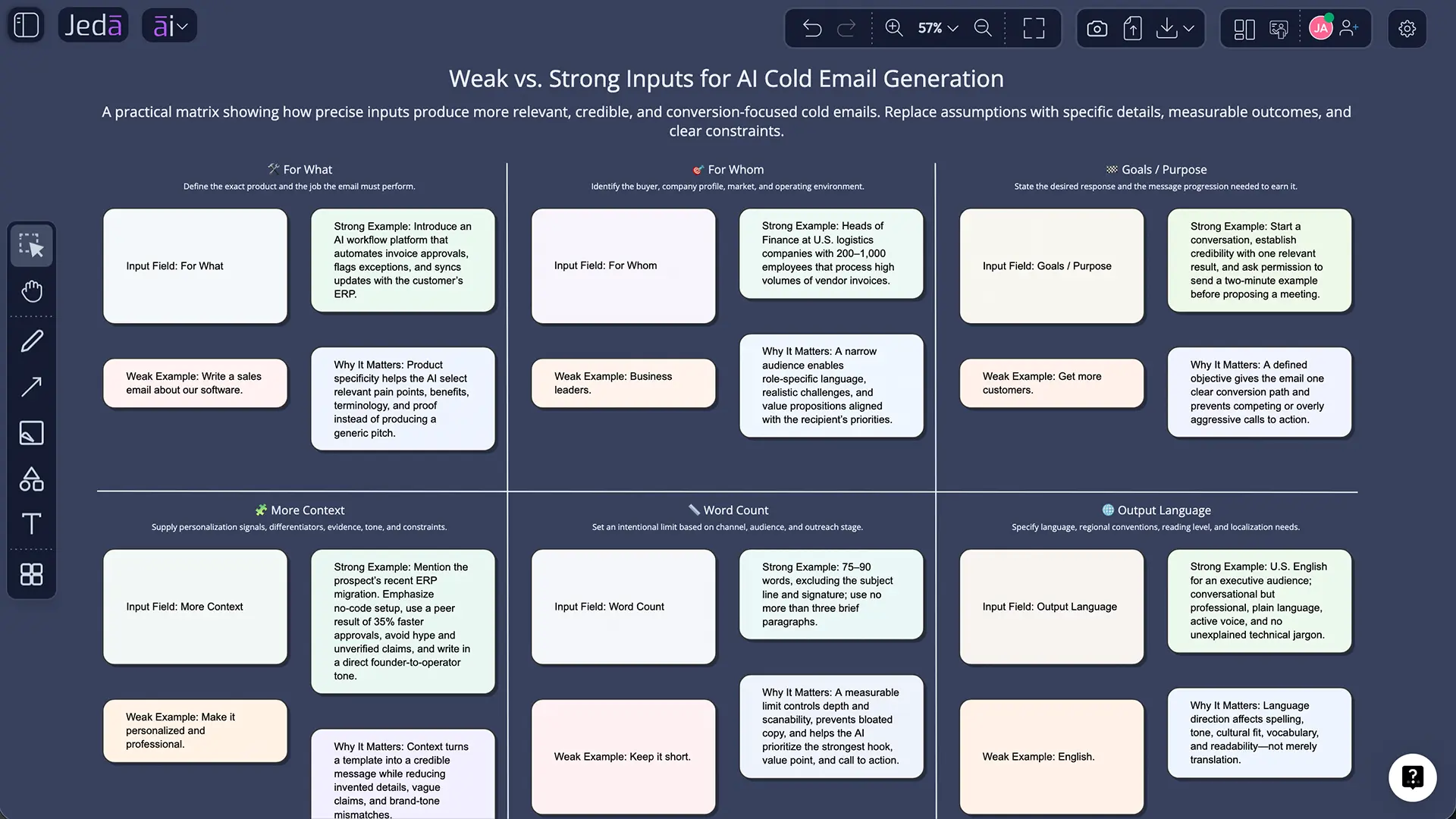
For example, these two prompts are not equal:
| Weak input | Strong input |
|---|---|
| Write a cold email for my software. | Generate a cold email sales script for booking product demos for a visual AI workspace, targeting strategy consultants at boutique advisory firms who need faster client-ready deliverables. |
The second input gives the AI a target, a business context, and a believable reason for outreach. That is the difference between a vague pitch and a usable first draft.
This matters because sales teams are already under pressure to recover time from repetitive work. Salesforce’s 2026 State of Sales reporting says the average seller spends only 40% of their time selling, with the rest pulled into manual data entry, research, and other non-selling work. McKinsey also notes that generative AI can support B2B sales by generating research materials, scripts, and straightforward outreach, while helping sellers focus on higher-value customer interaction.
So the business case is not “AI writes emails.” That is table stakes now. The useful case is “AI turns a sales situation into a draft that a human can quickly judge, edit, and send.”
Why use Jeda.ai for AI cold email scripts?
Jeda.ai is built as an AI Workspace and AI Whiteboard, not a one-off text box. That matters when outreach is part of a broader revenue workflow: positioning, ICP definition, campaign planning, objection handling, and follow-up logic often need to sit together.
For a cold email script, the Writer recipe gives the user a structured form instead of an empty prompt. The form helps the user describe the sales use case before generation. Then the output can be previewed as Document or Text and edited manually with formatting on the canvas.
For teams, this is useful in three practical ways:
- It reduces blank-page time. The user starts with mandatory sales inputs instead of inventing a prompt from scratch.
- It improves message consistency. Sales reps can use the same recipe fields while still adapting the message to different audiences.
- It keeps the draft editable. After generation, the user can edit the wording, adjust formatting, and polish the copy before using it in an outreach tool.
Jeda.ai also supports one, two, or three reasoning models at a time. If multiple models are selected, the Aggregate feature can be enabled with an additional AI model that reviews the outputs and produces a consolidated result. For cold email, that is valuable because one model may be better at concise copy, another at strategic framing, and another at risk reduction. The aggregation step helps pick the strongest version rather than forcing the user to compare drafts manually.
When should you use the Cold Email Sales Script recipe?
Use the recipe when you need a first outbound draft for a clearly defined audience. It works best when the message has a specific business objective, such as starting a conversation, booking a demo, inviting a buyer to review a resource, or introducing a relevant offer.
Good use cases include:
- A founder writing first-touch outreach to potential pilot customers.
- A sales rep generating a tailored demo invitation for a vertical segment.
- A consultant introducing a workshop, audit, or advisory service.
- A marketer testing multiple cold email angles for a campaign.
- A business development team creating a reusable base script before manual personalization.
Do not use the recipe as an excuse to blast generic emails. That is how domains get damaged and prospects get annoyed. Even AI-generated sales writing needs targeting, evidence, consent-aware list building, and compliance review.
Google’s sender guidelines are especially relevant for teams scaling outbound. For messages sent to personal Gmail accounts, Google points to requirements around authentication, spam-rate thresholds, DMARC, and one-click unsubscribe for marketing or promotional messages. In the United States, the FTC’s CAN-SPAM guidance requires commercial emails to avoid deceptive headers and subject lines, include a valid postal address, and provide a clear opt-out method.
In plain English: if the message is commercial, treat compliance as part of the script. The footer is not “legal decoration.” It is part of deliverability and trust.
What fields are used in Jeda.ai’s Cold Email Sales Script recipe?
The recipe is intentionally lean. It asks for the inputs that materially affect the quality of the script, without turning the workflow into a form-filling marathon. Tiny mercy. Big productivity win.
Mandatory fields
| Field | What to enter | Example |
|---|---|---|
| For What | The offer, campaign, product, service, or sales objective | “Book discovery calls for a B2B SaaS workflow automation platform” |
| For Whom | The target buyer, role, segment, or audience | “VPs of Operations at mid-market logistics companies” |
These two fields are the core. If they are vague, the output will be vague. A strong “For What” describes the business outcome. A strong “For Whom” describes the buyer precisely enough that the email can sound relevant.
Optional fields
| Field | How it improves the draft | Example |
|---|---|---|
| Goals/Purpose | Clarifies the intended action | “Start a conversation, not ask for a meeting immediately” |
| More Context | Adds pain points, proof, constraints, differentiators, or campaign notes | “Prospects are struggling with manual lead routing and slow response times” |
| Word Count | Controls length | “90 words” or “under 120 words” |
| Output Language | Sets the language; English is default | “English” |
Use “More Context” carefully. Add details that make the message sharper, not longer. Prospect pain, trigger event, proof point, offer constraint, and preferred CTA are useful. A three-paragraph company biography is not.
How to create a Cold Email Sales Script with AI in Jeda.ai
There are two practical ways to access the recipe: search directly or navigate through the Writer tab. Both routes lead to the same guided form.
Method 1: Search for the recipe directly
- Open a Jeda.ai workspace.
- Click the ai∨ AI Menu in the top-left corner.
- Use the search bar in the AI Recipes panel.
- Search for Cold Email Sales Script.
- Select the recipe.
- Fill in the mandatory fields: For What and For Whom.
- Add optional context such as Goals/Purpose, More Context, Word Count, and Output Language.
- Choose your reasoning model setup: one model, two models, or three models.
- If using multiple models, enable Aggregate and select the additional model that should consolidate the best result.
- Choose the output format: Document or Text. This changes the preview style; it does not generate a native document file.
- Set Web Search to Auto, On, or Off.
- Use Clear Chat Context if the workspace contains unrelated prior discussion.
- Generate the output.
- Review, manually edit, and apply available text formatting before using the script externally.
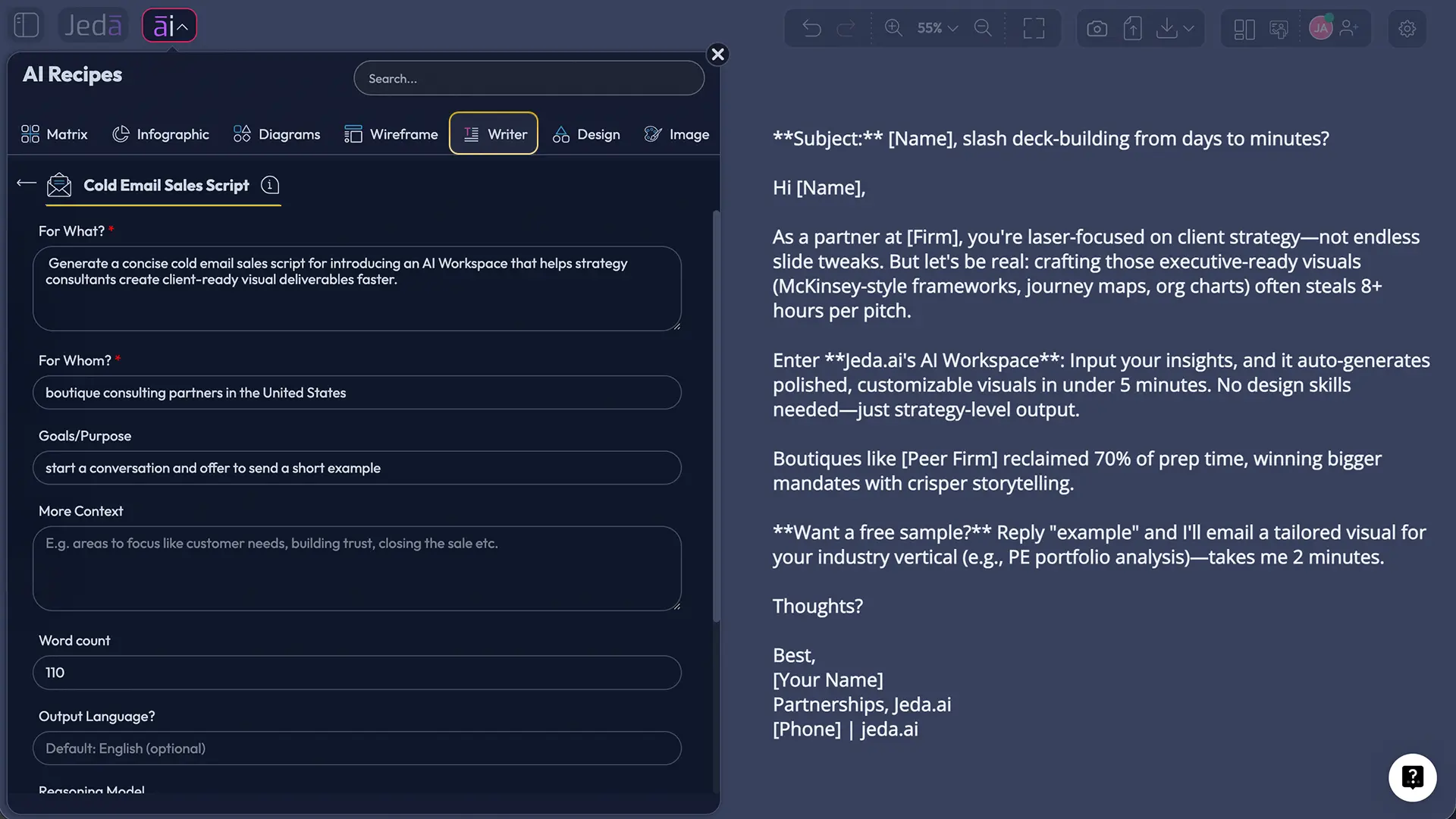
Method 2: Navigate through the Writer tab
- Open a Jeda.ai workspace.
- Click ai∨ in the top-left corner.
- Select the Writer tab.
- Find and open the Cold Email Sales Script recipe. There is no extra sub-recipe or category to choose.
- Complete the same fields and generation settings.
- Generate, review, edit, and format the result.
This recipe is strongest when the user treats the generated copy as a draft, not a finished campaign. The best cold emails still need human judgment: remove exaggeration, verify personalization, check claims, and make the CTA match the relationship stage.
What should you enter in “For What” and “For Whom”?
“For What” should describe the business result the email is trying to create. “For Whom” should identify the buyer tightly enough that the message can feel relevant.
Here are practical input patterns:
| Scenario | For What | For Whom |
|---|---|---|
| SaaS demo outreach | “Generate a first-touch email to invite prospects to a 15-minute product demo for an AI workspace that helps teams create visual strategy boards faster” | “Strategy consultants and boutique advisory partners in the United States” |
| Consulting service outreach | “Write a cold email introducing a 2-week workflow audit for teams struggling with scattered planning tools” | “COOs and Heads of Operations at 100–500 employee SaaS companies” |
| Agency lead generation | “Create a concise cold email offering a paid landing page review for improving conversion clarity” | “B2B software founders running paid acquisition campaigns” |
| Education partnership | “Draft an outreach email proposing a visual AI workshop for business strategy coursework” | “MBA program directors and executive education coordinators” |
The pattern is simple: describe the offer in outcome language and the audience in buyer language.
What makes a good AI-generated cold email script?
A good AI-generated cold email script is short, specific, and easy to answer. It should not try to close the deal in the first message. It should earn a reply.
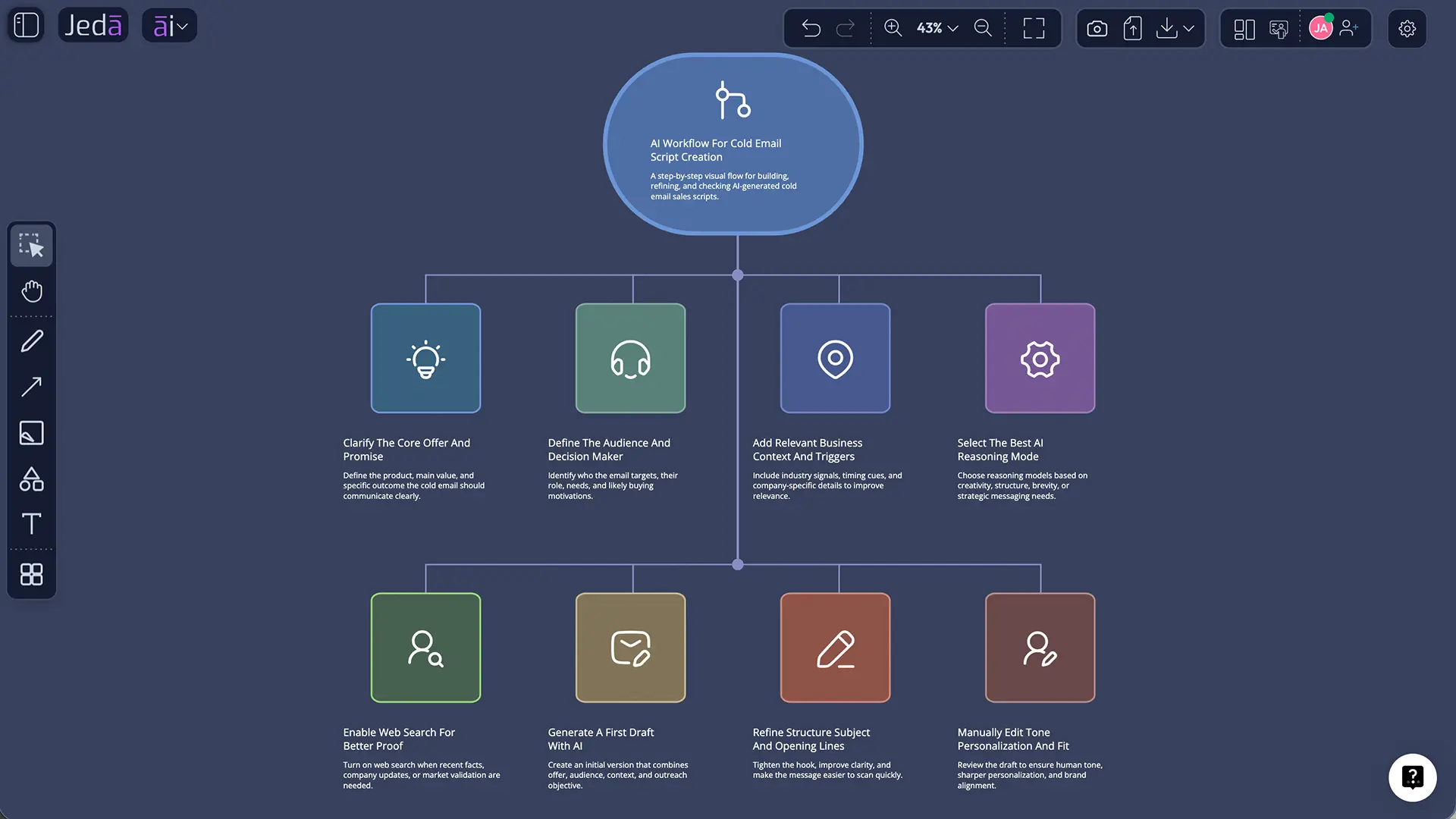
Use this structure as a review checklist after generation:
- Subject line: Clear, short, and not deceptive.
- Relevance signal: A reason this buyer is receiving the message.
- Problem hypothesis: One business pain the recipient may recognize.
- Outcome statement: What changes if the problem is solved.
- Credibility cue: A concise proof point, use case, or category fit.
- Soft CTA: A low-friction question, not a forced calendar grab.
- Compliance footer: Required sender and opt-out information where applicable.
A weak AI-generated cold email tries to sound polished. A strong one sounds like it was written by someone who understands the buyer’s situation.
Example structure
Subject: Quick idea for [business outcome]
Hi [First Name],
Noticed [relevant signal]. Teams in [segment] often run into [specific problem], especially when [trigger or condition].
Jeda.ai helps [audience] turn [input/workflow] into [specific output] inside an AI Workspace, so the team can review, edit, and align faster.
Worth sending over a quick example for [use case]?
Best, [Name]
This is not meant to be pasted unchanged. Use it as a shape. The actual script should reflect your offer, buyer, proof, and compliance needs.
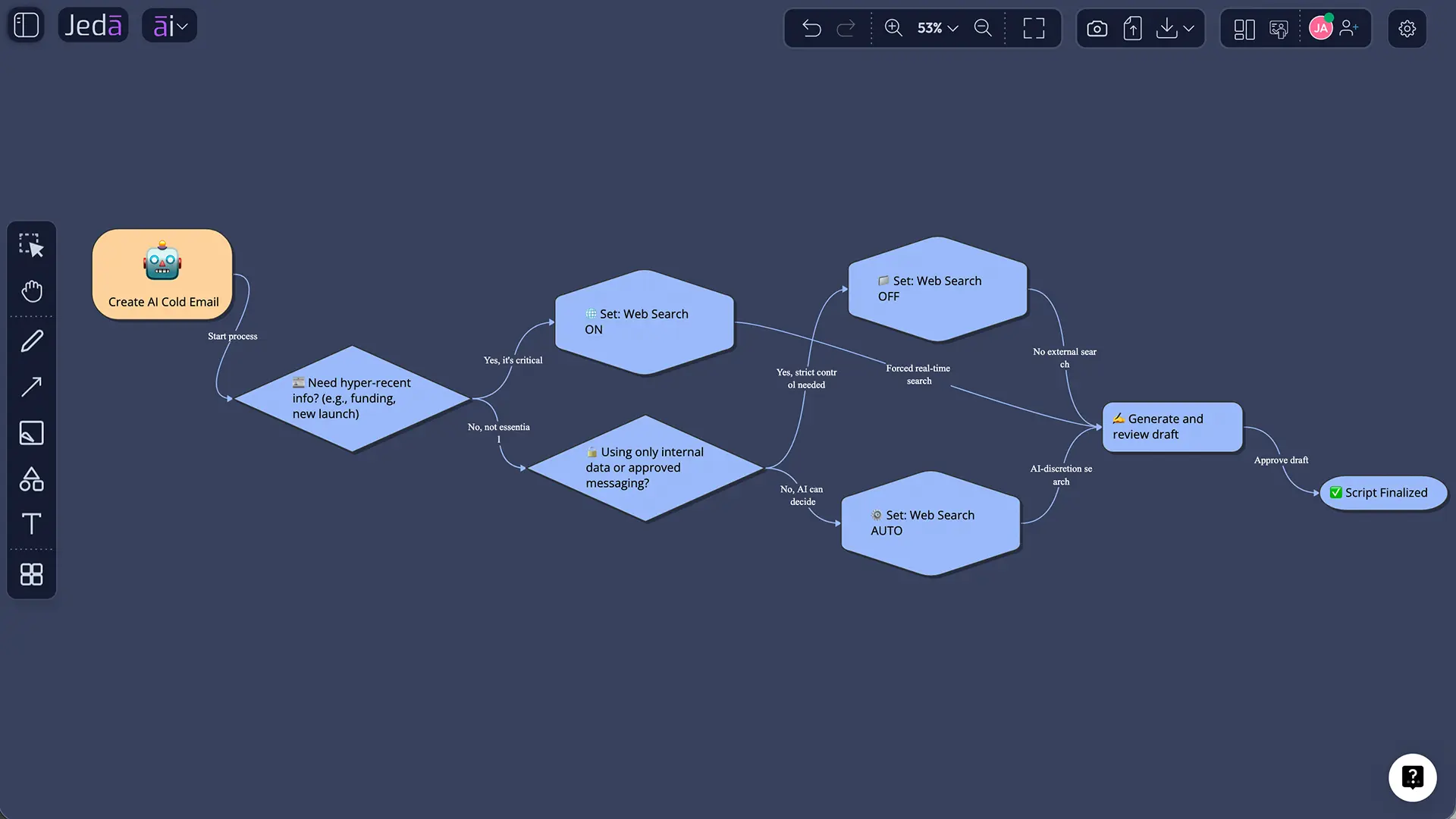
How should Web Search be used for cold email scripts?
Jeda.ai’s Web Search setting can be set to Auto, On, or Off. For cold email scripts, the right setting depends on whether the message needs current context.
| Web Search setting | Best use | Example |
|---|---|---|
| Auto | Default when you are unsure whether current information is needed | General sales script with light market context |
| On | Current market, company, regulation, or industry context matters | Email referencing recent industry change or compliance context |
| Off | You already have all the needed context and want no outside grounding | Internal campaign draft using approved positioning only |
Use Web Search carefully. Current context can improve relevance, but it should not create unverifiable claims about a specific prospect. If the script says a company “just expanded” or “recently raised funding,” verify before sending. AI can help draft. It should not become your excuse for sloppy prospect research. Little robot, big consequences.
How do reasoning models and aggregation improve the output?
Cold email writing is not just copywriting. It involves positioning, sales psychology, risk control, and tone. That is why model choice matters.
In Jeda.ai, the recipe can use one, two, or three reasoning models at a time. When more than one model is selected, the Aggregate feature lets the user choose an additional AI model to consolidate the strongest result.
A practical setup might look like this:
| Model setup | When to use it |
|---|---|
| One model | Fast draft for a simple sales use case |
| Two models | Compare two writing styles or messaging angles |
| Three models | Generate broader variations for important campaigns |
| Multi-model + Aggregate | Select and consolidate the strongest version into one cleaner script |
This is especially useful for teams that want a professional tone without losing clarity. One model may over-write. Another may under-explain. Aggregation helps produce a middle path: concise, relevant, and easier to edit.
How should teams edit the generated script?
After generation, manual editing is allowed and expected. Treat the first output as a working draft.
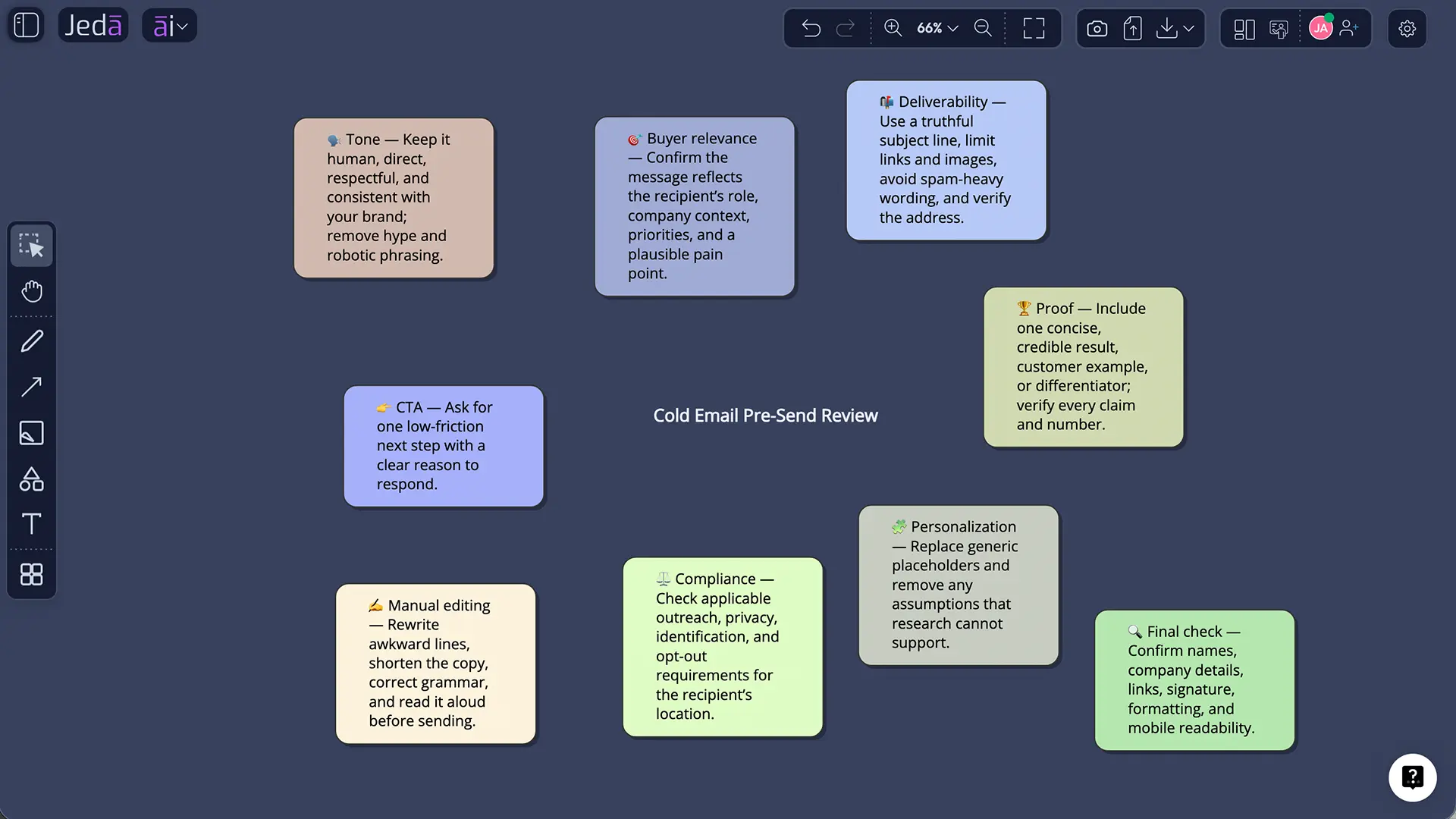
Before sending, review the script against five questions:
- Is the buyer clearly defined? If the script could apply to anyone, it is too broad.
- Is the offer specific? Avoid vague claims like “improve efficiency.” Say what improves.
- Is the CTA too heavy? A first-touch email should often ask for interest, not a meeting.
- Are all claims true? Remove any unverified metrics, customer names, or prospect-specific facts.
- Is the message compliant? Add required opt-out and sender information for commercial outreach.
Formatting should support scanning. Keep paragraphs short. Use one idea per sentence where possible. Avoid over-designed formatting inside the email body; cold email needs clarity more than decoration.
Common mistakes to avoid
Mistake 1: Asking AI for a finished campaign with no sales context
The recipe needs clear fields. “Write a cold email for my company” will usually produce generic copy. Use the mandatory fields properly.
Mistake 2: Over-personalizing with fake relevance
AI can produce convincing but unsupported personalization. Remove anything you cannot verify. False familiarity is cringe in a suit.
Mistake 3: Making the first CTA too demanding
A cold prospect may not owe you 30 minutes. A better first CTA can be a simple question: “Worth sending a short example?” or “Is this relevant to your team right now?”
Mistake 4: Ignoring deliverability and compliance
Cold email is not just writing. Sender authentication, low spam rates, unsubscribe handling, and truthful messaging all affect whether the email gets delivered and whether the brand stays credible.
Mistake 5: Treating Document and Text output as file generation
In this recipe, Document and Text are output preview formats. They help control how the generated content appears in Jeda.ai. They do not create native document files.
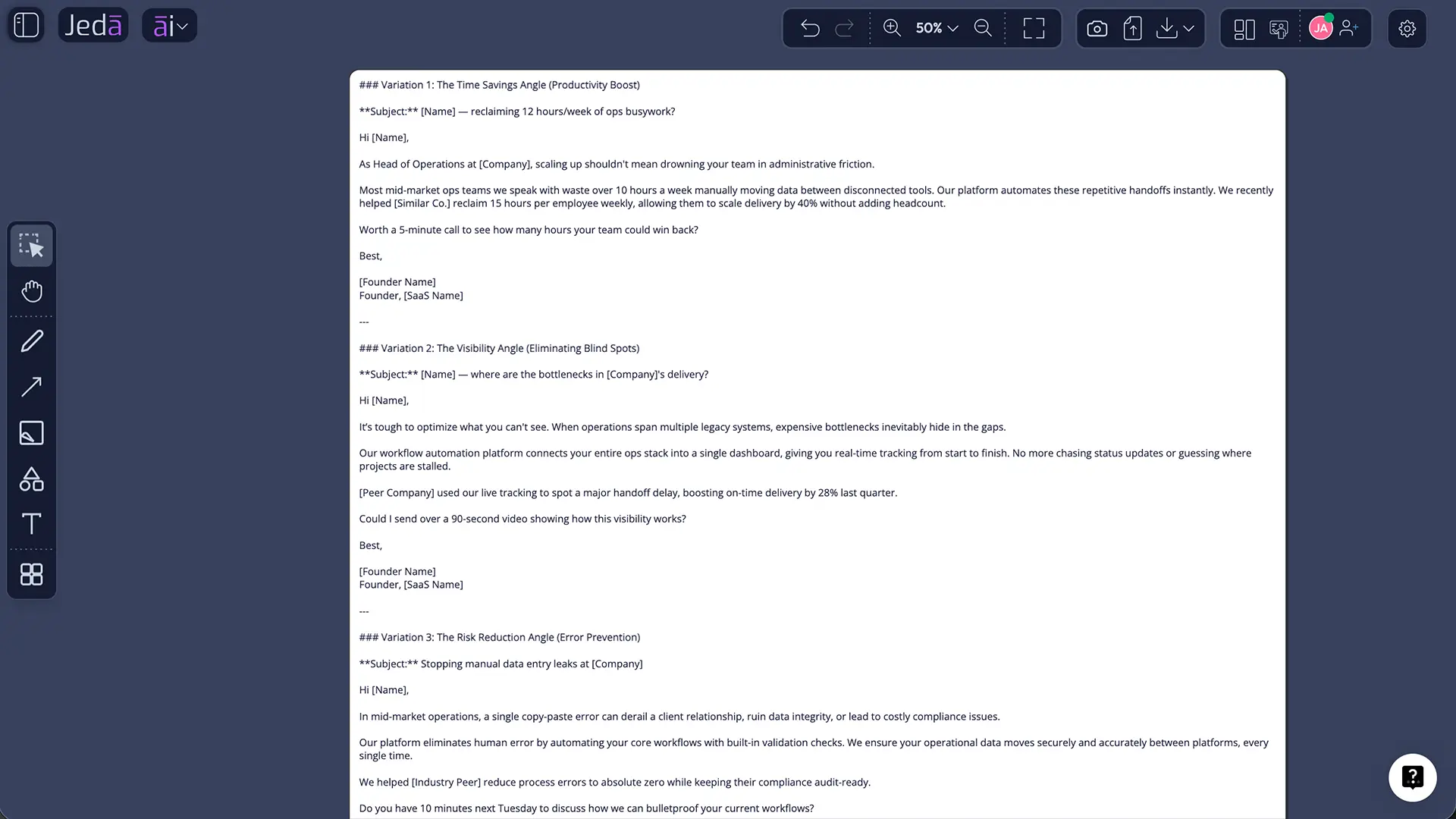
Cold Email Sales Script with AI: practical example inputs
Here is a clean input set for a professional B2B outreach draft:
| Recipe field | Example input |
|---|---|
| For What | “Generate a concise cold email to introduce Jeda.ai’s AI Writer recipe for creating sales outreach drafts faster inside an AI Workspace.” |
| For Whom | “Sales managers, startup founders, and business consultants who need prospect-ready outreach drafts without starting from blank pages.” |
| Goals/Purpose | “Start a conversation and invite the recipient to review a short example, not book a meeting immediately.” |
| More Context | “Mention that users can choose one, two, or three reasoning models, use aggregation, control Web Search, preview as Document or Text, and manually edit the final draft.” |
| Word Count | “90–120 words” |
| Output Language | “English” |
This level of detail gives the recipe enough material to generate a script that is specific without becoming bloated.
Frequently Asked Questions
- What is the Cold Email Sales Script recipe in Jeda.ai?
- It is a Writer recipe that generates cold email outreach copy from guided fields such as For What, For Whom, Goals/Purpose, More Context, Word Count, and Output Language. The output can be previewed as Document or Text and edited manually before use.
- Is there a sub-recipe or category for Cold Email Sales Script?
- No. The recipe sits in the Writer tab of Jeda.ai’s AI Recipe menu. Users can either search for Cold Email Sales Script directly or navigate to the Writer tab and select the recipe.
- Which fields are mandatory?
- The mandatory fields are For What and For Whom. For What defines the offer, objective, or sales situation. For Whom defines the target buyer or audience. These two fields have the biggest impact on the relevance of the generated email.
- Which fields are optional?
- Optional fields include Goals/Purpose, More Context, Word Count, and Output Language. English is the default language. The optional fields help control the message objective, business context, length, and localization.
- Can I use multiple AI models for the recipe?
- Yes. The recipe can use one, two, or three reasoning models at a time. If multiple models are selected, the Aggregate feature can use one additional AI model to choose and consolidate the best result.
- Does the Document output format generate a document file?
- No. Document and Text are preview formats for how the generated content appears in Jeda.ai. The option does not create a native document file from the recipe output.
- Should Web Search be Auto, On, or Off?
- Use Auto for most cases, On when current market or industry context matters, and Off when you want the script based only on your supplied internal context. Verify any prospect-specific claims before sending.
- Can I manually edit the generated cold email?
- Yes. Manual editing is allowed after generation. Users can refine the copy, adjust wording, and apply available text formatting before using the script outside Jeda.ai.
- Is AI cold email compliant by default?
- No. AI can draft the message, but the sender is responsible for compliance. Review the script for truthful subject lines, accurate sender identity, required opt-out handling, sender address requirements, and any jurisdiction-specific rules before sending.
- Who should use this recipe?
- Sales representatives, founders, consultants, marketers, and business development teams can use it when they need a structured first draft for outbound outreach. It is most useful when the target buyer and offer are already clear.
Final takeaway
Cold Email Sales Script with AI is useful when it turns a defined sales situation into a draft your team can quickly improve. It is not a shortcut around strategy, targeting, or compliance.
Jeda.ai’s advantage is the guided workflow: define the offer, define the buyer, choose the reasoning setup, control Web Search, preview the result, and edit the script manually inside the AI Workspace. For sales teams trying to move faster without sounding generic, that is the workflow worth building around.
Research Notes and Source Citations
- [1]
Salesforce (2026) . “Salesforce Announces State of Sales Report for 2026” Salesforce Newsroom.
View Source ↗ - [2]
Google Gmail Help . “Email Sender Guidelines FAQ” Google Help.
View Source ↗ - [3]
Federal Trade Commission . “CAN-SPAM Act: A Compliance Guide for Business” Federal Trade Commission.
View Source ↗
Turn Sales Context Into Better Cold Email Drafts
Use Jeda.ai’s AI Workspace to define the offer, clarify the buyer, choose the reasoning setup, control Web Search, preview the result, and manually refine your cold email script before sending. Move faster without sounding generic.
Try Jeda.ai Free