A Job Post with AI can turn a blank page into a structured hiring draft in minutes. But speed is the least interesting benefit. The real opportunity is to make the role clearer: what the person will own, which skills actually matter, and why a qualified candidate should care. Jeda.ai brings that work into an editable AI Workspace where hiring teams can generate, compare, refine, and format the post before it goes anywhere near a job board.
That last step matters. AI can draft the language, but it cannot own the hiring decision. A vague brief produces polished vagueness. A biased requirement can return wearing cleaner grammar. The better model is human-led, AI-assisted writing — faster, yes, but still accountable.
What Is a Job Post with AI?
A Job Post with AI is a public hiring announcement drafted with generative AI from structured role information. You provide the job title and, when available, the responsibilities, requirements, tone, target length, and output language. The AI converts those inputs into a candidate-facing post that can be reviewed and edited before publishing.
A job post is not quite the same thing as an internal job description. The internal document may define reporting lines, classification, duties, and operational expectations. The job post has a different job: attract relevant candidates, explain the opportunity, set honest expectations, and tell people how to apply.
That difference is easy to miss. Many hiring teams paste an internal specification onto a job board and wonder why the result reads like procurement paperwork. A strong post translates the role without diluting it. It names the outcomes, separates essential requirements from preferences, and gives candidates enough context to decide whether applying is worth their time.
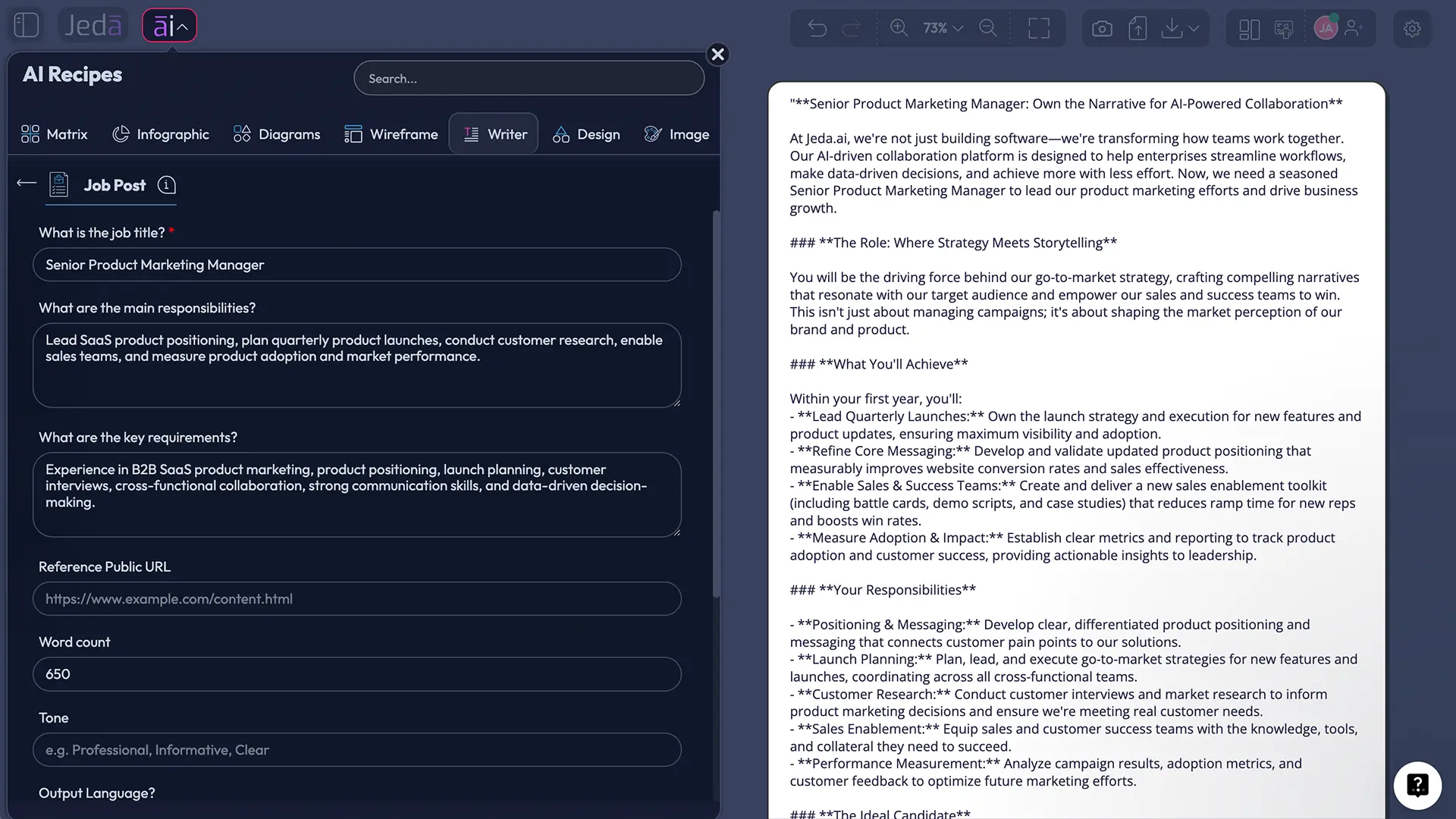
Jeda.ai supports this through the Job Post recipe in the Writer area. There is no sub-recipe or nested category to hunt through. You can navigate to the recipe or search for it directly, complete the guided fields, choose one to three reasoning models, and generate the result as a Document or Text preview on the AI Whiteboard.
Why Use AI to Write a Job Post?
The obvious answer is time. The better answer is structure.
Hiring managers often know the role but struggle to turn scattered notes into a coherent post. Recruiters may inherit a title, a recycled list of duties, and a deadline. AI can organize that material into a usable first draft, exposing gaps while the team can still fix them.
There is also a broader reason to rethink job-posting language. The World Economic Forum reports that employers expect a substantial share of key skills to change by 2030. That makes static, pedigree-heavy templates age badly. A skills-first post — one centered on what the person must do and learn — is usually more useful than a wall of inherited qualifications.
LinkedIn has reported that job posts emphasizing responsibilities rather than requirements received more applications per view in its analysis. The principle is simple: candidates need to understand the work before they can judge their fit.
- Draft faster
Turn a job title and a few role details into an organized first draft without starting from an empty page.
- Clarify the role
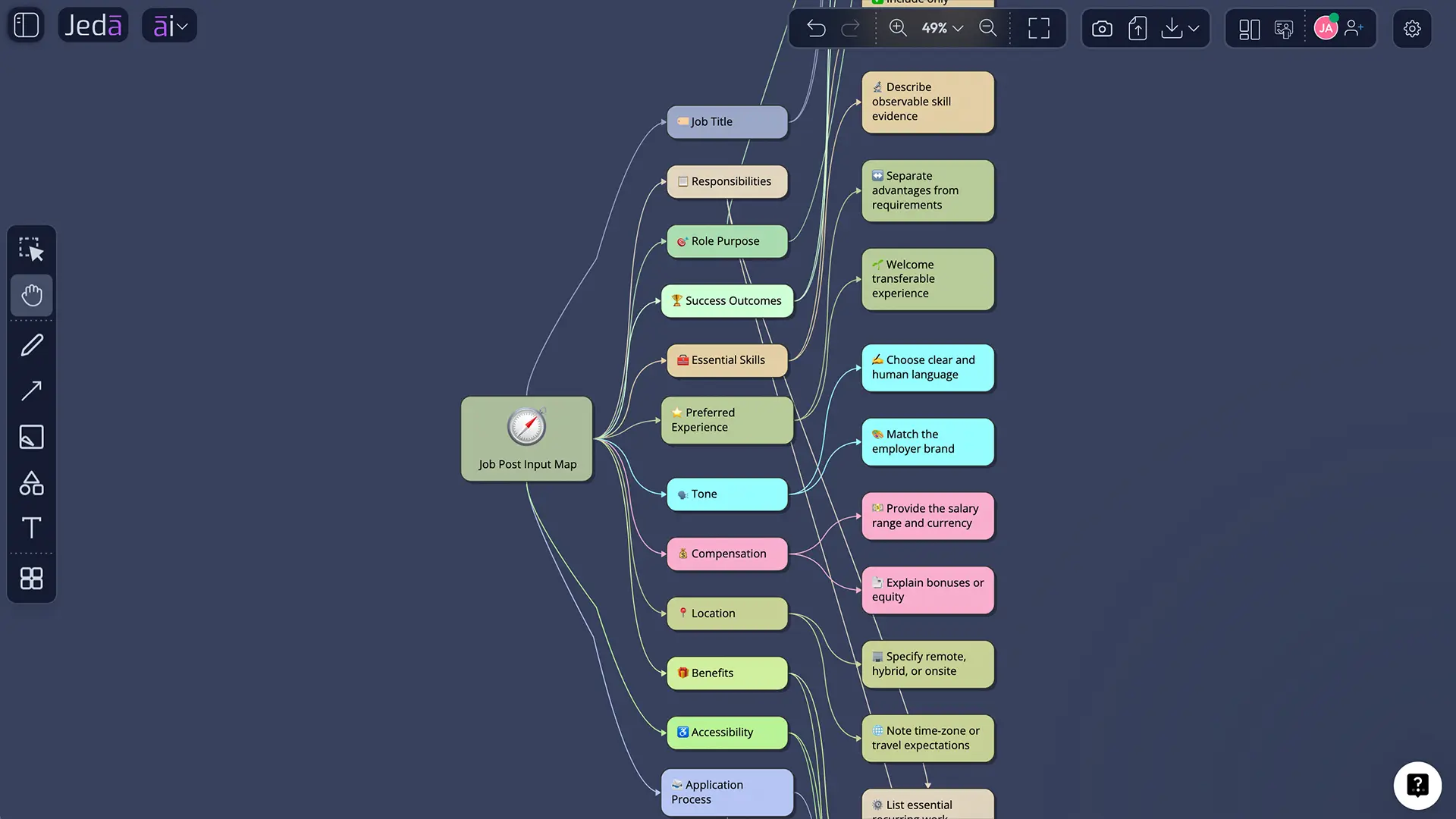
Separate responsibilities, success outcomes, essential requirements, and preferred experience so the post does not blur them together.
- Review collaboratively
Keep the draft on an editable AI Whiteboard where recruiters, hiring managers, and team leads can refine wording and formatting.
But here is the catch: AI does not automatically make a job post inclusive, accurate, or lawful. LinkedIn's own guidance tells job posters to review AI-generated descriptions and take responsibility for the final content. Greenhouse makes a similar point: its suggestions are designed with fairness in mind but are not automatically checked for bias.
So use AI as a drafting partner, not a compliance department wearing a chatbot costume.
What Information Does the Jeda.ai Job Post Recipe Use?
The recipe is deliberately lightweight. It asks for one mandatory input and lets you add detail where the role demands it.
Mandatory field
What is the job title? This anchors the draft. Use a title that candidates are likely to recognize rather than an internal nickname. “Senior Backend Engineer” is clearer than “Platform Ninja III.” Cute titles are fun until nobody searches for them.
Optional fields
What are the main responsibilities? Describe the work the person will own. Strong inputs use outcomes and concrete activities: “Own quarterly product launches,” “Build lifecycle campaigns,” or “Reduce support resolution time.”
What are the key requirements? Include only capabilities that are necessary to perform the role. Separate non-negotiable skills from preferences. Degrees, certifications, and years of experience should not appear by reflex; they should earn their place.
Tone. Choose how the post should sound. A technical infrastructure role may need precise, direct language. A community role may benefit from warmth. Tone should reflect the company without turning the post into brand theater.
Word Count. Set a useful length for the role and channel. More words do not make the opportunity clearer. They often just give jargon extra seating.
Output Language. English is the default, and you can select another supported language when needed. Review localized drafts with someone who understands the language, labor context, and cultural nuance.
How to Create a Job Post with AI in Jeda.ai
You can reach the recipe in two ways. Both open the same guided Job Post form, so choose whichever is faster for you.
Method 1: Navigate to the Job Post recipe
Use this method when you want to browse the Writer recipes and understand where the tool lives.
- Open the AI Menu
From the Jeda.ai workspace, click the ai menu in the top-left corner to open AI Recipes.
- Choose Writer
Select the Writer tab. The Job Post recipe appears as a standalone Writer recipe, without a sub-recipe or nested category.
- Open Job Post
Select the Job Post recipe to launch its guided input form.
- Complete the role fields
Enter the mandatory job title. Add responsibilities, requirements, tone, word count, and output language when those details are available.
- Configure and generate
Choose the reasoning model setup, output format, Web Search mode, and Clear Chat Context option, then generate the draft.
Method 2: Search for the Job Post recipe
Use search when you already know the recipe name and do not need to browse.
- Open AI Recipes
Click the ai menu in the upper-left of the workspace.
- Search Job Post
Use the search bar at the top of the panel and enter Job Post.
- Select the result
Open the Job Post recipe directly from the search results.
- Add hiring context
Provide the job title first, then add responsibilities, key requirements, tone, word count, and output language as needed.
- Review the settings
Select one, two, or three reasoning models, decide whether to aggregate multiple results, choose Document or Text, and set Web Search to Auto, On, or Off.
- Generate and edit
Generate the preview, then edit the wording and use the available text formatting controls before publishing elsewhere.
How Do Reasoning Models and Aggregation Improve the Draft?
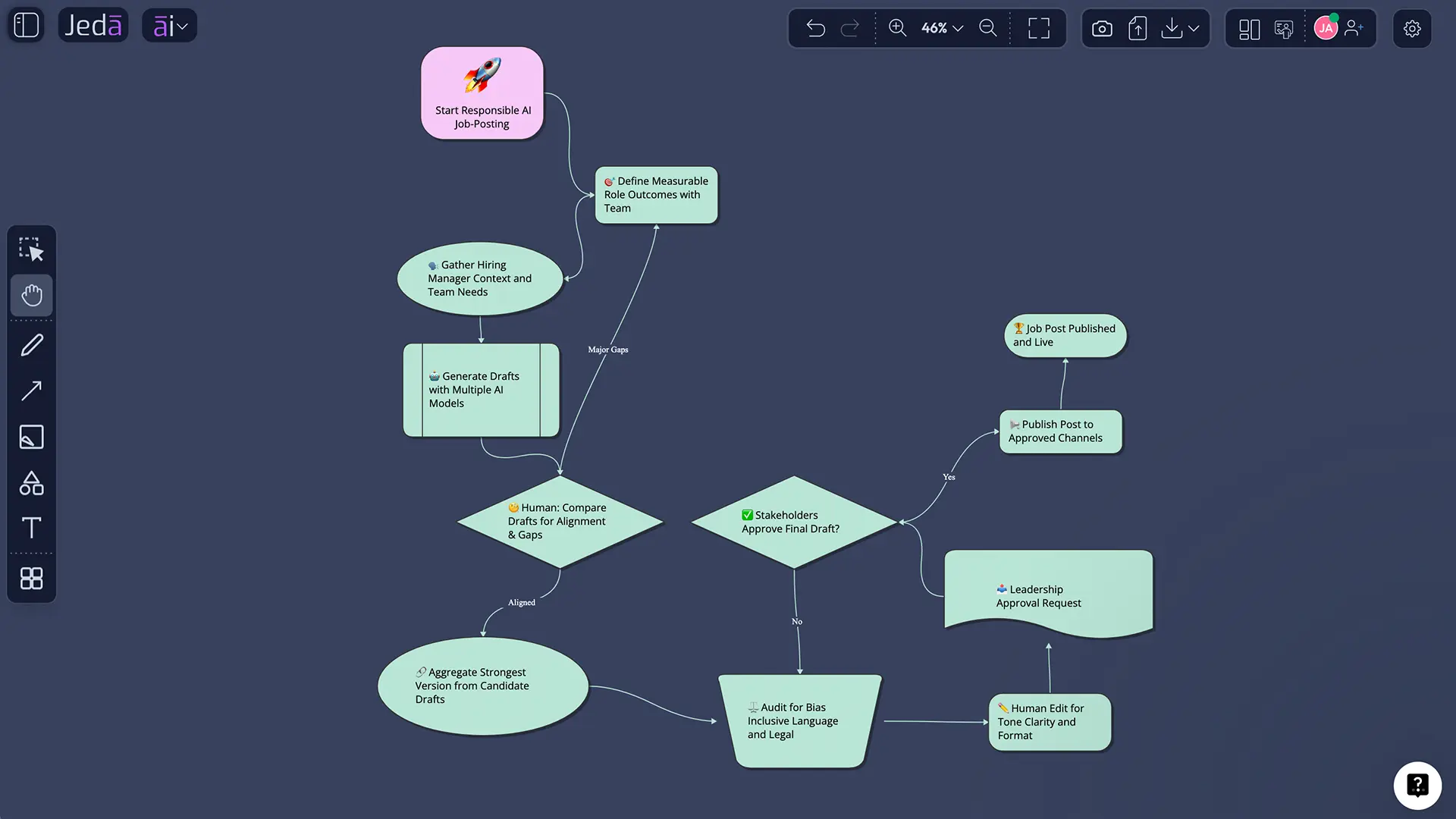
Jeda.ai lets you select one, two, or three reasoning models at a time. One model is useful for a fast, focused draft. Multiple models are useful when the role is complex, the tone is sensitive, or the hiring team wants alternatives before settling on one version.
When more than one model is selected, you can toggle the Aggregate feature and choose an additional AI model to evaluate the results. The aggregation step can compare different drafts and produce a consolidated version. Think of it as structured editorial comparison rather than a magic “best answer” switch.
A practical workflow looks like this:
- Generate multiple drafts for a hard-to-position role.
- Compare how each draft frames responsibilities and requirements.
- Use aggregation to consolidate the strongest elements.
- Manually review facts, tone, inclusivity, and legal requirements.
The models can improve phrasing. They cannot decide whether a requirement is truly necessary, whether the salary information satisfies local law, or whether the role itself is scoped sensibly. Those are hiring decisions, not writing tricks.
Should Web Search Be Auto, On, or Off?
Web Search controls whether the Job Post recipe can use current web information while generating.
Auto lets Jeda.ai decide whether current information would help. This is a sensible default when the role includes fast-changing technologies, certifications, market terminology, or emerging skills.
On forces a web-grounded generation. Use it when you want the draft to reflect current role language or when the position sits in a field that changes quickly. Still verify every external detail; current does not mean correct for your organization.
Off keeps the draft focused on the information you provide. This is useful for confidential roles, tightly defined internal positions, or cases where external market patterns would add noise.
The thought-provoking bit? Web Search can tell you how the market describes a role. It cannot tell you whether your company actually needs that market-standard laundry list. Copying consensus is not the same as defining value.
Document or Text: Which Output Format Should You Choose?
The Job Post recipe can generate a Document or Text output. Both are previews on the Jeda.ai workspace. Neither option creates a downloadable DOC or Word file.
Choose Document when you want the content presented inside a styled container. It is useful for reviewing a complete draft as a distinct object on the AI Whiteboard.
Choose Text when you want a cleaner text block without the document-style container. This can be convenient for copying, comparing, or arranging several draft versions side by side.
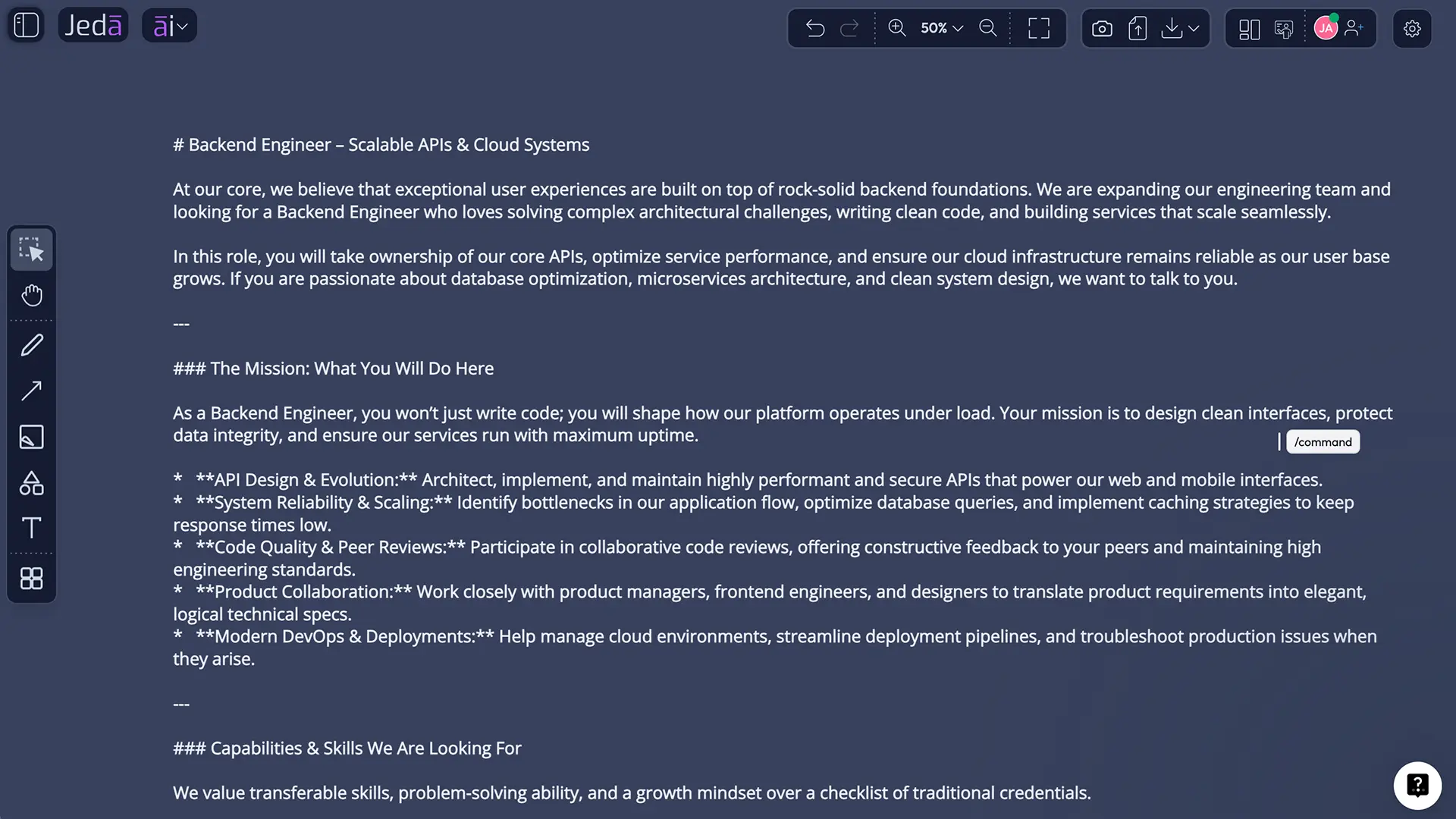
After generation, you can manually edit the content and apply available text formatting. Fix headings. Tighten paragraphs. Bold the role outcomes. Remove anything that sounds like a committee swallowed a thesaurus.
What Should a Strong AI-Generated Job Post Include?
A good post helps the right candidates make a decision. It is not merely a list of employer demands.
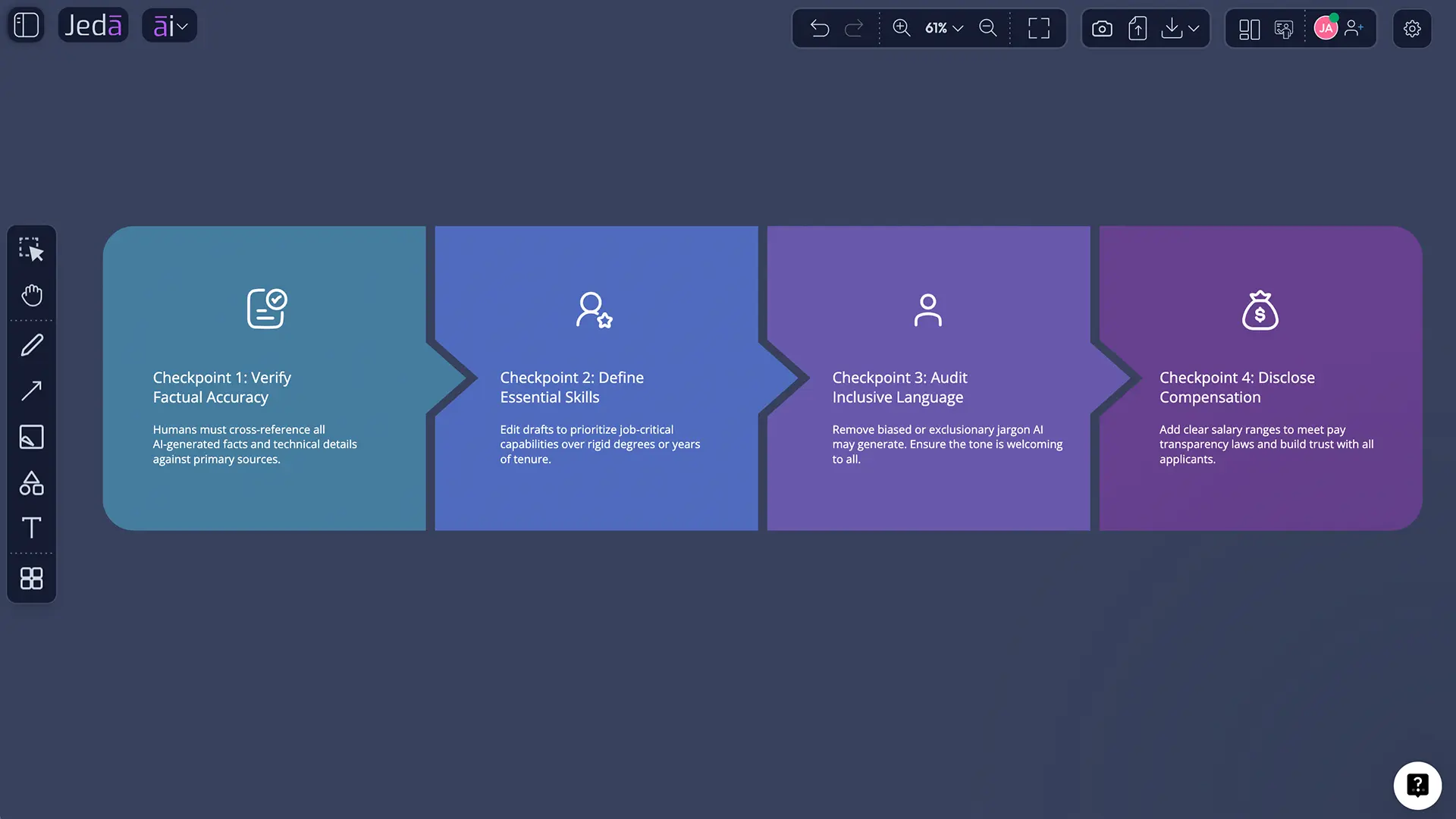
Start with a searchable, recognizable title. Follow with a brief role summary: what the person will own, who they will work with, and why the work matters. Then list responsibilities as outcomes and recurring work rather than abstract personality traits.
Requirements need discipline. Ask whether each item is essential on day one, learnable after joining, or simply inherited from the last version. Skills-based hiring begins here. LinkedIn recommends focusing on performance and day-to-day skills instead of defaulting to long lists of education and experience requirements.
A complete post may also include location or workplace type, compensation and benefits where appropriate or legally required, employment type, application instructions, and an accessibility or accommodation statement. Those details are not included as dedicated fields in the Job Post recipe, so add them manually when your jurisdiction or hiring process requires them.
How Do You Keep an AI Job Post Inclusive and Accurate?
Start by assuming the draft needs review. Because it does.
Research by Danielle Gaucher, Justin Friesen, and Aaron Kay found that gendered wording in job advertisements can affect perceived belonging and contribute to inequality in traditionally male-dominated fields. That does not mean a single adjective determines who applies. It does mean language deserves more scrutiny than a spell-check.
Legal requirements also matter. The U.S. Equal Employment Opportunity Commission states that job advertisements may not express preferences or discourage applicants based on protected characteristics. Other jurisdictions have their own rules, including salary-transparency, privacy, accommodation, and language requirements.
Use plain language. Replace vague traits such as “aggressive,” “young,” or “culture fit” with job-related behaviors and expectations. Avoid unnecessary physical, schedule, education, or experience requirements unless they relate directly to safe and effective performance.
And do not let AI invent facts. Verify reporting lines, working arrangements, compensation, benefits, tools, qualifications, and application deadlines. A beautifully written falsehood is still a falsehood — now with better punctuation.
Example: Turning Weak Inputs into a Better Job Post
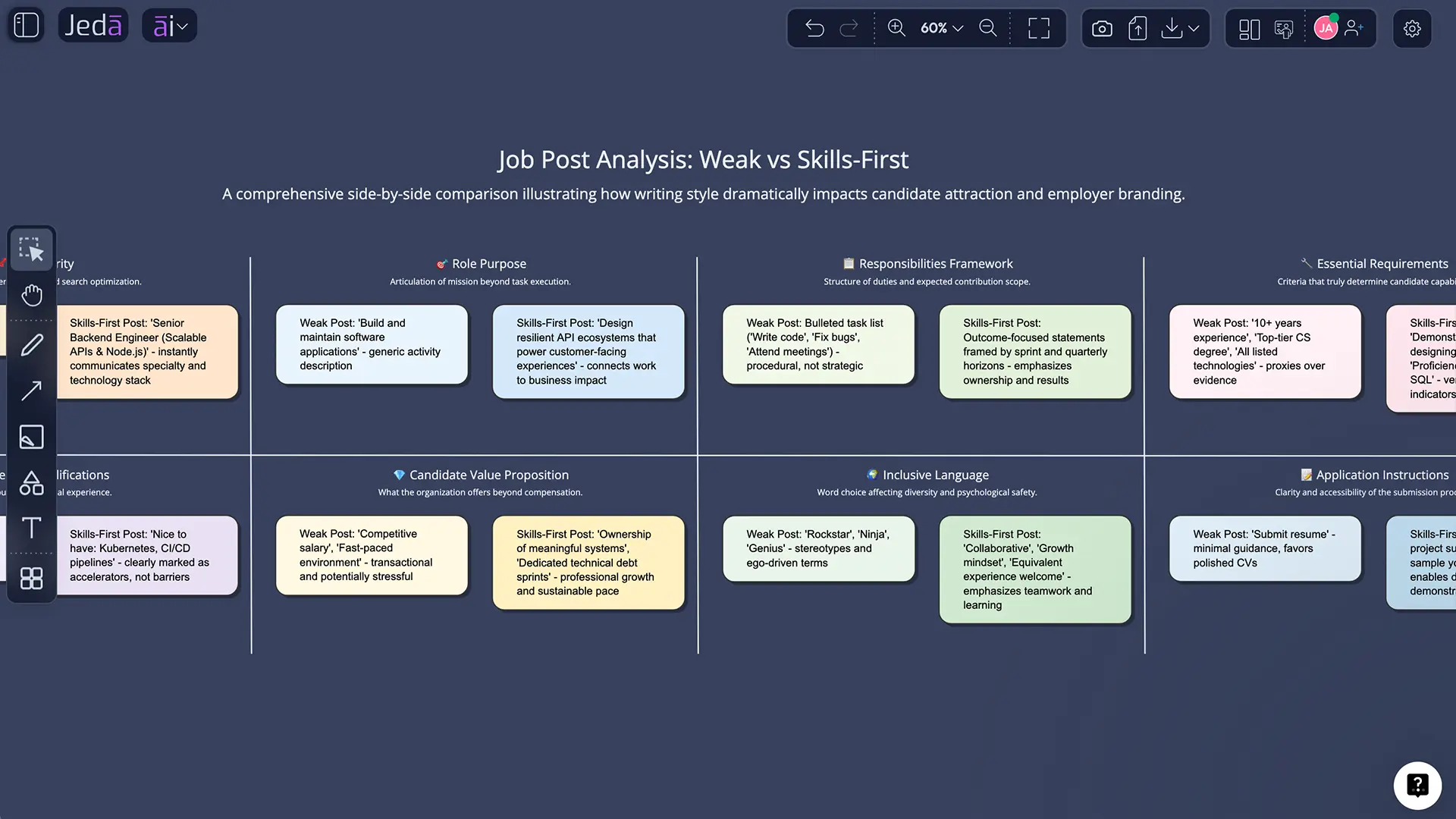
Suppose the only input is “Product Marketing Manager.” AI can generate something, but it will probably be generic. Add stronger context and the quality changes quickly.
Weak input:
- Job title: Product Marketing Manager
Stronger input:
- Job title: Senior Product Marketing Manager
- Main responsibilities: Own positioning for two SaaS products; lead quarterly launches; create sales enablement; interview customers; measure adoption and pipeline impact
- Key requirements: B2B SaaS positioning, launch planning, customer research, cross-functional communication, analytical decision-making
- Tone: Direct, confident, human
- Word count: 650
- Output language: English
The second version gives the model actual work to describe. It also gives the hiring team something to challenge. Is every responsibility realistic? Are the requirements observable? What would success look like after six months?
That is the deeper value of a Job Post with AI: not merely generating copy, but forcing the role definition into the open.
Common Mistakes When Writing a Job Post with AI
Treating the first draft as final
Generated text is a starting point. Review it with someone who understands the role and someone responsible for the hiring process.
Providing only a job title
The recipe can work from the mandatory title, but optional context makes the result far more specific. Use the responsibilities and requirements fields whenever possible.
Mixing essential and preferred requirements
A giant list discourages candidates and makes screening harder. Mark the real non-negotiables. Everything else should be framed honestly.
Using model aggregation as a substitute for judgment
A consolidated draft may read better, but it can still preserve flawed assumptions shared across every input. Consensus among models is not governance.
Forgetting the post is candidate-facing
Explain what the person gains: meaningful work, learning, scope, team context, benefits, flexibility, or growth. Hiring is a two-sided decision, despite what some job ads seem to believe.
Claiming the preview is a generated document file
Document and Text are output formats on the workspace. The recipe does not generate a Word or DOC file. Say what the product does. Small accuracy, big trust.
Why Jeda.ai Is Useful Beyond the First Draft
Most AI writing tools stop at a text box. Jeda.ai places the draft inside a broader Visual AI environment where the hiring team can keep related thinking together.
You might place the job post beside a role scorecard, team structure, interview plan, or onboarding flow on the same AI Whiteboard. That makes the draft easier to challenge against the actual hiring system. Does the post match the interview criteria? Do the stated responsibilities align with the team map? Are the requirements reflected in the evaluation plan?
Jeda.ai is an AI Workspace for strategy, design, writing, and collaborative thinking, with 300+ AI recipes and strategic frameworks. For hiring teams, the point is not to turn recruitment into a canvas art project. It is to reduce the gap between the role you think you are hiring for and the role candidates actually read.
Explore the broader AI Workspace and AI Whiteboard to see how generated content can sit beside editable planning, analysis, and decision artifacts.
Frequently Asked Questions
- What is a Job Post with AI?
- A Job Post with AI is a candidate-facing vacancy announcement drafted from role inputs such as the job title, responsibilities, requirements, tone, length, and language. AI organizes those details into a structured first draft, while the employer remains responsible for reviewing accuracy, fairness, legal disclosures, and final wording.
- What is mandatory in the Jeda.ai Job Post recipe?
- The only mandatory field is the job title. Main responsibilities, key requirements, tone, word count, and output language are optional. Adding those optional details usually produces a more specific, useful draft because the model has real context instead of relying on generic assumptions about the role.
- Where is the Job Post recipe in Jeda.ai?
- Open the ai menu, choose the Writer tab, and select Job Post. It is a standalone Writer recipe with no sub-recipe or nested category. You can also use the AI Recipes search bar and search for Job Post to open the same guided form directly.
- Can I use multiple AI models for a job post?
- Yes. You can select one, two, or three reasoning models. When multiple models are selected, you can enable Aggregate and choose an additional model to evaluate the responses and produce a consolidated draft. Review the result manually, since aggregation improves synthesis but does not guarantee accuracy or fairness.
- What does Web Search do in the Job Post recipe?
- Web Search can be set to Auto, On, or Off. Auto lets Jeda.ai decide when current information may help, On forces web-grounded generation, and Off uses the context you provide. Web results may improve current terminology, but they should not replace your internal role definition or factual review.
- Does Document output create a Word file?
- No. Document is a styled preview format inside the Jeda.ai workspace, while Text displays a cleaner text block. The Job Post recipe does not generate DOC or Word files. You can edit and format the generated content, then copy it into the hiring platform or document workflow you use.
- Can I edit the job post after generation?
- Yes. The generated output can be manually edited, and Jeda.ai provides text-formatting controls for refining headings, emphasis, alignment, and presentation. Review responsibilities, requirements, compensation details, application instructions, and company-specific facts before moving the post to an external job board.
- How can I make an AI-generated job post more inclusive?
- Use plain, neutral language; focus on skills and observable outcomes; remove requirements that are not essential; and avoid wording tied to protected characteristics or stereotypes. A human reviewer should check the final draft for bias, accessibility, accommodation language, and any employment-law requirements that apply in the relevant jurisdiction.
- Should a job post focus on responsibilities or requirements?
- It should include both, but responsibilities and outcomes deserve priority. Candidates need to understand what they will do and how success will be judged. Keep requirements limited to capabilities that are genuinely necessary, and separate them from preferred qualifications so strong candidates are not screened out by an inflated wish list.
- When should I use Clear Chat Context?
- Use Clear Chat Context when switching to an unrelated vacancy or when previous conversations may influence the next output. Clearing the context gives the new Job Post generation a cleaner starting point, reducing accidental carryover of role details, tone, seniority, or requirements from an earlier draft.
- [1]
U.S. Equal Employment Opportunity Commission (n.d.) . “Prohibited Employment Policies and Practices” EEOC.
View Source ↗ - [2]
LinkedIn Talent Solutions (2021) . “Why Skills-Based Hiring Starts with Your Job Descriptions” LinkedIn.
View Source ↗ - [3]
LinkedIn (n.d.) . “Use AI-Assisted Job Descriptions” LinkedIn Help.
View Source ↗ - [4]
Greenhouse Software (2026) . “Job Post Description Suggestions” Greenhouse Support.
View Source ↗ - [5]
Gaucher, Danielle; Friesen, Justin; Kay, Aaron C. (2011) . “Evidence That Gendered Wording in Job Advertisements Exists and Sustains Gender Inequality” Journal of Personality and Social Psychology.
View Source ↗ - [6]
World Economic Forum (2025) . “The Future of Jobs Report 2025” World Economic Forum.
View Source ↗ - [7]
Indeed Employer Content Team (2026) . “Job Posting Template and Examples” Indeed Employer Guide.
View Source ↗ - [8]
University of Wisconsin–Madison Human Resources (2025) . “Best Practices for Writing Job Postings” UW–Madison.
View Source ↗
Create a Clearer Job Post with AI
Join 150,000+ users using Jeda.ai to draft, review, and refine work in one visual AI Workspace.
Create a Job Post