A LinkedIn Invitation Note with AI should sound like one person noticing another—not a sales sequence wearing a name tag. LinkedIn’s guidance recommends short, specific notes that explain the shared context and the reason for reaching out. Jeda.ai turns those inputs into a focused draft inside an AI Workspace without surrendering judgment. For 150,000+ users working across strategy, sales, recruiting, content, and professional networking, that is the practical promise: less blank-page friction, more deliberate outreach.
The hard part is deciding which words deserve the recipient’s attention.
What Is a LinkedIn Invitation Note with AI?
A LinkedIn Invitation Note with AI is a short connection-request message drafted from details about the sender, recipient, reason for connecting, shared context, tone, length, and language. The AI creates a starting point. You verify the facts, edit the wording, and decide whether the note is worth sending.
A useful invitation has to do several jobs in very little space. It should explain why the connection makes sense and stop before becoming a pitch. LinkedIn currently advises members to reference a shared role, event, group, post, or other genuine point of connection. Its current Help page lists a 200-character ceiling for Basic personalized notes, although limits and account entitlements can change. Check the live counter in LinkedIn before sending.
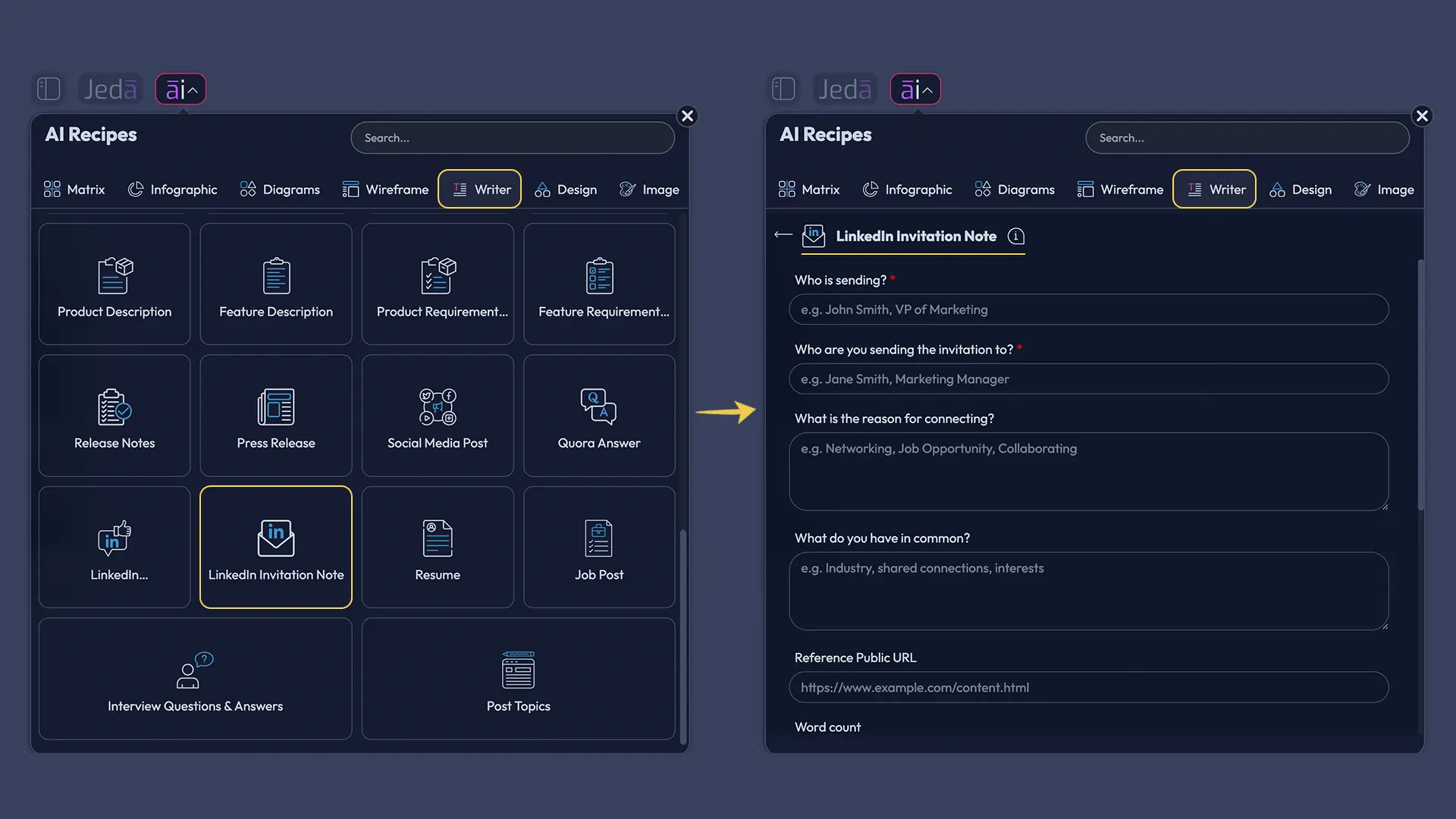
Jeda.ai’s LinkedIn Invitation Note Writer recipe structures that work. It asks who is sending, who will receive the invitation, why the connection makes sense, what the two people have in common, the desired tone, word count, and output language. Instead of wrestling with a blank prompt, you work through the decisions that make the note believable.
Why Does a LinkedIn Invitation Need More Than a Template?
Templates solve structure. They do not solve relevance.
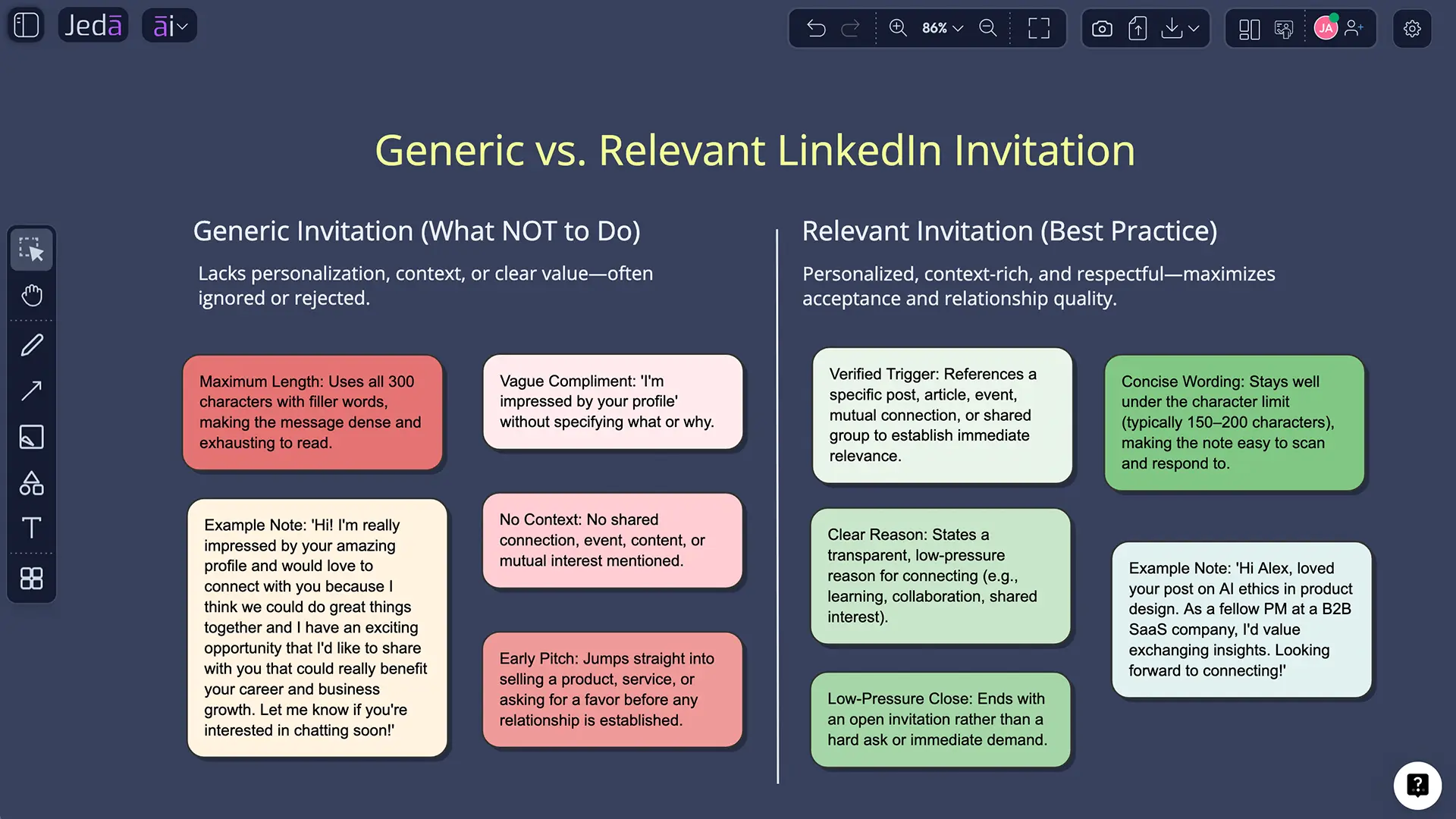
“Hi, I came across your profile and would love to connect” is polite, clean, and almost empty. It gives the recipient no evidence that you noticed their work and no reason the connection matters now. “I love your content” is barely better; it can be sprayed across thousands of profiles.
The stronger approach is specific without becoming invasive. Mention the post, event, shared field, alumni link, mutual professional interest, or project theme that created the reason to reach out. Then stop. A good LinkedIn Invitation Note with AI should preserve that restraint rather than produce an over-engineered paragraph.
Research on professional networks explains why this small interaction matters. Granovetter’s “strength of weak ties” work argued that acquaintances connect people to information beyond their closest circles. A later five-year experiment involving more than 20 million LinkedIn members found that weaker professional ties can contribute to job mobility. The note is tiny. The network bridge may not be.
- Relevant context
Anchor the request in a real post, event, role, interest, introduction, or shared professional problem.
- Low-pressure intent
State why connecting makes sense without forcing a pitch, favor, call, or immediate commitment.
- Disciplined brevity
Compress the idea until every phrase earns its place and the note still sounds human.
What Information Does the Jeda.ai Recipe Ask For?
The recipe separates essential context from optional refinement.
Mandatory fields
Who is sending identifies the sender’s role or professional perspective. “A strategy consultant advising SaaS teams” is more useful than “me.” Who are you sending the invitation to describes the recipient and the context that makes them relevant. Without this pair, AI fills the gaps with beige networking language. Beige is ignored.
Optional fields
What is the reason for connecting explains why the relationship makes sense now. What do you have in common adds verified shared context. Tone controls delivery; professional, warm, curious, peer-to-peer, and direct are useful. Word Count guides the draft, but LinkedIn limits notes by characters. Output Language defaults to English and should be reviewed for cultural tone and idiom.
How to Create a LinkedIn Invitation Note with AI in Jeda.ai
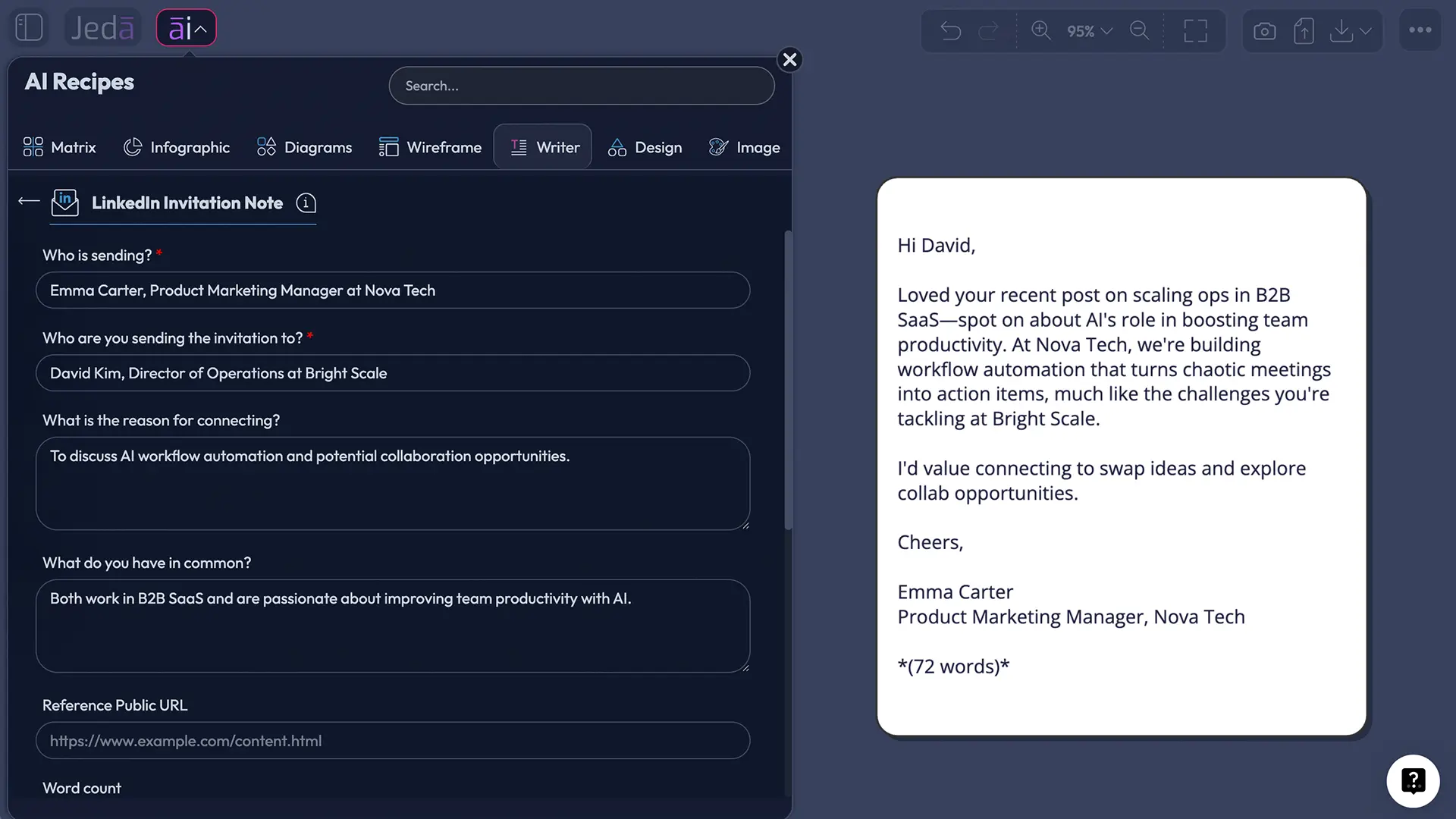
Jeda.ai provides two practical routes: browse the Writer recipes or search for the recipe directly. Both open the same form.
Method 1 — Navigate through Writer
Open the AI Menu from the top-left of the Jeda.ai workspace. Select Writer, choose LinkedIn Invitation Note, and complete the mandatory sender and recipient fields. Add the reason, common ground, tone, word count, and output language when relevant.
Method 2 — Search the recipe directly
Open the AI Menu, use the search field, enter LinkedIn Invitation Note, and select the matching result. This is faster when you already know the recipe name.
- Open the recipe
Browse the Writer tab or search the exact LinkedIn Invitation Note recipe name.
- Describe the sender
Enter the sender’s role, professional context, organization, or expertise.
- Describe the recipient
Include the recipient’s role and the post, event, company move, or context behind the invitation.
- Add reason and common ground
Explain why connecting makes sense and include one verified shared detail when available.
- Set tone, length, and language
Choose a professional tone, a compact drafting length, and the most appropriate output language.
- Choose reasoning models
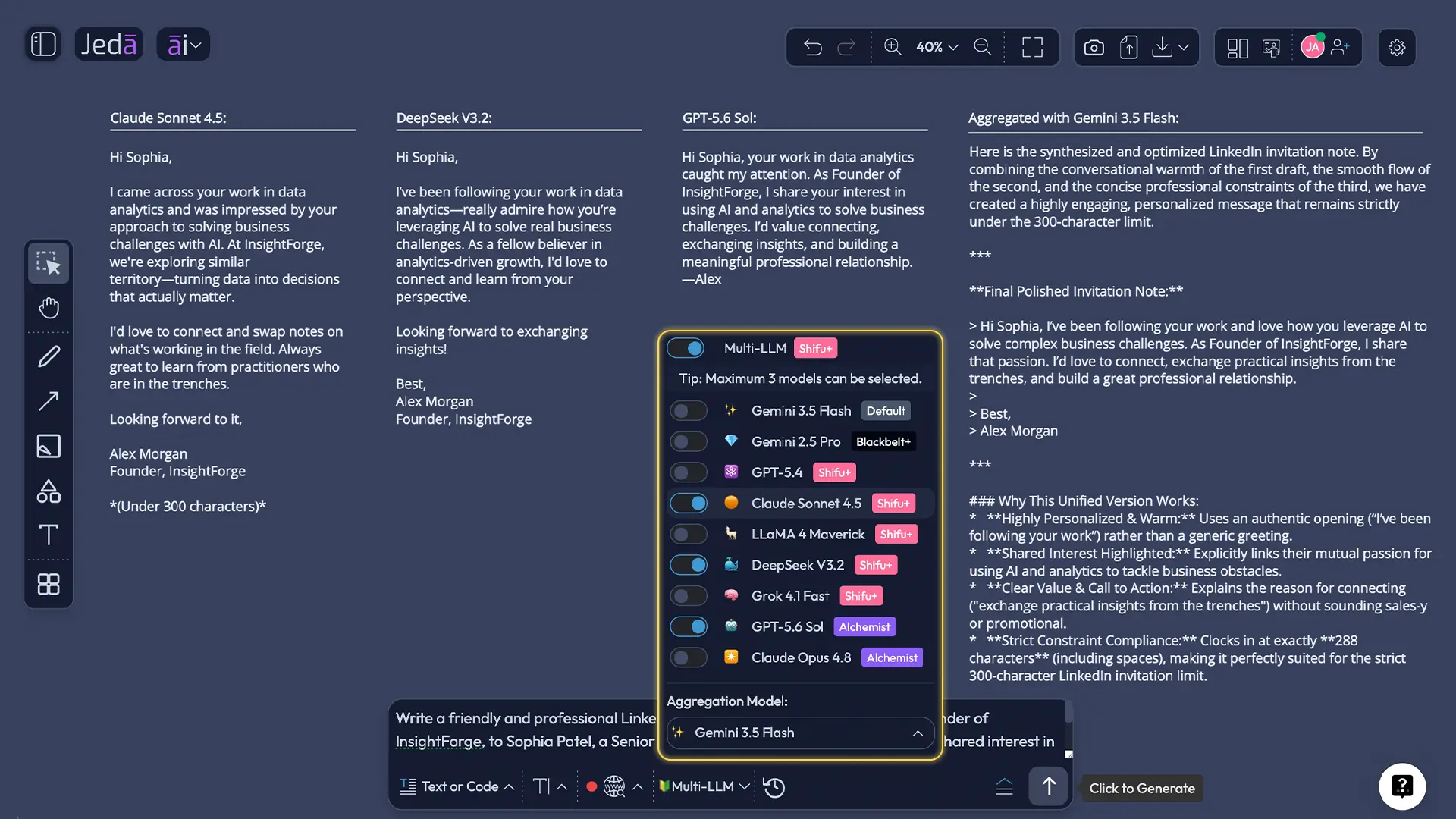
Select one, two, or three models. With multiple models, enable Aggregate and choose an additional model to consolidate the result.
- Set Web Search and format
Choose Auto, On, or Off for Web Search, then select Document or Text for the canvas preview.
- Generate and verify
Edit the note, confirm every personal detail, and check the final character count in LinkedIn.
How Should You Use Multiple Models and Aggregate?
One model is enough for a straightforward invitation. Multiple models help with sensitive or hard-to-phrase situations, such as senior outreach or long-gap reconnection.
Jeda.ai lets you select one, two, or three reasoning models. When multiple models are selected, you can toggle Aggregate and choose one additional model to evaluate the candidate responses and create a consolidated output.
Compare the result on three dimensions:
- Specificity: Does it mention a real reason to connect?
- Pressure: Does it ask too much before acceptance?
- Voice: Would you actually say this in a professional conversation?
Aggregation selects wording; it does not verify the relationship or shared details.
When Should Web Search Be Auto, On, or Off?
Web Search should support relevance, not manufacture familiarity.
Choose Auto when Jeda.ai can decide whether current public context would improve the note. Choose On when the reason depends on a recent post, company announcement, new role, conference appearance, article, or industry development. Verify every detail before sending; search results can be stale or attached to the wrong person.
Choose Off when you already have trusted context or when the recipient’s information is private, confidential, or inappropriate to search. A note based on a real interaction is stronger than one padded with scraped trivia.
Should You Choose Document or Text Output?
The recipe generates a Document or Text preview on the Jeda.ai canvas. It does not create a Word or .docx file.
Choose Document for a styled AI Whiteboard container when comparing variants or placing the note beside an outreach plan. Choose Text for a cleaner object that is easy to edit and copy.
Both remain editable inside the broader AI Workspace. You can revise wording and use text formatting for internal review. LinkedIn invitations are ultimately plain text, though. Bold styling on the AI Whiteboard will not teleport into LinkedIn. Typography has boundaries.
What Makes an AI-Generated Invitation Sound Human?
Human does not mean casual. It means situated.
A human-sounding note contains evidence of attention. It refers to the recipient’s actual work or a credible point of overlap. It avoids inflated compliments and theatrical language. “Your visionary leadership journey deeply resonated with me” is not a connection note. It is fog wearing a blazer.
Use this structure: context + reason + light close.
- After a post: “Hi Maya—your post on AI governance made the speed-versus-trust trade-off unusually clear. I work on similar questions and would be glad to connect.”
- Shared event: “Hi Daniel, I enjoyed your point on product discovery at SaaS North. I’m working on the same challenge and would value staying connected.”
- Alumni: “Hi Amina, fellow JUST alum here. I’ve followed your move into product operations and would be glad to connect.”
- Consultant peer: “Hi Robert, I saw your work on pricing transformation. I advise SaaS teams on related decisions and would enjoy comparing notes.”
- Recruiting: “Hi Leila, your experience in enterprise UX stood out. I recruit in product design and would be glad to connect, even if the timing is not right.”
These are starting points, not magic spells. Replace every detail with truth. Cut any phrase that sounds like a favor disguised as networking.
How Can You Edit the Result on the AI Whiteboard?
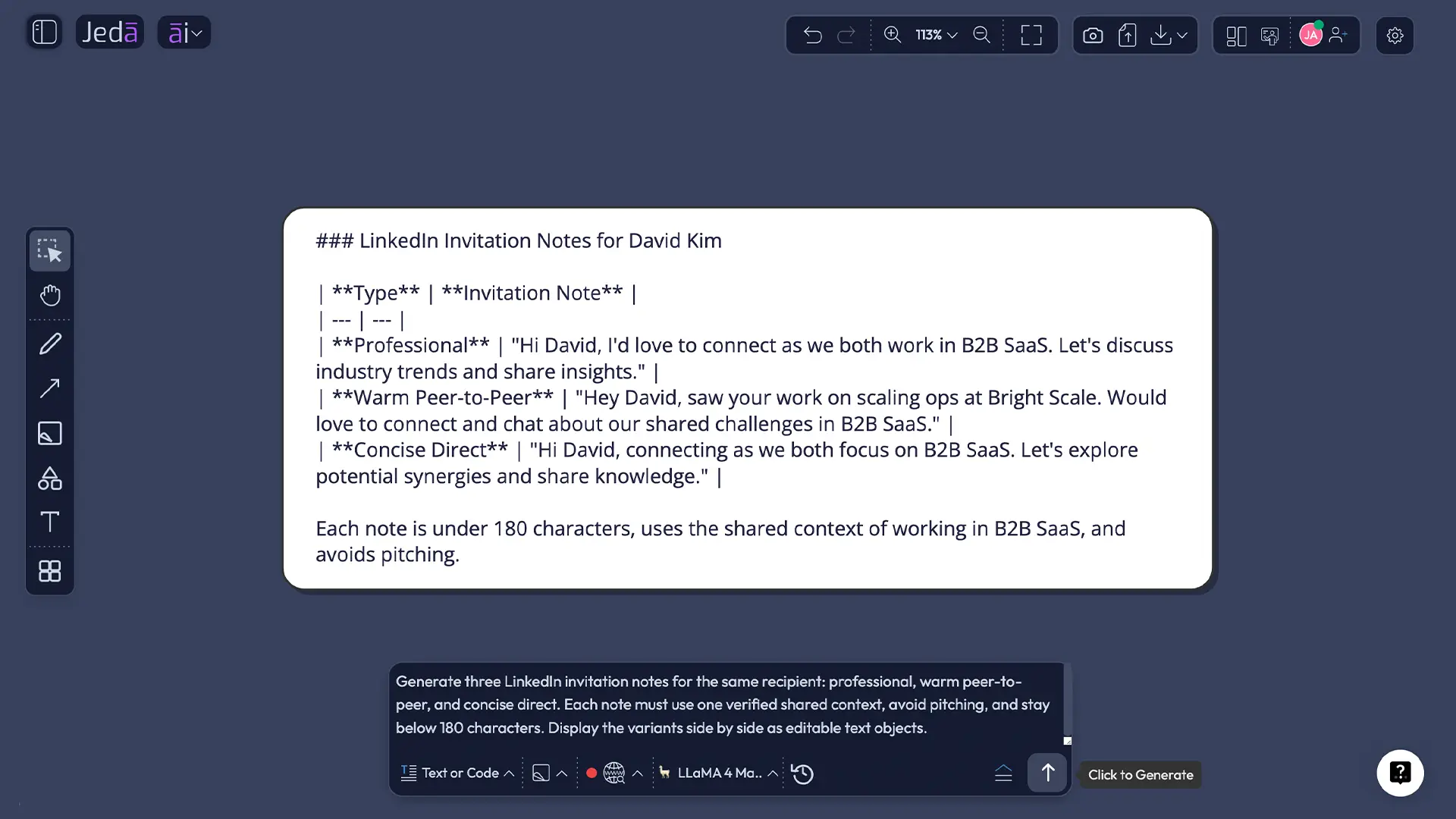
Select the generated text or document and revise it directly. Put “warm,” “peer-to-peer,” and “direct” variants side by side, then label the real trigger behind each. The Visual AI canvas makes the sequence visible.
Use Clear Chat Context when you switch recipients, audiences, or campaigns. Resetting context reduces the chance that names, companies, or assumptions from the previous task bleed into the next draft. That small button can prevent an impressively awkward mistake.
For this short Writer output, manual editing is usually more useful than extending the note with AI+. More words are rarely the answer. Vision Transform is optional; use it when you want to convert the surrounding outreach plan into a flowchart or matrix, not to inflate the invitation itself.
Common Mistakes to Avoid
Pitching before acceptance
A request is not space for your service, case study, meeting link, and life story. Establish relevance first.
Personalizing only the name
“Hi Priya” is identification, not personalization. The meaningful part is the verified reason the message belongs to Priya rather than anyone else with the same title.
Inventing familiarity
Do not praise an article you did not read or imply an introduction that never happened. AI can produce confident fiction. Remove it.
Writing to the maximum limit
A ceiling is not a target. LinkedIn’s InMail analysis found shorter and individually sent messages performed better. Connection notes differ, but the principle travels: make the decision easy.
Reusing stale context
Use Clear Chat Context before changing recipient types, industries, or campaigns. Names leaking between drafts is the sort of automation people remember for all the wrong reasons.
How Does This Recipe Fit a Larger Networking Workflow?
The recipe is narrow; the surrounding workflow can be broader.
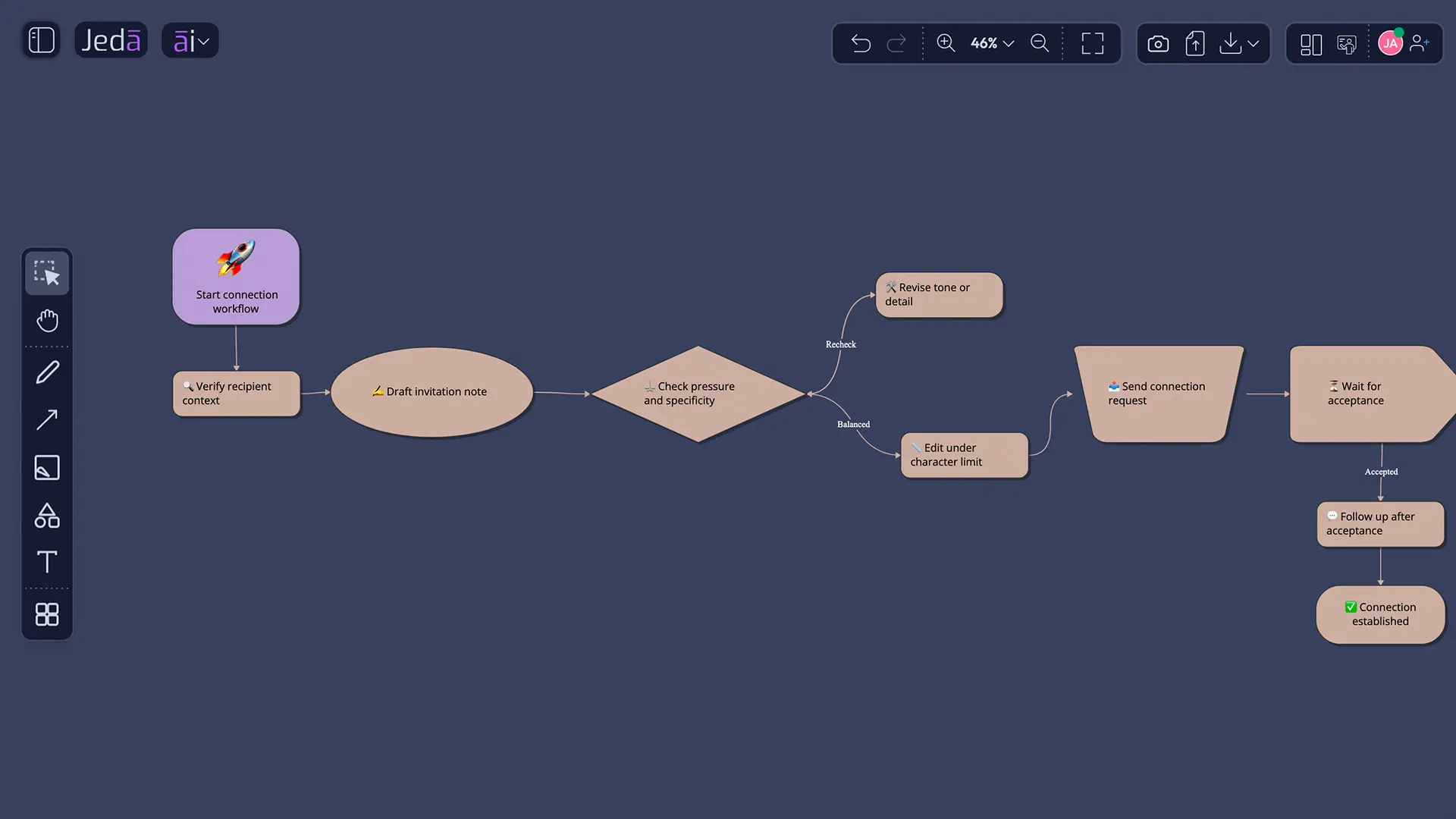
On the same AI Whiteboard, you can map audiences, group contacts by shared context, draft follow-ups, and build a relationship cadence. Jeda.ai includes 300+ strategic frameworks, so consultants can pair notes with account matrices, founders with partnership maps, and recruiters with candidate flows.
Related resources include Social Media Post with AI, Cold Call Sales Script with AI, Press Release with AI, the AI Workspace, and the AI Whiteboard.
The bigger idea: do not use AI to send more forgettable messages. Use it to make fewer messages easier to think through.
Frequently Asked Questions
- What is a LinkedIn Invitation Note with AI?
- A LinkedIn Invitation Note with AI is a short connection-request message drafted from the sender, recipient, reason, shared context, tone, length, and language. The sender should verify every detail, edit the wording, and check LinkedIn’s current character limit before sending.
- Does Jeda.ai have a LinkedIn Invitation Note recipe?
- Yes. Jeda.ai includes a LinkedIn Invitation Note recipe in the Writer section of the AI Menu. There is no sub-recipe or extra category. You can browse to it through Writer or search the recipe name directly.
- What fields are mandatory?
- The mandatory fields are Who is sending and Who are you sending the invitation to. These establish the relationship between sender and recipient. Specific role and context descriptions usually produce stronger drafts than names alone.
- Which optional fields improve the note most?
- The reason for connecting and verified common ground usually add the most value. Tone, word count, and output language refine delivery. Real shared context matters more than clever phrasing because it makes the request relevant rather than mass-produced.
- How long should a LinkedIn invitation note be?
- A LinkedIn invitation note should usually be one or two compact sentences. LinkedIn’s current Help guidance lists a 200-character limit for Basic personalized notes, but limits may change. Write below the ceiling and confirm the live counter before sending.
- Should I include a sales pitch?
- No. A connection request should establish context and relevance, not deliver a full pitch. Avoid links, meeting requests, product descriptions, and exaggerated claims. Continue the conversation only after the recipient accepts and shows interest.
- Can I use multiple AI models?
- Yes. The recipe supports one, two, or three reasoning models. With multiple models selected, enable Aggregate and choose an additional model to evaluate the responses and produce a consolidated result. Review specificity, pressure, tone, and accuracy.
- What do Auto, On, and Off mean for Web Search?
- Auto lets Jeda.ai decide whether current context is useful. On fits recent posts, role changes, events, articles, or company news. Off fits complete trusted context or situations where external research is unnecessary or inappropriate.
- Does Document output create a Word file?
- No. Document is a styled preview on the Jeda.ai canvas, not a native Word or DOCX export. Text creates a cleaner text object. Both can be manually edited before copying the final plain-text note into LinkedIn.
- When should I use Clear Chat Context?
- Use Clear Chat Context when switching recipients, industries, campaigns, or purposes. It resets the AI conversation context and reduces the risk that a previous person’s name, company, tone, or assumptions appear in the next invitation.
- Can AI guarantee acceptance?
- No. Acceptance depends on targeting, profile credibility, timing, shared context, recipient preferences, and factors outside the wording. AI improves the drafting process; it does not create a conversion guarantee.
Final Takeaway
A LinkedIn Invitation Note with AI is valuable when it helps you notice what matters: who the person is, why the connection makes sense, and which words can be removed. Jeda.ai provides a structured Writer recipe, multiple reasoning models, Aggregate, Web Search controls, Document or Text previews, Clear Chat Context, and manual editing inside one AI Workspace.
But the final quality test stays human.
Would the recipient know why this note was meant for them?
If yes, send it. If not, no amount of AI polish will rescue the premise.
- [1]
Jeda.ai (2026) . “Jeda.ai User Guide v4.5” Jeda.ai Product Documentation.
View Source ↗ - [2]
LinkedIn (2026) . “Personalize Invitations to Connect” LinkedIn Help.
View Source ↗ - [3]
LinkedIn Talent Solutions (2022) . “How to Improve Your InMail Response Rate, According to LinkedIn Data” LinkedIn Business.
View Source ↗ - [4]
Granovetter, Mark S. (1973) . “The Strength of Weak Ties” American Journal of Sociology, 78(6), 1360-1380.
View Source ↗ - [5]
Rajkumar, Karthik; Saint-Jacques, Guillaume; Bojinov, Iavor; Brynjolfsson, Erik; Aral, Sinan (2022) . “A Causal Test of the Strength of Weak Ties” Science, 377(6612), 1304-1310.
View Source ↗ - [6]
LinkedIn Sales Solutions (2024) . “Elevating Your Outreach Strategy with Sales Navigator Insights” Sales Navigator Masterclass.
View Source ↗
Write a LinkedIn Invitation Note That Earns Attention
Join 150,000+ users using Jeda.ai to turn professional context into clearer, more thoughtful outreach inside one visual AI Workspace.
Try Jeda.ai Free