Release Notes with AI is not merely an automated writing shortcut. It is a structured method for translating product change into public, internal, or classroom-ready communication without losing the release facts that matter: product name, version, feature scope, improvement rationale, bug-fix detail, release date, audience, and required action.
That distinction matters. A release note is a bridge between what a team shipped and what a user can now understand, adopt, or evaluate. Software engineering research treats release notes as important communication artifacts because they summarize changes between versions and help different stakeholders understand what has changed without reading source code, issue trackers, or engineering logs. In practice, the release note is where engineering truth meets product language. Not glamorous. Definitely necessary.
Jeda.ai’s Release Notes recipe brings that communication task into the AI Workspace. The recipe lives in the Writer section of the AI Recipe menu, has no nested sub-recipe, and can be opened by navigation or direct search. Users enter the product name as the mandatory field, add optional details such as version number, features, improvements, bug fixes, release date, word count, tone, and output language, then generate either a Document-style or Text-style preview. The output is a preview for editing and formatting; it does not create a native document file by itself.
For product teams, software teams, and MBA cohorts, this is the useful part: the release note becomes a repeatable communication exercise. The AI drafts. The human verifies. The team edits. Jeda.ai keeps the work in a shared AI Whiteboard context where the release scope, stakeholder map, and final message can sit together instead of scattering across tickets, slides, docs, and chat threads. More than 150,000+ users use Jeda.ai for visual thinking and structured AI work, and the Release Notes recipe extends that workspace logic into product communication.
What Are Release Notes with AI?
Release Notes with AI means using artificial intelligence to draft, organize, rewrite, and adapt release communication from structured product inputs. The goal is not to let AI invent the release. The goal is to help a team express the release clearly after the facts have been supplied.
A strong release note usually answers five questions: what changed, who is affected, why the change matters, whether the user must act, and where to learn more. AI can help arrange those answers into a readable sequence. It can also adjust tone, reduce jargon, group similar fixes, and produce versions for different audiences. But the factual ownership stays with the product team. AI should not decide whether a feature shipped, whether a bug fix is complete, or whether a compatibility change is safe to understate.
That human-in-the-loop position is consistent with release-note research. Studies on release-note production identify recurring problems such as missing information, inconsistent structure, poor presentation, and difficult access. AI can help with structure and drafting speed, but accuracy, completeness, and risk disclosure still require review.
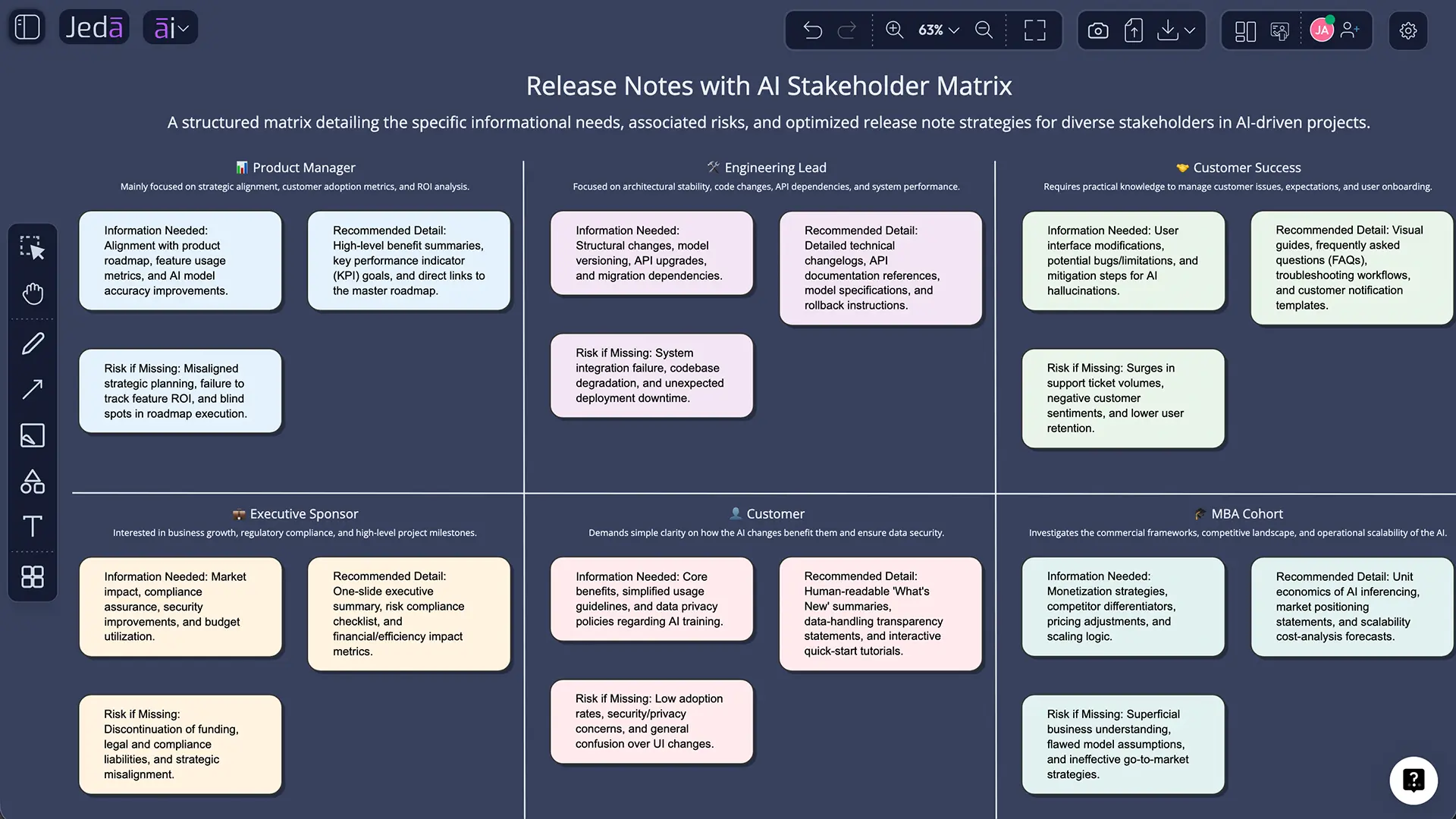
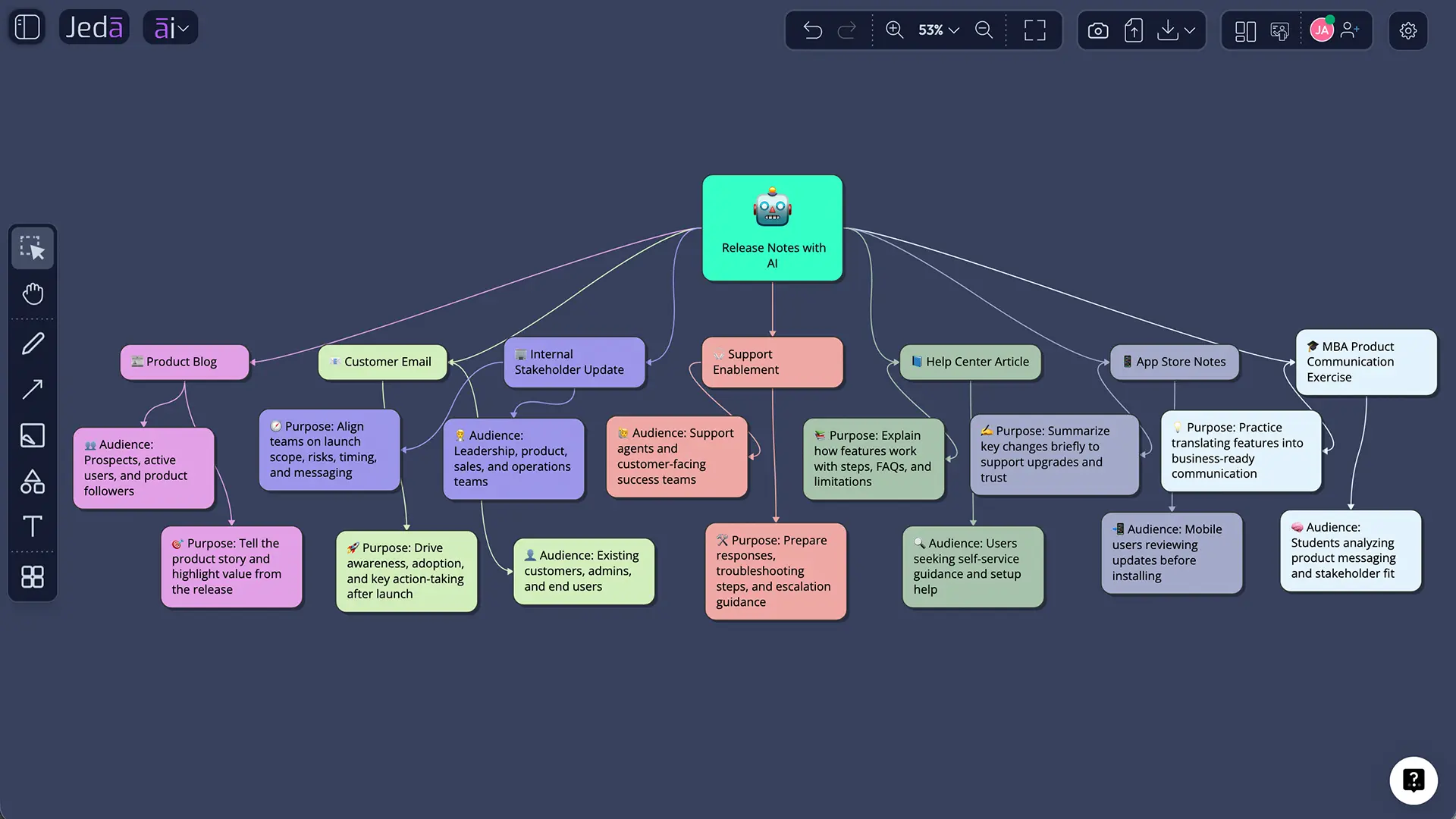
In Jeda.ai, the Release Notes recipe belongs to the broader Visual AI workspace. The final artifact is written text, but the surrounding thinking can remain visual: a feature-impact matrix, a release-readiness flowchart, a customer-segment map, or a support-escalation summary. That is the category advantage. Jeda.ai is not just asking for a prompt in a blank chat box. It lets teams keep the draft close to the reasoning that produced it.
Why Release Notes Often Fail
Most bad release notes are not bad because the team is careless. They are bad because the release facts are fragmented.
Engineering may have pull requests. Product may have roadmap labels. QA may have severity notes. Customer success may know the real user pain. Marketing may need benefit language. Leadership may need risk and adoption context. The release note has to absorb all of that and become readable. Tiny job. No pressure.
The academic literature backs up this mess. Nath and Roy found that release-note content can include issues, pull requests, commits, and vulnerability references, while different practitioner roles want different information from the same artifact. Wu et al. analyzed release-note issues on GitHub and grouped the challenges into content, presentation, accessibility, and production, with production and missing information appearing as major pain points.
This is why one-shot generation is risky. A generic AI release notes generator can produce fluent text from weak inputs. Fluent does not mean correct. A polished sentence about a feature that is not generally available is worse than a rough bullet that tells the truth.
Jeda.ai’s Release Notes recipe works best when the user treats the fields as an editorial checklist, not a decorative form. Product name creates scope. Version number anchors the release. Major features identify what deserves attention. Bug fixes separate quality changes from new capabilities. Release date gives the reader time context. Tone and word count shape the final communication. Clear Chat Context prevents an old conversation from contaminating a new release. Boring details? Yes. Also the stuff that keeps release communication from going feral.
Why Use Jeda.ai for Release Notes with AI?
Jeda.ai is useful for Release Notes with AI because it combines guided writing, model selection, editable output, and visual planning in one AI Workspace. The release note is not isolated from the work around it. A team can map the release, review stakeholder needs, draft the note, and manually refine the preview on the same canvas.
That matters for cross-functional teams. A developer-facing changelog may be accurate but unreadable to customers. A marketing announcement may be clear but too vague for support. A release manager needs enough structure to serve both sides without rewriting from scratch each time.
Jeda.ai’s Release Notes recipe supports this through its fields:
| Field | Role in the release note | Editorial guidance |
|---|---|---|
| Product name | Defines the release subject | Use the public product name unless the update is internal |
| Version number | Anchors the release | Include semantic versioning, app version, or release train when relevant |
| Major features and improvements | Supplies the headline substance | Write user-facing outcomes, not just internal implementation notes |
| Bug fixes and minor updates | Records quality improvements | Group small fixes by user impact when possible |
| Release date | Sets timing | Use exact dates for public launches or migration notices |
| Word count | Controls density | Short for in-app updates; longer for blogs or customer emails |
| Tone | Shapes voice | Academic, professional, concise, conversational, or customer-facing |
| Output language | Supports localization | English is the default |
| Output format | Controls preview style | Document or Text preview; not a downloadable doc-file generator |
| Web Search | Adds current public grounding when needed | Use Off for confidential releases, Auto for mixed context, On for public external references |
| Reasoning models | Changes drafting perspective | One model for speed, two or three for comparison, aggregation for synthesis |
| Clear Chat Context | Removes prior conversation influence | Recommended when switching products, releases, or audiences |
The broader Jeda.ai platform also supports 300+ strategic frameworks and AI Recipes, which can help teams prepare release decisions before they write the notes. For example, a product manager might use a matrix to prioritize feature impact, a flowchart to show migration steps, or a mind map to group fixes by customer segment. Then the Writer recipe turns that reviewed context into a release-note preview.
Release Notes, Changelogs, and Patch Notes Are Different Artifacts
Teams often blur release notes, changelogs, and patch notes. That creates confusion. The terms overlap, but they are not identical.
A release note is usually a curated communication about one release. It explains what changed and why the audience should care. A changelog is a running historical record of notable changes across versions. A patch note is often narrower and more technical, focused on fixes, stability, security, or compatibility updates. GitHub’s generated release notes, for example, are tightly connected to repository activity such as merged pull requests and contributors. That is excellent for developer traceability, but it is not automatically the same as a customer-ready product update.
| Artifact | Main purpose | Typical audience | Best use of AI |
|---|---|---|---|
| Release notes | Explain a specific release clearly | Customers, internal teams, stakeholders | Convert product facts into readable, audience-aware communication |
| Changelog | Preserve a historical record | Developers, maintainers, technical users | Group changes by version and category |
| Patch notes | Detail fixes and maintenance changes | Support, QA, power users, administrators | Summarize fixes without burying severity or action required |
| Product announcement | Drive awareness and adoption | Customers, prospects, executives | Translate release value into launch messaging |
Jeda.ai’s Release Notes recipe is strongest in the release-note and product-update layer. It can produce structured text from product facts, but the team should still decide whether the final artifact belongs in a public blog, an internal memo, a help-center article, a customer email, or a technical changelog.
How to Create Release Notes with AI in Jeda.ai
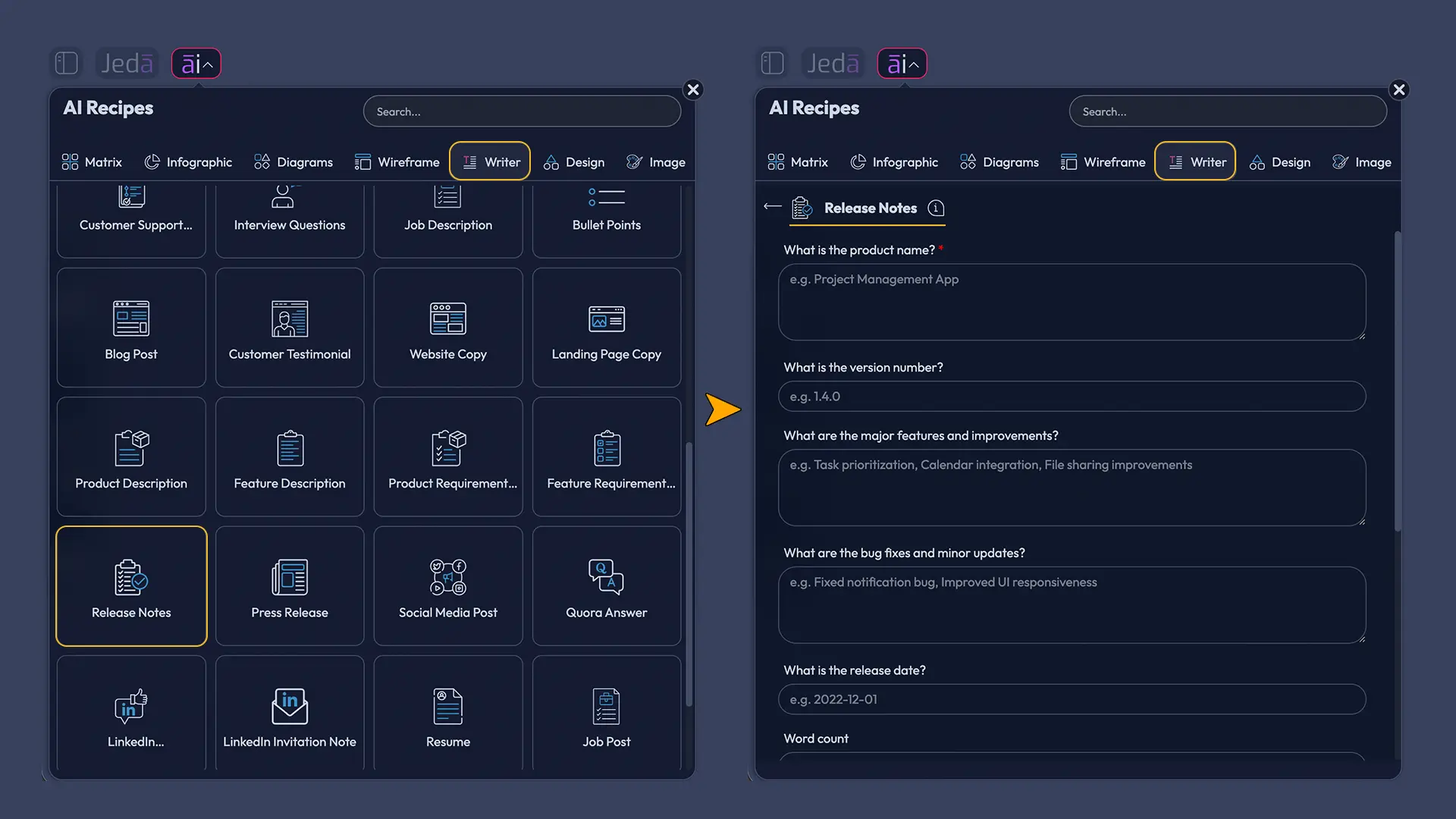
There are two practical ways to use the Release Notes recipe: navigate to it through the AI Menu or search for it directly. Both methods support the same fields and generation controls.
Method 1: Navigate to the Release Notes recipe
- Open a Jeda.ai workspace.
- Select the AI Menu from the top-left workspace area.
- Open the Writer recipe category.
- Choose the Release Notes recipe.
- Enter the mandatory field: What is the product name?
- Add optional details: version number, major features and improvements, bug fixes and minor updates, release date, word count, tone, and output language.
- Select one reasoning model, or select two or three models when you want draft alternatives.
- If multiple models are selected, use the Aggregate option with an additional model to consolidate the best result.
- Choose the output format: Document or Text. This changes the preview style; it does not create a downloadable document file.
- Set Web Search to Auto, On, or Off depending on whether the release note needs current public context.
- Use Clear Chat Context when the release should not inherit prior conversation context.
- Generate the release-note preview.
- Manually review, edit, format, and validate the preview before publishing.
Method 2: Search directly for the recipe
- Open the AI Menu.
- Use the recipe search bar.
- Search for Release Notes.
- Select the Release Notes recipe card.
- Complete the same product, version, feature, fix, release-date, tone, model, Web Search, and output-format fields.
- Generate the preview.
- Edit and format the preview before using it in a release blog, customer email, internal update, support note, or classroom exercise.
The navigation method is easier for first-time users because it shows where the recipe sits. The search method is better for repeat users who already know the recipe name. It is the difference between browsing the library and using the card catalog. Ancient technology, surprisingly useful metaphor.
How to Use the Recipe Fields Well
The product name is the only mandatory field, but a release note based only on the product name will be generic. For useful output, add the optional fields. AI performs better when it has release-specific material to preserve.
A weak feature input says: “Improved dashboard.”
A better feature input says: “Added dashboard filters that let admins view workspace usage by team, date range, and activity type.”
A weak bug-fix input says: “Fixed upload issues.”
A better bug-fix input says: “Resolved a failed retry state that could prevent large PDF uploads from completing after a temporary connection drop.”
Specificity is not a luxury here. It is the raw material.
For most SaaS teams, a good recipe input should include:
| Field | Example input |
|---|---|
| Product name | Jeda.ai AI Writer |
| Version number | v4.8 |
| Major features and improvements | Added Release Notes recipe; supports product name, version number, major features, improvements, bug fixes, release date, word count, tone, output language, reasoning model selection, output format, Web Search, and Clear Chat Context |
| Bug fixes and minor updates | Improved preview formatting; clarified output format behavior; improved recipe search discoverability |
| Release date | August 2026 |
| Word count | 500 |
| Tone | Academic but readable |
| Output language | English |
| Output format | Document preview |
| Web Search | Off, unless public references are required |
The generated preview should then be reviewed against the release source of truth: tickets, acceptance criteria, QA sign-off, product requirements, or customer-facing documentation. AI can draft the note, but it should not become the authority of record.
Model Selection, Aggregation, Web Search, and Clear Chat Context
The Release Notes recipe allows one, two, or three reasoning models. Single-model generation is usually enough for routine releases: small fixes, minor UI improvements, internal update summaries, or short release blurbs.
Multi-model generation becomes more useful when the release has multiple audiences. A product manager may want clarity. A technical lead may want precision. Customer success may want adoption language. An executive may want risk context. Multiple models can produce useful variation, and aggregation can synthesize a stronger final preview.
Web Search should be handled carefully. Use Off when the release includes private product details, unreleased roadmap information, confidential customer examples, internal bug records, or security-sensitive content. Use Auto when public context may help but is not central. Use On when the release note explicitly references current external facts, such as a third-party integration change, platform policy update, public standard, or public API dependency.
Clear Chat Context deserves more attention than it usually gets. Release notes are highly context-sensitive. If the workspace previously discussed another product, another audience, or another release, the model can accidentally borrow language from that prior context. Clearing the chat context before generating a new release note reduces that risk. Not exciting. Very useful.
Recommended Release Note Structure
A reliable AI-generated release note should be structured enough for scanning and specific enough for trust.
Use this structure as a baseline:
- Release title — Product name plus version or release date.
- Short summary — Two to four sentences explaining the release.
- Major features — Three to six user-facing changes.
- Improvements — Usability, performance, workflow, or quality gains.
- Bug fixes — Specific resolved issues, grouped by theme when possible.
- Known issues or limitations — Included when relevant.
- Action required — Migration, configuration, update, or training steps.
- Support or next step — Documentation, help center, contact path, or CTA.
This structure works for customer-facing releases, internal product updates, and academic examples. It also matches what release-note research keeps pointing toward: readers need organized, role-relevant information, not a wall of merged tickets.
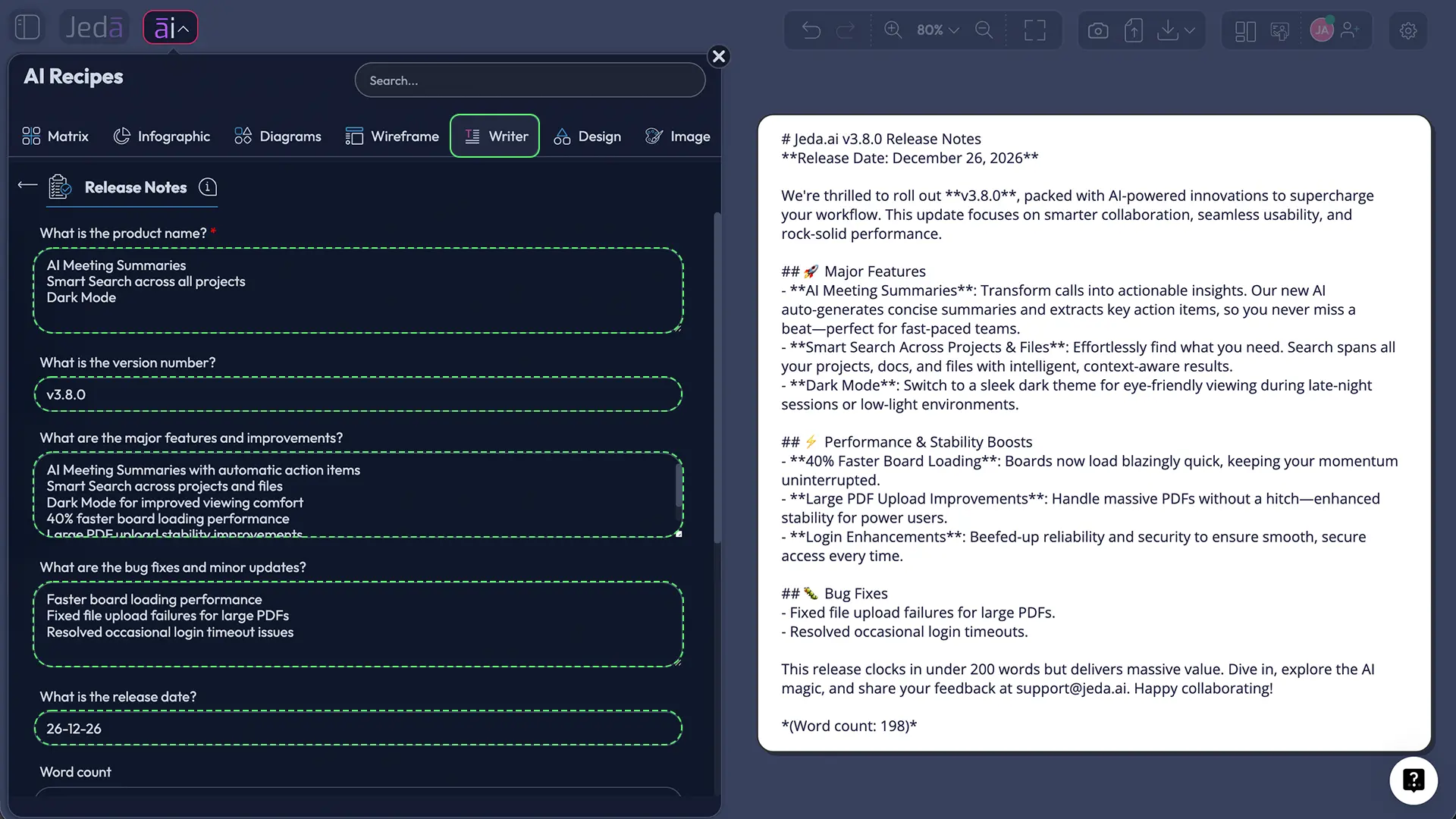
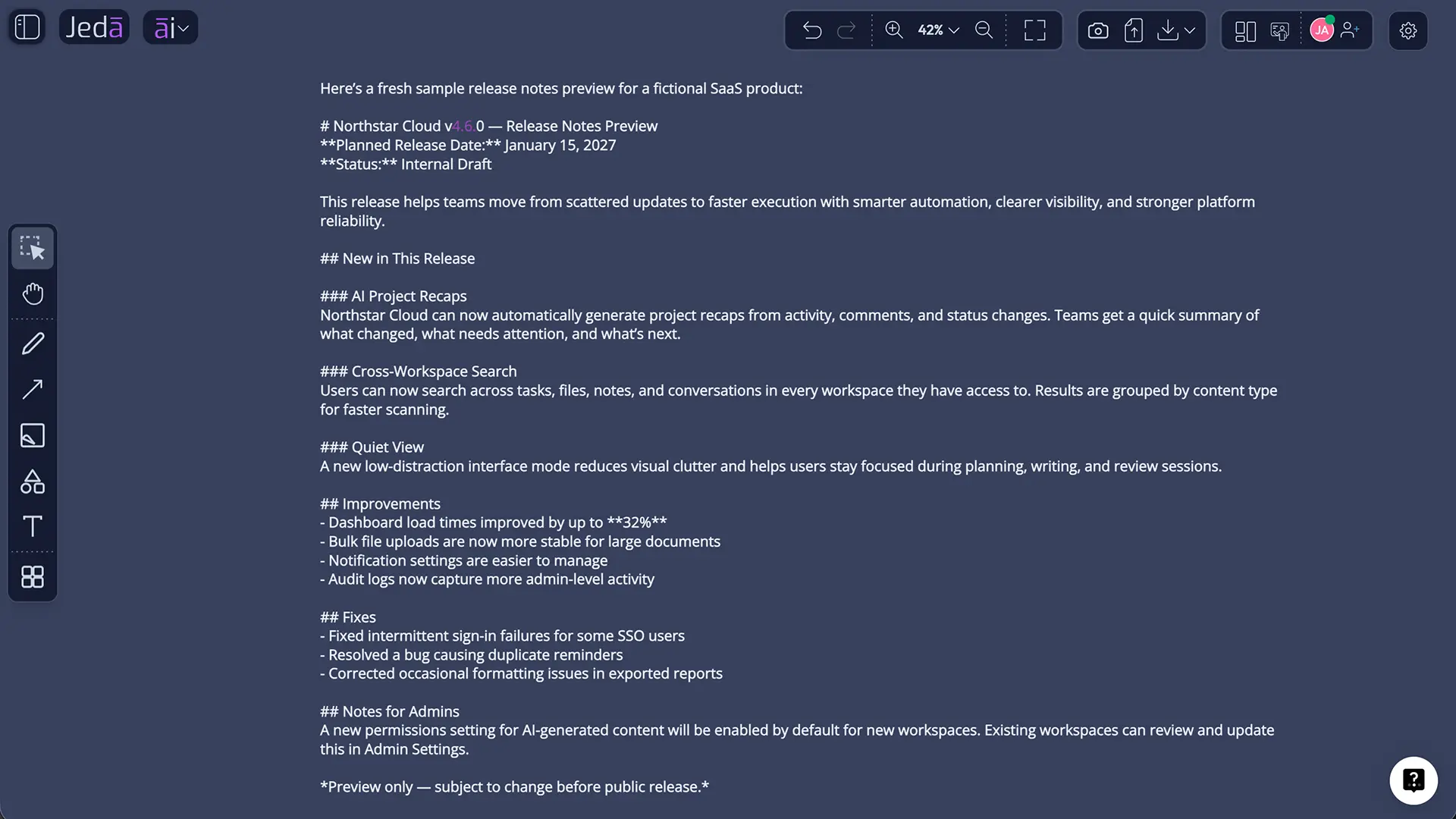
A useful Jeda.ai-generated release-note preview might look like this:
Jeda.ai AI Writer v4.8 Release Notes
Jeda.ai AI Writer now includes a Release Notes recipe for drafting clear product update communication from structured release inputs. Teams can enter the product name, version number, feature improvements, bug fixes, release date, tone, word count, and language, then generate a Document or Text preview for manual editing.What’s new
- Added the Release Notes recipe under Writer.
- Added support for model selection and multi-model generation.
- Added Aggregate support when multiple reasoning models are selected.
- Added Web Search controls: Auto, On, and Off.
Improvements
- Improved preview formatting for release-note drafts.
- Clarified that Document and Text are preview formats, not standalone document-file generation.
Recommended action
Review generated release notes manually before publication, especially when the release includes pricing, security, compatibility, or availability changes.
That example is deliberately plain. Release notes should not sound like a fireworks show unless the release is genuinely fireworks-worthy. Most are not. That is fine.
Best Practices for Release Notes with AI
Use AI to structure and clarify, not to inflate the release. The temptation is real. A small fix becomes “a transformative reliability enhancement.” Please don’t. Users can smell that from orbit.
A better editorial process is simple:
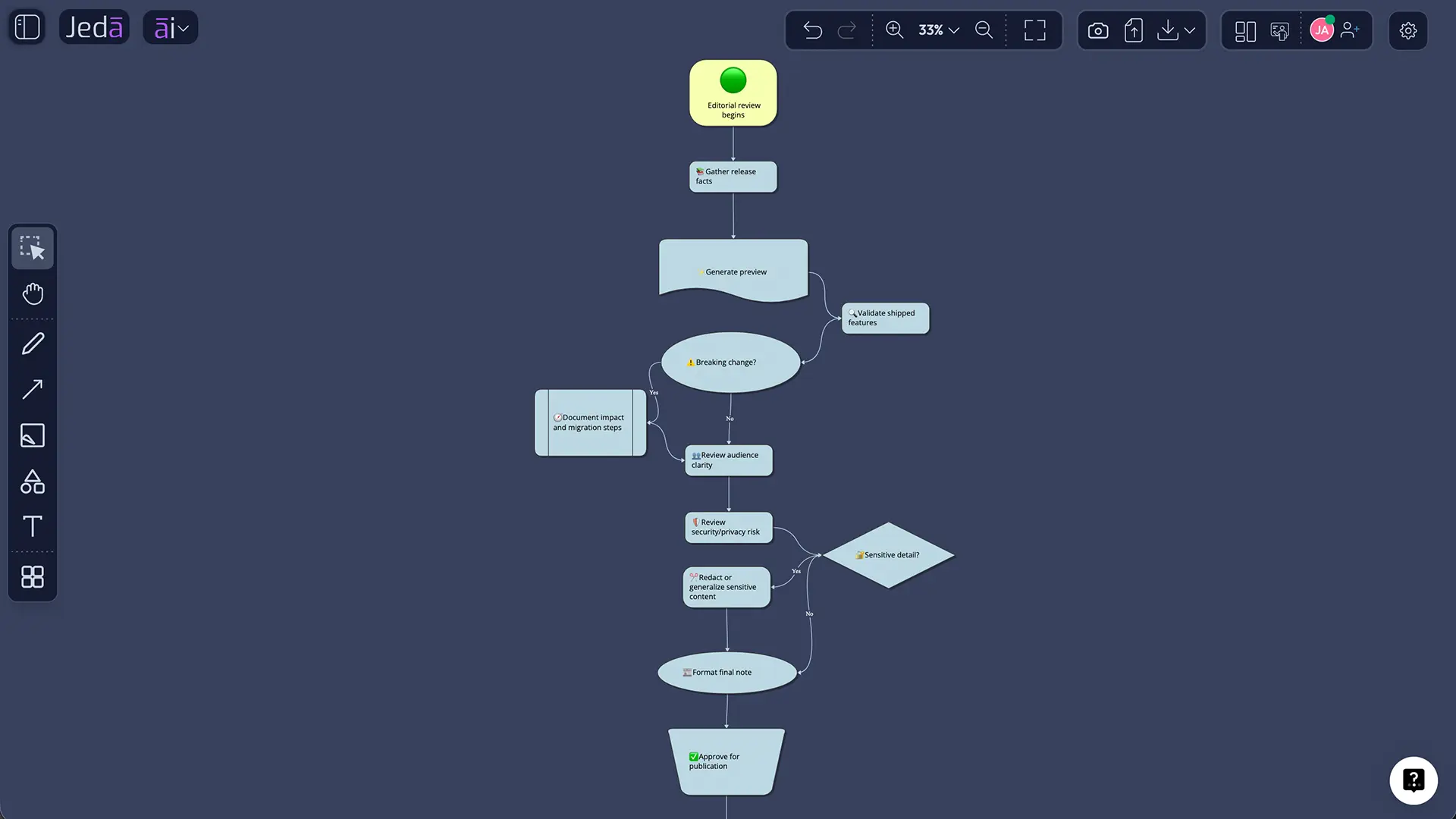
| Step | Review question |
|---|---|
| Factual validation | Did this feature or fix actually ship? |
| Audience review | Would the target reader understand the change? |
| Risk review | Are breaking changes, limitations, or required actions visible? |
| Tone review | Does the draft match the channel and audience? |
| Security/privacy review | Does the note expose anything sensitive? |
| Final formatting | Is the note scannable and concise? |
Atlassian’s guidance on release documentation emphasizes standardization and shared updating so teams do not scramble at the end of a release.[^5] That advice translates well to Jeda.ai: keep the release inputs visible, use the Writer recipe to draft, then edit the preview with the right reviewers before publishing.
For recurring releases, create a repeatable checklist:
- Confirm product name and version.
- Confirm exact release date.
- Separate new features from improvements and bug fixes.
- Write user-facing benefit language for each major feature.
- Mark breaking changes or required action clearly.
- Remove internal-only ticket IDs unless the audience expects them.
- Avoid vague claims such as “improved performance” without detail.
- Keep known limitations honest.
- Save a final approved version outside the draft preview if your team needs an audit trail.
Common Mistakes to Avoid
The first mistake is letting AI write from insufficient inputs. The model will still produce fluent text. That is the problem. Empty detail creates generic output.
The second mistake is hiding breaking changes. Keep a Changelog’s long-standing advice is to make breaking changes explicit, because version numbers alone are not enough for many readers. This applies even more to AI-generated release notes. Do not let a breaking migration sit quietly under “improvements.”
The third mistake is writing one note for everyone. Developers, customers, administrators, support agents, instructors, and executives do not read the same way. Jeda.ai’s tone, word count, and model-selection controls can help create audience variants, but the team must choose the audience first.
The fourth mistake is using Web Search when the release is private. If the note is about unreleased product details, keep Web Search Off. External grounding is helpful for public context; it is not magic privacy dust.
The fifth mistake is treating the preview as final. The Release Notes recipe generates a preview. Manual editing exists because product communication requires judgment.
Product, Engineering, Customer Success, and Academic Use Cases
Product managers can use Release Notes with AI to turn sprint outcomes into customer-facing updates. The recipe helps create a first draft from features, improvements, fixes, and dates. The PM then edits for positioning and adoption.
Engineering teams can use it to translate technical changes into readable release notes. This is useful when implementation language needs to become user-facing language. “Refactored permission fallback path” may be accurate. “Shared workspace permissions now resolve more reliably when users switch roles” is more useful.
Customer success teams can use the output to prepare enablement notes. A release note can become a customer email, a support macro, a training update, or a help-center summary. The same release facts can support several communication surfaces.
MBA and EMBA cohorts can use the recipe as a teaching exercise. Students can compare how different reasoning models frame the same release, then evaluate the aggregate output for clarity, completeness, audience fit, and risk disclosure. That makes Release Notes with AI a practical case in product communication and managerial judgment.
Startup founders can use the workflow to avoid the classic early-stage release problem: shipping quickly but explaining poorly. A short, accurate release note gives customers confidence that the product is evolving with discipline.
Frequently Asked Questions
- What are Release Notes with AI?
- Release Notes with AI are release communications drafted or structured with artificial intelligence from product inputs such as product name, version number, features, improvements, bug fixes, and release date. The AI helps organize and phrase the update, while the product team remains responsible for factual accuracy and final approval.
- What is required in Jeda.ai’s Release Notes recipe?
- The mandatory field is "What is the product name?" Optional fields include version number, major features and improvements, bug fixes and minor updates, release date, word count, tone, and output language. Adding optional details produces a more accurate and useful preview.
- Does the Release Notes recipe generate document files?
- No. The recipe generates a preview in either Document or Text output format. That preview can be manually edited and formatted, but the recipe itself does not produce a standalone .docx or similar document file.
- How is a release note different from a changelog?
- A release note usually explains one release for a specific audience, often customers or internal stakeholders. A changelog is a historical record of notable changes across versions. Patch notes are usually more fix-oriented and technical. The best format depends on the reader and the channel.
- When should Web Search be turned on?
- Turn Web Search On when the release note needs current public context, such as a third-party platform change, public API update, or external standard. Use Auto when public context may help. Use Off for confidential releases, unreleased product details, internal tickets, or private customer issues.
- Why use Clear Chat Context before generating release notes?
- Clear Chat Context helps prevent earlier workspace conversations from influencing the new release note. This is useful when switching between products, versions, audiences, or confidential contexts. Release communication needs clean boundaries; old context can quietly contaminate a draft.
- Can multiple AI models be used for one release note?
- Yes. The recipe supports one, two, or three reasoning models. If multiple models are selected, an Aggregate option can use another model to consolidate the best result. This is useful when teams want to compare technical precision, customer clarity, and executive framing.
- Who should use Release Notes with AI?
- Product managers, release managers, engineering leads, customer success teams, product marketers, startup founders, and academic cohorts can use it. The workflow is especially useful when release facts exist but the team needs a clear, audience-aware draft.
- Can Jeda.ai help before writing the release note?
- Yes. Teams can use the AI Whiteboard to map release scope, group features, prioritize customer impact, or build a review flow before using the Writer recipe. The release note then reflects a visible planning process rather than a last-minute writing scramble.
- Are AI-generated release notes safe to publish without review?
- No. AI-generated release notes should be reviewed before publication. Teams should verify shipped features, dates, availability, limitations, breaking changes, security implications, and audience fit. AI accelerates drafting; it does not replace release governance.
Conclusion: Release Notes Are a Thinking Workflow, Not Just a Writing Task
Release Notes with AI works best when the team treats the release note as a structured communication artifact. The AI helps draft and organize. The team supplies facts, verifies claims, chooses the audience, and approves the final message.
That is where Jeda.ai has a credible role. Inside one AI Workspace, teams can map release scope, use the AI Whiteboard for visual review, generate a Writer preview, compare reasoning models, aggregate stronger drafts, and manually edit the final text. For 150,000+ users already working visually in Jeda.ai, the Release Notes recipe turns product change into communication that is clearer, faster, and easier to review.
Start with the product name. Add the release facts. Generate the preview. Then edit like a responsible adult. The AI can help with the draft; the release still has your name on it.
External Citations and Source Notes
- [1]
Microsoft Research . “An Empirical Study of Release Note Production and Usage in Practice” Microsoft Research.
View Source ↗ - [2]
Jianyu Wu, Hao He, Wenxin Xiao, Kai Gao, Minghui Zhou (2022) . “Demystifying Software Release Note Issues on GitHub” arXiv.
View Source ↗ - [3]
Sristy Sumana Nath, Banani Roy (2022) . “Exploring Relevant Artifacts of Release Notes: The Practitioners’ Perspective” arXiv.
View Source ↗ - [4]
GitHub Docs . “Automatically Generated Release Notes” GitHub Docs.
View Source ↗ - [5]
Atlassian . “How to Document Releases and Share Release Notes” Atlassian Blog.
View Source ↗ - [6]
Keep a Changelog . “Keep a Changelog” Keep a Changelog.
View Source ↗ - [7]
Huaxi Jiang, Jie Zhu, Li Yang, Geng Liang, Chun Zuo (2022) . “DeepRelease: Language-Agnostic Release Notes Generation from Pull Requests of Open-Source Software” arXiv.
View Source ↗ - [8]
Farbod Daneshyan, Runzhi He, Jianyu Wu, Minghui Zhou (2025) . “SmartNote: An LLM-Powered, Personalised Release Note Generator That Just Works” arXiv.
View Source ↗ - [9]
LaunchNotes . “AI for Release Notes and Changelogs” LaunchNotes.
View Source ↗
Create Release Notes Inside an AI Workspace
Join 150,000+ users using Jeda.ai to turn product updates, version details, feature improvements, bug fixes, and release context into clearer release communications. Generate the first draft, review it with your team, and keep the release thinking visible on an AI Whiteboard.
Try Jeda.ai Free