Social Media Post with AI sounds like a speed feature: enter a topic, choose a platform, and get a draft. That is useful, but it is not the real advantage. The stronger use case is turning genuine expertise into platform-aware content without sanding away the point of view that made the idea worth sharing.
Jeda.ai brings that process into an AI Workspace where the draft can sit beside campaign strategy, research, visual concepts, and team feedback on the AI Whiteboard. More than 150,000+ users use Jeda.ai for structured thinking and content workflows. The Social Media Post recipe applies the same discipline to a deceptively hard problem: writing quickly without sounding interchangeable.
What Is Social Media Post with AI?
Social Media Post with AI is a guided Writer recipe in Jeda.ai. It creates a social post from two required inputs—who is writing and which platform the post is for—plus optional details such as the message, tone, word count, and output language.
The recipe matters because platform choice changes the writing job. A founder's LinkedIn post should not read like an Instagram caption. A release announcement needs a different rhythm from a contrarian industry opinion. The core idea may stay consistent, but the hook, density, evidence, and call to action should change.
The output appears as an editable preview in Document or Text format. It does not publish automatically or generate a native document file.
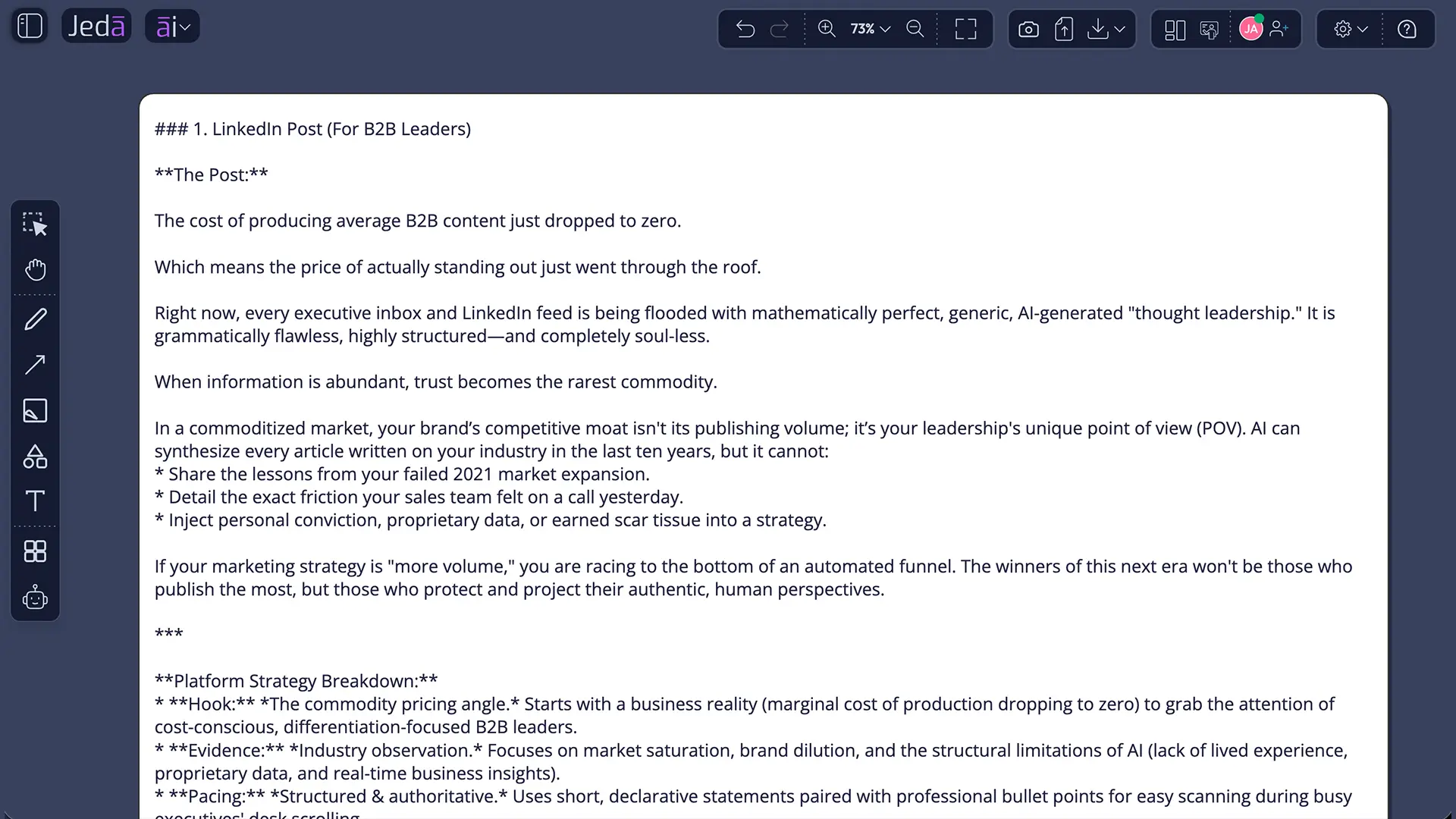
Why AI Social Writing Is No Longer Just About Speed
The blank page is no longer the main bottleneck. Generic output is.
LinkedIn has said that AI-assisted writing is acceptable, but posts still need to represent the author's real voice and perspective. The platform is also reducing distribution for generic, repetitive, heavily automated content. Research on AI-assisted social interaction shows the same tension: generative tools can increase participation while reducing perceived quality and authenticity.
So the useful question is not, “Can AI write a post?” It can. The better question is, “Can your workflow preserve judgment, specificity, and accountability while removing avoidable drafting work?”
- Faster first drafts
Turn a clear idea into a structured draft without spending an hour rearranging the opening.
- Platform-aware framing
Use the selected platform to guide length, pacing, context, and reader action.
- Alternative angles
Compare different reasoning models instead of treating the first output as a verdict.
What Information Does the Recipe Use?
Mandatory fields
Who is writing defines the voice and authority behind the post. “Founder of a B2B SaaS company sharing a lesson from a failed launch” is far more useful than “business owner.” The stronger input tells the model what the writer has earned the right to say.
Which platform defines the destination and expected behavior. LinkedIn, Instagram, Facebook, TikTok, X, and Threads reward different forms of attention and interaction.
Optional fields
What is the message or topic provides the substance. Use a claim, lesson, announcement, customer problem, or opinion—not a vague category.
Tone controls delivery. Thought-provoking, professional, conversational, educational, or direct can all work when they support the idea.
Word Count creates a practical boundary. It prevents a simple update from becoming a manifesto or a nuanced argument from shrinking into three vague lines.
Output Language defaults to English and can be changed for the intended audience.
| Controls | Weak input | Stronger input | |
|---|---|---|---|
| Who is writing | Voice and authority | A marketer | A product marketer sharing a lesson from a failed launch |
| Platform | Format and reader behavior | Social media | LinkedIn for product leaders and consultants |
| Message | Substance and angle | Write about AI | Why AI drafts still need a human point of view |
| Tone | Delivery | Good tone | Direct, evidence-led, and thought-provoking |
How Do Reasoning Models and Aggregate Improve the Draft?
You can select one, two, or three reasoning models. One model is enough for a routine update. Multiple models are more useful when the same idea can support different credible narratives—customer value, market change, operational learning, or a contrarian viewpoint.
When two or more models are selected, Aggregate becomes available. You can choose one additional model to compare the outputs and generate a consolidated result. Think of it as an editorial comparison layer, not a truth machine. Agreement between models is not evidence.
When Should You Use Web Search?
The Web Search setting offers Auto, On, and Off.
Auto is the practical default. Jeda.ai decides whether the post needs current information.
On is useful for recent industry developments, company announcements, changing regulations, new research, live statistics, or factual comparisons.
Off works for personal experience, evergreen ideas, internal updates, or tightly supplied source material.
Web Search improves grounding, but it does not remove the need for verification. Check names, dates, numbers, quotations, and links before publishing. A polished hallucination is still a hallucination—just with better posture.
How to Create a Social Media Post with AI in Jeda.ai
You can reach the recipe by navigating through the Writer tab or searching for it directly. Both methods open the same guided form.
Method 1: Navigate through Writer recipes
- Open AI Recipes
Click the ai∨ menu in the top-left corner of the Jeda.ai workspace.
- Choose Writer
Select the Writer tab to view business and marketing writing recipes.
- Open Social Media Post
Locate the recipe and open its guided form.
- Complete required fields
Describe who is writing and select the target platform.
- Add optional direction
Enter the message, tone, word count, and output language when useful.
- Configure generation
Choose one to three reasoning models, enable Aggregate when needed, set Web Search, and use Clear Chat Context if unrelated history could influence the draft.
- Choose Document or Text
Select the preview format, generate the post, then manually edit and format it before publishing.
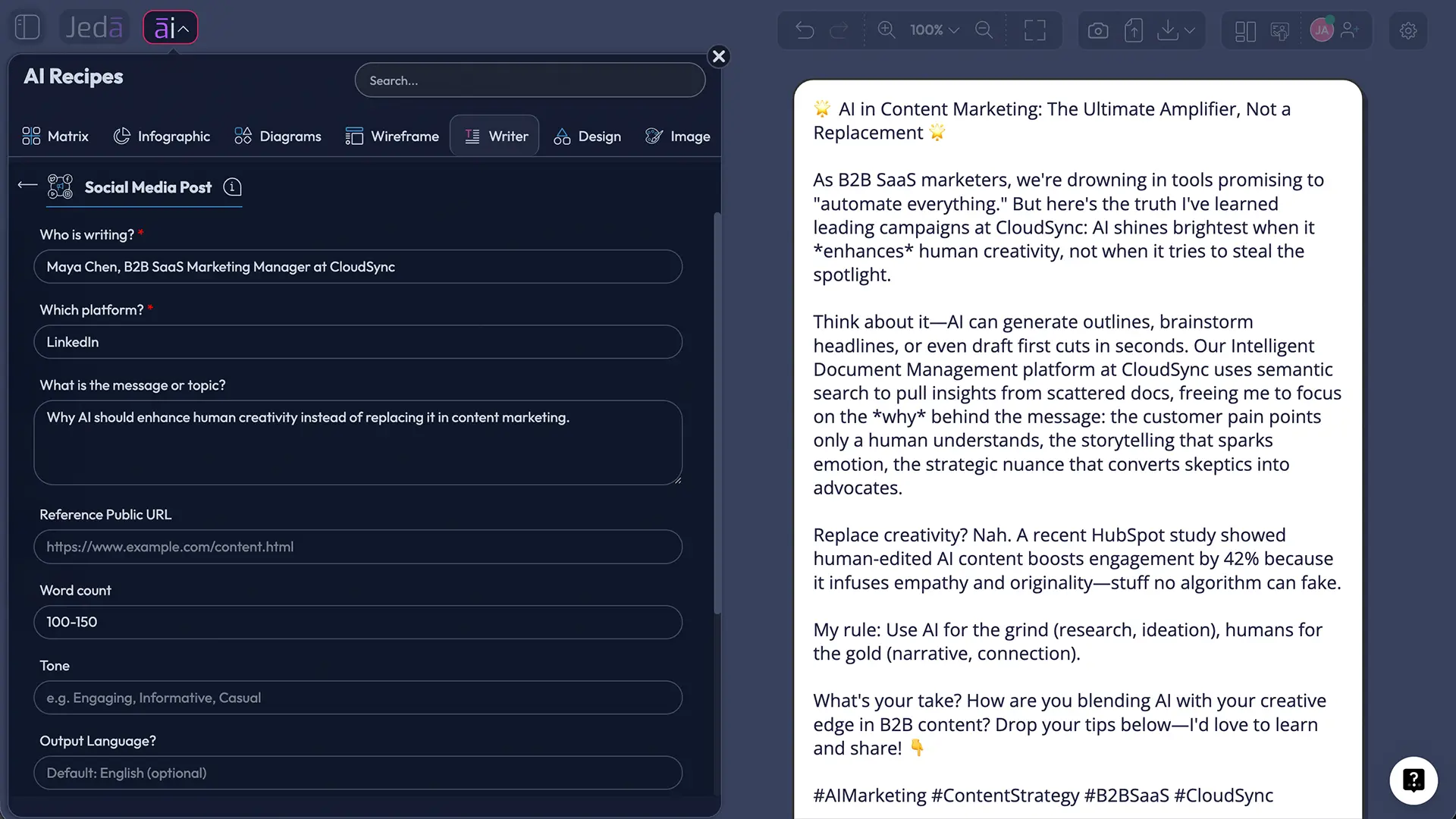
Method 2: Search for the recipe directly
- Open AI Recipes
Click the ai∨ menu to open the recipe panel.
- Search the recipe name
Type Social Media Post into the search bar.
- Open the result
Select the matching recipe without browsing the Writer tab.
- Enter writer and platform
Complete the two mandatory fields first.
- Refine and generate
Add optional details, configure models, Aggregate, Web Search, Clear Chat Context, and output format, then generate.
- Edit the preview
Review facts, sharpen the voice, format the text, and copy the final version to the selected platform.
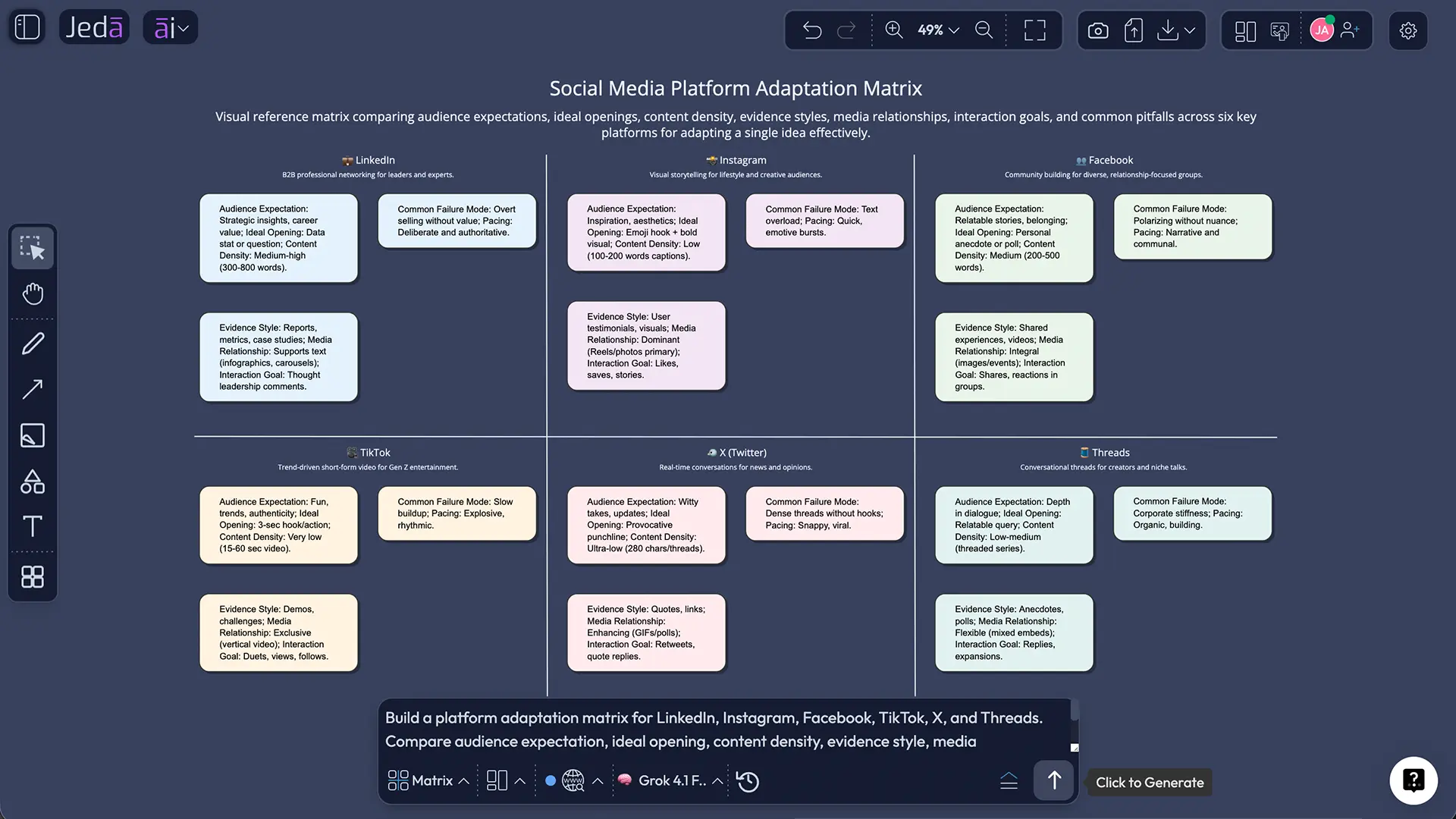
What Do Document and Text Output Formats Mean?
Document places the generated post inside a styled text container. It is useful when the draft needs to remain visually organized beside campaign notes, research, and other assets on the AI Whiteboard.
Text returns a simpler text object for quick editing, copying, and rearranging.
Both are preview formats inside the Jeda.ai workspace. Neither creates a native Word file or publishes directly to the selected platform.
A Better Human-in-the-Loop Content Workflow
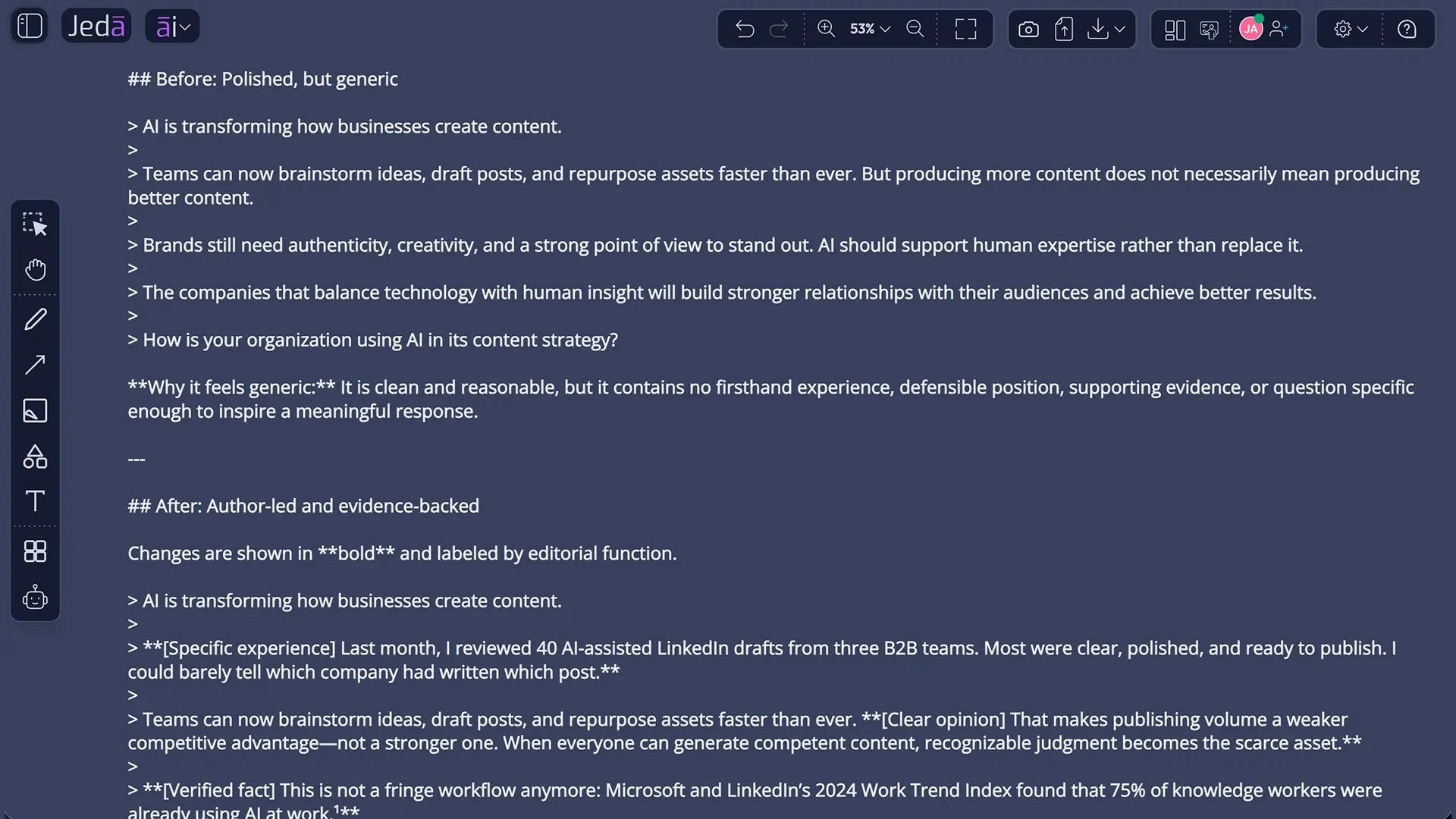
Start with a claim, not a topic
“Write about customer retention” is a subject. “Most retention problems begin before onboarding ends” is a claim. Claims create tension and give the reader something to test or remember.
Add earned context
Include the writer's role, the real event or lesson, the intended reader, and the desired outcome. A model can imitate confidence with almost no context. It cannot invent legitimate experience without crossing into fiction.
Generate alternatives when the stakes justify it
Use multiple models for distinct narratives: educational, proof-led, story-led, contrarian, or product-led. Use Aggregate to consolidate only after you have compared the differences.
Edit ruthlessly
Delete throat-clearing. Replace abstractions with examples. Remove unsupported claims. Add the sentence only you could write. Then make the call to action proportional to the idea.
Adapt instead of duplicating
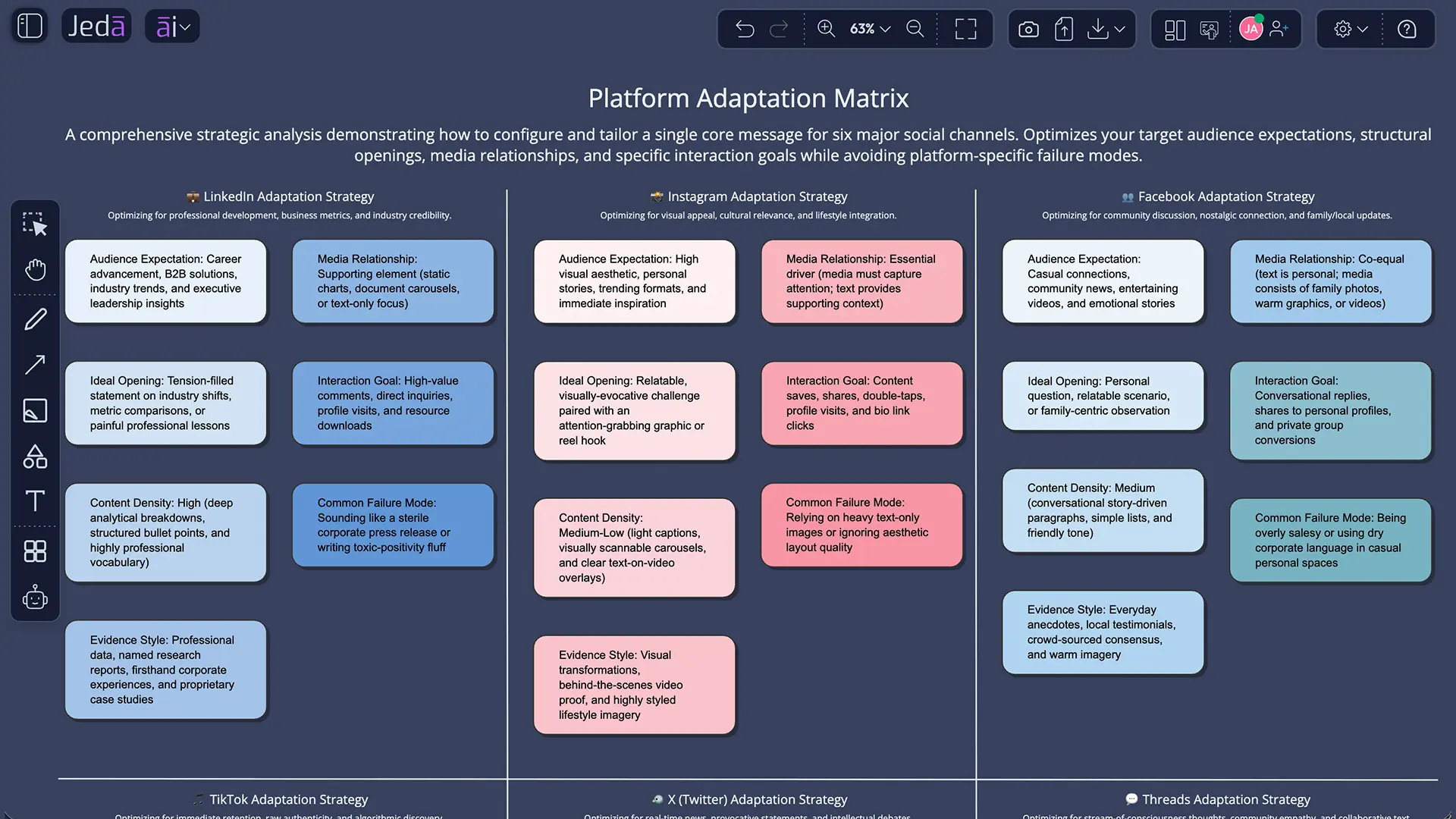
Keep the central insight, but rebuild the opening, density, formatting, and interaction style for each platform. Copy-paste publishing saves minutes and wastes relevance.
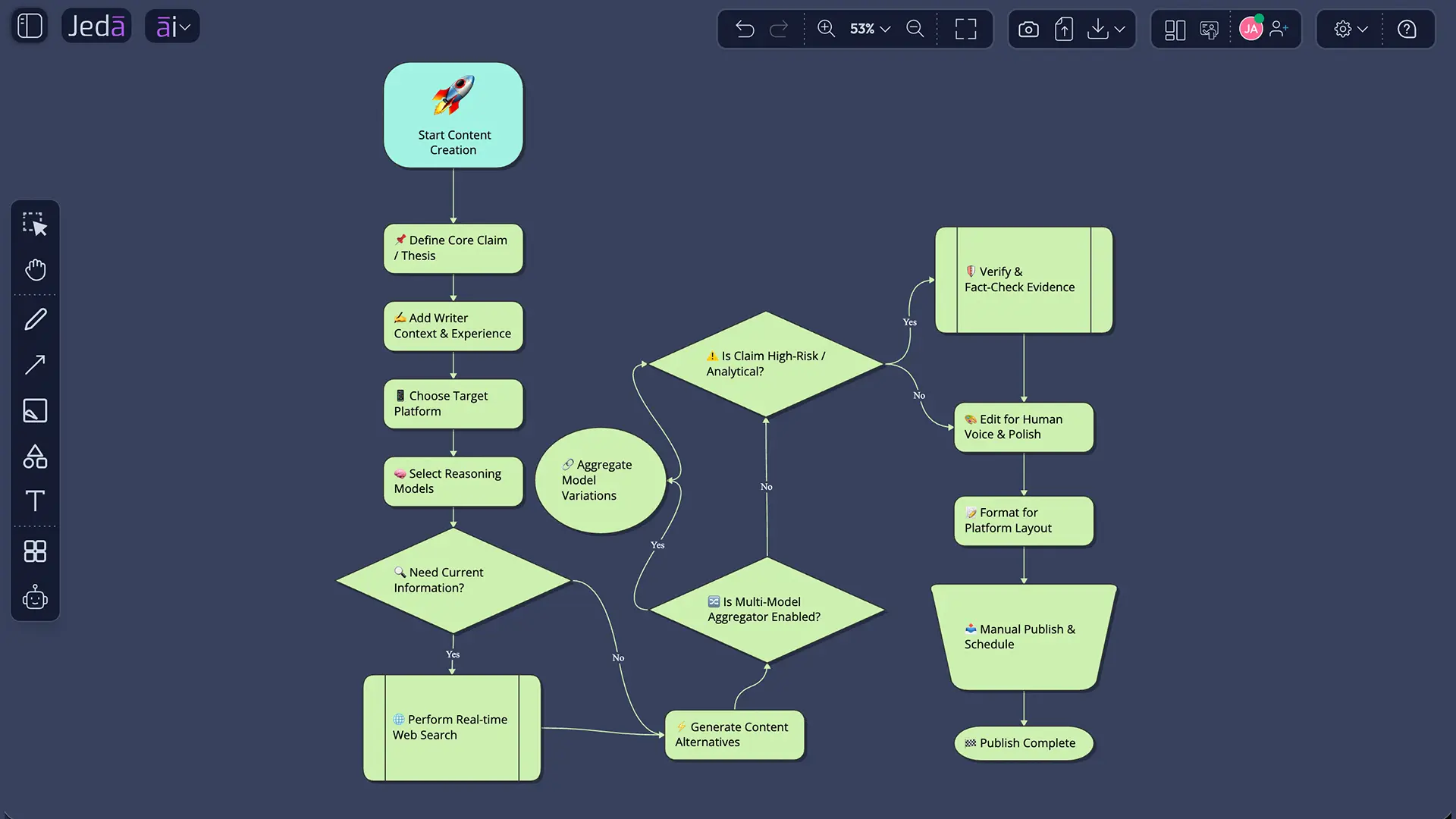
How Should the Draft Change by Platform?
LinkedIn: Lead with a specific claim or direct answer. Add professional context, useful evidence, and a real point of view. Avoid generic motivation dressed as expertise.
Instagram and Facebook: Let the caption add meaning the media cannot provide. Do not simply narrate the image. When realistic AI-generated media is involved, current platform labeling rules may apply.
TikTok: Write for the spoken or on-screen moment. The hook must be immediate, but it still needs an honest payoff. TikTok requires labels for realistic AI-generated content.
X and Threads: Compress the claim without flattening it. One clear observation, one useful piece of context, and one reply-worthy question usually beat a miniature essay.
| Primary job | Useful opening | Common mistake | |
|---|---|---|---|
| Share expertise | Specific claim | Generic inspiration | |
| Instagram / Facebook | Add meaning to media | Missing context | Repeating the visual |
| TikTok | Frame a fast payoff | Immediate tension | Unresolved clickbait |
| X / Threads | Compress and invite response | Clear observation | Too many ideas |
Example Input for a Thought-Leadership Post
That brief gives the model a role, audience, position, and boundary. It leaves room for variation without leaving room for fog.
Best Practices and Common Mistakes
The common failures are predictable: entering a topic without a position, reusing one draft across every platform, treating Aggregate as fact-checking, publishing the preview untouched, and leaving stale current information in the post. Clear Chat Context when unrelated previous work could contaminate the new draft—but keep useful context when it genuinely supports the message.
What This Recipe Changes—and What It Does Not
The Social Media Post recipe changes the economics of drafting. It makes it easier to explore hooks, structures, tones, and platform-specific versions. It does not create lived experience, own the consequences of a false claim, or decide which opinion your company is prepared to defend when the comments arrive.
That is the deeper shift. As writing becomes easier to generate, editorial courage becomes more valuable.
Jeda.ai makes the workflow practical inside a Visual AI environment. You can compare up to three reasoning models, consolidate alternatives with Aggregate, use Web Search for current context, clear unrelated chat history, and keep the result beside campaign strategy on the AI Whiteboard. The broader AI Workspace also gives teams access to 300+ strategic frameworks for planning the thinking behind the content—not just the caption at the end.
Frequently Asked Questions
- What is Social Media Post with AI?
- Social Media Post with AI is a Jeda.ai Writer recipe that creates a platform-aware post from structured inputs. You specify who is writing and the target platform, then optionally add the topic, tone, word count, and output language before generating an editable preview.
- Which fields are required?
- The required fields are Who is writing and Which platform. They establish the voice, authority, destination, and expected format. The message, tone, word count, and output language are optional but usually improve specificity.
- Can Jeda.ai write for different platforms?
- Yes. The recipe uses the selected platform to shape the draft. The central idea can remain consistent, but the hook, pacing, density, formatting, and call to action should change for each platform.
- Can I use multiple reasoning models?
- Yes. You can select one, two, or three reasoning models. Multiple models are useful when you want different hooks or arguments. With two or more models, Aggregate can consolidate the outputs through an additional selected model.
- Does Aggregate verify facts?
- No. Aggregate compares and consolidates model outputs, but it does not certify factual accuracy. Verify names, dates, statistics, quotations, and links against authoritative sources before publication.
- When should Web Search be On?
- Use Web Search On when the post depends on recent events, current research, changing product details, regulations, live statistics, or factual comparisons. Use Auto for most mixed cases and Off for personal experience or fully supplied material.
- Does the recipe publish directly?
- No. It generates an editable preview inside Jeda.ai. You manually review, format, and copy the final version to the target platform. The recipe does not automatically publish or schedule the post.
- Does Document output create a Word file?
- No. Document and Text are preview formats inside the workspace. Document uses a styled container; Text uses a simpler text object. Neither creates a native Word file.
- What does Clear Chat Context do?
- Clear Chat Context resets the AI conversation context. Use it when unrelated previous prompts may influence the new post. Keep the context when earlier research or campaign discussion is directly relevant.
- Should AI-assisted content be labeled?
- Disclosure depends on the platform, jurisdiction, and content type. Major platforms require or apply labels to some realistic AI-generated images, audio, or video. Check current rules and disclose AI media when viewers could reasonably be misled.
Sources and Further Reading
- [1]
Davang Shah (2026) . “How to Maximize AI Visibility for Your LinkedIn Posts” LinkedIn Marketing Solutions.
View Source ↗ - [2]
LinkedIn (2026) . “Keeping Conversations Real on LinkedIn” LinkedIn News.
View Source ↗ - [3]
Simon Kemp and DataReportal (2025) . “Digital 2026: 2 in 3 People on Earth Now Use Social Media” DataReportal.
View Source ↗ - [4]
Anders Giovanni Møller, Daniel M. Romero, David Jurgens, and Luca Maria Aiello (2026) . “The Impact of Generative AI on Social Media” Scientific Reports.
View Source ↗ - [5]
Meta (2024) . “Our Approach to Labeling AI-Generated Content and Manipulated Media” Meta Newsroom.
View Source ↗ - [6]
TikTok (2025) . “More Ways to Spot, Shape and Understand AI-Generated Content” TikTok Newsroom.
View Source ↗
Create a Social Post Worth Reading
Join 150,000+ users using Jeda.ai to turn real expertise into sharper, platform-aware content inside one AI Workspace.
Try the Social Media Post Recipe