Website Copy with AI helps teams turn rough product notes into structured, page-ready messaging faster. Not final-perfect. Not “ship whatever the robot says.” Faster. The real advantage is getting a useful first draft that already understands the product, the page type, the audience, and the job that page has to do.
That matters because website copy is where strategy gets exposed. A vague homepage makes the product look vague. A service page that talks only about features makes buyers do the translation work. A landing page with five different messages and no clear call to action? Beautiful little conversion crime scene.
Jeda.ai’s Website Copy recipe gives marketers, founders, consultants, and product teams a guided way to create website copy inside an AI Workspace. You provide the product or service, define the page, add audience and purpose if needed, choose your reasoning setup, and generate a preview that can be manually edited and formatted after generation. The output is copy you can refine, not a locked file.
What is Website Copy with AI?
Website Copy with AI is the process of using artificial intelligence to draft structured website messaging for pages such as homepages, product pages, service pages, landing pages, feature pages, and about pages. The best workflows do more than generate words. They help clarify the promise, organize sections, adapt tone, and produce copy that a human team can review before publishing.
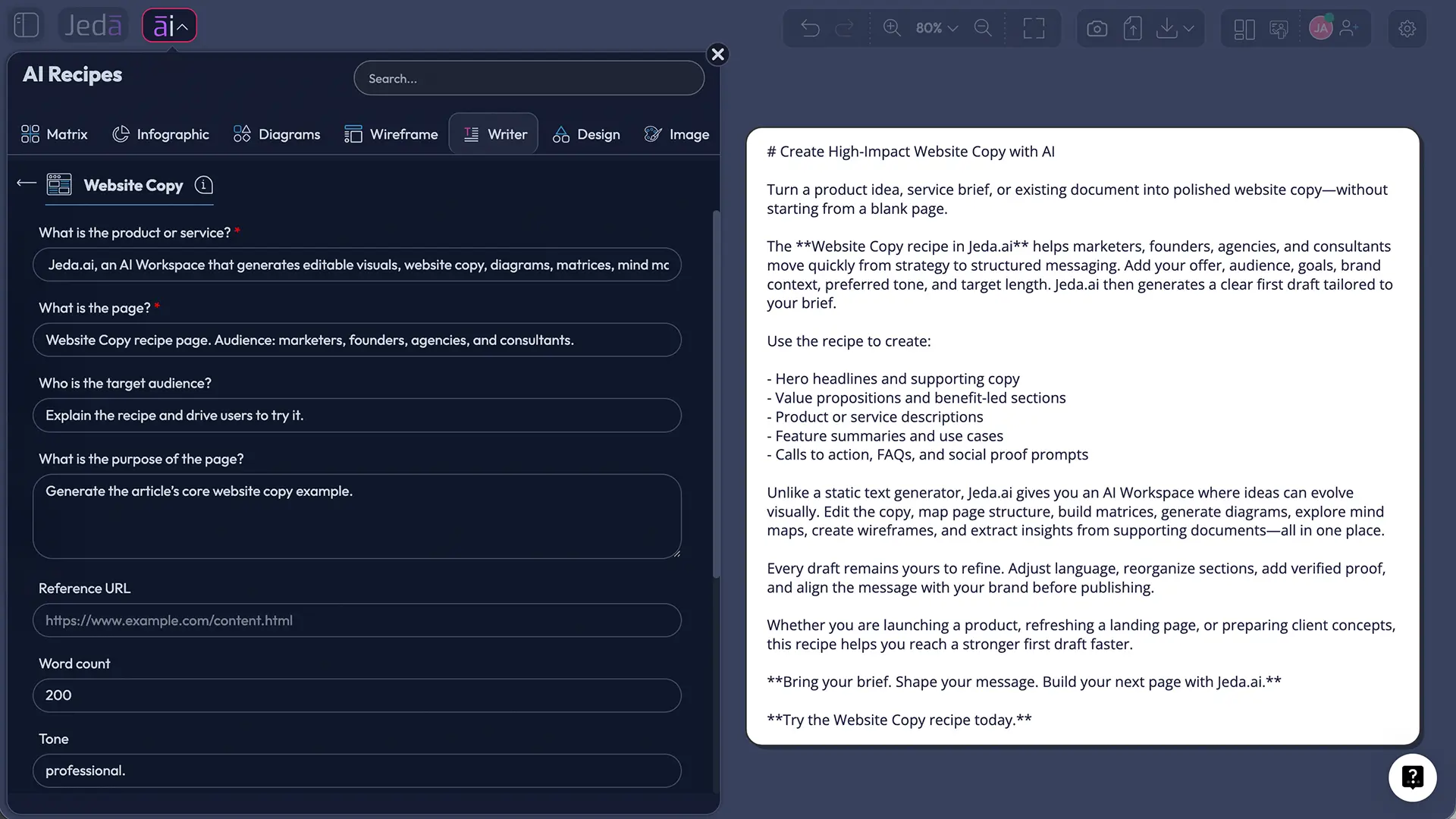
In Jeda.ai, Website Copy is available as a Writer recipe. There is no separate sub-recipe or category inside the AI Writer tab for this specific recipe; users can navigate to it from the Writer recipe area or search for it directly. That keeps the workflow simple: find the recipe, fill in the required fields, pick settings, generate, then edit.
The required fields are practical by design: What is the product or service? and What is the page? Those two inputs force the AI to ground the copy in an actual offering and a specific page objective. Optional fields let you add the target audience, page purpose, preferred tone, word count, and output language. English is the default.
Why website copy needs more structure than a prompt
A blank prompt usually creates generic copy. A structured recipe creates better constraints.
Good website copy answers four questions quickly: what is this, who is it for, why should someone care, and what should they do next? That sounds simple until a team starts writing. Product wants every feature included. Marketing wants a sharper angle. Sales wants objection handling. Leadership wants the brand story. Someone adds “revolutionary” and everyone loses a little dignity.
Google’s guidance for helpful content emphasizes original value, clear purpose, trust, accuracy, and usefulness for a real audience—not content made mainly to manipulate search visibility. That applies directly to AI-generated copy. A page generated with AI still needs human context, proof, and review before it earns trust.
There is also a usability problem. Nielsen Norman Group’s long-standing web writing research says users skim, scan, and look for meaningful headings instead of reading dense page copy end to end. So the win is not “more copy.” The win is clearer copy, structured in sections that a buyer can understand quickly.
Jeda.ai’s Website Copy recipe helps by turning the copy task into a guided form rather than an open-ended guess. That form becomes the strategy container.
Where Jeda.ai fits in the AI copywriting workflow
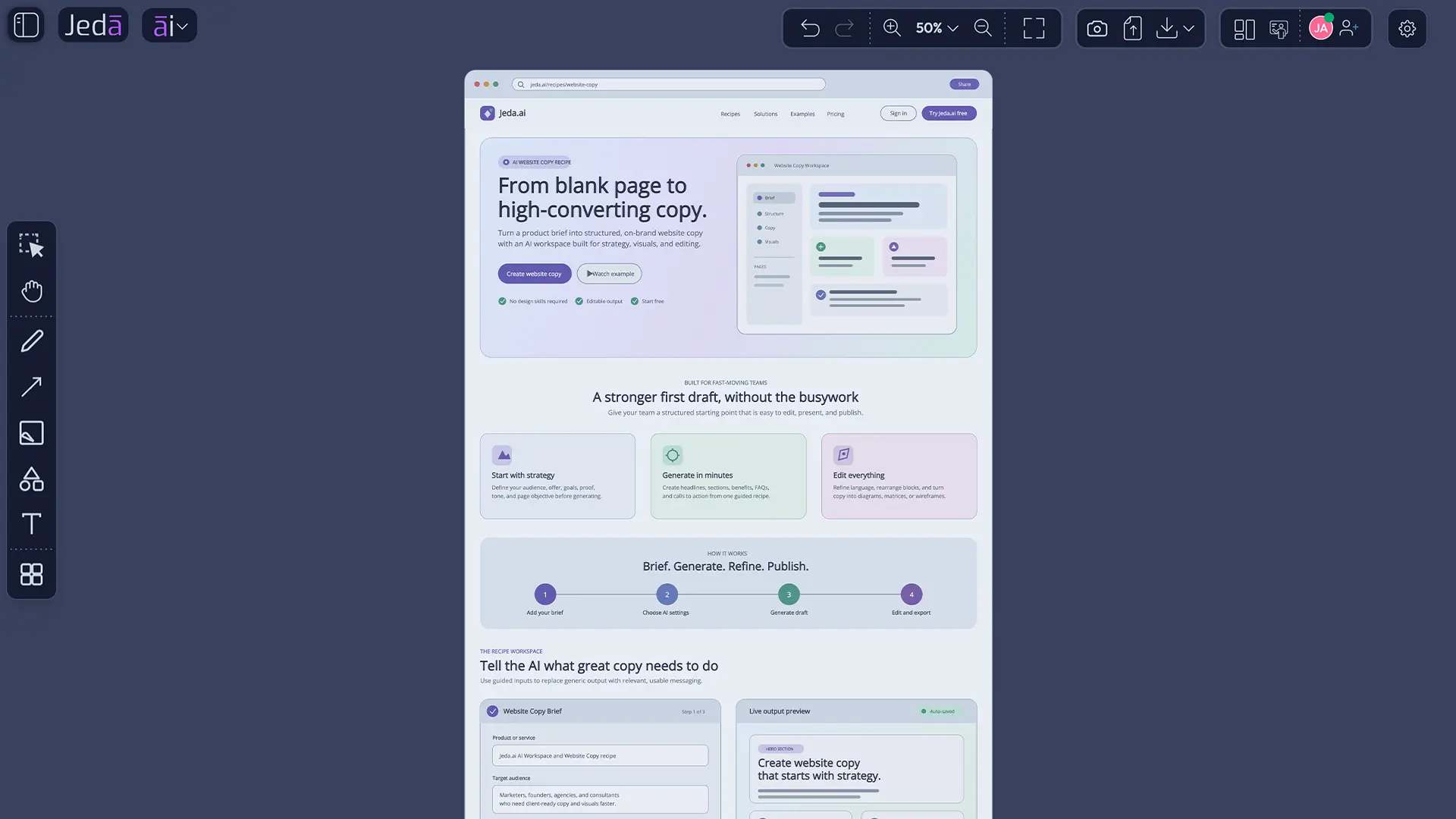
Jeda.ai is an AI Workspace for strategy, design, and innovation: framework-native, visual-first, and built for collaboration. That positioning matters here because website copy does not live alone. It connects to positioning, campaign strategy, customer segments, feature messaging, wireframes, sales scripts, product documentation, and landing-page tests.
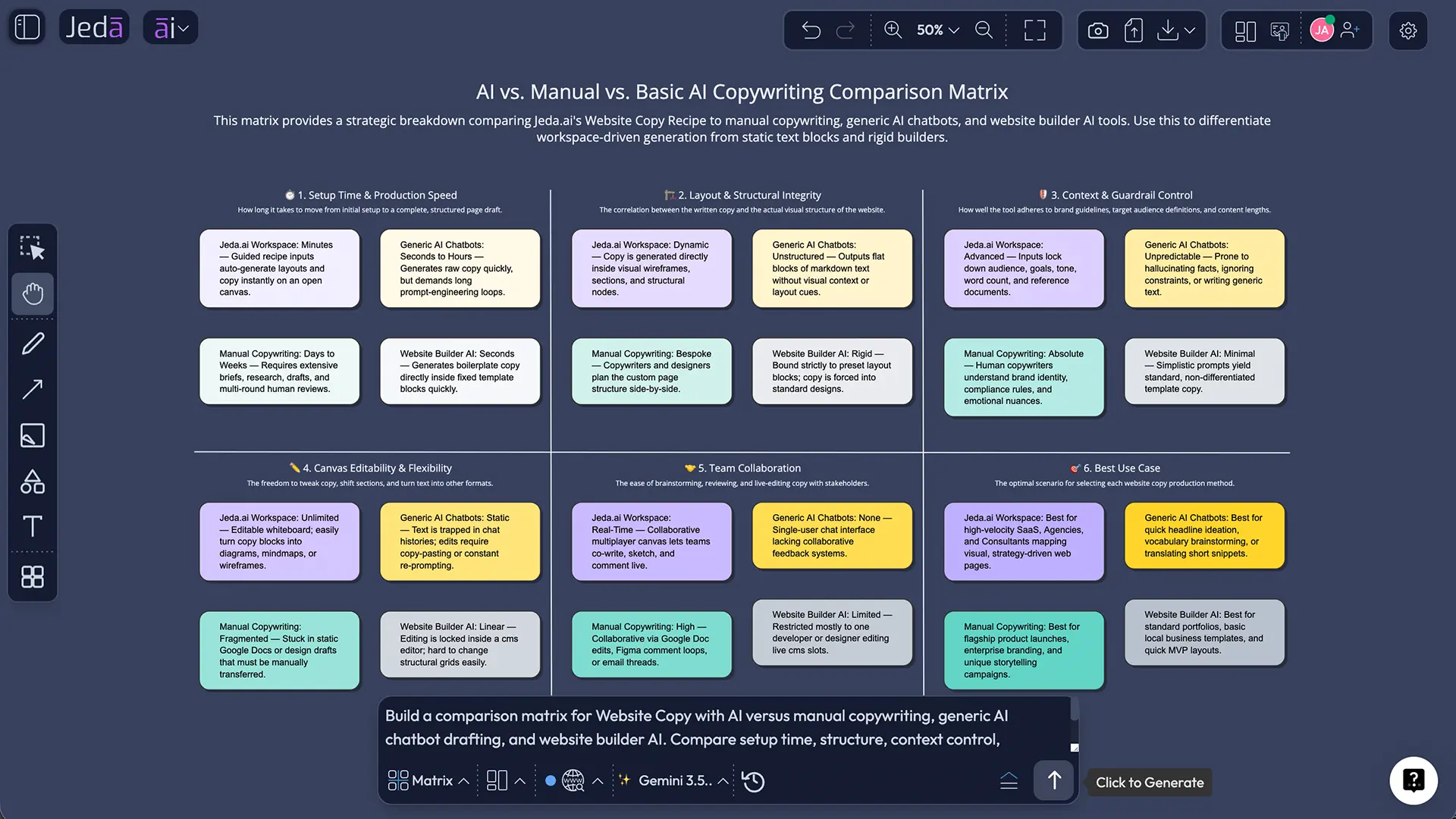
With Jeda.ai, teams can generate website copy, then keep working in the same visual environment. A marketer might draft a service page using the Website Copy recipe, turn the same brief into a Wireframe command for page structure, use a Matrix command to compare three value propositions, and bring stakeholders into the AI Whiteboard to comment on copy blocks. That is a better workflow than copying text between six tabs and pretending the chaos is “collaboration.”
Jeda.ai also supports Web Search as a platform feature in AI Recipes. Users can set Web Search to Auto, On, or Off depending on whether the copy needs current market context, competitor language, recent proof points, or industry trends. For evergreen product messaging, Auto may be enough. For a time-sensitive campaign page, turning Web Search On can help ground the draft with fresher context.
What can you generate with the Website Copy recipe?
The Website Copy recipe is useful for first drafts and structured revisions across common page types. Typical outputs include:
- Homepage copy with hero messaging, value props, proof sections, and calls to action
- Product page copy explaining what the product does, who it serves, and why it is different
- Service page copy for agencies, consultants, SaaS teams, or professional services firms
- Feature page copy with benefits, use cases, objections, and short CTA sections
- Landing page copy for campaigns, launches, waitlists, webinars, or product-led signup flows
- About page messaging that connects mission, credibility, and customer relevance
- Section-level copy such as headlines, subheads, FAQs, feature blurbs, and CTA blocks
The output can be generated as Document or Text. Document output is better when you want a structured preview with sections that feel closer to a page draft. Text output is better when you want plain copy that you can paste elsewhere or format yourself. Important detail: this is a preview. It does not generate native document files. Manual editing and text formatting are available after generation.
How to create Website Copy with AI in Jeda.ai
Use this workflow when you need a structured first draft for a website page.
Method 1: Navigate from the AI Recipes menu
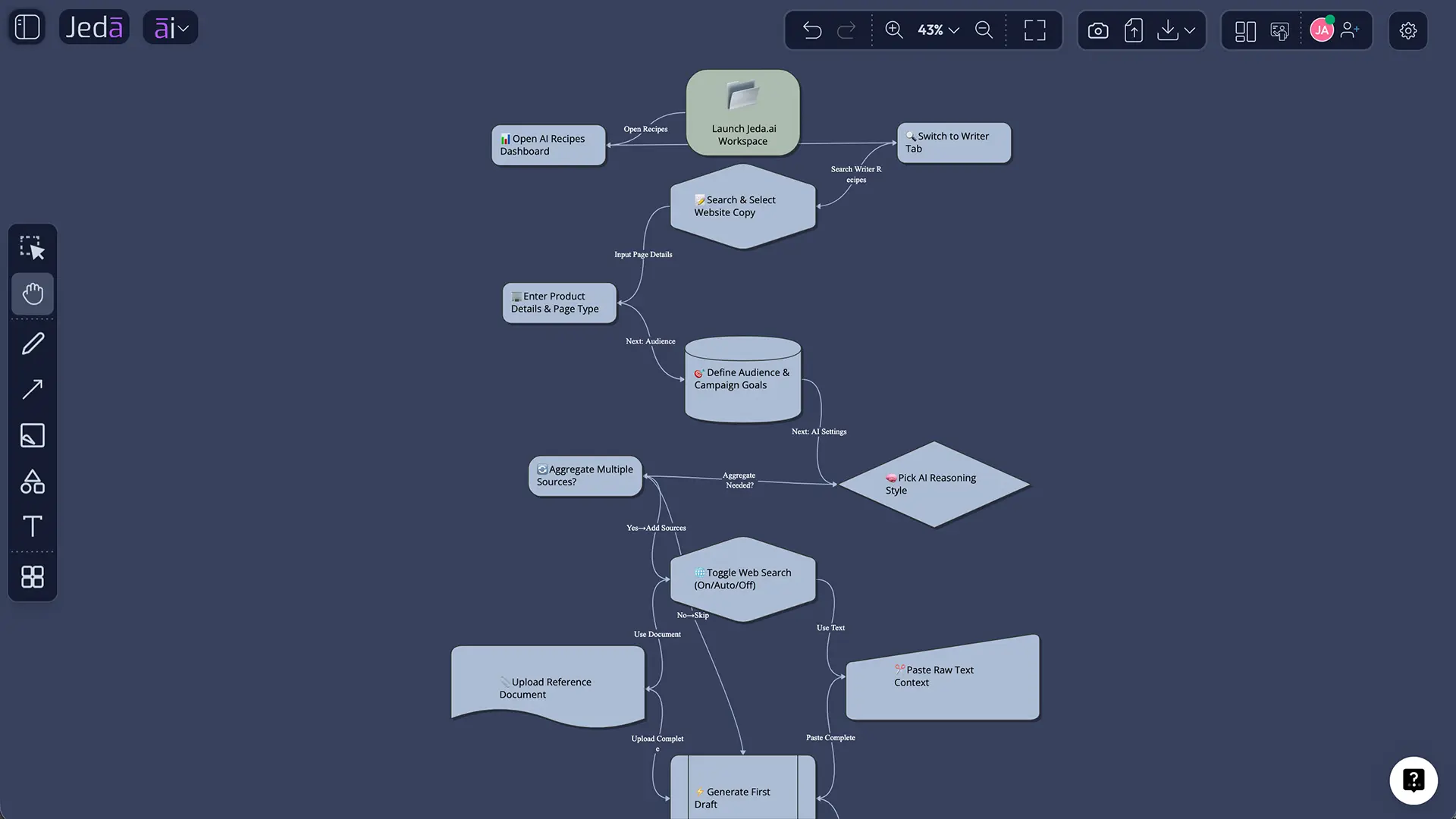
- Open Jeda.ai and enter your workspace.
- Click the AI Menu from the top-left area of the workspace.
- Select the Writer category.
- Find Website Copy. There is no sub-recipe or extra category for this recipe.
- Open the recipe form.
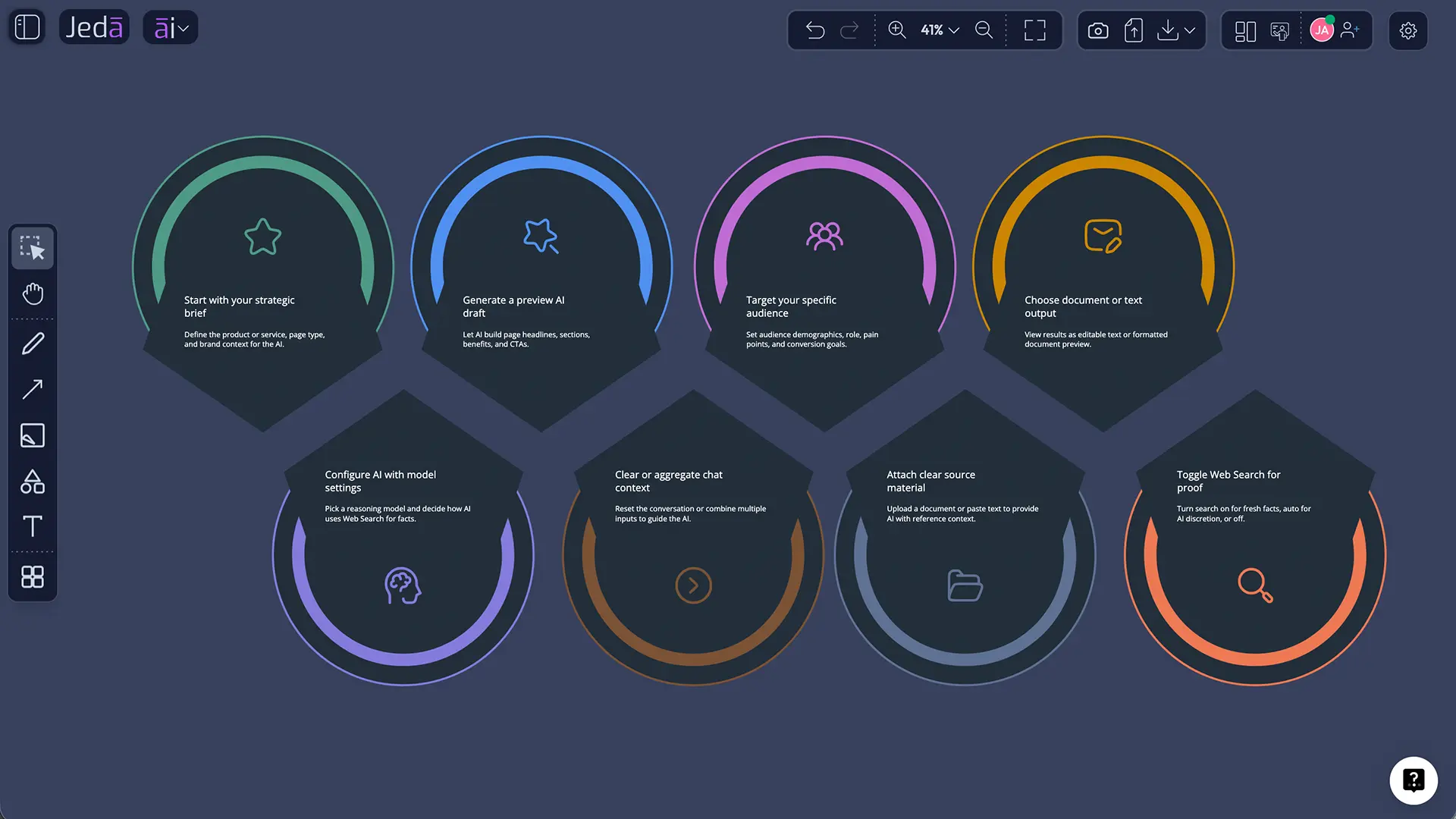
- Fill in the mandatory fields: What is the product or service? and What is the page?
- Add optional details if available: target audience, page purpose, tone, word count, and output language.
- Choose one reasoning model, or select two or three models for multi-model generation.
- If multiple models are selected, turn on Aggregate if you want one additional AI model to evaluate and consolidate the best result.
- Choose the output format: Document or Text.
- Set Web Search to Auto, On, or Off.
- Use Clear Chat Context if you want the recipe to ignore prior unrelated chat context.
- Click Generate and review the preview.
- Edit the copy manually, adjust formatting, and refine the final sections before publishing.
Method 2: Search for the recipe directly
- Open the AI Recipes panel.
- Use the search bar and type Website Copy.
- Select the Website Copy recipe when it appears.
- Complete the same required and optional fields.
- Generate the output, then edit and format it on the canvas.
This direct-search method is better when you already know which recipe you need and do not want to browse the Writer tab.
What should you enter in the Website Copy recipe fields?
Your result depends heavily on the input. Garbage in, confetti out.
For What is the product or service?, give a specific description. Instead of “AI tool,” write: “An AI Workspace for consultants and product teams that turns prompts, documents, and data into editable visuals like matrices, diagrams, mind maps, wireframes, and website copy.”
For What is the page?, name the exact page type. For example: “Homepage,” “AI Writer feature page,” “pricing page section,” “service page for B2B SEO consulting,” or “landing page for a webinar signup.” The page type changes the structure. A homepage needs broad positioning. A landing page needs tight conversion focus. A service page needs trust, process, and outcomes.
For Who is the target audience?, describe the buyer or reader. “Startup founders” will generate different copy from “enterprise procurement leaders” or “MBA program directors.”
For What is the purpose of the page?, define the action. Good examples include “drive free signups,” “explain a new feature,” “increase demo bookings,” “educate visitors before pricing,” or “convert paid search traffic.”
For Tone, use a specific tone choice. Professional works well for B2B pages. Conversational works well for founder-led pages. Direct and concise works well for landing pages.
For Word Count, set a realistic range. A homepage first draft may need 600–1,000 words. A campaign landing page may need 400–700. A long service page could need 1,200+.
Choosing reasoning models and Aggregate mode
Jeda.ai lets users select one, two, or three reasoning models at a time. For a simple first draft, one model is usually enough. For a high-value page, using two or three models can help generate stronger alternatives, especially when you want different angles on the same offer.
When multiple models are selected, Aggregate mode can be used with one additional AI model. That aggregation model reviews the outputs and creates a consolidated version. Think of it as an editor that compares drafts, trims weaker phrasing, and pulls stronger ideas into one final answer.
A practical setup looks like this:
- Use one model for fast copy exploration.
- Use two or three models when writing a strategic page such as a homepage, product page, or campaign page.
- Use Aggregate when you want a single polished output instead of reviewing multiple versions manually.
- Still review the final copy. Always. AI can produce momentum, but humans own judgment.
When should Web Search be Auto, On, or Off?
Web Search is useful when the page depends on current context. It should not be treated as a decoration.
Use Auto when you want Jeda.ai to decide whether current information is needed. This is a good default for most website copy tasks.
Use On when the copy needs timely data: current industry trends, competitor positioning, recent launch context, market language, event information, or fresh customer proof.
Use Off when you want the copy to rely only on the details you provide. This is useful for confidential product messaging, internal drafts, or brand-sensitive pages where you do not want outside web context shaping the language.
The important rule: Web Search is a Jeda.ai platform feature, not a feature of any specific AI model. The model generates the copy; the platform setting determines whether web context is used.
Why Clear Chat Context matters for better copy
Clear Chat Context resets the AI conversation context before generation. Use it when you are switching from one project to another, one audience to another, or one product line to another.
Website copy is sensitive to context. If the previous chat was about a webinar, and the next task is a service page for enterprise buyers, old context can bleed into the new draft. That is how you end up with weird sections that sound technically correct but strategically haunted.
Use Clear Chat Context when:
- You are starting copy for a new product or service
- You are changing the target audience
- You are moving from a blog/content task to a conversion-page task
- You want a clean draft without previous assumptions
- The generated copy feels off-topic or overly influenced by earlier prompts
It is a small button with a very useful job: reduce context contamination.
How to edit the generated copy after preview
The Website Copy recipe generates a preview. After generation, you can manually edit the text and use available formatting options. This is where the draft becomes usable.
Start by checking the hero section. Does it say what the product does in plain language? Does it name the audience or problem? Does it give the reader a reason to continue? If the hero is vague, fix that before touching the rest of the page.
Then review the section order. Most pages need a clear flow: problem, promise, benefits, proof, how it works, objections, CTA. The order may change based on page type, but the copy should move the visitor forward.
Next, tighten the language. Remove filler claims. Replace abstract benefits with specific outcomes. “Save time” is fine, but “draft a structured product page in minutes, then edit it with your team” is stronger.
Finally, format for scanning. Use short paragraphs, descriptive subheads, bullets where they help, and clear CTA sections. A page that reads well in a document can still fail online if it looks like a wall of words.
What makes AI-generated website copy publishable?
Publishable AI website copy has five traits.
First, it is specific. It names the product, the user, the problem, and the outcome. Second, it has structure. The visitor can scan the page and understand the argument. Third, it includes proof. Claims need examples, numbers, customer language, demos, screenshots, or credible context. Fourth, it uses human editing. You remove the generic phrases, sharpen the promise, and make the copy sound like the brand. Fifth, it has a clear next action.
Google’s AI content guidance is useful here: generative AI can help with research and structure, but scaled pages without added value can violate spam policies. That is the line. Use AI to accelerate meaningful work, not to flood the site with thin pages.
Jeda.ai’s advantage is that the Website Copy recipe sits inside a broader Visual AI workflow. You can draft copy, map page structure, compare messaging angles, and collaborate on the AI Whiteboard. For teams, that is the point. Better inputs, faster drafts, clearer decisions.
Example prompt setup for a product page
Here is a strong input example for the Website Copy recipe.
What is the product or service?
Jeda.ai is an AI Workspace that helps consultants, product teams, marketers, and founders generate editable visuals, structured strategy frameworks, website copy, diagrams, mind maps, wireframes, and document-driven insights on one collaborative AI Whiteboard.
What is the page?
Product page for the AI Writer Website Copy recipe.
Who is the target audience?
Marketing teams, startup founders, product marketers, agencies, and consultants who need professional website copy quickly but still want to review and edit the final copy.
Purpose of the page
Explain the Website Copy recipe, show how to use it, and encourage users to generate copy inside Jeda.ai.
Tone
Professional, direct, conversion-focused.
Word count
800 words.
Output language
English.
That input gives the AI enough direction to create a useful first draft. It tells the model what the product is, what the page is, who the reader is, and what action the copy should support.
Common mistakes to avoid
Do not ask for “website copy” without naming the page. The AI needs to know whether it is writing for a homepage, product page, service page, landing page, or about page.
Do not skip the audience field if the page is buyer-specific. Website copy for a founder, CFO, student, agency owner, and product manager should not sound the same.
Do not publish the first draft without review. AI can produce confident language that still lacks proof, accuracy, or brand fit.
Do not use Web Search On for confidential positioning drafts unless you truly need external context.
Do not confuse preview output with file generation. The Website Copy recipe can output Document or Text preview formats, but it does not create native document files.
Do not bury the call to action. If the page exists to drive signups, demos, or trials, the CTA should appear naturally throughout the page, not only at the bottom like an apologetic footnote.
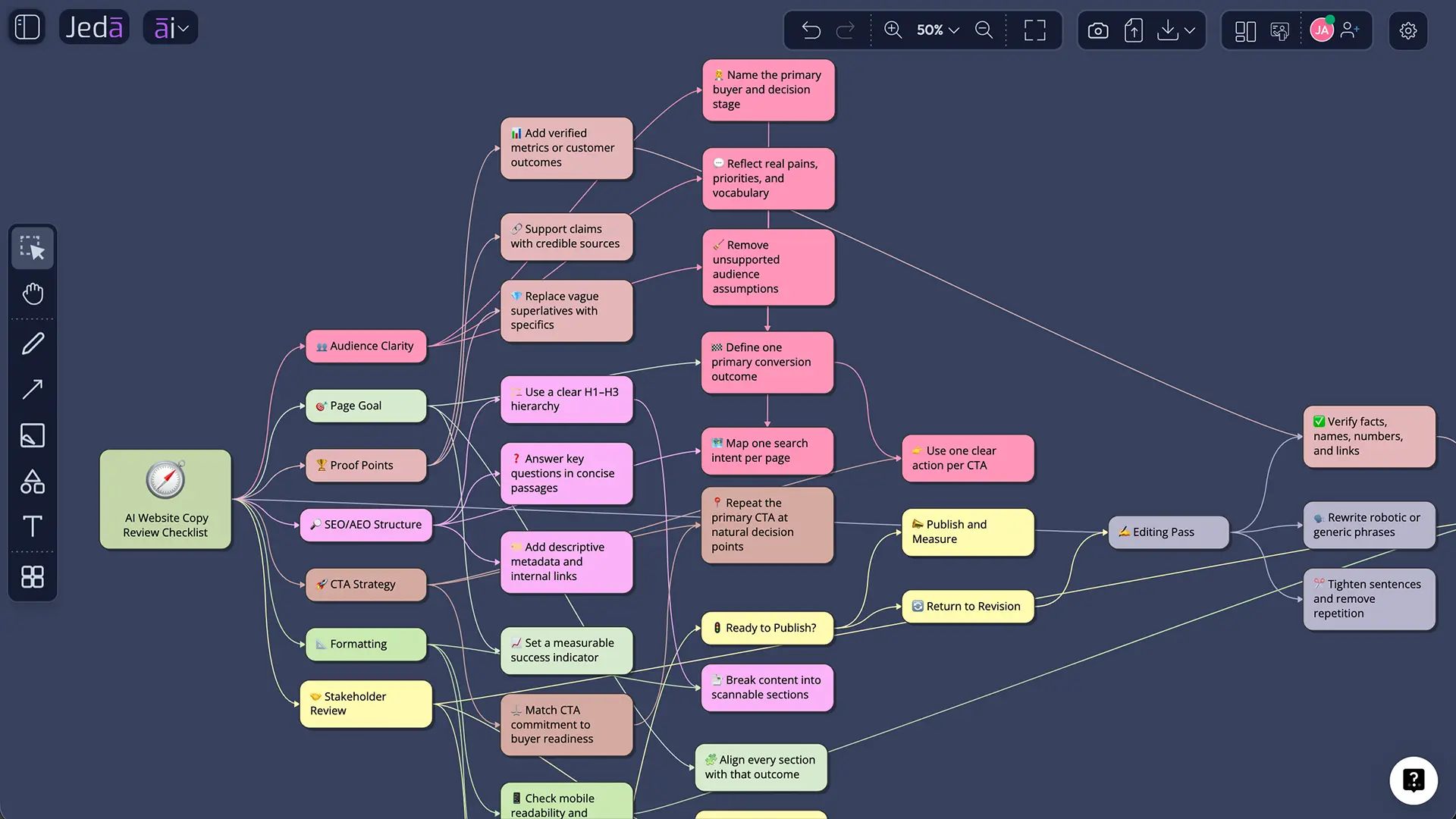
Best practices for stronger Website Copy with AI
Use the recipe like a strategist, not a vending machine.
Give it a sharp product description. Add audience detail. Name the page. State the business goal. Include must-use proof points. Tell it what to avoid. If your brand has banned phrases, include them. If your offer has a strong differentiator, make that explicit.
After generation, run a copy review pass with these questions:
- Can a new visitor understand the offer in five seconds?
- Does the headline explain value, not just category?
- Is each section doing a different job?
- Are the benefits tied to real user problems?
- Does the copy include proof or only claims?
- Is the CTA specific enough?
- Does the page sound like your brand after editing?
For Jeda.ai users, one effective workflow is to generate the copy, then create a Wireframe from the same page goal. Place both on the AI Whiteboard and compare whether the message and layout support each other. It is much easier to fix page strategy when copy and structure are visible together.
Frequently Asked Questions
- What is the Website Copy recipe in Jeda.ai?
- The Website Copy recipe is an AI Writer recipe that helps users generate structured copy for website pages. It asks for the product or service and the page type, then uses optional audience, purpose, tone, word count, and language settings to create a preview that users can edit.
- Is there a sub-recipe or category for Website Copy?
- No. Website Copy is a Writer recipe in Jeda.ai, and there is no additional sub-recipe or category inside the AI Writer tab. Users can navigate to it through the Writer recipes area or search for Website Copy directly.
- What fields are required?
- Two fields are mandatory: "What is the product or service?" and "What is the page?" These fields define the offer and the page type, which are the minimum inputs needed to generate relevant website copy.
- What optional fields can improve the result?
- Optional fields include target audience, purpose of the page, tone, word count, and output language. These details help the AI produce copy that matches the reader, conversion goal, and communication style instead of generating generic page text.
- Can I use multiple reasoning models?
- Yes. Users can select one, two, or three reasoning models. If multiple models are selected, users can also toggle Aggregate with one additional AI model to evaluate the outputs and produce a consolidated version.
- What output formats are available?
- The Website Copy recipe supports Document or Text output format. The output is a preview for review and editing; it does not generate native document files. Users can still manually edit and format the generated content after preview.
- Should I turn Web Search on?
- Use Web Search On when the page needs current market context, competitor positioning, recent trends, or time-sensitive information. Use Auto for general cases. Use Off when you want the copy to rely only on the details you provide.
- What does Clear Chat Context do?
- Clear Chat Context resets the prior AI conversation context. It is useful when switching between products, audiences, page types, or unrelated tasks, because it helps prevent old context from influencing the new website copy draft.
- Can I edit the generated website copy?
- Yes. After generation, manual editing is allowed. Users can refine the copy, adjust wording, and use available text formatting options before moving the final version into a CMS, website builder, or design workflow.
- Is AI-generated website copy safe for SEO?
- AI-generated website copy can support SEO when it is accurate, useful, original, and edited for real users. It should not be mass-produced without added value. The strongest workflow is AI-assisted drafting plus human review, proof, and page-specific refinement.
Final takeaway
Website Copy with AI is not about replacing strategic thinking. It is about removing the blank-page tax.
Jeda.ai gives teams a guided way to generate structured website copy, compare model outputs, use Web Search when needed, clear old context, and refine the draft in an AI Workspace built for visual collaboration. For marketers and founders, that means faster first drafts. For consultants and agencies, it means cleaner client-ready messaging. For teams, it means fewer copy debates happening in scattered docs.
Join 150,000+ users using Jeda.ai to turn prompts, documents, data, and ideas into editable work. Start with Website Copy, then keep building the page strategy on the AI Whiteboard.
Source Citations and Research Notes
- [1]
Google Search Central . “Creating Helpful, Reliable, People-First Content” Google Search Central.
View Source ↗ - [2]
Google Search Central . “Google Search’s Guidance on Using Generative AI Content on Your Website” Google Search Central.
View Source ↗ - [3]
Google Search Central . “SEO Starter Guide” Google Search Central.
View Source ↗ - [4]
Google Search Central . “Google’s Guide to Optimizing for Generative AI Features on Google Search” Google Search Central.
View Source ↗ - [5]
Jakob Nielsen (1997) . “Be Succinct! Writing for the Web” Nielsen Norman Group.
View Source ↗ - [6]
Jasper . “The Landing Page AI Agent Purpose-Built for Marketing” Jasper.
View Source ↗ - [7]
Copy.ai . “AI Landing Page Copy: Scale Your Conversions” Copy.ai.
View Source ↗ - [8]
Content Marketing Institute (2026) . “B2B Content and Marketing Trends: Insights for 2026” Content Marketing Institute.
View Source ↗ - [9]
Farseev et al. (2025) . “MindFuse: Towards GenAI Explainability in Marketing Strategy Co-Creation” arXiv.
View Source ↗ - [10]
Kong et al. (2023) . “Neural Insights for Digital Marketing Content Design” arXiv.
View Source ↗ - [11]
Grossman et al. (2026) . “How Generative AI Disrupts Search: An Empirical Study of Google Search, Gemini, and AI Overviews” arXiv.
View Source ↗
Create Website Copy Without the Blank-Page Tax
Join 150,000+ users using Jeda.ai to turn prompts, documents, data, and ideas into editable work. Generate structured website copy, compare model outputs, refine the message with your team, and keep building the page strategy on an AI Whiteboard.
Try Jeda.ai Free