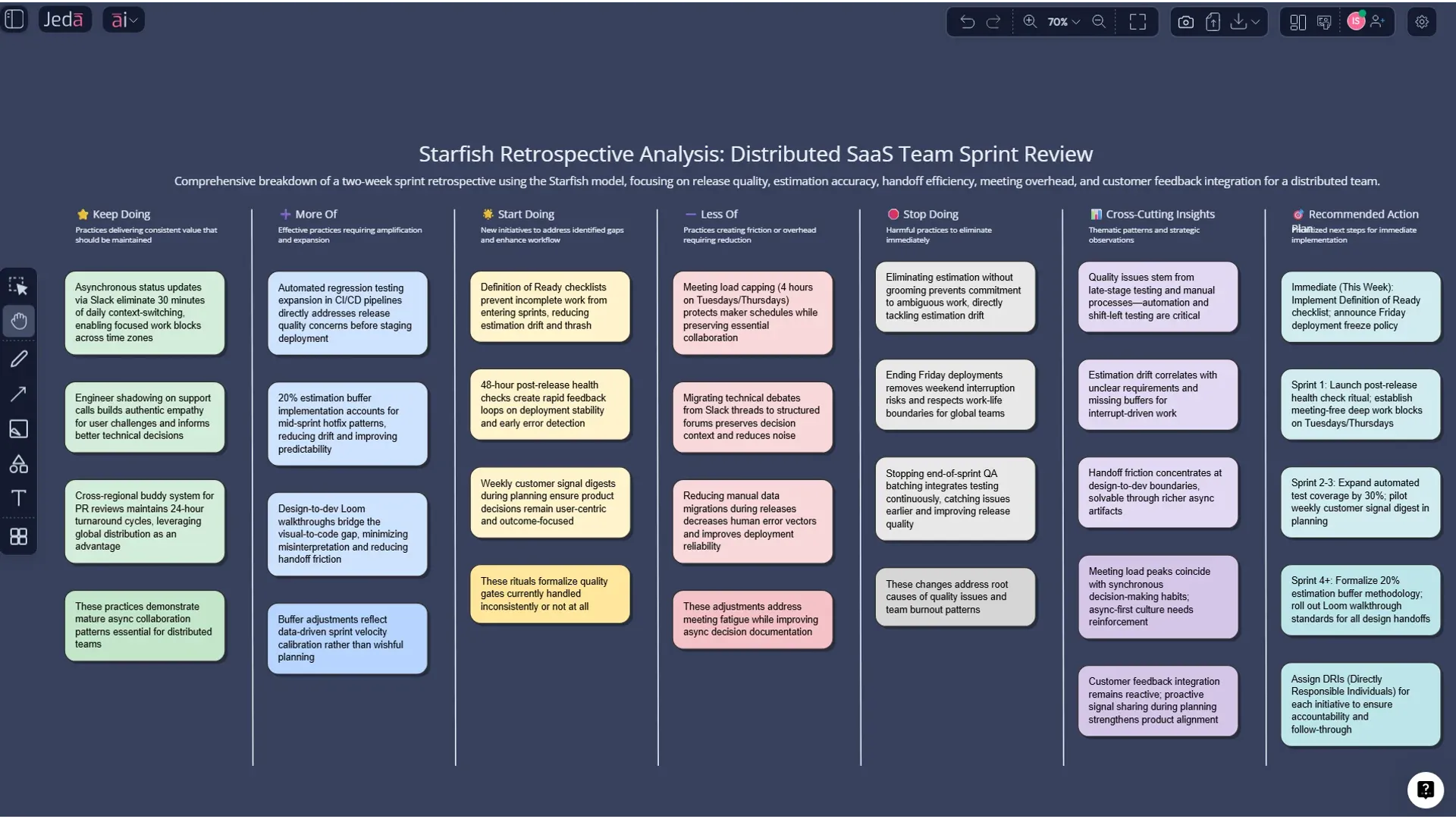
Starfish Retrospective with AI: Turn Sprint Reflection Into Action in Jeda.ai
Starfish Retrospective with AI gives your team a sharper way to reflect than the usual “that sprint was fine, I guess” routine. Inside Jeda.ai’s AI Workspace and AI Whiteboard, you can generate a five-part retrospective matrix, surface nuance across what to keep, stop, start, do more of, and do less of, and turn scattered feedback into visible next steps. For teams that are tired of blank boards, vague takeaways, and action items that die quietly in the corner, this is a much better way to work.
An ordinary retro board captures thoughts. A better one captures momentum. That’s the real point.
What is a Starfish Retrospective?
A Starfish retrospective is an Agile reflection format popularized by Patrick Kua in 2006. Instead of splitting feedback into a simple “good” versus “bad” frame, it uses five categories: Keep Doing, Less Of, More Of, Stop Doing, and Start Doing. That structure matters because real teams rarely need only black-and-white answers. They need nuance, trade-offs, and clearer judgment about where to invest energy next.
That’s why the format keeps showing up in product teams, engineering retros, service reviews, launch debriefs, and cross-functional process reviews. It works especially well when your team is dealing with mixed signals: maybe standups are still useful, just too long; maybe documentation is good, but not used enough; maybe experimentation is happening, but in random bursts instead of with purpose.
The Scrum Guide frames the retrospective as a chance for the team to inspect itself and plan improvements for the next sprint. Starfish gives that conversation a better container. Jeda.ai makes that container faster to build, easier to edit, and far more useful when you need an AI Whiteboard that can move from feedback to action without the usual sticky-note swamp.
Why Use a Starfish Retrospective with AI?
A Starfish board already improves the conversation. But adding AI changes the speed and the quality of the output.
On a blank canvas, facilitators spend too much time setting up the frame, rewriting prompts, clustering duplicate notes, and trying to turn broad complaints into actionable items. Inside Jeda.ai, the AI Workspace handles the structure for you, gives you a cleaner starting point, and lets your team spend more time thinking than formatting. That sounds obvious. It should be. Yet most retro sessions still waste time on setup instead of insight.
And there’s another edge here: Jeda.ai is not just a blank collaboration board with AI pasted on later. It is a Visual AI workflow built for structured thinking, and it already supports 300+ strategic frameworks and template flows across analysis, planning, and reflection. That makes it a far better fit for teams who want a retrospective that can feed directly into follow-up planning, sprint improvement, or leadership review.
- Nuance over noise
Starfish avoids the shallow yes-or-no framing of simpler retros by splitting discussion into five more useful lenses.
- Faster first draft
Jeda.ai generates the matrix structure quickly, so your team starts with a real working board instead of an empty canvas.
- Better remote collaboration
A shared AI Whiteboard makes it easier for distributed teams to contribute, review, and react without losing context.
- Action-oriented outputs
AI can help turn broad observations into clearer next steps, owners, or experiments for the next sprint.
- Expandable with AI+
Once the board exists, use the AI+ button to deepen one category, explore causes, or generate more detailed ideas.
- Convertible follow-through
Use Vision Transform to turn the retrospective into a flowchart, mind map, or follow-up planning visual.
Why Starfish beats a simpler retro when the sprint was messy
Start/Stop/Continue is still useful. But it tends to flatten everything. A team might know it should do “less meeting time” without believing meetings should stop. Or it may want to keep code reviews while also doing more cross-reviewing between product and engineering. Starfish makes that distinction visible.
Parabol’s framing is spot on here: the extra More Of and Less Of categories create nuance that binary retro structures often miss. SessionLab and Patrick Kua’s original write-up make the same basic point from a facilitation angle: people often need a gradient, not a verdict.
That matters in real life. Teams don’t usually fail because they do one thing that is purely bad. They fail because they overuse the wrong good thing, underuse the right good thing, and postpone the uncomfortable fix until next sprint. Again.
How to Create a Starfish Retrospective with AI in Jeda.ai
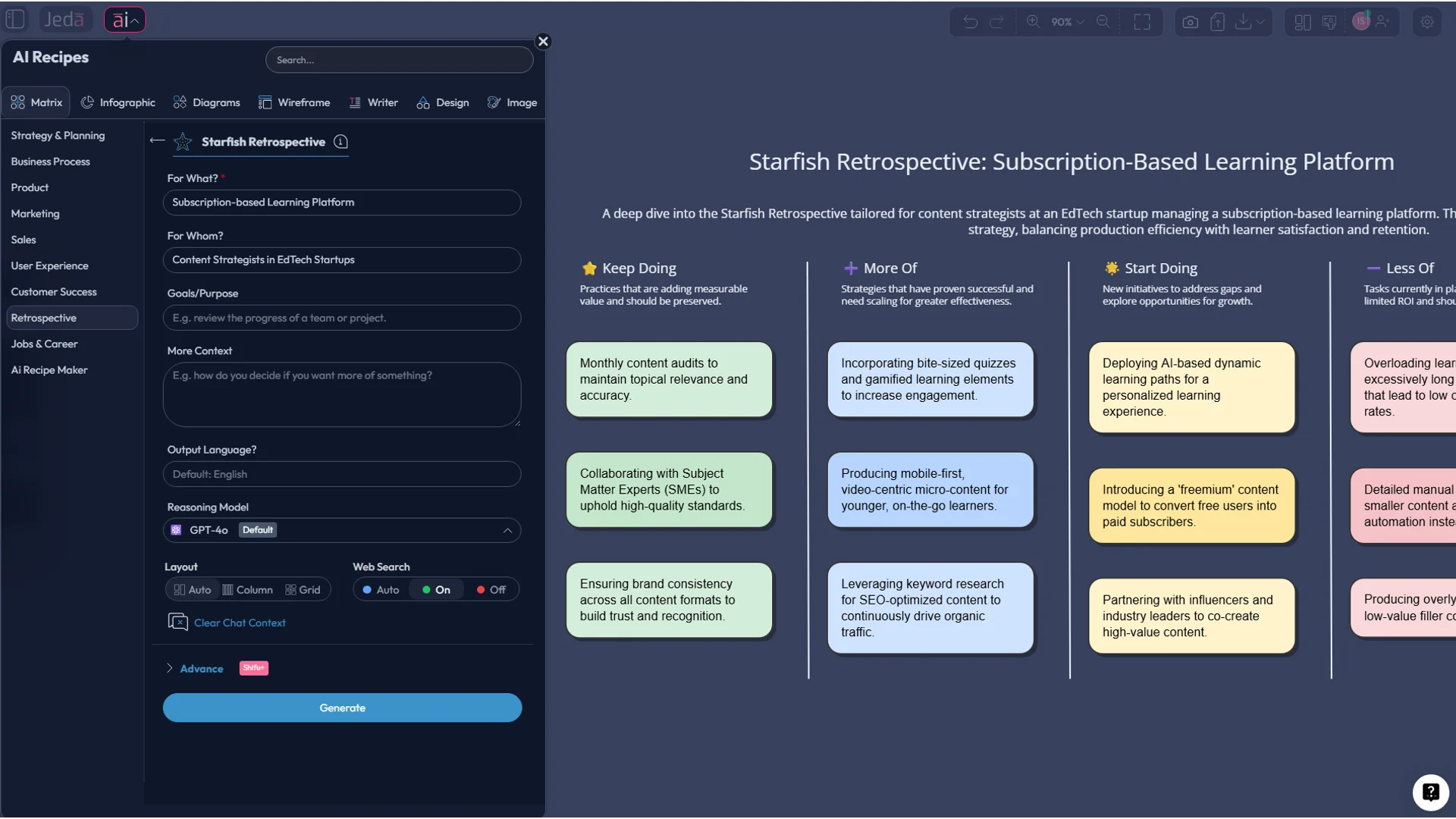
Jeda.ai supports both a structured recipe-led route and a flexible prompt-led route. For this page, Method 1 uses the Recipe Matrix flow and Method 2 uses the Prompt Bar. Then you can use the AI+ button to deepen the first output.
Method 1: Recipe Matrix (recommended)
This is the fastest route when you want a clean, guided setup inside the AI Workspace.
- Open Jeda.ai and enter a workspace
Log in to Jeda.ai and open the AI Whiteboard workspace where you want to run the retrospective.
- Open the AI Menu
Click the AI Menu at the top-left of the workspace and navigate to the Retrospective category.
- Choose Starfish Retrospective
Select the Starfish Retrospective recipe so Jeda.ai can prepare the matrix structure for this framework.
- Add your retrospective context
Describe the sprint, release, project phase, or review period so the generated board reflects your real situation.
- Pick your preferred layout and AI model
Choose the matrix layout and model combination that fits your team’s depth and speed needs.
- Generate the first matrix
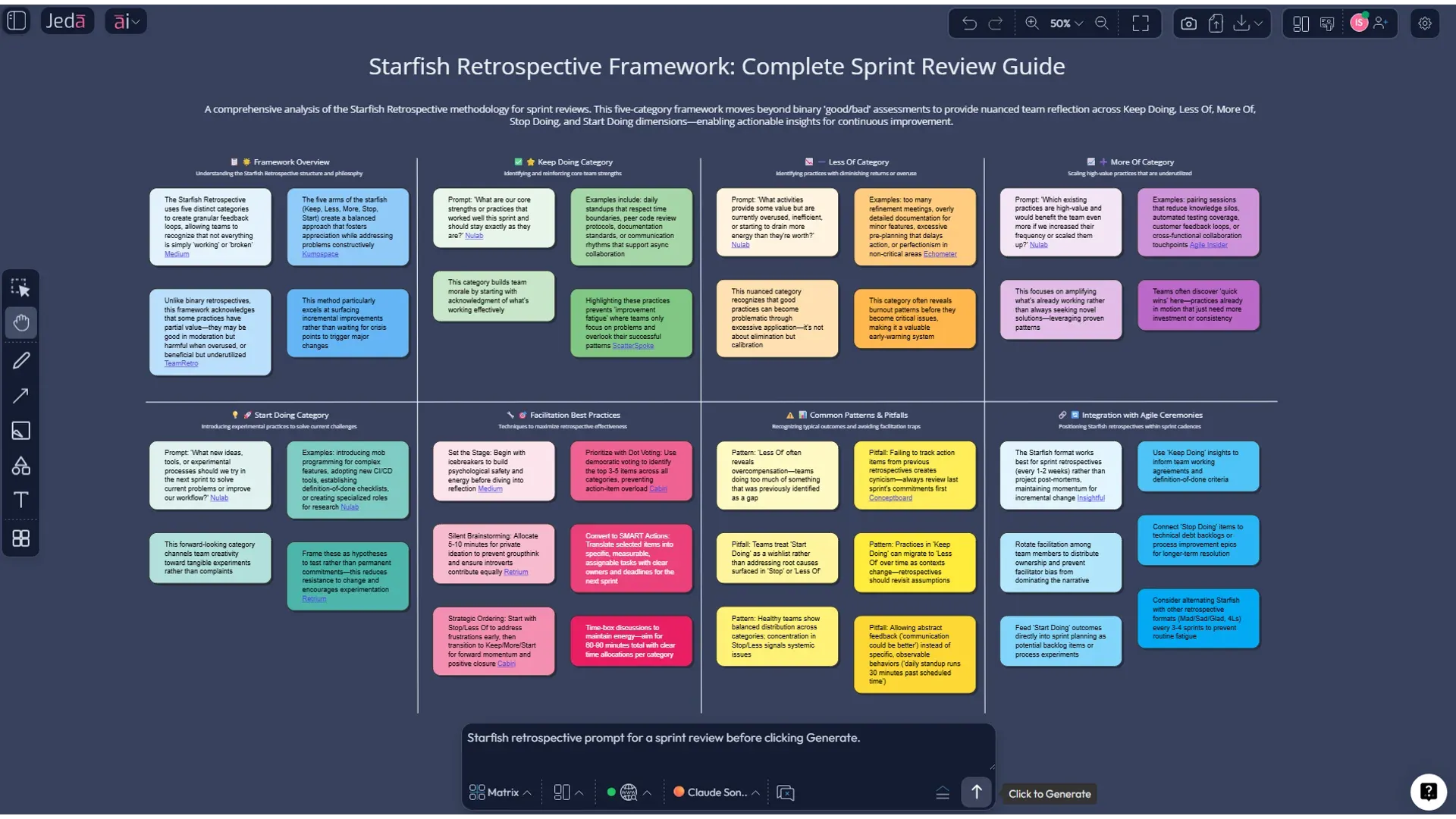
Click Generate to create the five-part Starfish board with clear sections for Keep, Less Of, More Of, Stop, and Start.
- Review and edit the board together
Use the editable smart shapes to refine wording, merge repeated points, and clarify which ideas are real actions.
- Use AI+ to deepen a category
Select a node or section and use the AI+ button to expand that part of the board with deeper analysis or more ideas.
Method 2: Prompt Bar
This route is better when you already know what you want and prefer a direct prompt.
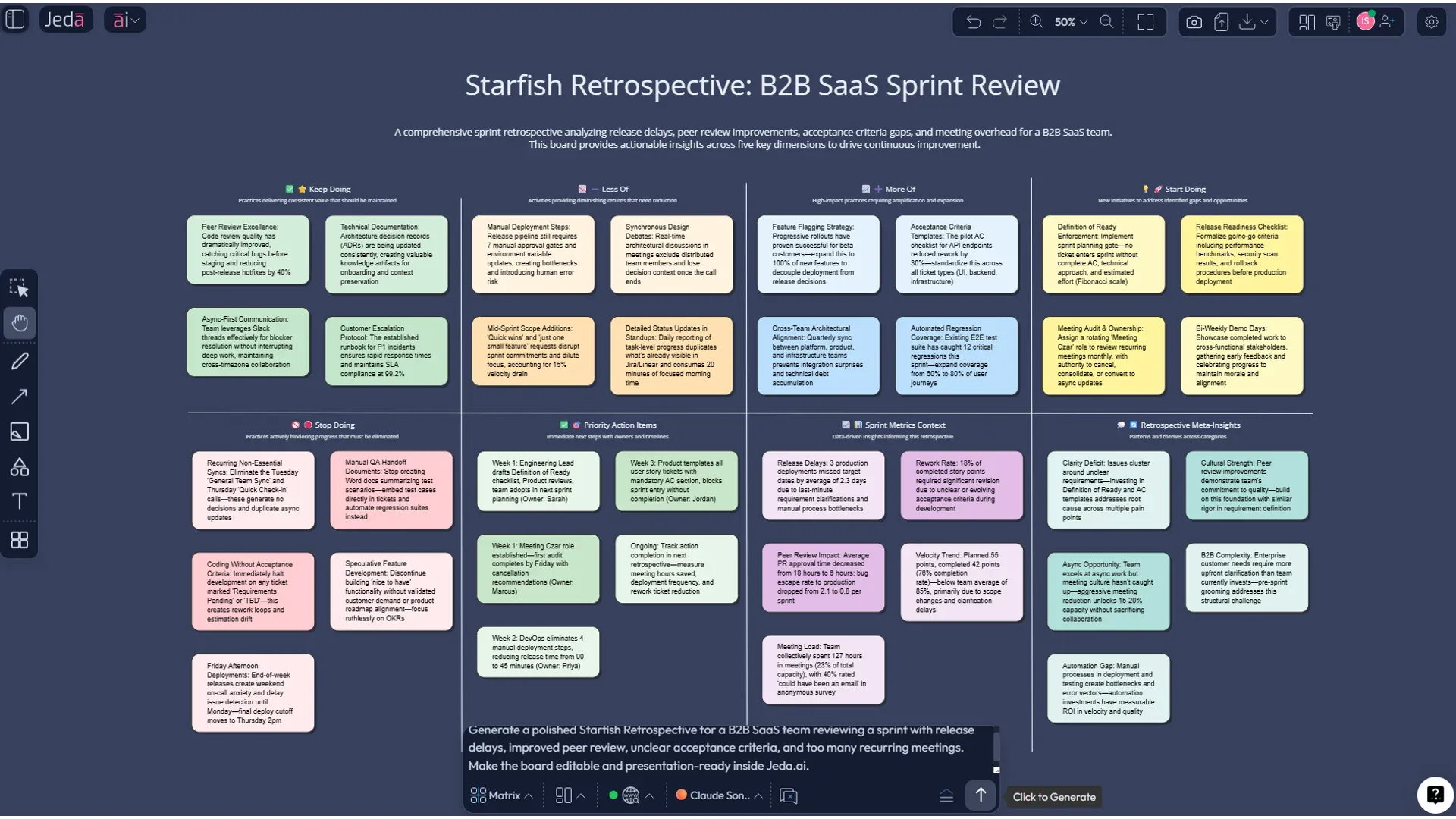
Open the Prompt Bar at the bottom of the AI Whiteboard, select the Matrix command, and use a prompt like this:
Build a Starfish retrospective for a seven-person product team after a two-week sprint. Use five sections: Keep Doing, Less Of, More Of, Stop Doing, and Start Doing. Focus on release quality, estimation drift, cross-team handoffs, meeting load, and customer feedback. Write each item as a short sticky note with practical language.
You can also turn on Web Search when you want outside context, though most retrospectives work best with team-specific inputs, not internet noise dressed up as wisdom.
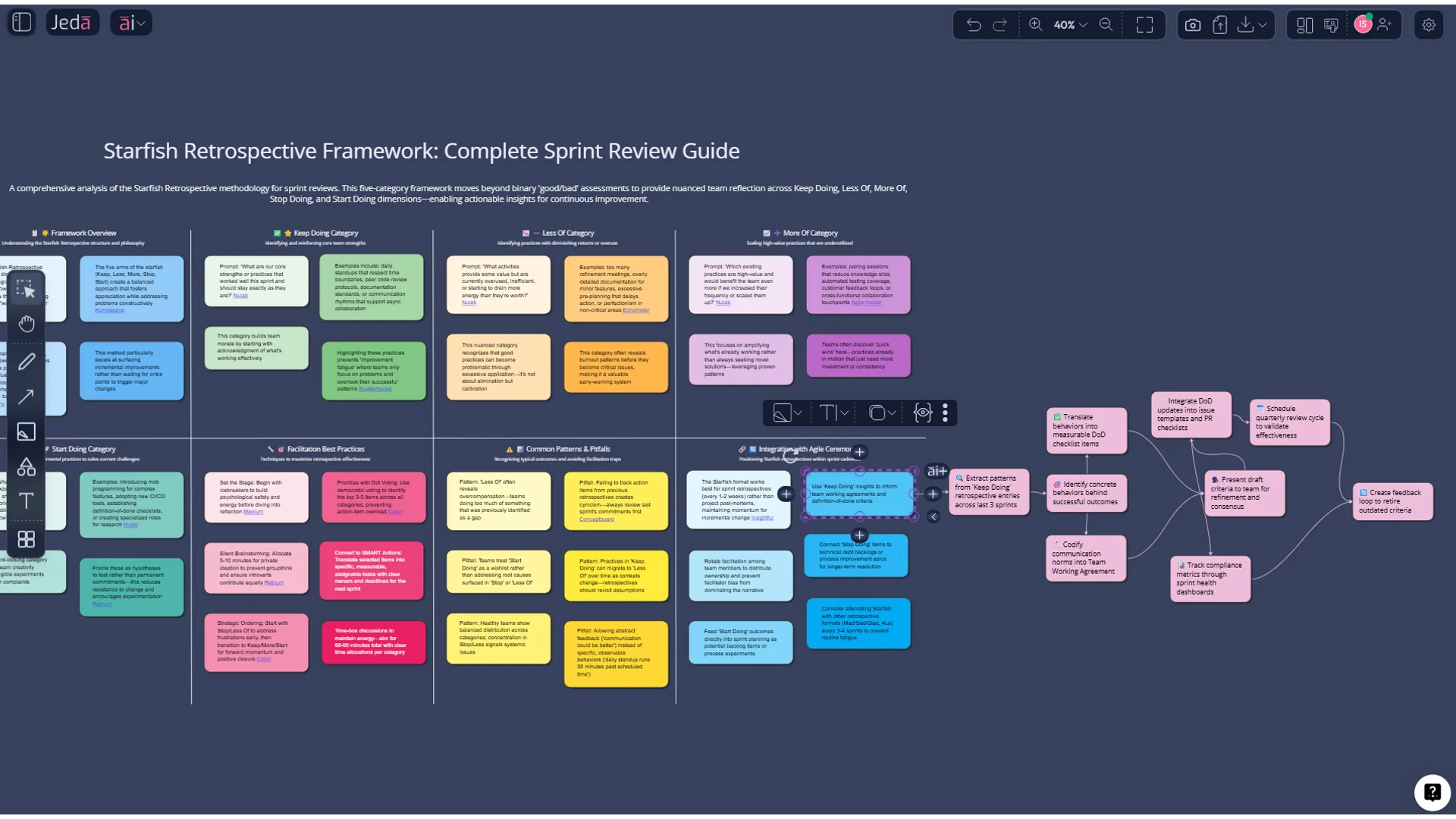
AI+ button generated deep dive
Once the first matrix exists, select a smart shape, category header, or sticky-note cluster and click the AI+ button. This is the right move when you want Jeda.ai to expand what is already on the board.
Use AI+ for:
- deeper causes behind repeated blockers
- richer ideas under “Start Doing”
- stronger actions under “Stop Doing”
- more examples inside “More Of” and “Less Of”
Use AI+ as an extension tool, not as a tightly specified replacement for the original prompt. In other words: let it deepen the branch that exists, instead of trying to make it behave like a brand-new custom recipe. That’s where teams usually get the best result.
And when the retro is done? Use Vision Transform to convert the final matrix into a flowchart of follow-up actions or a mind map for a sprint improvement plan.
Starfish Retrospective Template with AI: practical examples
Here’s where this gets real. The Starfish format is not only for Scrum ceremonies. It works for almost any team review where you need structured reflection without draining the room dry.
Example 1: Product sprint retrospective
A product squad uses the board after a two-week sprint.
Keep Doing: fast bug triage, weekly demo clips, peer review rotation.
Less Of: ad hoc scope changes, Slack firefighting, last-minute copy edits.
More Of: customer call snippets, QA before merge, async updates.
Stop Doing: vague acceptance criteria.
Start Doing: one owner for release readiness.
Example 2: Cross-functional launch review
Marketing, product, sales, and CS run a retro after a feature launch. The Starfish structure helps them separate things that should disappear from things that simply need less emphasis. That difference alone saves a lot of bad decisions.
Example 3: Incident or post-mortem retro
Engineering teams can use the same structure after an outage or service incident. Instead of only listing failures, the team captures what crisis behaviors actually worked and should be preserved next time.
Best practices for a Starfish retrospective that doesn’t go nowhere
The format is only half the job. Facilitation still matters.
A good AI Workspace does not replace the conversation. It makes the conversation more visible, more structured, and harder to forget later. That’s a better bargain.
Common mistakes to avoid
The biggest mistake is treating the board like a complaint wall. Starfish works best when the team uses the five categories to judge value, effort, and frequency, not just to vent.
The second mistake is overloading the board. If every thought becomes its own precious artifact, nobody can see the themes.
The third one is classic: no follow-through. A retrospective without action is basically team theater. It may feel cathartic, but it won’t improve much.
And one more thing: don’t let AI make the board sound polished but generic. The first draft should get you moving, not replace the team’s real knowledge. Edit aggressively. Make it yours.
Frequently Asked Questions
- What is a Starfish retrospective?
- A Starfish retrospective is a five-part Agile reflection format that organizes team feedback into Keep Doing, Less Of, More Of, Stop Doing, and Start Doing. It gives teams more nuance than simpler retro formats and helps turn observations into action.
- Why use a Starfish retrospective instead of Start Stop Continue?
- Starfish adds More Of and Less Of, which makes it better for teams dealing with mixed or gradual improvements. It helps you reduce something without killing it completely and scale something useful without pretending it is already enough.
- When should you run a Starfish retrospective?
- Use it after sprints, releases, incidents, project milestones, or cross-functional launches. It is especially useful when the team needs a richer discussion than a simple good-versus-bad review can provide.
- How does AI improve a Starfish retrospective?
- AI speeds up the initial board setup, helps draft clearer category prompts, and can support clustering, reframing, and action-oriented wording. The biggest win is speed to first useful version, not replacing team judgment.
- Can I create a Starfish retrospective in Jeda.ai without the recipe flow?
- Yes. Open the Prompt Bar, select the Matrix command, and describe the team, time period, and five Starfish categories you want. The recipe flow is faster, but the prompt-led route gives you more control.
- What does the AI+ button do in this workflow?
- The AI+ button extends an existing visual or section. In a Starfish board, it is best used to deepen one category, generate more examples, or expand a theme that already exists on the matrix.
- Is Jeda.ai a blank whiteboard or a structured AI workspace?
- Jeda.ai is an AI Workspace and AI Whiteboard designed for structured visual thinking. It supports editable visuals, collaborative boards, and 300+ strategic frameworks, which makes it stronger than a blank canvas for framework-led work.
- Can remote teams use a Starfish retrospective with AI effectively?
- Yes. In fact, remote teams often benefit more because the board gives everyone a shared visual structure. It reduces facilitation friction, helps quieter contributors participate, and keeps the discussion anchored in visible categories.
- What should come out of a Starfish retro?
- The best output is a focused set of actions, not a beautiful pile of observations. Aim for one to three improvements with clear owners or experiments for the next sprint or review cycle.
- Where should I go after the Starfish board is finished?
- Use AI+ to deepen important sections, then use Vision Transform to convert the matrix into a follow-up flowchart or mind map. That keeps the retrospective connected to execution instead of ending as a static artifact.
Sources & Further Reading
Want the broader context around structured retrospectives and team reflection? Start with Patrick Kua’s original Starfish write-up, the Scrum Guide, and Atlassian’s retrospective guidance. For Jeda.ai-specific related pages, see AI Workspace, AI Whiteboard, Visual AI for Retrospective Analysis, and Agile Sprint Retrospective with AI.
- [1]
Patrick Kua (2006) . “The Retrospective Starfish” thekua.com.
View Source ↗ - [2]
Ken Schwaber and Jeff Sutherland (2020) . “The Scrum Guide” Scrum Guides.
View Source ↗ - [3]
Norman L. Kerth (2001) . “Project Retrospectives: A Handbook for Team Reviews” Dorset House.
View Source ↗ - [4]
Esther Derby and Diana Larsen (2006) . “Agile Retrospectives: Making Good Teams Great” Pragmatic Bookshelf.
View Source ↗ - [5]
Amalie M. Stålesen (2015) . “Agile Retrospectives: An Empirical Study of Characteristics and Organizational Learning” NTNU.
View Source ↗ - [6]
Torgeir Dingsøyr, Marius Mikalsen, Anniken Solem, and Kathrine Vestues (2018) . “Learning in the Large: An Exploratory Study of Retrospectives in Large-Scale Agile Development” XP 2018.
View Source ↗ - [7]
Atlassian (2025) . “What are agile retrospectives?” Atlassian Agile Coach.
View Source ↗
Start Your Starfish Retrospective with AI Today
Join over 150,000+ users who use Jeda.ai’s AI Workspace to turn reflection into clearer decisions, better collaboration, and faster follow-through.
Try Free Template