AI Email Copy Generator: Create Better Campaigns, Replies, and Cold Emails Faster
AI Email Copy Generator tools are everywhere now. The problem is that most of them stop at the first draft. They help you write words, but they do not help you think through audience, angle, sequence, review flow, and next-step execution. That is where Jeda.ai feels different. Instead of acting like a one-shot text box, it gives you an AI Workspace and AI Whiteboard where your email ideas, campaign logic, copy variants, and team feedback can live in one place.
For marketers, founders, product teams, and consultants, that matters. A launch email is never just a launch email. It sits beside a subject-line test, a segment plan, a reply path, a CTA decision, and often a sales or nurture follow-up. Jeda.ai turns that messy workflow into something you can generate, refine, extend, and visualize without bouncing across five tabs and losing the plot.
If you are comparing tools, start here: AI Workspace, AI Whiteboard,Email Marketing Templates with AI. Jeda.ai already supports the building blocks behind a serious AI Email Copy Generator workflow, and it does it for 150,000+ users inside a Visual AI environment built for collaboration, not just drafting.
What Is an AI Email Copy Generator?
An AI Email Copy Generator is a tool that drafts email content from a few core inputs: your audience, your goal, your offer, your tone, and the action you want the reader to take. In practice, that means it can help you produce launch emails, nurture emails, newsletter blurbs, follow-ups, cold outreach, reply drafts, and even variations for testing.
But the useful version is not “write me an email.” It is “help me decide what kind of email this should be, what promise belongs in the subject line, what proof belongs in the body, and what CTA deserves the click.” That is the difference between generic AI writing and a workflow that actually helps a team ship.
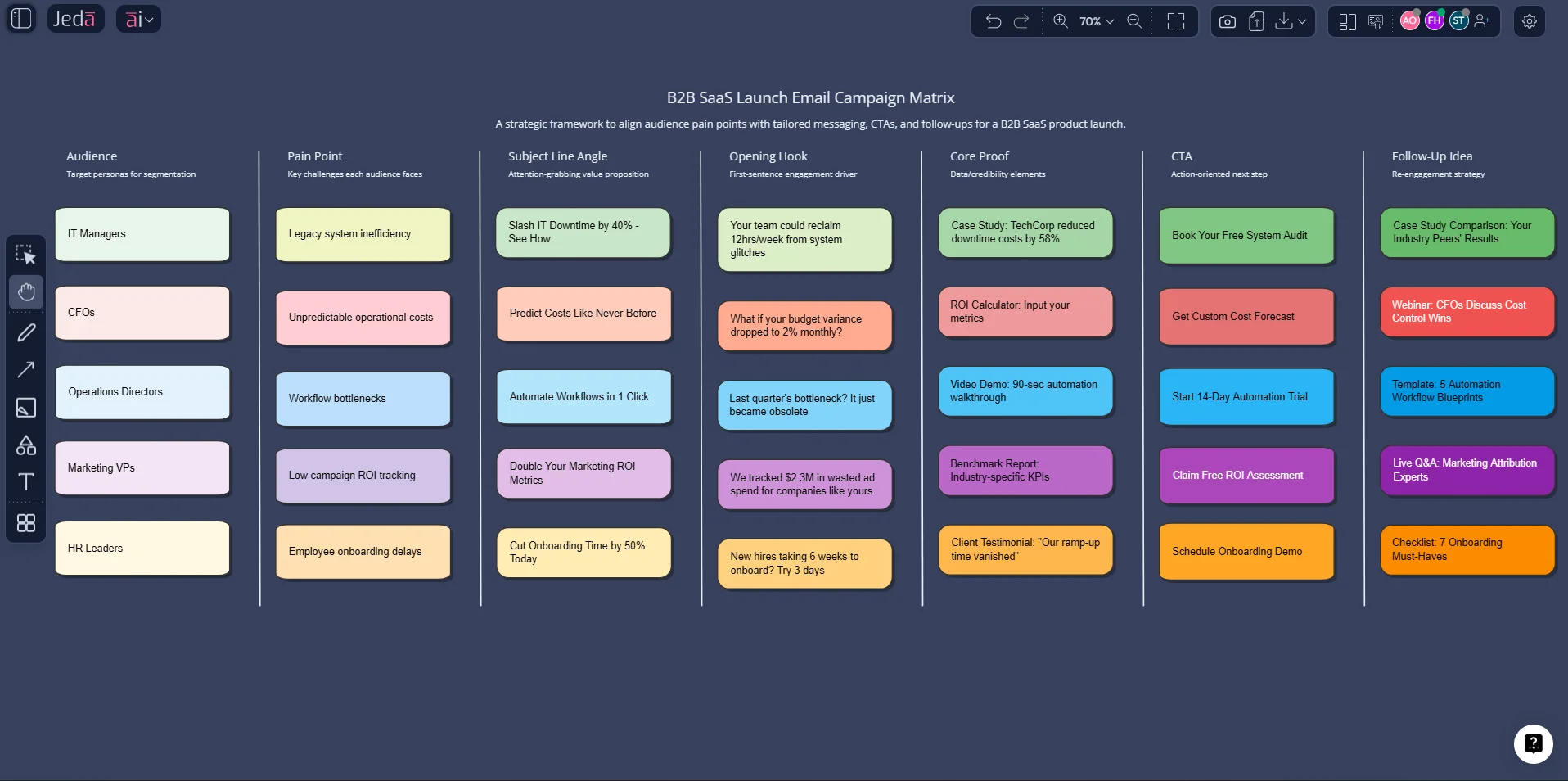
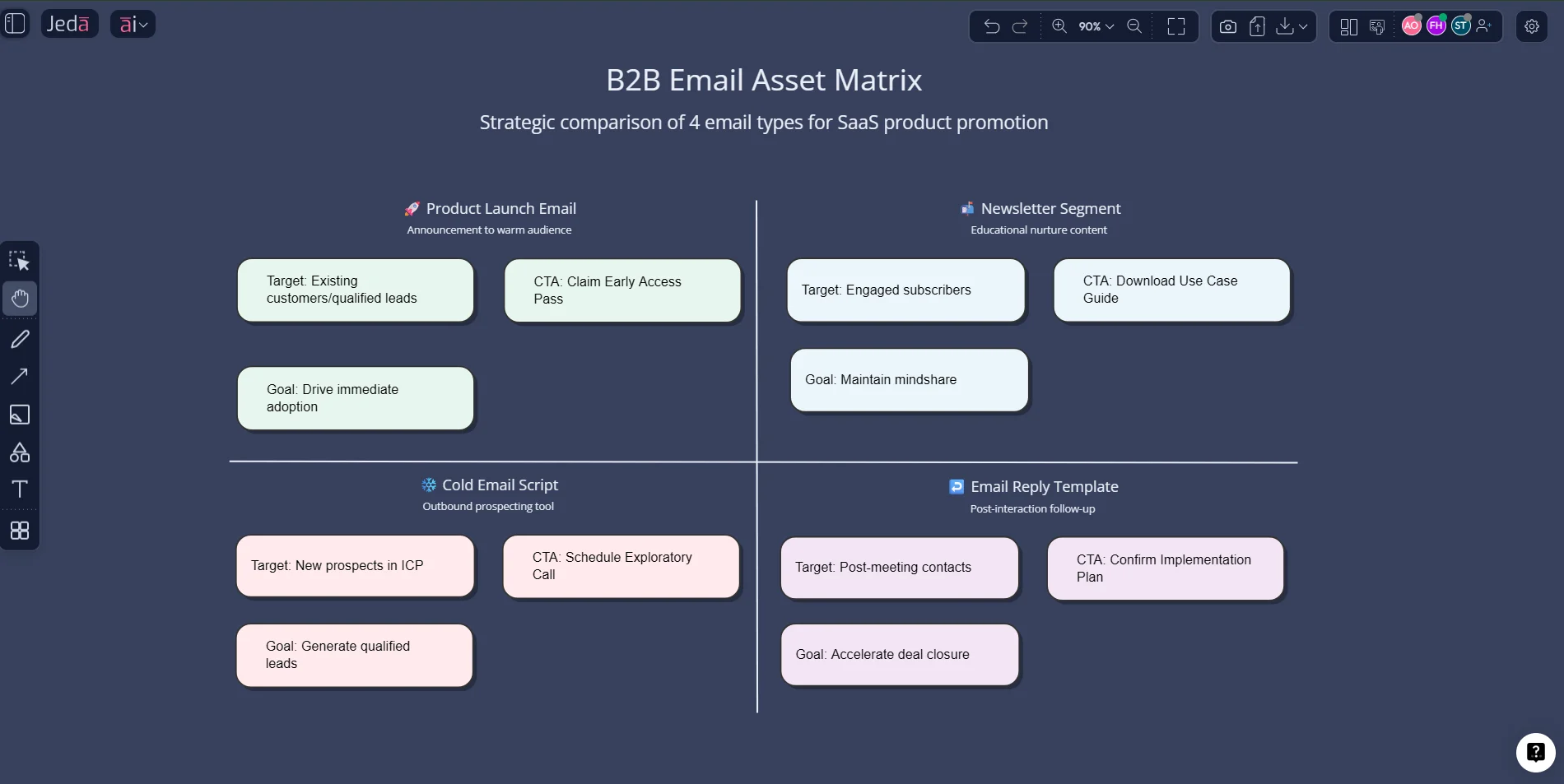
On Jeda.ai, that workflow can start visually. You can map the campaign in a matrix, spin email variants with the Prompt Bar, expand the strongest angle with the AI+ button, and convert the logic into another structure with Vision Transform when you need a sequence, a decision tree, or a review board. That makes Jeda.ai useful as both an AI Workspace and an AI Whiteboard for email strategy.
Why Use an AI Email Copy Generator with Jeda.ai?
A plain-text generator can give you speed. Jeda.ai gives you speed plus structure.
- Draft faster
Turn a rough brief into usable email copy in minutes instead of staring at a blinking cursor.
- Plan before writing
Use a matrix to map audience, offer, objections, CTA, and message angle before the final draft.
- Create variants visually
Build subject-line, body-copy, and follow-up variations without losing track of which version belongs where.
- Extend with AI+
After the first pass, use the AI+ button to deepen the strongest section with more examples, hooks, or supporting notes.
- Ground with live context
When you need market context, benchmark language, or timely references, web search can support the workflow as a platform feature.
- Review together
Keep drafts, comments, revisions, and campaign logic inside the same Jeda.ai board so collaboration stays visible.
This is the real pitch. A good AI Email Copy Generator should not only write the draft. It should help you think through the campaign. Jeda.ai does that by combining prompt-based drafting with a visual planning surface, 300+ strategic frameworks, and a workflow that can move from idea to review to final copy without the usual chaos.
And there is another practical upside. You are not boxed into a single format. You can use the same AI Workspace to draft the email, compare variants, map a nurture sequence, summarize customer research, and turn uploaded documents into copy-ready insights. That makes Jeda.ai especially strong for marketing teams, product marketers, startup founders, strategy consultants, and business leaders who need email assets tied to broader decision-making.
How to Create Email Copy in Jeda.ai
There are two practical ways to do this in Jeda.ai.
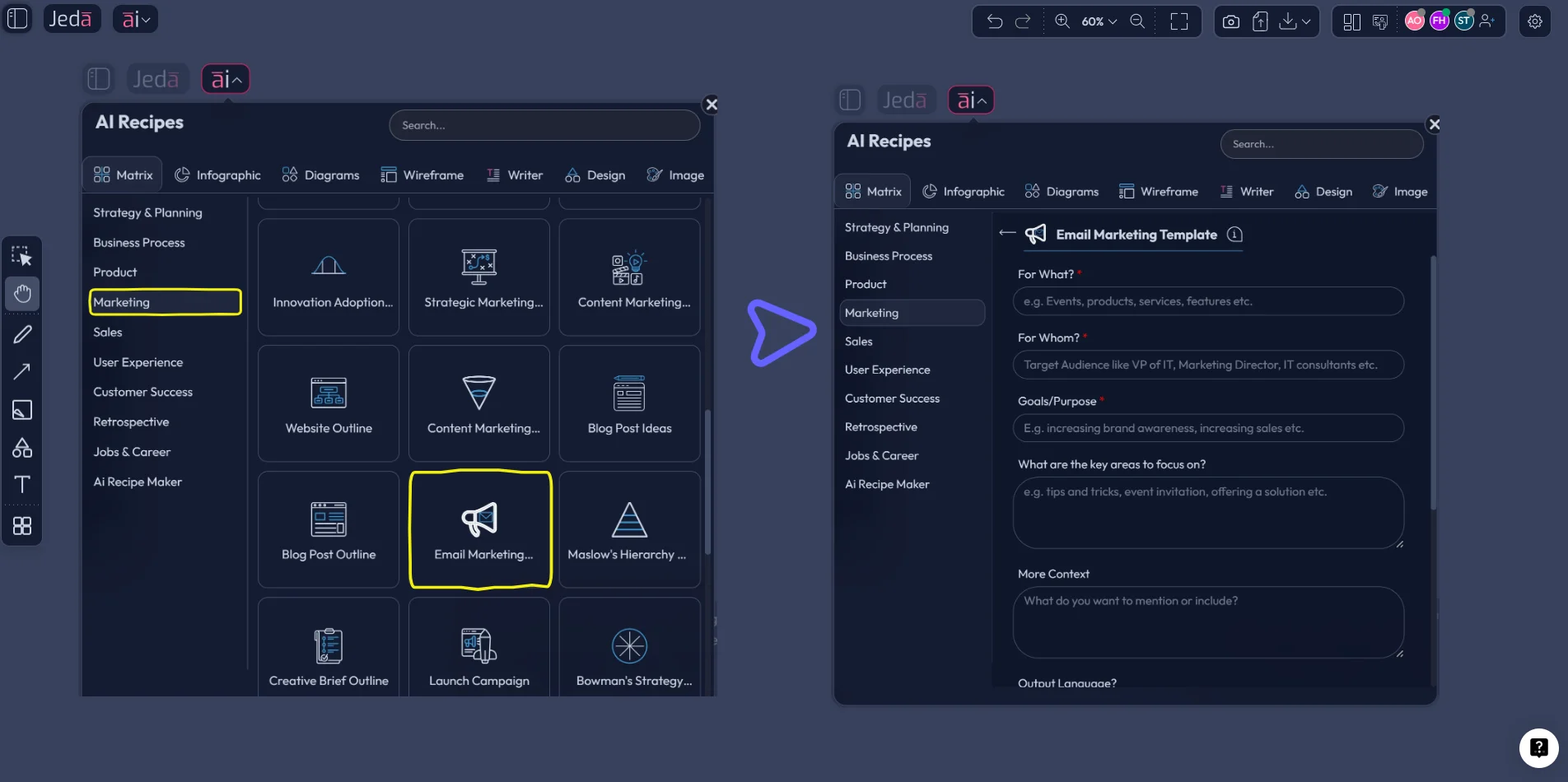
Method 1 uses the AI Menu and the Email Marketing Template recipe under the Marketing matrix category. This is the better entry point when you want structure before polish.
Method 2 uses the Prompt Bar. This is better when you already know the email you want and just need Jeda.ai to generate, refine, and iterate quickly.
After either method, use the AI+ button to deepen what already works. That part matters, because AI+ is best treated as an expansion tool, not a magic wish machine for ultra-specific instructions.
Method 1: Recipe Matrix
This route is ideal when you want more than one draft. Maybe you need campaign angles, segment-specific messages, several hooks, or a mini sequence. The matrix-first approach lets you think before you send.
- Open the AI Menu
Inside your Jeda.ai workspace, click the AI Menu in the top-left corner to open AI Recipes.
- Choose the marketing matrix recipe
Go to the Matrix recipes, open the Marketing category, and select the Email Marketing Template recipe.
- Add the core brief
Enter who the email is for, what you are promoting, the goal of the email, the tone, and any offer, deadline, objection, or CTA details.
- Generate the visual plan
Let Jeda.ai generate a structured matrix that organizes message angles, audience fit, benefits, hooks, and call-to-action options.
- Pick the winning direction
Review the matrix with your team, select the strongest block, and turn that direction into a polished email draft.
- Use AI+ to deepen the winner
Select the best section and use the AI+ button to extend it with richer detail, sharper hooks, supporting notes, or adjacent ideas.
Once the matrix is on the board, you can treat it like a working campaign brief. Pull one block into a finished promotional email. Turn another into a reply template. Save a third as a cold outreach angle. That is why this method is strong for teams that need a repeatable system, not just one decent paragraph.
Method 2: Prompt Bar
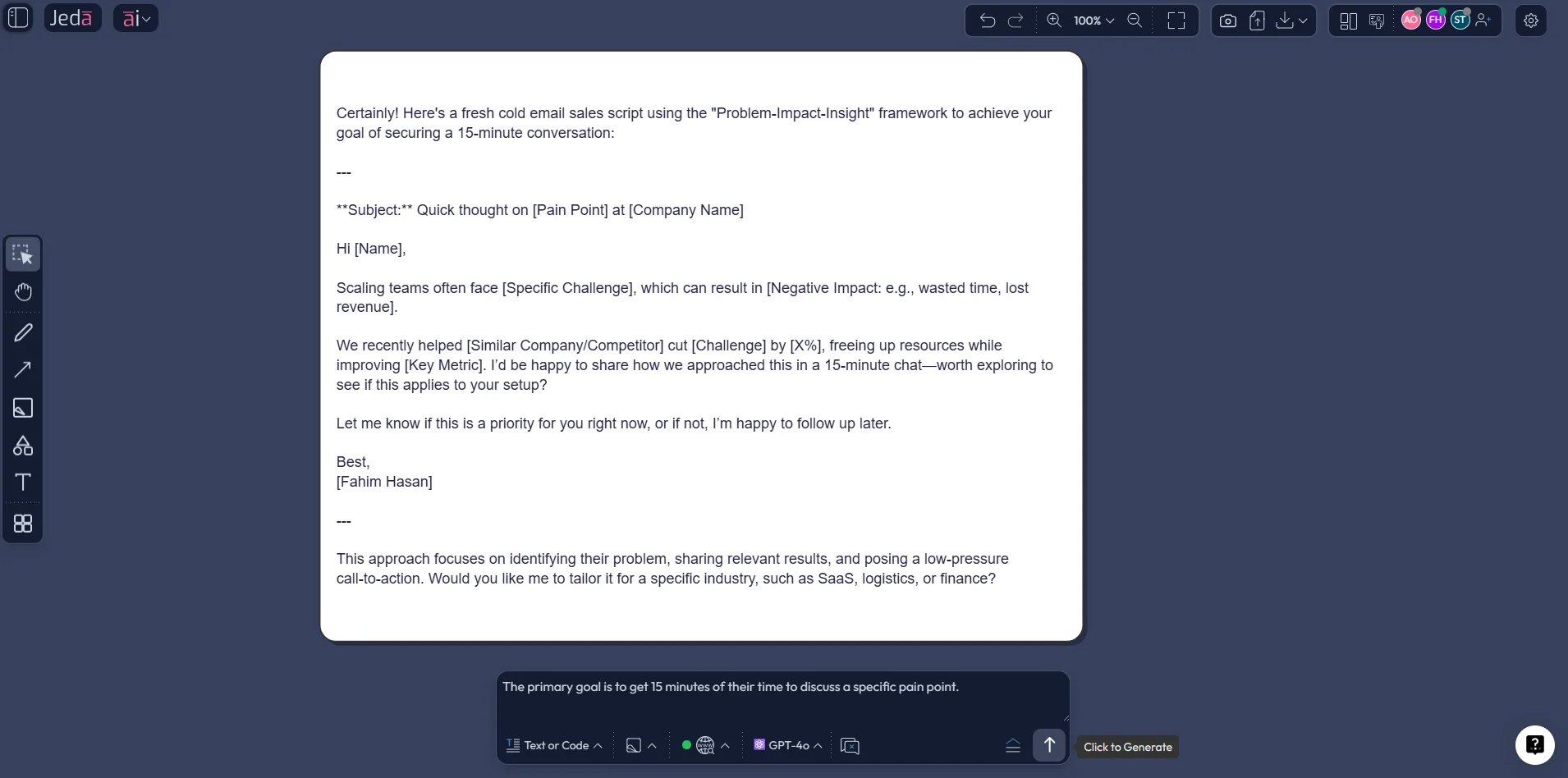
The Prompt Bar is the faster route when you already know the task. Open the Prompt Bar at the bottom of the canvas. Then choose the command that fits the job.
For polished email body copy, select Text or Code and use the Document output style so the result appears in a cleaner container. For planning multiple variants or segment angles, select Matrix first. If you want to convert the result into another format later, use Vision Transform.
A few prompt patterns that work well:
- “Write a product launch email for mid-market SaaS buyers. Tone: professional. Goal: book demos. Include subject line, preview text, body, and CTA.”
- “Draft a customer re-engagement email for inactive trial users. Keep it short, direct, and value-led.”
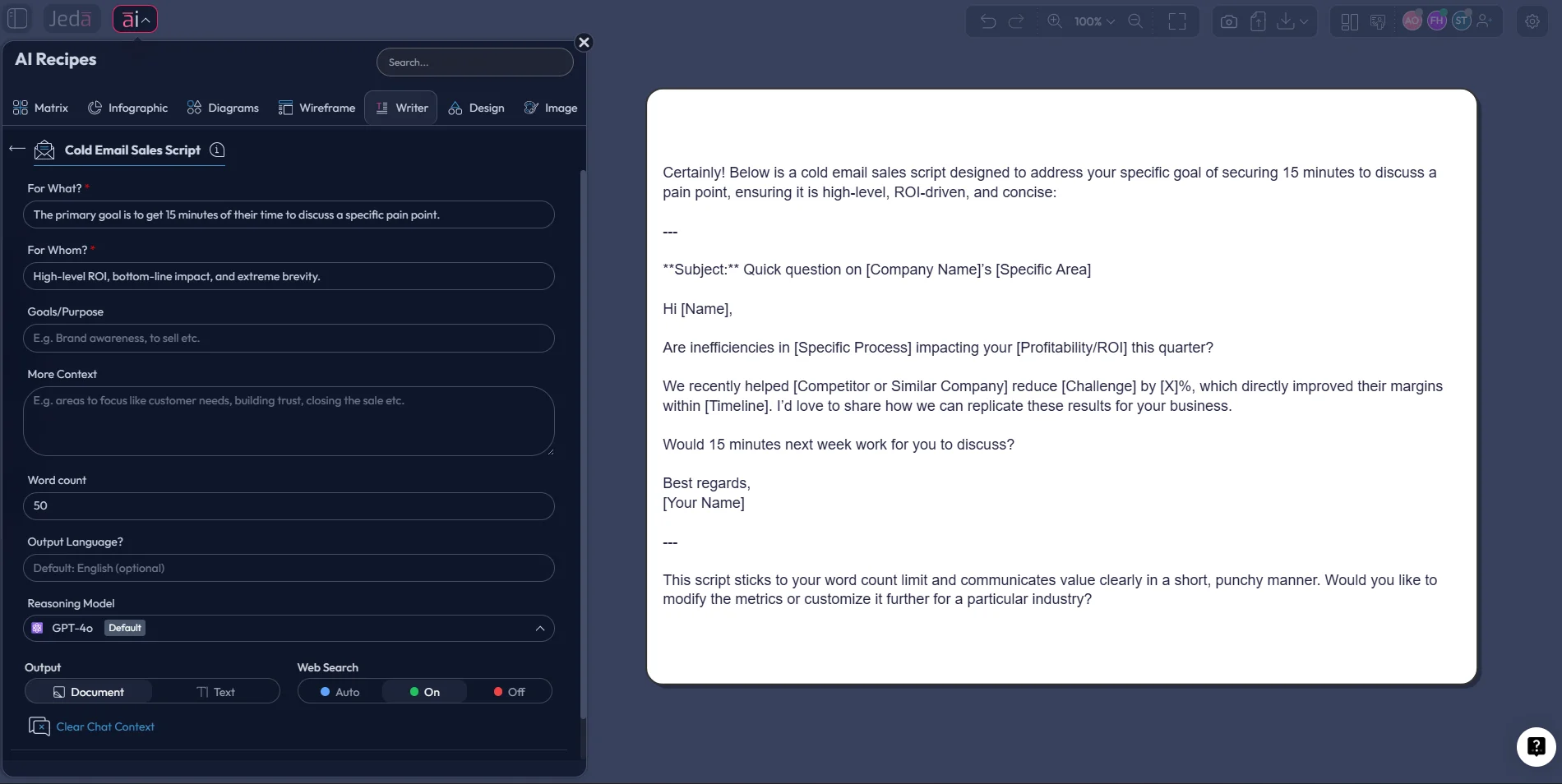
- “Write a cold email sales script for operations leaders at logistics companies. Focus on cost visibility and fast rollout.”
This method is also where the related Writer recipes become handy. After you get the base angle right, you can branch into Email, Email Reply, or Cold Email Sales Script recipes in the Writer section to generate more format-specific assets.
AI+ Button Generated Deep Dive
Here is the honest version: AI+ is not where you should dump a brand-new, highly specific request and expect a miracle. It works best after the first structure already exists.
So generate the email plan first. Then select the best node, block, or section. Use AI+ to extend that part into richer supporting content such as stronger benefits, alternate hooks, follow-up ideas, CTA wording, or another message angle. Think expansion, not replacement.
That one habit keeps the workflow clean.
What Jeda.ai Can Generate Beyond One Basic Email
A lot of teams search for an AI Email Copy Generator when what they actually need is an email system.
With Jeda.ai, you can generate:
This is where Jeda.ai earns its keep as an AI Workspace. The writing happens. But the planning, review, extension, and conversion happen there too.
Best Practices for Better AI-Generated Email Copy
Good email copy is still good email copy. AI just helps you get there faster.
A few rules are worth keeping in play:
- Start with the audience, not the wording. If the brief is vague, the output will be vague too. State who the reader is, what they care about, and what action you want.
- Keep subject lines clear. Mailchimp recommends short subject lines and says many recipients see better results with no more than 9 words and 60 characters. It also advises limiting punctuation because excess punctuation can look spammy.
- Treat preview text as part of the message. It is not filler. HubSpot notes that preview text gives readers more context about what is actually in the email.
- Test one variable at a time. Salesforce highlights subject line, preheader, CTA, content, image, and timing as common variables in email A/B testing.
- Use personalization with a brain. Personalization can help, but lazy first-name tricks are not automatic winners. Recent academic work found no clear lift from first-name subject-line personalization alone, while more formal title-and-surname personalization showed a small positive effect in some contexts.
- Write for the phone screen. Subject lines get cut off. Dense blocks get skipped. Shorter paragraphs and obvious CTA language usually win.
That mix of speed plus judgment is what separates a forgettable AI draft from an email someone actually opens and clicks.
Common Mistakes to Avoid
The biggest mistake is assuming the first output is the final answer. It almost never is.
Another common one: asking for “a professional email” and nothing else. That prompt gives AI too much room to be generic. You want to specify audience, goal, offer, tone, objection, CTA, and constraints.
Then there is over-personalization. Marketers love the idea because it sounds smart. But research is messier than the hype. Not every personalization tactic improves performance, and some familiar ones are losing their edge.
And one more thing. Do not separate the email from the campaign logic. If the subject line promises one thing and the body copy drifts somewhere else, the message weakens fast. Keep the structure visible. That is one reason an AI Whiteboard workflow can beat a simple text generator.
Frequently Asked Questions
- What does an AI Email Copy Generator do?
- An AI Email Copy Generator drafts email content from a brief that includes audience, goal, offer, tone, and CTA. The better tools also help you create variants, organize campaign logic, and refine the strongest draft instead of stopping at one generic email.
- Can Jeda.ai generate more than one kind of email?
- Yes. Jeda.ai can support launch emails, newsletters, nurture emails, reply drafts, and cold email sales scripts. You can start with the Email Marketing Template recipe, then branch into Writer recipes such as Email, Email Reply, or Cold Email Sales Script.
- Which Jeda.ai method is better for email copy: AI Menu or Prompt Bar?
- Use the AI Menu when you want structure and multiple campaign angles before drafting. Use the Prompt Bar when you already know the email you want and need a faster path to a polished draft. Many teams end up using both.
- How should I use the AI+ button for email work?
- Use AI+ after you already have a promising section on the board. Select the strongest node or block and extend it with deeper hooks, supporting points, or adjacent ideas. It works better as an expansion tool than as a replacement for the original brief.
- Can an AI Email Copy Generator help with subject lines and preview text?
- Yes. It should. Strong prompts ask for subject line, preview text, opening hook, body copy, CTA, and one alternate version for testing. That produces a more useful output than asking for body copy alone.
- Is personalization always a win in email copy?
- Not automatically. Personalization can improve relevance, but some tactics are weaker than marketers assume. Academic research suggests that simply inserting a recipient’s first name in the subject line does not always improve open or click rates.
- Can I A/B test copy generated in Jeda.ai?
- Yes. In fact, that is one of the easiest next steps. Use Jeda.ai to create two versions of a subject line, CTA, body opening, or offer framing, then test one variable at a time in your email platform.
- Is Jeda.ai only for writing, or can it help with campaign planning too?
- It can do both. Jeda.ai works well as an AI Workspace for campaign planning because you can map audience segments, message angles, objections, follow-ups, and final copy on one board instead of separating the strategy from the writing.
- Can Jeda.ai turn email ideas into another visual format?
- Yes. Vision Transform lets you convert existing content into another visual type. That means you can turn an email matrix into a flow, a decision tree, or another structure when you want to review the sequence or present it to a team.
- Who benefits most from an AI Email Copy Generator workflow in Jeda.ai?
- Marketing teams, startup founders, product marketers, consultants, and business leaders all benefit when email drafting is tied to campaign thinking. Jeda.ai is especially useful when more than one person needs to review or reuse the work.
Sources & Further Reading
- [1]
Mailchimp (2026) . “Best Practices for Email Subject Lines” Mailchimp.
View Source ↗ - [2]
Mailchimp (2026) . “How AI Can Improve Your Email Subject Lines” Mailchimp.
View Source ↗ - [3]
Salesforce (2026) . “Email Marketing A/B Testing: A Complete Guide” Salesforce.
View Source ↗ - [4]
Litmus (2025) . “The ROI of Email Marketing” Litmus.
View Source ↗ - [5]
Nobile, T.H. & colleagues (2023) . “Personalisation (In)effectiveness in email marketing” Decision Analytics Journal.
View Source ↗ - [6]
Defau, L. & De Pelsmacker, P. (2023) . “Personalized subject lines in email marketing” Marketing Letters.
View Source ↗ - [7]
Campaign Monitor (2026) . “The Ultimate Guide to Personalized Email for Every Marketer” Campaign Monitor.
View Source ↗ - [8]
HubSpot (2024) . “How to Write a Marketing Email: 28 Tips for Writing Compelling Email Copy” HubSpot.
View Source ↗
Start Your AI Email Copy Generator Workflow Today
Join over 150,000+ users who use Jeda.ai to plan, write, refine, and visualize smarter email campaigns in one AI Workspace.
Try Free Template