AI for Consultants has moved past the novelty phase. Clients no longer need to hear that a consultant uses AI. They need to understand how the work was developed, what evidence shaped it, where assumptions were challenged, and why the final recommendation deserves confidence.
That trust gap is the real story. In a September 25, 2026 post titled “Beyond ‘We Use AI’: Trust Is the New Competitive Advantage”, Law.com said clients do not need another firm simply announcing AI use; at this point, they assume it. The firms that stand out are the ones that show why their AI approach deserves trust.
For consultants, that means the deliverable is only half the work. The other half is the visible reasoning behind it. Jeda.ai is built for that second half: a visual AI Workspace where consultants can turn documents, notes, data, client context, and strategic frameworks into editable boards that teams can review together. Not another hidden chat transcript. A working surface for decisions.
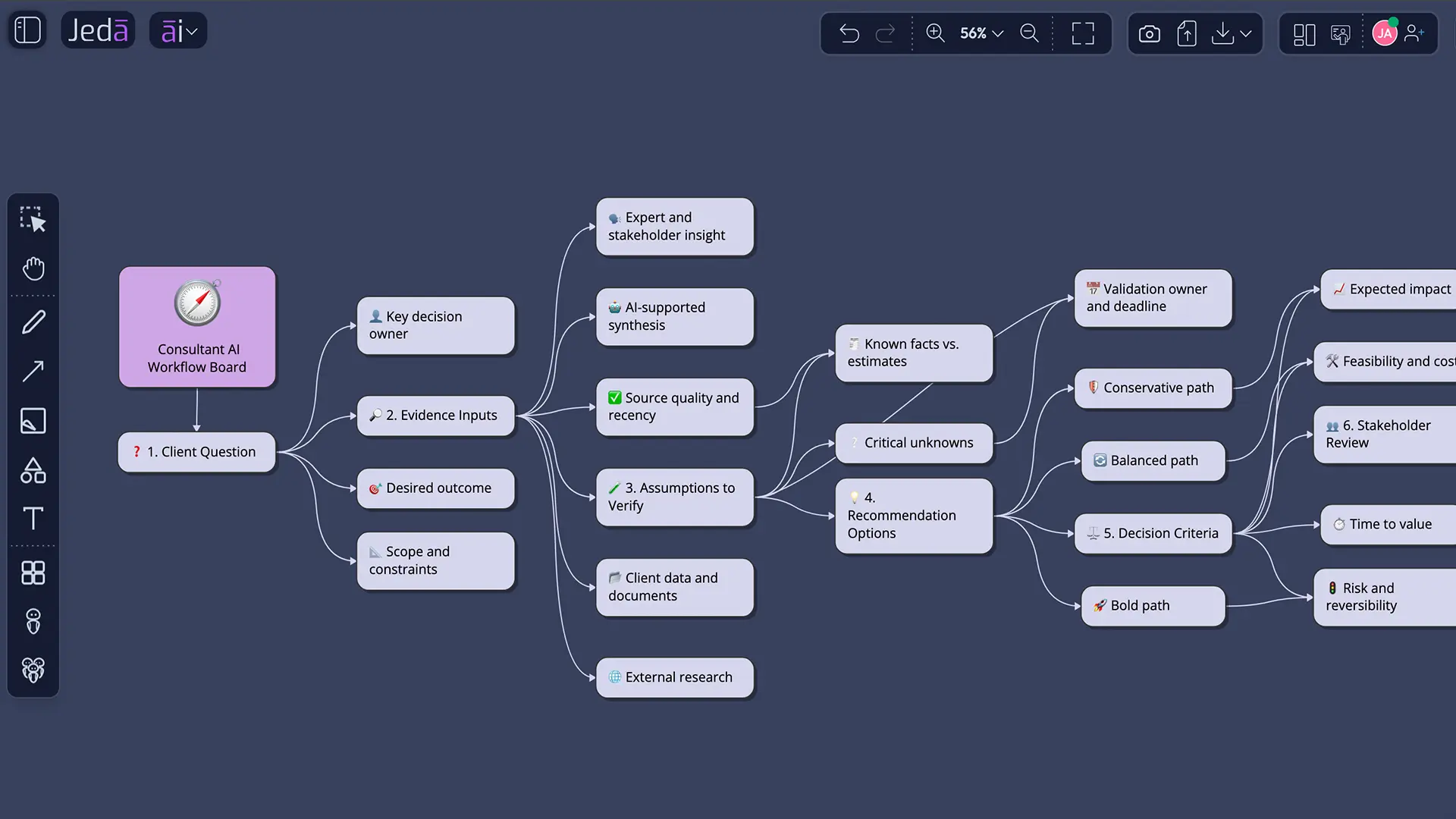
Why “we use AI” is not a consulting advantage anymore
AI use is no longer the interesting claim. Process is. A consultant who says “we use AI” without showing how the output was checked, structured, compared, and refined is asking the client to trust a black box.
That is a weak position. Clients want speed, yes, but they also want traceability. They want to see which inputs were used. They want to know whether the recommendation came from a single pass or from a structured review. They want to understand the trade-offs before they approve the work.
The better consulting message is not “we use AI.” It is: “Here is the visual workflow we used to turn your context into a recommendation.”
That is where Jeda.ai becomes useful. Inside the visual AI workspace, consultants can build a shared board where the problem, evidence, assumptions, alternatives, and final direction are all visible. The client does not have to guess how the conclusion appeared. They can inspect the work.
What trust means in an AI-assisted consulting workflow
Trust is not a slogan. In consulting work, trust usually comes from a few concrete things: clear inputs, structured reasoning, transparent assumptions, reviewable alternatives, and a recommendation that survives discussion.
Jeda.ai supports that pattern because it is not limited to plain text output. Consultants can work across matrices, mind maps, flowcharts, diagrams, infographics, document-driven analysis, data-driven analysis, and visual summaries inside one AI Whiteboard. The point is not to make the board look busy. The point is to make the reasoning visible enough for a client conversation.
- Evidence stays visible
Bring client notes, documents, research, and structured inputs into the workspace so the recommendation has a visible starting point.
- Reasoning becomes structured
Use visual frameworks, diagrams, and maps to organize the problem instead of leaving the logic buried in paragraphs.
- Review happens together
Teams can inspect, edit, comment, and align around the same visual board before turning analysis into a client-ready output.
This is the difference between AI as a shortcut and AI as a professional workflow. A shortcut creates content faster. A workflow helps people understand whether the content should be trusted.
Why Jeda.ai is effective AI for Consultants
Jeda.ai is effective AI for Consultants because it combines the things consultants already need: structured thinking, client context, visual deliverables, and collaborative review. The workflow is not “ask once, paste into a slide, hope nobody asks hard questions.” Thankfully. Nobody needs more mystery meat strategy.
In Jeda.ai, consultants can start with a client challenge and turn it into a visual decision system. A discovery note can become a mind map. A messy process can become a flowchart. A set of options can become a decision matrix. A long document can become a visual summary. A board can keep evolving as the consultant and client sharpen the thinking together.
That matters because trust is easier to build when the work remains editable. Consultants can adjust labels, reorganize sections, add missing assumptions, remove weak logic, and turn rough AI output into a polished client artifact without restarting from scratch.
| Consulting Need | Weak AI Workflow | Jeda.ai Workflow | |
|---|---|---|---|
| Client context | Use the actual situation | Prompt from memory | Bring notes, files, and context into a shared visual board |
| Reasoning | Explain why the recommendation makes sense | Show a final paragraph | Map assumptions, criteria, options, and trade-offs visually |
| Review | Let stakeholders challenge the work | Send a static answer | Edit, comment, and refine the board together |
| Output | Create a client-ready deliverable | Copy and reformat manually | Generate editable diagrams, matrices, summaries, and visual narratives |
The trust-first consulting workflow inside Jeda.ai
A trust-first workflow starts before the first AI output. The consultant defines the problem, adds context, selects a visual structure, generates a first version, reviews assumptions, compares alternatives, and then refines the board into a decision-ready artifact.
That is a very different motion from treating AI as an answer machine.
A practical Jeda.ai workflow can look like this:
- Define the client question
Start with the business problem, audience, goal, decision deadline, and any constraints that should shape the recommendation.
- Add supporting context
Upload or paste relevant notes, documents, research summaries, discovery findings, or structured data that should inform the output.
- Choose the visual format
Select the format that fits the consulting task: matrix for evaluation, mind map for exploration, flowchart for process logic, or diagram for relationships.
- Generate the first working board
Use Jeda.ai to create an editable visual output that organizes the problem, options, assumptions, and next-step recommendations.
- Review assumptions and gaps
Inspect the board with the team or client. Mark unclear claims, missing inputs, weak assumptions, or areas that need more evidence.
- Refine into a client-ready artifact
Edit the structure, labels, priorities, and visual layout until the board explains both the recommendation and the reasoning behind it.
AI+ can extend and deepen selected parts of an existing board when more detail is needed. The important part is still human judgment: the consultant reviews, edits, and decides what belongs in the final client-facing narrative.
How-To 1: Create a consultant trust workflow from the AI Menu
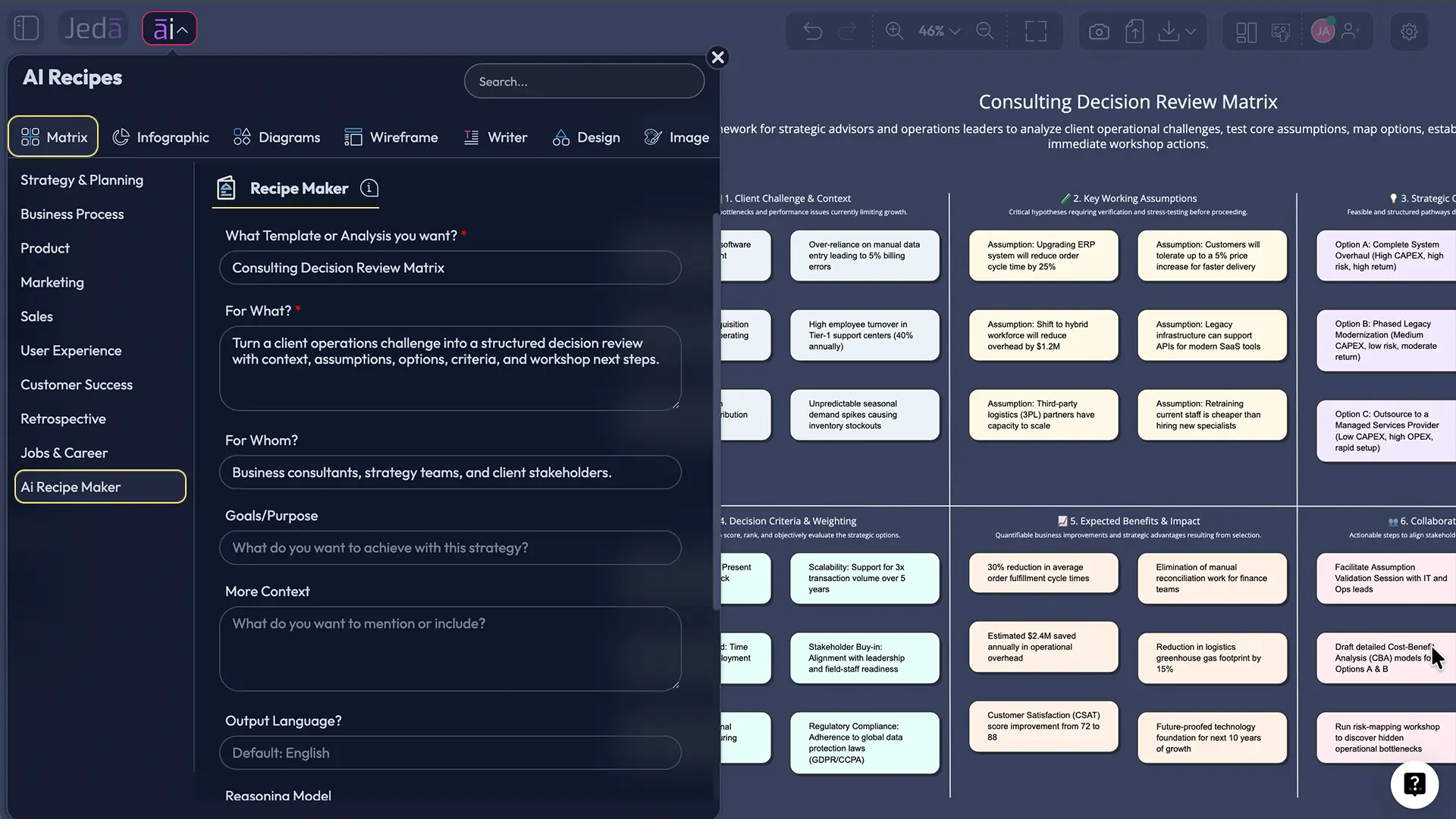
Use this method when you want a guided start. The AI Menu is useful when the consultant knows the type of work they need but wants a structured form instead of a blank prompt.
- Open a Jeda.ai workspace.
- Click the AI Menu in the top-left area of the canvas.
- Choose a relevant recipe category for the consulting task, such as strategy, planning, process, or visual analysis.
- Select a recipe that matches the desired output style.
- Add the client problem, context, audience, and constraints into the guided fields.
- Choose the output format that best supports the discussion.
- Generate the board.
- Review the result, then edit the structure, text, priorities, and visual layout with your team.
This method works well for repeatable consulting work because it reduces setup time while keeping the consultant in control of the final reasoning.
How-To 2: Create a consultant trust workflow from the Prompt Bar
Use this method when you already know what you want and want to generate directly from the canvas. The Prompt Bar is faster for custom consulting tasks, especially when the work does not fit a preset template.
- Open the Prompt Bar at the bottom of the Jeda.ai workspace.
- Select the command that fits the output: Matrix for evaluation, Mindmap for exploration, Flowchart for process logic, Diagram for relationships, or Infographic for a client-ready visual summary.
- Add the consulting prompt with context, objective, audience, boundaries, and desired output.
- Attach supporting files when the analysis should be grounded in specific material.
- Use Web Search only when current public context is needed for the task.
- Generate the output.
- Review the visual board and adjust anything that needs better wording, stronger logic, or clearer structure.
- Use Vision Transform if the output needs to become another visual format, such as turning a mind map into a matrix or a process map into an infographic.
The key is to treat the first output as a working draft. Good consultants do not outsource judgment. They use AI to accelerate structure, then they sharpen the recommendation.
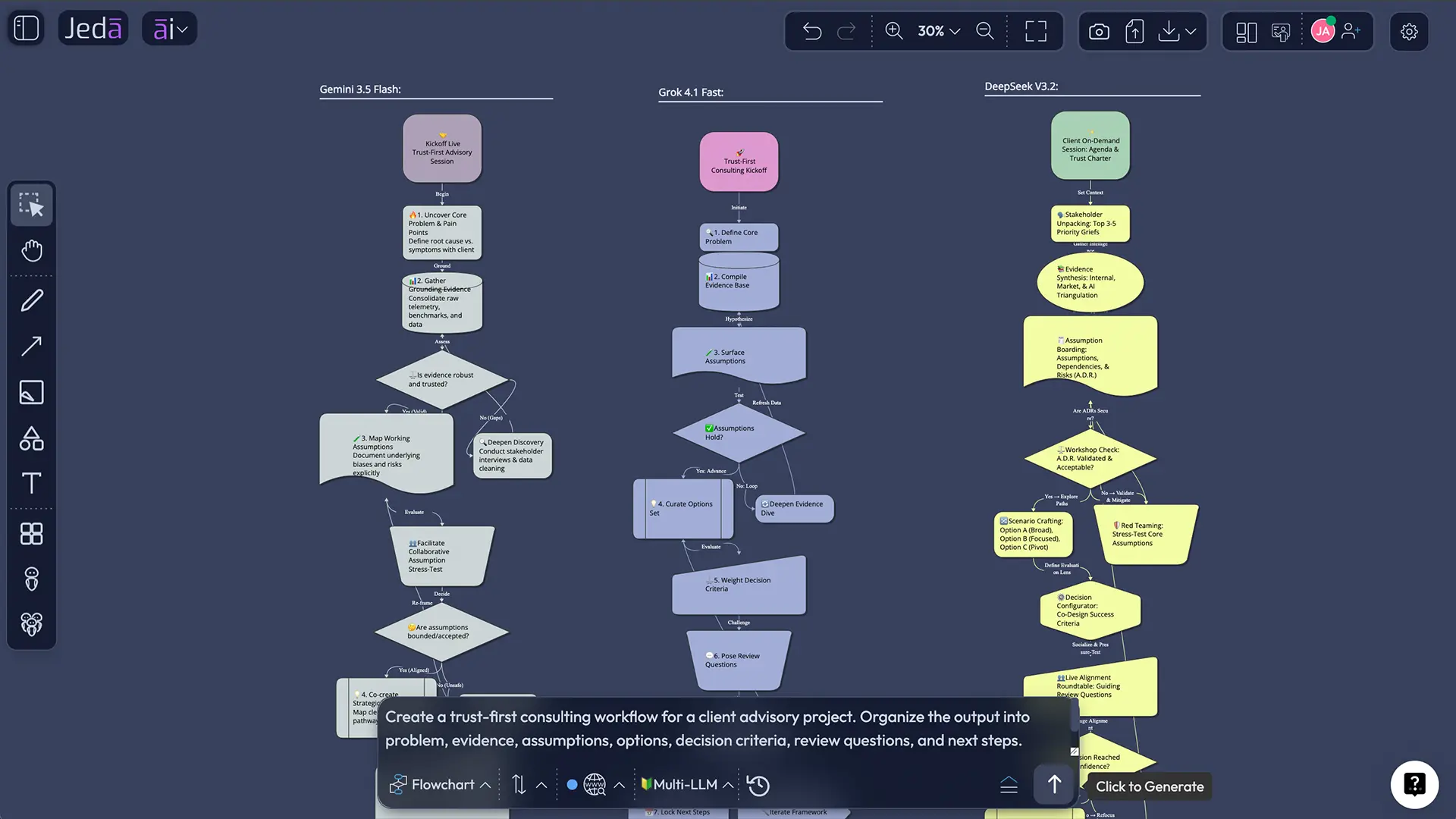
Example prompt for a trust-ready consulting board
Here is a practical prompt consultants can adapt inside Jeda.ai. Keep the client and project details fictional or anonymized when capturing a public screenshot.
Create a client advisory trust board for a software operations improvement engagement. Organize the board into seven sections: client goal, evidence inputs, assumptions to verify, recommendation options, decision criteria, unresolved questions, and next-step workshop plan. Make the output concise, visual, and ready for a client review session.
That prompt is intentionally structured. It does not ask AI for a final answer in isolation. It asks Jeda.ai to create a board that supports review, discussion, and decision-making.
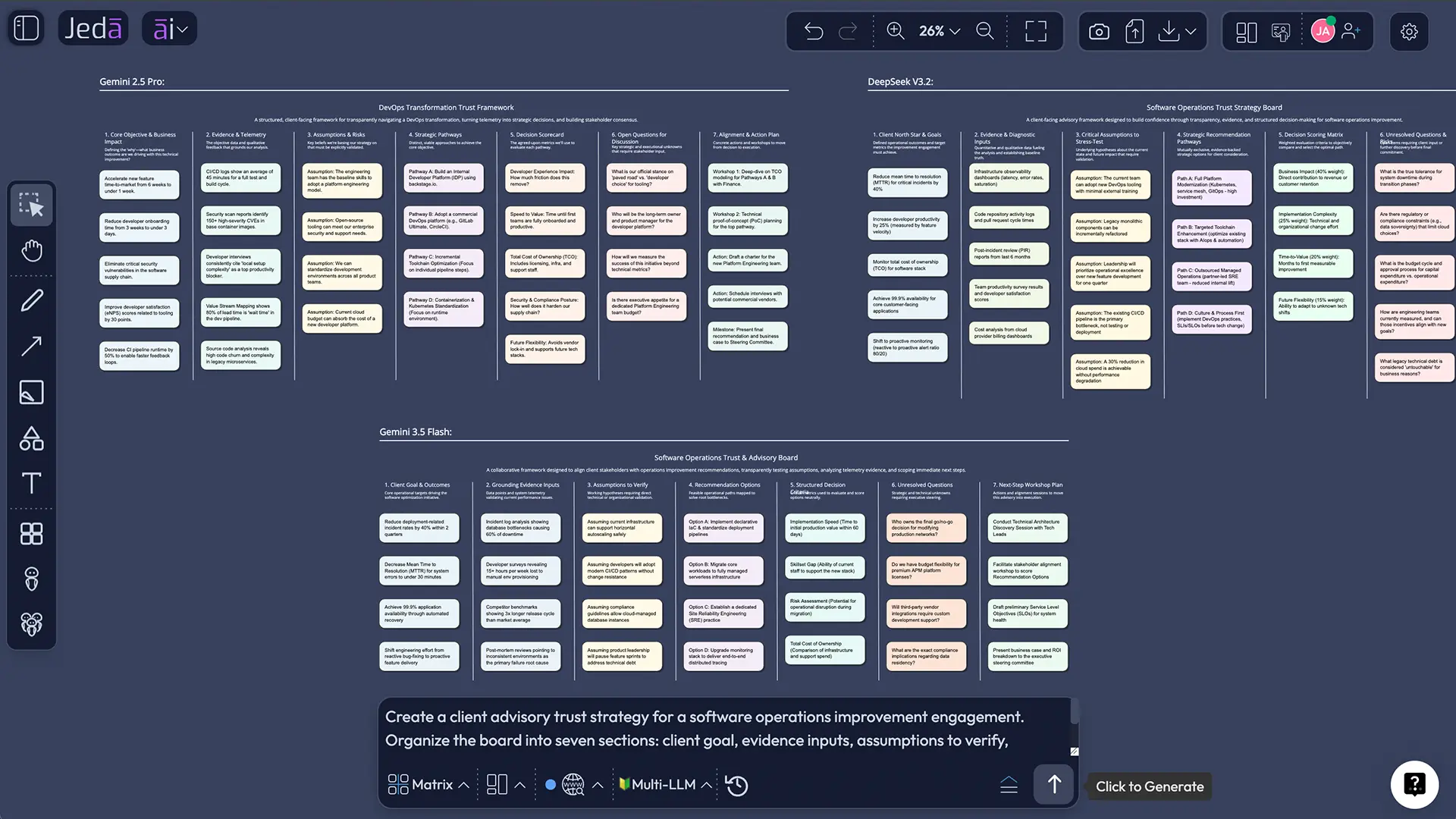
What consultants can create with Jeda.ai
Jeda.ai works best when consultants need to convert messy context into structured visual thinking. That includes discovery, diagnosis, planning, option comparison, and client alignment.
Inside the collaborative AI whiteboard, consultants can create:
- Client discovery maps
- Problem framing boards
- Decision matrices
- Process improvement maps
- Opportunity prioritization boards
- Stakeholder alignment diagrams
- Workshop summaries
- Implementation roadmaps
- Client-ready visual narratives
This is also where cumulative Jeda.ai capabilities matter. The product is not just one feature. It combines visual generation, editable outputs, document insight, data insight, multi-perspective reasoning, AI Recipes, Vision Transform, collaboration, and the AI Whiteboard into one workspace. The result is a more complete consulting workflow: input, thinking, review, and output stay connected.
Why visible AI workflows help consultants win better conversations
A client does not always reject a recommendation because it is wrong. Sometimes they reject it because they cannot see the path that led there.
Visible AI workflows reduce that problem. When the board shows the inputs, logic, gaps, and options, the conversation changes. The consultant no longer has to defend a mysterious conclusion. They can walk the client through the reasoning and invite focused critique.
That creates a better meeting. It also creates a better consultant. The board becomes a thinking partner, not just a presentation asset. Teams can spot thin logic early, catch missing context, and turn disagreement into a structured decision instead of a long debate with no artifact.
Jeda.ai’s workspace console update also reinforces this direction: cleaner canvas controls, AI Vision access, smarter diagrams, and more usable visual workflows for serious work. For consultants, that matters because the workspace needs to support live thinking, not just polished screenshots after the fact.
Best practices for using Jeda.ai in client work
The tool helps, but the consulting discipline still matters. A good AI Workspace can make reasoning visible. It cannot decide what your client should believe.
Use these practices to keep the work professional:
Common mistakes to avoid
The first mistake is using AI to create a polished answer before the problem is properly framed. That creates fast confusion. Start with the decision, audience, and constraints.
The second mistake is burying assumptions. If the recommendation depends on something uncertain, show it. A visible assumption is manageable. A hidden assumption becomes a meeting ambush.
The third mistake is overloading the board. Consultants love frameworks; clients love clarity. Use enough structure to explain the thinking, but do not turn the board into a museum of every idea that crossed the room.
The fourth mistake is treating collaboration as a final review step. In Jeda.ai, collaboration can happen while the thinking is still forming. That is the advantage. Bring stakeholders into the board before the recommendation hardens.
Frequently Asked Questions
- What does AI for Consultants mean in Jeda.ai?
- AI for Consultants in Jeda.ai means using AI to structure client problems, organize evidence, generate editable visual analysis, compare options, and support reviewable recommendations inside one collaborative AI Workspace.
- Why is trust more important than simply using AI?
- Clients increasingly assume consultants use AI. Trust comes from showing how AI-assisted work was created, reviewed, challenged, and refined before it becomes a recommendation.
- How does Jeda.ai make AI work more transparent?
- Jeda.ai turns prompts, files, notes, and analysis into visible boards, matrices, diagrams, maps, and summaries that consultants and clients can inspect, edit, and discuss together.
- Can consultants use Jeda.ai for client workshops?
- Yes. Consultants can use Jeda.ai as a shared AI Whiteboard for discovery, problem framing, option comparison, planning, and decision review during or after client workshops.
- Does Jeda.ai replace consultant judgment?
- No. Jeda.ai accelerates structure and visual analysis, but the consultant still reviews assumptions, edits outputs, applies context, and decides what belongs in the final recommendation.
- What visual formats are useful for consultants?
- Matrices, mind maps, flowcharts, diagrams, infographics, sticky-note clusters, document summaries, and data-driven visual boards are especially useful for consulting workflows.
- How should consultants use AI+ in this workflow?
- AI+ can extend and deepen selected parts of an existing Jeda.ai board when more detail is needed. The consultant should still review and refine the result before using it with clients.
- What makes Jeda.ai different from a text-only AI workflow?
- Jeda.ai keeps the consulting process visual, collaborative, and editable. Instead of ending with a text answer, consultants can build a shared workspace that explains the reasoning behind the recommendation.
Final thought: trust is the deliverable behind the deliverable
A consultant’s visible output might be a board, a summary, a roadmap, or a recommendation. But the deeper deliverable is trust.
That is why Jeda.ai fits this moment. Law.com’s trust argument points to the shift: simply saying “we use AI” is not enough. Consultants need a way to show how AI-assisted work becomes credible work.
Jeda.ai gives consultants that surface. It turns AI into a visible workflow: evidence in, frameworks applied, alternatives compared, assumptions reviewed, outputs edited, and clients aligned. That is the version of AI for Consultants worth building around.
- [1]
Amyote, Tanya (2026) . “Beyond ‘We Use AI’: Trust Is the New Competitive Advantage” Law.com.
View Source ↗ - [2]
Jeda.ai (2026) . “AI Workspace — Visual AI Thinking OS” Jeda.ai.
View Source ↗ - [3]
Jeda.ai (2026) . “Jeda.ai’s New Workspace Console: Floating Toolbar, Visual AI & Smarter Diagrams” Jeda.ai Resources.
View Source ↗
Build Trust-Ready Client Workflows in Jeda.ai
Turn context, evidence, frameworks, and AI reasoning into editable visual boards your team can review before the client sees the recommendation.
Start Free in Jeda.ai