AI in Marketing stopped being a cute productivity hack a while ago. It is now a planning system, a research assistant, a creative partner, a reporting analyst, and, when teams get sloppy, a very fast way to scale bland work. That tension is the whole game.
The real question is not whether your team should use AI in Marketing. It is whether you can use it without creating tool sprawl, generic messaging, and dashboards nobody wants to read. Salesforce’s latest State of Marketing shows that marketers feel the pressure from both sides: 83% say customers now expect two-way conversations, yet 69% still struggle to respond promptly and 84% admit they are running generic campaigns. McKinsey, meanwhile, keeps pointing to the same upside: more personalization, faster content cycles, and more value when workflows are redesigned instead of merely automated.
That is where Jeda.ai earns its keep. Instead of splitting your work across chat tabs, slide decks, docs, spreadsheets, image tools, and whiteboards, you can run strategy, research, creation, collaboration, and visual decision-making inside one AI Workspace and one AI Whiteboard. The platform combines 300+ strategic frameworks, editable visuals, document and data analysis, static image generation, collaboration, and the AI+ button for deeper expansion. No tool-hopping. No re-drawing the same thinking five times. And yes, this is exactly why 150,000+ users are already using Jeda.ai as a Visual AI workspace for serious work—not just pretty outputs.
If you want the broader platform context while reading this page, start with AI Workspace, AI Whiteboard, Visual AI Data Analysis, Visual AI Document Analysis, and the AI Infographic Generator.
What is AI in Marketing?
AI in Marketing is the use of artificial intelligence to improve marketing decisions, automate routine execution, surface patterns in customer or campaign data, and personalize experiences at a scale humans cannot manage alone. IBM frames it around data collection, analysis, machine learning, and NLP for customer insight and decision automation. That is the clean definition.
But the practical definition is messier. AI in Marketing now touches audience research, campaign planning, positioning, content operations, media optimization, journey design, creative production, customer response, analytics, and reporting. McKinsey argues that generative AI is pushing marketing toward hyperpersonalization at scale and faster campaign cycles. HubSpot’s recent marketing trend reporting shows the same shift from another angle: marketers are leaning harder into personalized content, automation, repurposing, and AI-aware search content.
Here is the catch. Most teams adopt AI in fragments. One tool for copy. Another for images. Another for analytics. Another for notes. Another for workflow diagrams. That stack looks “modern” on paper and feels ridiculous by week three.
Jeda.ai fixes that by turning AI in Marketing into a visual operating system. You can start with a strategic matrix, convert it into a campaign flow, expand it into a mind map, upload a brief for document analysis, drop in performance CSVs for data insight, create an infographic for stakeholders, and use the same board to collaborate with the team.
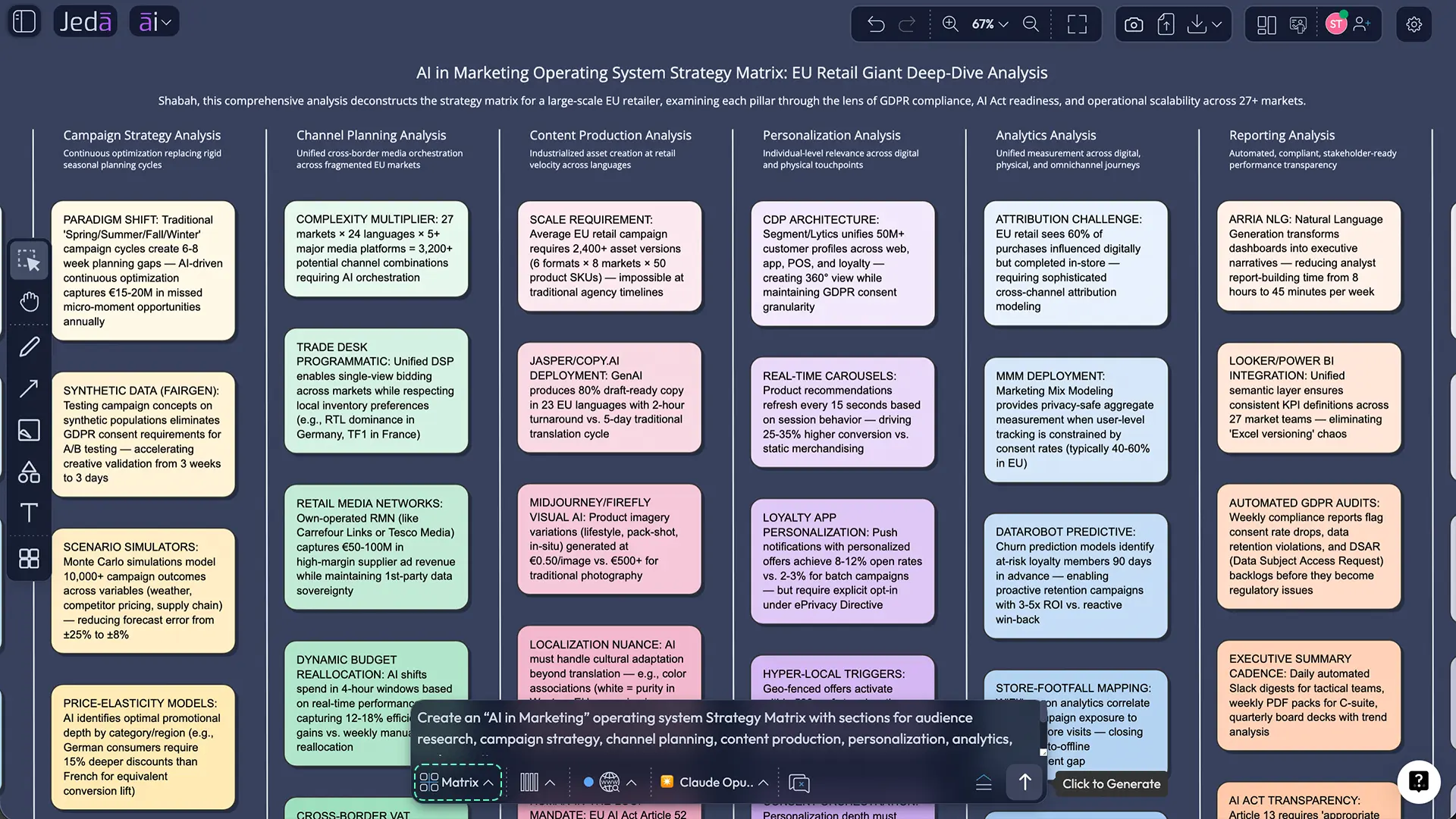
Why AI in Marketing needs a visual workflow, not another text box
Most AI in Marketing content online stops at the obvious wins: write faster, personalize more, analyze more data, and automate repetitive tasks. All true. Still incomplete.
Marketing is not just a writing problem. It is a decision problem.
You need to connect the brief to the audience, the audience to the offer, the offer to the channel, the channel to the content, the content to the KPI, and the KPI back to the next decision. That is why a visual workflow matters more than another chat answer.
- See strategy, not scraps
Map positioning, audiences, channels, offers, and KPIs in one editable board so your team stops guessing what connects to what.
- Create faster without flattening the brand
Use AI for drafts, variants, and repurposing, then keep human direction visible on the canvas so the work stays on-brand.
- Turn data into decisions
Upload campaign CSV or Excel files and move from raw performance numbers to visual patterns, priorities, and next actions.
- Break down briefs and reports
Use Document Insight to turn PDFs, planning docs, customer interviews, and research decks into structured marketing visuals.
- Move from plan to execution
Start with a Matrix or Mindmap, switch to Flowchart or Diagram, then share the same workspace with leadership, content, and growth teams.
- Collaborate in context
Comments, edits, follow-me presentations, and shared boards keep campaign thinking visible instead of buried across meetings and tabs.
A few live signals make the case even sharper. Salesforce surveyed roughly 4,500 marketing leaders and found that only one in four are satisfied with how they use data for those personalized moments. HubSpot’s 2026 trend reporting says personalized content, automation, and SEO adaptation are top priorities, while McKinsey’s 2025 AI survey shows most organizations are using AI somewhere, but only a minority have redesigned workflows deeply enough to capture serious enterprise value.
That is the difference between AI as a feature and AI as an operating model.
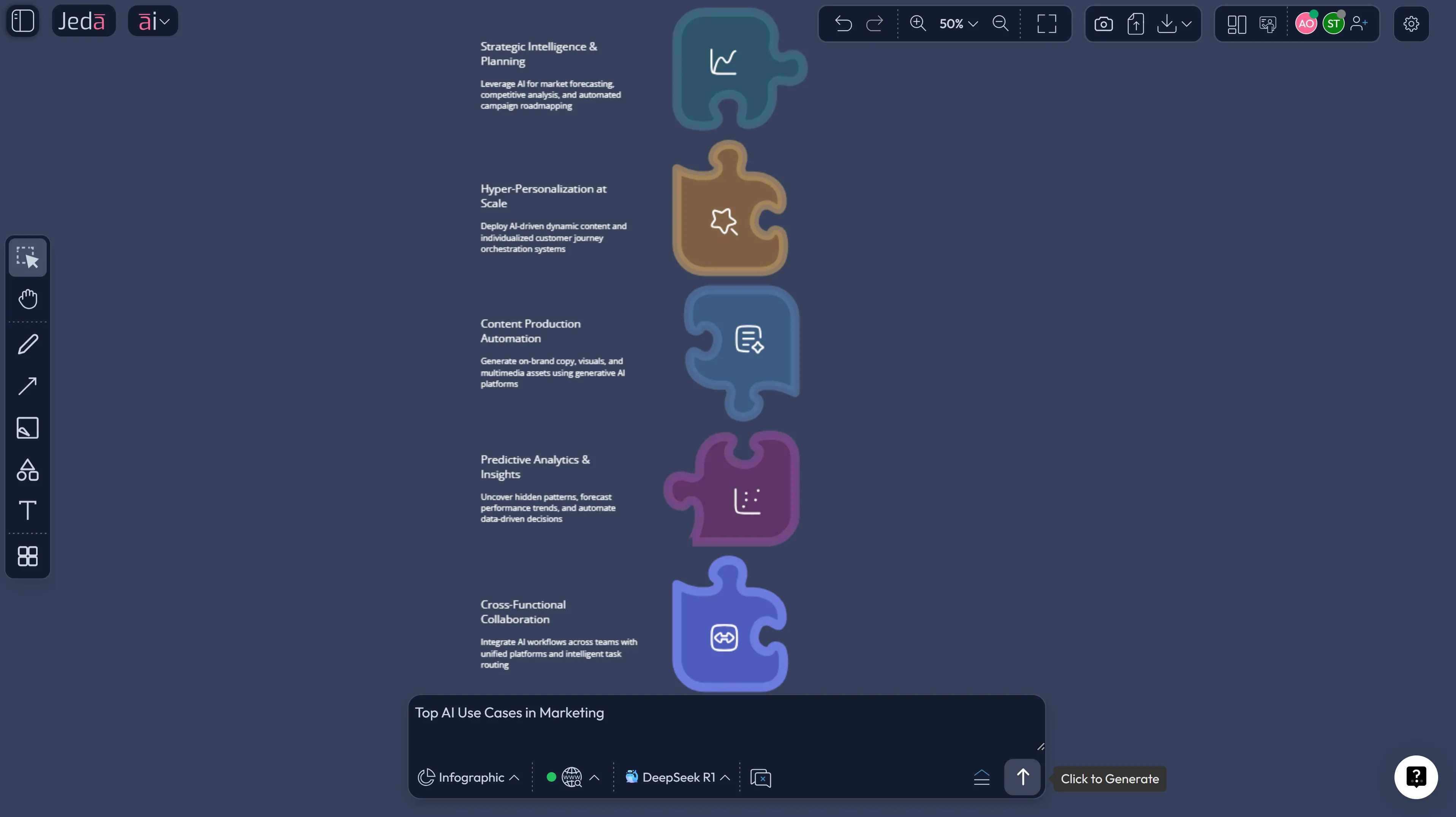
23 AI use cases in Marketing that matter right now
You do not need 200 use cases. You need the ones that actually move work.
1) Strategy, research, and planning
- ICP and persona mapping using interviews, CRM notes, or sales call summaries.
- Segmentation strategy based on behavior, industry, lifecycle stage, or intent.
- Positioning and message architecture for new product or campaign launches.
- SWOT, PESTEL, and competitive analysis for market shifts and response planning.
- Customer journey mapping across awareness, consideration, conversion, onboarding, and retention.
- Content pillar and topic clustering tied to funnel stages and search intent.
2) Campaign creation and content operations
- Campaign brief generation with goals, audience, offer, tone, and channel logic.
- Email sequence drafting for nurture, webinar, product launch, ABM, or reactivation.
- Ad copy variants for paid social, search, and retargeting.
- Landing page wireframes for demand-gen or product messaging tests.
- Social calendar planning with per-channel format adaptation.
- Repurposing long-form content into newsletters, posts, hooks, scripts, and visuals.
3) Data, reporting, and optimization
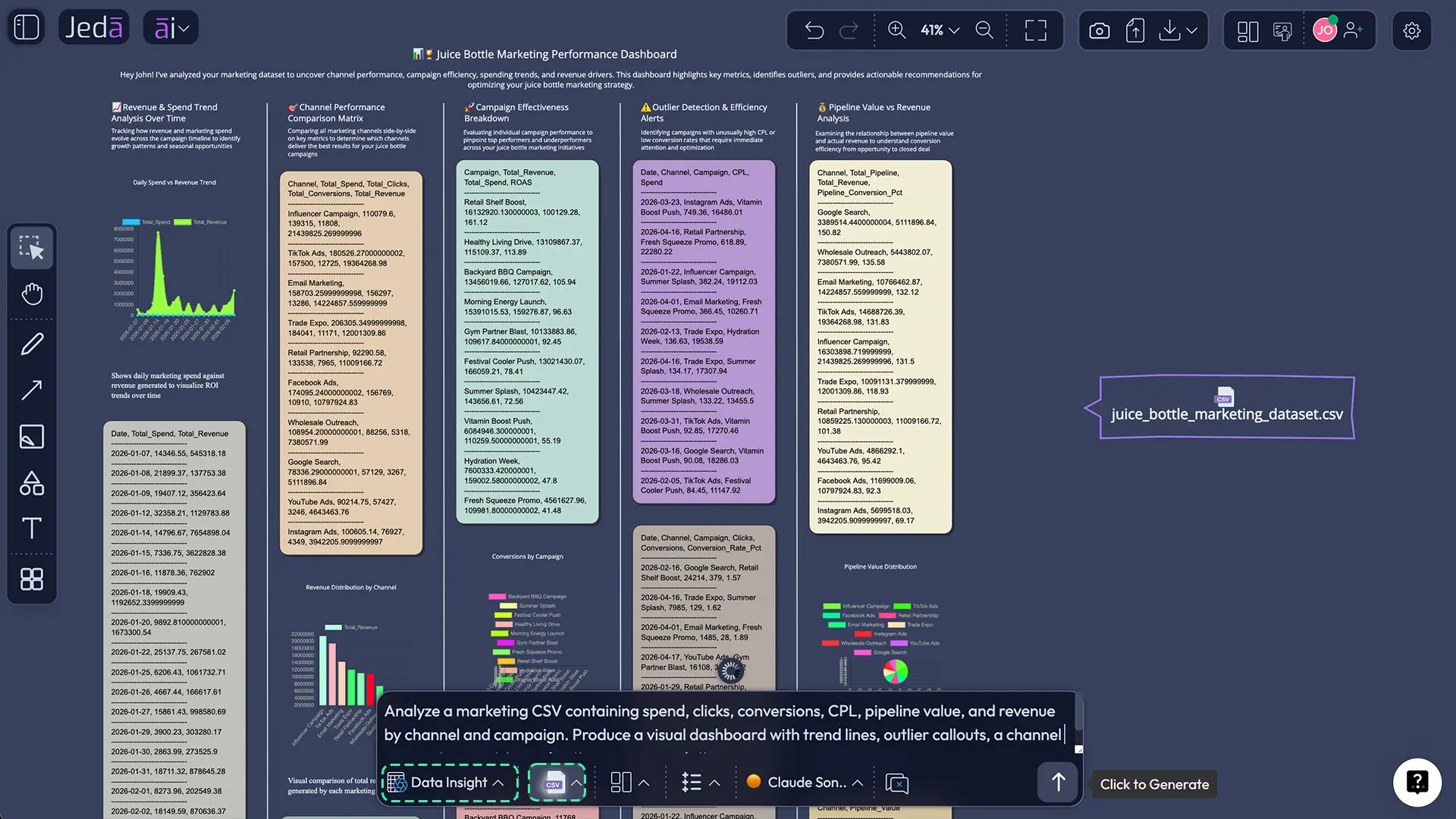
- Marketing dashboard analysis from CSV or Excel exports.
- Channel mix review to spot underperforming spend or over-weighted channels.
- A/B test hypothesis generation from engagement and conversion patterns.
- Lead quality analysis using sales feedback, pipeline stage data, and campaign source.
- Attribution storyboarding to explain what influenced conversion, not just what got clicked.
- Forecast and scenario planning for budget cuts, launch changes, or funnel drops.
4) Creative, experience, and collaboration
- Creative concept expansion for offers, campaign themes, and hooks.
- Static visual generation for hero images, social graphics, concept art, and storyboards.
- Infographic creation for performance summaries or stakeholder updates.
- Response workflow design for inbound leads, lifecycle messages, and customer education.
- Cross-functional campaign rooms where marketing, product, leadership, and design work on the same board.
A good rule here: if the work needs both thinking and showing, it belongs in Jeda.ai.
A quick way to match the use case to the right starting point
| Marketing job to be done | Best starting command in Jeda.ai | Why it works |
|---|---|---|
| Build a campaign strategy | Matrix | Gives structure fast |
| Explore themes and angles | Mindmap | Expands options visually |
| Map journeys and automations | Flowchart | Clarifies sequence and triggers |
| Explain a system or funnel | Diagram | Flexible visual relationships |
| Draft copy or briefs | Text | Fast written output on-canvas |
| Brainstorm with a team | Stickynotes | Loose ideation without friction |
| Mock up a landing page | Wireframe | Visualize structure before design |
| Summarize insights for leadership | Infographic | Cleaner stakeholder storytelling |
| Analyze campaign CSVs | Data Insight | Converts performance data into action |
| Turn a brief or report into a board | Document Insight | Pulls structure from source material |
How to create AI in Marketing workflows in Jeda.ai
You can do this two ways inside Jeda.ai: start from the AI Menu with a recipe-led structure, or build directly from the Prompt Bar. For broad marketing work, the smartest move is usually to begin with structure and then expand.
Method 1: Recipe Matrix
This is the better option when you want a clear starting framework for campaign planning, audience strategy, market analysis, or prioritization.
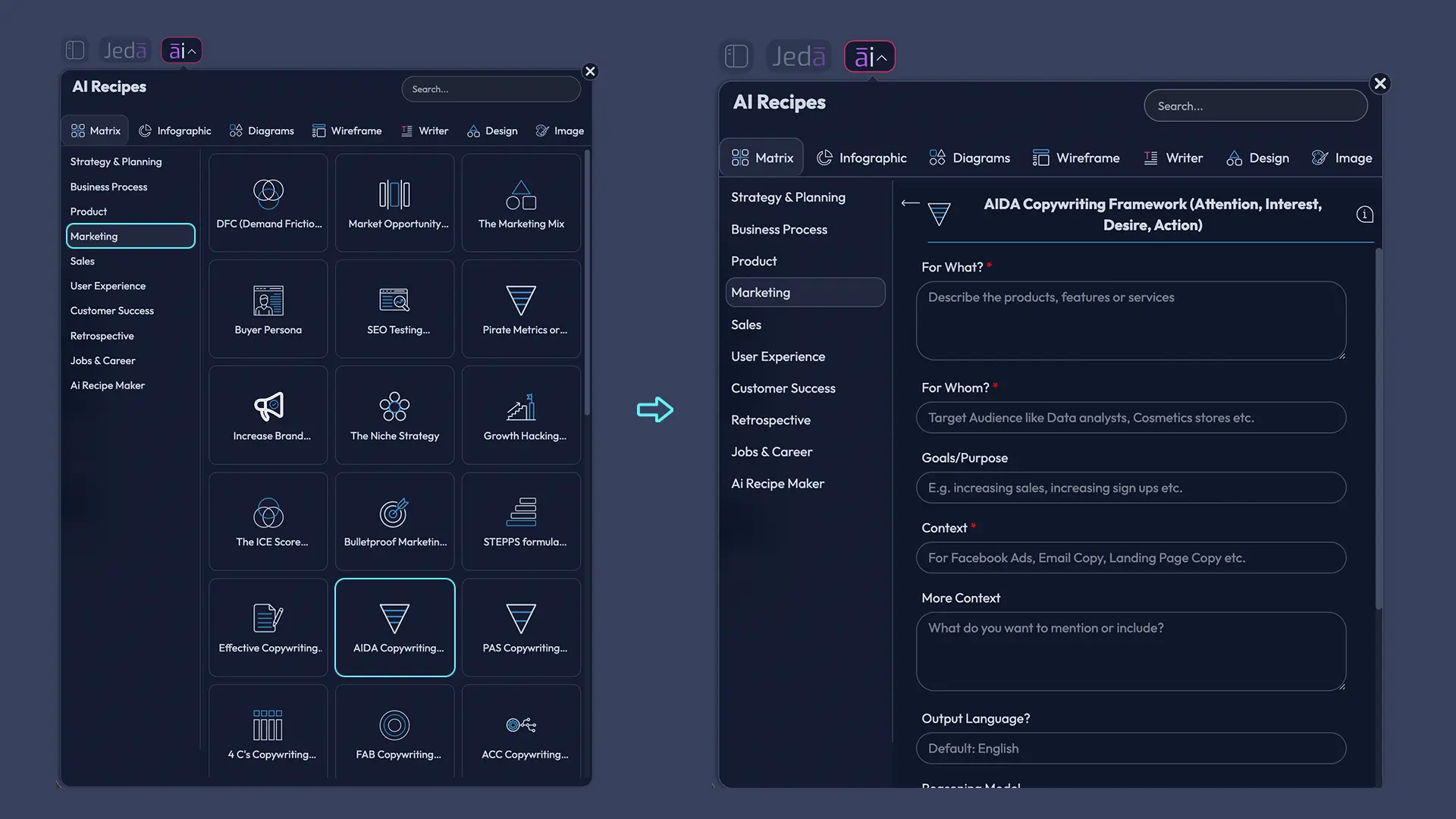
- Open the AI Menu
In the top-left of your workspace, open the AI Menu and go to the recipe categories that fit marketing work, starting with Matrix Recipes or another relevant visual recipe.
- Choose a marketing-friendly structure
Pick a recipe that gives your work shape, such as SWOT, PESTEL, risk analysis, project planning, or a marketing-oriented recipe from the Marketing or Strategy & Planning subcategory.
- Enter real campaign context
Add your goal, audience, offer, channel mix, positioning angle, budget notes, constraints, and success metrics instead of a vague one-line prompt.
- Generate the first board
Let Jeda.ai build the initial visual so you can see the plan as an editable matrix rather than a wall of text.
- Use AI+ to deepen the board
Select any box or node and extend it with AI using the AI+ button to unpack objections, personas, content ideas, campaign risks, or KPI definitions.
- Transform the output when needed
Use Vision Transform or generate adjacent visuals to turn the same thinking into a Mindmap, Flowchart, Diagram, or Infographic for different stakeholders.
Method 2: Prompt Bar
This is the move when you already know what output you want and do not need a pre-built recipe.
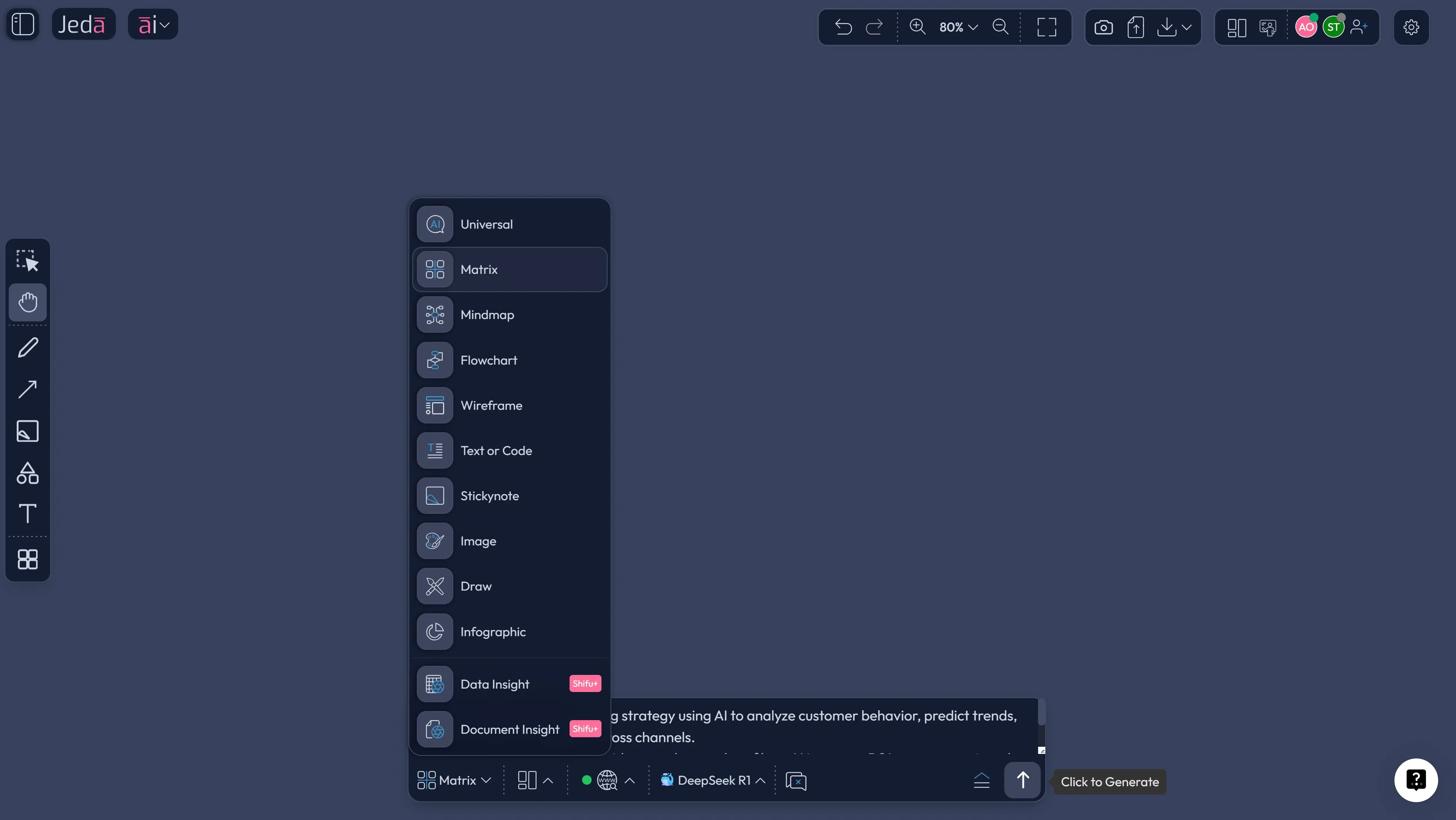
- Open the Prompt Bar
Use the Prompt Bar at the bottom of the workspace and select the command that matches your first output, such as Matrix, Mindmap, Flowchart, Wireframe, Infographic, Data Insight, or Document Insight.
- Write a precise marketing prompt
Include the business goal, target audience, funnel stage, channel, offer, brand tone, and the exact output you want instead of asking for 'a marketing plan' in the abstract.
- Turn on the right intelligence
Use Web Search when recency matters, enable Multi-LLM Agent when the decision is high stakes, and upload source files if your work depends on data, briefs, screenshots, or research docs.
- Generate and edit on canvas
Review the visual output directly in the workspace, rewrite labels, move sections, add notes, connect ideas, or collaborate live with teammates.
- Extend, convert, and export
Use the AI+ button to go deeper, Vision Transform to switch formats, and export the result as PNG, SVG, or PDF when you are ready to share.
What to ask AI+ to deepen
The AI+ button is where AI in Marketing gets more useful and less generic.
Use it when you want to deepen one part of an existing visual without regenerating the whole thing. Good prompts for AI+ inside Jeda.ai include:
- Expand this audience segment into pain points, triggers, objections, and buying signals.
- Extend this campaign branch into channel-specific content ideas.
- Deepen this KPI box into leading indicators, lagging indicators, and reporting cadence.
- Expand this landing page section into proof points, FAQs, and CTA options.
- Extend this performance insight into three next-step experiments.
That workflow matters because serious marketing work rarely gets better by starting over. It gets better by pushing one promising branch further.
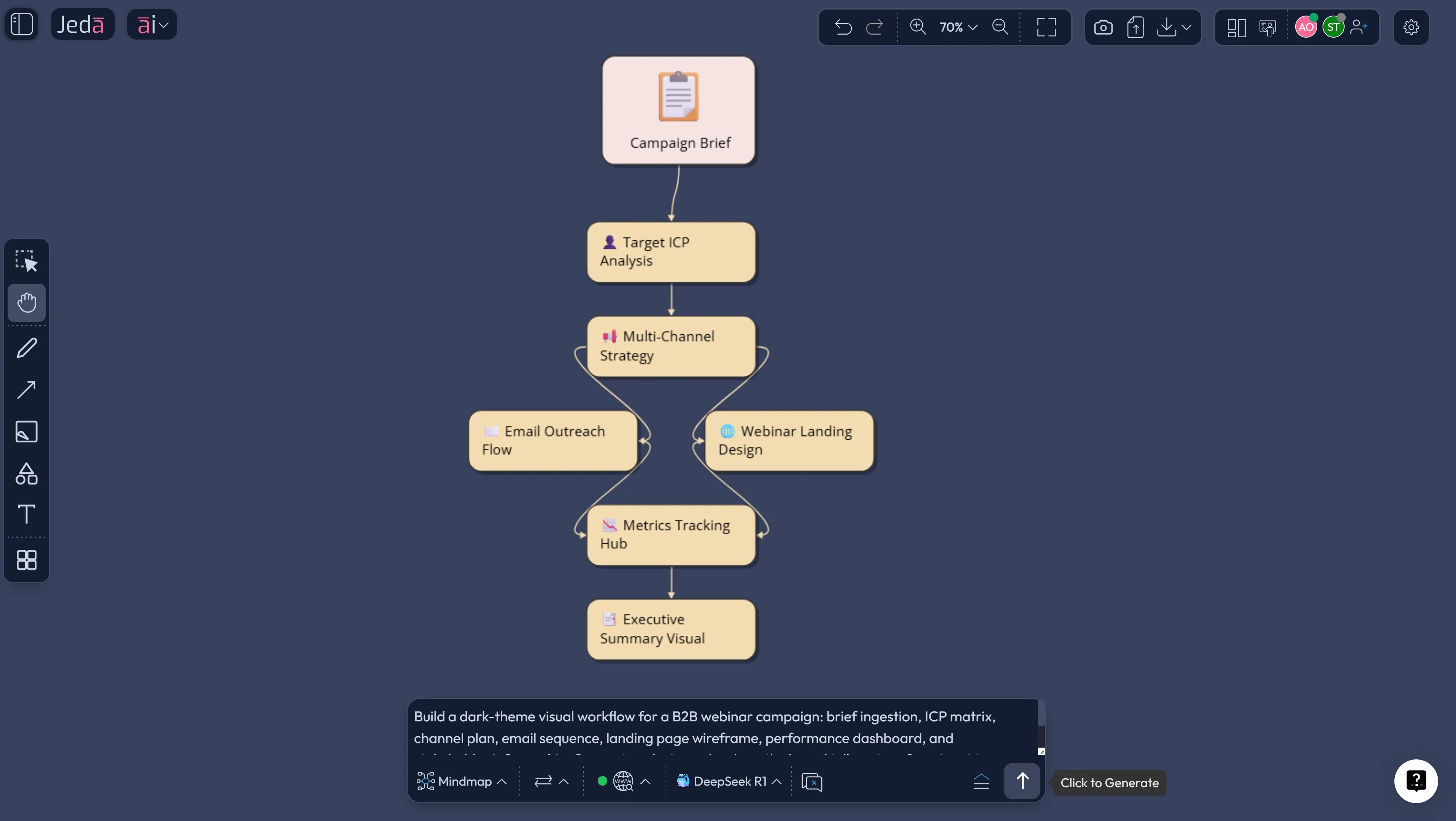
An end-to-end example: one webinar campaign, one board, zero chaos
Look at a typical B2B webinar launch. Normally the team has a brief in one doc, ICP notes in another, the ad plan in a spreadsheet, copy drafts in chat, the landing page in a design file, and reporting in a dashboard tab nobody names consistently. Charming.
Inside Jeda.ai, the same project can run in one AI Workspace:
That is why AI in Marketing works better on an AI Whiteboard than in a single chat pane. You are not only generating output. You are keeping the reasoning visible.
Best practices for using AI in Marketing without wrecking quality
HubSpot’s recent trend data makes the brand point especially clear: marketers are seeing more AI-generated content in the market, and consumers are getting better at spotting it. So the win is not “more AI.” The win is stronger judgment with less manual drag.
Common mistakes to avoid
1. Using AI only for copy.
That is the starter pack. Useful, sure. But limiting. AI in Marketing creates much more value when it is tied to planning, audience logic, reporting, and creative decisions.
2. Feeding weak inputs and expecting sharp outputs.
Messy briefs create messy campaigns. Poor audience data creates shallow personalization. IBM, HubSpot, and Salesforce all point back to the same bottleneck: data quality and context.
3. Confusing automation with strategy.
Automation speeds up motion. It does not guarantee better choices. You still need a board that shows what you are doing, why it matters, and how you will measure it.
4. Spreading work across too many point tools.
This is where teams lose speed they thought they were gaining. The switch cost is real.
5. Publishing AI-looking work.
If the content sounds interchangeable, it is. Keep the human taste. Keep the brand edge. Keep the receipts.
Frequently Asked Questions
- What is AI in Marketing in plain English?
- AI in Marketing is the use of AI to improve marketing decisions and execution, from audience analysis and personalization to content creation, campaign planning, reporting, and workflow automation. The strongest teams use it to reduce manual drag while keeping human judgment on strategy and brand.
- What are the best AI use cases in Marketing to start with?
- The best starting point is a repeatable workflow with clear success metrics. Campaign briefs, content repurposing, landing page planning, monthly reporting, audience segmentation, and webinar or product-launch workflows are usually the easiest places to prove value fast.
- Can AI in Marketing improve personalization?
- Yes, when the data is usable. McKinsey, Salesforce, and HubSpot all point to the same pattern: AI helps teams personalize at scale, but weak data quality and disconnected systems quickly limit the upside. Better context beats more output.
- Is AI in Marketing only about content generation?
- No. Content generation is the most visible use case, but AI in Marketing is also about segmentation, journey design, media optimization, research synthesis, dashboard interpretation, experiment planning, and stakeholder communication. The copy is only one layer.
- How does Jeda.ai help with AI in Marketing?
- Jeda.ai gives teams one AI Workspace for strategy, research, content planning, data insight, document analysis, visual storytelling, and collaboration. Instead of juggling separate tools, you can generate and edit matrices, mind maps, flowcharts, wireframes, infographics, dashboards, and campaign boards in one place.
- When should I use Data Insight or Document Insight?
- Use Data Insight when your decision depends on structured data like campaign exports, performance dashboards, or channel reports. Use Document Insight when the source is a brief, PDF, deck, report, interview notes, or another document you need turned into a visual structure.
- What does the AI+ button do for marketing teams?
- The AI+ button helps you deepen one section of an existing visual without rebuilding the whole board. Marketing teams use it to expand audience segments, extend campaign branches, generate more experiments, deepen objections, or unpack KPI definitions and follow-up actions.
- Can I create visuals for leadership and not just for the marketing team?
- Absolutely. One of the best uses of AI in Marketing is translating execution detail into a board leaders can understand fast. In Jeda.ai, you can convert source material into matrices, campaign flows, diagrams, and infographics that are easier to present and discuss than raw notes or spreadsheet tabs.
- Can Jeda.ai export campaign visuals?
- Yes. Jeda.ai exports visuals as PNG, SVG, and PDF. That makes it easy to share boards, bring visuals into decks, or archive key planning and reporting outputs without rebuilding them elsewhere.
- Does image generation in Jeda.ai stay editable?
- No. Static image outputs are not editable like smart-shape visuals. If you want editable planning or analytical structures, start with Matrix, Mindmap, Flowchart, Diagram, Wireframe, Infographic, Data Insight, or Document Insight instead of relying only on image output.
Sources & Further Reading
- [1]
IBM Think (2026) . “A guide to AI in marketing” IBM.
View Source ↗ - [2]
Salesforce (2026) . “Tenth Edition State of Marketing” Salesforce.
View Source ↗ - [3]
Kelsey Robinson, Eli Stein, and others (2025) . “Unlocking the next frontier of personalized marketing” McKinsey.
View Source ↗ - [4]
Lisa Harkness, Kelsey Robinson, Eli Stein, Winnie Wu (2023) . “How generative AI can boost consumer marketing” McKinsey.
View Source ↗ - [5]
Dhruv Grewal, Cinthia B. Satornino, Thomas H. Davenport, Abhijit Guha (2025) . “How Should Gen AI Fit into Your Marketing Strategy?” Harvard Business Review.
View Source ↗ - [6]
V. Kumar, Abdul R. Ashraf, Waqar Nadeem (2024) . “AI-powered marketing: What, where, and how?” International Journal of Information Management.
View Source ↗ - [7]
Mekhail Mustak, Joni Salminen, Loic Ple, Jochen Wirtz (2021) . “Artificial intelligence in marketing: Topic modeling, scientometric analysis, and research agenda” Journal of Business Research.
View Source ↗ - [8]
Abid Haleem, Mohd Javaid, Mohd Asim Qadri, Ravi Pratap Singh, Rajiv Suman (2022) . “Artificial intelligence (AI) applications for marketing: A literature-based study” International Journal of Intelligent Networks.
View Source ↗ - [9]
Mohd Rushidi Mohd Amin, Ammar Asbi, Vinesh Maran Sivakumaran, Junyong Kim, Eka Septiarini (2025) . “Artificial Intelligence (AI) adoption in marketing strategies: Navigating the present and shaping the future business landscape” Social Sciences & Humanities Open.
View Source ↗ - [10]
Harinder Hari, Arun Sharma, Sanjeev Verma, Rijul Chaturvedi (2025) . “Exploring ethical frontiers of artificial intelligence in marketing” Journal of Responsible Technology.
View Source ↗
Start Your AI in Marketing Workflow Today
Join over 150,000 professionals who use Jeda.ai to turn strategy, content, research, and reporting into editable visual decisions.
Try Free Template