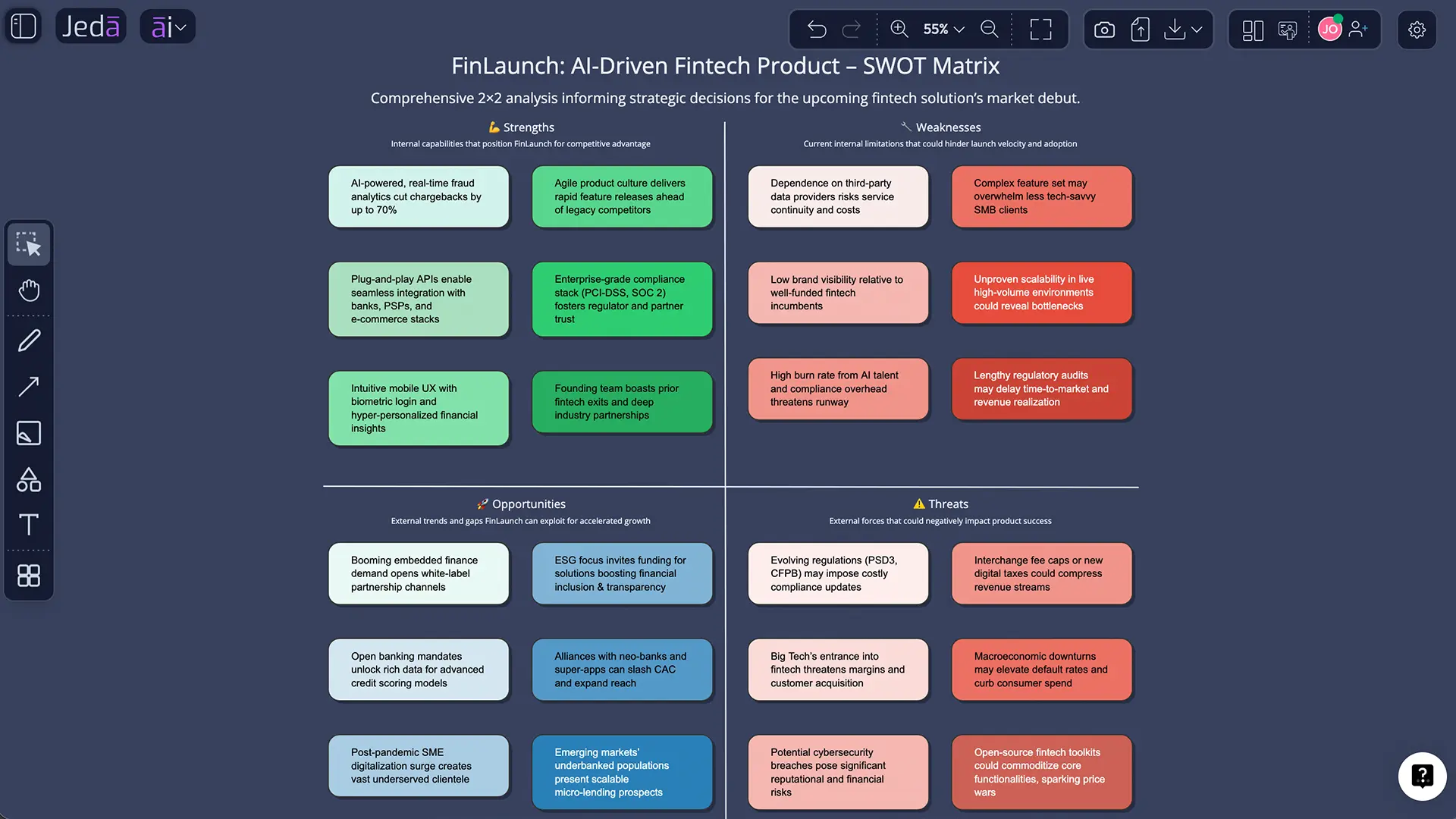
Look, most SWOT sessions still die the same slow death. Someone opens a blank slide, the team throws in generic bullets, and by the end you have a neat little 2x2 grid that says almost nothing useful.
SWOT analysis with AI changes that. In Jeda.ai, you can move from scattered notes, PDFs, screenshots, market signals, and rough ideas to an editable matrix inside one AI Workspace. Then you can push it further with AI+, Vision Transform, Document Insight, Data Insight, and live collaboration on an AI Whiteboard. That matters when your strategy window is small and your team does not have three spare hours to argue over whether “good brand” counts as a strength.
Jeda.ai is built for exactly that kind of work. More than 150,000+ users already use Jeda.ai as a Visual AI workspace for strategy, analysis, and planning, with 300+ strategic frameworks available through the AI Menu and editable outputs on the canvas.
What is SWOT analysis, really?
A SWOT analysis is a four-part framework for examining strengths, weaknesses, opportunities, and threats around a business, product, initiative, team, or even a career move. The logic is simple. Strengths and weaknesses describe internal reality. Opportunities and threats describe the outside world.
Simple does not mean shallow.
That is why SWOT has stayed useful for decades. It gives teams one frame to compare internal capability against external pressure. Recent sources still describe it as a core planning tool for strategy, prioritization, and decision-making, even if the exact origin story is messier than people often claim. Albert Humphrey is often credited, but later historical research points to earlier SOFT work and broader contributions tied to Stanford Research Institute planning research.
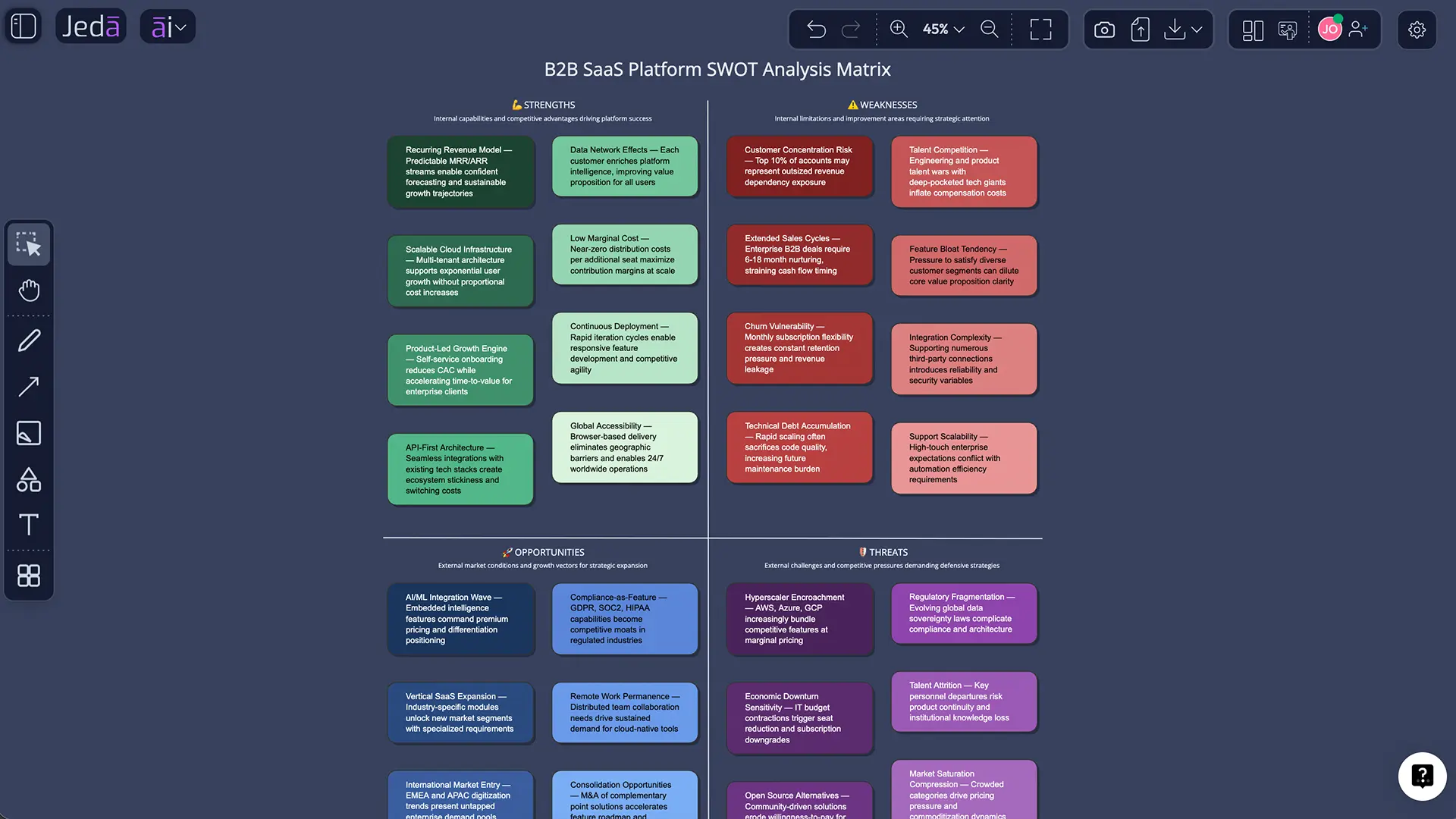
In practice, a SWOT is most useful when you do two things well:
- stay specific enough that each point can be tested,
- turn the matrix into action instead of treating it like the final deliverable.
That second part is where many teams trip over their own shoelaces.
Why SWOT analysis with AI works better inside Jeda.ai
The old workflow is clunky. You gather input in one tool, draft a matrix in another, discuss it in a meeting, rewrite it in slides, then lose the reasoning behind half the bullets.
Jeda.ai fixes that by keeping the thinking, the visual, and the follow-up in one AI Workspace and AI Whiteboard.
- Faster first draft
Use the Matrix recipe or Prompt Bar to generate a structured SWOT in minutes instead of starting from a blank box.
- Evidence from documents
Pull SWOT inputs from PDFs, strategy docs, meeting notes, or research using Document Insight, then render them as a matrix.
- Data-backed signals
Feed CSV or Excel files through Data Insight when your SWOT needs revenue, customer, or performance context, not guesswork.
- Live market context
Use Web Search when you need current signals, competitor updates, or trend context beyond model memory.
- Easy next-step visuals
Turn the finished SWOT into a flowchart, diagram, or mind map with Vision Transform when the team needs execution paths.
- Deeper analysis on demand
Select a quadrant or note and use the AI+ button to extend that exact point into richer detail, examples, or next moves.
And here is the part people usually underplay: AI is not just saving typing time. It is helping you synthesize mixed inputs into one visible structure. In Jeda.ai, that structure stays editable. You are not trapped in a static image or chat transcript.
That is a big deal for consultants, product managers, founders, analysts, and leadership teams who need the work to survive contact with actual stakeholders.
The top 10 SWOT analyses to run with AI
This is where the framework gets practical. Not theoretical. Not “someday.” Here are ten of the highest-value SWOT analyses to run inside Jeda.ai.
1) Startup launch SWOT
Use this when you are validating a new startup, preparing for fundraising, or pressure-testing a go-to-market story. Feed in your pitch deck, a one-page business model, customer interview notes, and competitive context. AI helps turn founder instinct into a structured board you can actually debate.
2) SaaS product positioning SWOT
This is perfect for a product team trying to clarify why customers buy, churn, or hesitate. Use support themes, win-loss notes, pricing objections, and roadmap priorities. A good AI SWOT will surface where product strength is real and where “we think users love this” is just optimism in a nice jacket.
3) Market entry SWOT
Expanding into a new country, segment, or vertical? Run a SWOT before you commit budget. Bring in market reports, regulatory notes, channel assumptions, and competitor screenshots. This helps the team separate internal readiness from external opportunity, which is not the same thing, no matter how often people mash them together.
4) Competitor response SWOT
When a competitor changes pricing, launches a new feature, acquires a player, or starts eating your lunch, use SWOT to reset quickly. The AI pass can help summarize the threat, identify your defendable strengths, and point to opportunity gaps before the meeting turns into pure panic.
5) Product launch SWOT
This one is underrated. Before launching a new feature, product line, or service, run a launch-specific SWOT. Focus on adoption friction, support burden, distribution leverage, timing, and external blockers. Jeda.ai works well here because you can move from the matrix to a flowchart of launch actions right after the analysis.
6) Marketing campaign SWOT
Campaign teams often default to channel metrics without asking the bigger strategic question. A campaign SWOT helps you assess message strength, creative risk, audience fit, timing, competitive noise, and platform shifts. If you already have performance data, bring it in through Data Insight and let the matrix reflect reality.
7) Retail or ecommerce SWOT
Retail teams need a clean way to weigh internal capability against external pressure like shifting consumer demand, margin pressure, returns, fraud, and channel complexity. A SWOT gives that frame. AI helps summarize large volumes of sales, customer, and competitor data faster, which matters in a market where ecommerce remains a major share of retail sales and returns continue to create real operational and profit pressure.
8) Nonprofit strategy SWOT
For nonprofits, a strong SWOT often reveals mission strength, volunteer energy, partnership potential, funding risk, donor concentration, and policy exposure in one view. Use this before annual planning, fundraising pivots, or program redesign. It is also one of the easiest ways to get board members aligned without sending them a novella.
9) Education or program design SWOT
Academic teams, training leaders, and program directors can use SWOT to evaluate course delivery, student experience, faculty capability, delivery model, market demand, and retention risk. Inside Jeda.ai, this fits naturally into a broader AI Workspace where notes, diagrams, and supporting documents live in the same board.
10) Personal career SWOT
Yes, personal SWOT still works. Quite well, actually. Use it when planning a job move, promotion path, portfolio repositioning, or skill-building plan. The trick is honesty. AI can help structure the first pass, but you still have to admit that “I work hard” is not a strategy.
How to create SWOT analysis in Jeda.ai
You have two solid paths in Jeda.ai.
Method 1: Recipe Matrix is the fastest option when you want a guided SWOT setup.
Method 2: Prompt Bar is better when you want more control over the wording, scope, or supporting context.
If you already have source material, you can also bring a report through Document Insight or a spreadsheet through Data Insight, then choose Matrix as the output format.
Method 1: Recipe Matrix
This is the recommended path for most users because it reduces setup friction and keeps the structure tight.
- Open the AI Menu
In the top-left of the canvas, open the AI Menu and go to Matrix Recipes.
- Choose the SWOT Analysis recipe
Select the SWOT template so Jeda.ai starts from the correct four-quadrant structure.
- Define the subject and decision
Enter what you are analyzing, why you are analyzing it now, and the decision the SWOT should support.
- Add evidence and context
Include market signals, customer feedback, internal notes, uploaded files, or web context so the analysis is grounded instead of generic.
- Generate and edit the matrix
Review the first draft, rewrite vague bullets, merge duplicates, and sharpen each quadrant into concrete statements.
- Use AI+ for a deeper layer
Select any quadrant or item, then use the AI+ button to extend that exact point into deeper analysis, examples, risks, or next actions. Use Vision Transform if you want to turn the finished SWOT into another visual.
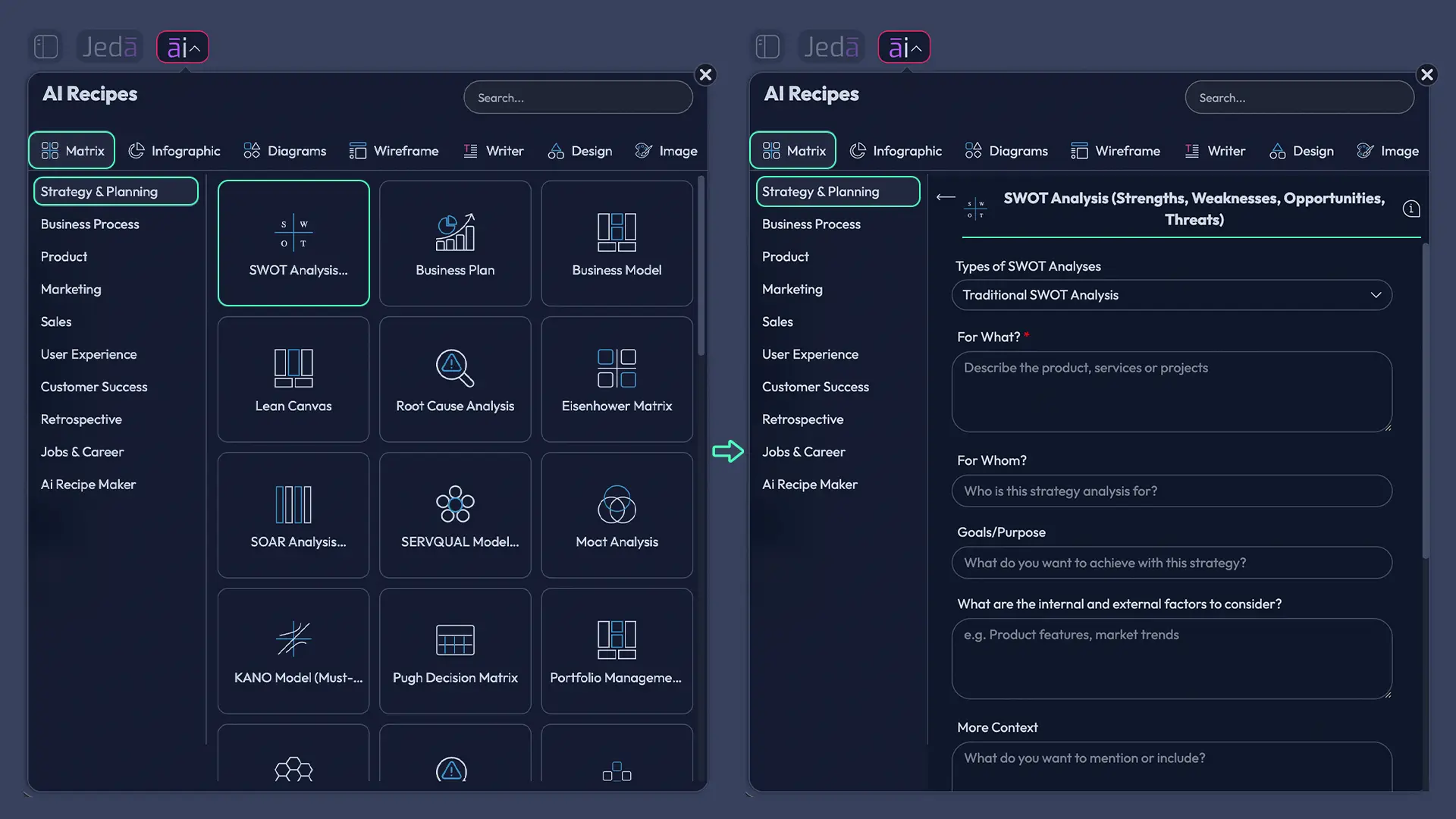
A good recipe input sounds like this:
Analyze the SWOT for a B2B SaaS company expanding into the UK mid-market. Use strengths and weaknesses that are internal to the company, and opportunities and threats that are external. Prioritize issues tied to pricing, onboarding, integration depth, and competitive pressure.
Method 2: Prompt Bar
Use this when you want tighter control, more custom framing, or a one-shot prompt that mixes strategic context with supporting evidence.
- Open the Prompt Bar
At the bottom of the canvas, open the Prompt Bar and choose the Matrix command.
- Set the scope
Name the company, product, team, or initiative you want to analyze and state the decision the SWOT should inform.
- Add structured context
Include audience, market context, recent performance, goals, constraints, and any sources the AI should weigh.
- Generate the matrix
Press Generate to create the initial SWOT board as editable smart shapes on the canvas.
- Refine weak bullets
Rewrite generic items into specific claims, then cluster overlapping points so the matrix becomes decision-grade.
- Extend with AI+
Use the AI+ button on the strongest or riskiest items to deepen analysis instead of starting a separate follow-up document.
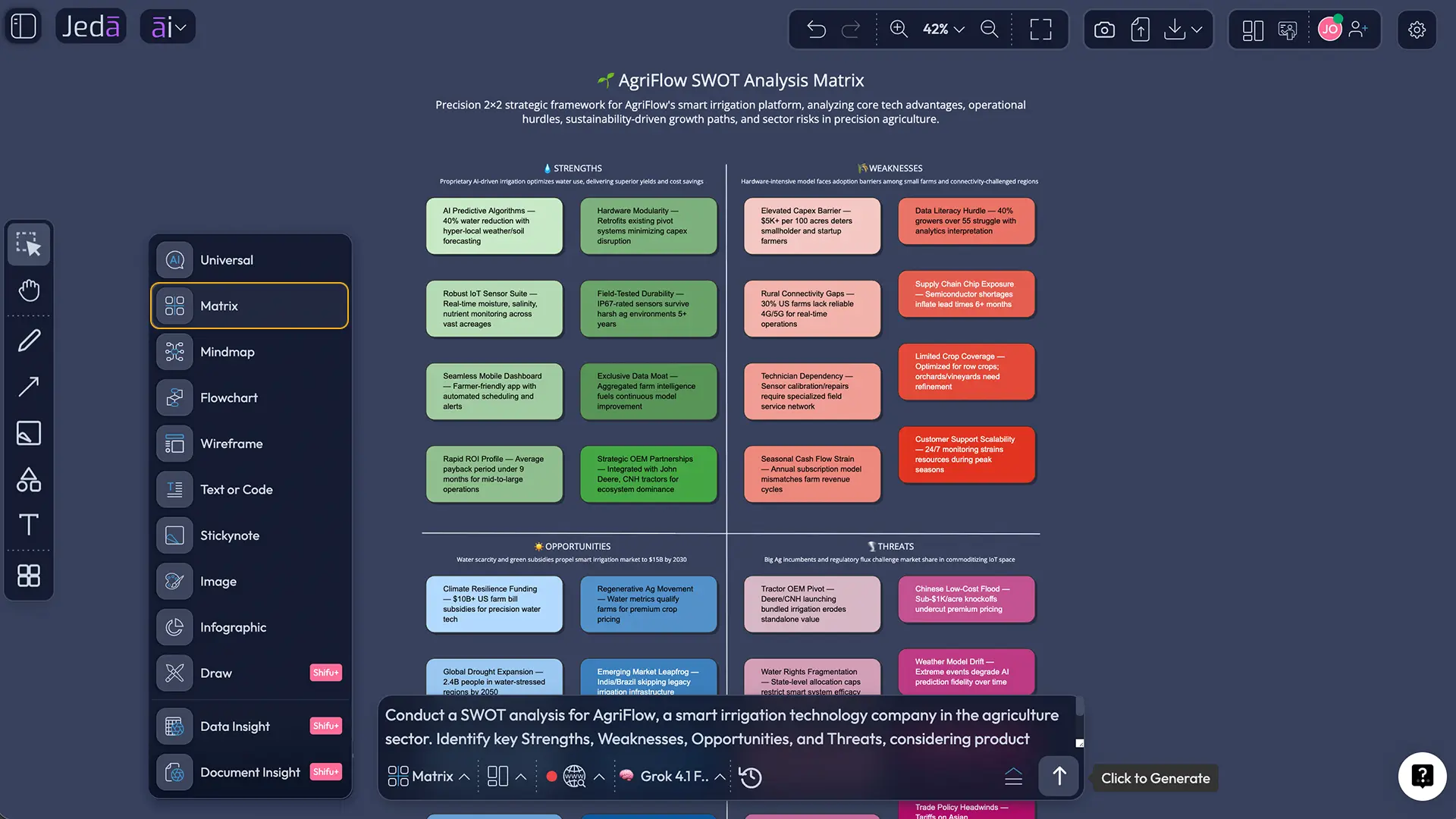
Here are three prompt patterns that work well:
How the AI+ button turns a flat SWOT into a deeper strategy board
A plain SWOT can tell you what is true. It usually does not tell you what to do next.
That is where the AI+ button earns its keep.
In Jeda.ai, you can select one quadrant or one smart shape and extend that exact item with AI. So instead of generating a whole new board from scratch, you deepen the part that matters most. A vague opportunity can become a concrete growth path. A threat can become a short risk-response tree. A weakness can turn into a remediation list.
That is the right use of AI+ here. Not “make me a completely unrelated thing.” More like: take this exact point and push it further.
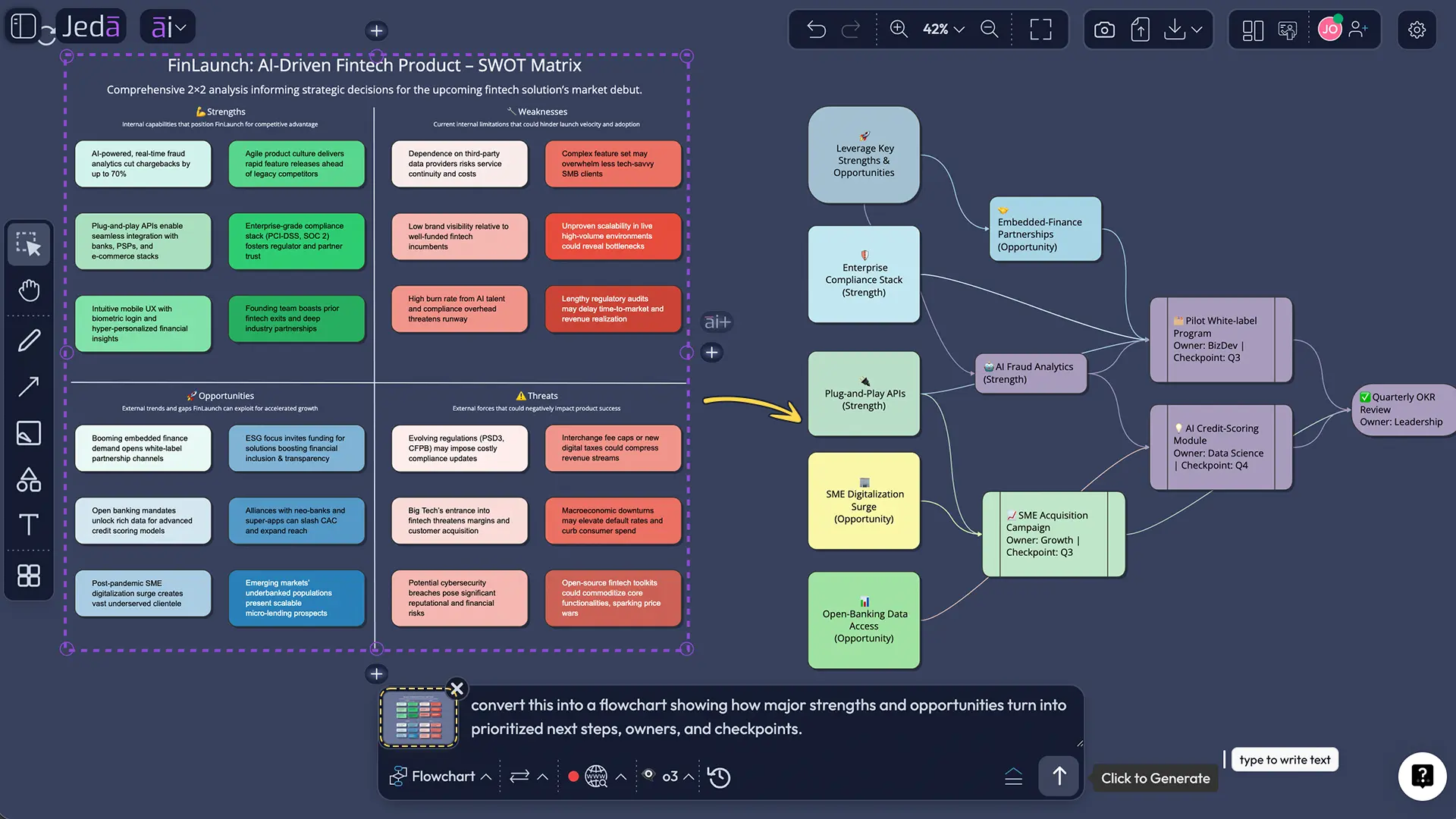
You can also use Vision Transform after the SWOT is done. Convert it into a flowchart for execution, a mind map for workshop discussion, or a diagram for stakeholder communication. That is especially useful when you want to move from strategy analysis to implementation without rebuilding the board somewhere else.
Best practices for better SWOT analysis with AI
If you want stronger companion analyses, link your SWOT work to related frameworks inside Jeda.ai, like Porter's Five Forces, PESTEL analysis, or flowcharts for execution planning. The point is not to make a prettier board. The point is to make a better decision.
Common mistakes to avoid
The first mistake is treating SWOT like a dumping ground for every thought the team has. That is how you get forty bullets and zero clarity.
The second is writing generic statements that sound strategic but do not survive basic scrutiny.
The third is stopping at the matrix.
Here are the usual offenders:
- Vague strengths such as “great team” or “strong product” with no proof.
- Weak external analysis because nobody looked at current market or competitor context.
- Confusing symptoms with causes. “Low conversion” is not always the weakness. It may be the effect.
- No prioritization. Not every item deserves equal weight.
- No action layer. A SWOT without next moves is a framed photo of indecision.
Honestly, most bad SWOT work is not caused by the framework. It is caused by lazy inputs.
Frequently asked questions
- What is SWOT analysis with AI?
- SWOT analysis with AI means using AI to draft, structure, refine, or extend a strengths, weaknesses, opportunities, and threats matrix. The best setups combine AI speed with human judgment, evidence, and a visual workspace where the matrix stays editable.
- Is AI SWOT analysis reliable enough for real strategy work?
- It is reliable enough for first-pass synthesis and idea expansion, but it should not replace judgment or source validation. The strongest results come from combining AI with internal data, documents, current market context, and team review before decisions are made.
- What inputs produce the best SWOT analysis with AI?
- Clear business context, a specific decision to support, internal metrics, customer feedback, competitor signals, and relevant files produce the best results. A vague prompt with no evidence usually creates a vague matrix. Garbage in still behaves like garbage out.
- Can Jeda.ai build a SWOT from documents or spreadsheets?
- Yes. You can use Document Insight for PDFs or Word files and Data Insight for CSV or Excel files, then render the output as a Matrix. That makes Jeda.ai useful when the source material already exists but the structure does not.
- What is the difference between SWOT and TOWS?
- SWOT helps you identify internal and external factors. TOWS helps you combine those factors into strategic options such as strength-opportunity or weakness-threat responses. In plain English, SWOT describes the situation and TOWS helps convert it into action.
- When should a team update its SWOT analysis?
- Update the SWOT whenever the decision changes or the environment shifts in a meaningful way. For fast-moving teams, quarterly reviews are sensible. For launches, funding rounds, market entry, or major competitor moves, update it immediately rather than waiting for a calendar ritual.
- Can I use SWOT analysis with AI for personal planning?
- Yes. A personal SWOT is useful for career planning, skill development, promotion strategy, and job-search positioning. The same rule applies: keep the statements concrete, tie them to a decision, and turn the results into actions instead of leaving them as self-reflection wallpaper.
- Can multiple people work on the same SWOT board in Jeda.ai?
- Yes. Jeda.ai supports real-time collaboration on the same board, so teams can edit, discuss, and refine the SWOT together in one AI Whiteboard. That reduces the usual mess of separate notes, version confusion, and disconnected presentation files.
- What should happen after the SWOT matrix is finished?
- After the matrix is finished, the team should prioritize the most important items, extend the critical ones with AI+, and turn the conclusions into actions. In Jeda.ai, Vision Transform can help convert the matrix into a flowchart, diagram, or mind map for execution planning.
- How can I export a finished SWOT from Jeda.ai?
- Jeda.ai supports export formats such as PNG, SVG, and PDF from the workspace. That is useful when you want to present the matrix, share it with stakeholders, or move the visual into another workflow without rebuilding the content by hand.
Sources & further reading
- [1]
Richard Willem Puyt and Finn Birger Lie (2023) . “The origins of SWOT analysis” Long Range Planning.
View Source ↗ - [2]
D. Teoli, E. Sanvictores, and J. An (2023) . “SWOT Analysis” StatPearls / NCBI Bookshelf.
View Source ↗ - [3]
Heinz Weihrich (1982) . “The TOWS Matrix: A Tool for Situational Analysis” Long Range Planning.
View Source ↗ - [4]
Harvard Business Review (2021) . “Are You Doing the SWOT Analysis Backwards?” HBR.
View Source ↗ - [5]
U.S. Chamber of Commerce (2025) . “How to Use AI to Perform a SWOT Analysis” CO by U.S. Chamber of Commerce.
View Source ↗ - [6]
Asana (2026) . “SWOT Analysis: Examples and Templates [2026]” Asana Resources.
View Source ↗ - [7]
Lucidchart (2026) . “SWOT Analysis: Complete Guide and Templates” Lucidchart.
View Source ↗ - [8]
Government of British Columbia (n.d.) . “How to Conduct and Use a SWOT Analysis” Gov.bc.ca.
View Source ↗
Start Your SWOT Analysis with AI Today
Join over 150,000+ users who use Jeda.ai to turn messy inputs into clear strategy on one AI Workspace.
Try Free Template