Agentic AI for MBA Instructors is no longer just about building an AI team. It is about giving instructors, MBA cohorts, consultants, and decision makers more control over how AI work is designed, executed, reviewed, and converted into usable business outputs.
This release upgrades Jeda AI’s Agentic Workflow layer with more precise model behavior controls, faster agent setup, single-agent execution, richer visual output formats, safer collaboration rules, and a cleaner support experience.
That sounds technical. It is not just technical.
It changes how instructors can teach business with AI.
Instead of asking students to “use AI” vaguely, MBA instructors can now guide students through a more realistic business workflow:
- Select or create specialist agents
- Tune how each model behaves
- Decide when one agent is enough
- Run full agent teams when the problem requires multiple perspectives
- Lock the workflow while work is running
- Review outputs as matrices, diagrams, and other visual formats
- Keep collaboration structured, visible, and controlled
Jeda AI’s Agentic AI layer is designed for complex business analysis and MBA/business education, where users create skills, configure specialist agents, assemble teams, provide business problems and files, review Orchestrator plans, approve execution, and receive final outputs in selected formats.
The big idea is simple:
One AI can answer a question. An Agentic Workflow can teach students how business work actually moves through expert roles, assumptions, handoffs, and decisions.
Why This Release Matters for MBA Classrooms
MBA instructors are not only teaching strategy, operations, market analysis, or leadership anymore. They are also teaching students how to work with AI systems responsibly.
That means students need more than generic chatbot exposure.
They need to learn how to:
- Design AI-supported workflows
- Assign expert roles
- Build and refine skills
- Evaluate assumptions
- Compare specialist perspectives
- Review the logic behind recommendations
- Exercise human judgment over AI execution
That is already part of Jeda AI’s positioning for its Agentic Learning Environment.
This release strengthens that educational layer. It makes Agentic AI more practical for actual classroom use because instructors now get better controls, safer collaboration behavior, and more flexible outputs.
For MBA cohorts, this means agentic learning becomes less abstract. Students can see how AI roles are configured, how agents behave differently, how workflows are protected while running, and how outputs become visual thinking artifacts on the Jeda AI canvas.
For business consultants and leaders, the same upgrades create a more reliable environment for client analysis, strategic planning, competitive reviews, and executive decision support.
1. Per-Agent Temperature and Reasoning Controls
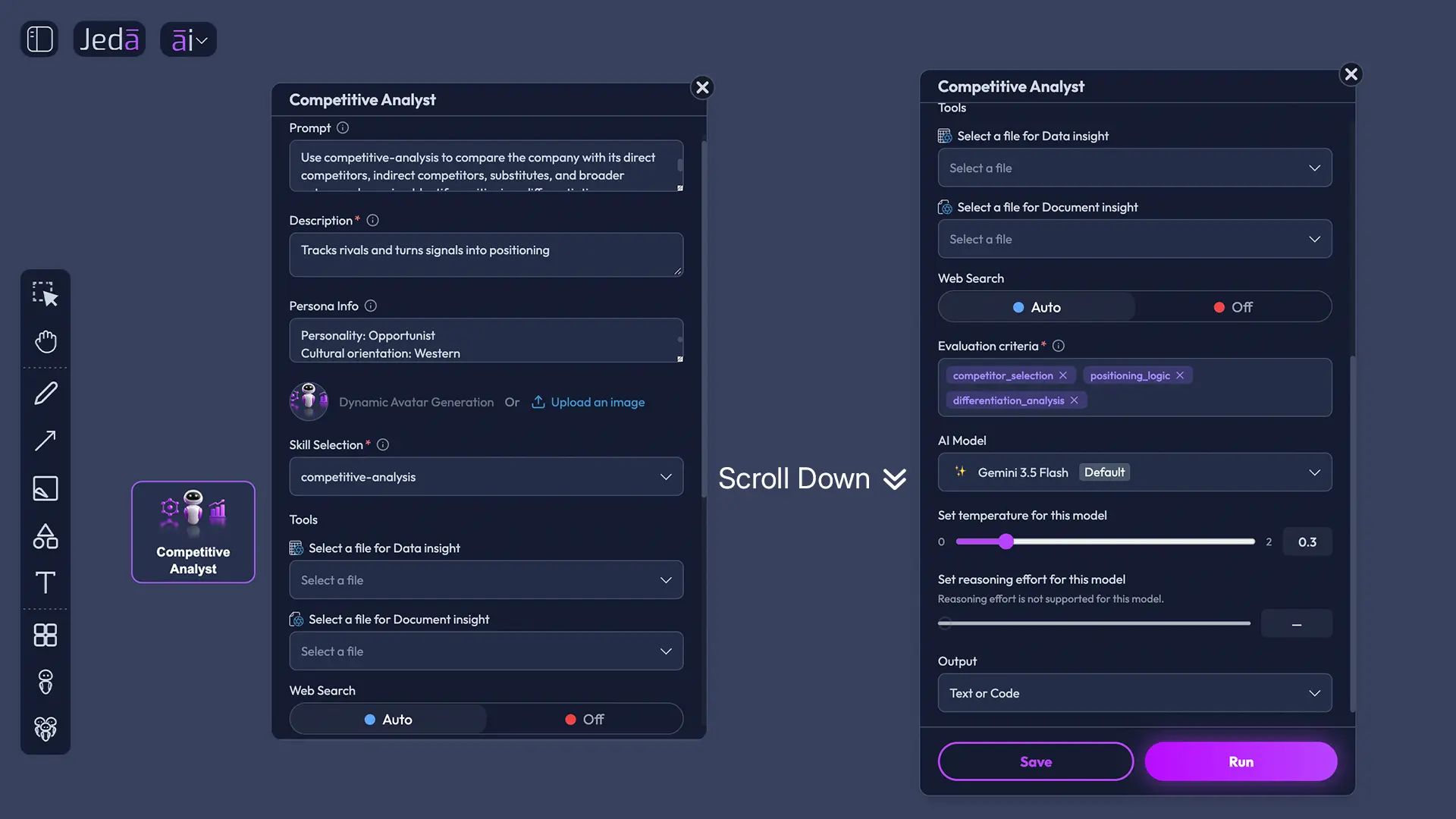
Jeda AI now supports temperature and reasoning controls for each supported LLM inside agents.
This is a major upgrade for serious AI workflow design.
Different business tasks require different AI behavior. A creative strategy agent may need more exploratory thinking. A structured analysis agent may need tighter, more conservative reasoning. A competitive analyst may need broader scenario exploration. A review agent may need discipline, consistency, and lower randomness.
Now, where supported, instructors and business users can tune model behavior at the agent level.
Important: not every LLM supports both temperature and reasoning controls. Some agents may support one control, both controls, or neither, depending on the selected model.
That limitation is not a weakness. It is honest product behavior.
In an MBA classroom, this becomes a powerful teaching point. Students can compare how model settings influence outputs and discuss when higher creativity helps or hurts the quality of business reasoning.
For consultants, this means agent behavior can be better matched to the workstream. You do not want the same behavior profile for brainstorming new growth bets and reviewing a risk model.
For decision makers, this means less blind AI usage and more intentional AI system design.
2. Drag-and-Drop Agent Setup
Jeda AI now supports adding agents by drag and drop.
This makes Agentic Workflow setup faster, more visual, and easier to teach.
Instead of treating agent selection as a hidden configuration task, instructors can make it part of the classroom discussion:
- Which agents belong in this business case?
- Do we need a Business Analyst?
- Is a Competitive Analyst enough, or do we need a Market Research Agent too?
- Who plays the skeptical role?
- Which specialist is missing?
Jeda AI materials already frame agent selection as part of the problem-solving process. Drag-and-drop makes that process more intuitive and visible.
For MBA cohorts, the agent team becomes a board-level artifact. Students can literally see the team being assembled.
For consultants, this speeds up workshop preparation. A client strategy session can be configured visually: business model, competitive landscape, customer research, risk review, and executive synthesis.
For leaders, it makes the structure of analysis easier to understand before the AI work begins.
3. Single-Agent Execution Without the Team Sandbox
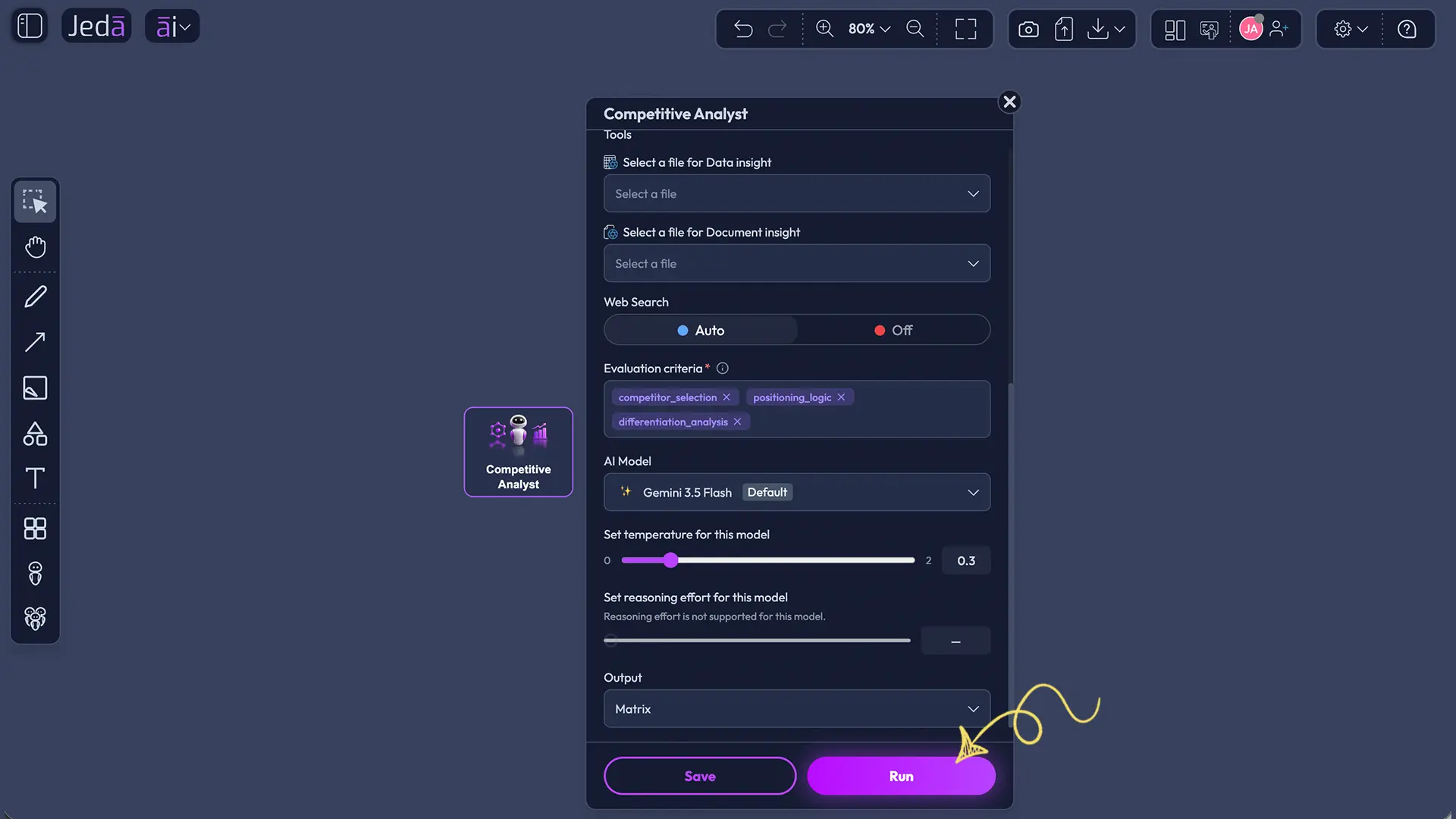
Previously, Agentic AI workflows centered around the team sandbox. Now, a single agent can run on its own without requiring the Team Sandbox, as long as the agent has the necessary files and information.
This is a practical improvement.
Not every task needs a full agent team.
Sometimes an MBA instructor wants one Business Model Analyst to review a short case. Sometimes a student team wants one Analysis Agent to inspect a spreadsheet. Sometimes a consultant wants a Research Agent to summarize a report before involving the full team.
Single-agent execution makes Jeda AI more flexible.
Use one agent when the task is focused.
Use an Agent Team when the problem needs multiple expert perspectives.
That distinction matters in education and business.
Instructors can now teach students when agentic complexity is useful and when it is unnecessary. Not every problem deserves a committee, human or artificial.
4. Workflow-Safe Collaboration: No Sandbox or Agent Changes While Running
Jeda AI now prevents Sandbox or Agent changes while a workflow or agent task is running.
This includes two important protections:
- Running workflows or AI Agent tasks lock the sandbox for all users, preventing agent and team configuration changes.
- Leaving or switching workspace requires confirmation and aborts the running workflow or single-agent task before navigation.
This is exactly the kind of UX that serious agentic systems need.
In a collaborative MBA session, multiple students may be working in the same environment. In a consulting engagement, several team members may be reviewing the same workflow. In executive analysis, one person changing the setup mid-run could damage the integrity of the result.
Jeda AI now protects the workflow while it is in motion.
This matters because Agentic AI is not just content generation. It is process execution. If the agent team changes halfway through the task, the work can become inconsistent.
For MBA instructors, this provides cleaner classroom control. Students can observe the workflow without accidentally changing the system while it runs.
For consultants, it protects client-facing work.
For decision makers, it improves trust in the final output.
5. New Visual Output Formats for Single and Multi-Agent Workflows
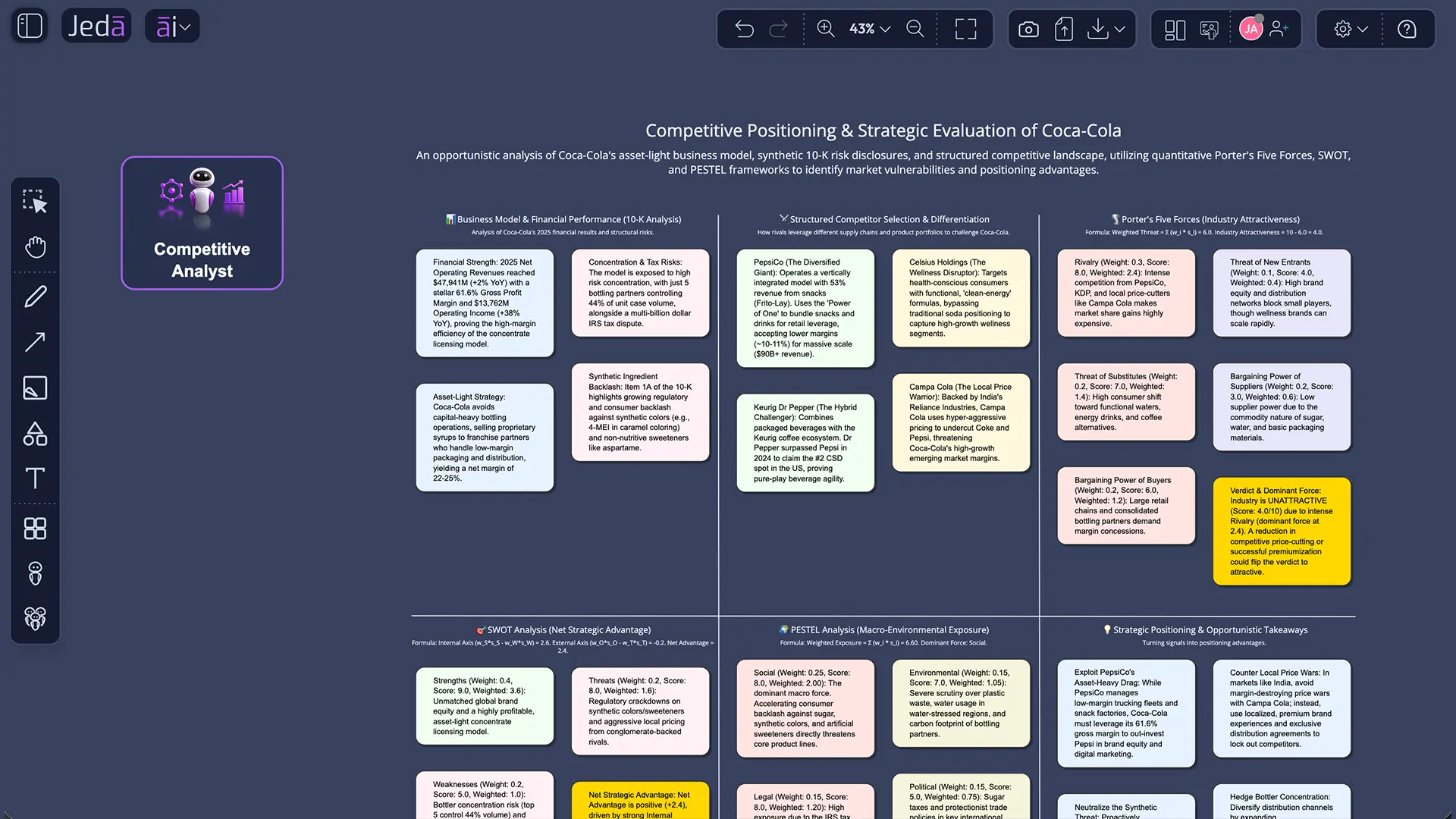
Jeda AI now supports new output formats and visualizations for both single-agent and multi-agent workflows.
This includes:
- Matrix
- Mind Map
- Flowchart
- Wireframe
- Sticky Note
- Text or Code
- Image
- Draw
This is a major step because business work should not end as a wall of text.
MBA students learn better when ideas become visible. Business leaders decide faster when trade-offs are structured. Consultants communicate more clearly when analysis becomes a framework, map, matrix, or diagram.
Jeda AI already positions its Agentic AI capability as a structured, visual, human-controlled workflow environment where users build skills, configure agents, assemble teams, review Orchestrator plans, approve execution, and receive decision-ready outputs.
This update strengthens the “visual” part of that promise.
Imagine a team of agents analyzing a business case and returning:
- A competitive analysis matrix
- A business model diagram
- A decision reasoning map
- A market risk framework
- A decision tree
- A classroom presentation structure
- A visual case debrief
For MBA instructors, these outputs become teaching artifacts.
For consultants, they become client-ready starting points.
For decision makers, they become decision boards instead of buried AI responses.
6. Team Workflow Visibility for All Participants
Jeda AI now improves collaboration behavior when a Team Workflow is running.
When one user runs a Team Workflow, other participants can see that the workflow is in progress. They are not allowed to run another workflow with the same team until the current task completes. If they try, Jeda AI shows a toast notification.
This is a subtle but important collaborative safeguard.
In MBA classrooms, multiple students may be working inside the same shared workspace. Without workflow visibility, someone could accidentally launch another task with the same team, creating confusion or conflict.
Now the system makes the workflow state visible and prevents overlapping execution.
This improves:
- Classroom coordination
- Group assignment control
- Live workshop reliability
- Team-based analysis discipline
- Multi-user workspace clarity
For consultants, this prevents accidental duplication during client work.
For leaders, it makes the workspace feel more governed and less chaotic.
This is what agentic collaboration needs: not just intelligence, but operational control.
7. Cleaner Support Access
Jeda AI has also updated its support experience.
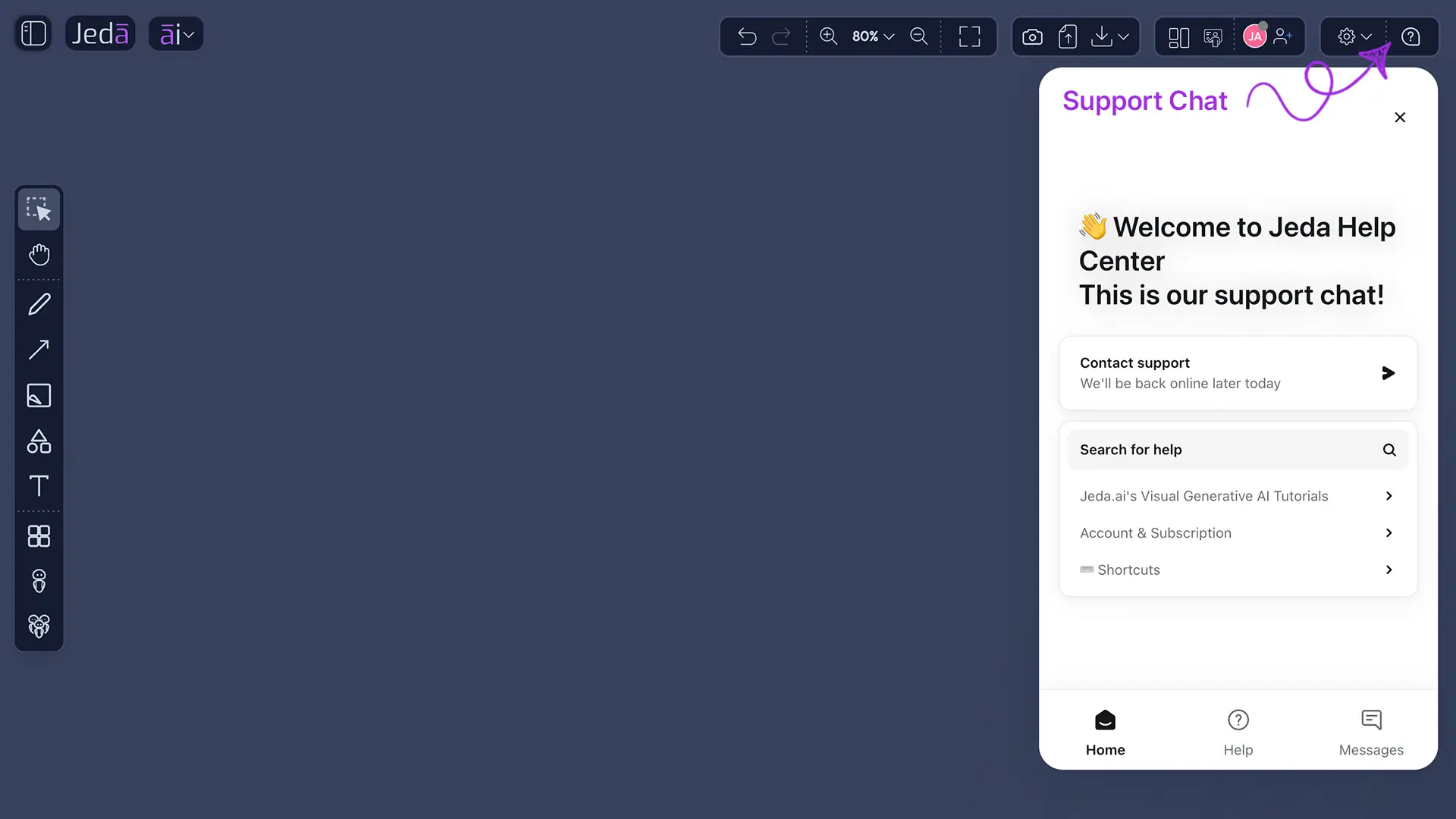
The old bottom-right support chat has been replaced with a new custom support launcher in the top-right question mark icon.
This is a small UI change with a big usability impact.
The canvas is where users think, build, and present. Moving support access into a cleaner top-right question mark keeps the workspace less cluttered while still making help easy to find.
For MBA instructors, this matters during class preparation. For consultants, it matters during time-sensitive client work. For decision makers, it reduces friction when a support question appears mid-workflow.
Support should be available without getting in the way.
What MBA Instructors Gain
This release gives MBA instructors a more controlled Agentic AI teaching environment.
They can now:
- Demonstrate how agent settings influence work quality
- Build agent teams faster with drag and drop
- Run a single agent for focused tasks
- Lock workflows while they execute
- Prevent conflicting team runs
- Convert agent outputs into matrices, diagrams, and visual formats
- Teach students how to critique AI workflows, not just consume AI answers
This is the difference between “AI as a shortcut” and “AI as a business learning environment.”
What MBA Cohorts Gain
Students gain a more realistic view of modern AI-supported work.
They learn that AI work is not only about prompting. It is about:
- Choosing the right expert roles
- Providing the right context
- Selecting the right output format
- Understanding when one agent is enough
- Knowing when a team is required
- Watching for workflow conflicts
- Reviewing results visually
- Questioning assumptions before accepting conclusions
That is LLM literacy in action.
What Consultants, Leaders, and Decision Makers Gain
For business consultants and leaders, this release makes Jeda AI more useful for real engagements.
Consultants can structure client work faster and safer. Leaders can see how analysis is configured and protected. Decision makers can review more visual, decision-ready outputs.
The biggest gain is not automation.
The biggest gain is controlled orchestration.
Jeda AI is not pushing users toward fully autonomous AI that runs without judgment. The stronger framing is human-controlled agentic work, where users build skills, configure agents, approve plans, and evaluate outputs. Human review, approval, and evaluation remain central.
That is the right direction for business education and serious strategy work.
How Instructors Can Use This Release in Class
- Build the agent
Choose or create the specialist agent needed for the case or class activity.
- Tune the model
Set available behavior controls where supported by the selected model.
- Run the workflow
Use either a single agent or an Agent Team depending on the task.
- Review the output
Use visual formats such as matrices and diagrams as class discussion artifacts.
- Teach the reasoning
Ask students to inspect assumptions, compare perspectives, and defend the final judgment.
Final Take: Agentic AI Is Becoming a Real Business Learning System
This Agentic AI release makes Jeda AI more flexible, more visual, more collaborative, and more controlled.
Temperature and reasoning controls make agents more tunable.
Drag-and-drop makes team setup faster.
Single-agent execution makes small tasks easier.
Workflow locks protect live work.
Visual outputs turn analysis into classroom and boardroom artifacts.
Team workflow visibility prevents collaboration chaos.
The new support launcher keeps help close without cluttering the canvas.
For MBA instructors, this is a stronger way to teach business with AI.
For MBA cohorts, it is a more realistic way to learn AI-supported case analysis.
For consultants and decision makers, it is a safer way to structure complex work before it becomes a recommendation.
This is Jeda AI moving Agentic AI from impressive demo to practical workflow infrastructure.
Build the agent.
Tune the model.
Run the workflow.
Review the output.
Teach the reasoning.
That is where Agentic AI becomes useful.
Release FAQ
- What is the main update in this release?
- The release adds more control to Jeda AI Agentic Workflows, including per-agent model behavior controls, drag-and-drop agent setup, single-agent execution, workflow locks, team visibility, visual outputs, and cleaner support access.
- Can every model use temperature and reasoning controls?
- No. Availability depends on the selected model. Some models may support both controls, one control, or neither.
- When should instructors use a single agent?
- Use a single agent when the task is focused and does not need multiple expert perspectives.
- When should instructors use an Agent Team?
- Use an Agent Team when the task needs multiple roles, handoffs, review, or broader reasoning across perspectives.
- Why do workflow locks matter?
- Workflow locks prevent sandbox or agent changes while work is running, which protects consistency during collaborative sessions.
- What visual outputs are supported in this release?
- The release supports Matrix, Diagram, and existing Jeda AI visual command formats for single-agent and multi-agent workflows.
Try the updated Agentic AI workflow in Jeda AI
Build specialist agents, run controlled workflows, and turn agent outputs into visual classroom and decision artifacts.
Open Jeda AI