Jeda AI's New AI Model Fleet is not a cosmetic dropdown update. It is a quality upgrade to the reasoning and image-generation layer inside Jeda.ai, the AI Workspace where teams turn messy thinking into structured, editable visuals. For business consultants, decision makers, and MBA cohorts, that matters because the real value of AI is no longer “can it answer?” The better question is: can it help a team think clearly, compare options, and defend the decision?
What Changed in Jeda AI's New AI Model Fleet?
Jeda.ai has upgraded several models across image generation and reasoning so users get a more capable experience when building strategy boards, visual analyses, diagrams, and business-ready outputs. The point is simple: better models should reduce friction between a question, an insight, and a usable visual artifact.
Here is the release-level model change list.
- Nano Banana as Default Image Model
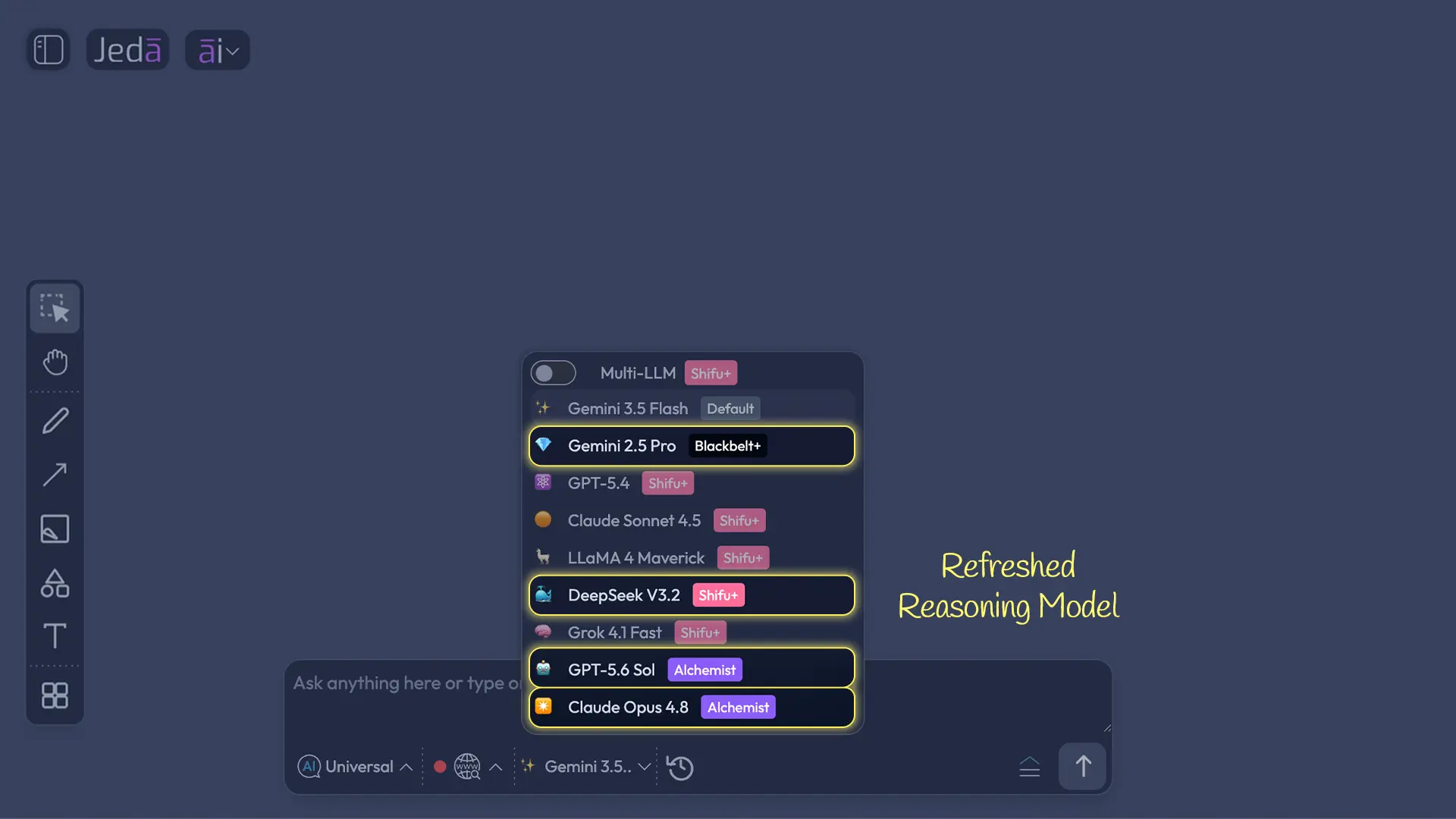
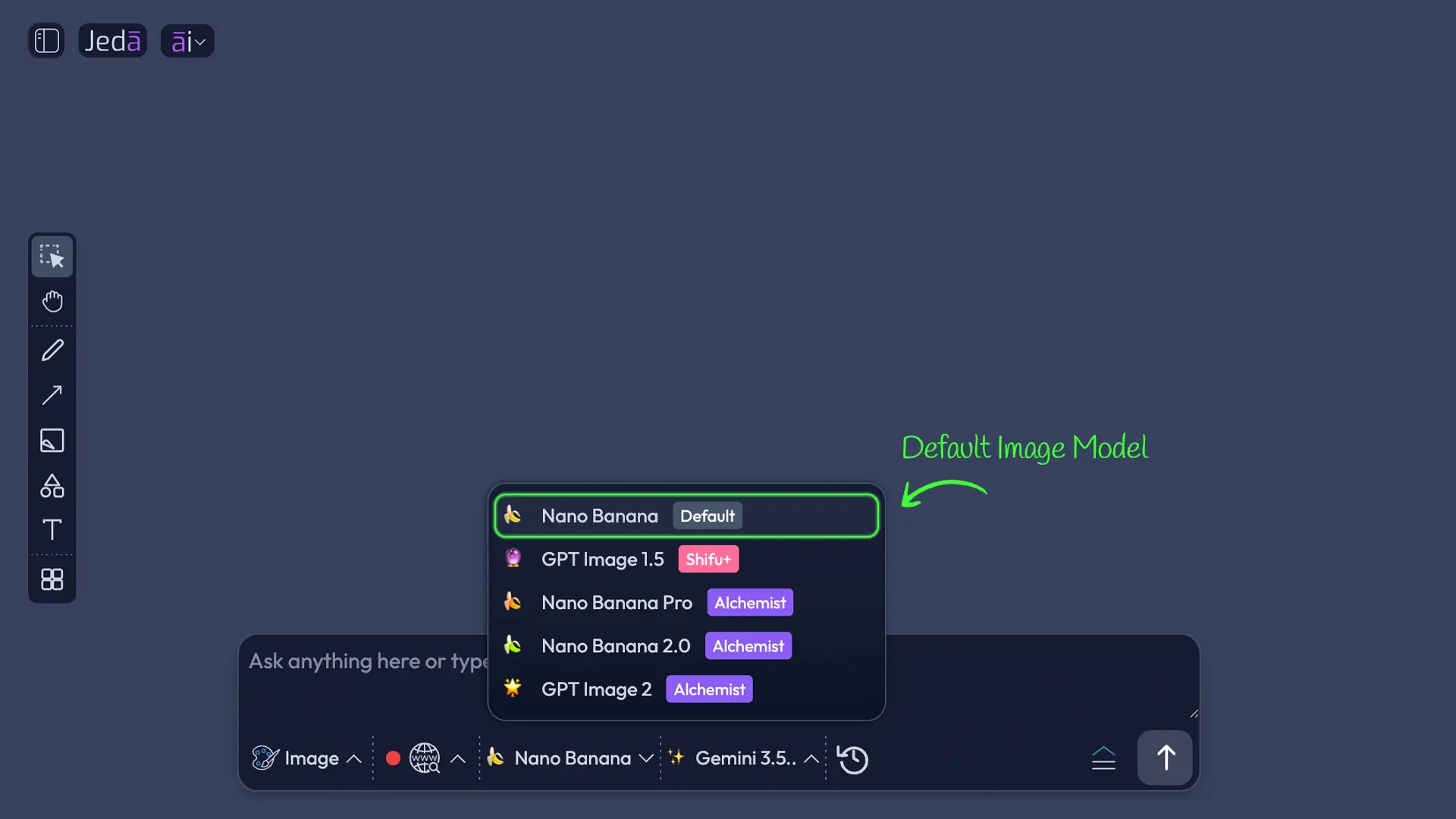
Nano Banana is now available for White Belt and Black Belt users as the default image generation model, helping more users create visual assets from day one.
- Gemini 2.5 Pro for Black Belt Reasoning
Gemini 2.5 Pro is now available for Black Belt users as the default reasoning model, bringing stronger analytical support into everyday visual workflows.
- Older Models Removed
GPT Image 1 and GPT 5.4 Mini have been removed from the active model fleet to simplify routing and improve the default experience.
- o3 Replaced by GPT 5.6 Sol
Jeda.ai has replaced o3 with GPT 5.6 Sol for higher-quality reasoning support inside structured workflows.
- Claude Opus 4.8 Replaces 4.5
Claude Opus 4.5 has been replaced with Claude Opus 4.8 for premium reasoning experiences where depth, nuance, and synthesis matter.
- DeepSeek V3.2 Replaces R1
DeepSeek R1 has been replaced with DeepSeek V3.2 to support stronger model routing and more dependable reasoning workflows.
This update also keeps the broader Jeda.ai product thesis intact. Jeda.ai is not just a chat interface with a pretty canvas around it. It is a Visual AI Workspace where prompts, files, ideas, data, and discussions can become editable matrices, diagrams, mind maps, flowcharts, sticky notes, strategy boards, and visual assets.
Why Model Fleet Quality Matters for Strategy Work
AI model quality matters most when the work is ambiguous. A consultant comparing market-entry options, a CFO reviewing trade-offs, or an MBA team preparing a case recommendation is not asking for a trivia answer. They are asking the system to hold context, reason through constraints, organize evidence, and generate a structure the team can inspect.
That is where model fleet upgrades become practical. Stronger reasoning models can improve synthesis, prioritization, scenario analysis, trade-off mapping, and decision framing. Stronger image models can help users communicate strategy visually through campaign concepts, workshop visuals, stakeholder maps, and presentation-ready graphics.
External AI development is moving in the same direction. Google described Gemini 2.5 as a “thinking model” built for more complex problems, with reasoning before response as a central design direction. Google also positioned Gemini 2.5 Pro around strong reasoning, coding, science, math, multimodal input, and long-context work. That kind of capability maps naturally to consulting and business education workflows where users bring documents, data, images, and complex context into the same task.
What Business Consultants Gain
For consultants, the upgrade is about client-ready thinking. Nobody pays a consultant because they can generate a wall of text faster. Clients pay for structured judgment: what matters, what changed, which option wins, what risk is being ignored, and what the team should do next.
Jeda AI's New AI Model Fleet supports that work in three ways.
First, stronger reasoning helps with messy inputs. A consulting workflow rarely starts clean. It starts with discovery notes, market screenshots, interview quotes, sales numbers, competitor claims, PDFs, spreadsheets, and executive opinions that do not fully agree with each other. In Jeda.ai, those inputs can move into Matrix, Diagram, Mindmap, Flowchart, Data Insight, and Document Insight workflows.
Second, better model routing supports more defensible outputs. A consultant can build a SWOT analysis, market-entry matrix, stakeholder map, Porter-style competitive structure, or option comparison board without manually rebuilding the framework from scratch. The output is visual and editable, so the consultant can revise the logic before presenting it. Less screenshot archaeology. More actual thinking.
Third, the image model change gives consultants a faster path to visual communication. Nano Banana as the default image generation model for White Belt and Black Belt users means early-stage users can create supporting visuals without needing a premium image workflow first. That matters for proposal decks, workshop openings, internal strategy narratives, and visual metaphors that help clients understand the point.
What Decision Makers Gain
Decision makers do not need AI to sound smart. They need AI to make uncertainty easier to work with.
Leadership teams usually have too much information and too little shared structure. One executive has the customer context. Another has the financial constraints. Product has the roadmap. Sales has market feedback. Operations knows where the plan will break. When AI outputs stay trapped in isolated chats, the decision becomes harder to align around.
Jeda.ai’s AI Workspace and AI Whiteboard help move that reasoning into a shared visual environment. With the new model fleet, decision makers can use stronger reasoning support to compare options, identify risks, create scenario maps, and turn discussions into visible decision artifacts.
This is especially useful when the next step is not obvious. A leadership team may need to decide whether to enter a new market, cut a product line, reorganize a team, prioritize a roadmap, or fund a new initiative. Better reasoning does not replace executive judgment. Good. It should not. It gives the team a structured surface where judgment can happen faster and with fewer blind spots.
What MBA and EMBA Cohorts Gain
MBA cohorts are in a strange spot. AI is already part of the professional environment, but many classrooms are still debating whether students should use it, how they should use it, and what “good use” even means. That debate is not going away. But business education is clearly moving from AI avoidance toward AI literacy and responsible integration.
AACSB’s 2026 work on AI in business education frames the shift as moving from experimentation to implementation across teaching, learning, research, and operations. Another AACSB article argues that the real challenge is not simply student misconduct, but the gap between what business schools certify and what professionals are expected to do with AI at work.
That is exactly where a visual AI workspace helps. MBA students do not just need a model that writes a clean paragraph. They need a place to compare assumptions, map stakeholder incentives, test strategy logic, and explain why one recommendation is stronger than another.
For MBA and EMBA cohorts, Jeda AI's New AI Model Fleet can improve practical learning in four ways:
- Better Case Analysis
Students can use stronger reasoning models to structure case facts into matrices, stakeholder maps, opportunity boards, and strategy recommendations.
- Stronger Group Work
Teams can collaborate on one AI Whiteboard instead of splitting work across chat threads, slides, documents, and screenshots.
- Visible AI Literacy
Instructors can evaluate the structure of student reasoning, not just the polish of the final written answer.
- Presentation-Ready Thinking
Students can turn analysis into editable visuals that support classroom debate, executive-style presentations, and applied business assignments.
This matters because MBA work is not just about getting to an answer. It is about learning how to frame the problem. A model fleet with stronger reasoning gives students better raw thinking support; Jeda.ai gives that thinking a visual structure instructors and peers can critique.
Why Gemini 2.5 Pro as a Black Belt Default Matters
Gemini 2.5 Pro becoming available as the default reasoning model for Black Belt users is a meaningful accessibility move. It gives solo professionals and smaller teams stronger reasoning without forcing them into a higher-tier workflow immediately.
For Black Belt users, that can improve everyday analysis: business model comparisons, research synthesis, strategy workshop prep, roadmap prioritization, and decision mapping. It also strengthens the bridge between individual work and team collaboration. A consultant can start with a model-supported Matrix. A founder can build a market map. A student can create a case framework. Then the board can be edited, expanded, and shared.
The external context supports the direction. Google has described Gemini 2.5 Pro as a model designed for enhanced reasoning, complex problem solving, coding, multimodality, and long-context tasks. In a tool like Jeda.ai, that is useful because the model is not just answering one isolated prompt. It is supporting structured outputs inside a collaborative canvas.
Why Nano Banana as a Default Image Model Matters
Nano Banana becoming the default image generation model for White Belt and Black Belt users lowers the barrier for visual communication. That is more important than it sounds.
A lot of business work fails at the communication layer. The analysis may be good, but the story is dry. The options may be clear, but the visual metaphor is weak. The workshop may have smart ideas, but the final board looks like someone glued sticky notes to a spreadsheet and called it strategy. Brutal, but we have all seen it.
With a stronger default image model, more Jeda.ai users can create supporting visuals directly from their thinking environment. That helps with:
The caveat is worth saying plainly: image outputs are static visual assets, while Jeda.ai’s Matrix, Diagram, Mindmap, Flowchart, and Draw-style outputs are designed for editable visual thinking. Use the image model when the goal is communication. Use structured commands when the goal is analysis.
How Teams Can Use the New Model Fleet in Jeda.ai
The best way to test this release is not to ask a vague prompt and hope for magic. Put the model fleet to work on a real decision.
- Start with a real business question
Choose a decision that matters, such as market entry, product prioritization, customer segmentation, pricing, positioning, or operating-model redesign.
- Open the Prompt Bar
Use the Prompt Bar at the bottom of the Jeda.ai canvas and select the command that matches the work: Matrix for comparison, Diagram for relationships, Flowchart for process, or Mindmap for exploration.
- Choose the reasoning model
Use Gemini 2.5 Pro where available, or select another model suited to the task. For deeper synthesis on eligible plans, use Multi-LLM Agent to compare model outputs.
- Generate the first visual structure
Ask Jeda.ai to create the framework, decision board, strategy map, or analysis structure. Keep the prompt specific: audience, objective, constraints, and output type.
- Use AI+ to extend the strongest sections
Select a generated smart shape and use AI+ to add detail, risks, alternatives, or supporting ideas where the board needs more depth.
- Use Vision Transform when the format needs to change
Convert a matrix into a flowchart, a mind map into a diagram, or a document summary into a visual decision structure when the team needs a different view.
- Create supporting visuals with the image model
Use Nano Banana for visual assets when you need a campaign image, workshop graphic, presentation concept, or visual metaphor to support the analysis.
What This Means for the Jeda.ai Product Direction
This release says something clear about where Jeda.ai is going. The platform is investing in model quality, visual generation, structured reasoning, and role-specific workflows. That is the right bet.
The AI market is crowded with tools that produce answers. Jeda.ai’s stronger opportunity is to help users turn those answers into shared thinking systems: boards, diagrams, matrices, frameworks, decision maps, and editable visual outputs. The upgraded model fleet strengthens that promise.
For consultants, it can mean faster movement from messy research to client-ready logic. For decision makers, it can mean clearer alignment around uncertain choices. For MBA cohorts, it can mean AI-supported learning that is visible, structured, and easier to evaluate.
And for Jeda.ai, it sharpens the core positioning: the AI Workspace for people who need to think visually, reason clearly, and make better decisions together.
Frequently Asked Questions
- What is Jeda AI's New AI Model Fleet?
- Jeda AI's New AI Model Fleet is a refresh of the reasoning and image models available inside Jeda.ai. The update improves default model routing, removes older models, and introduces stronger replacements for strategy, visual generation, and decision-support workflows.
- Which image model changed in this release?
- Nano Banana is now available as the default image generation model for White Belt and Black Belt users. This helps more users create visual assets for presentations, strategy communication, campaigns, and classroom work without starting from a higher-tier image workflow.
- Which reasoning model is now available for Black Belt users?
- Gemini 2.5 Pro is now available as the default reasoning model for Black Belt users. This gives solo professionals and smaller teams stronger reasoning support for matrices, decision boards, research synthesis, planning workflows, and strategy analysis.
- Which models were removed from Jeda.ai?
- GPT Image 1 and GPT 5.4 Mini were removed from the active model fleet. The release also replaces o3 with GPT 5.6 Sol, Claude Opus 4.5 with Claude Opus 4.8, and DeepSeek R1 with DeepSeek V3.2.
- How does this help business consultants?
- Consultants benefit from stronger reasoning for discovery synthesis, market analysis, framework generation, and client-ready decision boards. The upgraded model fleet can reduce manual structuring work while keeping the output editable and reviewable inside Jeda.ai.
- How does this help decision makers?
- Decision makers gain better support for comparing options, surfacing risks, mapping trade-offs, and creating shared visual artifacts. The value is not automated judgment; it is clearer structure around the judgment leaders still need to make.
- How can MBA cohorts use the new model fleet?
- MBA and EMBA cohorts can use the upgraded models to structure case analysis, compare strategic options, create stakeholder maps, and build visual presentations. This supports AI literacy by making student reasoning visible instead of hiding it inside chat outputs.
- Does this replace human judgment?
- No. The upgraded model fleet supports analysis, synthesis, and visual structure, but teams still need to challenge assumptions, validate evidence, and make the final decision. Jeda.ai is strongest when AI output becomes a shared board for human review.
- Where can users test the improved experience?
- Users can visit Jeda.ai and open the workspace to test the improved model experience. A practical starting point is to run a real decision workflow using Matrix, Diagram, Mindmap, Flowchart, or Image generation.
Sources & Further Reading
- [1]
Google DeepMind (2025) . “Gemini 2.5: Our newest Gemini model with thinking” Google Blog.
View Source ↗ - [2]
AACSB (2026) . “AI Integration, Not Prohibition” AACSB Insights.
View Source ↗ - [3]
DeepSeek (2026) . “DeepSeek-V3.2 Transparency and Model Overview” DeepSeek Transparency Center.
View Source ↗ - [4]
Anthropic (2025) . “Introducing Claude Opus 4.5” Anthropic News.
View Source ↗
Test Jeda AI's New AI Model Fleet
Join 150,000+ users using Jeda.ai to turn strategy, analysis, research, and classroom thinking into editable visual outputs.
Visit Jeda.ai