This is not another “one feature shipped” release.
Jeda AI has upgraded both the Agentic AI system and the overall AI Workspace in a substantial way.
For MBA instructors and cohorts, that means a more realistic environment for learning how modern AI-supported business work is actually structured: configure specialist agents, control model behavior, inspect agent communication, generate visual outputs, and review execution history.
For business consultants, leaders, and decision makers, it means something equally practical: more controlled AI workflows, better visibility into what agents are doing, stronger file handling, richer outputs, and a workspace that is more reliable when the work gets complex.
The distinction matters.
Some updates in this release improve Jeda AI everywhere. Others specifically strengthen the Agentic AI layer. Together, they push Jeda AI further toward what serious users actually need: AI that is visual, controllable, collaborative, and useful beyond a chat response.
The next step for business AI is not simply more autonomy. It is better control over how AI work is configured, executed, reviewed, and turned into decisions.
For a broader view of the product context behind these changes, explore the Jeda.ai AI Workspace.
The AI Model Stack Has Moved Forward
Jeda AI has also refreshed the reasoning and image model lineup across the platform.
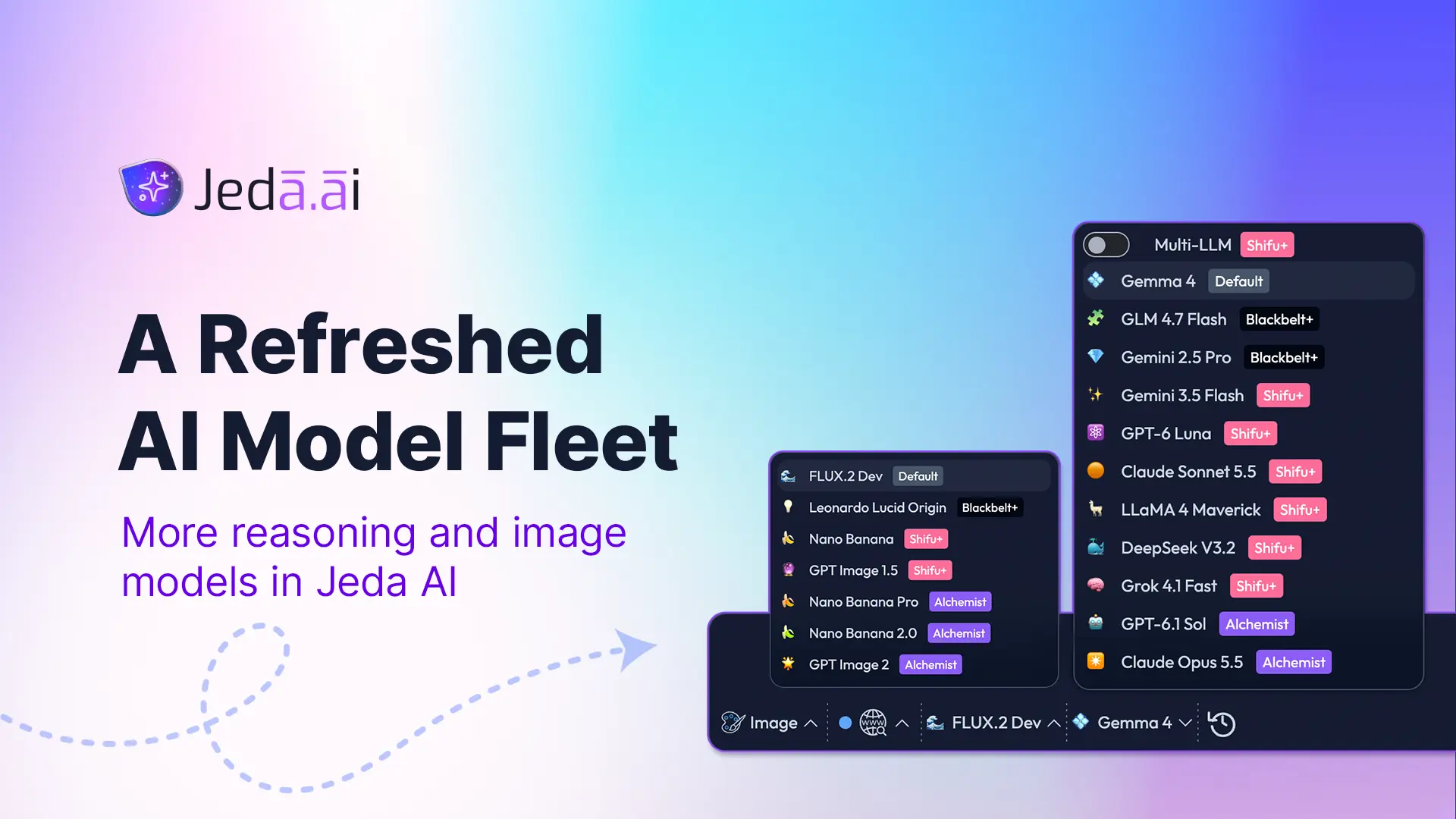
Reasoning models
- Gemma 4 is now the default reasoning model for all plans.
- GLM 4.7 Flash has been added starting from the Blackbelt plan.
- GPT 5.4 has been replaced by GPT 6 Luna.
- GPT 5.6 Sol has been replaced by GPT-6.1 Sol.
Image models
- FLUX.2 Dev is now the default image-generation model for all plans.
- Leonardo Lucid Origin has been added starting from the Blackbelt plan.
This is more than a model-menu refresh.
For MBA instructors and cohorts, the updated lineup gives more room to compare how different models approach reasoning, analysis, and visual generation.
For consultants, leaders, and decision makers, it means access to newer model options for strategy work, business analysis, case exploration, visual communication, and decision support inside the same Jeda AI Workspace.
The goal is not to collect model logos like trading cards.
The value is giving users stronger model choices for the kind of work they are actually doing.
Agentic AI Gets More Control at the Individual Agent Level
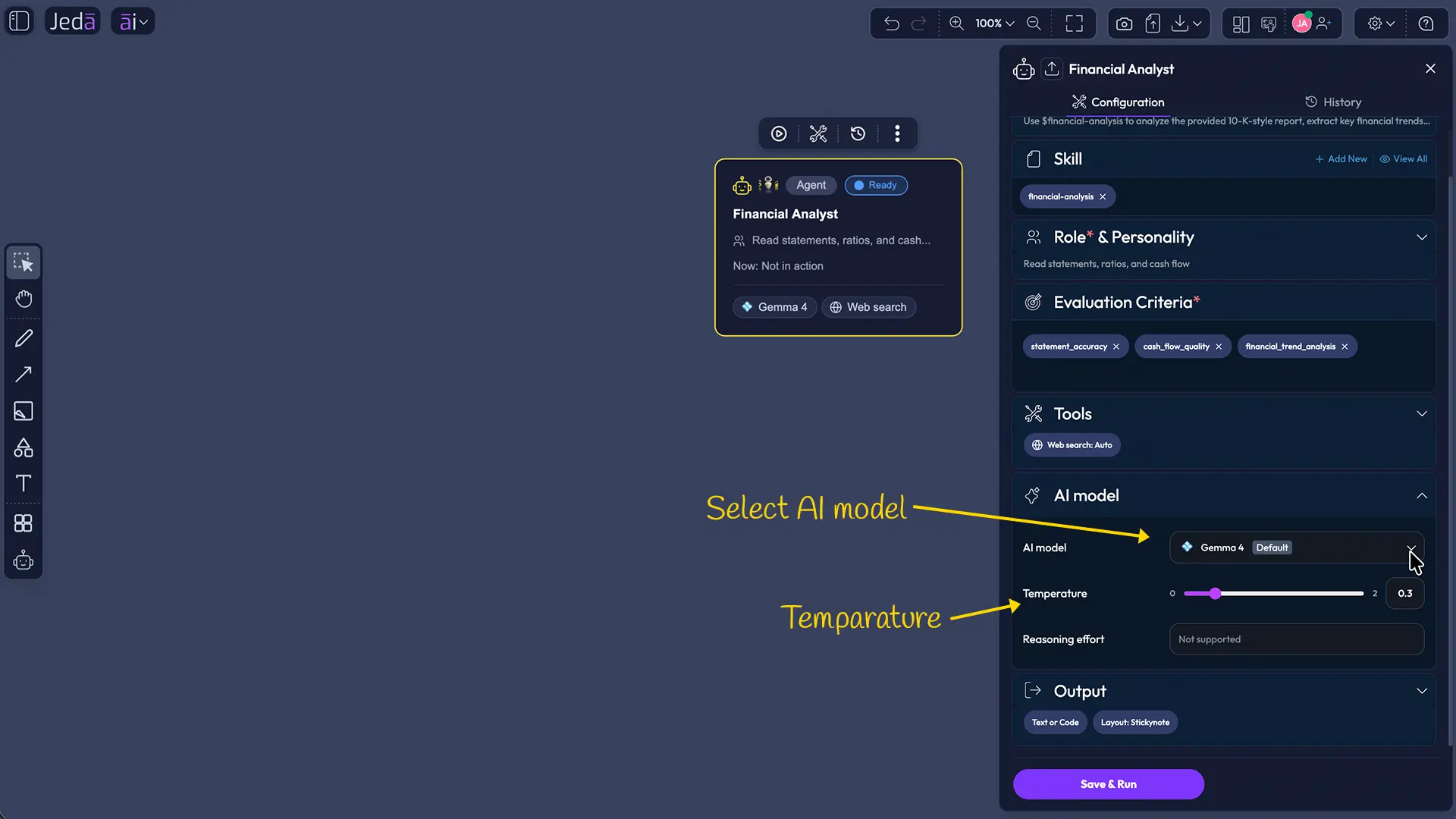
Temperature and reasoning controls for supported models
Individual AI Agents now support Temperature and Reasoning effort controls where the selected model allows them.
Not every model supports both controls, and Jeda AI reflects that instead of pretending every LLM behaves the same way. Multi-LLM is also not available inside an individual Agent.
That distinction is valuable.
A creative strategy agent may benefit from broader exploration. A quality reviewer may need tighter reasoning. A research agent and a synthesis agent may need different behavior even inside the same business problem.
For MBA instructors, that creates a real lesson in AI literacy: model behavior can be configured, compared, and challenged.
For consultants, it means agent configuration can better match the role being performed instead of treating every task as identical.
Building Agent Teams Is Faster With Drag and Drop
Agents can now be added through drag and drop.
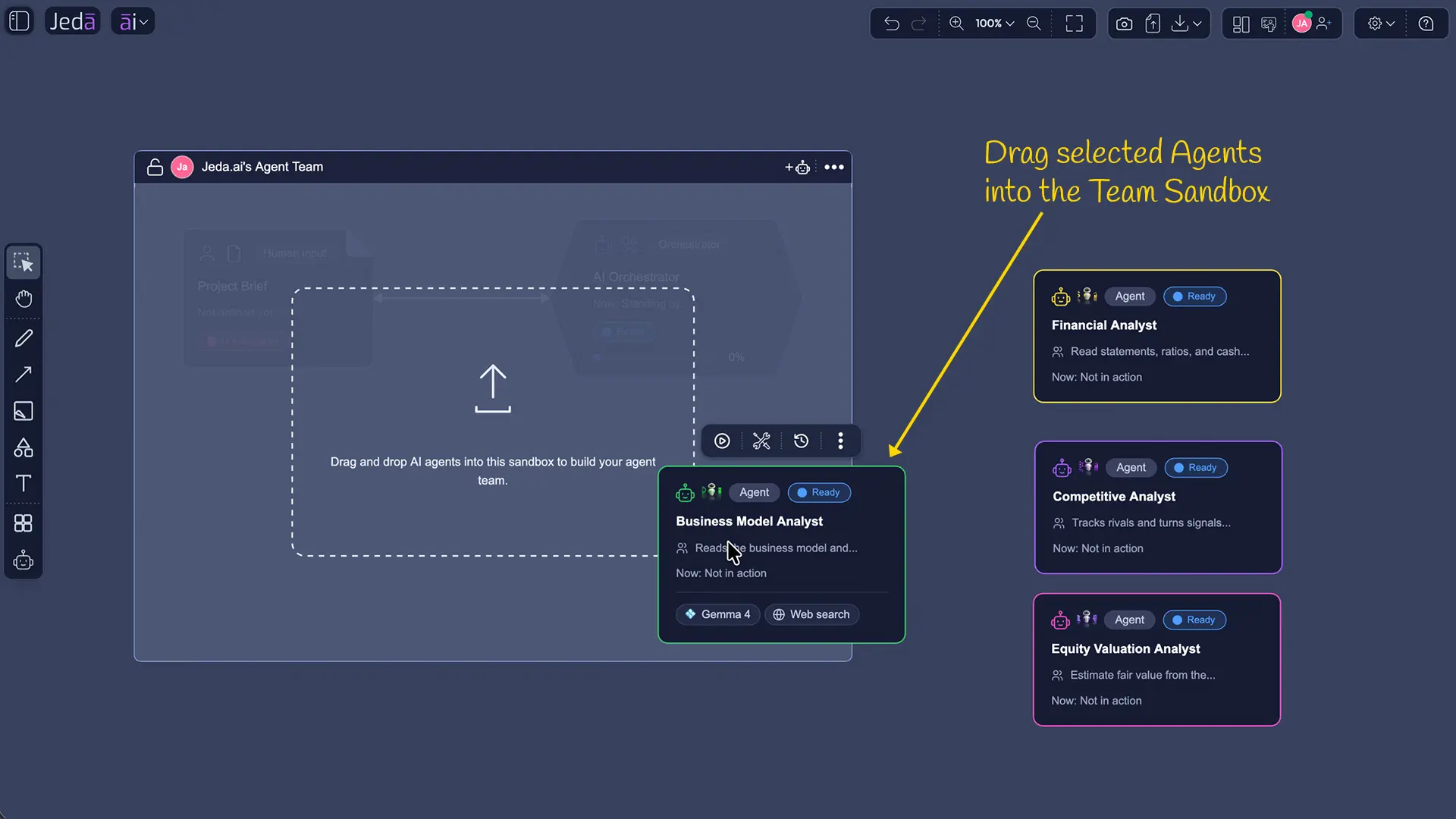
That sounds like a UI improvement. In practice, it changes how naturally an Agent Team can be assembled.
An MBA instructor can visually build a case team with a Strategy Agent, Research Agent, Data Analyst, and Competitive Analyst, then ask students whether the team is actually complete.
A consulting team can configure the specialists needed for a client engagement without navigating through layers of setup.
Agent selection becomes visible, understandable, and easier to discuss.
Running Agentic AI Is Now Safer in Collaborative Workspaces
Several improvements in this release are specifically about protecting active workflows.
When an Agent or Team Workflow is running:
- The Sandbox is locked against Agent or Team configuration changes.
- The lock applies to collaborators, helping protect the running setup.
- Switching or leaving the workspace requires confirmation.
- Continuing with navigation aborts the running workflow or single-agent task.
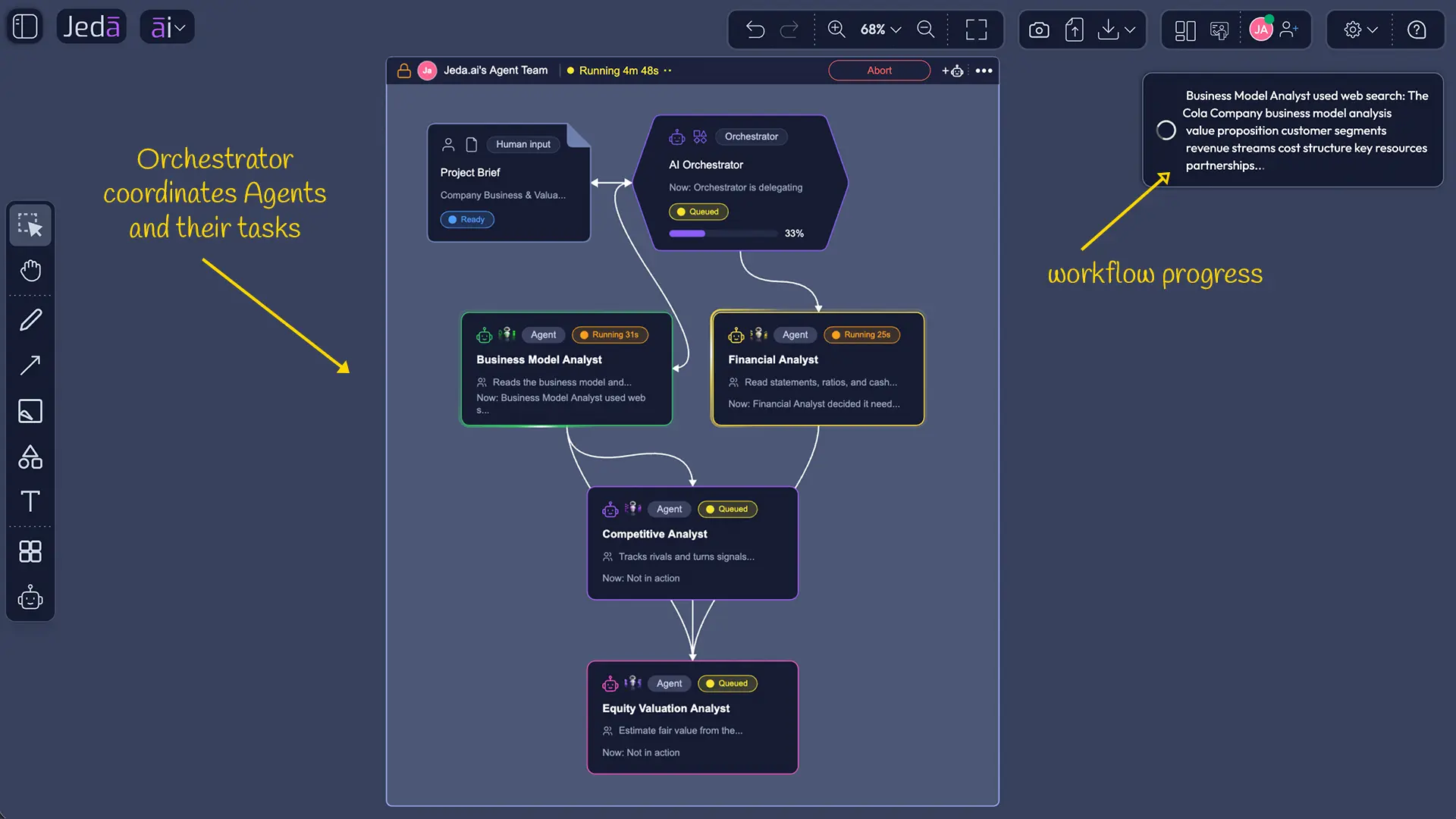
This matters because an agentic workflow is not a static prompt.
It is an execution process.
If someone changes an Agent, removes a specialist, or alters the Team Sandbox while the workflow is already running, the integrity of the work can collapse.
For MBA classrooms, these controls reduce accidental disruption when multiple students share a workspace.
For consultants and decision makers, they bring a more professional level of execution discipline to collaborative AI work.
Team Workflow Visibility Is Better for Every Collaborator
When one participant runs a Team Workflow, other participants can now see that the Team is already working.
They cannot launch another workflow using that same Team until the active task completes. If they try, Jeda AI shows a notification explaining that the Team is currently in use.
That is a small but important collaboration rule.
Instructors do not need two students accidentally launching competing runs.
Consulting teams do not need duplicate executions burning time and creating conflicting outputs.
Leaders do not need to wonder which run is actually authoritative.
Agentic collaboration needs coordination, not AI traffic jams.
Agent Outputs Are Becoming More Visual
Matrix, diagrams, and existing Jeda AI formats
Single-Agent and Multi-Agent workflows can now produce richer Jeda AI output formats and visualizations, including Matrix, Diagrams, and existing command-based formats. Matrix layout support has also been added to Agent outputs.
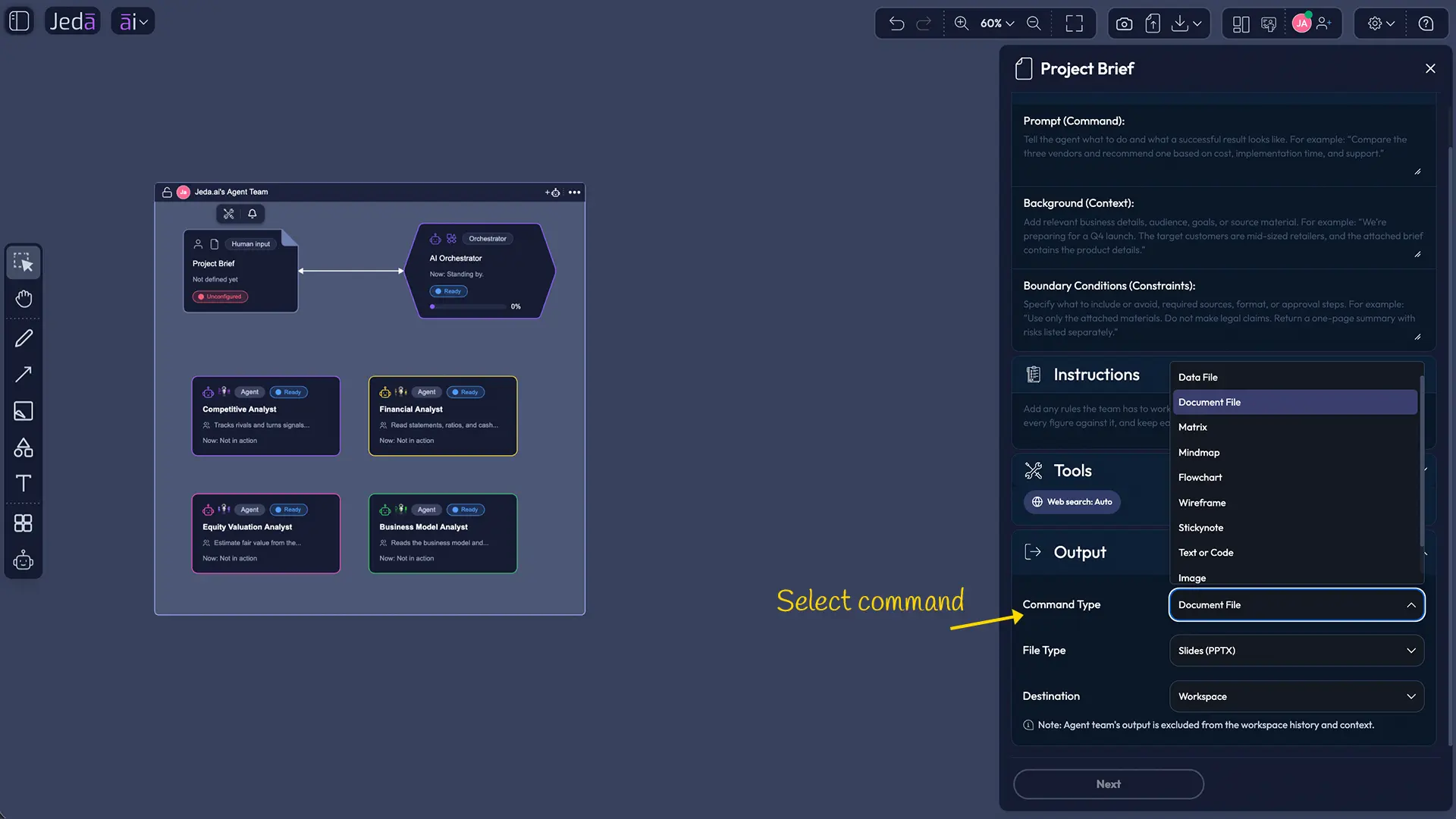
This is important because serious business analysis should not end as a wall of generated text.
A strategy Agent can return a Matrix.
A process Agent can return a Diagram.
A business case can become a visual framework.
A classroom analysis can become something students can inspect, rearrange, critique, and present.
For MBA cohorts, this makes Agentic AI more useful as a teaching environment.
For consultants and leaders, it moves AI closer to an actual deliverable.
These visual outputs can then be refined on the Jeda.ai AI Whiteboard, where teams can continue working with editable structures on the shared canvas.
Sandbox and Workspace Results Now Behave Differently
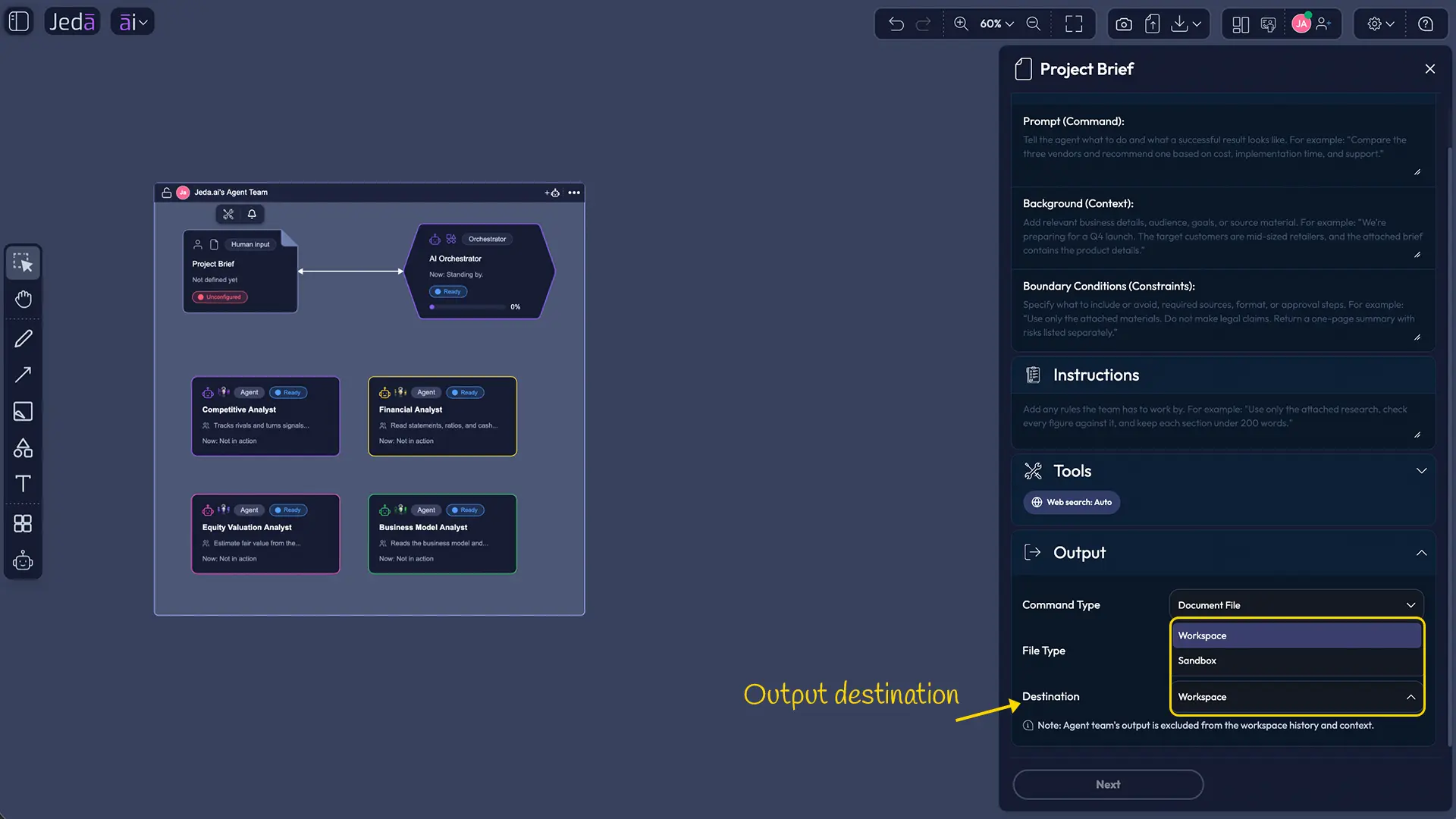
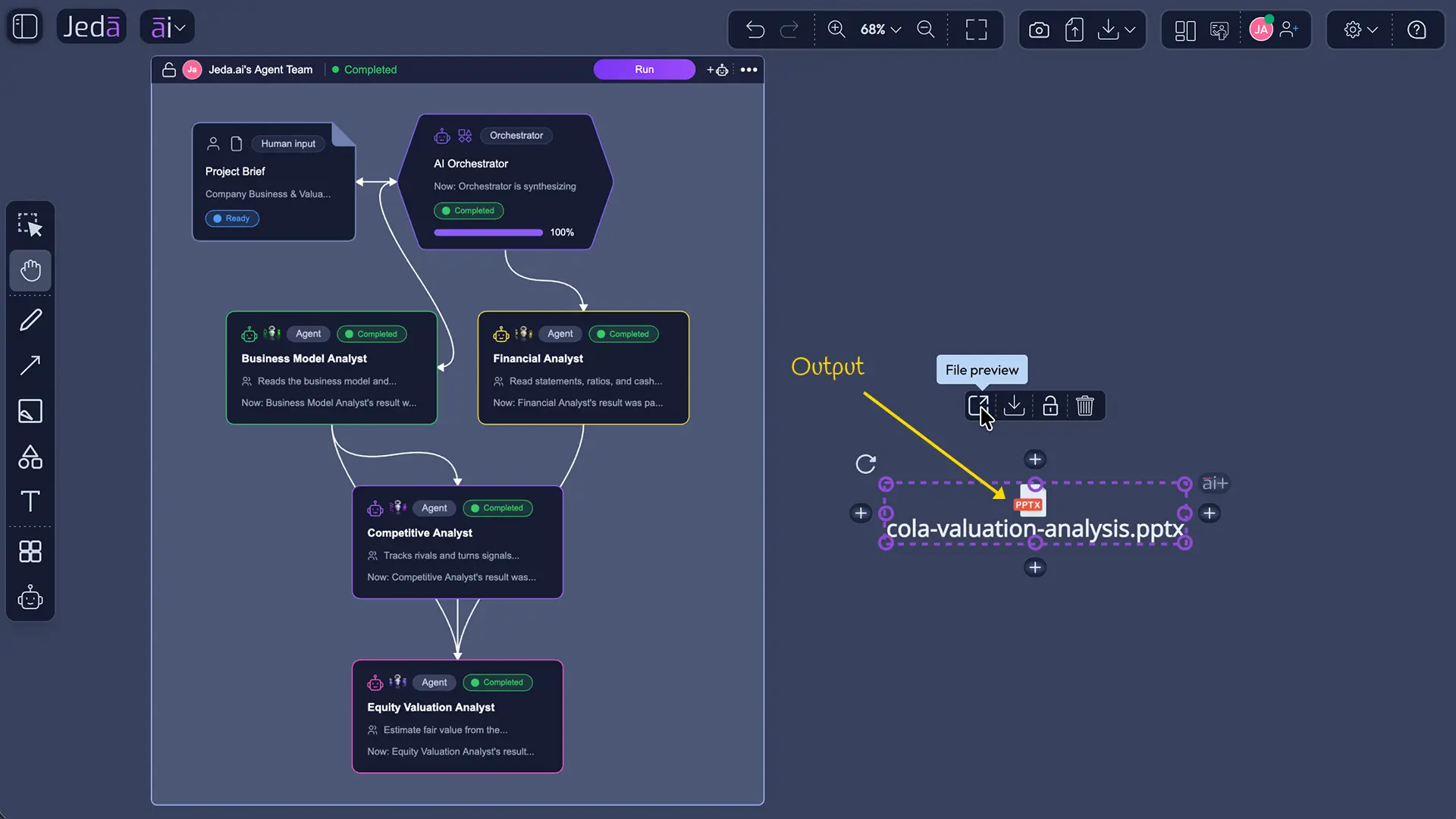
Jeda AI has also introduced a new result style depending on where Agent Team output is generated.
Inside the Sandbox, Team results remain inside a frame and are connected through connectors, helping preserve the workflow structure.
When results are generated into the Workspace, they behave more like normal Jeda AI command outputs on the broader canvas.
That gives users a useful choice:
Keep the result close to the Agent Team when you want to inspect how the workflow unfolded.
Move the result into the Workspace when you want to build on it, discuss it, or use it as part of a larger strategy board.
That distinction is especially valuable in MBA case analysis and consulting workshops.
Agent Run History Is Now Workspace-Level
Jeda AI has implemented workspace-level Agent Run History and execution locking.
That means Agentic AI is becoming easier to inspect as an ongoing workspace activity rather than a collection of disconnected runs.
For MBA instructors, run history can support review and discussion:
- What was executed?
- Which approach was used?
- What changed between runs?
- Which result was stronger?
- Where did the workflow fail or improve?
For consultants and leaders, execution history gives teams a clearer operational record of how AI work was performed.
That is valuable when decisions need traceability, not just output.
Agent-to-Agent Communication Is More Visible
The Agent history experience now gives users better visibility into Agent-to-Agent communication and conversations.
This is one of the more interesting upgrades in the release.
Agentic AI becomes much more useful when users can inspect not only the final result but also how specialist roles interacted along the way.
For instructors, this creates a teaching opportunity around delegation, handoffs, and reasoning quality.
For consultants, it helps expose whether specialist Agents actually contributed useful work or simply passed weak assumptions downstream.
For decision makers, it gives more transparency into how the final recommendation came together.
Agentic File Workflows Get a Major Upgrade
The Agentic AI file-upload experience has been improved, and Agent workflows now support additional file output formats:
- .csv
- .xls
- .xlsx
- .doc
- .docx
- .txt
- .md
This significantly expands what an Agent or Agent Team can produce.
A Data Agent can create structured spreadsheet output.
A research workflow can return a document.
A Team can generate a PDF-ready artifact instead of forcing the user to manually reconstruct the result elsewhere.
For MBA cohorts, this means assignments can move more naturally from AI analysis into usable coursework.
For consultants, it reduces the gap between “the AI completed the task” and “the deliverable is actually ready to use.”
Skills Are Easier to Inspect and Edit
Users can now open Skill files directly in the Skill Editor by selecting the Skill from the Project Brief configuration panel.
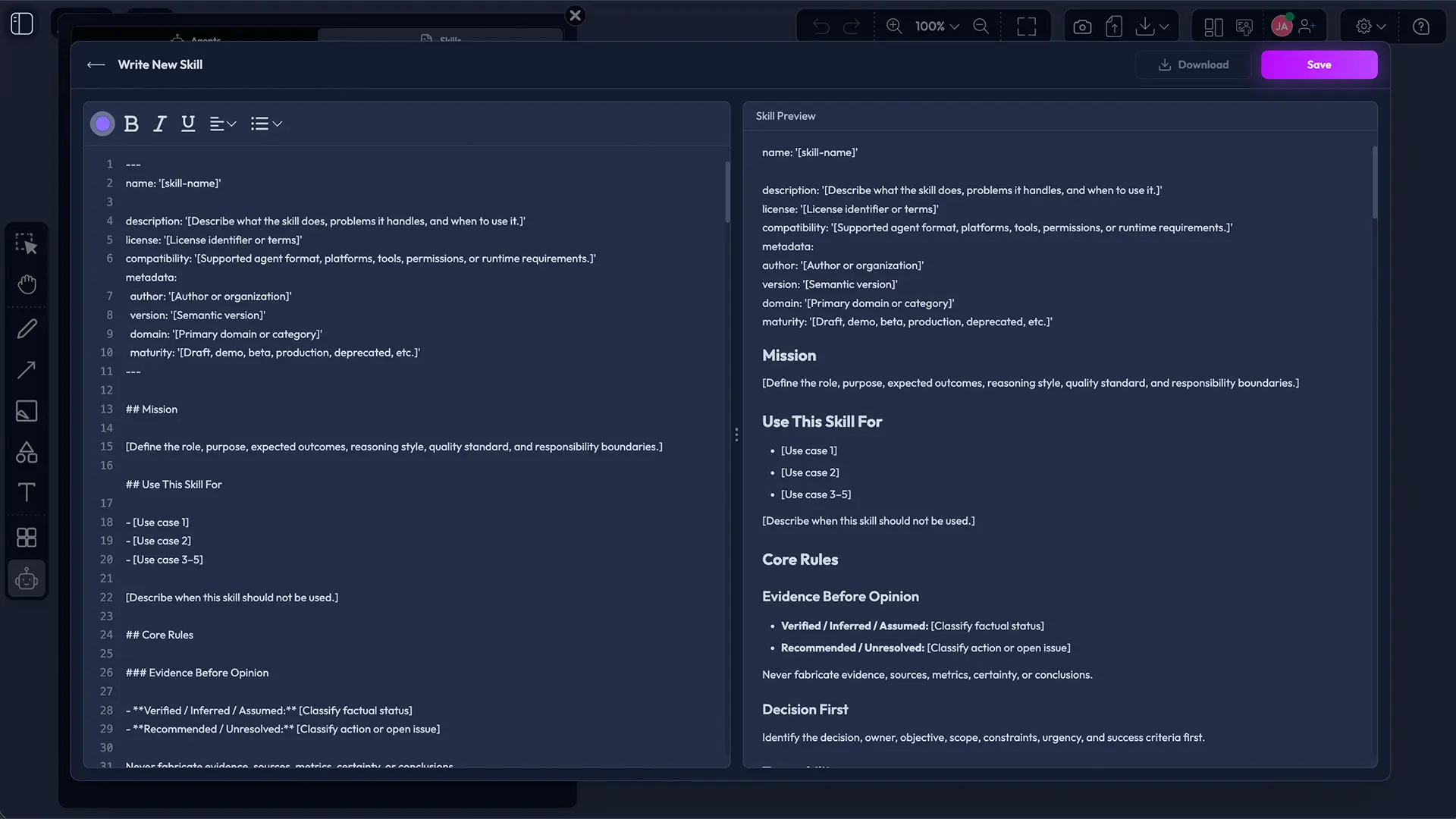
That makes Skill design less hidden.
Instructors can inspect how an Agent has been instructed to work.
Students can study how analytical methodologies are encoded.
Consultants can refine a Skill without breaking their workflow to hunt for the underlying file.
That improves one of the most important parts of Agentic AI: not just which model is used, but how the Agent is instructed to think and work.
Agent Settings and History Now Live Together
Agentic AI Settings and History have been moved into the same pane for more consistent navigation.
This reduces unnecessary movement between configuration and review.
Set up the Agent. Run it. Inspect the history. Refine it.
That is the workflow.
The UI should follow the thinking, not fight it.
- Configure the Agent
Set the specialist role and supported behavior controls for the work being performed.
- Build the Team
Add the required specialist Agents and Skills to the Team Sandbox.
- Run the Workflow
Start the Agent or Team Workflow while Jeda.ai protects the active execution state.
- Inspect the History
Review execution history, Agent-to-Agent communication, and the quality of the result.
- Shape the Output
Keep results near the Team for inspection or move them into the Workspace for refinement and presentation.
The Wider Jeda AI Workspace Also Got Stronger
The Agentic AI changes are only half of this release.
Several updates apply across Jeda AI as a whole.
Undo and Redo Has a New Architecture
Jeda AI has implemented a new Undo/Redo architecture across the workspace.
That matters on an infinite visual canvas where users are constantly moving, generating, editing, grouping, connecting, and reshaping content.
For consulting workshops and MBA classrooms, Undo/Redo is not glamorous.
Until it fails.
A more robust architecture means users can work more confidently on complex boards without treating every edit like a potentially irreversible life decision.
Text and Code Outputs Now Support Lists
Text and Code content can now be formatted using list styles, including:
- Bullet points
- Numbered lists
- Other structured list formatting
This makes AI-generated content much easier to turn into:
- Recommendations
- Action plans
- Case findings
- Executive next steps
- Research summaries
- Workshop outputs
Good analysis deserves readable structure.
Bigger Groups and Bigger Generated Objects
Jeda AI now supports larger groups and bigger generated objects across the canvas.
That is important as visual work becomes more ambitious.
Strategy boards get large. MBA case maps get messy. Agent-generated outputs can span multiple analytical areas.
The workspace needs to scale with the thinking.
TXT Downloads Are Now Available for Text Objects
Any object containing text can now be downloaded as a .txt file, and download dropdowns show file extensions more clearly.
That makes content portability more straightforward.
Users can take canvas content into documentation workflows, notes, archives, or other business systems without copy-paste gymnastics.
Output Terminology Is Cleaner
Across the application:
- Output Format in the command bar is now called Layout.
- The previous Document output type for Text or Code is now called Sticky Note.
The names now better match what users are actually choosing.
Clear terminology reduces onboarding friction, especially for new MBA cohorts and business users who should not need a glossary to understand a dropdown.
Help and Support Have Been Redesigned
Jeda AI has implemented a redesigned Help Center with:
- Onboarding tutorials
- FAQs
- Easier support-chat access
The support experience also has a new custom launcher UI.
That matters because powerful software becomes useless surprisingly quickly when users cannot figure out the next click.
For MBA instructors introducing Jeda AI to a cohort, better onboarding reduces teaching overhead.
For consultants working under deadline, easier support access reduces interruption.
- More reliable editing
A rebuilt Undo/Redo architecture supports confident work on complex boards.
- Clearer structured text
Text and Code outputs can use bullets, numbered lists, and other list formatting.
- Faster support access
Redesigned Help Center guidance and easier support access reduce onboarding friction.
What This Release Means for MBA Instructors and Cohorts
MBA education increasingly needs to teach more than business frameworks.
Students need to understand how AI-supported work is designed.
This release gives instructors more material for doing exactly that:
- Configure Agent behavior instead of using generic defaults.
- Build Teams visually.
- Examine Agent communication.
- Review workflow history.
- Generate matrices and diagrams from Agent work.
- Work with real business file formats.
- Challenge the structure of the AI workflow, not just the answer.
That is far closer to the future workplace than “paste the case into a chatbot and summarize it.”
MBA cohorts can learn how business problems move across specialist roles, files, outputs, and execution states.
More importantly, they can critique the system.
That is where AI literacy gets interesting.
What This Release Means for Consultants, Leaders, and Decision Makers
Consultants gain stronger workflow control, more usable Agent outputs, richer file formats, and better visibility into what happened during execution.
Business leaders gain a cleaner path from AI-supported investigation to structured visual artifacts.
Decision makers gain more transparency around execution, communication, history, and output.
And across all of Jeda AI, the workspace itself is becoming more resilient: stronger Undo/Redo, larger visual structures, clearer terminology, better support, more portable text, and an updated model stack.
The point is not to remove the human from the process.
The point is to give humans a better system for directing the process.
You can also follow the ongoing Jeda.ai release updates for the latest workspace and Agentic AI improvements.
The Bottom Line
This release represents a clear maturation of Jeda AI.
Agentic AI is becoming more controllable, traceable, visual, and practical.
The overall AI Workspace is becoming more robust, scalable, and easier to use.
For MBA instructors, that means a stronger environment for teaching AI-native business work.
For MBA cohorts, it means learning how to design and evaluate AI workflows instead of merely consuming AI answers.
For consultants, leaders, and decision makers, it means a more operational platform for moving from evidence to analysis to visual decision support.
Configure the Agent. Build the Team. Inspect the work. Shape the output. Make the decision.
That is where Jeda AI is heading.
Frequently Asked Questions
- What is the main focus of this Jeda AI release?
- The release strengthens both the Agentic AI workflow layer and the wider AI Workspace. It adds more control over Agent execution, clearer collaboration states, richer visual outputs, stronger run history, broader file handling, and several workspace-level usability improvements.
- Can individual Agents use different behavior controls?
- Yes. Individual Agents can use Temperature and Reasoning effort controls when the selected model supports them. Jeda AI reflects model-specific differences instead of presenting unsupported controls as if every model behaves the same way.
- What happens when a Team Workflow is already running?
- The active Team is protected from conflicting changes. The Sandbox is locked against Agent or Team configuration edits, collaborators can see that the Team is in use, and leaving the workspace requires confirmation because continuing can abort the active run.
- What visual outputs can Agent workflows produce?
- Single-Agent and Multi-Agent workflows can produce richer Jeda AI formats including Matrix, Diagram, and other existing command-based visual outputs. These results can remain near the Team for inspection or move into the broader Workspace for continued refinement.
- How does workspace-level Agent Run History help teams?
- Workspace-level Agent Run History makes repeated execution easier to inspect. Teams can review what ran, compare approaches, see what changed between attempts, inspect Agent communication, and discuss where a workflow became stronger or weaker.
- Which file types can Agent workflows return?
- The release expands Agentic AI output support across structured data, document, text, Markdown, and PDF-ready file formats. That reduces the gap between completing an AI task and producing an artifact that can move into a real work or classroom workflow.
- What changed outside the Agentic AI layer?
- The wider Jeda AI Workspace received a rebuilt Undo/Redo architecture, list formatting for Text and Code, larger canvas groups and generated objects, clearer output terminology, TXT downloads for text objects, and redesigned help and support access.
- Why does this release matter for MBA instructors and cohorts?
- It gives instructors a more practical environment for teaching AI-supported work as a designed process. Students can configure roles, build teams, inspect Agent communication, compare run history, generate visual outputs, and critique the workflow instead of only consuming a final AI answer.
Build a More Controlled Agentic AI Workflow
Use Jeda.ai to configure specialist Agents, run collaborative workflows, inspect the work, and turn results into editable visual outputs.
Start in Jeda.ai