Customer Support Guidelines with AI only matter when your team can use them mid-ticket, not admire them in a folder. Inside Jeda.ai’s AI Workspace, you can draft the written standard first, then turn it into a flowchart, matrix, or escalation board inside the same AI Whiteboard. That matters because expectations have moved fast: Zendesk says 74% of consumers now expect 24/7 service and 88% expect faster responses than a year ago, while Salesforce expects half of service cases to be resolved by AI by 2027. Jeda.ai gives 150,000+ users one place to write the rulebook and operationalize it.
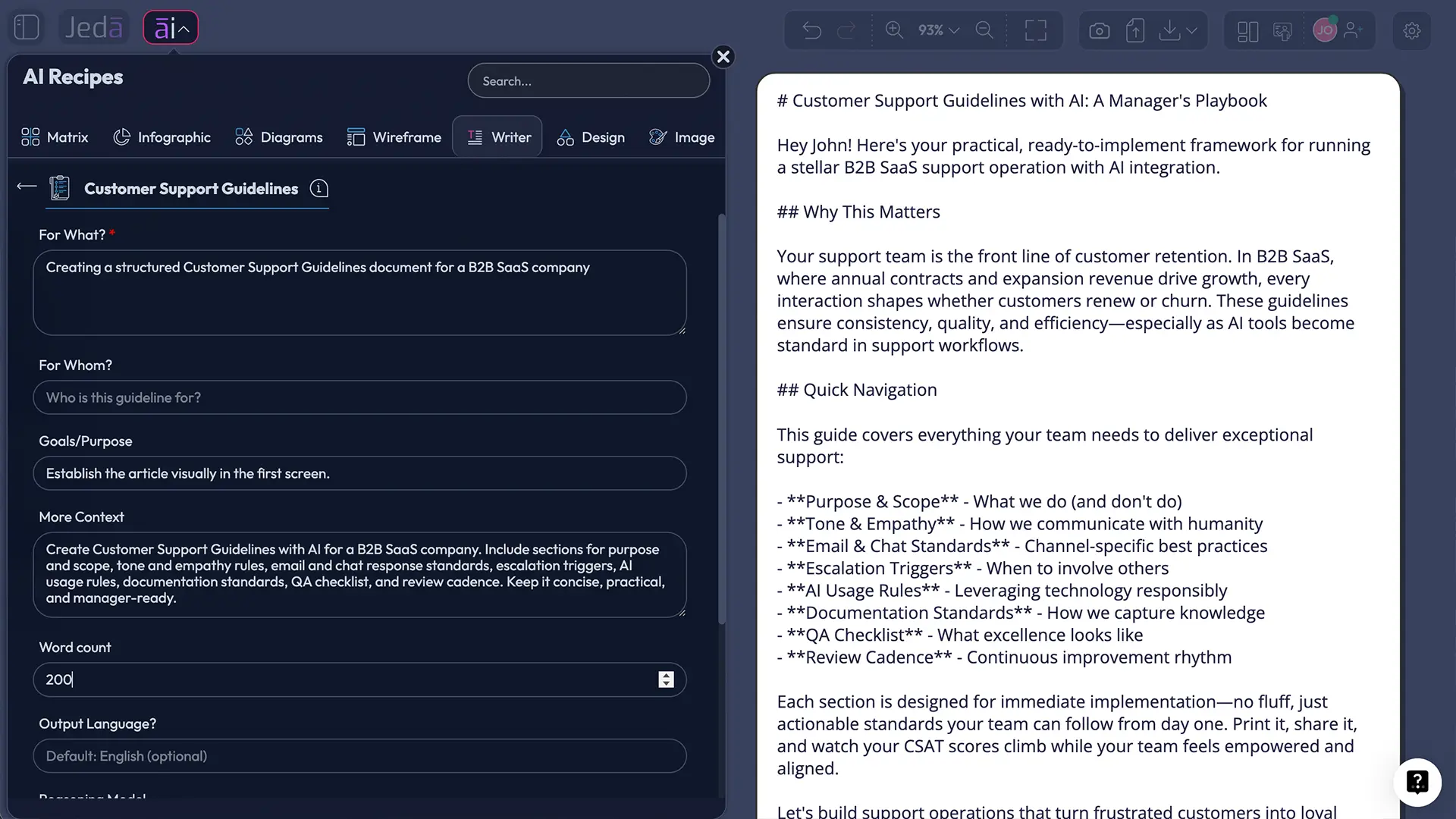
What are customer support guidelines?
Customer support guidelines are the practical rules that tell agents how to respond, what they can promise, when to escalate, and how to document the issue. Good ones create consistency without turning every reply into a robotic script.
That balance is the whole game.
The best sets usually cover four basics: common language, channel expectations, escalation paths, and contingency plans for edge cases. They also leave room for judgment. HelpSpot’s guidance gets this right: strong guidelines empower teams rather than handcuff them. The service-quality research behind SERVQUAL still helps here too. Reliability, responsiveness, assurance, and empathy remain useful lenses when you decide what “good support” should look like.
AI raises the stakes. IBM makes the tradeoff plain: AI can speed up support, but customers notice when the experience feels robotic. So your guideline document has to govern both people and automation.
Why teams are using AI to write support guidelines now
Most support leaders are not stuck because they lack opinions. They’re stuck because turning those opinions into a clear, usable standard takes time they do not have.
Jeda.ai compresses that work.
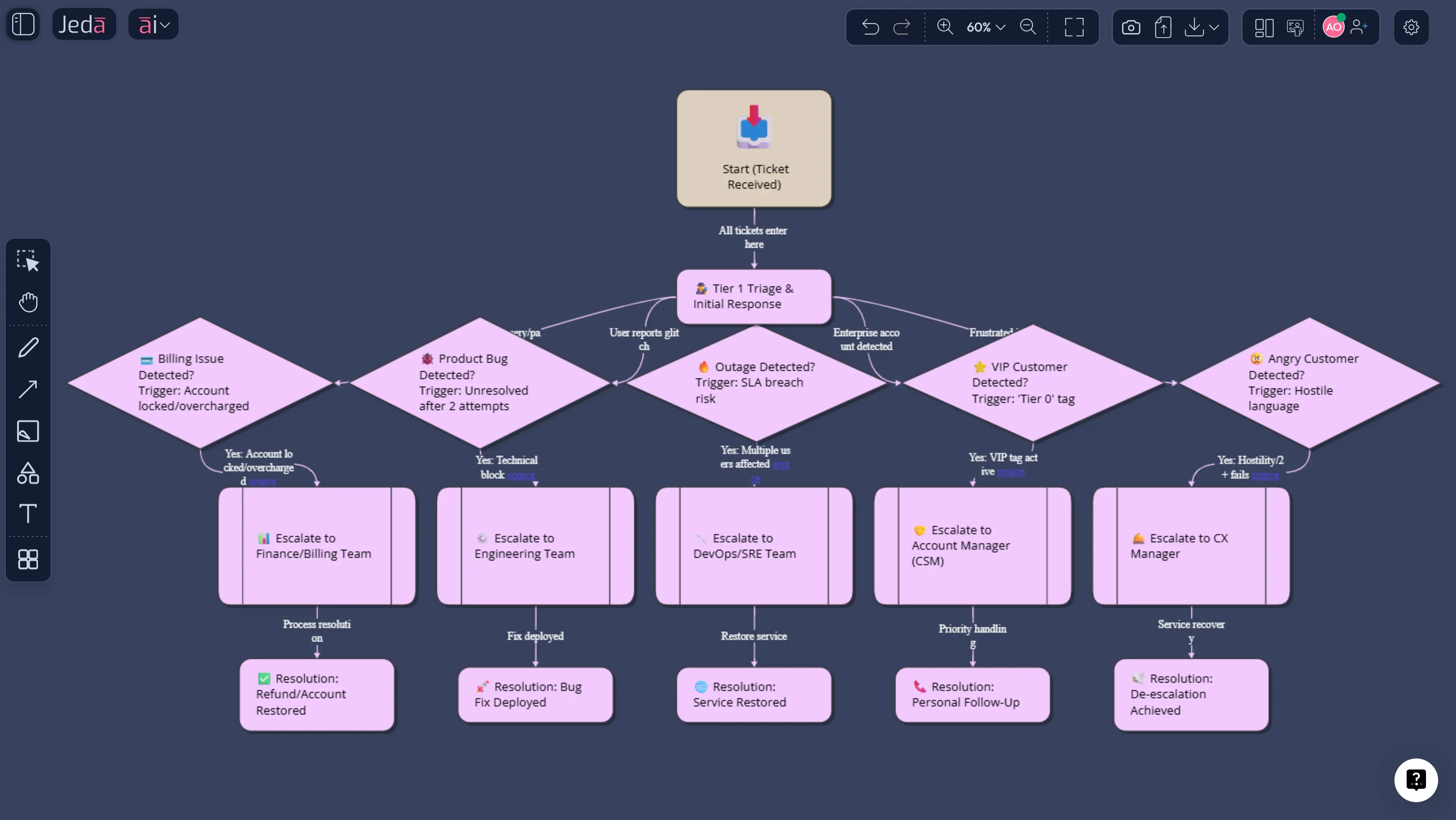
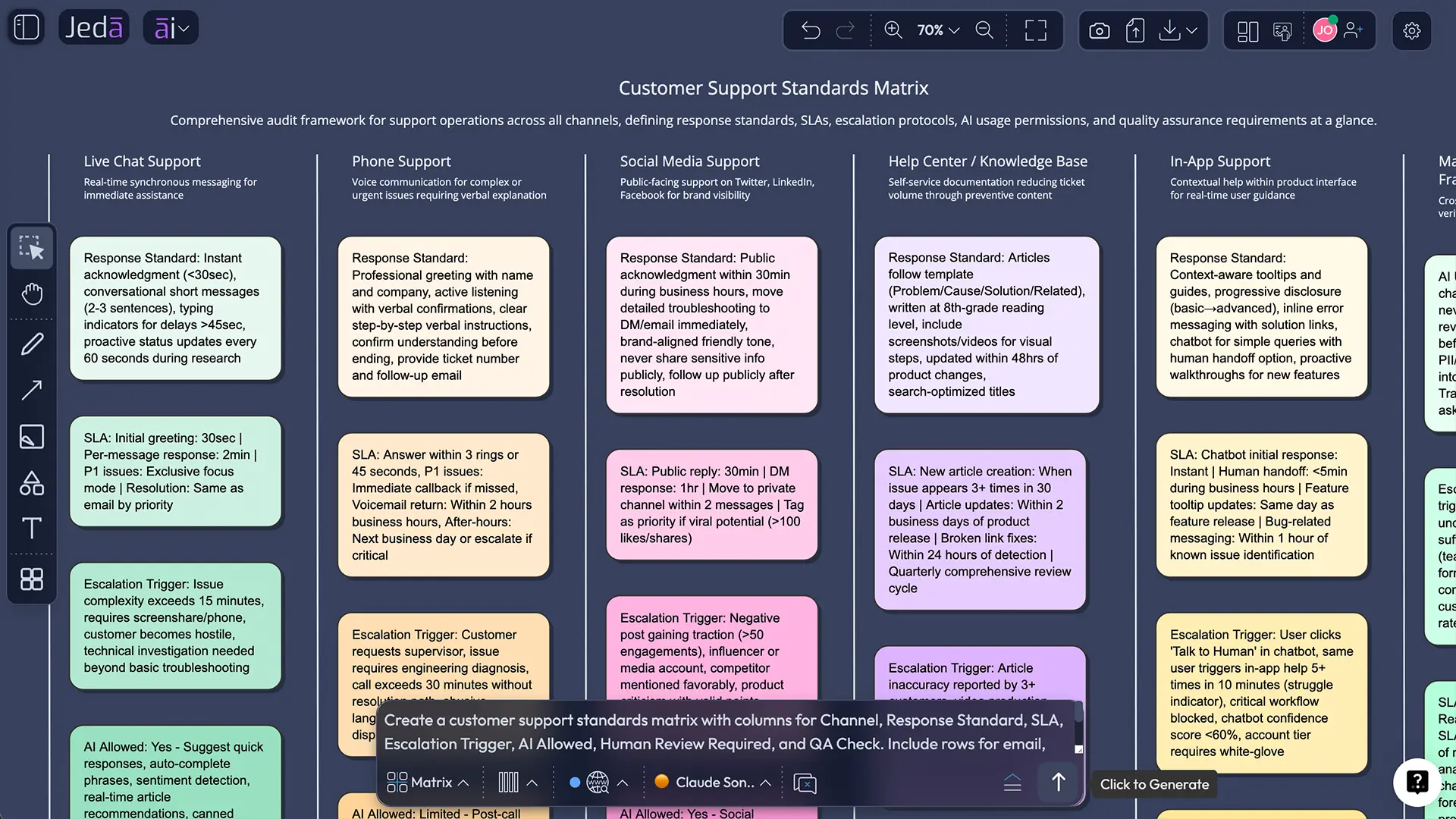
You can use the Writer recipe to produce the first draft, then convert the escalation logic into a Flowchart, the channel rules into a Matrix, and the review version into a shared AI Whiteboard. That is a better workflow than drafting in one app, diagramming in another, and collecting review comments in a third. If you want to branch further, you can extend the work into AI flowcharts or connect it with visual AI document analysis.
- Start with a real draft
Use the Writer recipe or Prompt Bar to create a usable first version in minutes instead of staring at a blank page.
- Turn text into operating visuals
Convert written rules into flowcharts, matrices, and review boards that managers and agents can actually use.
- Standardize without over-scripting
Set tone, boundaries, and escalation rules while preserving human judgment for messy or sensitive cases.
- Connect rules to performance
Map the document to FCR, CSAT, reopen rate, QA checks, and response-time goals so it stays accountable.
The broader market is already there. Even though this is a Writer use case, it still lives inside the same Jeda.ai platform that gives teams 300+ strategic frameworks and editable visuals for adjacent work. Google Workspace now showcases customer-service prompt patterns for communication templates and best-practice lists. The real question is no longer whether AI can draft support standards. It can. The better question is how to turn that draft into something editable, reviewable, and operational. That is where Jeda.ai’s Visual AI workflow is much stronger than a chat-only pass.
What strong customer support guidelines usually include
A solid guideline set usually covers six working parts.
- Tone and voice: how agents acknowledge frustration, explain limits, apologize, and close the loop.
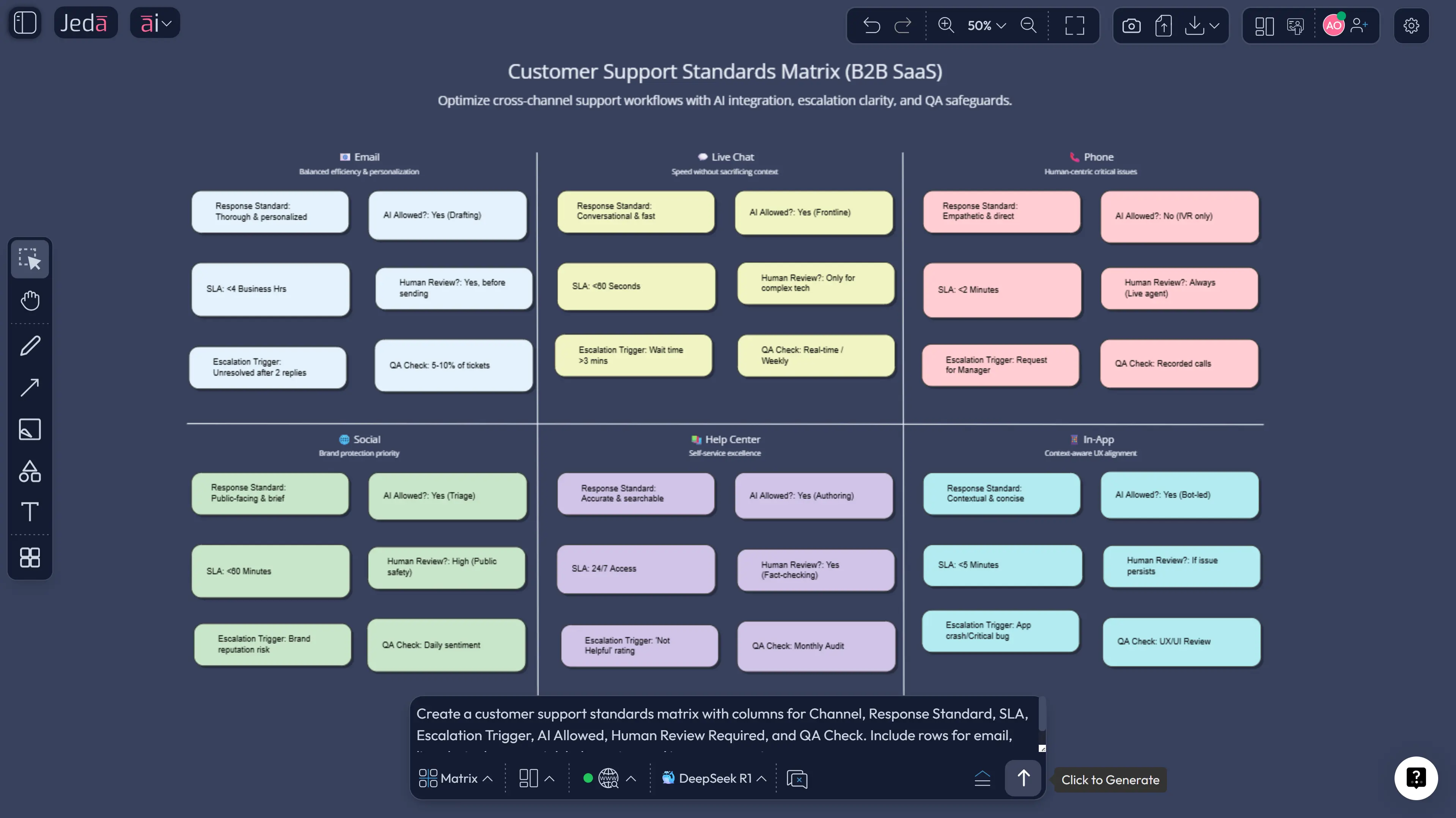
- Channel standards: what “good” looks like for email, chat, phone, help center, and social.
- Triage and routing: what gets solved frontline, what gets escalated, and who owns the next step.
- Documentation rules: what must be logged, tagged, summarized, or screenshotted.
- Quality standards: what every good reply should include.
- AI guardrails: what AI may draft, what needs human review, and what should never be automated.
Zendesk’s customer service guidance lines up with this nicely: define standards, train around them, make support easy to reach, expand self-service, and keep agents close to product knowledge. Google’s Search guidance adds another useful operational point: list all support methods clearly so customers know how to reach you. Clear routes reduce friction before the ticket even starts.
How to create customer support guidelines in Jeda.ai
This works best as a two-method flow: recipe first for structure, Prompt Bar second for control. Jeda.ai supports both. Writer recipes live in the AI Menu, and the Prompt Bar lets you generate the same content directly in document form. After that, you can use Vision Transform and the AI+ button to push the draft into a more operational format. That is the big advantage of doing this inside an AI Workspace instead of a plain text editor.
- Open a board in Jeda.ai
Create or open a workspace in Jeda.ai. This board becomes the shared source of truth for support operations, QA, and training.
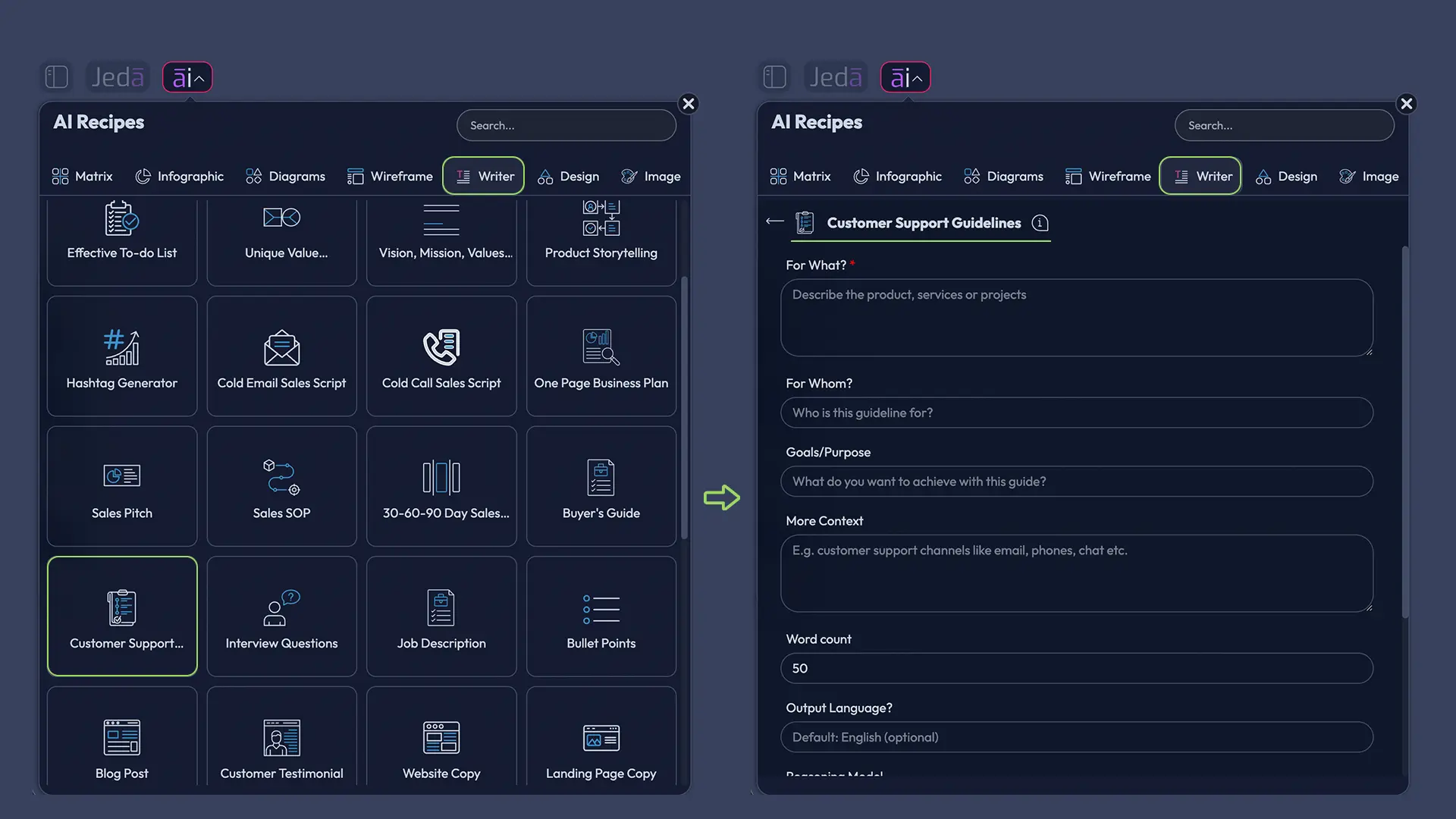
- Method 1: Use the Recipe Matrix in the AI Menu
Open the AI Menu at the top-left, go to Writer, choose the Customer Support Guidelines recipe, and fill in the guided fields such as For What, For Whom, Goals or Purpose, More Context, and Output Language.
- Generate the first written standard
Review the draft as a working document. Aim for sections on tone, response rules, escalation, AI use, QA, and update cadence.
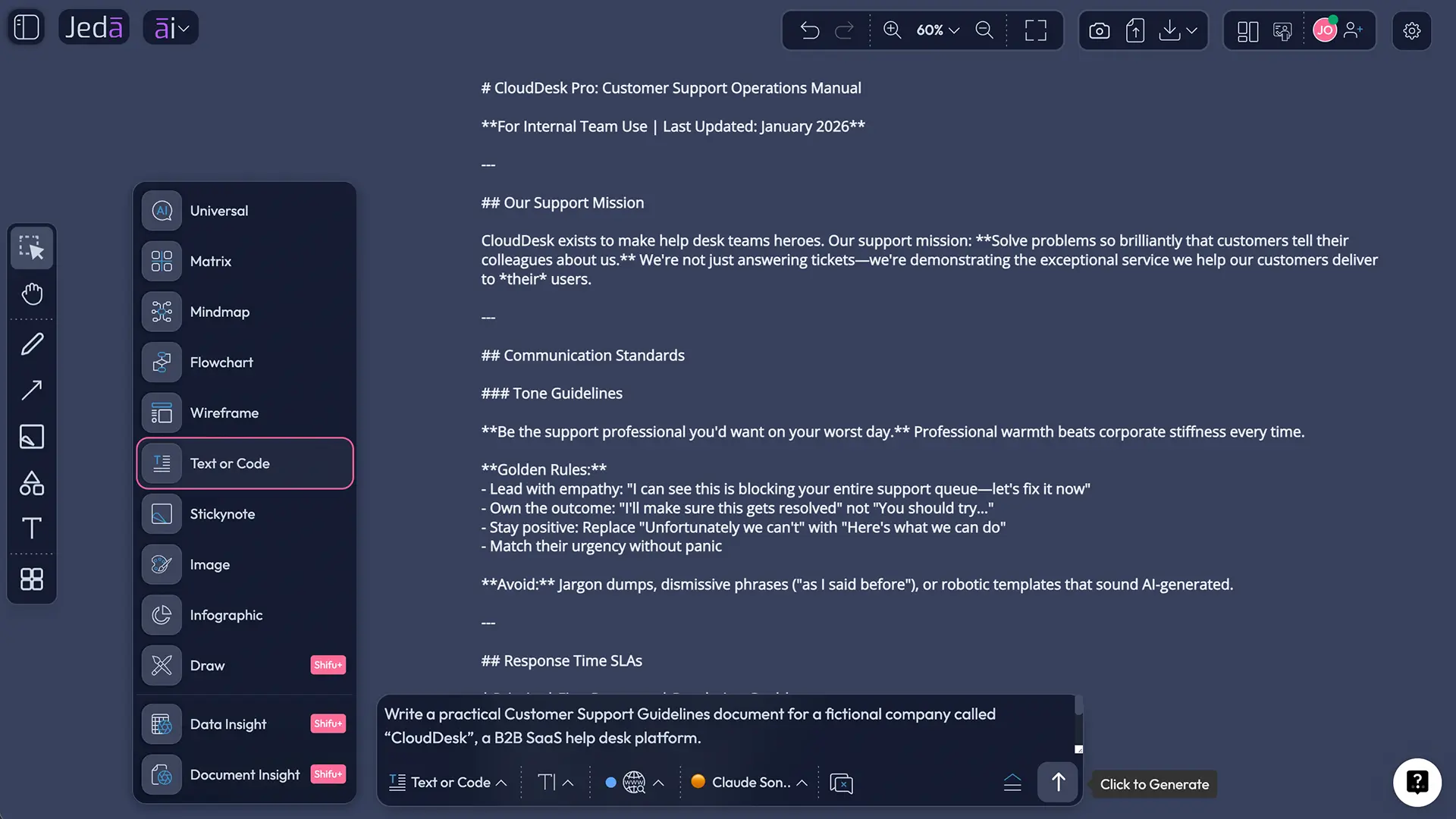
- Method 2: Use the Prompt Bar for tighter control
Open the Prompt Bar, select Text or Code, switch the output to Document, paste a more specific prompt, and generate a custom version for your team, product, and support channels.
- Turn the draft into an operational board
Use Vision Transform to convert the escalation section into a Flowchart or the channel rules into a Matrix. Then use the AI+ button to deepen thin areas such as edge cases, exception handling, or QA checks.
- Review, collaborate, and export
Invite support leads, QA, and ops into the AI Whiteboard, tighten the rules together, and export the finished board as PNG, SVG, or PDF.
Copy-paste prompt for the Prompt Bar
Prompt:
Create Customer Support Guidelines with AI for [company or product].
Audience: [support team, QA leads, customer success managers, outsourced agents, etc.]
Support channels: [email, chat, phone, help center, social]
Include sections for tone and voice, channel response standards, triage and escalation rules, refund and billing boundaries, AI drafting and human-review rules, documentation standards, a QA checklist, and a review cadence.
Keep the language practical, not legalistic. End with a one-page quick-reference checklist for agents.
Turn the document into an operating system, not a dusty PDF
A support guideline document is helpful. A support guideline document connected to a board, a flowchart, and a matrix is far more useful. It becomes part of daily work instead of something people vaguely remember from onboarding.
That is the gap Jeda.ai closes.
Chat-only AI tools are fine for drafting. Static docs are fine for storage. But support leaders usually need guided writing, editable visuals, shared review, and export-ready output in one place. Jeda.ai gives you that without forcing a tool hop.
Use this sequence if you want the page to become a real support asset:
- draft the standard in Writer,
- convert escalation logic into a Flowchart,
- convert channel rules into a Matrix,
- review the board with support leads,
- export the final version for onboarding and QA.
That is a much better outcome than a long document nobody opens after week one.
Best practices that keep the guidelines useful
1) Write rules for moments, not ideals
Do not write “be empathetic.” Write what empathy sounds like when a customer is angry, confused, short on time, or asking for something your team cannot approve.
2) Set boundaries agents can actually use
Spell out what agents may decide alone, what needs a lead, and what always requires another team. Ambiguity feels polite right up until it creates three transfers and a furious customer.
3) Tie each section to a metric
Use first response time, first contact resolution, reopen rate, CSAT, QA adherence, and knowledge-base deflection. If you cannot measure whether a rule helps, that rule will decay.
4) Keep human takeover explicit
SAP and IBM make the same core point: AI works best when it supports people rather than replacing judgment. Sensitive, emotional, high-risk, or policy-exception cases should have a clear human path.
5) Review on a schedule
Monthly works for fast-moving teams. Quarterly works for steadier ones. Annual-only review usually means the document is already wrong.
Common mistakes to avoid
1) Writing for calm situations only
Test the document against angry tickets, refund disputes, outages, and vague bug reports. Easy scenarios tell you almost nothing.
2) Confusing scripts with guidelines
Scripts help with repeated language. Guidelines define the operating logic underneath the language.
3) Leaving AI undefined
If your team is already using AI informally, silence creates shadow usage. Write down what AI may draft, what needs review, and what should never be automated.
4) Ignoring self-service
If the guideline set never mentions the help center, FAQ routing, or next-issue avoidance, agents will keep doing repeat work.
5) Treating the document like a launch artifact
Support changes. Products change. Customer expectations change. The guideline set has to move with them.
Frequently Asked Questions
- What are customer support guidelines?
- Customer support guidelines are the practical standards that tell agents how to respond, what they can promise, when to escalate, and how to document customer issues. They create consistency without forcing every conversation into a rigid script.
- What should customer support guidelines include?
- Include tone and voice rules, channel expectations, escalation paths, approval boundaries, documentation standards, QA checks, and AI usage rules. The stronger versions also define ownership, review cadence, and quick-reference examples for common support situations.
- How are customer support guidelines different from support scripts?
- Scripts give agents sample wording for recurring scenarios. Guidelines set the broader standard behind those replies: judgment, boundaries, escalation, and service quality. Most teams need both, but the guideline set should come first because it defines the operating logic.
- Can AI write customer support guidelines well enough for a real team?
- Yes, if you give AI real context such as channels, escalation rules, policy limits, product details, and support goals. AI is strong at structure and first-pass language, but managers should still review policy risk, tone, and edge cases before rollout.
- How often should we update our customer support guidelines?
- Update them whenever product behavior, refund rules, service channels, staffing models, or complaint patterns change. For many teams, a monthly or quarterly review works better than an annual rewrite because support quality usually drifts in small ways first.
- Which metrics matter most when validating the guidelines?
- Start with first response time, first contact resolution, reopen rate, CSAT, QA adherence, and knowledge-base deflection. Pick the handful that map directly to your stated rules so the document becomes measurable instead of aspirational.
- Can small teams use this approach too?
- Yes. Small teams often need guidelines more because inconsistency spreads faster when one person answers chat, another handles refunds, and a founder jumps into email threads. A lightweight standard can prevent chaos without creating bureaucracy.
- Can Jeda.ai turn the written guidelines into visuals?
- Yes. You can draft the written version in Jeda.ai, then use Vision Transform to convert sections into a flowchart, matrix, or another visual format inside the same AI Workspace. That makes the standards easier to review and apply.
- Where does the AI+ button fit into this workflow?
- Use AI+ after the first version exists. It works best when you want to deepen a weak branch, add edge cases, or extend a visual section such as an escalation path or QA matrix. Think expansion, not microsurgery.
- Can we share or export the finished support guideline board?
- Yes. Jeda.ai supports collaboration in the AI Whiteboard and lets you export finished work as PNG, SVG, or PDF. That makes it easy to hand the output to managers, trainers, outsourced teams, or leadership without rebuilding it elsewhere.
Sources and further reading
- [1]
A. Parasuraman, Valarie A. Zeithaml, and Leonard L. Berry (1985) . “A Conceptual Model of Service Quality and Its Implications for Future Research” Journal of Marketing.
View Source ↗ - [2]
A. Parasuraman, Valarie A. Zeithaml, and Leonard L. Berry (1988) . “SERVQUAL: A Multiple-Item Scale for Measuring Consumer Perceptions of Service Quality” Journal of Retailing.
View Source ↗ - [3]
Jonah Berger, Yang Li, and Grant Packard (2024) . “How to Structure Customer Service Calls to Boost Satisfaction and Sales” Harvard Business Review.
View Source ↗ - [4]
Zendesk (2026) . “CX Trends 2026” Zendesk.
View Source ↗ - [5]
Salesforce (2026) . “The Seventh Edition State of Service Report” Salesforce Research.
View Source ↗ - [6]
IBM (2025) . “AI in Customer Service” IBM Think.
View Source ↗
Create Customer Support Guidelines with AI This Week
Join over 150,000+ users building clearer support operations in Jeda.ai’s AI Workspace.
Try Free Template