Sales SOP Template content gets ignored when it is vague, bloated, or trapped in a static doc nobody wants to open. That is the usual mess. One rep improvises, another forgets the CRM update, and a third writes follow-up notes like they are sending a telegram from 1998.
Jeda.ai fixes the first-draft problem fast. Used by 150,000+ users, Jeda.ai turns the first draft into something your team can actually work with. Inside the Jeda.ai AI Workspace, you can generate a structured sales SOP from a Writer recipe, refine it with guided prompting, extend one section with AI+, and turn the same process into a flowchart or visual handoff map on the AI Whiteboard. For teams that need consistency without slowing down, that matters.
And this is not just a writing trick. A good sales SOP template should show purpose, scope, responsibilities, qualification logic, discovery flow, follow-up rules, CRM requirements, approval paths, and post-sale handoff. Industry templates from Smartsheet, Asana, Notion, and HubSpot all point in that direction. Jeda.ai simply helps you get there faster, cleaner, and with less blank-page suffering.
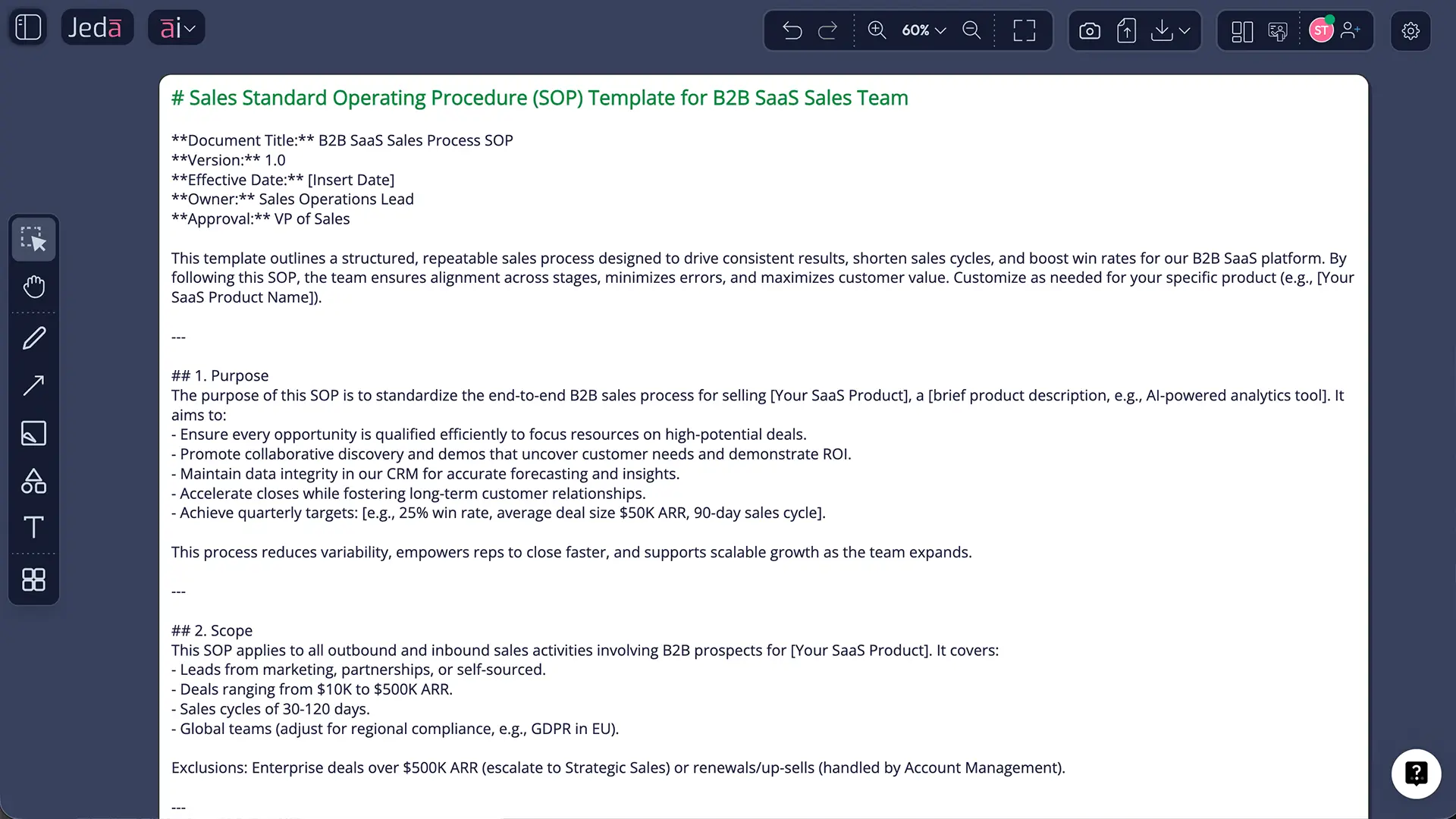
What is a sales SOP template?
A sales SOP template is a standard operating procedure format built for repeatable selling work. It tells the team how a sales process should run, who owns each step, what tools to use, what data must be recorded, and what happens next when a deal moves forward, stalls, or gets disqualified.
In practice, a useful sales SOP template usually covers lead capture, qualification, discovery, proposal or quoting, follow-up cadence, closing, and the handoff after the deal. Smartsheet's sales SOP template frames it from lead capture through post-sale handoff, while Asana's current SOP guidance describes a sales SOP as the clear steps your team follows across email, CRM, or sales tools. Notion's marketplace version also positions a sales process SOP around prospecting through closing with follow-up procedures. Different wrappers. Same backbone.
That backbone matters because sales execution falls apart in small places. The CRM field is skipped. The proposal goes out without an approval step. The rep books a demo before discovery is done. Then leadership wonders why forecasting looks like fiction.
A strong template removes that drift. And when you build it inside Jeda.ai, you are not limited to a plain text document. You can keep the SOP as a structured document, map it visually on the AI Whiteboard, collaborate in real time, and use Visual AI workflows to connect the written process to the actual work.
Why generate a sales SOP template with AI?
Writing a sales SOP from scratch is not difficult because the structure is mysterious. It is difficult because teams sit on fragmented inputs: call notes, CRM conventions, onboarding docs, proposal checklists, pricing rules, and tribal knowledge living in one rep's head. AI helps you gather that sprawl into one repeatable process.
Jeda.ai is especially good at this because it is not just a text box. It is an AI Workspace that supports Writer recipes, Prompt Bar generation, Document Insight for source material, Vision Transform for converting content into a different visual form, and AI+ for extending one section after the first draft is already on the canvas. That makes the SOP feel less like a dead doc and more like a working system.
- Faster First Draft
Generate a usable sales SOP template in minutes instead of stitching together scattered notes by hand.
- Process Clarity
Turn a messy sales motion into clear stages, decision points, responsibilities, and handoff rules.
- Team Alignment
Give every rep, manager, and ops owner the same playbook for prospecting, discovery, follow-up, and close.
- Living Documentation
Revise the SOP as your ICP, CRM process, qualification model, or pricing workflow changes.
- Visual Transform
Convert the SOP into a flowchart, diagram, or mind map when the team needs a faster visual read.
- Section Deep Dive
Use AI+ to deepen one stage, such as objection handling or proposal approvals, without rewriting everything.
One more advantage. Jeda.ai sits in the middle of document thinking and visual thinking. So your sales SOP template can start as a Writer output, then become a decision-ready visual for onboarding, coaching, or process audits. That is a better fit for revenue teams that actually need to use the process, not just archive it.
How to create a sales SOP in Jeda.ai
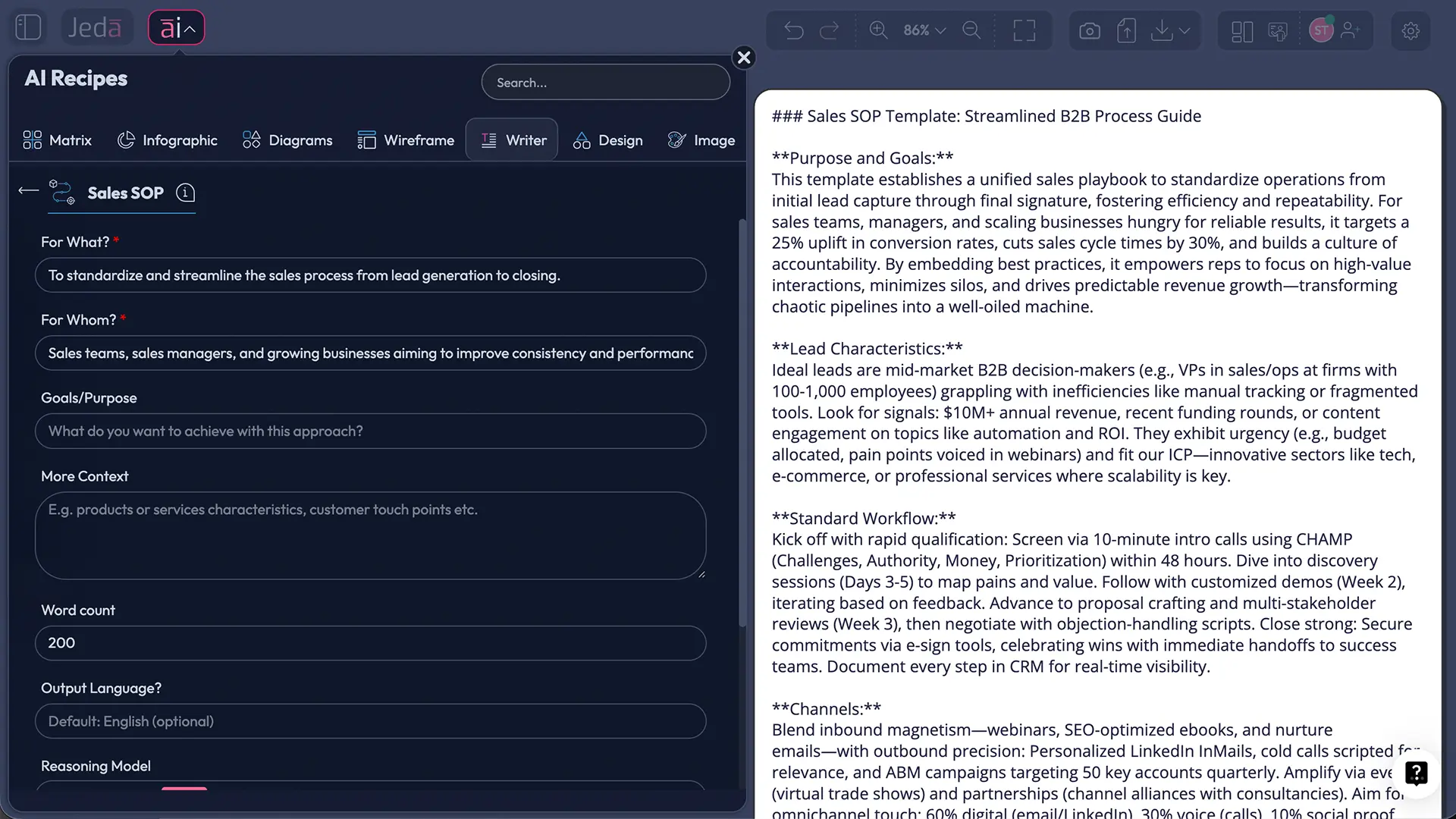
There are two practical ways to build this page topic in Jeda.ai. The first is the guided Writer recipe. The second is the Prompt Bar. Use the first when you want structure quickly. Use the second when you already know the exact output you want.
Method 1: Recipe Matrix
For this page, "Recipe Matrix" means the structured AI Menu route, even though the actual recipe lives under the Writer category. In plain English: open the AI Menu, choose the Writer recipe called Sales SOP, fill the form, and generate.
- Open the AI Menu
Click the ai∨ button in the top-left corner of Jeda.ai to open AI Recipes.
- Choose the Writer route
Select the Writer category, then open the Sales subcategory and choose the Sales SOP recipe.
- Fill the guided recipe form
Add the product or service, target buyer, sales motion, qualification logic, CRM rules, approval requirements, and post-sale handoff details.
- Set generation options
Pick the reasoning model, keep the output in English if needed, and turn on Web Search only when live market or policy context is required.
- Generate the SOP
Click Generate to create a structured sales SOP template on the canvas as an editable text document.
- Use AI+ for depth
Select one section, such as discovery calls or proposal approval, and use AI+ to extend that section with more detail.
- Turn it into a visual workflow
Use Vision Transform to convert the written SOP into a flowchart, mind map, or diagram for onboarding and team reviews.
This method is the cleanest starting point because Jeda.ai already guides the prompt structure for a business writing task. You are not arguing with the blank page. The blank page already lost.
Method 2: Prompt Bar
Use the Prompt Bar when you want more control or when you want Jeda.ai to generate a sales SOP template from a very specific scenario.
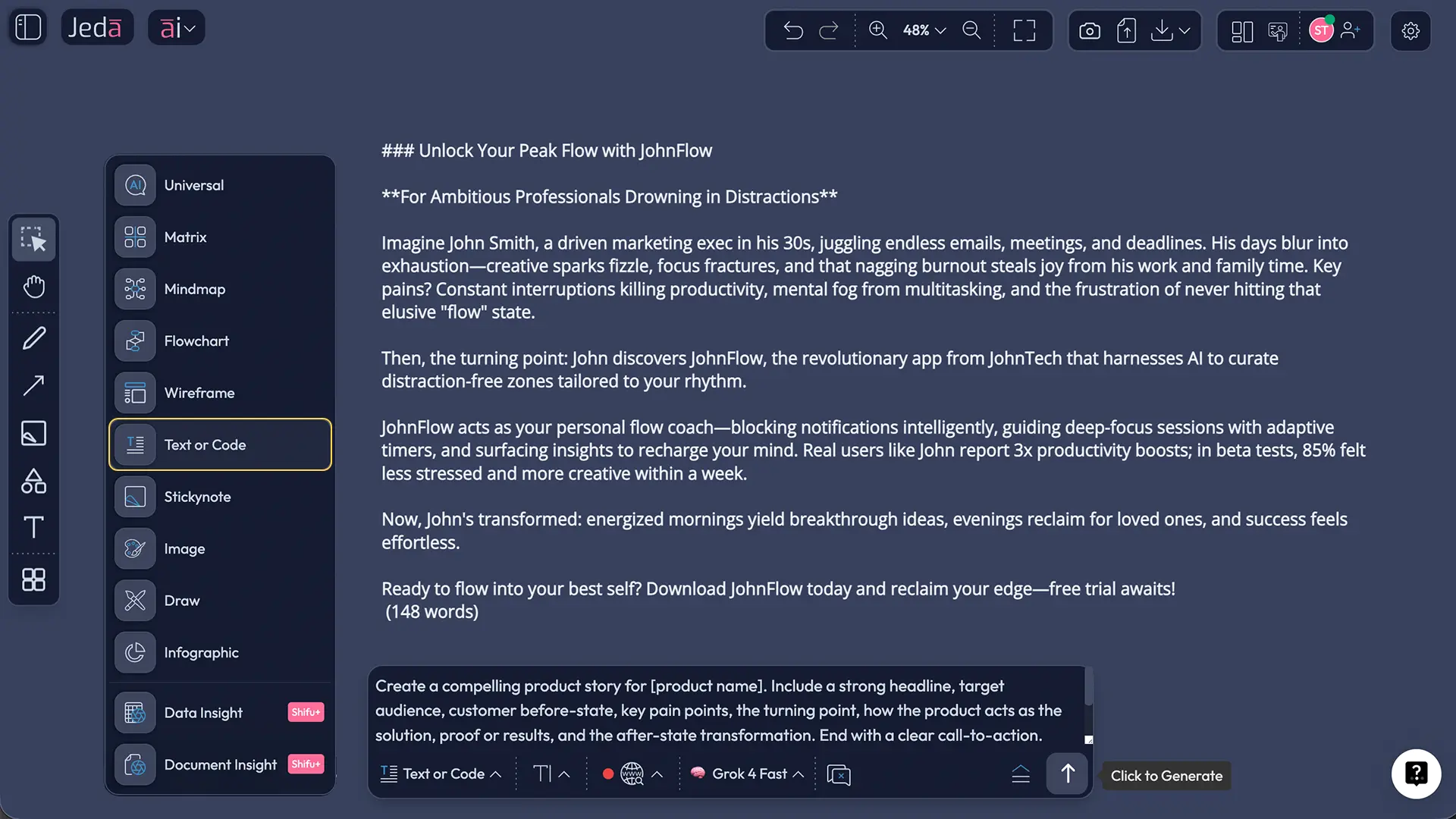
Select Text or Code from the Prompt Bar and set the output format to Document if you want a polished SOP block on the canvas. Then write a direct brief like this:
This works well when you already know the stages and want Jeda.ai to assemble them into one clean operating document. It also works when you upload existing material and use that as context. For example, you can use Document Insight to ground the SOP in current onboarding docs, pricing notes, or sales enablement material, then switch the final output into a Text document.
A practical rule for AI+ here: use it after generation to deepen a section that already exists. It is excellent for a focused deep dive. It is not the best place to inject an entirely new, highly specific brief from scratch. Do the heavy instruction in the recipe form or the Prompt Bar first. Then extend.
Sales SOP template structure you can generate with AI
The best sales SOP template is not just a list of steps. It is a control system. It should help a rep know what to do next, help a manager inspect quality, and help sales ops see whether the process is actually being followed.
Here is the structure worth generating first:
That list looks basic. It is not. Most broken SOPs fail because one of those pieces is missing. Usually CRM discipline. Sometimes handoff. Sometimes approvals. The glamorous stuff is rarely the real problem.
If you are building for a SaaS team, add qualification logic, buying committee mapping, meeting prep checklist, proposal approvals, and customer handoff. If you are building for a services or agency team, add scoping, pricing assumptions, legal review, and delivery kickoff requirements. The template should reflect your motion, not a generic Pinterest quote disguised as process documentation.
Sales SOP example: B2B SaaS outbound workflow
Let us make this concrete. Suppose you run a mid-market SaaS sales team.
Your SOP might define inbound and outbound entry points, require qualification against industry, company size, pain point, and timeline, set a discovery score threshold before demo booking, enforce CRM updates within the same business day, require manager approval for custom pricing, and define a closed-won handoff packet for implementation.
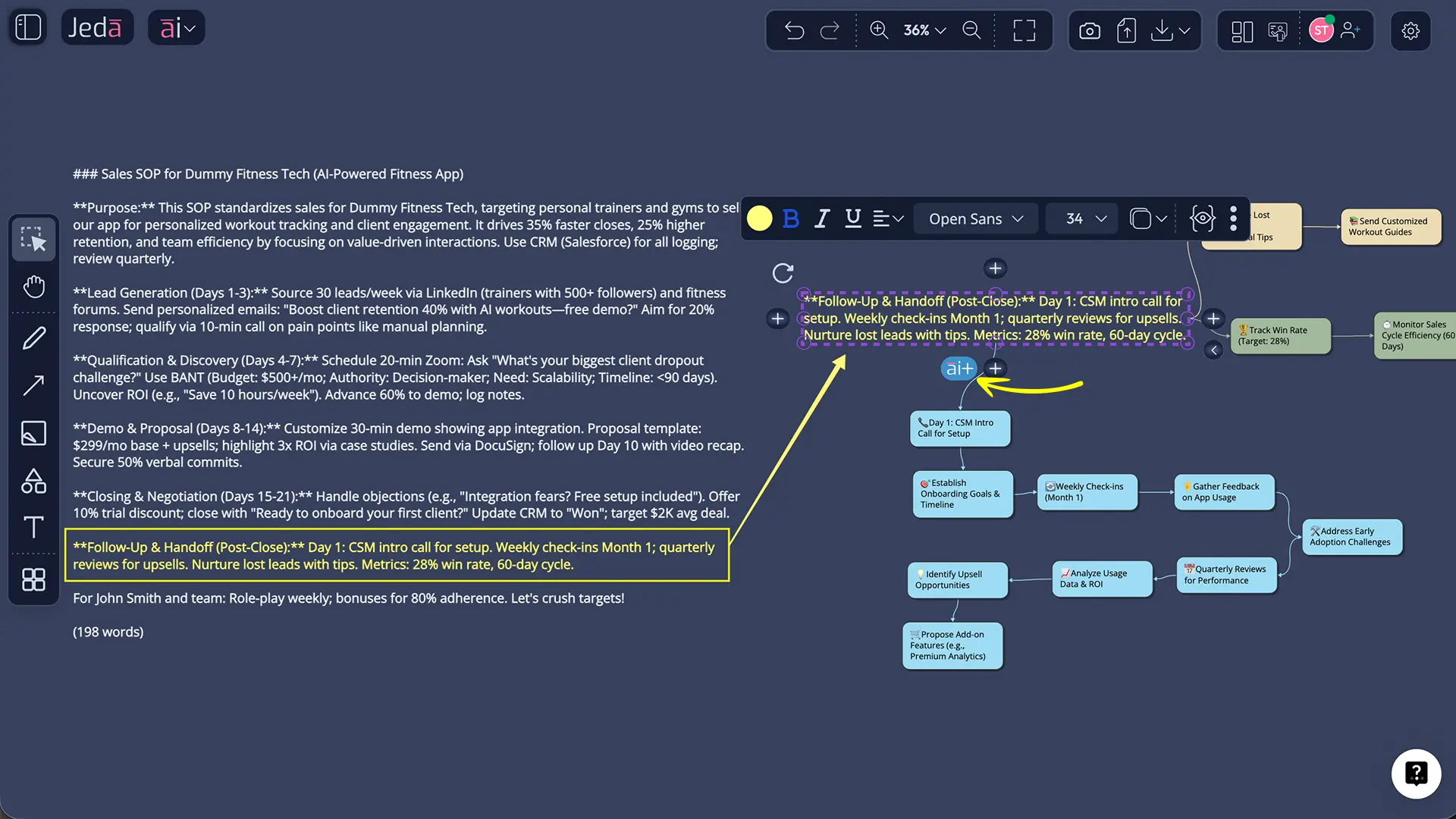
That is exactly where Jeda.ai earns its keep. Generate the written SOP first. Then convert it into a flowchart on the AI Whiteboard so the team can see the logic at a glance: lead captured, qualified, discovery complete, demo approved, proposal sent, legal review, close, handoff. When a process is visible, adoption gets easier.
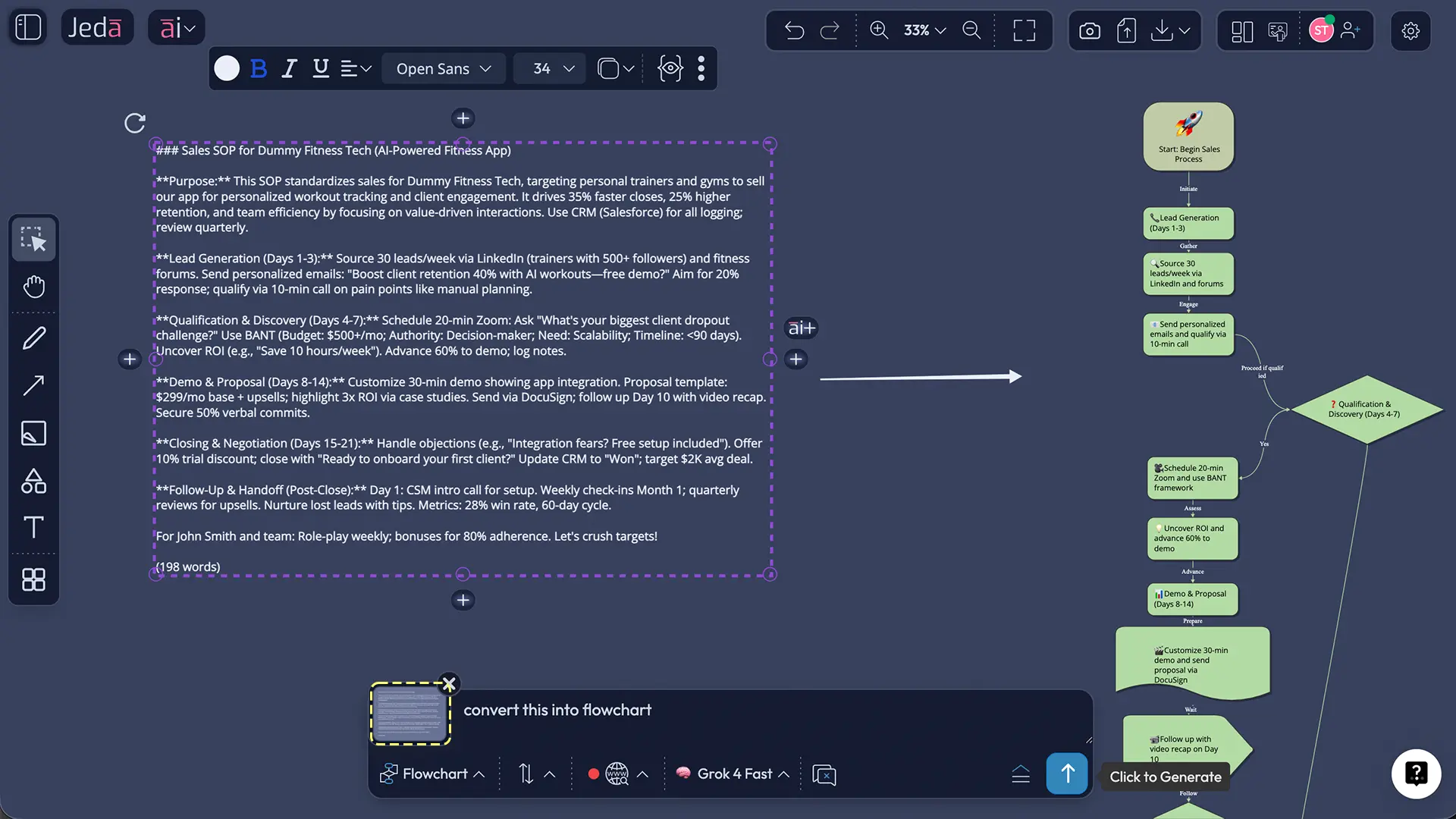
And because Jeda.ai is a Visual AI workspace, you can keep both versions on the same canvas. The written SOP for policy. The flowchart for onboarding. The AI Whiteboard for review and collaboration. One system. Less rework.
Best practices for a sales SOP that people actually follow
Reps do not ignore SOPs because they hate structure. They ignore SOPs because the doc is vague, too long, disconnected from the CRM, or written like it was assembled by a committee trapped in a beige conference room.
So keep it sharp.
First, make every stage measurable. "Follow up promptly" is useless. "Send follow-up within 24 hours and update next step date in CRM" is usable.
Second, define exit criteria. A rep should know when discovery is truly complete, not just when the conversation felt productive.
Third, connect the SOP to the tools your team already uses. Smartsheet's sales template explicitly includes tools and systems, and that is a smart move. Your SOP should say which CRM fields must be updated, which proposal tool is used, which approval path applies, and where final notes live.
Fourth, treat the SOP as a living document. Review it monthly or quarterly. The moment your ICP, product packaging, or approval path changes, the SOP is already aging.
Jeda.ai helps here because the SOP does not have to remain trapped in text. You can use AI+ to strengthen one section, use Vision Transform to create a visual training asset, and collaborate on changes in the same AI Workspace. That is a much saner way to maintain process documentation.
Common mistakes to avoid
The first mistake is writing the SOP at management altitude. If a rep cannot tell what to do in the next five minutes, the SOP is still too abstract.
The second is documenting stages without documenting evidence. Every stage should have required inputs, outputs, and CRM fields. Otherwise stage progression becomes theater.
The third is copying a generic template without adapting it to your sales motion. A transactional inside-sales team does not need the same SOP as an enterprise SaaS team with procurement and legal review.
The fourth is hiding the handoff. Closed-won is not the end of the process. It is the point where context transfer becomes critical. If the SOP stops at signature, support tickets are coming. Probably with feelings.
The fifth is freezing the document. A sales SOP should not change every afternoon, but it should change when process reality changes. Static SOPs age like milk.
Why Jeda.ai is a better fit than a plain doc for sales SOP work
A plain doc can store an SOP. It cannot easily help your team think with it.
Jeda.ai gives you the Writer route for the first draft, the Prompt Bar for custom generation, the AI Whiteboard for visual clarity, AI+ for targeted section expansion, and Vision Transform for moving from document to flowchart or diagram without starting over. It also supports collaboration in the same workspace, which is useful when sales leadership, enablement, ops, and customer success all need a say.
That combination matters because SOPs are both policy and workflow. They need words. They also need shape.
If your team also works with notes, decks, playbooks, or source documents, Jeda.ai can pull them into the same environment. You are not forced to choose between a writing tool and a visual tool. You get both, which is why the platform fits sales process design unusually well.
Frequently Asked Questions
- What is a sales SOP template?
- A sales SOP template is a structured format for documenting how your sales team should execute repeatable work. It usually covers purpose, scope, roles, qualification, discovery, proposal flow, CRM updates, follow-up rules, and post-sale handoff.
- What should a sales SOP include?
- A useful sales SOP should include ownership, scope, stage-by-stage instructions, required tools, mandatory CRM updates, decision criteria, approvals, escalation paths, KPIs, and revision history. If any of those are missing, execution usually gets inconsistent fast.
- Can AI generate a sales SOP from my current process notes?
- Yes. AI can turn existing notes, playbooks, or rough process descriptions into a first-draft SOP. In Jeda.ai, you can start from the Sales SOP Writer recipe or use the Prompt Bar and then refine the result into a cleaner, team-ready operating document.
- Should a sales SOP be a document or a flowchart?
- It should usually be both. The document handles policy, rules, and details. The flowchart helps reps and managers see the process quickly. Jeda.ai is useful here because you can generate the written SOP first and then convert it into a visual workflow with Vision Transform.
- How often should we update a sales SOP?
- Review it whenever your qualification logic, CRM process, pricing approvals, or handoff workflow changes. For most teams, a monthly or quarterly review keeps the SOP current without creating churn or version chaos.
- What is the difference between a sales SOP and a sales playbook?
- A sales SOP explains how work must be done consistently. A sales playbook is broader and often covers messaging, talk tracks, personas, objections, and strategy. The SOP is the operating system. The playbook is the field guide.
- Can Jeda.ai help us deepen one part of the SOP without rewriting the full document?
- Yes. AI+ is built for that kind of targeted expansion. Generate the main SOP first, then select a section such as discovery, approvals, or follow-up cadence and use AI+ to extend only that portion.
- Can we collaborate on the sales SOP inside Jeda.ai?
- Yes. Jeda.ai supports collaborative workspaces, shared AI chat history, visual editing, and real-time teamwork. That makes it easier for sales leaders, enablement, ops, and customer success to refine the SOP together instead of emailing versions back and forth.
- Do I need a finished template before using Jeda.ai?
- No. You can start with a short prompt, a structured Writer recipe, or existing source material. Jeda.ai can generate the first version and then help you improve, restructure, and visualize it without forcing you to arrive with a perfect draft.
- Why use Jeda.ai instead of a generic SOP generator?
- Most SOP generators focus on document output only. Jeda.ai combines document generation with an AI Workspace, AI Whiteboard, Vision Transform, AI+ extensions, and collaborative editing. That makes the SOP more useful for training, coaching, and process reviews after generation.
Sources & further reading
- [1]
HubSpot (2024) . “How I Write SOPs to Streamline My Workflow [+ Free Template]” HubSpot Blog.
View Source ↗ - [2]
Smartsheet (2025) . “Free Standard Operating Procedures (SOP) Templates” Smartsheet.
View Source ↗ - [3]
Asana (2026) . “SOP Template: Free Standard Operating Procedure Template [2026]” Asana.
View Source ↗ - [4]
Notion (2026) . “Sales Processes SOP Template” Notion Marketplace.
View Source ↗ - [5]
Tango (2026) . “AI SOP Generator [Software to Create SOPs Fast!]” Tango.
View Source ↗
Related resources
Explore AI Workspace, AI Whiteboard, AI Email Copy Generator, Lead Generation Strategies with AI, and Sales Pitch with AI if you want to connect your SOP with adjacent sales workflows.
Start Your Sales SOP Template in Jeda.ai
Join 150,000+ users using Jeda.ai to generate structured workflows, editable documents, and Visual AI outputs in one AI Workspace.
Try Free Template