A crowded list can look productive while doing the opposite. It mixes five-minute actions with five-week projects and forces you to remake every hard decision when work begins. An effective to do list with AI should turn a broad task into a clear sequence, connect actions to an outcome, and leave room for judgment when reality changes.
Jeda.ai's Effective To Do List Writer recipe generates an editable plan inside the same AI Workspace and AI Whiteboard where your team can discuss, format, rearrange, and refine the work. 150,000+ users use Jeda.ai for visual planning, writing, analysis, and structured decision work. The useful shift: stop asking what you need to remember and start defining the next credible action.
What Is an Effective To Do List with AI?
An effective to do list with AI is a prioritized, actionable plan generated from a task, its desired outcome, and relevant constraints. Instead of merely restating what you typed, the AI helps break the work into smaller actions, arrange them in a sensible order, and write each item so a person can start without decoding vague language.
“Work on launch” is not a useful task. “Confirm launch scope with product and marketing owners” is. Research by E. J. Masicampo and Roy Baumeister found that unfinished goals can remain cognitively active, while specific plans can reduce intrusive goal-related thoughts. Planning is not completion, but a credible plan can free attention.
Jeda.ai interprets the task, goals, breakdown, and context together. The editable Visual AI result can sit beside diagrams, notes, meeting outputs, or strategy frameworks in the same AI Workspace.
Why Do Most To-Do Lists Fail?
Most lists fail because they are inventories, not execution plans. They collect everything that could be done, then pretend every item deserves equal attention. By noon, the list has become an accusation with checkboxes.
A workable list makes decisions before the work begins. It distinguishes outcomes from activities, large projects from next actions, and genuine priorities from requests that merely arrived loudly. It also respects capacity. A 17-item “daily” list is often a weekly backlog wearing a fake moustache.
| Clarity | Priority | Sequence | Capacity | Review | |
|---|---|---|---|---|---|
| Effective AI-assisted list | Action verbs and defined outputs | Ranked by impact and urgency | Dependencies appear in order | Sized for available time | Edited by the user |
| Typical task dump | Vague reminders | Everything looks urgent | Random order | Unlimited | Rarely revised |
Task switching creates another problem. Research summarized by the American Psychological Association shows that shifting between tasks produces cognitive switching costs, especially when the work is complex or unfamiliar. A list that constantly sends you from planning to email to analysis to design may look varied, but it can bleed time and attention. Grouping related tasks and protecting focused blocks is usually saner.
So the goal is not maximum list length. It is minimum ambiguity.
What Should AI Actually Do for a To-Do List?
AI is most useful before execution, when the work is still fuzzy. It can propose task breakdowns, expose missing dependencies, rewrite vague items as observable actions, and organize steps around a stated objective. That gives you a stronger first draft than an empty page.
But AI should not become the authority on your workload. It does not know which colleague is overloaded, which deadline is politically fixed, whether a “quick approval” normally takes four days, or whether you are running on three hours of sleep and spite. Human review is not optional. It is the control layer.
- Clarify
Convert broad intentions into concrete, verb-led actions with visible outputs.
- Sequence
Arrange prerequisites, handoffs, reviews, and follow-up work in a credible order.
- Align
Connect each task to the goal, deadline, audience, or success condition that gives it meaning.
- Right-size
Break oversized work into smaller units that can fit real working sessions.
- Check gaps
Surface common missing steps such as approval, quality review, documentation, or communication.
- Refine
Provide an editable draft that you can correct, format, shorten, or expand on the AI Whiteboard.
This is the larger thought-leadership point: AI planning should increase agency, not replace it. The best system helps you see the work more clearly and make better trade-offs. It does not manufacture false certainty.
How Do You Create an Effective To Do List with AI in Jeda.ai?
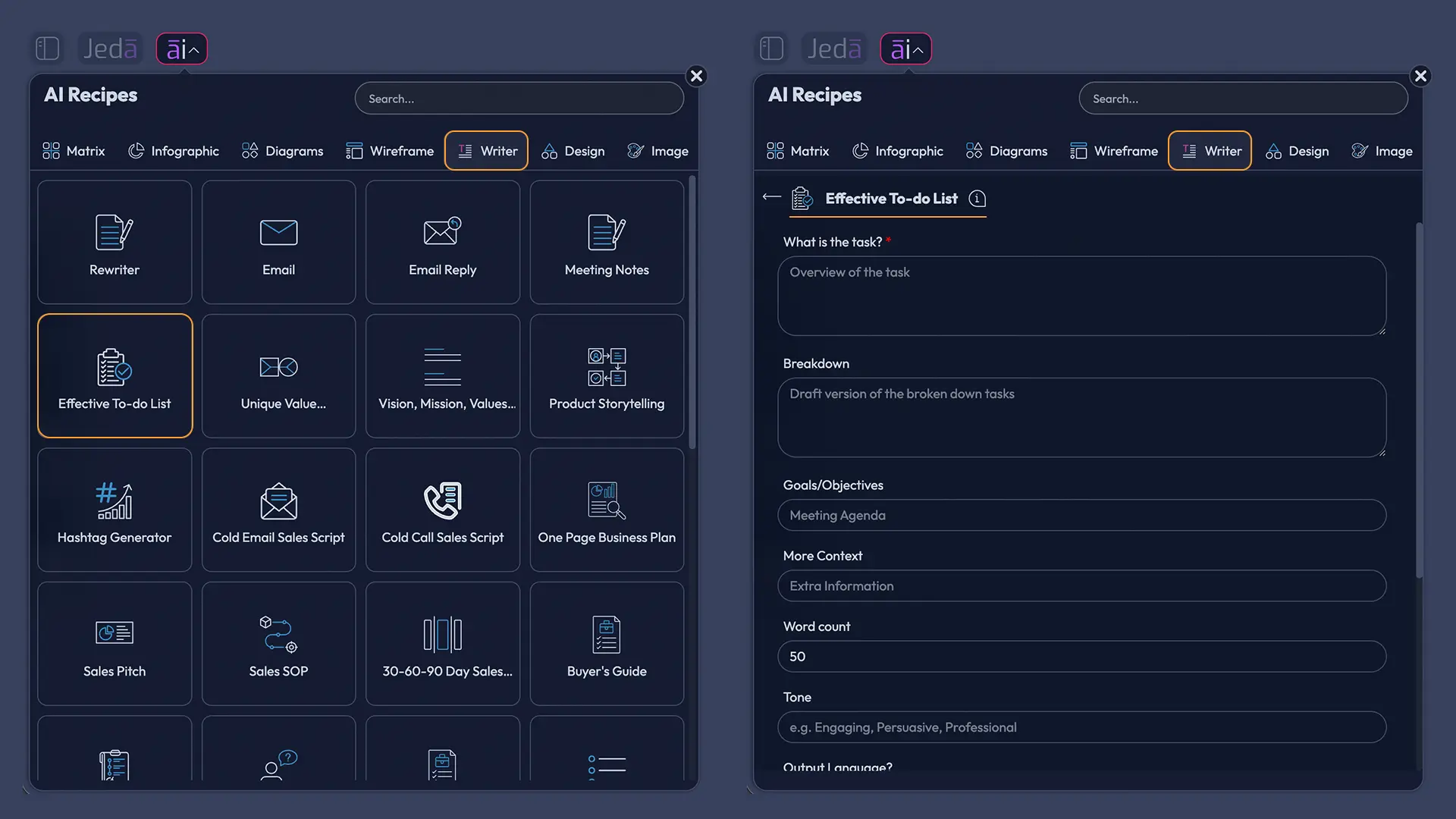
Jeda.ai includes a dedicated Effective To Do List recipe in the Writer tab. There is no sub-recipe or separate category inside the Writer tab. You can reach it by navigating through the AI Recipes panel or by searching for the recipe directly.
Method 1: Navigate to the Writer Recipe
- Open the AI Menu
Click the ai∨ menu in the top-left corner of the Jeda.ai workspace.
- Choose Writer
Select the Writer tab to open the available business, marketing, and operations writing recipes.
- Open Effective To Do List
Find and select the Effective To Do List recipe. It appears as a standalone Writer recipe without a sub-recipe.
- Describe the task
Complete the mandatory What is the task field with a clear outcome or responsibility.
- Add useful context
Optionally provide the breakdown, goals or objectives, more context, desired word count, tone, and output language.
- Configure generation
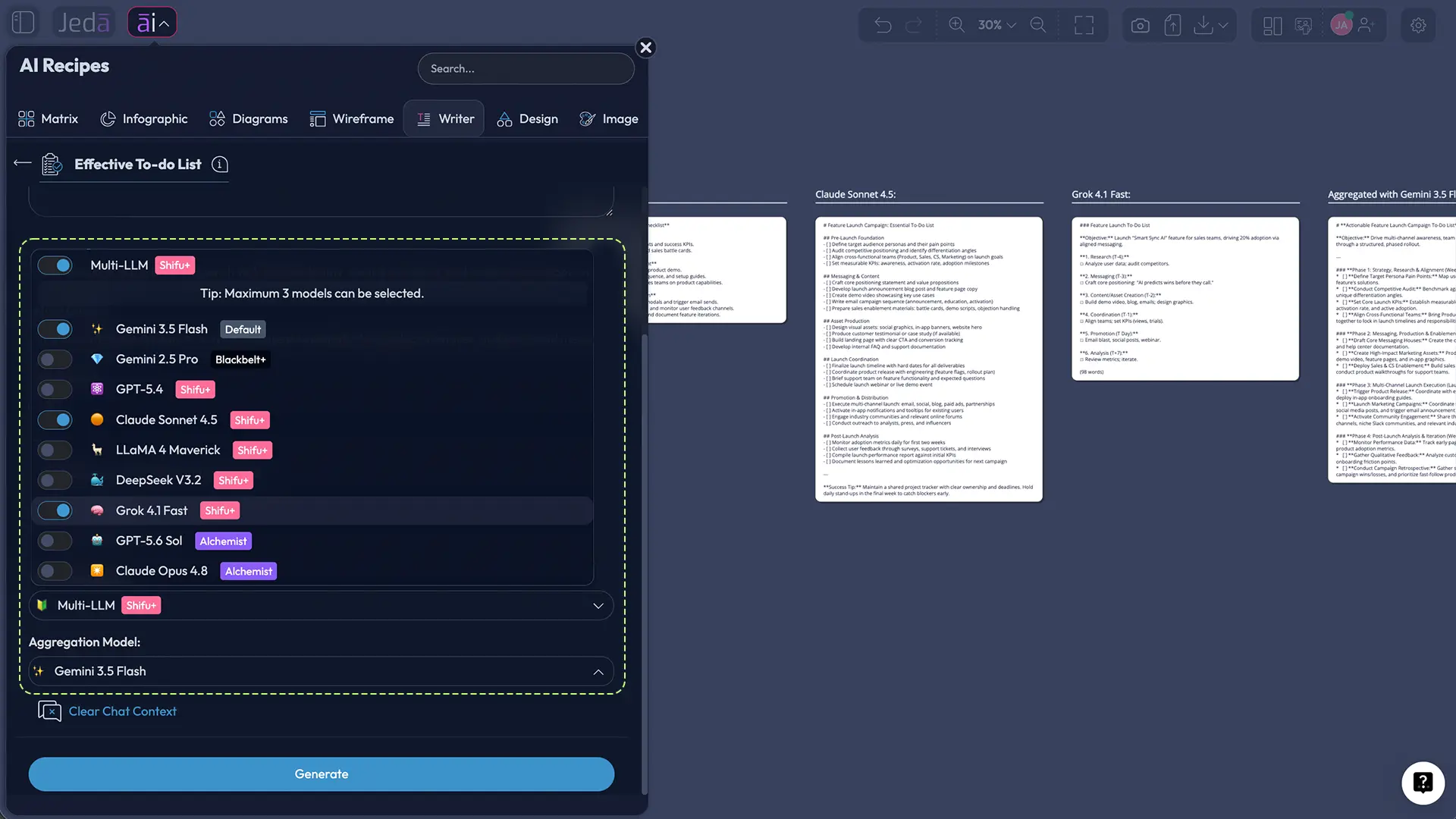
Choose one to three reasoning models, set Web Search to Auto, On, or Off, and select Document or Text as the output format.
- Generate and review
Generate the list, then check priority, dependencies, workload, wording, and missing steps before treating it as your plan.
- Edit on the canvas
Revise the generated content manually and use the available text formatting controls to fit your workflow.
Method 2: Search for the Recipe Directly
- Open AI Recipes
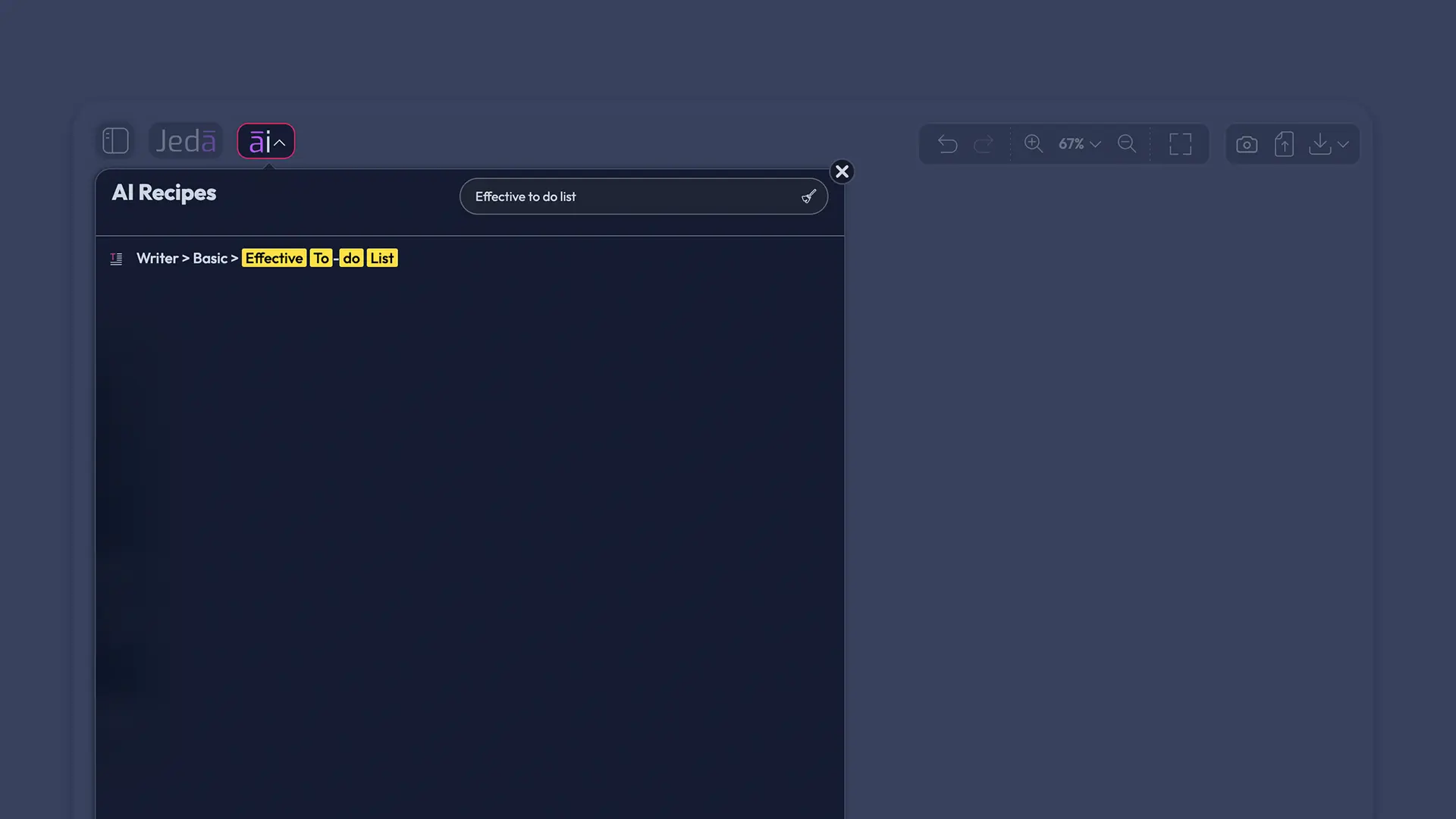
Click ai∨ in the top-left corner to open the recipe panel.
- Use the search bar
Search for Effective To Do List instead of browsing through the Writer tab.
- Select the result
Open the matching Writer recipe from the search results.
- Complete the fields
Enter the task first, then add optional breakdown, objectives, context, length, tone, and language details.
- Choose settings and generate
Set the reasoning model configuration, Web Search mode, and output format, then generate the preview.
- Edit before using
Adjust the list so it reflects actual owners, dates, constraints, and available capacity.
Which Recipe Fields Produce a Better Task List?
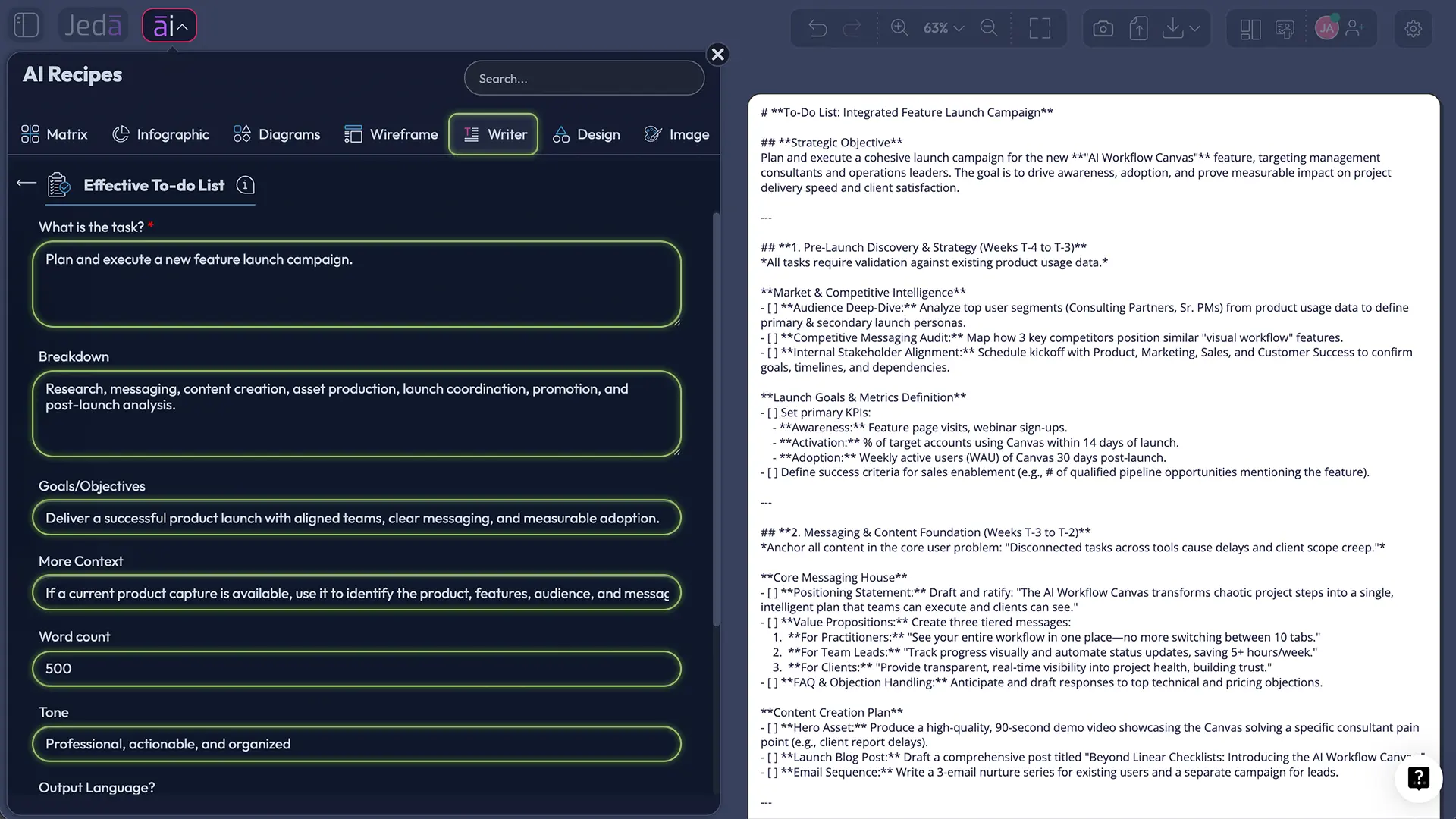
The mandatory field is What is the task. Write it as an outcome, not a topic. “Prepare the website redesign for stakeholder approval by Thursday” gives the model a finish line; “website redesign” does not.
The optional fields sharpen the effective to do list with AI. Breakdown preserves known phases. Goals/Objectives explains why the task exists. More Context captures constraints such as team size, fixed dates, approvals, dependencies, tools, budget, and risks.
Use Word Count to control detail, Tone to fit personal or shared use, and Output Language when the plan should be generated in a language other than the default English.
How Should You Use Multiple Reasoning Models and Aggregation?
You can select one, two, or three reasoning models. One is enough for straightforward work; multiple models help when a task is ambiguous or cross-functional. Enable Aggregate and choose an additional aggregation model to compare the responses and produce one consolidated plan.
Aggregation is a second pass, not a guarantee. Review the result against real owners, deadlines, dependencies, and capacity.
What Is the Difference Between Document and Text Output?
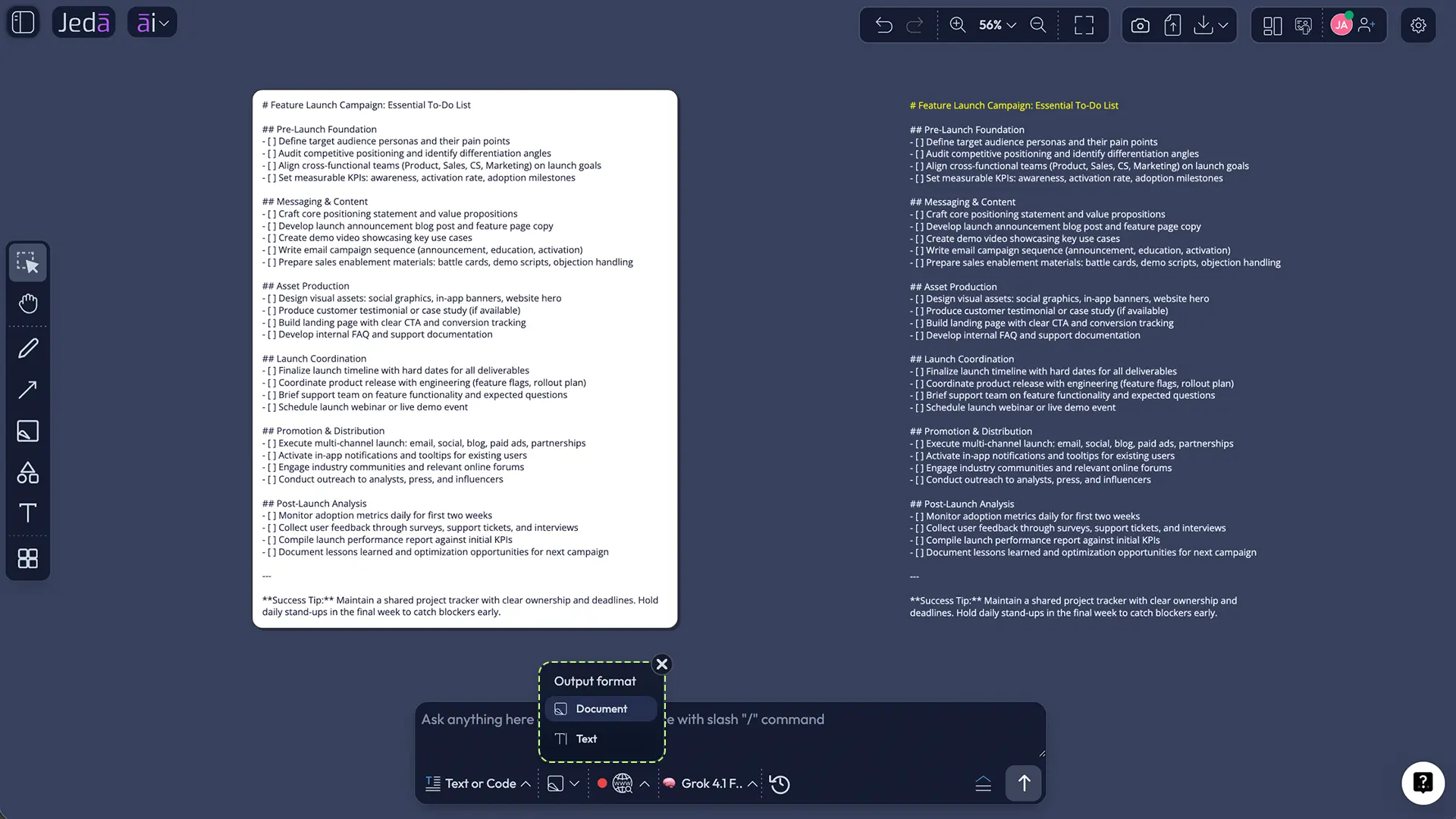
The recipe generates a canvas preview in Document or Text format. Document places the response in a styled container; Text renders a lighter plain-text object that can be positioned with other canvas elements.
Neither option generates a native document file. It is a preview on the Jeda.ai canvas, not an automatic .docx file. You can manually edit the wording and apply font, size, emphasis, alignment, and links. “Document” describes the visual format, not a file download.
What Does a Strong Effective To Do List with AI Example Look Like?
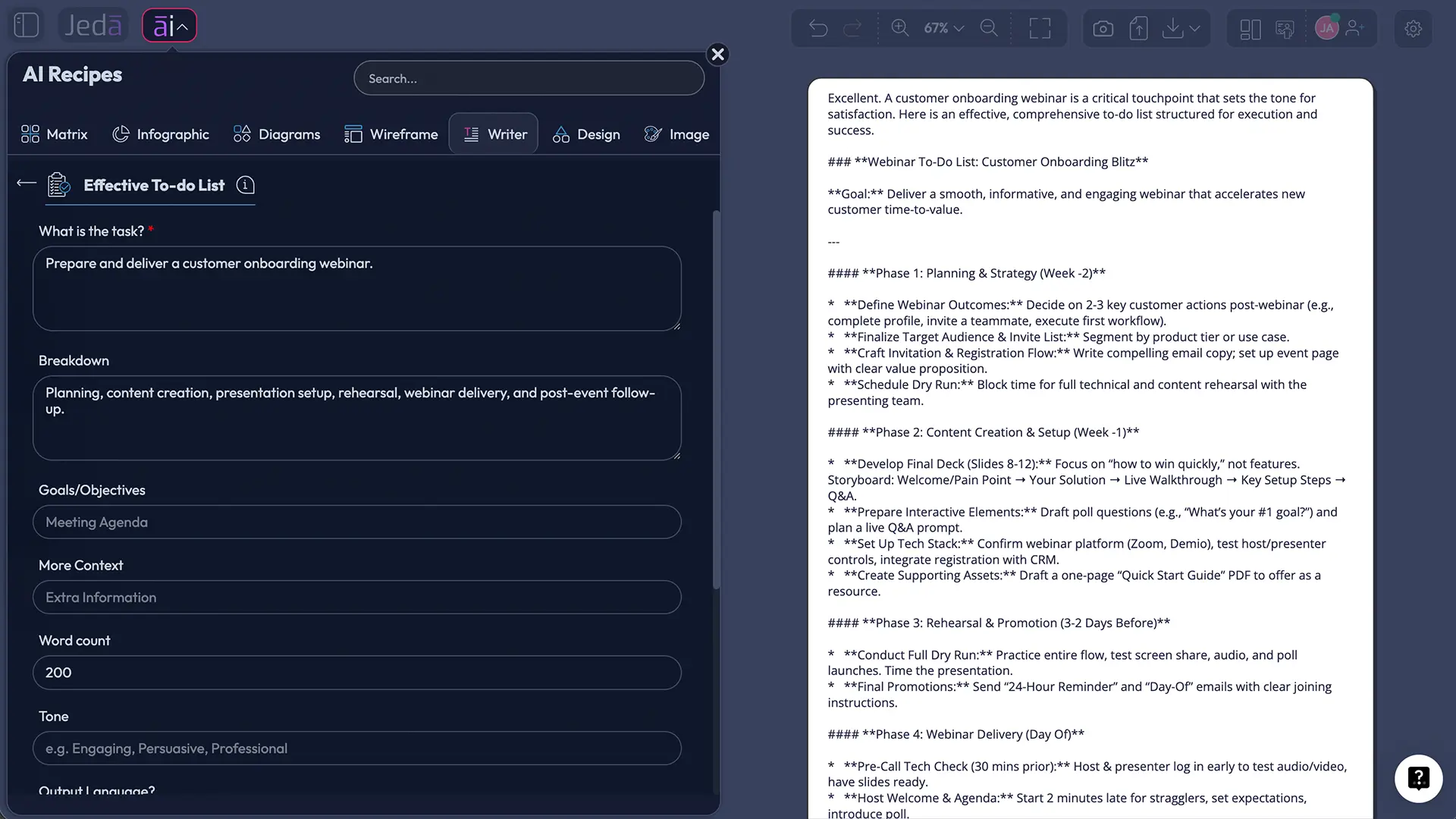
A product manager preparing a customer onboarding webinar could enter more than “Make a webinar to-do list.” A stronger setup gives the AI a boundary:
A useful output should put prerequisites before production, include review ownership, add rehearsal and technical checks, and capture follow-up work. It still cannot decide whether September 15 is realistic, who owns final approval, or whether the demo environment is stable. Those remain human decisions.
How Can You Make an AI To-Do List More Executable?
Start each item with a verb, define the output, and add a time or condition when it matters. “Review the last 30 days of activation data and identify the top three onboarding drop-off points” gives you a stopping rule; “review analytics” does not.
Locke and Latham's goal-setting research supports specificity, while implementation-intention research by Peter Gollwitzer and Paschal Sheeran links action to concrete situations. Decide what you will do and when or under which condition you will begin.
Time-blocking makes the list honest: assign focused work to calendar windows, batch similar tasks, and leave buffer for interruptions. And delete things. A system with no deletion rule is digital hoarding with better typography.
Which Common Mistakes Should You Avoid?
Do not enter a project as one task, omit the objective, accept AI sequencing without checking dependencies, mark everything high priority, or ignore working capacity. Put unavailable days, approval delays, and team constraints in More Context.
Another trap is generating new versions instead of executing the current one. Use Clear Chat Context when switching to an unrelated task, not whenever the list contains an uncomfortable action. AI cannot productivity-hack you out of avoidance.
When Should You Use Web Search or Clear Chat Context?
Set Web Search to On when the list depends on current public information, Auto when fresh context may help, and Off for private or fully supplied tasks. Web Search is a Jeda.ai platform control; the reasoning model and search setting solve different problems.
Use Clear Chat Context before an unrelated task. Keep the context when refining the same plan. Yesterday's marketing discussion should have nothing to say about today's incident-response checklist.
Because Jeda.ai places writing and planning in one AI Whiteboard, you can keep the generated list beside related notes, a flowchart, a mind map, or one of the platform's 300+ strategic frameworks. That is more useful than treating the checklist as a lonely island. Explore the broader AI Workspace, AI Whiteboard, AI Writer, and resource library when the task needs visual structure beyond text.
Frequently Asked Questions
- What is an effective to do list with AI?
- An effective to do list with AI turns a task and its goals into clear, prioritized, sequenced actions. The AI can suggest subtasks and missing steps, but the user should verify deadlines, owners, dependencies, and workload before using the result.
- How do I create an effective to do list in Jeda.ai?
- Open the AI Menu, choose the Writer tab, and select Effective To Do List, or search for the recipe directly. Enter the mandatory task, add optional context and objectives, choose model and output settings, generate the preview, and edit it on the canvas.
- What is the mandatory field in the Effective To Do List recipe?
- The mandatory field is What is the task. Describe a specific outcome or responsibility rather than a broad topic. A clear finish line gives the AI enough direction to generate more actionable, relevant steps.
- Which optional fields can I add?
- You can add a breakdown, goals or objectives, more context, word count, tone, and output language. These fields help the AI understand known steps, success conditions, constraints, desired detail, writing style, and language.
- Can I use multiple AI models for the same to-do list?
- Yes. You can select one, two, or three reasoning models. When multiple models are selected, you can enable Aggregate and choose an additional aggregation model to compare the responses and generate one consolidated result.
- Does Document output create a Word document?
- No. Document is a styled preview format on the Jeda.ai canvas; it does not generate a native Word or `.docx` file. Text produces a plainer canvas output. Both can be manually edited and formatted after generation.
- Can I edit the generated to-do list?
- Yes. The generated content can be edited manually on the AI Whiteboard. You can revise wording, remove tasks, change order, add missing details, and apply available text formatting such as emphasis, alignment, font, size, and links.
- When should Web Search be turned on?
- Turn Web Search on when the task depends on current public information. Auto lets Jeda.ai decide whether fresh context is useful, while Off is better for internal tasks or cases where all necessary information is already supplied.
- What does Clear Chat Context do?
- Clear Chat Context resets the AI conversation context. Use it when switching to an unrelated task so prior prompts do not influence the new list. Keep the context when refining or expanding the same plan.
- How do I stop an AI-generated list from becoming too long?
- Set a tighter word count, define the time horizon, state the available capacity, and ask for a limited number of priority actions. Move lower-value work into a backlog instead of pretending it belongs on today's execution list.
- Who benefits most from the Effective To Do List recipe?
- Project managers, product managers, consultants, founders, leaders, marketers, and cross-functional teams benefit when they need to convert a broad responsibility into an editable action plan with clear steps and objectives.
- [1]
Masicampo, E. J., and Baumeister, R. F. (2011) . “Consider It Done! Plan Making Can Eliminate the Cognitive Effects of Unfulfilled Goals” Journal of Personality and Social Psychology.
View Source ↗ - [2]
Gollwitzer, P. M., and Sheeran, P. (2006) . “Implementation Intentions and Goal Achievement: A Meta-Analysis of Effects and Processes” Advances in Experimental Social Psychology.
View Source ↗ - [3]
Locke, E. A., and Latham, G. P. (2002) . “Building a Practically Useful Theory of Goal Setting and Task Motivation: A 35-Year Odyssey” American Psychologist.
View Source ↗ - [4]
Rubinstein, J. S., Meyer, D. E., and Evans, J. E. (2001) . “Executive Control of Cognitive Processes in Task Switching” Journal of Experimental Psychology: Human Perception and Performance.
View Source ↗ - [5]
Mukherjee, S., Mukherjee, S., Hasegawa, M., Awadallah, A. H., and White, R. W. (2020) . “Smart To-Do: Automatic Generation of To-Do Items from Emails” Proceedings of the 58th Annual Meeting of the Association for Computational Linguistics.
View Source ↗ - [6]
Chen, J., Meng, Y., and Nie, K. (2026) . “Not Just Me and My To-Do List: Understanding Challenges of Task Management for Adults with ADHD and the Need for AI-Augmented Social Scaffolds” arXiv preprint.
View Source ↗ - [7]
American Psychological Association (n.d.) . “Multitasking: Switching Costs” APA Topics.
View Source ↗ - [8]
Jeda.ai (2026) . “AI Writer — Generate Text, Articles and Code Directly on Visual Canvas” Jeda.ai.
View Source ↗ - [9]
Jeda.ai (2026) . “AI Workspace for Framework-Driven Strategic Visual Thinking” Jeda.ai.
View Source ↗
Build an Effective To Do List with AI
Join 150,000+ users turning broad tasks into clearer, editable action plans in Jeda.ai's AI Workspace.
Create Your To-Do List