Resume with AI should make your experience clearer, not invent a shinier version of you. The best result is a focused, role-relevant resume that sounds human, shows evidence, and survives both a recruiter’s quick scan and an applicant tracking system. Jeda.ai gives you a guided Resume recipe inside its AI Workspace, then lets you edit the draft directly on the AI Whiteboard before you use it anywhere else.
That distinction matters. NACE’s 2025 Student Survey found that only one-third of graduating seniors used AI during their job search, and among those users, resume creation was one of the most common uses. The opportunity is real. So is the risk of producing generic, forgettable copy. A good Resume with AI workflow keeps your facts in charge and lets AI handle structure, phrasing, condensation, and alternative versions.
What does Resume with AI actually help you do?
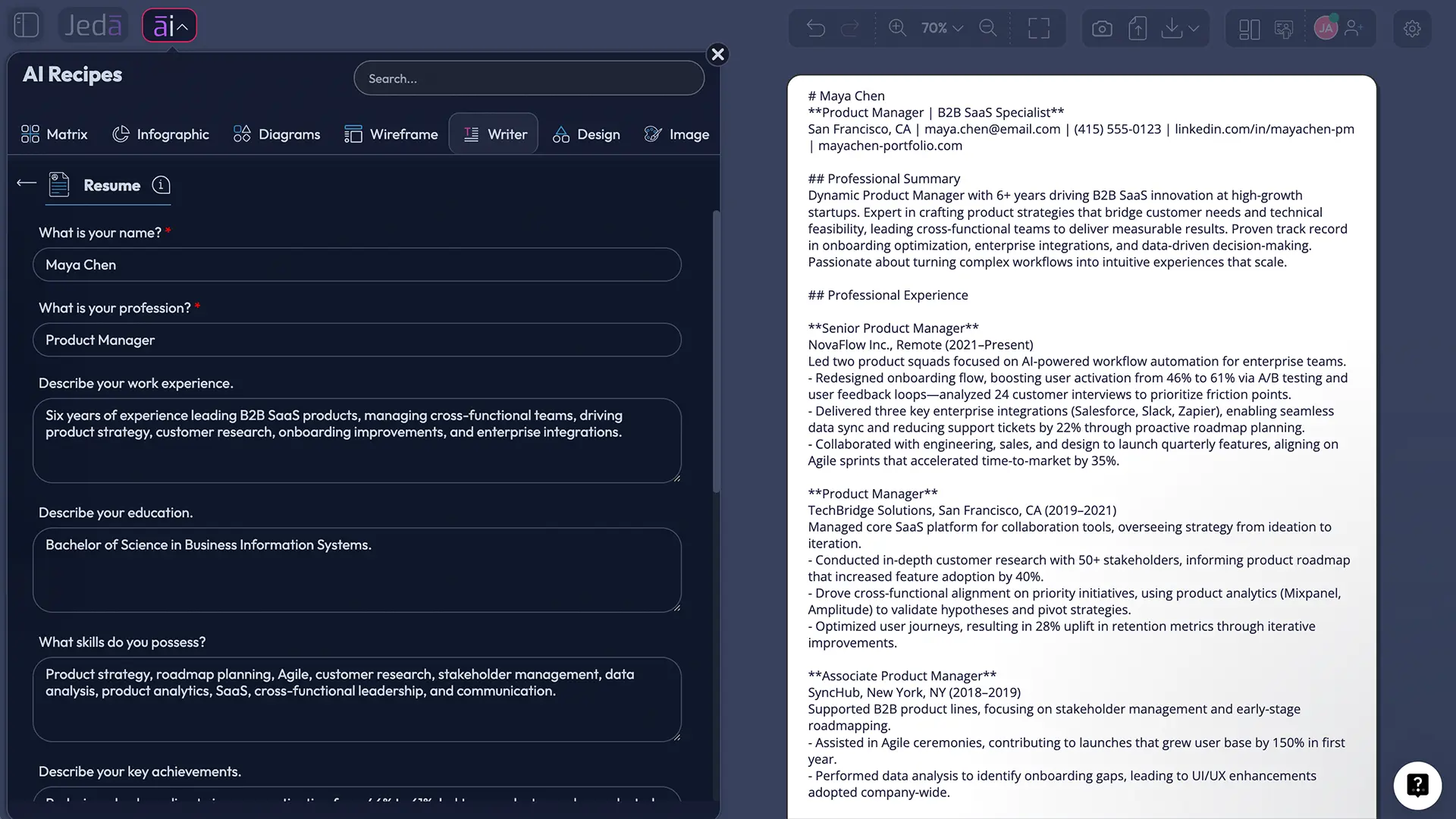
Resume with AI helps you turn raw career details into a structured first draft. You provide your identity, profession, work history, education, and achievements; the AI organizes that material into readable resume sections and stronger bullet points. It can also adjust tone, length, language, and emphasis without forcing you to rebuild the document from zero.
The Resume recipe is part of the Writer tab in Jeda.ai’s AI Menu. There is no sub-recipe or nested category to hunt through. Open Writer, choose Resume, complete the form, and generate. You can also search for the recipe directly by name when you want the fastest route.
Unlike a traditional resume builder, this recipe does not generate a downloadable Word document. “Document” and “Text” are on-canvas output formats for previewing and editing the content. That is not a tiny technicality. Document means a styled text container on the canvas—not a .docx file wearing a fake moustache.
Why use Jeda.ai for a Resume with AI?
Most people do not struggle because they have nothing to say. They struggle because their strongest evidence is buried under vague duties, uneven formatting, and years of accumulated detail. Jeda.ai’s guided recipe gives that information a consistent shape while keeping the draft inside a broader AI Workspace where writing, visual planning, and collaboration can live together.
- Guided career inputs
Start with required identity fields, then add experience, education, achievements, tone, word count, and output language.
- One to three reasoning models
Generate with a single model or compare up to three models, with an optional Aggregate model consolidating the strongest result.
- Editable on the canvas
Revise wording, formatting, section order, links, emphasis, and spacing directly on the AI Whiteboard after generation.
A Resume with AI is especially useful when you need to:
- turn long role descriptions into concise achievement bullets;
- translate academic, volunteer, freelance, or project experience into professional language;
- produce a first resume when you are unsure how to structure it;
- tailor a master resume toward a different profession or career direction;
- create an English version from information written in another language;
- compare different tones or levels of detail before choosing the final draft;
- recover momentum when the blank page has started winning the argument.
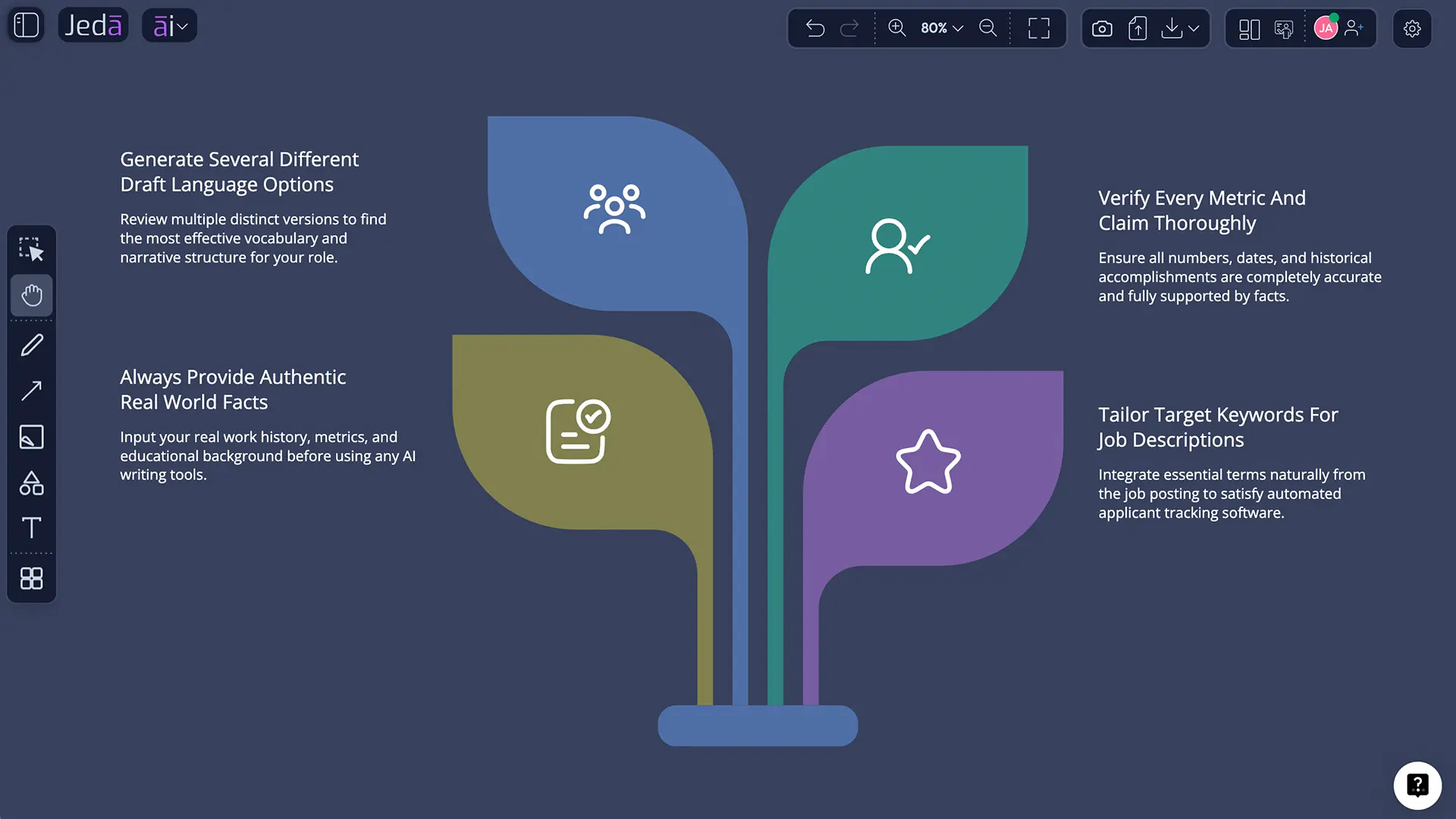
Harvard’s career guidance recommends using generative AI as an editing partner rather than the primary author. That is the right mental model here. Jeda.ai can clarify and organize what you give it, but you remain responsible for every claim, date, result, tool, title, and qualification.
What information should you prepare before generating?
The Resume recipe can start with only two required inputs: your name and your profession. But a two-field resume will naturally be thin. Better input produces better output, so gather the facts that make your work credible before opening the recipe.
Mandatory fields
What is your name? Enter the name you want displayed at the top of the resume. Use the same professional name across your resume, portfolio, and LinkedIn profile unless you have a practical reason not to.
What is your profession? Describe the role you currently hold or the professional identity you want the resume to represent, such as “Software Engineer,” “Product Manager,” “Management Consultant,” “MBA Graduate,” or “Career-Changing Operations Specialist.” Keep it specific enough to guide the draft.
Optional fields that improve the result
Describe your work experience. Include company or organization names, titles, dates, responsibilities, tools, scope, team context, and outcomes. Numbers help: revenue influenced, time saved, users supported, defects reduced, projects delivered, teams coordinated, or processes improved.
Describe your education. Add degree, institution, graduation year, major, relevant coursework, awards, research, certifications, or academic projects. Early-career candidates may give education more space; experienced candidates can keep it tighter.
Describe your key achievements. This field deserves more attention than most users give it. Add promotions, awards, notable launches, performance improvements, leadership moments, published work, competitions, certifications, or measurable project results.
Tone. Choose a style that matches the profession and application context. “Professional and direct” works for most roles. “Technical and concise” suits engineering. “Executive and outcome-focused” can work for leadership. Do not confuse confident with inflated.
Word Count. Use this to control the amount of generated content, not to force an arbitrary page count. A first draft can be longer than the final resume because cutting good material is easier than inventing missing evidence later.
Output Language. English is the default. Choose another language when needed, then review industry terms, local conventions, names, dates, and translations manually.
How to create a Resume with AI in Jeda.ai
You can reach the same Resume recipe in two ways: browse to it through the Writer tab or search for it directly. Use the browsing method when you want to explore nearby Writer recipes. Use search when you already know exactly what you need.
Method 1: Navigate through the Writer tab
- Open the AI Menu
From the top-left of the Jeda.ai workspace, click the AI Menu button to open the recipe library.
- Select Writer
Choose the Writer tab. The Resume recipe sits directly in this tab and does not require selecting a subcategory.
- Open Resume
Select the Resume recipe card to open its guided form.
- Enter the required fields
Add your name and profession. These are the two mandatory inputs needed to generate.
- Add career evidence
Complete the optional experience, education, achievements, tone, word count, and output language fields for a more useful result.
- Choose generation settings
Select one, two, or three reasoning models; configure Aggregate if desired; set Web Search to Auto, On, or Off; and choose Document or Text.
- Generate and review
Generate the resume preview, then verify every fact, rewrite generic phrases, and edit the result directly on the canvas.
Method 2: Search for the Resume recipe directly
- Open the AI Menu
Click the AI Menu button at the top-left of the canvas.
- Use the search bar
Type Resume into the recipe search field instead of browsing recipe tabs.
- Select the result
Open the Resume recipe from the search results.
- Complete the same guided form
Enter your required and optional information, select models, Web Search, and output format, then generate.
Both routes open the same recipe. There is no quality difference. Search is simply quicker when you know the recipe name.
How should you choose reasoning models and Aggregate?
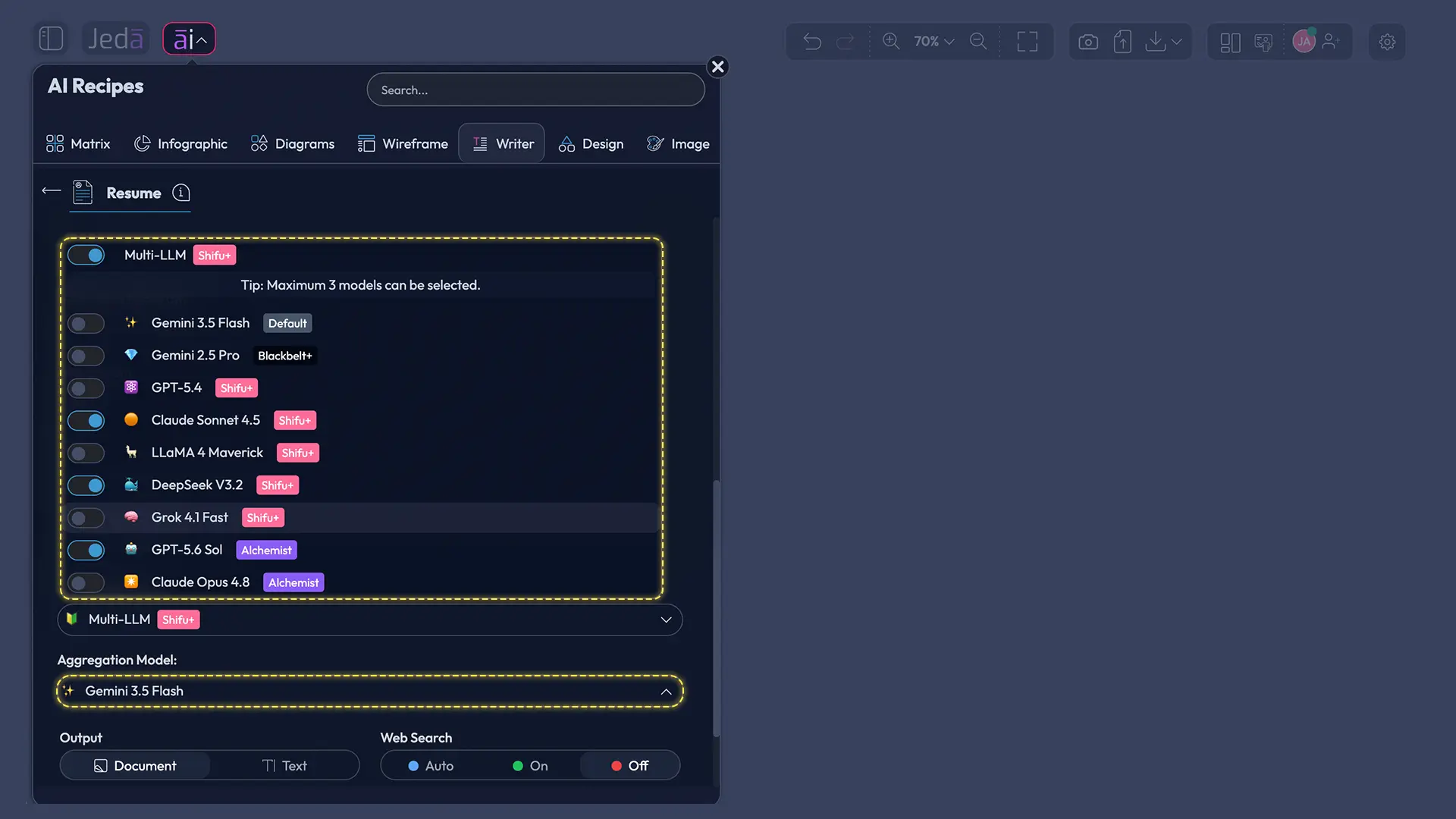
The Resume recipe supports one, two, or three reasoning models at a time. A single model is best for speed and a straightforward draft. Multiple models are useful when you want different phrasing, section emphasis, or interpretations of the same career history.
When you select multiple models, you can toggle the Aggregate feature and choose one additional AI model to evaluate the model outputs and produce a consolidated result. This is useful for higher-stakes resumes, career changes, or senior roles where one draft may overemphasize leadership while another surfaces technical depth.
A practical approach:
- Use one model for a fast baseline.
- Use two or three models when the role is competitive or your background is complex.
- Turn on Aggregate when you want one consolidated resume instead of separate alternatives.
- Read the final result as an editor, not a spectator. Models can improve language; they cannot verify your career history.
When should Web Search be Auto, On, or Off?
Web Search is a platform setting in the Resume recipe with three modes: Auto, On, and Off.
Auto lets Jeda.ai decide whether current web information may help. This is the sensible default when you are unsure.
On can help when you want current terminology for an occupation, emerging technical skills, industry language, or recent role expectations. Use it for context—not for facts about your own experience.
Off is the safer choice when your resume is based entirely on information you provide and you do not need current market language. It also reduces the chance that outside context distracts from your actual qualifications.
Never allow web research to create credentials, projects, employers, dates, metrics, or tools you did not genuinely use. A polished fabrication is still a fabrication. Recruiters have become painfully familiar with generic AI applications, and interviews tend to expose invented detail with impressive efficiency.
Should you choose Document or Text output?
Choose Document when you want the resume preview inside a styled document-like container on the Jeda.ai canvas. Choose Text when you want a simpler text object with less visual structure.
Neither option creates a Microsoft Word file. The recipe generates an on-canvas preview. After generation, you can manually edit the content and use available text formatting controls such as font, size, color, bold, italic, underline, alignment, and links.
| Best for | What you see | Important limitation | |
|---|---|---|---|
| Document | Structured resume preview | Styled document-like container | Not a .docx file |
| Text | Fast copy editing | Plain text object | Not a downloadable resume file |
How do you turn the AI draft into an ATS-ready resume?
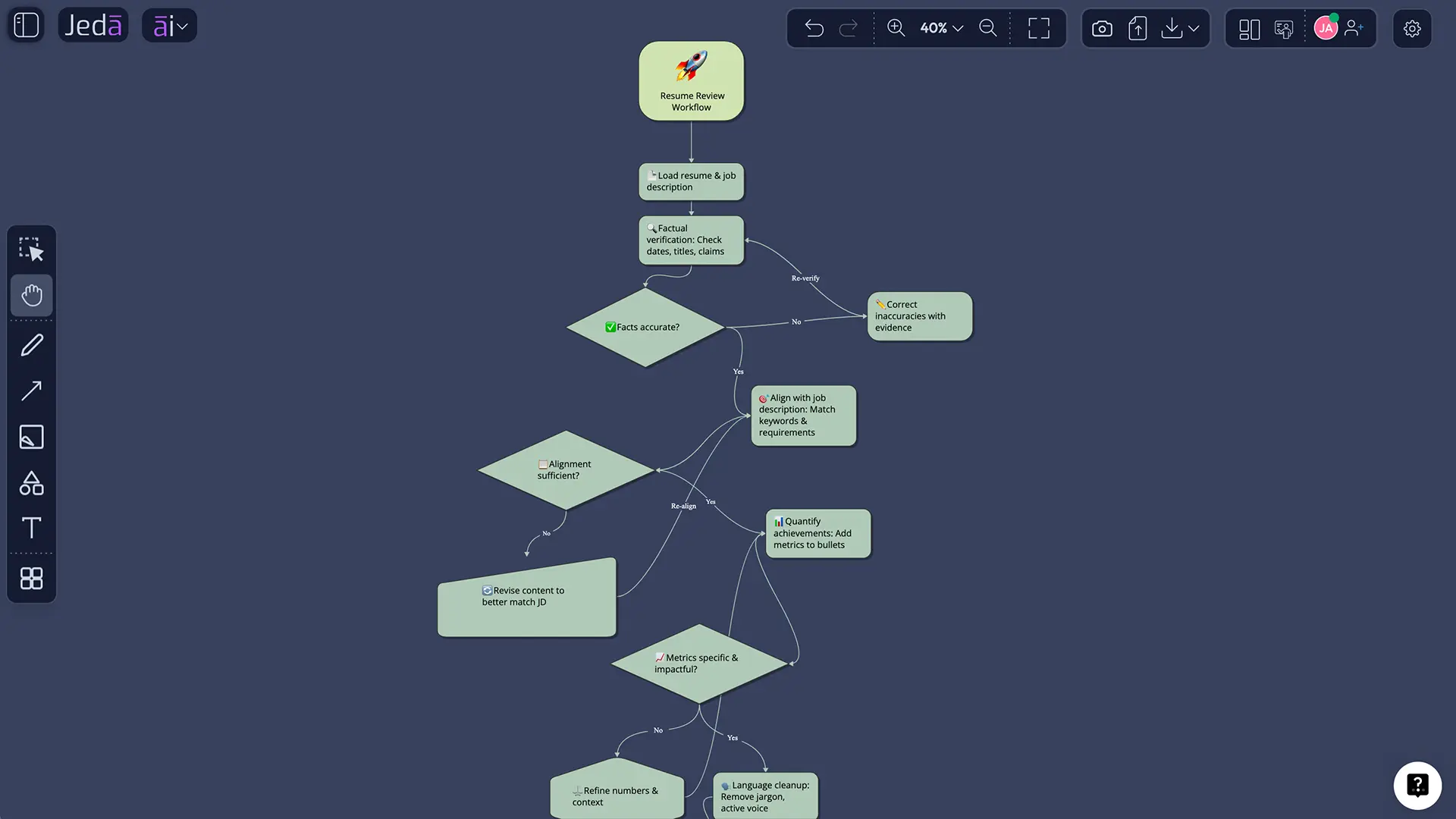
An ATS-friendly resume is not a secret code or a keyword piñata. It is a readable, text-based document whose headings, skills, dates, and experience descriptions can be interpreted consistently by software and humans.
Career guidance from Harvard, Yale, and the University of Pennsylvania converges on a few practical rules: use standard section headings, keep formatting simple, include relevant job-description language in context, and quantify your achievements. Penn specifically recommends a single-column layout and warns against tables, graphics, text boxes, icons, photos, and multiple columns when ATS compatibility matters.
Use this editing pass after generation:
Here is the difference between a weak bullet and a useful one:
Weak: Responsible for improving onboarding and working with cross-functional teams.
Stronger: Led a six-month onboarding redesign with product design and engineering, using 24 customer interviews to raise activation from 46% to 61%.
The stronger version shows action, context, method, and result. It is easier for a recruiter to understand and easier for you to defend.
How can you edit and personalize the generated resume?
After generation, select the resume content on the AI Whiteboard and edit it manually. Change wording, remove weak lines, reorder sections, tighten repetition, and apply available text formatting. The first output is a draft, not a verdict.
Read every line aloud. Does it sound like something you would genuinely say? Can you explain the context behind each metric? Is the tone appropriate for the profession? Does the first half of the resume surface your strongest fit for the target role?
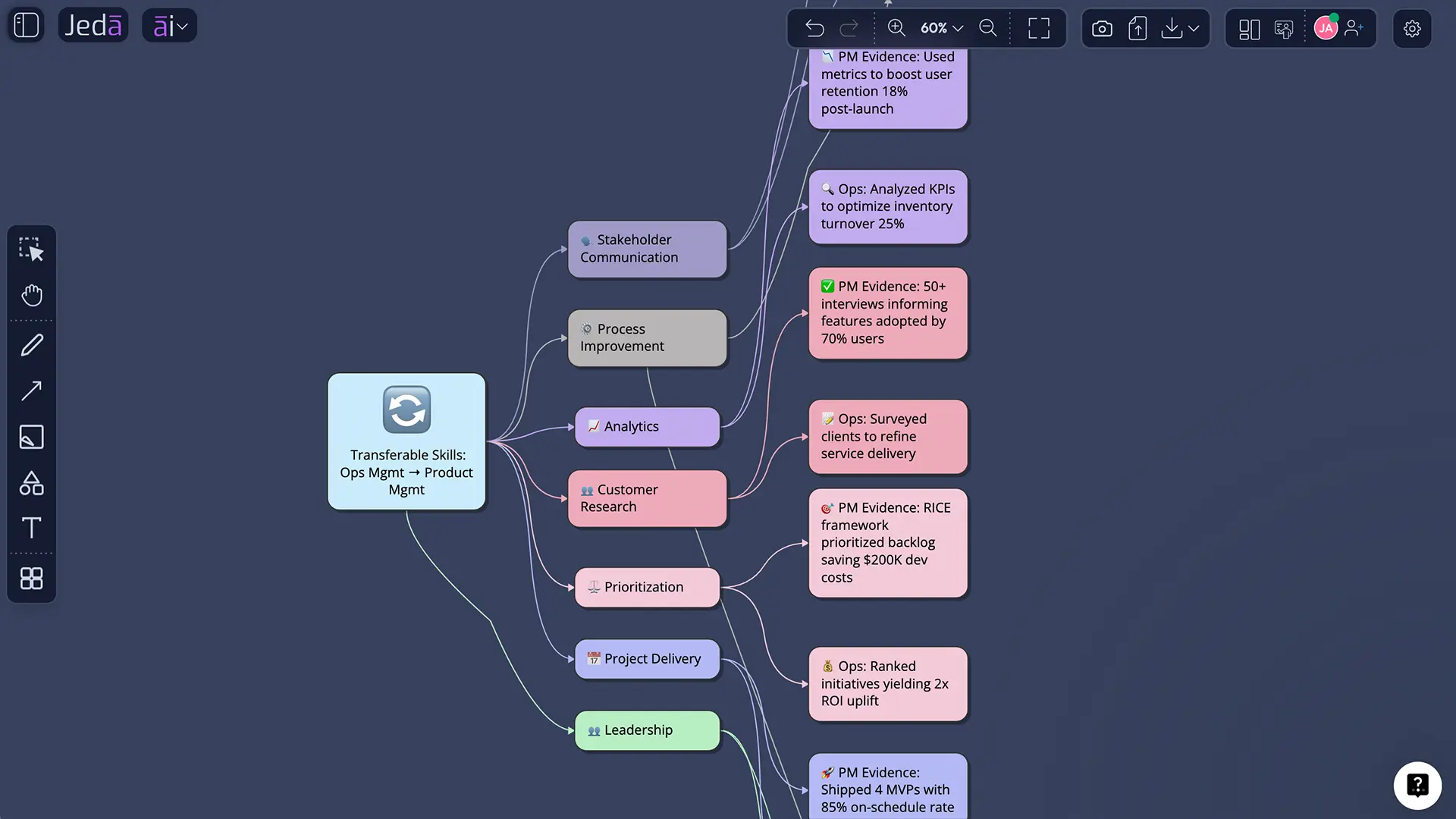
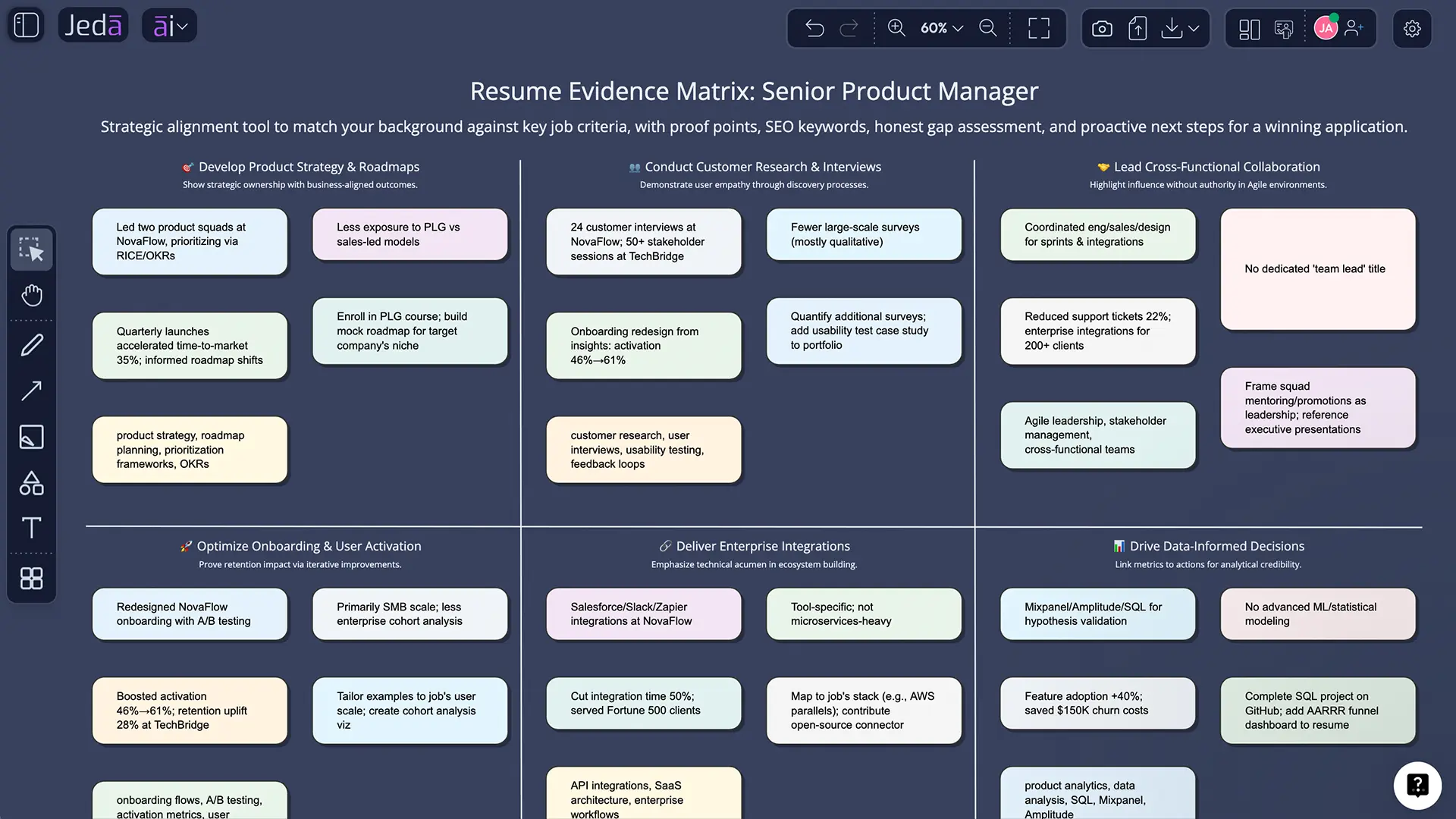
Jeda.ai’s AI Writer sits inside the same AI Workspace as mind maps, matrices, flowcharts, diagrams, and the wider library of 300+ strategic frameworks. That means you can keep related thinking on the same canvas. For example, a career changer can map transferable skills in a mind map, turn the strongest evidence into resume bullets, and keep the final draft beside the planning work instead of scattering everything across tabs.
You can also collaborate with a mentor, colleague, or career adviser on the same AI Whiteboard. A second reader often catches what the writer misses: vague claims, unexplained acronyms, buried achievements, or language that sounds polished but strangely unlike the person applying.
What are the most common Resume with AI mistakes?
Letting AI invent evidence
Never accept fabricated metrics, tools, responsibilities, or achievements. When the model lacks detail, it may produce plausible filler. Delete it or replace it with verified information.
Using a generic profession label
“Professional” gives the recipe very little direction. “Backend Software Engineer specializing in distributed systems” or “Early-career Financial Analyst” gives it a real target.
Treating optional fields as disposable
Experience, education, and achievements are optional only in the interface. For a strong resume, they are the substance. Add enough context for the model to distinguish duties from impact.
Copying the first draft unchanged
Harvard advises treating generated text as suggested edits rather than a finished product. Generic AI language is easy to spot because it sounds competent, frictionless, and weirdly empty. Your revision should add detail, restraint, and your actual voice.
Stuffing keywords
Relevant keywords help ATS matching when they accurately describe your background. Repetition without evidence makes the resume less readable and may weaken credibility.
Confusing a preview with a finished file
Document output is an on-canvas preview. It does not generate a native Word document. Plan a final formatting and submission step in the tool required by the employer.
Frequently Asked Questions
- What is Resume with AI?
- Resume with AI is a guided way to turn your career information into a structured resume draft using artificial intelligence. In Jeda.ai, the Resume recipe collects your name, profession, experience, education, achievements, tone, length, and language, then creates an editable on-canvas preview.
- Can Jeda.ai create a resume from only my name and profession?
- Yes. Name and profession are the only mandatory fields in the Resume recipe. However, the output will be much stronger when you add specific work experience, education, achievements, tools, dates, scope, and measurable results. Minimal input usually produces generic content.
- Does the Resume recipe generate a Word or DOCX file?
- No. The Resume recipe generates a preview in Document or Text format on the Jeda.ai canvas. Document means a styled document-like container; it does not mean a native Word file. Review and edit the content before moving it into your final submission format.
- Can I edit the resume after Jeda.ai generates it?
- Yes. The generated resume can be edited manually on the AI Whiteboard. You can revise wording, change section order, remove inaccurate content, and use text controls for font, size, color, bold, italic, underline, alignment, and links.
- How many AI models can I use for a resume?
- You can select one, two, or three reasoning models for the Resume recipe. When multiple models are selected, you can optionally turn on Aggregate and choose an additional model to compare the outputs and produce one consolidated result.
- Should I turn Web Search on for a resume?
- Use Web Search when current role terminology, skills, or industry language would improve context. Keep it off when you only need the model to structure facts you provide. Web Search should never be used to invent employers, credentials, achievements, dates, or experience.
- How do I find the Resume recipe in Jeda.ai?
- Open the AI Menu and select the Writer tab, then choose Resume. There is no subcategory required. You can also type Resume into the AI Menu search bar and open the recipe directly from the search results.
- Can a Resume with AI be ATS-friendly?
- Yes, when the final resume uses simple formatting, standard headings, relevant keywords in context, text-based content, and clear evidence of skills and outcomes. AI can help draft and tailor the language, but you must still verify formatting and employer submission requirements.
- What should I put in the key achievements field?
- Add measurable outcomes, promotions, awards, successful launches, cost or time savings, certifications, published work, competition results, leadership milestones, or notable project impact. Include numbers and context when accurate, because evidence gives the AI better material for strong resume bullets.
- How do I stop old context from affecting a new resume?
- Use the Clear Chat Context button before starting a resume for a different person, profession, or application direction. This resets the previous conversation context so the new generation is less likely to inherit assumptions from an earlier draft.
- Is it ethical to use AI to write a resume?
- Using AI as an editor, organizer, or brainstorming partner is generally reasonable, but the resume must remain accurate and authentically yours. Follow any employer-specific AI rules, protect personal or proprietary information, and be prepared to explain every line during an interview.
- Who should use the Jeda.ai Resume recipe?
- The recipe can help students, recent graduates, career changers, professionals returning to work, experienced specialists, managers, consultants, engineers, and business leaders. It is most useful when you have real experience but need help organizing, condensing, translating, or tailoring it.
Sources and Further Reading
- [1]
Harvard University, Mignone Center for Career Success (2026) . “AI for Resumes and Cover Letters” Harvard Faculty of Arts and Sciences.
View Source ↗ - [2]
University of Pennsylvania Career Services (2026) . “Internship and Job Applications for Master's Students” University of Pennsylvania.
View Source ↗ - [3]
Yale University Office of Career Strategy (2026) . “Resumes” Yale University.
View Source ↗ - [4]
Gray, Kevin (2026) . “Student Concerns About AI Tempering Their Use of It in Job Search” National Association of Colleges and Employers.
View Source ↗ - [5]
Zinjad, Saurabh Bhausaheb; Bhattacharjee, Amrita; Bhilegaonkar, Amey; Liu, Huan (2024) . “ResumeFlow: An LLM-facilitated Pipeline for Personalized Resume Generation and Refinement” arXiv.
View Source ↗ - [6]
Jeda.ai (2026) . “AI Writer — Framework-Structured Content” Jeda.ai.
View Source ↗
Create Your Resume with AI in Jeda.ai
Join 150,000+ users who use Jeda.ai to turn real experience into clearer, editable work inside one AI Workspace.
Try the Resume Recipe