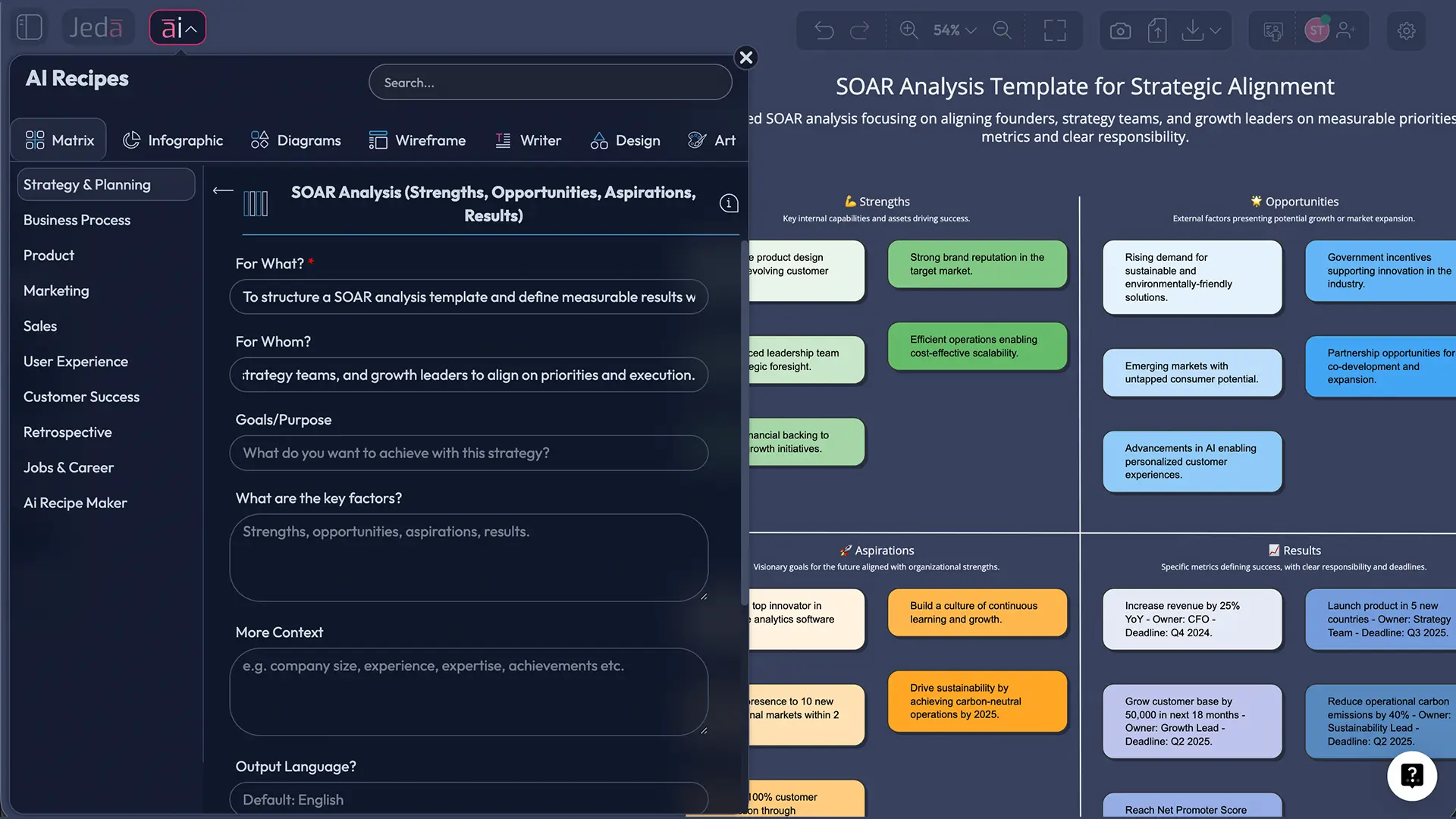
A SOAR analysis template is one of the few strategy tools that doesn’t drag your team into a blame spiral. It forces a better conversation: what’s working, what’s possible, what we want, and how we’ll prove it. Add AI, and you get speed without losing rigor—especially inside Jeda.ai, a Visual AI AI Workspace and AI Whiteboard built for decision-ready work.
And yes—this matters. Because the “strategy” most teams run is basically a vibe check with a slide deck at the end.
What is a SOAR analysis template?
A SOAR analysis template is a 2×2 strategic planning grid with four quadrants:
- Strengths (capabilities you can defend)
- Opportunities (external shifts you can capture)
- Aspirations (a shared future state worth chasing)
- Results (measurable outcomes that prove progress)
SOAR is commonly linked to strengths-based strategy and Appreciative Inquiry thinking. The point isn’t “be positive.” The point is to stop wasting cycles on performative diagnosis and start building momentum around what you can scale. When SOAR is done right, it becomes a compact strategy artifact you can revisit monthly—not a workshop souvenir.
Why use a SOAR analysis template with AI?
Most frameworks fail in the same boring way: the first draft takes too long, so the team rushes the thinking. Then “Results” becomes a wish list. Then nobody owns it. Then everyone politely forgets it.
AI helps you avoid that trap—if you use it like a co-pilot, not a substitute brain.
Here’s what AI does well in SOAR:
- Synthesizes messy inputs (notes, interview quotes, docs, data snippets) into a clean first draft
- Expands options fast (alternate strengths, missed opportunities, sharper aspirations)
- Turns aspirations into metrics (targets, time horizons, owners, leading indicators)
In Jeda.ai, you do this inside one AI Workspace. Generate the SOAR matrix, edit it visually, collaborate live, extend sections with the AI+ button, and export the final as PNG, SVG, or PDF. No tool-hopping. No rebuilding.
- Draft fast, think slow
AI generates a strong first draft in minutes. Your team spends time where it matters: debating trade-offs, sharpening aspirations, and deciding what ‘results’ actually mean.
- Alignment you can see
SOAR works best when stakeholders co-author it. Jeda.ai’s AI Whiteboard collaboration keeps everyone in the same visual source of truth—live cursors, comments, and shared context.
- Results with teeth
Use AI to propose KPIs and targets, then assign owners and deadlines. If it can’t be measured or owned, it doesn’t get to live in Results. Harsh. Necessary.
How to create a SOAR analysis template in Jeda.ai
Good news: you have the dedicated recipe. That means you should start with the AI Menu method because it’s structured, repeatable, and workshop-friendly. Then keep the Prompt Bar method in your back pocket for custom variations.
Method 1 (Recommended): AI Menu → Matrix Recipes → SOAR Analysis
- Open your AI Workspace board
Create a new board in Jeda.ai and drop in any context you already have—notes, goals, customer feedback, or a short strategy brief.
- Open the AI Menu
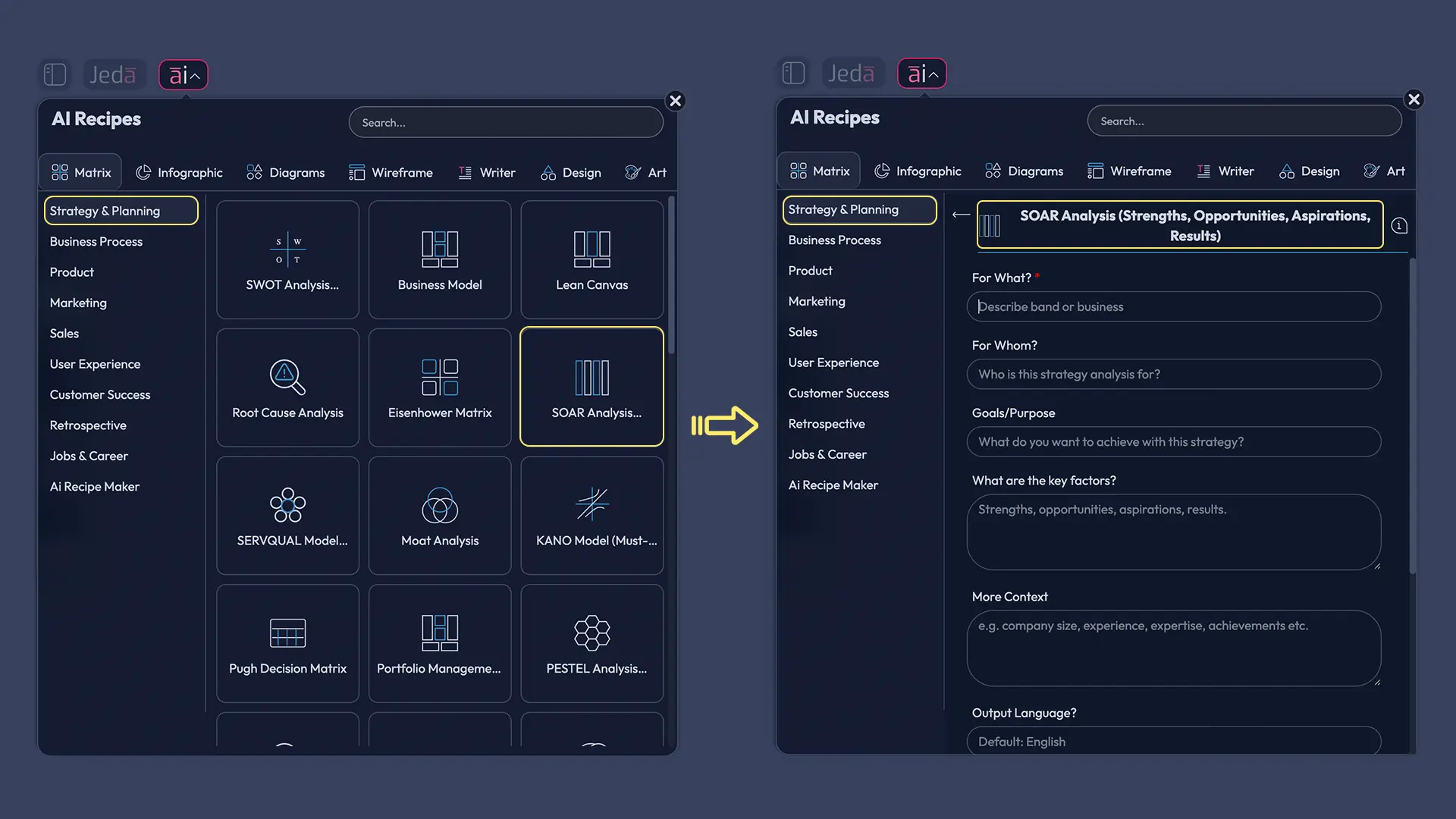
Click AI Menu (top-left). You’ll see the recipe categories with 300+ strategic frameworks.
- Choose Matrix Recipes → SOAR Analysis
Go to Matrix Recipes and select the SOAR Analysis recipe. This gives you a clean 2×2 structure with the right quadrants.
- Fill in context that makes the output specific
Add your team/company, target customer, timeframe, and the strategic goal. Include 2–4 facts that constrain the thinking (e.g., budget, market shift, headcount).
- Generate, then refine in the canvas
Click Generate. Then edit directly on the AI Whiteboard—rewrite vague items, merge duplicates, and remove anything that sounds like a slogan.
- Use AI+ and Vision Transform to operationalize
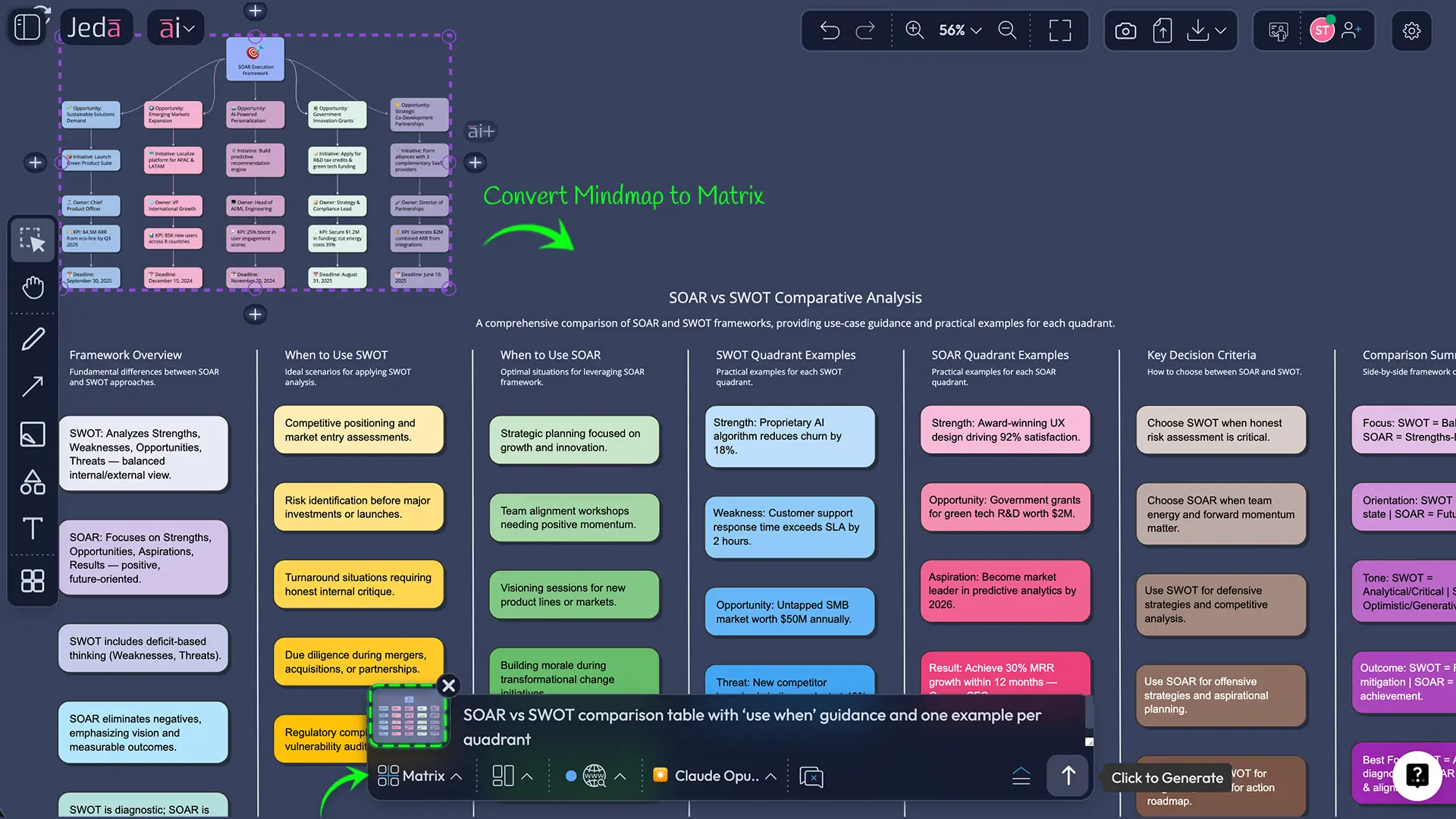
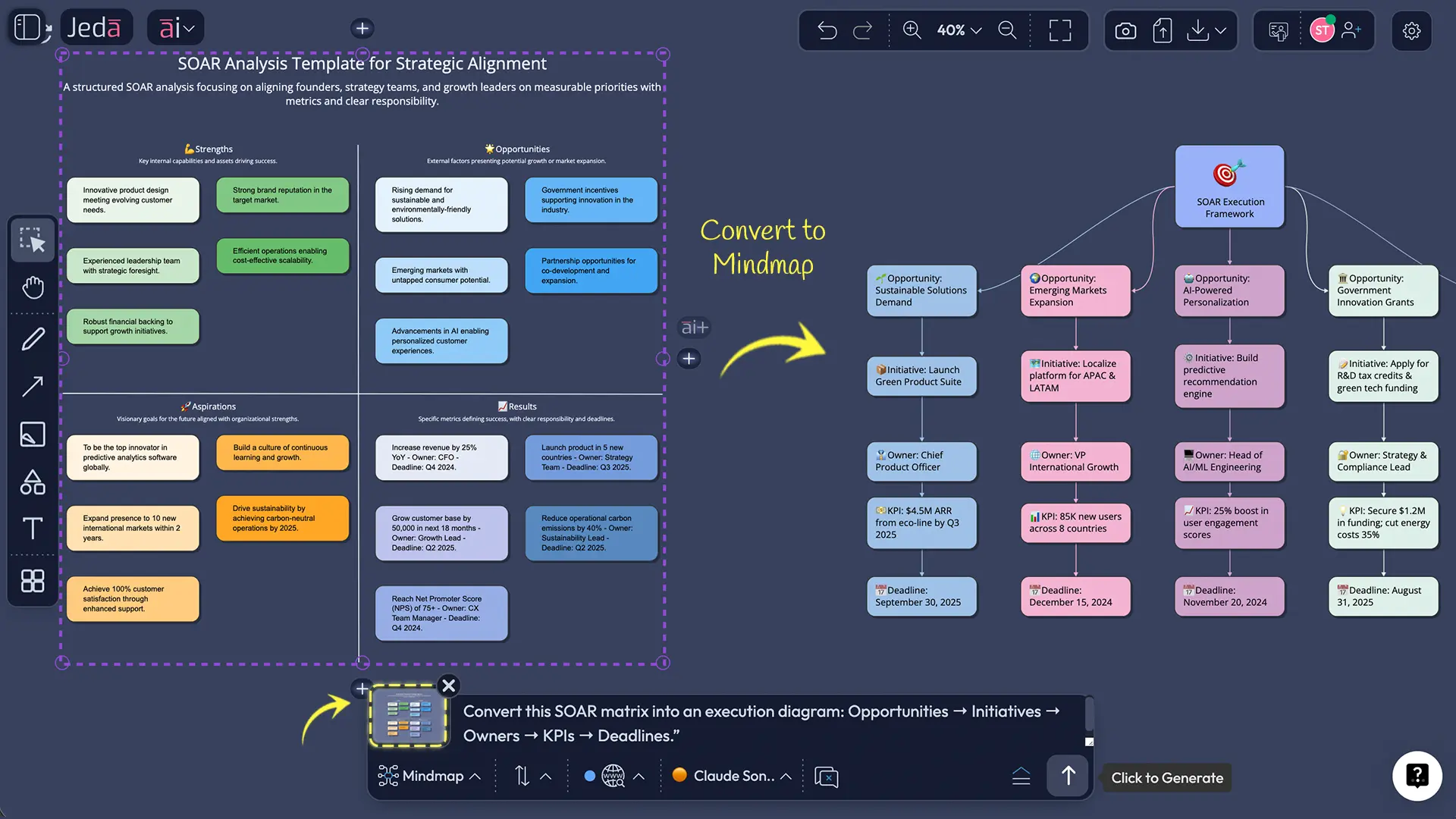
Select a quadrant and tap the AI+ button to extend. Then use Vision Transform to convert the matrix into an execution diagram (initiatives → owners → metrics).
Method 2: Prompt Bar (for custom SOAR variants)
Use this when you want a non-standard SOAR (extra rows, weighted results, segmented by customer type, etc.).
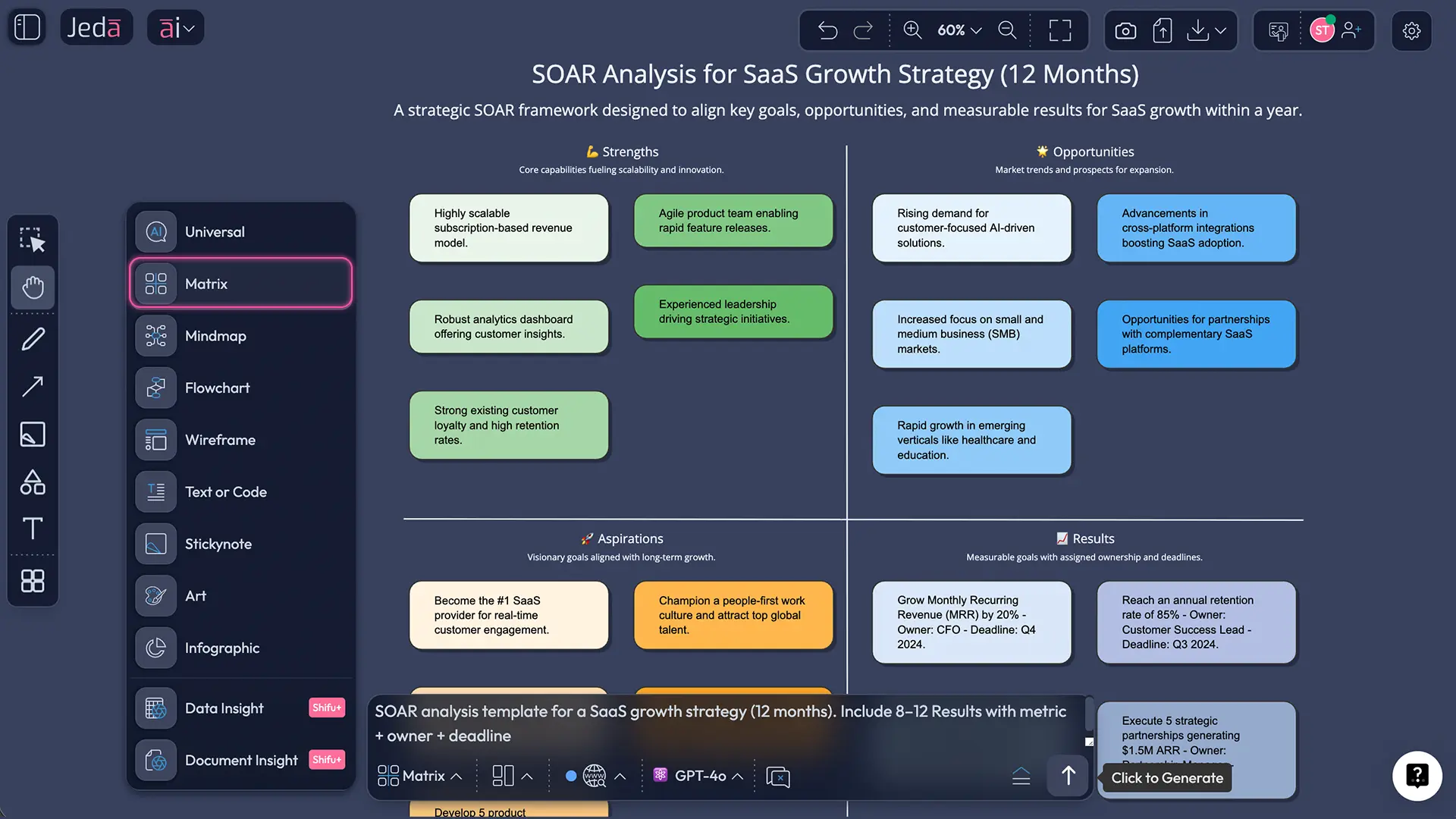
Copy/paste prompt (built to avoid fluffy output)
Prompt:
“Create a SOAR analysis template in a 2×2 grid for: [company/team/project].
Context: [industry, target customer, timeframe, strategic goal].
Rules:
- Strengths must be defensible capabilities with evidence (metrics, proof points, examples).
- Opportunities must be external (market/customer/competitor/regulatory), not internal tasks.
- Aspirations must be a specific future state in 12–18 months (no slogans).
- Results must include 8–12 measurable outcomes with metric, target, owner, and deadline.
Also add 3 assumption checks that could invalidate the plan.”
SOAR vs SWOT: when strengths-first beats risk-first
Both frameworks have their place. The mistake is pretending they do the same job.
- SOAR is for generating direction and commitment.
- SWOT is for mapping risks and constraints.
If you’re trying to move a team from confusion to action, SOAR is often the better first move. Then you run SWOT to pressure-test what you just decided.
| Primary focus | Best for | Typical failure mode | |
|---|---|---|---|
| SOAR | Strengths → future state → measurable outcomes | Alignment, planning, workshop facilitation, execution metrics | Aspirations get vague; Results aren’t owned |
| SWOT | Strengths/Weaknesses + Opportunities/Threats | Risk analysis, constraints, competitive pressure testing | Over-focus on problems; weak action conversion |
SOAR analysis questions that unlock better answers
A strong SOAR session is mostly about asking better questions. Here are prompts that don’t waste time.
Strengths: prove it, don’t praise it
- What do we do unusually well and have evidence for?
- What capabilities create outcomes competitors struggle to match?
- What do customers explicitly credit us for in reviews or interviews?
Opportunities: keep it external
- What changed in the market in the last 6–12 months that we can exploit?
- Where are customers underserved or overcharged?
- What adjacent segments are becoming viable now?
Aspirations: pick a future state you can recognize
- What do we want to be true in 12–18 months?
- What will we stop doing to make that future possible?
- If a journalist wrote about us then, what would the headline be?
Results: measurable, owned, dated
- What metrics prove the aspiration is real (not rhetorical)?
- Who owns each result—and what’s the deadline?
- What leading indicators warn us early if we’re off track?
SOAR analysis examples
Here are two examples that show the difference between “nice” and “useful.”
Example 1: SaaS product team planning a Q2 growth push
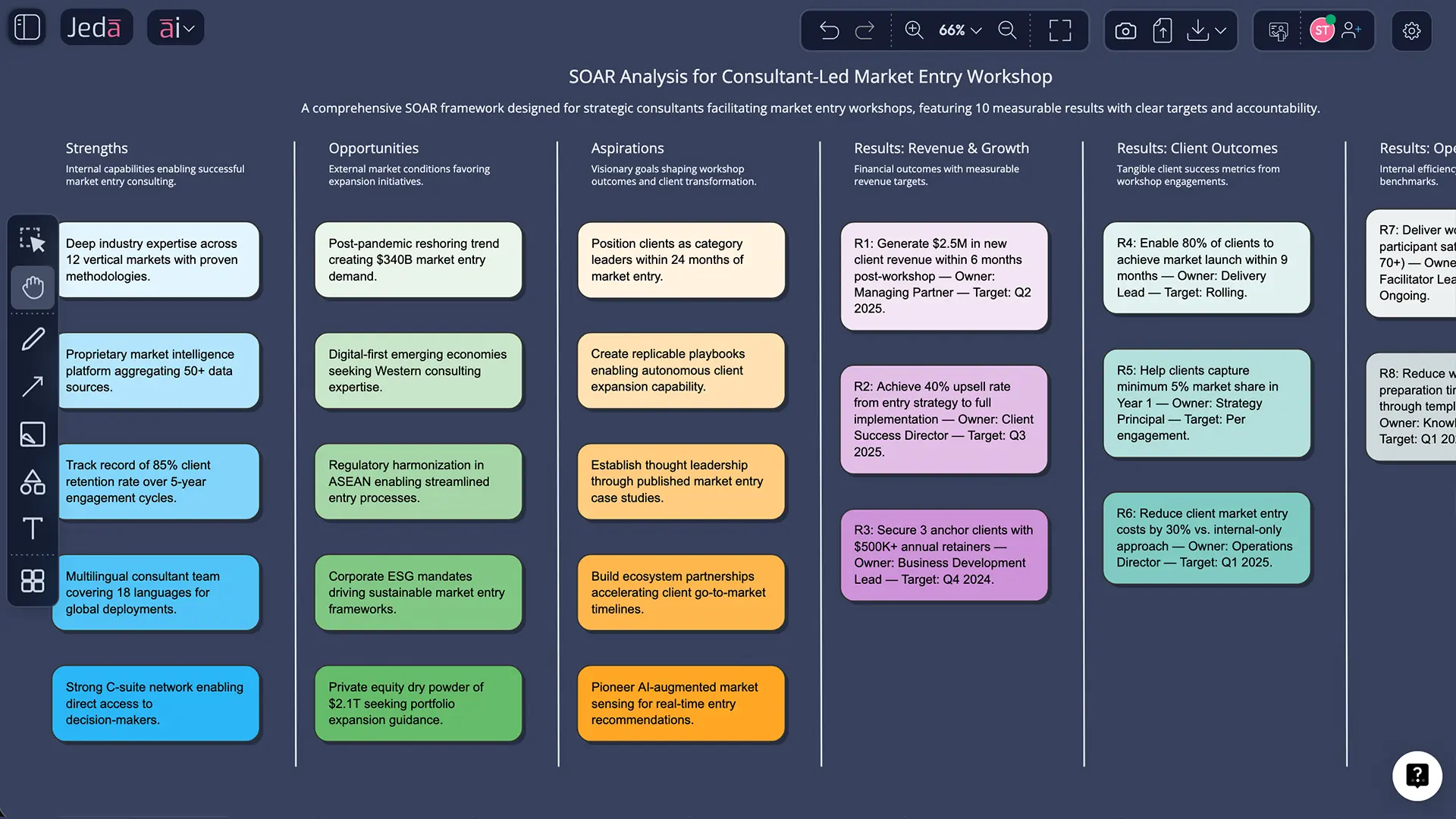
Example 2: Strategy consultant running a client alignment workshop
Consulting teams love SOAR for one reason: it converts stakeholder noise into a visible decision artifact.
A clean workflow looks like this:
- Pre-work: gather docs + discovery notes
- Workshop: generate SOAR via AI Menu recipe, edit live, assign owners
- Post-work: use Vision Transform to convert SOAR into an execution diagram, export PDF for the client pack
And here’s the honest part: AI won’t replace your judgment. It just removes the blank-page tax so you can spend time on the hard stuff—trade-offs, constraints, and accountability.
Best practices: make Aspirations sharp, Results real
Common mistakes to avoid
- Strengths that are compliments. “Great culture” isn’t a strength until you can show what it produces.
- Opportunities that are internal tasks. “Improve onboarding” is work. The opportunity is the market demand you’re capturing.
- Aspirations that dodge trade-offs. If everything is a priority, nothing is.
- Results without owners. Unowned outcomes are just meeting notes.
- Stopping at the matrix. Convert it into an execution diagram or roadmap view using Vision Transform.
Frequently Asked Questions
- What is a SOAR analysis template?
- A SOAR analysis template is a 2×2 strategic planning grid for Strengths, Opportunities, Aspirations, and Results. It helps teams align on what’s working, what to pursue, what future they want, and what measurable outcomes prove progress.
- What does SOAR stand for?
- SOAR stands for Strengths, Opportunities, Aspirations, and Results. Strengths and Opportunities capture today’s reality and external potential. Aspirations and Results define the desired future state and the metrics that confirm you’re getting there.
- How is SOAR different from SWOT?
- SOAR is strengths-based and future-focused, emphasizing aspirations and measurable results. SWOT includes weaknesses and threats to diagnose constraints and risk. Many teams use SOAR to set direction, then use SWOT to stress-test what they decided.
- When should I use a SOAR analysis?
- Use SOAR when you need alignment, momentum, and a clear outcomes-driven plan—especially for strategic planning, transformations, and stakeholder workshops. If your priority is risk mapping, follow the SOAR with a SWOT to cover threats and constraints.
- What are good SOAR analysis questions?
- Strengths: What do we do unusually well, and what evidence proves it? Opportunities: What external shifts can we capture? Aspirations: What do we want to be true in 12–18 months? Results: What metrics, owners, and deadlines prove we achieved it?
- How do I create a SOAR analysis template with AI in Jeda.ai?
- Open AI Menu, choose Matrix Recipes, select the SOAR Analysis recipe, add your context, and click Generate. Then refine the matrix on the AI Whiteboard, use the AI+ button to extend sections, and use Vision Transform to convert it into an execution diagram.
- What should go in the Results quadrant?
- Results should be measurable outcomes with a metric, target value, owner, and deadline. Avoid activities like “launch initiative.” Instead write outcomes like “reduce time-to-first-value to 20 minutes by June 30 (Owner: Product Ops).”
- Is there a free way to generate a SOAR analysis template?
- Yes. Jeda.ai’s Whitebelt plan is free and includes all 11 commands with limited daily usage. If you want expanded usage and collaboration, Blackbelt and Shifu plans increase limits and add advanced capabilities like Multi-LLM + Aggregator.
- What can I export after creating a SOAR analysis in Jeda.ai?
- You can export your SOAR board as PNG, SVG, or PDF. That makes it easy to share with leadership, clients, or teams without rebuilding visuals in other tools.
Related frameworks (keep the momentum)
- AI Workspace — your home base for strategy visuals
- AI Whiteboard — collaboration + live decision-making
- SWOT Analysis with AI
- Root Cause Analysis with AI
- Eisenhower Matrix with AI
Sources & Further Reading
- [1]
Jacqueline M. Stavros, Gina Hinrichs (2009) . “The Thin Book of SOAR: Building Strengths-Based Strategy” Thin Book Publishing Company.
View Source ↗ - [2]
Melanie L. Cole et al. (2022) . “Measuring Strengths, Opportunities, Aspirations, and Results: Psychometric Properties of the 12-Item SOAR Scale” Frontiers in Psychology.
View Source ↗ - [3]
Gregory Zarestky, Michael L. Cole (2017) . “Strengths, opportunities, aspirations, and results: An emerging approach to organization development” New Horizons in Adult Education and Human Resource Development (Wiley Online Library).
View Source ↗ - [4]
Notion (2023) . “Using a SOAR analysis to enhance your strategic planning” Notion Blog.
View Source ↗ - [5]
Cascade Strategy (2024) . “SOAR Analysis: What It Is & Step-By-Step Guide” Cascade Blog.
View Source ↗
Start Your SOAR Analysis Today
Join over 150,000+ users who build decision-ready visuals in Jeda.ai’s AI Workspace and AI Whiteboard.
Try Free Template