AI tools for MBA students are useful for one brutal reason: MBA work gets messy fast. You’re juggling case PDFs, lecture notes, survey data, group projects, and the recurring panic of “can we turn this into a clean recommendation by tomorrow?” Business schools are moving quickly here. AACSB, GMAC, Harvard Business School, and Berkeley Haas all point to the same shift: students need practical AI fluency. Jeda.ai fits that shift because it gives you an editable AI Workspace, a collaborative AI Whiteboard, and a Visual AI workflow for turning raw material into structured business thinking.
The smart play is not to worship one magical app. It is to use the right tool for the job. ChatGPT can tutor. NotebookLM can help you work through source material. Perplexity can speed up cited research. Power BI Copilot can interrogate data. Jeda.ai handles the missing middle: it turns messy inputs into editable matrices, mind maps, diagrams, flowcharts, infographics, and team-ready outputs inside one AI Workspace.
What Are AI Tools for MBA Students?
AI tools for MBA students are digital copilots for four jobs: learning, research, analysis, and communication. The good ones help you understand a concept faster, surface better evidence, structure a recommendation, and present the result clearly enough for a team, professor, or client-style audience to follow.
AACSB’s 2024 guidance on business schools makes the direction clear: generative AI is becoming part of learner experience, curriculum innovation, and decision-making. Its MBA-focused article also argues that employers increasingly expect AI literacy, but that managers need judgment and conceptual understanding more than deep technical mastery. That’s the right frame. You do not need to become a model builder. You need to become dangerous with questions, evidence, and decision logic.
Why AI Tools for MBA Students Now Matter More Than Another Elective
Harvard Business School described a 2025 MBA course where students used AI agents daily to build fluency in decision-making and opportunity spotting. Berkeley Haas showed MBA students using AI tools to analyze customer satisfaction data, debate strategy, and improve prompt quality in class. That’s the point: AI is no longer a side hobby in business education. It’s part of how modern business schools expect students to work.
But speed is only half the story. MBA assignments rarely end with “give me an answer.” They end with “show your logic.” A cited answer engine can summarize. A tutoring mode can explain. A BI copilot can query a model. Useful, yes. But you still need to synthesize findings, compare options, show trade-offs, and make the recommendation visible. That is where students start bouncing between tabs like pinballs. Jeda.ai works because it keeps that chain inside one editable AI Whiteboard.
The Best AI Tools for MBA Students Are Job-Specific
For step-by-step learning: ChatGPT Study Mode
OpenAI says ChatGPT Study Mode is designed to help users work through problems step by step instead of just receiving an answer. That makes it useful for accounting logic, pricing questions, operations trade-offs, and interview prep. Use it when you need a tutor. Don’t mistake it for final thinking.
For source-grounded reading: NotebookLM and Perplexity
Google highlights NotebookLM’s source-grounded reports, study guides, flashcards, quizzes, and Learning Guide. Perplexity’s own help center says every answer includes numbered citations, and its education product emphasizes reliable, cited answers and course-specific spaces. Both are good for fast reading and first-pass research. Neither is the full answer when the job becomes “turn this into a decision board.”
For data-heavy assignments: Power BI Copilot
Microsoft positions Power BI Copilot as a natural-language way to summarize reports, ask ad hoc questions, and analyze visuals. That is great when your MBA work already lives inside a data model. But a BI copilot is still built for data interrogation. It is not your strategy canvas.
For turning raw material into editable business visuals: Jeda.ai
Jeda.ai is strongest after the inputs start piling up. Its Prompt Bar, AI Menu, Matrix Recipes, Document Insight, Data Insight, Multi-LLM Agent, AI+ button, and collaboration tools let MBA students convert cases, notes, and data into something editable and discussable. That is the difference between an answer and a working surface.
Why Jeda.ai Works So Well for MBA Coursework
- Matrix-first thinking
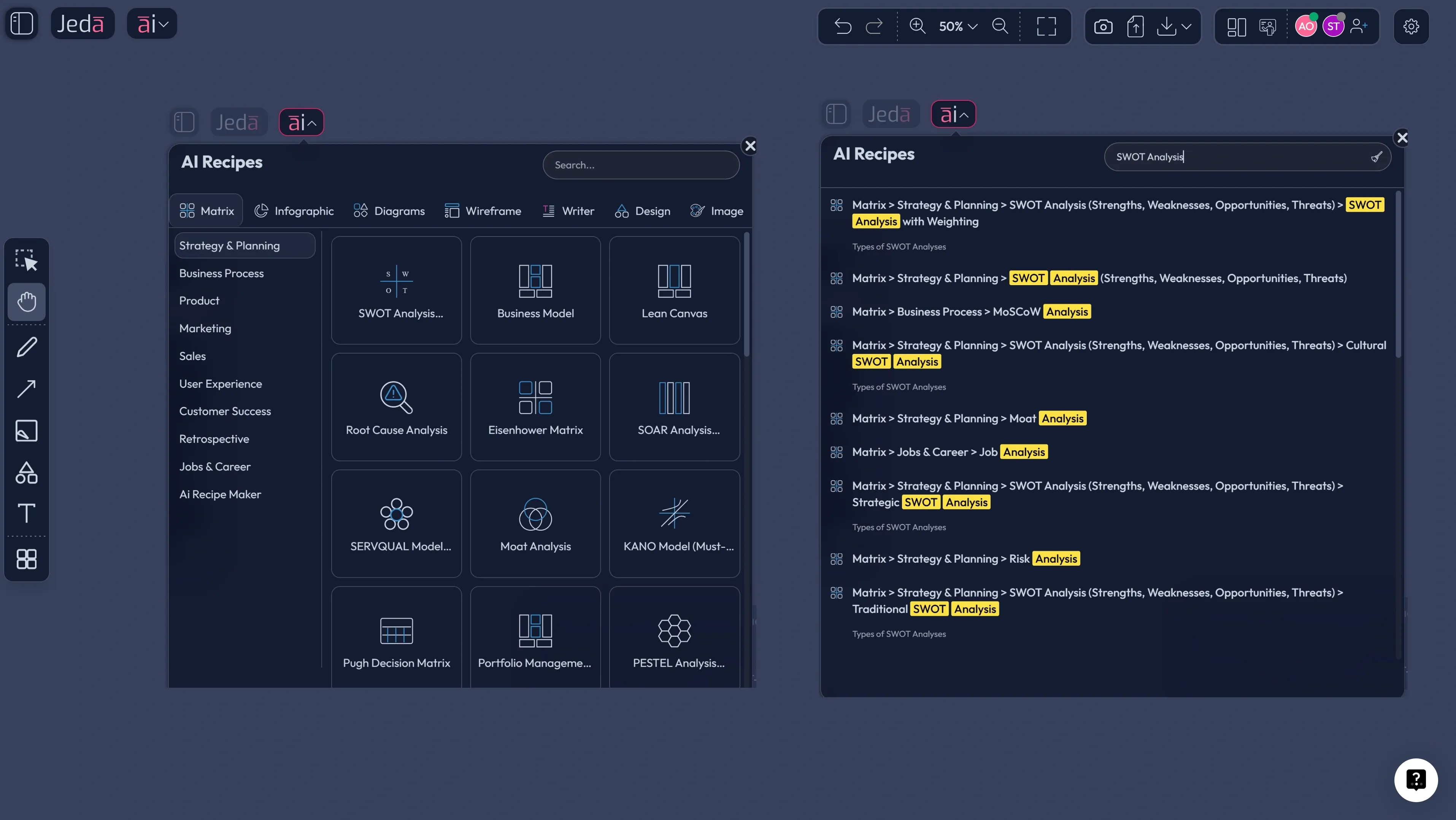
Use guided Matrix Recipes for SWOT, Business Model, Lean Canvas, KANO, PESTEL, Project Planning, and other MBA-friendly frameworks.
- Case PDF to visual
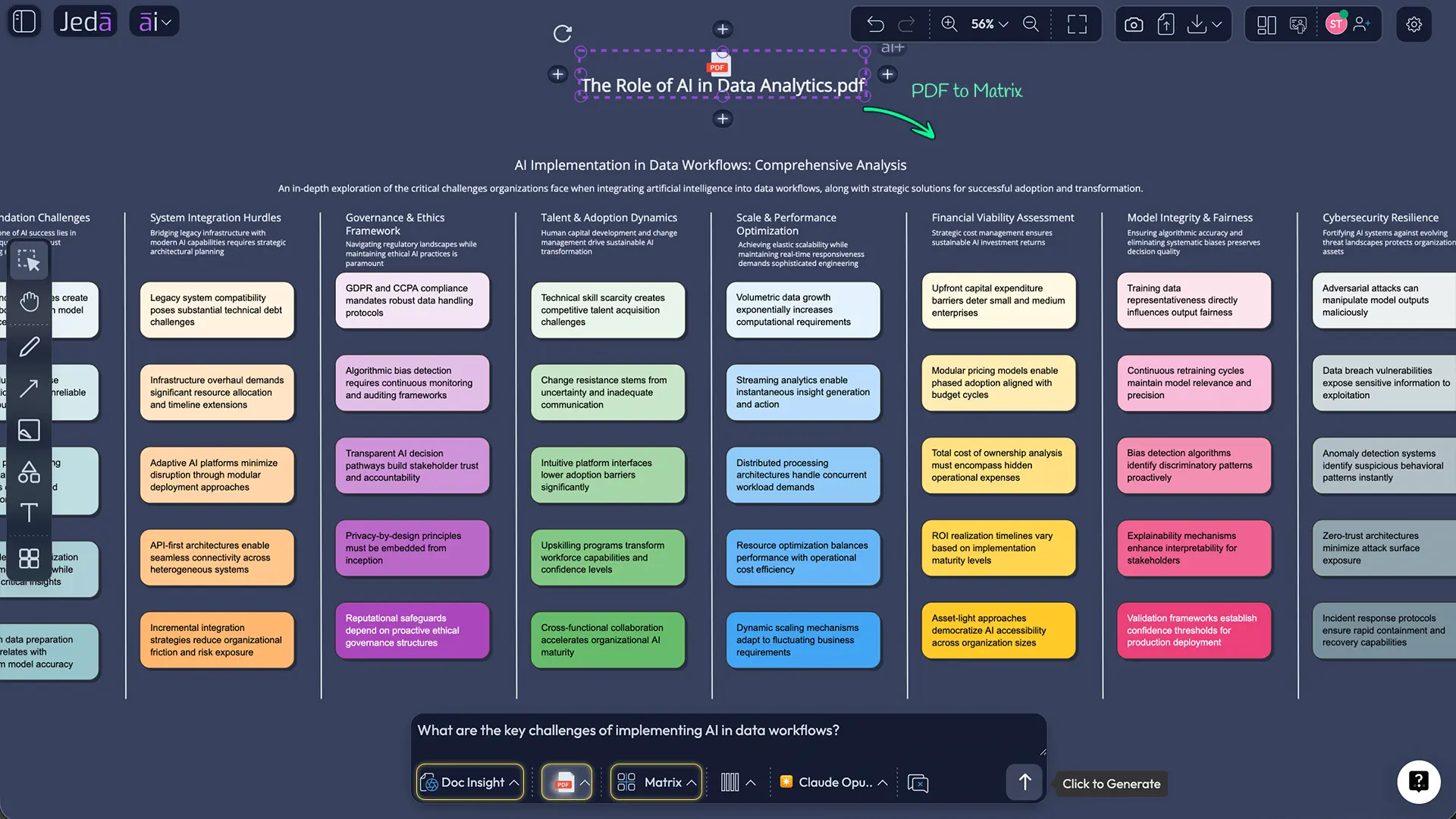
Upload lecture packs or case PDFs with Document Insight and turn them into an editable matrix, mind map, or diagram.
- Spreadsheet to insight
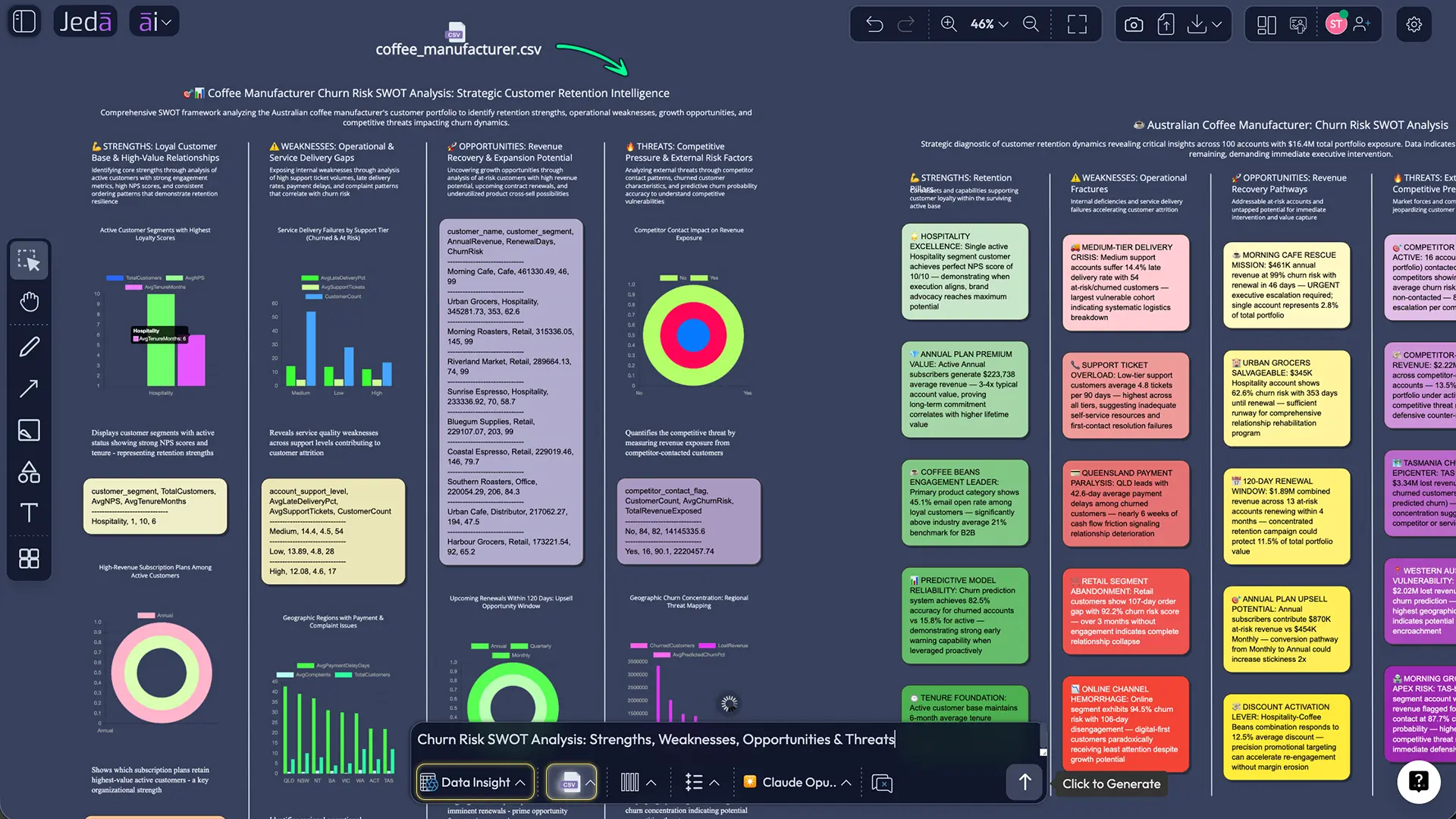
Use Data Insight to convert CSV or Excel files into visual analysis instead of wrestling with raw rows alone.
- Prompt Bar for custom work
Choose the command that fits the task and generate a custom output when the assignment does not map to a standard template.
- AI+ for deeper analysis
Use the AI+ button to expand assumptions, risks, next steps, or supporting detail after the first draft already exists.
- Built for group projects
Keep the analysis and collaboration in one AI Whiteboard so your team is not splitting logic across docs, chats, and slides.
A lot of content about AI tools for MBA students collapses everything into a lazy list. That misses the real workflow. MBA work is chained: read, interpret, frame, debate, refine, present. Jeda.ai earns its place because it covers the stretch where insight needs shape.
How to Use AI Tools for MBA Students in Jeda.ai
Jeda.ai gives you three practical paths, and each one fits a different kind of assignment.
Method 1: Recipe Matrix
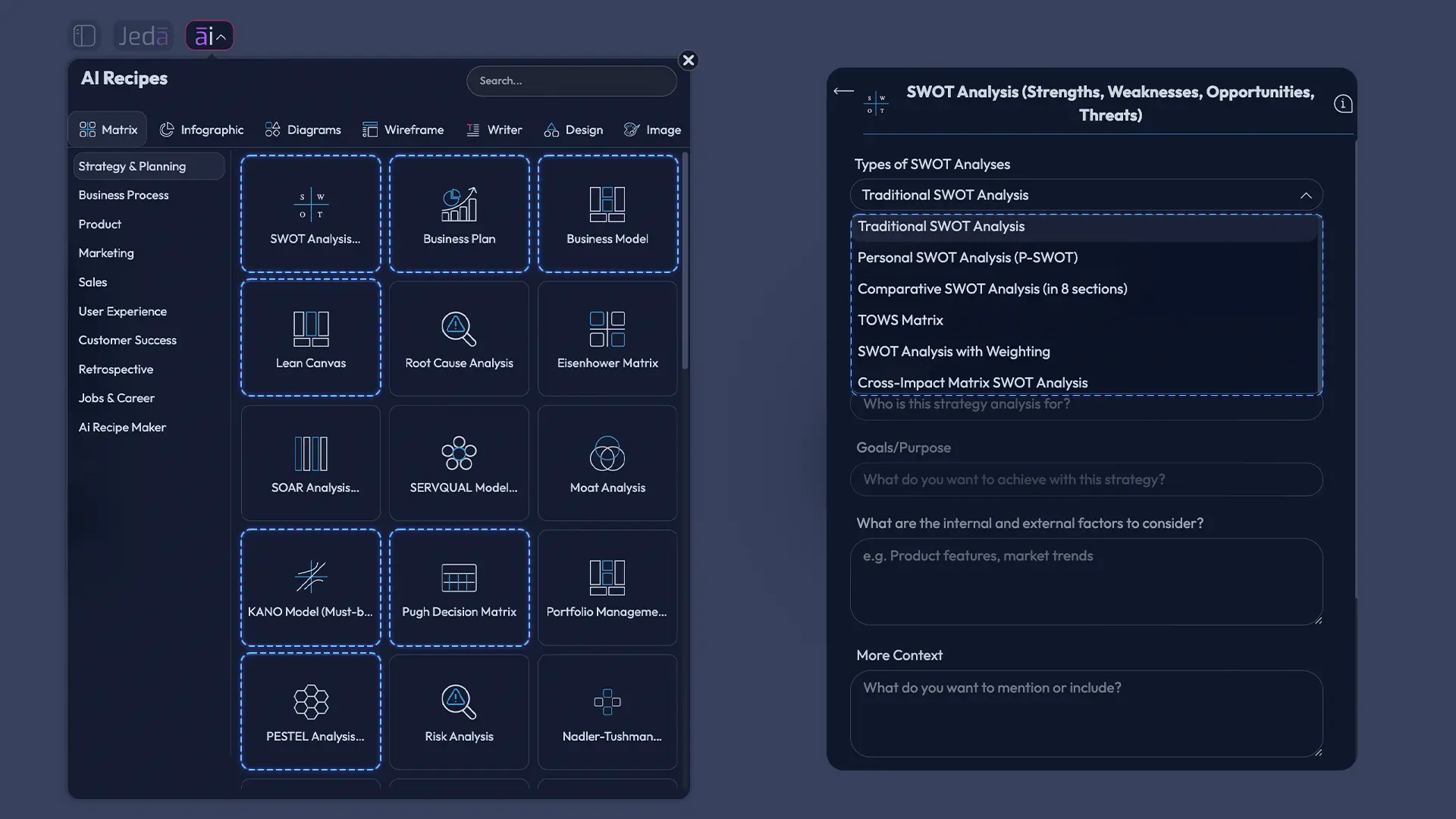
Start here when the assignment maps to a known business framework. Open the AI Menu, choose Matrix Recipes, pick the framework, answer the guided prompts, and generate. This is the cleanest way to build strategy-class deliverables because the structure is already working in your favor.
- Open the AI Menu
Click the AI Menu in the top-left of Jeda.ai and go to Matrix Recipes.
- Choose an MBA-ready framework
Pick a recipe such as SWOT Analysis, Business Model, Lean Canvas, KANO Model, PESTEL Analysis, Project Planning, or Financial Planning.
- Fill the guided fields
Add the company, market, problem, stakeholders, constraints, and case context.
- Generate the first visual
Let Jeda.ai build the matrix directly on the canvas so your team can review it immediately.
- Edit and tighten
Refine wording, priorities, and structure so the board reflects your own argument.
- Use AI+ for detail
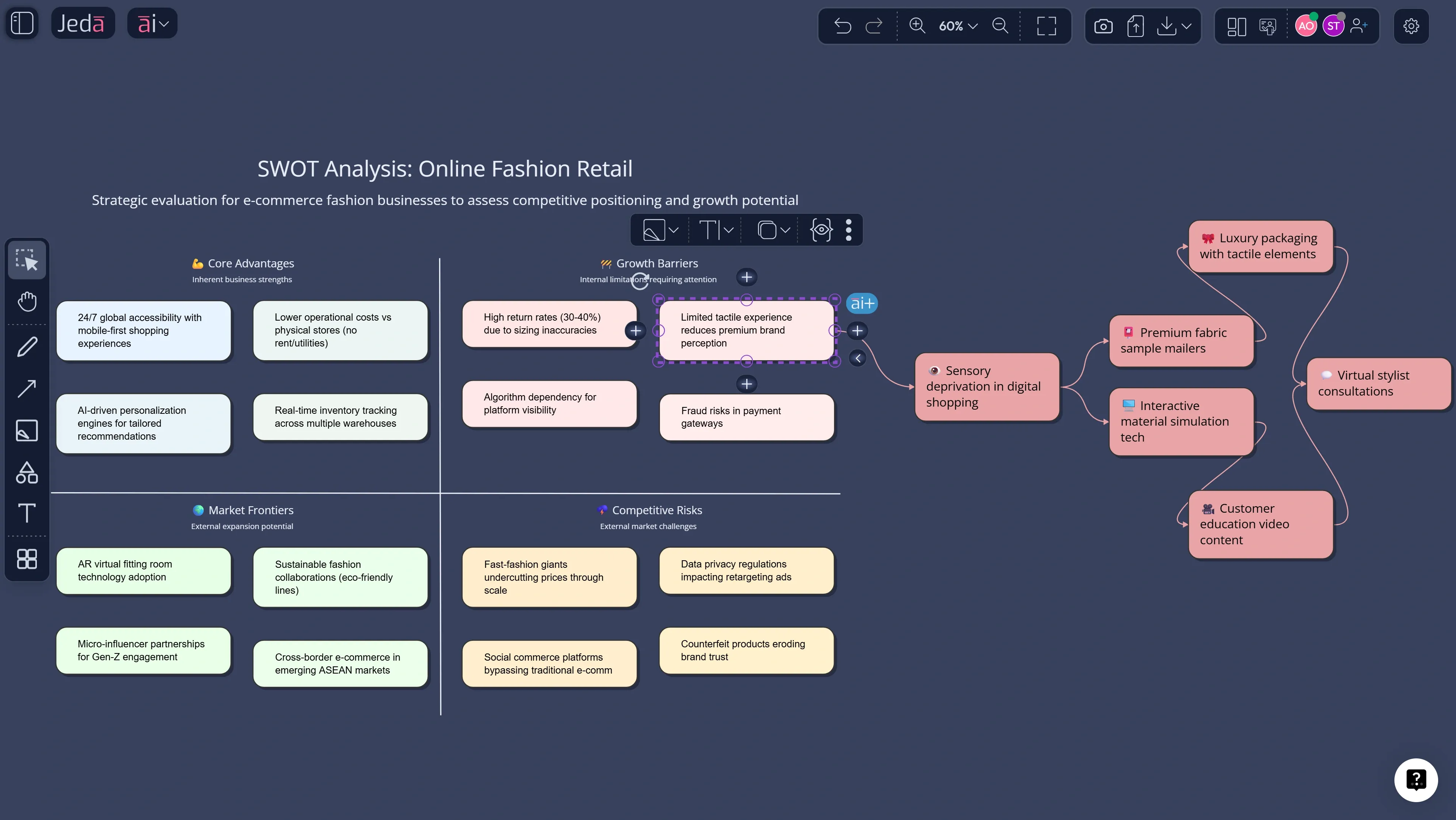
Select any smart shape and use the AI+ button to deepen assumptions, risks, or next actions.
Method 2: Prompt Bar
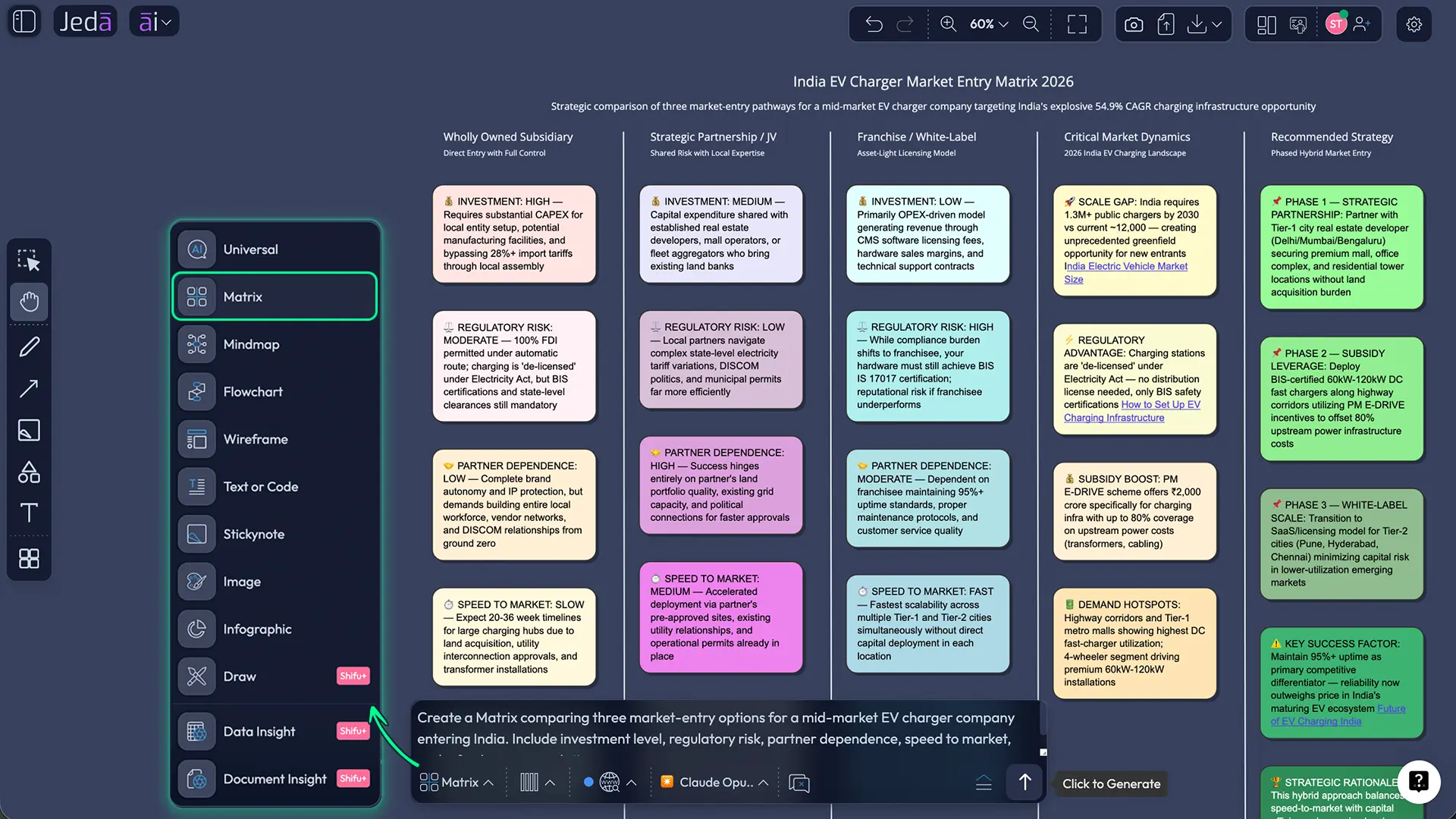
Use the Prompt Bar when the assignment is custom or messy. Choose the output type — Matrix, Mindmap, Flowchart, Infographic, Document Insight, Data Insight, or Text — then write a direct prompt.
Example:
“Create a Matrix comparing three market-entry options for a mid-market EV charger company entering India. Include investment level, regulatory risk, partner dependence, speed to market, and a final recommendation.”
That is already miles better than “analyze market entry.”
Method 3: AI+ Button Generated Deep Dive
AI+ is for refinement. Select a smart shape, tap the AI+ button, and tell Jeda.ai to expand that section with more detail. Use it to deepen a risk, widen a customer segment, add rationale to a recommendation, or push next actions further.
It is strongest after a first structure exists. Not before.
The MBA Use Cases Where Jeda.ai Pulls Ahead
Case study analysis from PDF to board
Upload a case PDF with Document Insight, choose the output format, and turn dense reading into an editable business visual. That is a much better flow than copying notes into a doc, then rebuilding them again in slides.
Data-backed recommendations from CSV or Excel
When the assignment includes survey results, pricing tables, or customer metrics, use Data Insight. Upload the file, generate a visual explanation, and move straight into discussion instead of making your team infer the point from a spreadsheet dump.
Group projects that need one source of truth
Most MBA team pain is not lack of intelligence. It is fragmentation. Jeda.ai fixes that by putting analysis and collaboration in one AI Whiteboard. Your recommendation stays visible, editable, and shared.
Entrepreneurship and innovation modules
For startup, product, and innovation work, Jeda.ai is also handy for mind maps, wireframes, diagrams, infographics, and pitch-friendly summaries. That makes it more than a framework tool. It becomes a working AI Workspace for the entire assignment.
If you want to go deeper after this page, Jeda.ai already connects naturally to adjacent workflows such as AI Workspace, AI Whiteboard, Generative AI Data Analysis, AI Infographic Generator, Porter’s Five Forces with AI, and PESTEL Analysis with AI. That broader library matters because Jeda.ai is built around 300+ strategic frameworks, not one-off prompts.
Best Practices and Common Mistakes
Turning in raw AI output as your own is still a bad idea. KU’s teaching guidance says unedited AI-generated work submitted as original is academic misconduct. Harvard Business School also warns students not to put confidential data into public AI tools with default settings and reminds them they remain responsible for accuracy, privacy, and citation. So yes, use AI. Just don’t use it like a fool.
Frequently Asked Questions
- What are the best AI tools for MBA students?
- The best AI tools for MBA students depend on the task. ChatGPT works for guided explanation, NotebookLM and Perplexity help with research, Power BI Copilot helps with data questions, and Jeda.ai is strongest when you need editable strategy visuals, collaboration, and one working canvas.
- Which AI tool is best for MBA case study analysis?
- The best tool for MBA case analysis is the one that can move from dense source material to structured thinking. Jeda.ai is especially useful because Document Insight can turn a case PDF into an editable matrix, mind map, or diagram your team can refine together.
- Can MBA students use AI ethically for assignments?
- Yes, MBA students can use AI ethically when they use it for brainstorming, outlining, summarization, and analysis support rather than passing off raw AI output as original work. The key is to follow course policy, verify facts, and cite AI use whenever your school requires it.
- Do MBA students need to master AI tools deeply?
- No, most MBA students do not need deep technical mastery. Business-school guidance increasingly points toward conceptual understanding, responsible use, and strategic application. You need to know what the tools do well, where they fail, and how they fit into decision-making.
- What AI tool helps MBA students with group projects?
- A collaborative AI Whiteboard or shared AI Workspace helps most with group projects because teams need one visible source of truth. Jeda.ai is built for that: collaborative editing, shared visuals, and editable outputs on one board instead of scattered files and chat threads.
- Can AI tools analyze PDFs and lecture slides for MBA classes?
- Yes. Several AI tools can analyze documents, but Jeda.ai is useful when you want the result in a business visual format. With Document Insight, you can upload a PDF or document and convert it into a matrix, flowchart, mind map, or other editable output.
- What is the best AI tool for MBA data analysis?
- If your job is strict dashboard or semantic-model analysis, a BI tool like Power BI Copilot is strong. If your job is turning spreadsheet findings into decision-ready class visuals, Jeda.ai’s Data Insight workflow is often the better fit.
- Can Jeda.ai replace every other AI tool an MBA student uses?
- No, and that is fine. Jeda.ai can replace a lot of tab switching by bringing analysis, visualization, and collaboration together, but specialized tools still have roles. Think of it as the workflow hub rather than the only AI tool you will ever use.
- How should MBA students use the AI+ button in Jeda.ai?
- MBA students should use the AI+ button after the first visual already exists. It works best for expanding a section, testing a risk, adding rationale, or deepening next steps. It is a refinement tool, not the smartest way to start from zero.
- Is there a free way to start with Jeda.ai?
- Yes. Jeda.ai offers a Whitebelt free plan, and the platform also lists Blackbelt and Shifu tiers for expanded usage and advanced capabilities. That makes it easy to test the workflow before deciding whether you need heavier collaboration or multi-LLM features.
Sources & Further Reading
- [1]
AACSB International (2024) . “Building Future-Ready Business Schools With Generative AI” AACSB.
View Source ↗ - [2]
Harland, Nick (2024) . “Management or Mastery: How Important Is AI for MBA Students?” AACSB.
View Source ↗ - [3]
Graduate Management Admission Council (2025) . “AI in Graduate Management Education” GMAC.
View Source ↗ - [4]
Harvard Business School (2025) . “New MBA Course Uses AI Tools to Help Students Stay on the Pulse of AI” HBS News.
View Source ↗ - [5]
UC Berkeley Haas (2025) . “AI in the classroom: Teaching MBA students to harness AI for business success” Berkeley Haas News.
View Source ↗ - [6]
OpenAI (2025) . “Introducing study mode” OpenAI.
View Source ↗ - [7]
Google (2025) . “6 NotebookLM features to help students learn” Google Blog.
View Source ↗ - [8]
Perplexity (2026) . “How does Perplexity work?” Perplexity Help Center.
View Source ↗ - [9]
Perplexity (2026) . “Perplexity Enterprise for Education” Perplexity.
View Source ↗ - [10]
Microsoft (2026) . “Overview of Copilot for Power BI” Microsoft Learn.
View Source ↗ - [11]
Suchanek, P. (2025) . “Generative artificial intelligence expectations and experiences in management education: ChatGPT use and student satisfaction” Journal of Innovation & Knowledge.
View Source ↗ - [12]
Acar, O. A. (2024) . “Reimagining marketing education in the age of generative AI” Industrial Marketing Management.
View Source ↗ - [13]
Center for Teaching Excellence, University of Kansas (2025) . “Using AI ethically in writing assignments” University of Kansas.
View Source ↗ - [14]
Harvard Business School MBA Program (2026) . “Using ChatGPT & Artificial Intelligence (AI) Tools” HBS MBA Handbook.
View Source ↗
Start Using AI Tools for MBA Students the Smart Way
Join over 150,000+ users who use Jeda.ai to turn documents, data, and messy ideas into editable strategy visuals inside one AI Workspace.
Try Jeda.ai Free