MBA cohorts do not need another place to paste a prompt and collect a wall of text.
They need a learning environment where students can work through messy business problems, build shared reasoning, compare alternatives, evaluate evidence, and explain why a recommendation makes sense. That is the real value of the learning tools available in Jeda AI for MBA cohorts: they turn AI from a private answer generator into a visible classroom workflow.
Jeda.ai brings together an AI Workspace, AI Whiteboard, visual frameworks, file-based analysis, Multi-LLM reasoning, AI Recipes, and new Agentic AI capabilities in one shared canvas. For MBA instructors, program leaders, teaching innovation staff, and business school professors, that means the classroom can move from “students used AI somewhere” to “students used AI in a structured, reviewable, teachable way.”
Why MBA cohorts need visible AI learning tools
Business education is moving from AI experimentation to AI integration. Recent business education research points to a clear direction: students need AI literacy, responsible use, collaborative judgment, and structured ways to evaluate AI-supported work.
That matters because MBA learning is not only about getting an answer. It is about how students frame a problem, choose a method, test assumptions, organize evidence, critique outputs, and explain decisions. If that reasoning stays hidden inside private chats, instructors lose the best teaching moments.
Jeda.ai gives those moments a shared visual surface.
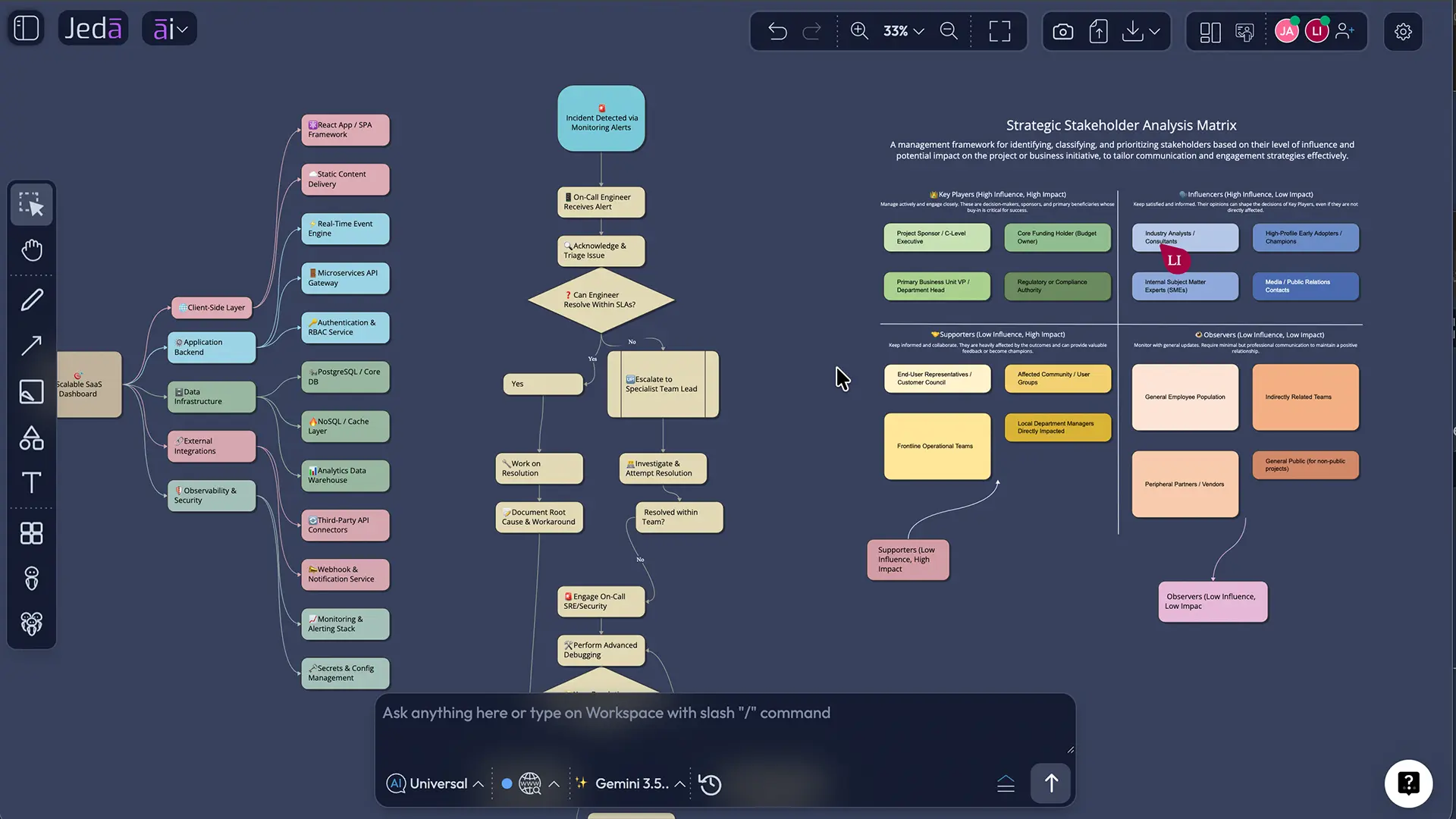
For MBA cohorts, the classroom question should not be, “Did the AI produce something?” It should be, “Can the students explain how the output was built, what they changed, and why they trust or challenge the result?”
That shift is where Jeda.ai becomes useful. It helps instructors turn AI use into visible learning activity.
The core learning tools available in Jeda.ai
Jeda.ai is useful for MBA teaching because its tools map to how business students already learn: cases, frameworks, group analysis, discussion, visual explanation, evidence review, and presentation.
- AI Workspace
A shared canvas where MBA cohorts can organize prompts, case notes, visuals, frameworks, outputs, and instructor feedback in one place.
- AI Whiteboard
A collaborative teaching surface for mapping ideas, building case logic, adding comments, and guiding live classroom discussion.
- Visual frameworks
Students can generate and edit structured outputs such as matrices, mind maps, flow diagrams, infographics, and strategy boards.
- Document Insight
Course documents, reports, notes, and case materials can become structured visual summaries, diagrams, and analysis outputs.
- Data Insight
Classroom datasets can become charts, visual summaries, tables, and discussion-ready analytical views.
- Agentic AI
Students can create Skills, configure specialist Agents, assemble Agent Teams, review Orchestrator plans, and run structured workflows.
These tools are strongest when used together. A professor can start with a course-safe case, ask students to produce a visual breakdown, compare reasoning across models, assemble an Agent Team, review the Orchestrator plan, and use the output as debate material.
That is much closer to real AI-supported work: collaborative, structured, evidence-aware, and full of judgment calls.
AI Workspace for shared case learning
The AI Workspace is the main learning environment. It gives MBA cohorts a place to keep the whole case process visible: the problem statement, source material, student notes, generated frameworks, instructor feedback, and final synthesis.
For instructors, this solves a common classroom problem. Group work often disappears into scattered documents, screenshots, message threads, and last-minute slide edits. Jeda.ai keeps the analysis on a shared canvas. Students can point to the exact object, node, framework section, or assumption they are discussing.
In practical teaching terms, the AI Workspace can support:
- Case warmups before class
- Live framework building during class
- Small-group analysis
- Instructor-led critique
- Team presentations
- Post-class reflection
- Repeatable assignment workflows
The important part is editability. MBA learning is not supposed to end with the first generated answer. The first output is usually where the real discussion starts.
AI Whiteboard for cohort collaboration
The AI Whiteboard is where a cohort can build together in real time. Students can add ideas, organize themes, create visual structures, connect concepts, and refine the board as the discussion develops.
This is especially useful for teaching innovation staff and program leaders who want AI to support active learning rather than passive answer collection. A shared board makes participation easier to see. It also makes gaps easier to catch.
For example, one team might focus heavily on learner needs while another focuses on delivery constraints. The instructor can guide the cohort toward a stronger and more balanced discussion because the thinking is visible. No mystery box. No “trust us, we discussed it.”
The AI Whiteboard also supports the social side of MBA learning. Cohorts learn by challenging each other’s assumptions. When the analysis sits on a shared canvas, disagreement becomes easier to manage because students can debate the structure, not just the person behind the answer.
AI Recipes and visual frameworks for classroom-ready structure
MBA courses rely heavily on frameworks. Jeda.ai’s AI Recipes help instructors and students turn those frameworks into editable classroom visuals.
Instead of drawing the same structure from scratch every semester, instructors can use Jeda.ai to generate a visual starting point and then let students refine it. This protects time for the actual discussion.
Useful classroom outputs include:
- Matrices for structured comparison
- Mind maps for idea expansion
- Flow diagrams for process reasoning
- Infographics for synthesis
- Document-based summaries
- Data-backed visual analysis
- Decision logic maps
- Presentation-ready case boards
The point is not to make every student board look pretty. Pretty is nice. Useful is better.
The value is that students learn to move from raw material into structured thinking, then from structured thinking into a defensible classroom explanation.
Document Insight for case materials and reading packs
Document Insight helps MBA cohorts convert uploaded course material into visual structures. Students can use it to summarize documents, identify themes, create maps, generate matrices, or turn long reading material into discussion-ready outputs.
For professors, this can support pre-class preparation and in-class analysis. For students, it creates a bridge between reading and reasoning.
A generic classroom workflow might look like this:
- Upload a course case, article, report, lecture note, or assignment brief.
- Select the output format, such as Matrix, Mindmap, Flowchart, or Text.
- Ask Jeda.ai to extract the relevant structure.
- Review and edit the output on the canvas.
- Use the visual as the basis for class discussion.
This keeps the workflow flexible enough for different MBA courses while still giving students a repeatable method.
Data Insight for classroom datasets
Data Insight helps students work with CSV or spreadsheet-style materials and convert them into visual analysis outputs. It can generate charts, summary tables, and structured insights that students can discuss and refine.
A professor might give students a fictional dataset about student preferences for an evening cohort learning service. Students can upload the file, generate a visual summary, identify patterns, and build recommendations for improving the learning experience.
That keeps the exercise safe, clean, and useful. No sensitive data. No real organization. No copyright headache wearing a fake mustache.
Multi-LLM reasoning for AI literacy
Multi-LLM reasoning is one of the strongest teaching tools in Jeda.ai because it helps students see that AI outputs are not all the same.
With Multi-LLM workflows, students can compare different model responses and use an aggregation layer to evaluate or synthesize the results. This is useful for AI literacy because students learn to ask better questions:
- Where did the models agree?
- Where did they disagree?
- Which answer made unsupported assumptions?
- Which answer was clearer but less complete?
- Which answer missed the teaching goal?
- What should the human reviewer challenge?
This is where AI literacy gets practical. Students stop treating AI output as a finished answer and start treating it as material to evaluate.
Recent AI literacy research highlights the importance of understanding, using, evaluating, creating with, and responsibly applying AI systems. Jeda.ai supports that kind of practice because students can work directly with prompts, outputs, comparisons, visual structures, and reviewable reasoning artifacts.
Agentic AI for specialist learning workflows
The new Agentic AI features give MBA instructors a way to teach structured AI-supported work through specialist roles.
In Jeda.ai, instructors and students can create Skills, create or select specialist Agents, assemble Agent Teams, delegate a problem, review the Orchestrator plan, approve or regenerate the plan, and then let the workflow run.
This matters for MBA cohorts because it turns case analysis into a visible workflow. Students can see which expert roles were included, which Skills guided them, what sequence the Orchestrator proposed, and where a missing capability might create a weak result.
A simple teaching version could include:
- Strategy Analyst
- Operations Analyst
- Customer Insight Analyst
- Research Analyst
- Learning Experience Synthesizer
The exact roles depend on the course and assignment. The important part is that students learn how to design the workflow before asking AI to produce the output.
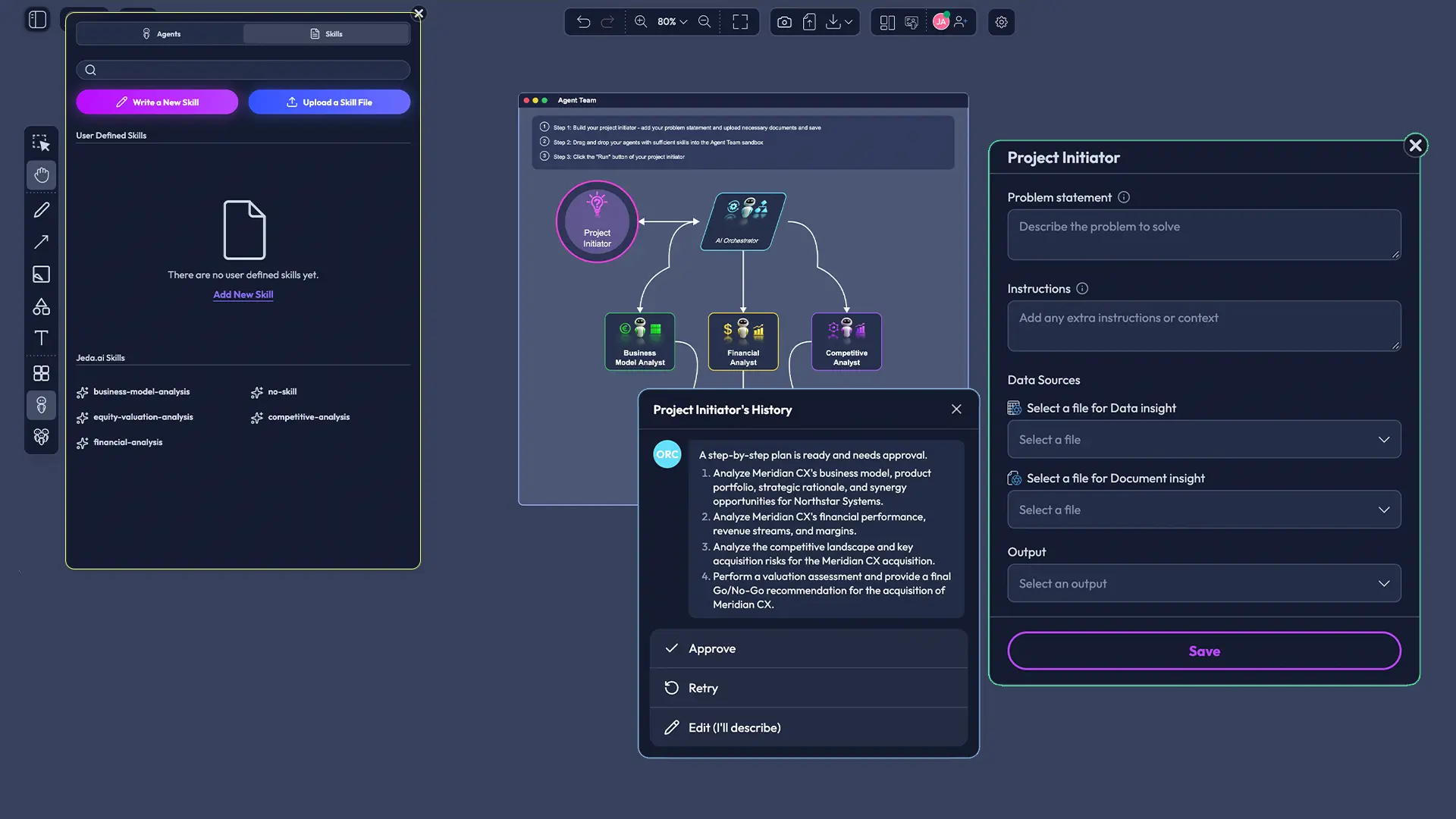
Agentic AI is not useful because it sounds futuristic. It is useful because it makes workflow design teachable.
Instead of asking, “Did the AI give a good answer?” the instructor can ask better questions:
- Which specialist Agents should be included?
- What Skill should guide each Agent?
- Is the Orchestrator plan logical?
- What perspective is missing?
- What should be reviewed before approval?
- Which output should be challenged?
- What evidence supports the final recommendation?
That is a stronger learning loop.
How to use Jeda.ai for an MBA cohort learning activity
Here is a generic teaching workflow that works for MBA instructors, program leaders, teaching innovation staff, and business school professors.
- Choose the learning objective
Start with the skill students should practice: case framing, learner insight, operational reasoning, AI literacy, group critique, or structured recommendation building.
- Prepare the input material
Use a course-safe business problem, short case note, fictional dataset, reading pack, or instructor-written assignment brief.
- Open the Jeda.ai workspace
Create a shared workspace for the cohort or class group. Keep the Prompt Bar visible and prepare the canvas for visual work.
- Select the right command
Choose Matrix, Mindmap, Flowchart, Document Insight, Data Insight, Infographic, or another relevant command from the Prompt Bar.
- Generate the first visual structure
Ask Jeda.ai to structure the case material into an editable output. Treat this as a first draft for discussion, not the final answer.
- Use AI+ for deeper development
After the initial visual is generated, use AI+ to extend or deepen selected sections when more detail is needed. Review the additions before using them.
- Use Vision Transform when the format should change
Select an existing visual or section and use Vision Transform to convert it into another format, such as turning a mind map into a matrix or a summary into a flow diagram.
- Build an Agent Team for complex cases
For deeper assignments, create or select specialist Agents, assign Skills, place them into an Agent Team, and delegate the problem.
- Review the Orchestrator plan
Before running the Agent Team workflow, review the Orchestrator plan. Approve, reject, or recreate the plan based on the assignment goal.
- Discuss the output in class
Use the final board or structured output as classroom material. Ask students to critique assumptions, missing perspectives, evidence quality, and recommendation logic.
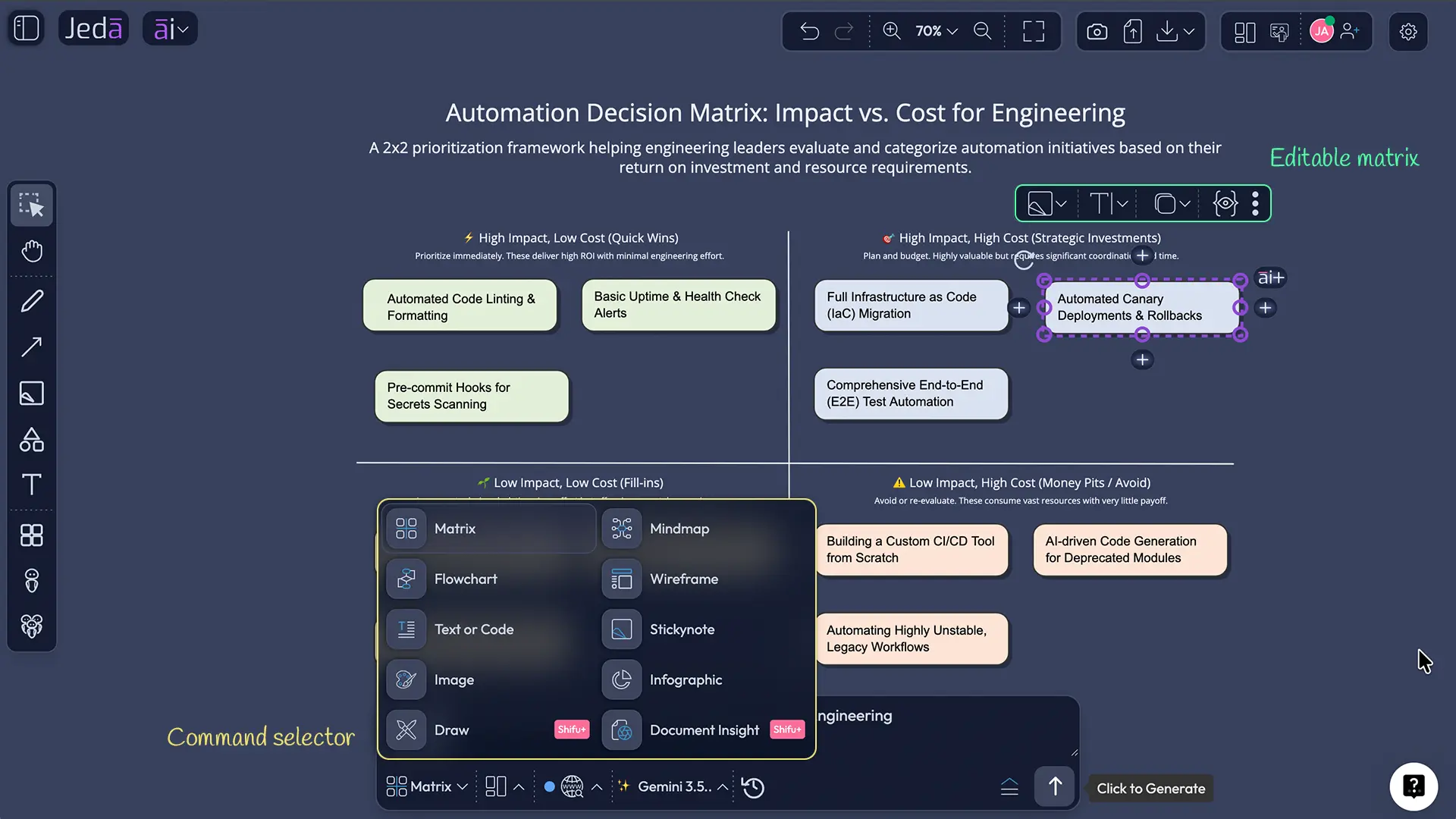
Example prompt for an MBA cohort activity
Use this as a safe, generic classroom prompt. It avoids sensitive sectors, known organizations, and restricted examples.
This prompt works because it is grounded in a familiar learning environment and does not require sensitive data. It also gives students room to debate trade-offs without turning the class into a guessing game about a real organization.
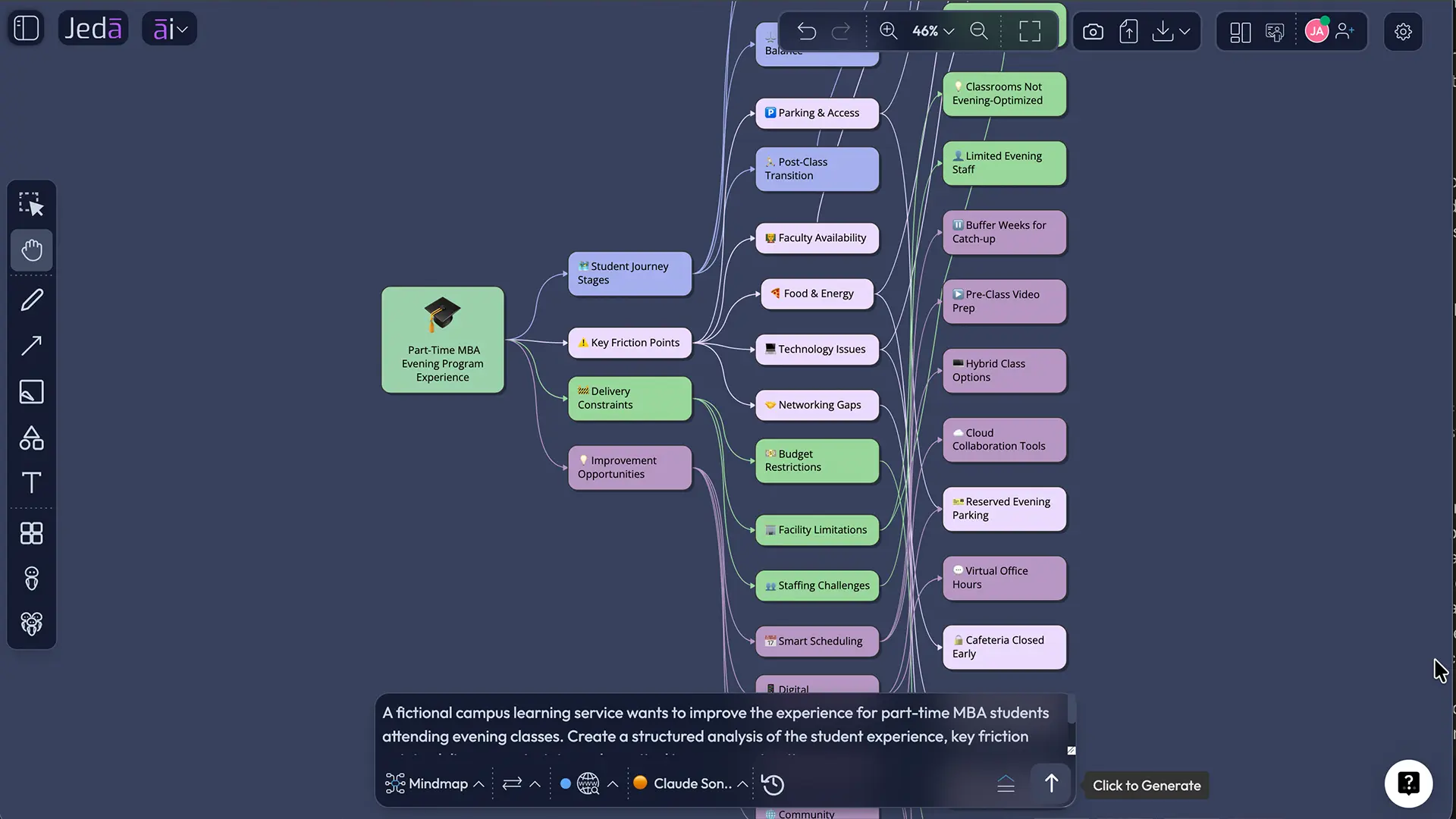
After generating the first output, students can edit the diagram, add missing assumptions, convert the analysis into a matrix, text, or build an Agent Team to examine the case through different expert perspectives.
Suggested classroom formats
Jeda.ai can fit several MBA teaching formats without forcing every course into the same pattern.
1. Live case breakdown
The instructor presents a fictional or course-safe case. Students use Jeda.ai to create a first visual structure, then the class critiques the assumptions and improves the board.
2. Small-group Agent Team activity
Each group builds a different Agent Team for the same problem. The class compares not only the outputs, but the team design. This is where students learn that workflow design changes the result.
3. Reading-to-board assignment
Students upload a reading pack or instructor-written brief and convert it into a visual map, matrix, or structured summary. The grading focus can be on interpretation and critique, not raw summarization.
4. AI literacy lab
Students run a prompt through multiple models, compare outputs, and identify differences in reasoning. The assignment asks them to explain what they accepted, rejected, revised, and why.
5. Presentation synthesis
Students turn a completed board into a clean explanation for class presentation. This helps them practice the bridge between analysis and communication.
What program leaders should look for
Program leaders and teaching innovation staff usually care about more than a single class session. They need repeatable teaching models.
Jeda.ai is worth evaluating through four practical questions:
- Can instructors use it without rebuilding the course from scratch?
- Can students collaborate in a way that is visible and assessable?
- Can the tool support responsible AI literacy rather than hidden AI usage?
- Can outputs become teachable artifacts, not just private student shortcuts?
The answer is strongest when Jeda.ai is used as a structured learning environment: one shared workspace, clear inputs, visible reasoning, editable outputs, and instructor-controlled Agentic AI workflows.
Common mistakes to avoid
Do not make Jeda.ai a shortcut machine. That weakens the learning.
Avoid these patterns:
- Asking for final answers without reviewing assumptions
- Letting students submit AI outputs without edits or reflection
- Treating one model response as automatically correct
- Skipping the Orchestrator review step in Agentic AI workflows
- Giving students vague prompts with no learning objective
- Using source material without permission
- Grading polish instead of reasoning quality
The better approach is simple: make the process visible, make the assumptions discussable, and make students defend what they keep.
Frequently Asked Questions
- What are the learning tools available in Jeda AI for MBA cohorts?
- The main learning tools include the AI Workspace, AI Whiteboard, AI Recipes, visual frameworks, Document Insight, Data Insight, Multi-LLM reasoning, Vision Transform, AI+, and Agentic AI workflows with Skills, Agents, Agent Teams, and Orchestrator planning.
- How can MBA instructors use Jeda.ai in class?
- MBA instructors can use Jeda.ai to structure case discussions, convert course materials into visual frameworks, support cohort collaboration, compare AI outputs, review Agentic AI workflow plans, and turn student reasoning into editable classroom artifacts.
- What makes Jeda.ai different from a generic AI answer tool for MBA teaching?
- Jeda.ai keeps the learning process visible. Instead of producing only text responses, it helps students build editable visuals, compare reasoning, collaborate on a shared canvas, review workflow plans, and discuss assumptions before accepting an output.
- Can students build AI agent teams in Jeda.ai?
- Yes. Students and instructors can create or select specialist Agents, assign Skills, assemble Agent Teams, delegate a problem, review the Orchestrator plan, approve or recreate it, and use the output for classroom discussion.
- Does Jeda.ai replace instructor judgment?
- No. Jeda.ai is strongest when instructors use it to make student reasoning easier to inspect and critique. Human review remains central, especially when approving Agentic AI workflow plans and evaluating final outputs.
- Can Jeda.ai support AI literacy in business schools?
- Yes. Jeda.ai supports practical AI literacy by helping students compare model responses, evaluate assumptions, structure prompts, review outputs, and understand how specialist AI workflows are designed and controlled.
- What kind of assignments work well with Jeda.ai?
- Good fits include case analysis, group strategy boards, reading-to-visual assignments, process mapping, learner insight exercises, innovation workshops, cohort presentations, AI literacy labs, and Agent Team workflow design activities.
- How should professors assess student work created in Jeda.ai?
- Professors can assess the clarity of problem framing, quality of assumptions, use of evidence, structure of the visual output, critique of AI responses, Agent Team design, and the student’s explanation of what they accepted or revised.
Sources and further reading
- [1]
AACSB (2026) . “A Framework for Artificial Intelligence in Business Education” AACSB Insights.
View Source ↗ - [2]
Nkomo, L. M. and colleagues (2026) . “The AI-augmented collaborative learning model: A conceptual framework for integrating generative AI in business and management education” The International Journal of Management Education.
View Source ↗ - [3]
Reicho, M. and colleagues (2026) . “Generative AI literacy across education and business: competencies, obstacles, and benefits” International Journal of Educational Technology in Higher Education.
View Source ↗ - [4]
Jeda.ai Research Team (2026) . “Agentic AI for MBA Instructors: Build AI Teams, Teach Better Business Reasoning” Jeda.ai Release Updates.
View Source ↗ - [5]
Jeda.ai Research Team (2026) . “AI Workspace Update: Smarter Canvas Control, Web-Grounded Files, Vision Support, and Faster Flow” Jeda.ai Release Updates.
View Source ↗
Bring AI-native learning into your MBA cohort
Use Jeda.ai to help students build visible reasoning, collaborate on business cases, compare AI outputs, and manage Agentic AI workflows with instructor control.
Start with Jeda.ai