Post Topics with AI should do more than rescue you from a blank content calendar. The useful version turns one industry, one audience, and one point of view into a connected system of blog ideas and social media angles you can actually publish. Jeda.ai brings that process into an AI Workspace where the topic list stays editable, reviewable, and visible beside the rest of your campaign planning—not buried in another disposable chat thread.
That distinction matters. Content teams already have access to more generated ideas than they can use. The bottleneck is deciding which ideas are relevant, which deserve a long-form article, which should become short-form posts, and which are merely polished noise. Post Topics with AI works best when AI supplies range while a human supplies judgment.
What are Post Topics with AI?
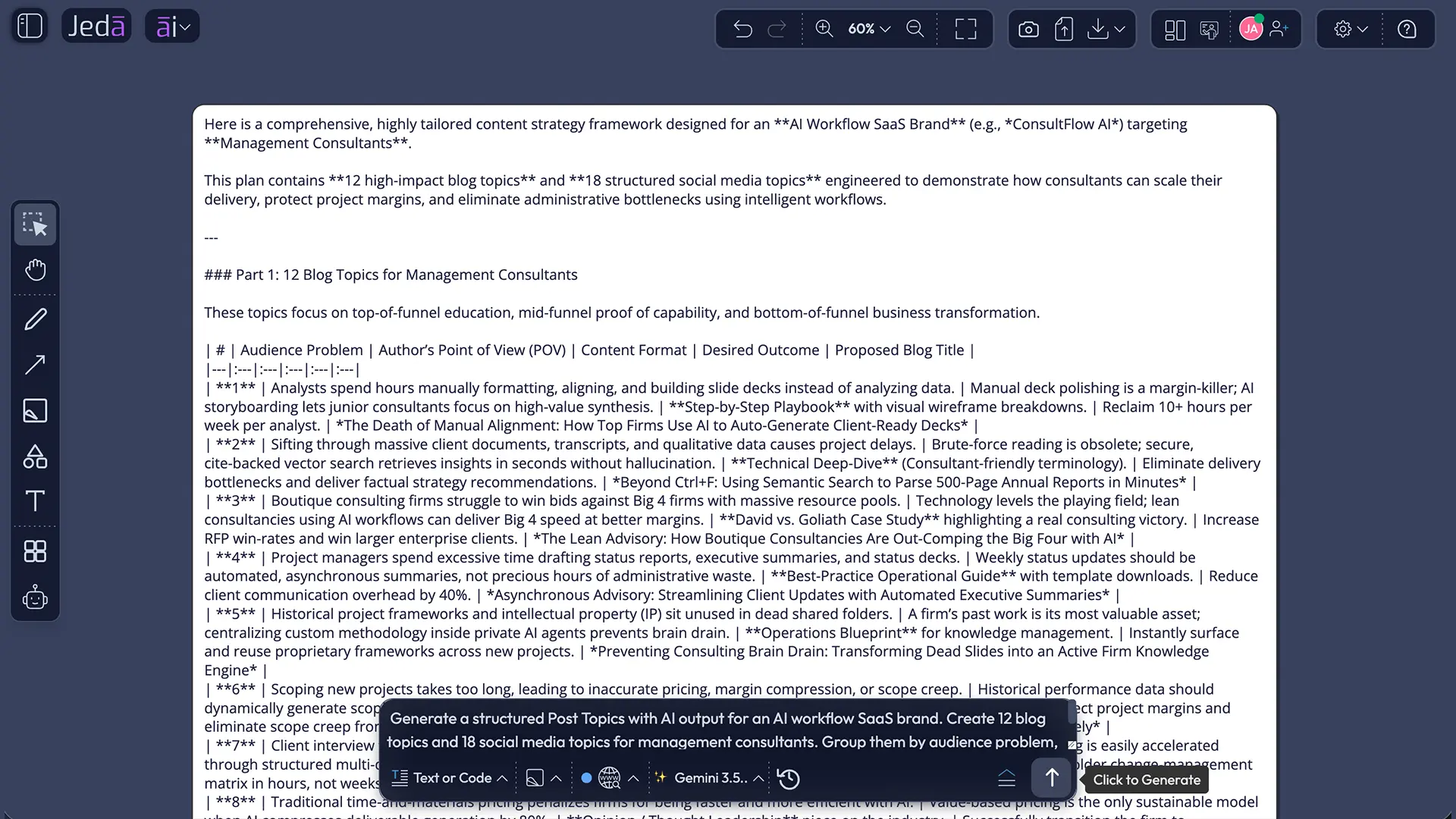
Post Topics with AI are AI-generated subject ideas for social media posts and blog content, shaped by your industry, audience, author perspective, requested quantity, and language. In Jeda.ai, the Post Topics Writer recipe collects those inputs and returns an editable preview as either a Document or Text output on the canvas.
The recipe is intentionally broader than a blog-title generator. A blog topic usually needs enough depth for search intent, examples, supporting evidence, and a clear reader outcome. A social topic may need a sharper opinion, a timely observation, a conversation starter, or a compact lesson. Treating both formats as identical creates awkward results: blog ideas that are too thin and social ideas that sound like article titles wearing tiny hats.
Jeda.ai’s Post Topics recipe helps you start from the shared strategic layer: what the audience cares about and what the author can credibly say. From there, you can edit, group, format, and refine the results inside the same AI Whiteboard. The wider Visual AI environment also connects writing with mind maps, matrices, diagrams, and more than 300 AI Recipes and strategic frameworks when the content plan needs deeper structure.
This page focuses on the Post Topics Writer recipe for both social media and blogs. For a blog-only matrix workflow, see Blog Post Ideas with AI. For broader writing workflows, explore the Jeda.ai AI Writer.
Why Post Topics with AI need a system, not a longer list
Post Topics with AI become valuable when they improve decisions, not merely output volume. A list of 100 generic ideas can feel productive for five minutes and become shelfware by lunch. A smaller, better-structured set can anchor a month of useful publishing.
Content Marketing Institute’s 2026 research shows the tension clearly. Among B2B marketers using AI for content creation, 87% reported improved productivity, yet only 58% reported improved content quality and 39% reported improved content performance. Faster production is real. Better thinking is not automatic.
Google’s people-first guidance lands on the same principle from a search perspective: content should serve an intended audience, demonstrate real expertise, and leave the reader feeling they achieved their goal. Sprout Social’s 2026 content strategy research adds the human side of the argument—audiences want brands to prioritize human-generated content while using AI for insight and process efficiency. The lesson is blunt: use AI to widen the option set, then bring human taste, experience, and accountability back into the room.
- Audience relevance
Generate ideas around real audience tensions, questions, and desired outcomes instead of broad industry labels.
- Cross-channel range
Develop blog topics and social media angles from the same strategic theme without forcing identical formats.
- Author credibility
Use the writer's role or perspective to produce topics the named author can defend with experience.
- Current context
Set Web Search to Auto or On when trends, recent events, or current market shifts should shape the ideas.
- Model comparison
Use one, two, or three reasoning models and optionally aggregate their outputs into one consolidated result.
- Editable output
Revise the generated preview manually and apply text formatting directly after generation.
What inputs make Post Topics with AI more useful?
The mandatory field is Industry or Niche. That field defines the territory, but it should be specific enough to guide meaningful topic selection. “Technology” is vague. “AI workflow software for management consultants” gives the model something to work with.
The optional fields determine whether the result feels generic or publishable:
- Number of Topics controls the size of the idea set. Request enough variety to compare, but not so many that review becomes a second job.
- Target Audience defines who should find the topics relevant. Name a role, situation, maturity level, or buying stage when possible.
- Who is writing the topics establishes the author’s perspective. A founder, product marketer, consultant, engineer, and instructor should not produce the same angles from the same niche.
- Output Language controls the response language, with English as the default.
A strong input bundle might read like this: Industry or Niche: “AI collaboration software for boutique consulting firms.” Number of Topics: “20.” Target Audience: “Independent strategy consultants and small consulting teams.” Who is writing: “A former management consultant who now builds client-delivery systems.” Output Language: “English.”
That prompt has edges. Good. Edges create specificity.
How to generate Post Topics with AI in Jeda.ai
The Post Topics recipe is available in the Writer tab without a sub-recipe or category. You can reach it by browsing the Writer recipes or by searching for it directly. Both methods open the same recipe form and use the same fields.
Method 1: Navigate through the Writer tab
Use this method when you want to browse the Writer recipe library and see nearby writing workflows.
- Open a Jeda.ai workspace
Sign in at go.jeda.ai and open an existing workspace or create a new one.
- Open the AI Menu
Click the ai∨ menu in the top-left corner of the workspace.
- Choose Writer
Select the Writer tab. The Post Topics recipe appears as a standalone Writer recipe, with no sub-category required.
- Select Post Topics
Open the Post Topics recipe for social media and blog topic generation.
- Enter the required niche
Fill in Industry or Niche. Add Number of Topics, Target Audience, Who is writing the topics, and Output Language when useful.
- Configure intelligence options
Choose one, two, or three reasoning models. If multiple models are selected, optionally enable Aggregate and choose an additional model to consolidate the strongest results.
- Set Web Search and context
Choose Auto, On, or Off for Web Search. Use Clear Chat Context when previous prompts should not influence the new topic set.
- Choose Document or Text
Select Document for a styled preview or Text for a simpler text object, then click Generate.
Method 2: Search for the recipe directly
Use the search route when you already know the recipe name and want the shortest path.
- Open the AI Menu
Click ai∨ in the top-left corner to open the recipe panel.
- Use the recipe search
Type Post Topics into the search bar at the top of the AI Recipes panel.
- Open the matching recipe
Select Post Topics from the search results. You do not need to choose a category or sub-recipe.
- Complete the form
Enter the mandatory Industry or Niche field and add any useful optional fields.
- Select models and aggregation
Run one model for speed, compare two or three models for range, or enable Aggregate to create one consolidated result.
- Generate and edit
Choose Document or Text, generate the preview, then manually revise wording and apply available text formatting on the canvas.
How should you configure models, Web Search, and chat context?
The settings beneath the form are not decoration. They change the character of the output.
A single reasoning model is usually enough for a straightforward niche and a modest topic count. Two or three models make more sense when you want varied perspectives—perhaps one model produces practical how-to ideas while another finds sharper opinion angles. When multiple models are active, the Aggregate option lets an additional model compare the candidates and generate a consolidated output. That is useful when you want one clean deliverable instead of parallel drafts.
Web Search has three modes:
- Auto lets Jeda.ai decide when current information is needed.
- On is better for trend-led topics, current events, recent product changes, seasonal moments, or fast-moving industries.
- Off fits evergreen planning where live context would add noise.
Use Clear Chat Context when you are switching brands, industries, audiences, or campaigns. Old context can quietly contaminate a new output. That is not “memory”; sometimes it is just yesterday’s leftovers wearing a strategy badge.
How do you choose the strongest AI-generated topics?
The best Post Topics with AI output is not the set with the cleverest wording. It is the set that gives the author a credible claim, gives the audience a reason to care, and gives the format enough substance to work.
Score each idea against six questions:
- Relevance: Does this solve a real audience problem or answer a live question?
- Specificity: Could the topic belong to this brand, author, and niche—or could anyone publish it unchanged?
- Authority: Can the writer support it with experience, evidence, examples, or a defensible opinion?
- Format fit: Is it deep enough for a blog, sharp enough for social, or adaptable to both?
- Novelty: Does it add a useful angle rather than restating the first page of search results?
- Business value: Does it support awareness, trust, evaluation, activation, retention, or another meaningful goal?
| Weak signal | Strong signal | Why it matters | |
|---|---|---|---|
| Audience | Everyone interested in marketing | B2B content leads building a lean editorial system | Sharper audience context creates more usable topics |
| Angle | AI content tips | Why faster ideation can make content strategy worse | A clear tension creates a reason to read |
| Evidence | General advice | Research, examples, workflow data, or first-hand lessons | People-first content needs substance, not fluent filler |
| Channel | Same title everywhere | Blog thesis plus platform-specific social angles | Each channel rewards a different depth and behavior |
LinkedIn’s thought leadership guidance says strong content should be accurate, digestible, shareable, actionable, and relevant—especially to decision-makers. That is a better review checklist than “Would this get clicks?” Clicks matter. Credibility compounds.
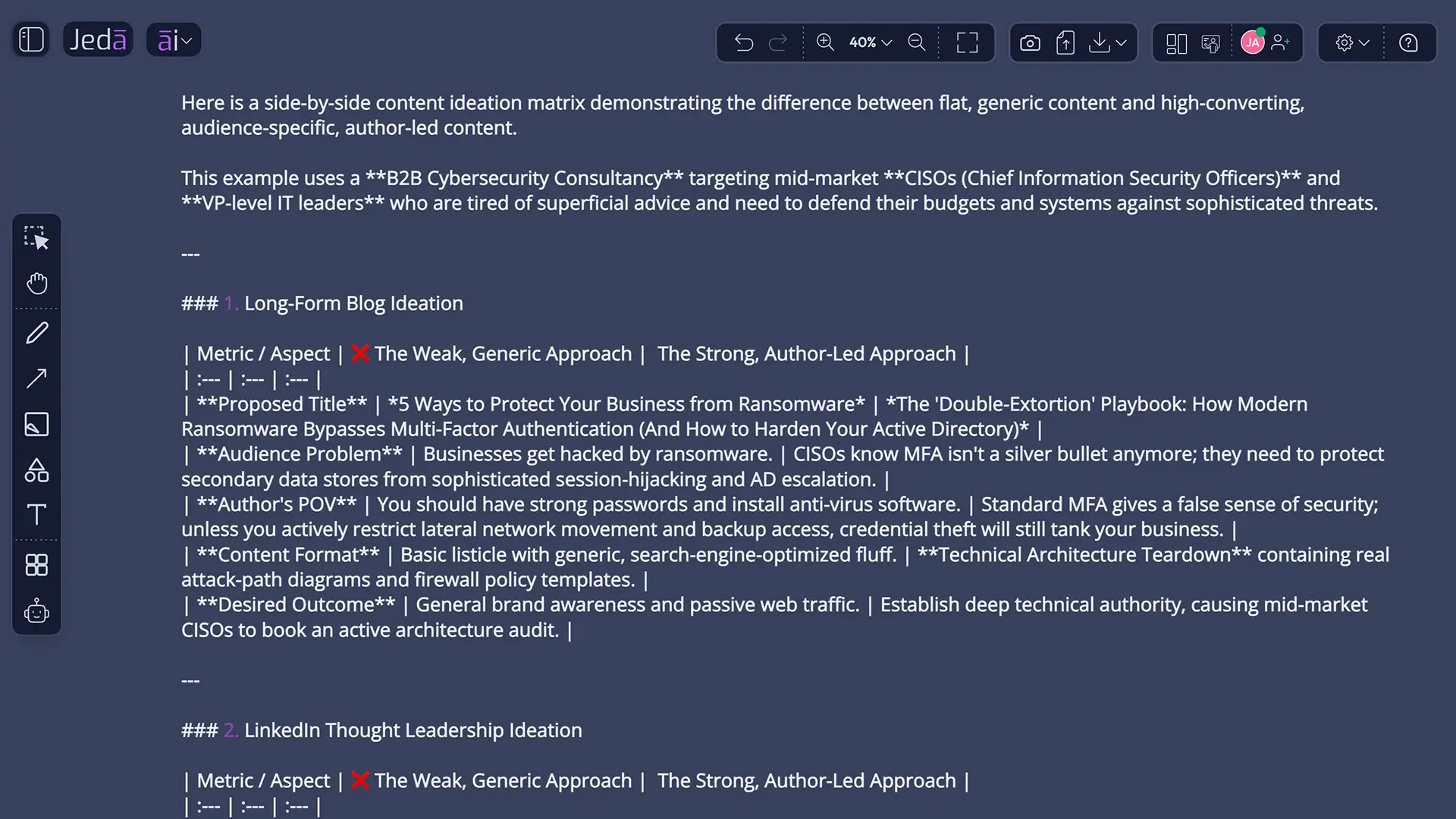
What can a strong cross-channel topic set look like?
Imagine a cybersecurity consultancy using Post Topics with AI. The niche is “cloud security for mid-market SaaS companies.” The target audience is CTOs and engineering leaders. The writer is a hands-on cloud security consultant.
A weak generator may return “Top Cloud Security Trends,” “Why Cybersecurity Matters,” and “Five Tips to Protect Your Data.” Nothing is technically wrong. Nothing is particularly useful either.
A stronger topic system could produce:
- Blog: “The hidden IAM debt that appears after a SaaS team doubles in size”
- LinkedIn: “Most access-control failures are org-chart failures before they are security failures”
- Blog: “A practical decision framework for choosing between native cloud security and third-party tooling”
- Social thread: “Seven questions we ask before recommending another security platform”
- Blog: “Why annual cloud-security reviews miss the moments when risk actually changes”
- Short post: “Your security stack can be compliant and still be operationally fragile”
The blog ideas provide room for evidence and explanation. The social ideas expose a tension quickly and invite response. Both come from the same expertise. That is the cross-channel advantage.
How do Document and Text outputs differ?
Document and Text control how the generated preview appears on the Jeda.ai canvas. Document places the content inside a styled container with a background and border. Text creates a simpler text object without the same document-style decoration.
Neither option generates a .doc or .docx file. It is a preview and working output inside the AI Workspace. After generation, you can edit the wording manually and use the available rich-text formatting controls, including font, size, color, bold, italic, underline, alignment, and links where supported.
This is more useful than it sounds. Topic generation is rarely correct in one pass. You may want to rewrite a generic title, combine two ideas, remove a weak angle, reorder sections, or mark topics for different channels. Keeping the result editable on the AI Whiteboard turns the recipe into a planning surface rather than a one-shot answer box.
Best practices for generating post topics that stay useful
Start with audience tension, not a broad theme. “Leadership” is a theme. “Newly promoted engineering managers struggling to delegate technical decisions” is a tension. The second one produces better content because it points toward a real situation.
Separate evergreen and timely ideas. Evergreen topics build a durable library. Timely topics respond to current events, product changes, seasonal shifts, or emerging debates. Turn Web Search On for the timely set and keep it Off when you want stable foundational content.
Ask for a deliberate mix of formats. For example: how-to, contrarian view, mistake analysis, comparison, case study, checklist, question-led post, and data interpretation. Variety should come from audience need, not from spinning one headline eight ways.
Use multiple models when the cost of sameness is high. A founder building a thought-leadership calendar may benefit from contrasting perspectives. A local business planning ten straightforward educational posts may not need the extra complexity.
Common mistakes to avoid
Using an industry label as the entire brief. “Healthcare” or “SaaS” gives the model almost no useful constraint. Add the audience, business situation, and author perspective.
Requesting a giant list before defining quality. One hundred ideas can hide weak reasoning behind volume. Decide what a useful topic must accomplish before asking for more of them.
Confusing a topic with a finished headline. A topic is the strategic subject and angle. The final headline may change after keyword research, evidence gathering, platform adaptation, or editorial review.
Publishing unreviewed AI output. Google does not ban AI-assisted content, but it does reward original, reliable, people-first work. A generated idea is a starting point, not borrowed authority.
Using the same topic wording on every channel. A blog needs depth and structure. LinkedIn may need a point of view. Instagram may need a visual narrative. X or Threads may need compressed argument and sequence. Preserve the idea; adapt the expression.
Forgetting the author. Thought leadership without a credible thinker behind it is just thought-shaped marketing.
How do you turn Post Topics with AI into a content calendar?
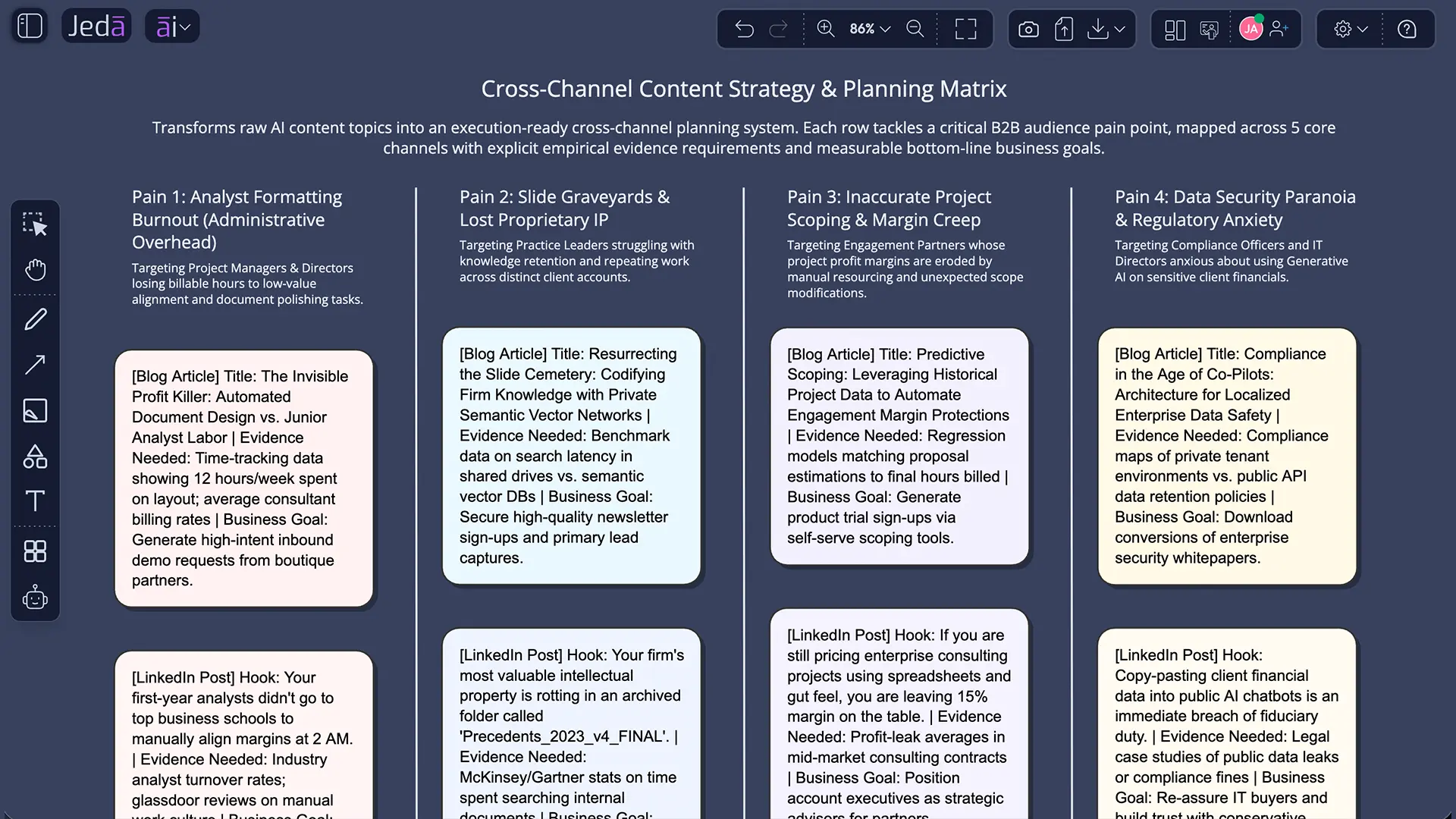
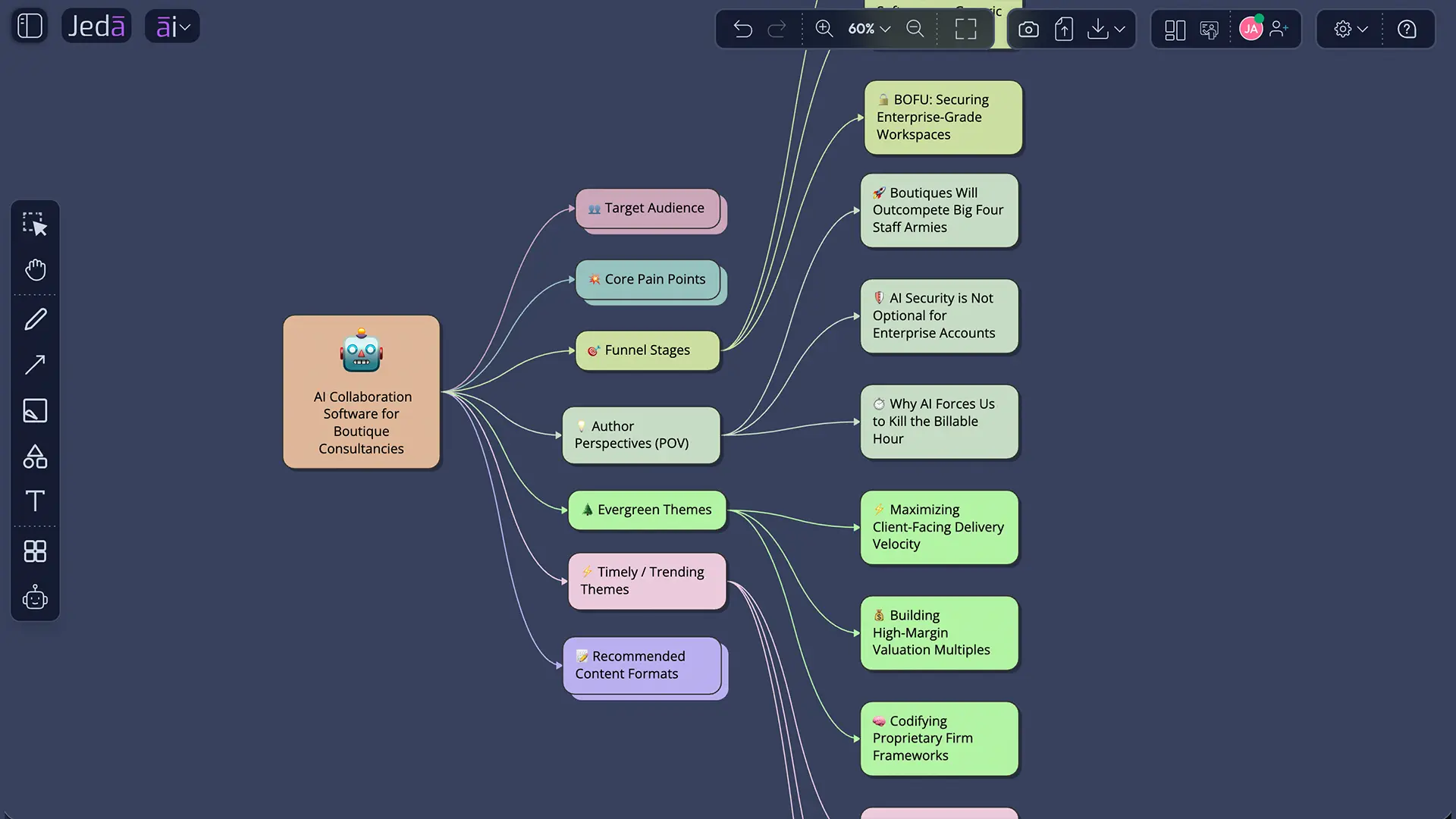
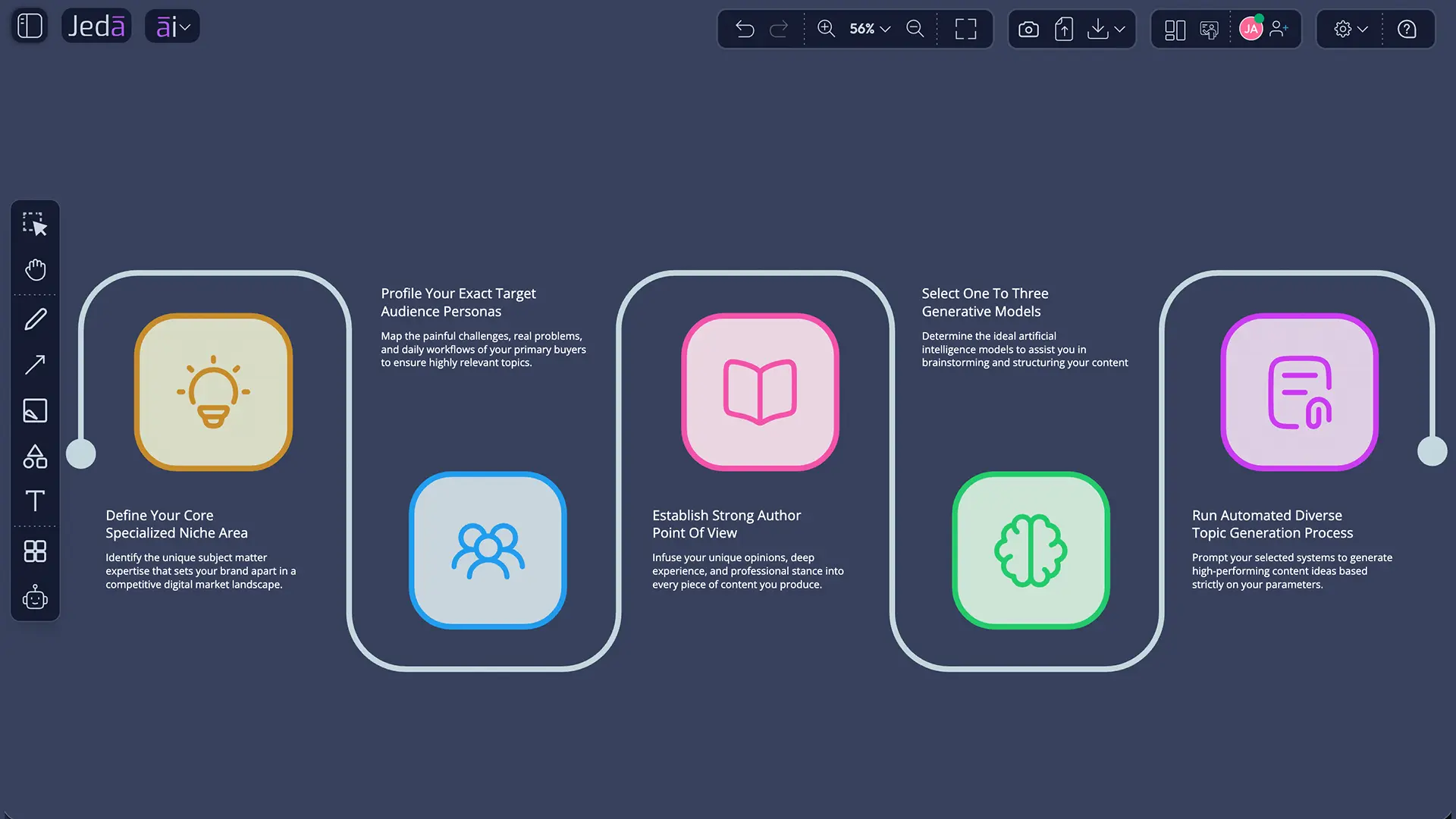
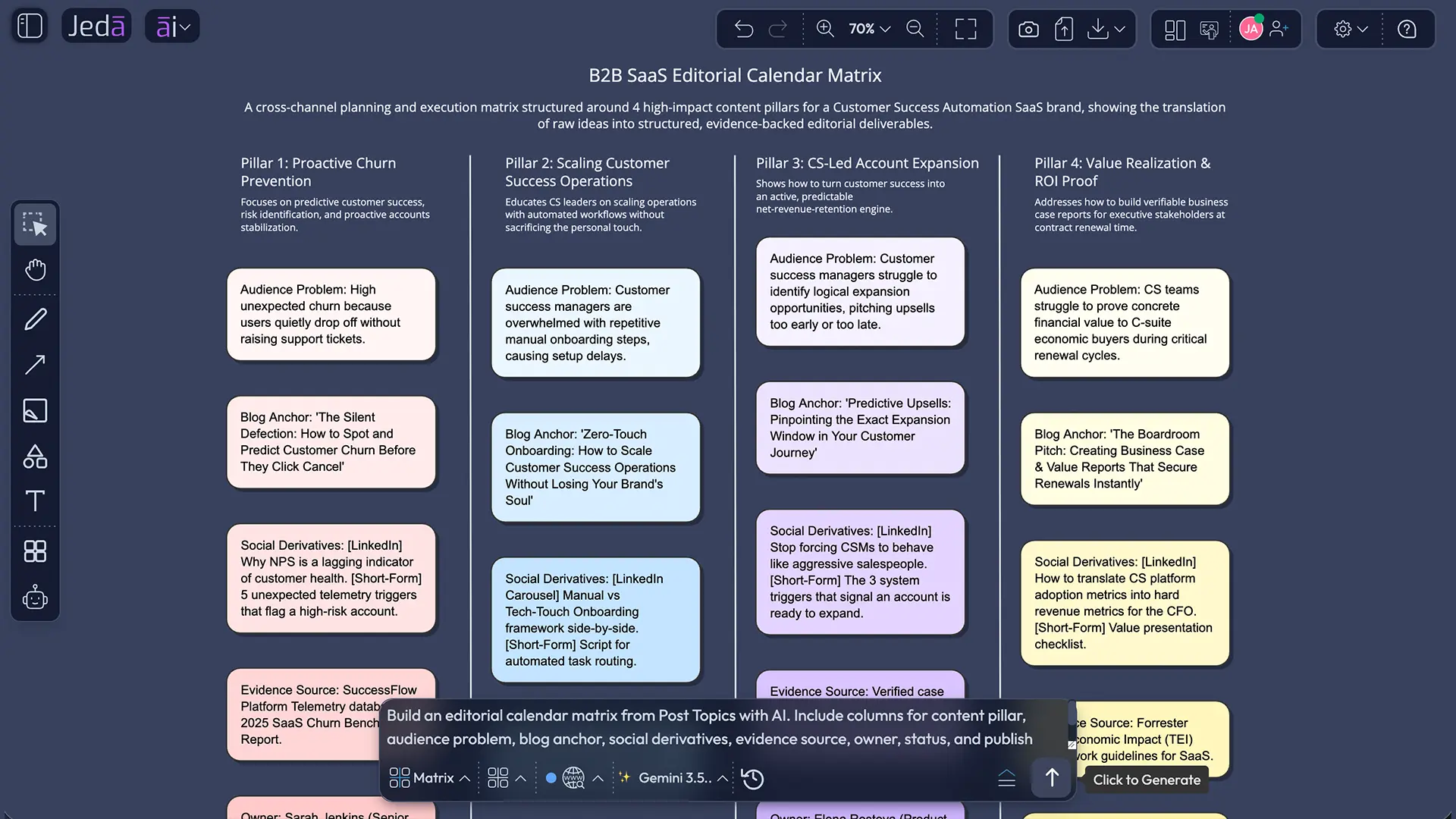
Start by clustering the generated ideas into three to five content pillars. Then label each topic by audience problem, funnel stage, format, channel, evidence needed, and next action. This turns ideation into an operating plan.
A useful sequence looks like this:
- Generate a broad but constrained topic set with the Writer recipe.
- Remove duplicates and ideas the author cannot support.
- Group the survivors into content pillars.
- Select one long-form anchor topic per pillar.
- Derive social angles from each anchor: opinion, lesson, question, example, myth, or behind-the-scenes view.
- Assign owner, channel, evidence, status, and publication date.
- Review performance and feed the lessons into the next generation round.
You can keep the writing output beside a mind map, content matrix, or campaign diagram on the same AI Whiteboard. That is where Jeda.ai’s AI Workspace becomes more than an idea generator. It becomes the shared place where topics are judged, shaped, and connected to actual work.
Frequently Asked Questions
- What is the Post Topics recipe in Jeda.ai?
- The Post Topics recipe is a Writer workflow that generates topic ideas for social media posts and blogs. You provide an industry or niche, then optionally add the number of topics, target audience, author perspective, and output language before generating an editable Document or Text preview.
- What information is required to generate Post Topics with AI?
- Industry or Niche is the only mandatory field. More specific inputs usually produce better results, so add the target audience, who is writing, desired number of topics, and output language when those details matter to the campaign.
- Can Post Topics with AI generate both blog and social media ideas?
- Yes. The recipe context covers post topics for social media and blogs. For stronger results, ask for separate sections or labels so long-form blog ideas and platform-friendly social angles are not treated as identical content formats.
- How many reasoning models can I use at once?
- You can use one, two, or three reasoning models at a time. When multiple models are selected, you can enable Aggregate and choose an additional aggregation model to evaluate the candidate outputs and generate one consolidated result.
- What do Auto, On, and Off mean for Web Search?
- Auto lets Jeda.ai decide when current information is useful, On always brings live web context into generation, and Off relies on the supplied inputs and model knowledge. Use On for trends, recent events, and fast-changing industries; use Off for evergreen planning.
- What does Clear Chat Context do?
- Clear Chat Context resets the AI conversation context for the workspace. Use it before switching to a different brand, niche, audience, or campaign so earlier prompts do not influence the new topic suggestions.
- Does Document output create a Word file?
- No. Document is a styled preview on the Jeda.ai canvas, not a `.doc` or `.docx` export. Text creates a simpler text object. Both outputs can be edited manually and formatted after generation.
- Can I edit the generated topic list?
- Yes. The generated output remains editable in the AI Workspace. You can rewrite topics, reorder ideas, remove weak suggestions, combine duplicates, and apply available text formatting such as font, size, color, emphasis, alignment, and links.
- Should I publish AI-generated topics without review?
- No. AI-generated topics should be reviewed for accuracy, originality, audience relevance, brand fit, and author credibility. Google’s guidance favors helpful, reliable, people-first content regardless of whether AI assisted the process, and audiences still expect human judgment and taste.
- How is Post Topics with AI different from a blog title generator?
- A title generator focuses on headline wording. Post Topics with AI can create a broader cross-channel idea set based on niche, audience, author, quantity, language, model choice, and live web context. The result is a planning input, not merely a list of headlines.
- Can I search for the Post Topics recipe directly?
- Yes. Open the AI Menu and type Post Topics into the recipe search bar. Select the matching Writer recipe, complete the form, configure models and Web Search, choose Document or Text, and generate.
- Who benefits most from the Post Topics Writer recipe?
- Content marketers, social media managers, startup founders, consultants, product marketers, subject-matter experts, agencies, and business leaders can use it to turn a defined niche and audience into a reusable set of blog and social media ideas.
Sources & Further Reading
- [1]
Google Search Central (2025) . “Creating Helpful, Reliable, People-First Content” Google for Developers.
View Source ↗ - [2]
Google Search Central (2023) . “Google Search's Guidance About AI-Generated Content” Google for Developers.
View Source ↗ - [3]
Content Marketing Institute (2025) . “B2B Content and Marketing Trends: Insights for 2026” Content Marketing Institute.
View Source ↗ - [4]
Sprout Social (2026) . “The 2026 Social Media Content Strategy Report” Sprout Social.
View Source ↗ - [5]
LinkedIn Marketing Solutions (2025) . “How to Create Impactful Thought Leadership Content” LinkedIn.
View Source ↗ - [6]
Buffer (2026) . “AI Assistant for Social Media Content Creation” Buffer.
View Source ↗ - [7]
HubSpot (2026) . “Blog Ideas Generator” HubSpot.
View Source ↗ - [8]
Xue, Haochen; Zhang, Chong; Liu, Chengzhi; Wu, Fangyu; Jin, Xiaobo (2024) . “Multi-task Prompt Words Learning for Social Media Content Generation” arXiv.
View Source ↗
Build Better Post Topics with AI
Join over 150,000 professionals using Jeda.ai to turn one niche into editable blog and social media topic systems inside an AI Workspace.
Try the Post Topics Recipe