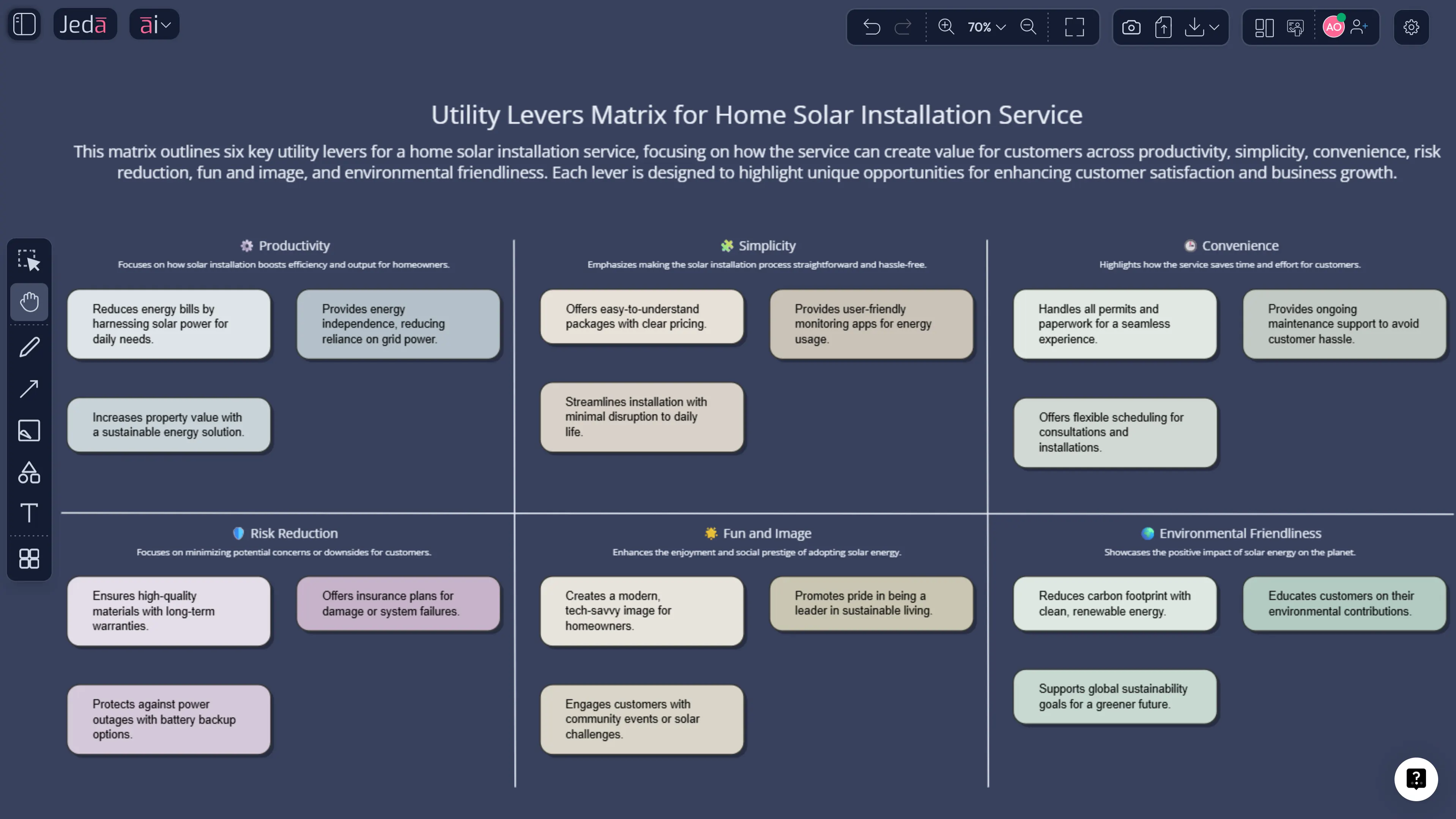
The six utility levers are not a flashy framework. They do not promise instant disruption, clever slogans, or a TED-talk ending. What they offer is something more valuable: a disciplined way to ask how buyers actually gain utility. That makes the framework easy to underestimate and hard to replace. In Jeda.ai, an AI Workspace and AI Whiteboard built for editable strategy, the six utility levers become a practical decision surface rather than a list people nod at and forget.
Within Blue Ocean Strategy, the six utility levers work with the Buyer Experience Cycle to form the Buyer Utility Map. The levers are customer productivity, simplicity, convenience, risk reduction, fun and image, and environmental friendliness. Together with the six stages of the buyer experience cycle, they create thirty-six possible utility spaces. That is the point. The framework widens the search field for value innovation instead of trapping teams inside the usual product-feature conversation.
Because Jeda.ai supports 300+ strategic frameworks inside one Visual AI workspace, you can map the utility levers, test ideas against specific buyer stages, and extend the board with the AI+ button when a promising utility move appears. The platform is used by 150,000+ people who need strategy work to stay editable and collaborative from first draft to final decision.
What are the Six Utility Levers?
The six utility levers are the major ways a company can unlock utility for buyers. Kim and Mauborgne describe them as customer productivity, simplicity, convenience, risk reduction, fun and image, and environmental friendliness. They form the vertical dimension of the Buyer Utility Map.
That setup matters because many offerings compete on narrow assumptions about value. A team may assume buyers mainly want more features, lower price, or stronger branding. The utility-lever lens asks a sharper question: what kind of utility is really missing?
Sometimes the answer is productivity. Sometimes it is simplicity. In other cases, the breakthrough is not more capability but lower perceived risk or better convenience. In established markets, the neglected lever is often where the strategic opening sits.
When you build the framework in Jeda.ai, the levers become editable columns or rows on a shared AI Whiteboard. That lets strategy consultants, founders, product managers, and business leaders inspect where current offerings cluster — and where the category still leaves room on the table.
Why use the Six Utility Levers with AI?
The framework is compact, but the reasoning behind it is not. Teams usually miss opportunities because they look in familiar places. AI helps by widening the option set before the group conversation narrows it again.
In Jeda.ai, AI can suggest where a category is overserving one utility lever and underserving another. It can also help teams test multiple assumptions at once. A mobility service, for example, may think its edge is convenience when the more credible opportunity is risk reduction. A premium software product may obsess over productivity while buyers are actually paying for simplicity. Those distinctions matter.
- Broader utility discovery
AI helps teams scan all six utility levers instead of defaulting to price, feature depth, or brand story.
- Better fit with BEC
Map utility levers directly against the buyer experience stages so the analysis becomes specific rather than abstract.
- Shared strategic language
Give cross-functional teams one visible board for discussing what kind of utility buyers truly value.
- Faster strategic iteration
Use AI+ to deepen promising utility spaces, generate alternatives, and connect the board to ERRC or strategy-canvas work.
There is another benefit. The six utility levers are useful precisely because they are restrictive. They force clarity. Inside Jeda.ai, that clarity compounds because the board remains live, editable, and linked to adjacent frameworks in the same AI Workspace.
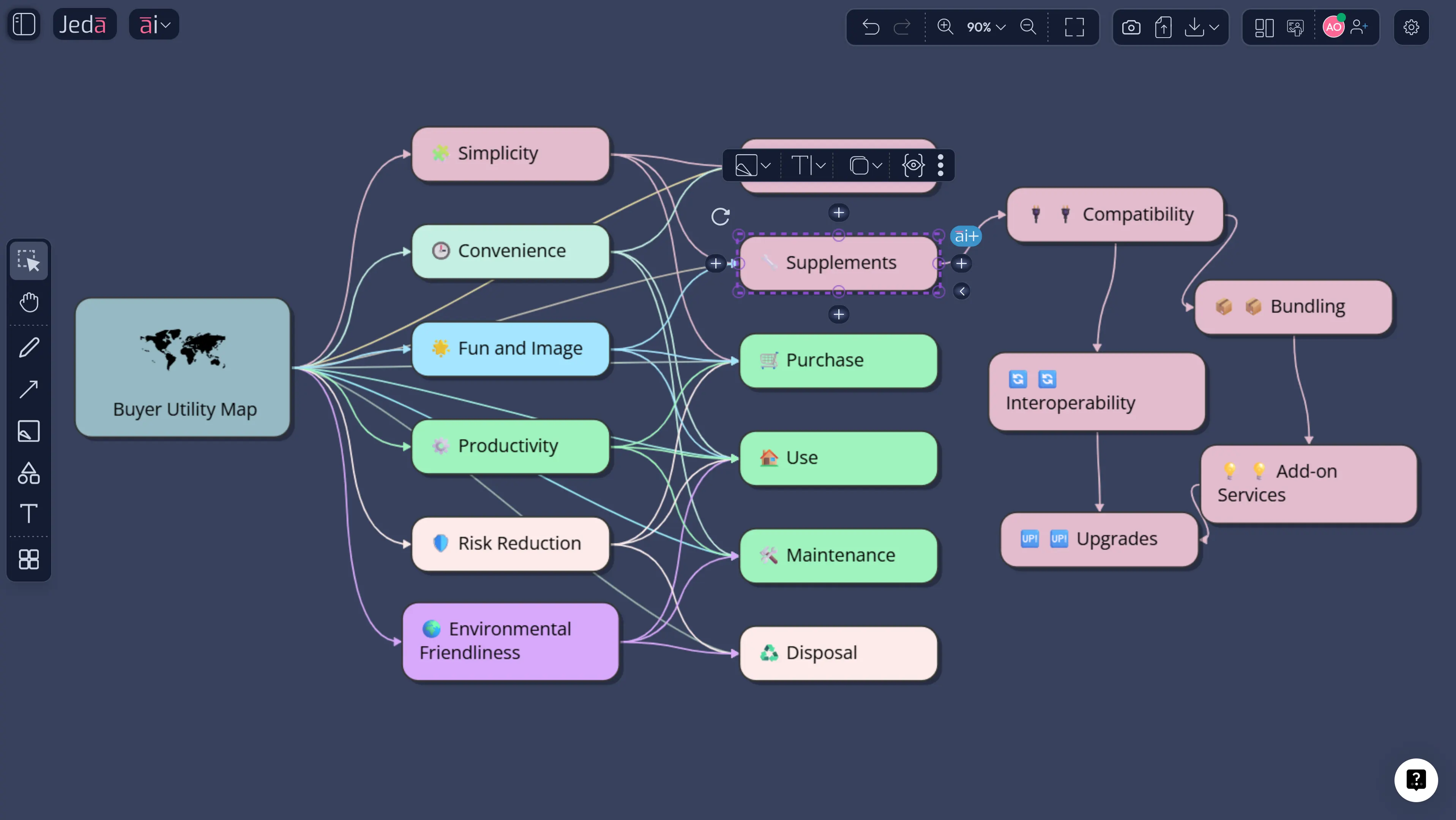
How to create a Six Utility Levers matrix in Jeda.ai
Because this Blue Ocean subtype is treated as a structured matrix in Jeda.ai, the recommended route is the AI Menu recipe first. Then use the Prompt Bar when you want a custom view tied to a specific category, segment, or buyer context.
Method 1: Recipe Matrix
Open Jeda.ai, enter your chosen AI Workspace, and click the AI Menu. Under Strategy & Planning, choose Blue Ocean Framework, then select Six Utility Levers. Add the business context, the offering type, the buyer profile, and any known industry constraints. Then choose your layout and AI model.
This method is useful when you want a fast first-pass matrix that already respects the Blue Ocean logic.
Method 2: Prompt Bar
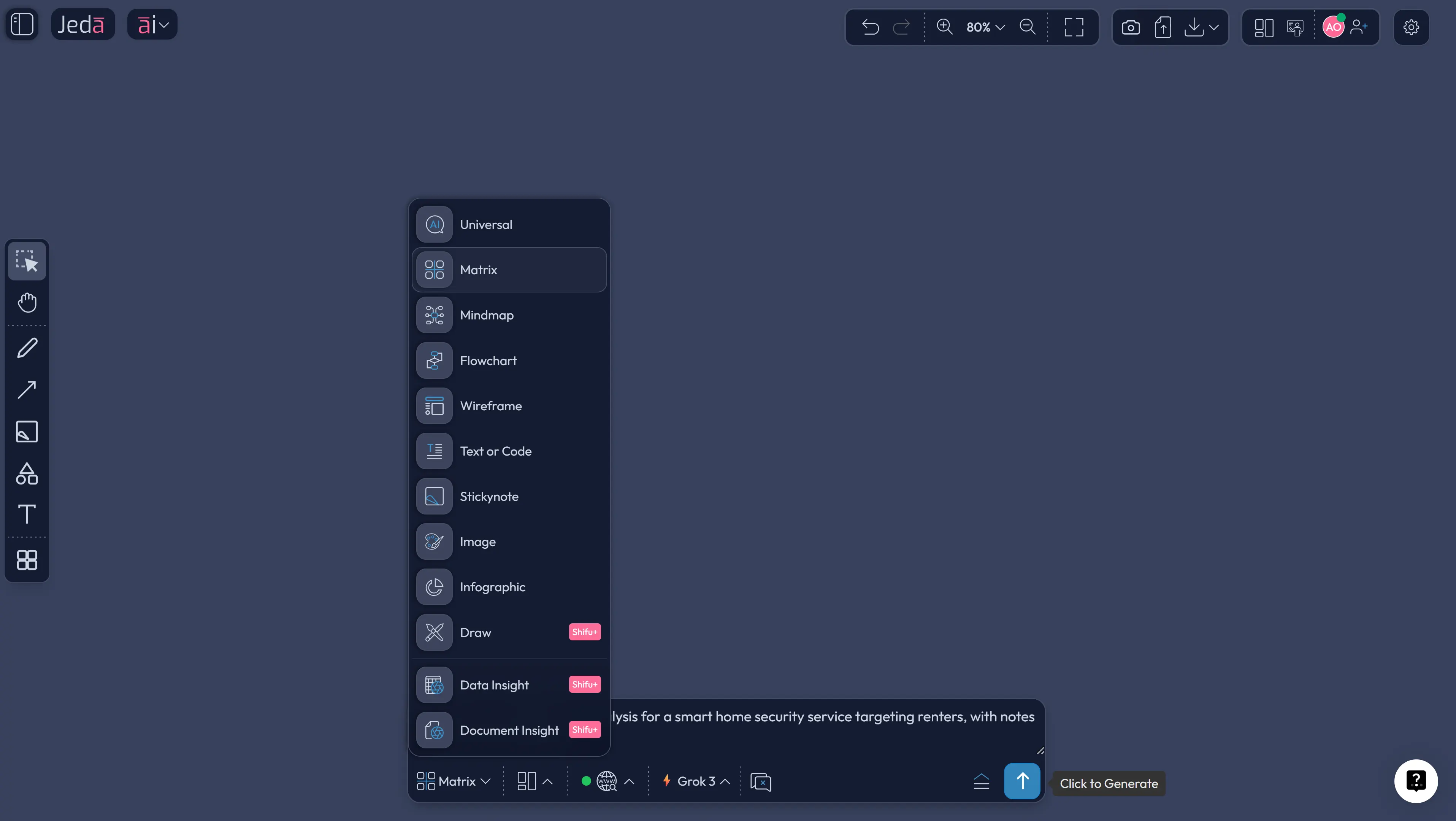
Open the Prompt Bar at the bottom of the canvas and select the Matrix command. Then type a prompt that names the category, the buyer, and the utility lens you want examined. For example: “Create a six utility levers matrix for a direct-to-consumer meal kit service for busy parents, identifying where the market competes heavily and where utility gaps still exist.”
After generation, refine any label, add notes to the most promising cells, use AI+ to expand opportunities, and use Vision Transform if you want to reframe the same logic as another visual.
- Open your AI Workspace
Log in to Jeda.ai and enter the workspace where you want to build the six utility levers matrix.
- Choose the utility-focused recipe
Click AI Menu, open Strategy & Planning, choose Blue Ocean Framework, and select Six Utility Levers.
- Add market and buyer context
Enter the offering, buyer group, and any industry assumptions or constraints that should guide the analysis.
- Generate the first matrix
Pick a layout and model, then generate an editable board based on the six utility levers.
- Inspect crowded versus open spaces
Mark where the category already competes heavily and where potential utility moves remain underexplored.
- Cross-check with buyer stages
If needed, connect the matrix to the Buyer Experience Cycle so the most interesting utility moves are stage-specific.
- Run a second pass in the Prompt Bar
Use the Matrix command to create an alternative version for a different segment or value proposition.
- Extend with AI+ and export
Use AI+ to deepen the best ideas, then export the board as PNG, SVG, or PDF.
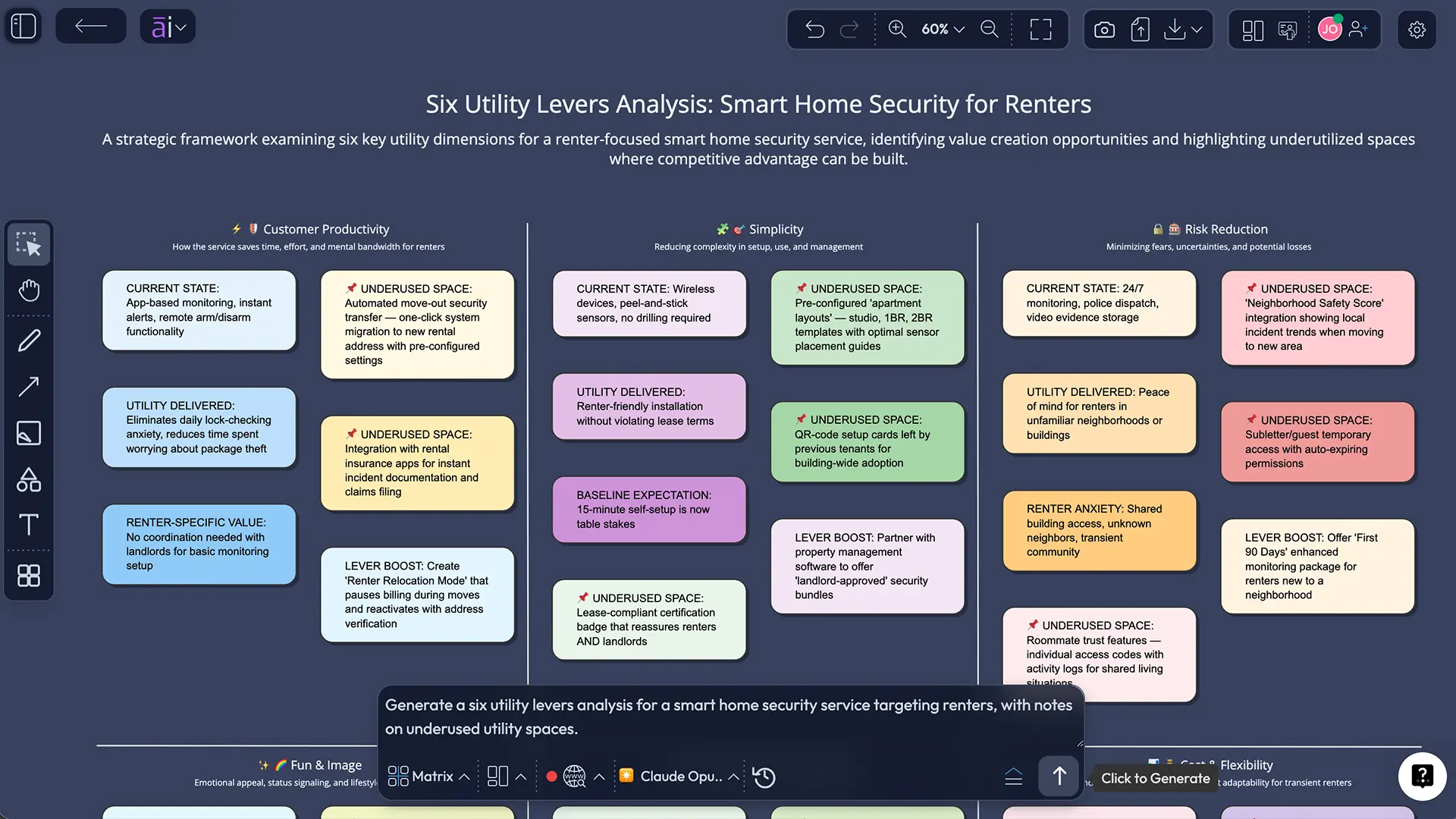
Six Utility Levers template and example
Take a smart home security company selling to renters. On the surface, the category competes on features, app quality, monthly fees, and camera resolution. A conventional product discussion would stop there.
A six utility levers analysis goes further.
Customer productivity asks whether the system reduces the time and mental load of feeling secure. Simplicity asks how easy the setup and daily use feel. Convenience looks at access, installation, and control from any location. Risk reduction inspects privacy, false alarms, contract rigidity, and trust. Fun and image tests whether the product signals something desirable about the home or user identity. Environmental friendliness examines packaging, battery disposal, and energy use.
The result is not just a better checklist. It is a more useful market view. Inside Jeda.ai, the team can see which utility levers the industry already saturates and which are still weakly served. That usually leads to more disciplined innovation. Not louder. Just better.
Best practices for using the Six Utility Levers well
The framework looks tidy. The implications usually are not. That is a good sign.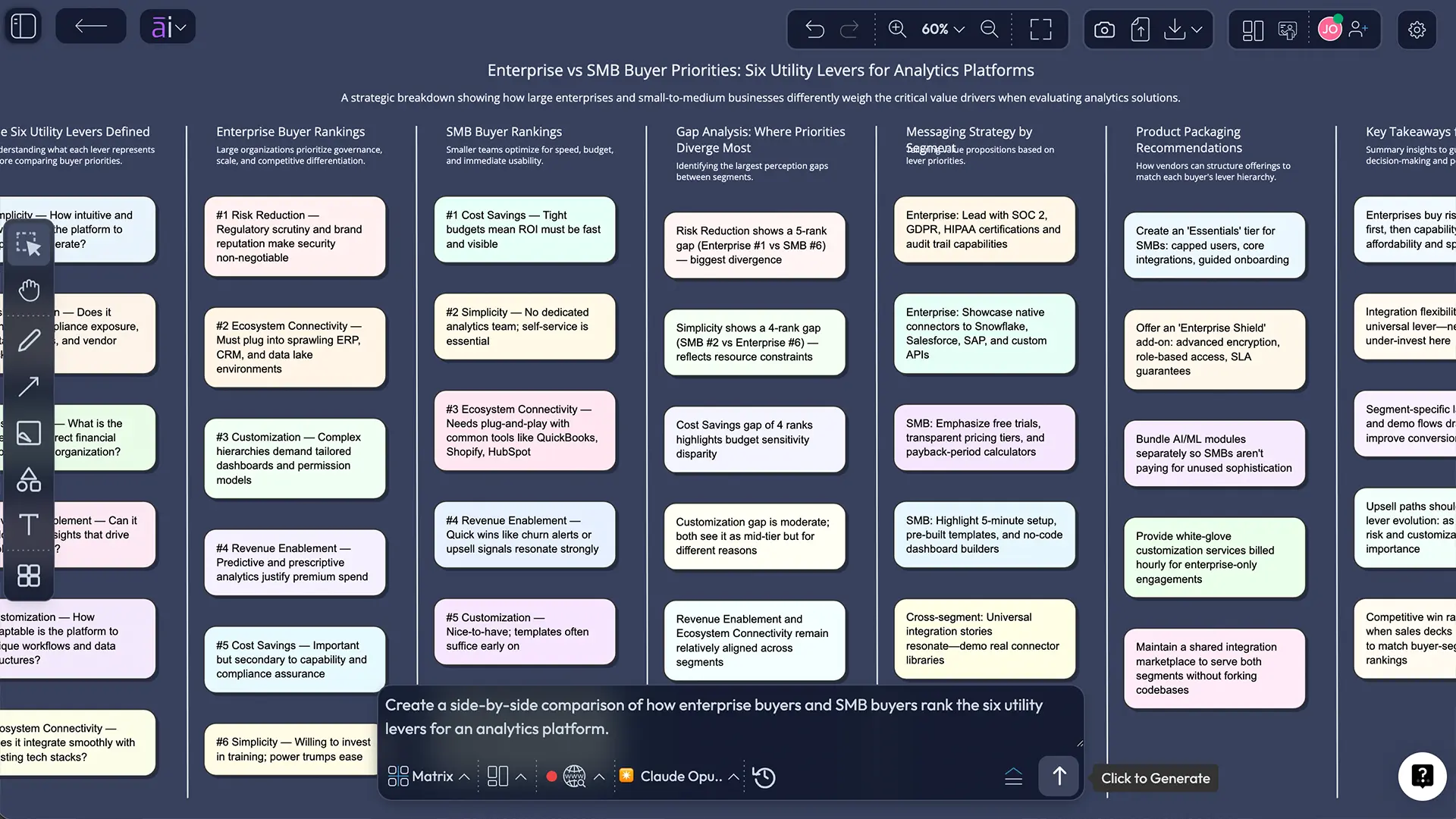
Common mistakes to avoid
One common mistake is treating the six utility levers like a branding exercise. They are not. They are a demand-side search structure for utility creation.
Another mistake is assuming all six levers matter equally. In most categories, one or two levers dominate buyer choice. The goal is not symmetry. It is insight.
Third, teams often confuse utility with features. More features can improve utility, but not always. In many categories, simplicity wins.
Fourth, some people use the framework without grounding it in buyer stages. That weakens the output because utility becomes too abstract.
Finally, teams sometimes document potential utility moves but never connect them to cost, differentiation, or feasibility. That is where value innovation gets stuck.
Frequently asked questions
- What are the six utility levers in Blue Ocean Strategy?
- The six utility levers are customer productivity, simplicity, convenience, risk reduction, fun and image, and environmental friendliness. They help teams examine how value can be created for buyers beyond standard product or pricing comparisons.
- How do the six utility levers connect to the Buyer Utility Map?
- The six utility levers form the vertical dimension of the Buyer Utility Map. When combined with the six stages of the Buyer Experience Cycle, they create thirty-six possible utility spaces that can reveal overlooked opportunities.
- What is the purpose of the six utility levers?
- Their purpose is to help managers think from the buyer's point of view and identify where an industry creates utility, where it overinvests, and where meaningful utility gaps still exist.
- Can the six utility levers be used with AI?
- Yes. In Jeda.ai, you can generate a six utility levers matrix using the AI Menu or the Matrix command in the Prompt Bar. AI helps with category scanning, idea expansion, and utility-gap analysis.
- Which utility lever matters most?
- There is no universal winner. It depends on the market and buyer group. In some categories, convenience dominates. In others, risk reduction or simplicity drives choice. The framework helps you identify the right lever in context.
- Are the six utility levers the same as product features?
- No. Features are what a product includes. Utility levers describe the type of value buyers gain. A feature may support simplicity or convenience, but the lever is the buyer outcome, not the feature itself.
- Why use an AI Workspace for this framework?
- An AI Workspace makes the matrix editable, collaborative, and reusable. Instead of a static table in slides, you get a living board where utility insights, prompts, notes, and follow-on frameworks stay connected.
- Does Jeda.ai support exporting the six utility levers board?
- Yes. You can export the final framework from Jeda.ai in PNG, SVG, or PDF while keeping the working version active inside the AI Whiteboard.
Sources & further reading
- [1]
Kim, W. Chan; Mauborgne, Renée (2026) . “Buyer Utility Map” Blue Ocean Strategy Tools and Frameworks.
View Source ↗ - [2]
Kim, W. Chan; Mauborgne, Renée (2021) . “Blue Ocean Toolkit” Blue Ocean Strategy.
View Source ↗ - [3]
Kim, W. Chan; Mauborgne, Renée (2004) . “Blue Ocean Strategy” Harvard Business Review.
View Source ↗
Continue the cluster with Buyer Experience Cycle with AI, ERRC Grid with AI, and Six Paths Framework with AI. For the broader product context, visit /ai-workspace and /ai-whiteboard.
Build a Six Utility Levers matrix in Jeda.ai
Join over 150,000+ users who use Jeda.ai's AI Workspace and AI Whiteboard to turn buyer utility into editable, decision-ready strategy.
Try Free Template