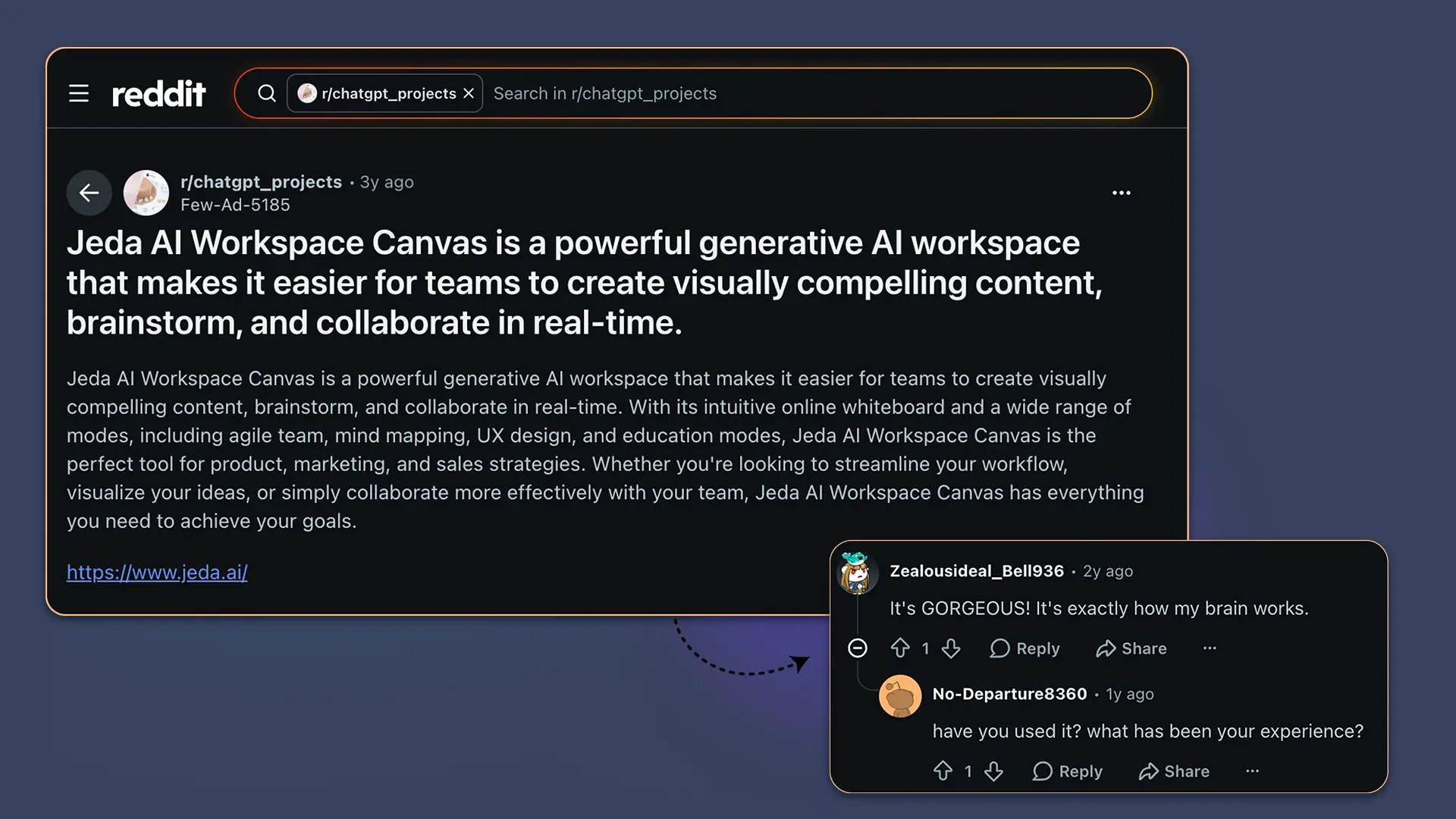
Jeda AI Workspace Canvas was already getting the kind of reaction most AI tools would kill for three years ago: not “nice feature,” not “interesting wrapper,” but “It’s GORGEOUS! It’s exactly how my brain works.” That Reddit comment matters because it names the real category shift. People don’t only want AI to answer faster. They want AI to help them think in space — visually, collaboratively, with enough structure that the work survives the meeting.
Why did Reddit notice Jeda AI Workspace Canvas so early?
The original Reddit post on r/chatgpt_projects described Jeda AI Workspace Canvas as a generative AI workspace for visually compelling content, brainstorming, and real-time collaboration. Pretty normal product language, at first glance. But the comments were more revealing than the post itself.
One person said it looked “exactly how my brain works.” Another asked the practical question every serious buyer eventually asks: “Have you used it? What has been your experience?” Then came the sharpest community update: this AI whiteboard has upgraded since then — by a lot.
That little thread is a useful time capsule. In 2023, most generative AI products were still fighting for attention inside text boxes. Prompt in, paragraph out. Maybe an image if you were lucky. Jeda.ai was already pushing a different idea: what if AI output became a shared canvas, not a private answer?
And now the discussion feels more urgent. Because the market has caught up to the vocabulary. Everyone says “AI workspace.” Everyone says “canvas.” Some tools mean a document beside a chat panel. Some mean a whiteboard with AI features bolted on. Jeda.ai’s more interesting claim is narrower and, frankly, harder to fake: an AI Workspace where reasoning becomes an editable visual structure.
What has changed since that Reddit post?
Jeda.ai has moved from “generative AI workspace canvas” toward a fuller Visual AI system for thinking, planning, analyzing, and collaborating. The current platform story is not simply “make visuals with AI.” It is closer to this: bring in prompts, documents, data, screenshots, sketches, or team ideas; generate structured boards; edit them together; extend the parts that need depth; and keep the output usable.
That matters because real work rarely ends with one answer.
A consultant does not need a clever paragraph about market risks. They need a board that turns those risks into categories, options, trade-offs, and next actions. A product manager does not need one more AI summary sitting in a chat log. They need a visual map the team can challenge. A professor, founder, marketer, or strategy lead needs the same thing: something inspectable.
Jeda.ai now positions itself as an AI Workspace and AI Whiteboard trusted by 150,000+ users, with 300+ strategic frameworks and a collaborative infinite canvas. The company’s current public positioning also describes Jeda.ai as combining multi-model reasoning, visual AI generation, analytical framework libraries, and editable collaborative outputs.
- From answer to artifact
Jeda.ai turns prompts into matrices, diagrams, mind maps, flowcharts, infographics, wireframes, and other shared visual outputs.
- From blank canvas to framework
The AI Menu and recipe categories help teams start with structure instead of staring at an empty board like it owes them rent.
- From solo prompting to shared thinking
Real-time collaboration, editable Smart Shapes, and visual controls let teams refine AI output instead of copying it into another tool.
Is this still just an AI whiteboard?
No. That is the easy label, but it undersells the point. An AI Whiteboard lets people generate and arrange content visually. A serious AI Workspace helps teams reason through messy inputs, build structured outputs, and keep the work editable after generation.
That distinction is where the Reddit comment becomes useful. “Exactly how my brain works” is not a compliment about buttons. It is a compliment about cognitive fit.
Brains rarely think in perfect paragraphs. They jump between clusters, arrows, trade-offs, assumptions, doubts, examples, and “wait, what if this depends on that?” A plain chat interface compresses that into a scroll. Useful, yes. But also weirdly lossy. A visual canvas gives the mess somewhere to live.
Jeda.ai’s current canvas supports Prompt Bar generation, AI Recipes, editable Smart Shapes, Vision Transform, Data Insight, Document Insight, AI+ extension, and collaborative board editing. The stronger idea is not that AI creates content for you. The stronger idea is that AI creates a first version of the thinking environment, and your team keeps shaping it.
How to explore Jeda.ai through AI Recipes
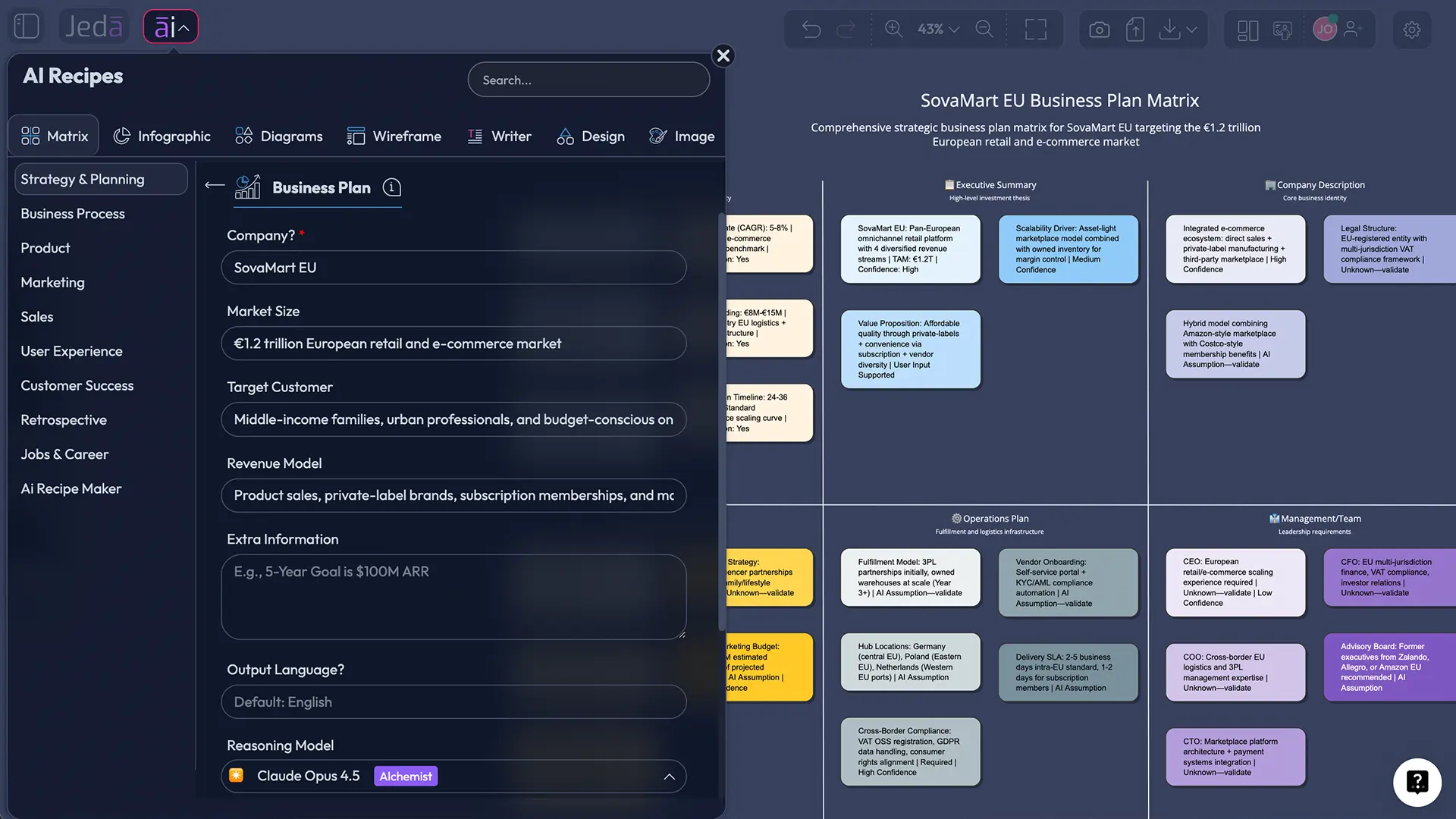
Use AI Recipes when the conversation needs structure. This post is not about one specific recipe, so think of the AI Menu as a doorway into repeatable ways of thinking: strategy analysis, diagrams, infographics, design, writing, wireframes, and more. It is the guided path.
- Open the AI Menu
Start from the top-left AI Menu on the Jeda.ai canvas. Use this when you want a guided workflow rather than a freeform prompt.
- Choose a relevant category
Pick the category that matches the discussion: Matrix for strategy, Diagram for systems, Mindmap for idea expansion, Infographic for visual summaries, or Writer for structured content.
- Select a useful recipe direction
Choose a recipe that gives the conversation shape. Since this is a community discussion, the goal is not one perfect template. The goal is to create a structured board for reflection, comparison, and debate.
- Add context from the Reddit discussion
Use the original Reddit post, the community comments, and the question “How has Jeda.ai evolved since then?” as the core input.
- Generate the first visual board
Let Jeda.ai create the first structured output. Review it as a thinking draft, not a final verdict.
- Use AI+ to extend and deepen
Select a generated section and use AI+ to extend it with more depth. AI+ can deepen the selected area, but do not treat it as a place to give detailed custom instructions.
How to explore Jeda.ai from the Prompt Bar
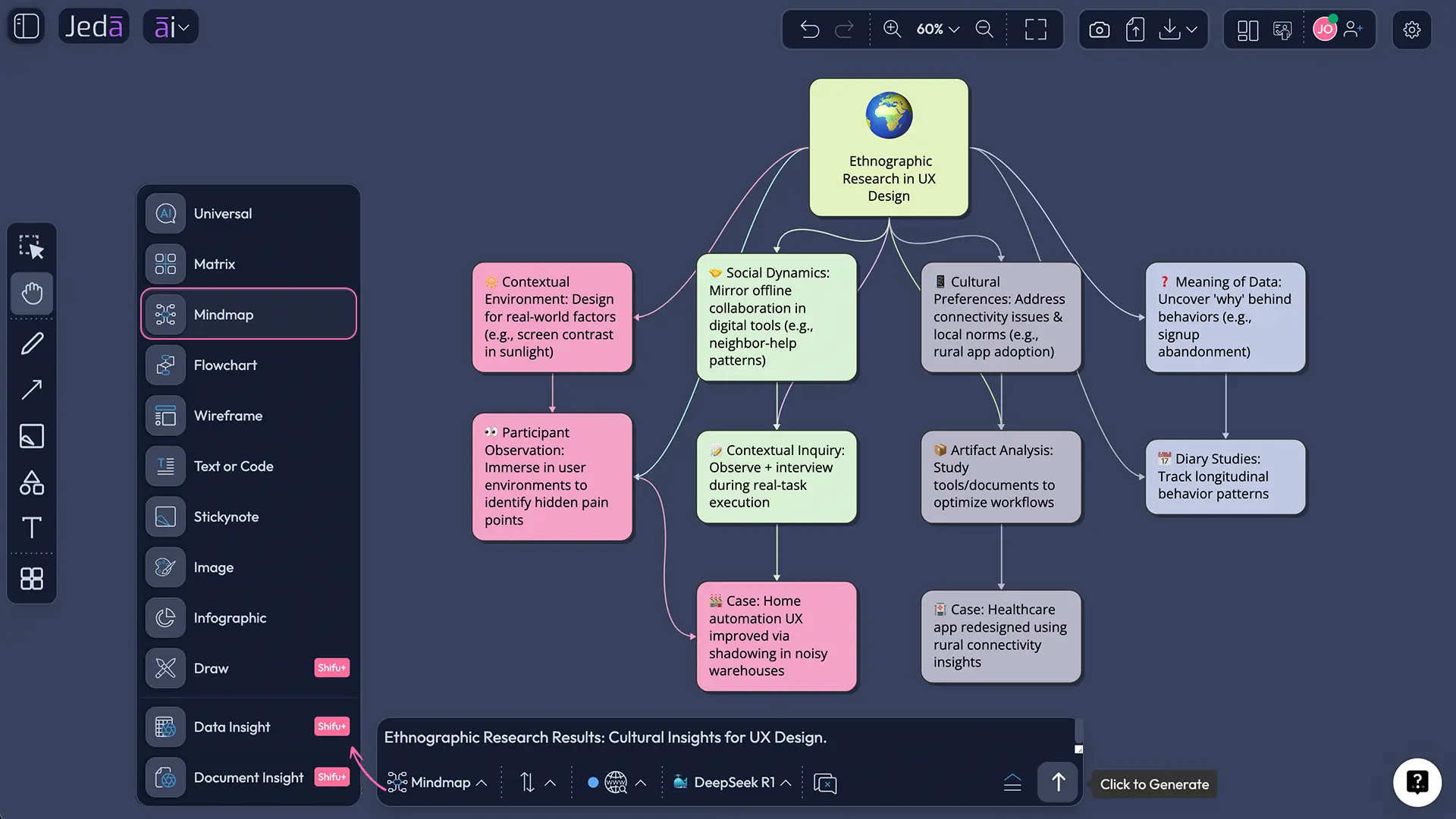
Use the Prompt Bar when you want speed and flexibility. This is the method for people who think by typing first, then organizing later. Pick the command that matches the output you want, write a clear prompt, and let Jeda.ai render the structure on the canvas.
- Open the Prompt Bar
Use the bottom-center Prompt Bar as the main input area for flexible visual generation.
- Select the output command
Choose Matrix, Mindmap, Flowchart, Image, Infographic, Text or Code, Data Insight, or Document Insight based on the kind of thinking you want to see.
- Write a discussion prompt
Prompt example: “Ethnographic Research Results: Cultural Insights for UX Design”
- Generate the visual
Review the output as a conversation starter. Move, edit, regroup, and restyle sections so the board reflects the argument you want to make.
- Convert when needed
Use Vision Transform if the first format is not right. A mind map can become a matrix. A matrix can become a flowchart. The canvas should adapt to the discussion.
- Extend carefully with AI+
Use AI+ on selected sections when the board needs more depth. Keep it as an extension tool, not a detailed instruction box.
The deeper question: what should an AI workspace actually do?
Here is where the discussion gets more interesting than a feature roundup. If an AI workspace only gives you a prettier place to store AI output, we are not far from digital stationery. Nice stationery, sure. But still stationery.
A real AI Workspace should change the shape of the work.
It should reduce the gap between thinking and showing. It should let a team move from “I have a thought” to “Here is the structure of that thought” without bouncing through five tools. It should make disagreement easier, because disagreement is often where the best decisions are hiding. And it should preserve the trail of reasoning instead of burying it in chat history.
That is why Jeda.ai’s current direction is worth discussing publicly. The old Reddit post saw the canvas. The current product leans into the system around the canvas: recipes, models, visual commands, AI+ extension, files, data, documents, collaboration, export, and editable Smart Shapes.
| Early perception | Current direction | Why it matters | |
|---|---|---|---|
| Generative AI canvas | A visual place to create and brainstorm | An AI Workspace for structured visual reasoning | The canvas becomes a thinking surface, not just a display area |
| Online whiteboard | A place for team collaboration | An AI Whiteboard with Prompt Bar, recipes, Smart Shapes, and real-time editing | Teams can generate, critique, and refine work together |
| AI content tool | Creates visually compelling content | Turns prompts, files, data, and documents into editable outputs | Outputs become usable artifacts instead of one-off responses |
| Brainstorming helper | Useful for ideas and planning | Supports strategy, design, education, product, marketing, and operations workflows | It can support repeatable decisions, not just loose ideation |
Example use case: turning a Reddit thread into a strategy board
Let’s make the community discussion concrete.
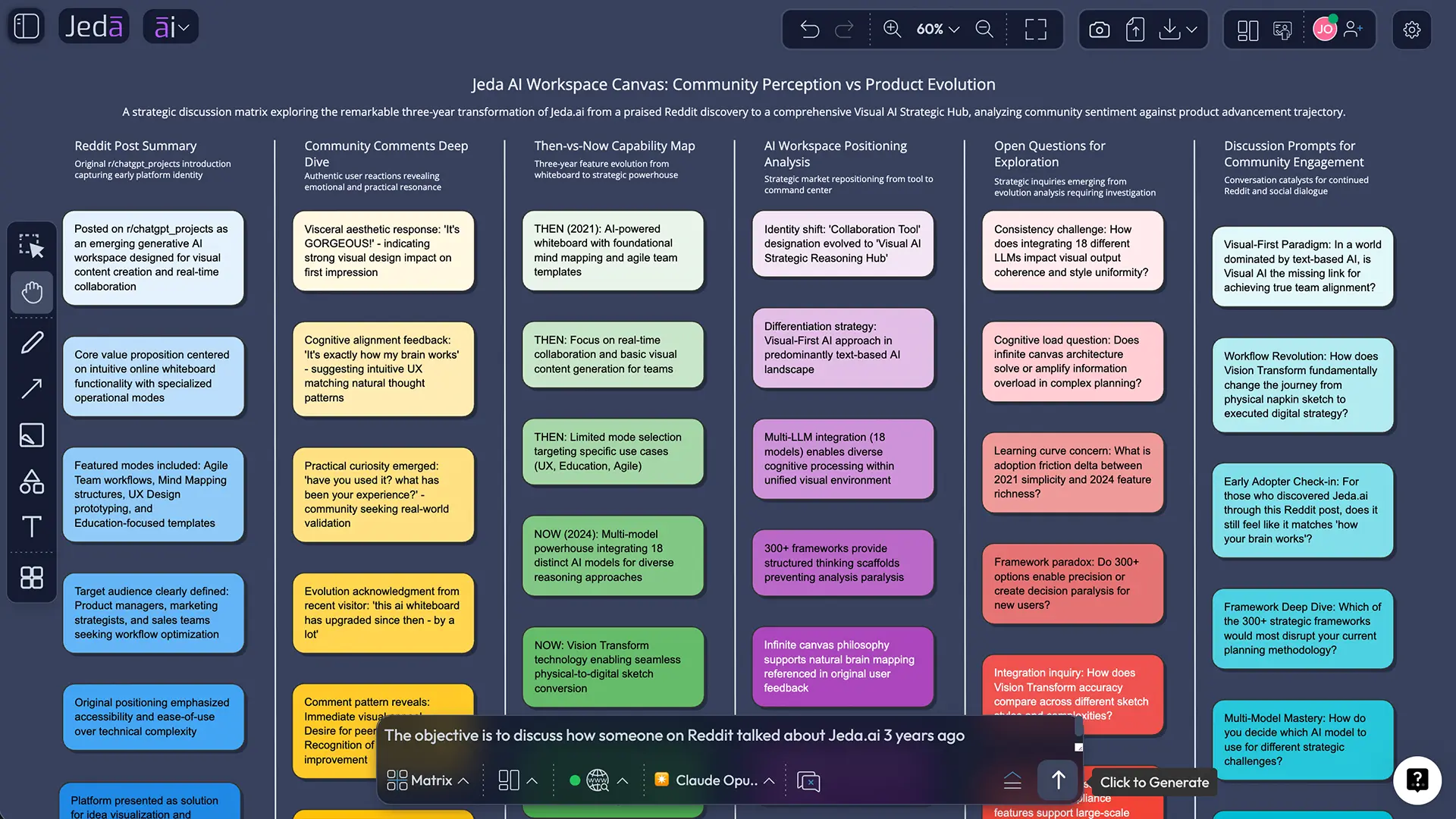
Suppose your team wants to understand whether Jeda.ai should be positioned around “AI Whiteboard,” “AI Workspace,” or “Visual AI Workspace.” You could paste the Reddit post, add the community comments, and ask Jeda.ai to produce a visual discussion board. The board might include audience sentiment, category language, missing proof, open objections, and prompts for further community debate.
A strong prompt would look like this:
“Create a strategic discussion board about Jeda AI Workspace Canvas. Use the 2023 Reddit post and comments as the starting point. Compare what people noticed then with what Jeda.ai can do now. Include sections for early perception, current AI Workspace capabilities, community questions, positioning risks, and discussion prompts for Reddit, LinkedIn, and product-led content.”
That is not a content brief pretending to be strategy. It is the seed of a board. After generation, a team could move sections around, add examples, attach screenshots, extend weak areas with AI+, and turn the board into an article, campaign, webinar outline, or product narrative.
What the community should debate next
The useful debate is not “Does Jeda.ai have more features now?” It does. The better debate is whether the upgraded AI Workspace changes how teams think together.
A few questions are worth asking:
Does visual AI make strategy more inspectable, or just more attractive? When AI generates a matrix, mind map, or flowchart, does the team understand the reasoning better — or are they simply dazzled by a nice artifact? Can editable visuals reduce the “copy from chat into slides” tax? Does AI+ help teams deepen a board at the right moment, or do people still need stronger prompting habits? And where should the line sit between AI-generated structure and human judgment?
That last one is the big one.
Jeda.ai is strongest when it does not pretend to replace the team. It gives the team a shared thinking surface. The AI can draft, structure, visualize, extend, and transform. Humans still decide what matters, what is wrong, what gets deleted, and what becomes action.
That is probably why the old Reddit comment still feels oddly current. “Exactly how my brain works” is not just praise. It is a product thesis.
Where Jeda.ai fits now
Jeda.ai now belongs in the conversation about AI tools that move beyond chat. The canvas gives ideas a body. The AI Recipes give structure. The Prompt Bar gives speed. Smart Shapes keep the work editable. Collaboration keeps it social. And Vision Transform lets teams reshape the format when the first draft is not the right shape.
For consultants, this can mean faster workshop boards and decision-ready frameworks. For product teams, it can mean user journeys, review flows, diagrams, and roadmap thinking in one place. For lecturers and instructors, it can mean turning course material into visual explanations and collaborative activities. For founders and marketers, it can mean strategy, campaign planning, and messaging maps without starting from a blank screen.
None of that makes Jeda.ai magic. Good. Magic is hard to trust.
It makes Jeda.ai a serious candidate for something more useful: a Visual AI workspace where teams can see the work forming, argue with it, and leave with a shared artifact.
Frequently asked questions
- What was the original Reddit discussion about Jeda AI Workspace Canvas?
- The Reddit post described Jeda AI Workspace Canvas as a generative AI workspace for visual content, brainstorming, and real-time collaboration. The more interesting part was the community reaction: one commenter said it matched how their brain works, while another asked for real user experience.
- How has Jeda.ai upgraded since that Reddit post?
- Jeda.ai now presents itself as a fuller AI Workspace and AI Whiteboard with AI Recipes, Prompt Bar generation, editable Smart Shapes, Multi-LLM reasoning, Vision Transform, Data Insight, Document Insight, AI+ extension, and real-time collaboration.
- Is Jeda.ai only an AI whiteboard?
- No. AI Whiteboard is one useful label, but Jeda.ai is better understood as a Visual AI workspace for turning prompts, files, data, documents, and ideas into editable visual outputs that teams can work on together.
- What makes Jeda.ai different from a normal chat assistant?
- A chat assistant usually returns text. Jeda.ai turns ideas and context into visual artifacts such as matrices, diagrams, mind maps, flowcharts, infographics, wireframes, and structured boards that can be edited, extended, and shared.
- How should teams start a community discussion board in Jeda.ai?
- Use AI Recipes when the discussion needs structure, or use the Prompt Bar when you want a fast custom board. Add the Reddit post, comments, product context, and the core question you want the team to debate.
- Can AI+ be used to ask for specific custom instructions?
- For this workflow, AI+ should be treated as an extension tool. Select a section and use AI+ to extend or deepen that selected area, but do not rely on it as a place for detailed custom instructions.
- Why does visual AI matter for strategy and planning?
- Visual AI matters because strategy is full of relationships, dependencies, trade-offs, and assumptions. A visual board makes those parts easier to inspect, challenge, reorganize, and turn into action than a long text answer.
- Who should care about Jeda AI Workspace Canvas now?
- Strategy consultants, product managers, business leaders, instructors, marketers, startup founders, and design teams should care if they need AI-generated thinking that becomes editable, collaborative, and presentation-ready rather than trapped inside chat.
Sources and further reading
- [1]
Few-Ad-5185 (2023) . “Jeda AI Workspace Canvas is a powerful generative AI workspace” Reddit r/chatgpt_projects.
View Source ↗ - [2]
Jeda.ai (2026) . “AI Workspace — Patented Visual Thinking OS” Jeda.ai.
View Source ↗ - [3]
Jeda.ai (2026) . “Getting Started with Jeda.ai: Your First AI Workspace” Jeda.ai Tutorials.
View Source ↗ - [4]
Jeda.ai (2026) . “Visual AI Agent: Why Jeda.ai Turns AI Output Into Shared Decisions” Jeda.ai Resources.
View Source ↗ - [5]
Jeda.ai (2026) . “How Jeda.ai Brings AI Agents Into a Visual AI Workspace” Jeda.ai Resources.
View Source ↗
Join the Jeda AI Workspace Canvas Discussion
Explore why 150,000+ users are moving from text-only AI output to shared visual thinking in Jeda.ai.
Start on Jeda.ai