
Text Walls
Other AI tools generate text reports you have to read sequentially.
Other AI tools generate text walls or single-model layout guesses. Your team can't see, challenge, or validate the design reasoning. Manual wireframing tools force you into manual layout work—dragging boxes, aligning elements, color-picking, repositioning. Figma has a steep learning curve. Balsamiq locks you into low-fidelity.
Text-based outputs are read sequentially. Visual layouts show hierarchy and content grouping at a glance. Jeda.ai's text-to-wireframe AI generates layout options from natural language for your team to review. Multi-LLM Agent runs GPT, Claude, Grok simultaneously.
Generic AI has no analytical methodology. Strategic UX frameworks like Nielsen's Heuristics and Information Architecture were developed over decades for this exact problem. Jeda.ai encodes this heritage. Generate wireframes from prompts, customize directly on canvas, collaborate in real-time.
Decades of UX/product design thinking. Jeda.ai encodes these frameworks as AI Recipes so your team starts with proven methodology, from Information Architecture to Nielsen's Heuristics, not blank prompts.
Jeda.ai outputs interactive wireframe layouts so your team can review the user experience hierarchy and flow in one view.
AI generates the wireframe. Your team sees it, challenges it, and refines it on a shared canvas. Multi-LLM Agent compares reasoning so AI is the thinking partner. Your team makes the decisions.
Jeda.ai runs 3+ LLMs (GPT, Claude, Grok, Llama, DeepSeek) simultaneously on your wireframe prompt. Aggregator Model compares outputs and picks the best layout suggestion.
Convert existing flowcharts, mind maps, or diagrams into wireframes with Vision Transform. Reuse your user flow diagram as a wireframe skeleton. Change one command, change the output.
Create wireframes alongside flowcharts, diagrams, mind maps, and infographics on your AI Whiteboard—the Visual AI Workspace that unifies all 11 commands on one canvas. Layer context. Tell the complete story.
A full AI powerhouse — the most powerful language, reasoning, and image models packed together for every use case. Jeda.ai's Multi-LLM Agent runs multiple models simultaneously, picks the best output, and delivers smarter results than any single model alone.
From prompt to visual deliverable—AI thinks WITH your team using frameworks built over hundreds of years. Write a natural language prompt or upload a document, screenshot, or image describing the layout you need.
Natural language prompt
Image, doc, screenshot
"Create a SaaS dashboard with sidebar navigation, metric cards, and data visualization"
Upload a PDF, DOC, PPT, or any document file containing requirements or specifications. AI reads the content and generates wireframe layouts that match the described functionality.
PDF, DOC, PPT, TXT & more
AI extracts & layouts
Analyzing Requirements.pdf...
Jeda.ai automatically runs 3+ LLM models simultaneously. Multi-LLM Agent compares reasoning so AI thinks WITH you. Aggregator Model compares outputs instantly and highlights the best wireframe structure.
3+ models simultaneously
Compare model outputs
AI generates multiple wireframe options. Review layout structure, content grouping, visual hierarchy. Customize directly on canvas. Share the visual output for team review.
Instant wireframe options
Wireframe toolbar
Select a wireframe section (header, sidebar, content area). Press AI+ (AI Extend button) to expand or refine that section. Add a feature section to your SaaS dashboard. Deepen your checkout flow. Extend wireframe narrative without starting over. Aggregator ensures design consistency across expansions.
Expand any section
Real-time preview
Download as PNG for presentations, SVG for direct Figma import (import as fully editable groups), or PDF for stakeholder docs. SVG handoff means your design team continues from AI wireframe without rebuilding. Version control built-in. Comment and iterate together on the same canvas before export.
Figma integration
PNG, SVG, PDF
Jeda.ai runs 3+ language models simultaneously on your wireframe prompt. Aggregator Model compares all outputs and recommends the best wireframe structure so AI thinks WITH you.
Platform-level web search brings UX references into your wireframe workflow. Review visual patterns alongside your layout.
Convert existing diagrams into wireframes instantly. Strategic methodology refined over centuries—now transformed into interactive wireframes at the click of a button.
Select an existing wireframe section and AI expands it instantly. Scale your layouts while maintaining design consistency and hierarchy across the entire visual canvas.
UX Designers use Nielsen's Heuristics and visual prototyping to think WITH AI about layout concepts. Review the resulting wireframe's hierarchy and flow. Export SVG for Figma to continue detailed design.
Product Managers use Information Architecture frameworks to think WITH AI about new features. Map product directions visually, share with the team, and get alignment on structure before scaling effort.
Founders use decades of design thinking methodology to think WITH AI about their MVP. Describe your product and get a structured wireframe instantly. Multi-LLM Agent ensures your layout follows UX best practices.
Manufacturing Design Engineers use systematic innovation and concept prototyping to think WITH AI about interface layouts. Visualize complex systems in seconds, ensuring every control and indicator is logically placed for high-speed comprehension.
Developers use interactive layouts to think WITH AI about UI implementation. Reduce ambiguity and build to spec, not guesswork. AI Extend lets you propose UX improvements and iterate collaboratively on the canvas.
Business Analysts use information design methodology to think WITH AI about user flows and requirements. Document requirements visually and connect wireframes to business logic diagrams on one canvas.
Text-only, slow, and non-collaborative
Other AI tools generate text reports you have to read sequentially.
Generic AI has no strategic UX framework heritage.
Single models hand you an answer you can't easily challenge.
Dragging boxes manually takes hours of tedious design work.
Revision cycles add days due to manual rework and re-exports.
Wireframes don't connect to flowcharts or analytical frameworks.
Visual, framework-driven, and collaborative
Visual layouts show hierarchy and content priorities at a glance.
Encodes decades of UX/IA methodology as AI Recipes.
Multi-LLM Agent compares reasoning so your team validates.
Aggregator picks a recommended layout for your specific use case.
Expand wireframes while maintaining design consistency.
One workspace for wireframes, flowcharts, and diagrams.
ChatGPT, Figma, Uizard, Balsamiq, Whimsical
| Feature | Jeda.aiAI-First |
|---|---|
| AI Wireframe Generation | Prompt → layout-aware wireframes |
| Dynamic Prompt | AI thinks WITH you |
| Multi-LLM Agent | 18 models — multi-reasoning + Aggregator |
| Fully Editable Outputs | 100% editable on canvas |
| Vision Transform | Flow → wireframe instantly |
| Unified Canvas | Wireframes + diagrams together |
| Real-Time Collaboration | Multi-user Canvas + AI Chat |
| Web Search | Live UX best practices |
| Wireframes from Documents | PDF, DOC, PPT → wireframes |
Some features require paid plans.
When evaluating an AI wireframe generator, define the job before building a shortlist. You might need a single website concept, several connected screens, or a layout your team will revise together. Write down the required output, who must review it, and where the work continues afterward. Use those requirements to judge suitability rather than treating a “top” label as evidence.
For reliability, repeat your representative task and record the corrections you need, including any inconsistent requirements. This is a project-specific trial, not a general benchmark or uptime test. Use the Wireframe command to make the first board. If the main uncertainty is how people move between screens, compare a flowchart of the journey alongside the layouts. Select the workflow only after the reviewers understand both the proposed screens and the decisions still to make.
Platform-level web search researches current wireframing standards, accessibility patterns, and industry-specific UX while generating your wireframe. Building an e-commerce site? AI incorporates conversion-optimized flows. Designing a SaaS dashboard? AI reflects modern data visualization and navigation patterns. Your wireframe benefits from live market research.
Multi-LLM Agent searches for and understands domain-specific UX requirements. Enterprise wireframes include security-first patterns. Financial apps incorporate compliance-ready layouts. SaaS products leverage feature discovery and onboarding best practices. E-commerce sites optimize for conversion funnels. Your wireframe generation includes domain context.
Web search automatically incorporates current WCAG accessibility standards, mobile responsiveness patterns, and platform-specific guidelines (iOS, Android, web) into wireframe generation. Your AI-generated layouts start accessible. No late-stage compliance rework.
Run 3+ language models (GPT, Claude, Grok, Llama, DeepSeek) simultaneously on your wireframe prompt. Each model approaches layout structure differently—GPT for commercial clarity, Claude for analytical rigor, Grok for edge cases. Aggregator compares outputs and recommends the best wireframe. No single-model bottleneck.
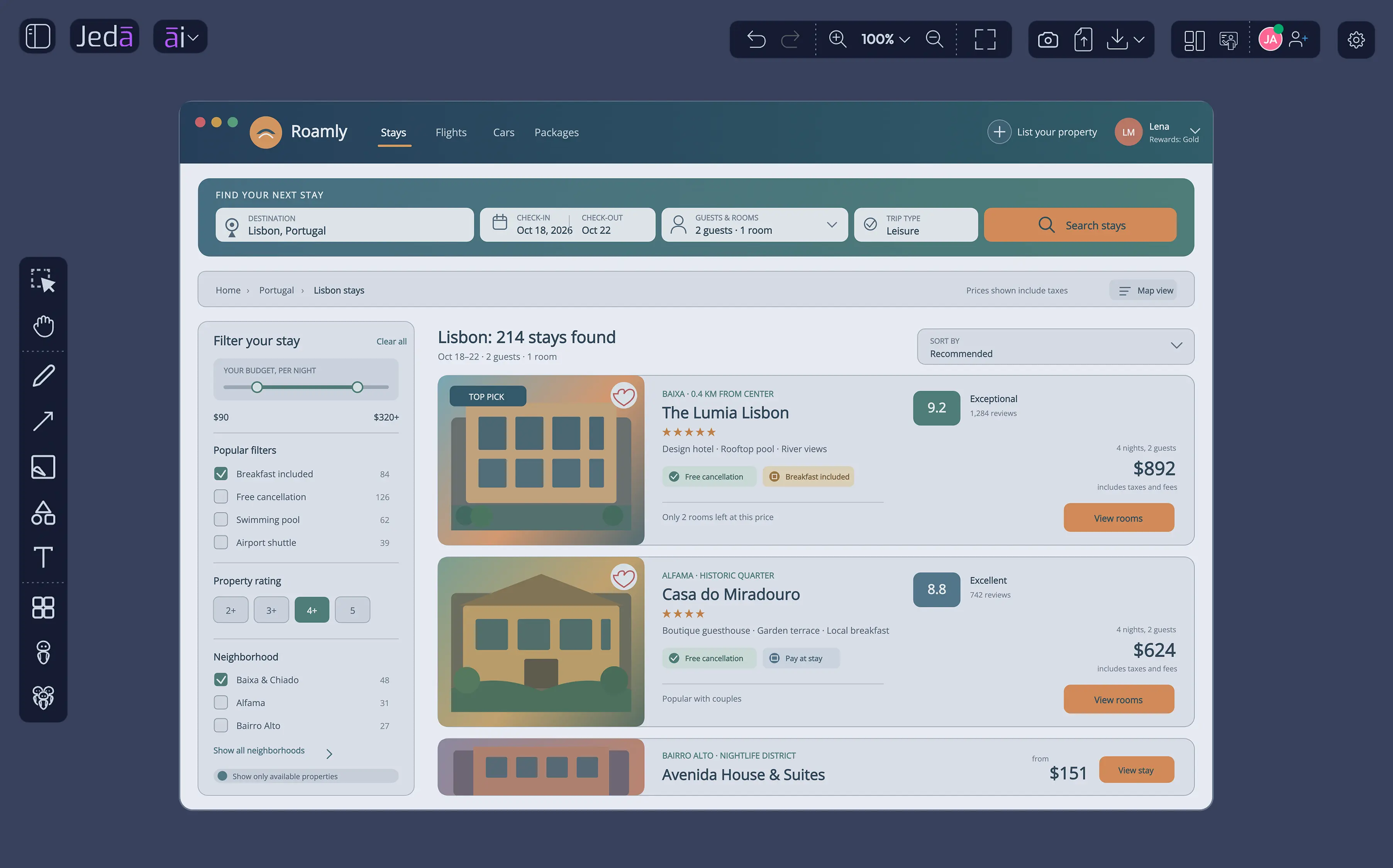
Natural language prompts become interactive wireframes instantly. Write “Create an SaaS dashboard with sidebar navigation, metric cards, and data visualization” and get a structured, layout-aware wireframe. AI understands hierarchy, content grouping, and user flow—not just generic boxes.
100% editable on canvas. Change labels, move shapes, reorganize sections. Use dedicated wireframe toolbar: header boxes, content areas, form fields, navigation elements, buttons, lists. Drag, resize, group. No restrictions. Your team customizes without design software.
Convert existing flowcharts, mind maps, diagrams into wireframes. Reuse structural work. Change command, change output type. One canvas, infinite visual expression. No recreating layouts—just transform them.
Select a wireframe section and expand it with AI. Add features. Deepen user flows. Scale layouts. Maintain design consistency while growing content. No starting from scratch.
Team members see updates instantly. Live cursors show who’s editing where. Comment on sections. Suggest changes. Follow Me mode syncs view across team. All on one canvas, no tool-switching.
Export as SVG and import into Figma as editable groups
Dedicated toolbar with wireframe-specific shapes: navigation headers, card containers, form groups, button areas, list layouts, dividers, icons. Pre-built components speed iteration. Drag into canvas. Customize text and styling.
An AI wireframe generator takes a description or other supplied context and drafts a screen layout. Review that layout against a user task before considering its appearance. For an early concept, your question might be whether someone can understand the information and find the next action, rather than whether the screen looks ready to launch.
Input and scope. Describe the intended user, the screen, and the action they need to complete. State what must appear and what is outside the exercise. If you supply requirements, check which ones the draft represents and which it omits. Keep any details introduced by AI separate from requirements your team has agreed.
Editable structure. Try changing a label, moving an element, and regrouping content. Those checks matter when a reviewer questions the hierarchy or a requirement changes. In Jeda.ai, edit wireframe elements on the canvas. Inspect the resulting structure yourself instead of assuming the initial arrangement is the intended design.
Iteration. Ask for a specific change and review the surrounding screen again. Adding a field may raise questions about grouping, instructions, and the next action. In Jeda.ai, AI+ extends a selected wireframe section. Treat an extension as another proposal to examine, including any requirements it may have introduced.
Review and handoff. Decide what the next reviewer needs to understand. Include a short explanation of the task, unresolved questions, and the reason for the current layout. Inspect an export in the receiving tool before committing to a handoff process. Exporting a visual does not by itself demonstrate that the underlying interaction has been tested.
Example brief: Draft an appointment screen with a selected service, available times, contact details, and a booking action. Leave payment outside this version.
Then ask a reviewer where they would look to change the time. AI drafts, you verify the evidence. If you need to examine the sequence across screens, map it with a user-flow diagram before refining each layout.
"Jeda.ai Version 3 sounds like a game-changer! The ability to turn ideas into editable visuals instantly and the multi-LLM agent feature are especially impressive. It’s like an all-in-one workspace for visual thinkers. Definitely excited to try it out!"
"Just explored Jeda.ai V3 - the new Infographic Generator and refined UI blew me away! Instantly turned prompts into clean visuals. From mind maps to strategic frameworks, it feels like an AI co-creator. Shifting from AI as a drafting tool to a live intelligence co-creator is the heart of this upgrade."